13 Best PandaDoc Alternatives in 2026 (Free & Paid, Reviewed)
Using PandaDoc for document automation? What if I tell you that you can get better features with a PandaDoc alternative, too, at a minimal cost! Sounds cool, right?
PandaDoc often faces controversy for its high-priced plan, editing difficulty, customization limitations, and learning curve. If you are one of those who are facing the same issue, this blog is for you.
In this article, I have researched and found the best nine PandaDoc alternatives to enhance your document automation and overall performance. Let’s get into details:
TL;DR
- Best all-in-one: Taskip — proposals, quotes, invoices, and e-sign in one place (free forever)
- Best visual proposals: Qwilr or Better Proposals
- Best proposal analytics: Proposify
- Best budget e-sign: BoldSign ($15/mo, unlimited sends)
- Best free e-sign: Zoho Sign
- Best enterprise e-sign: DocuSign
- Best for Salesforce teams: Conga Composer
- Best for MSPs: Zomentum
Table of Contents
What Is PandaDoc?
PandaDoc is a document automation and e-signing platform that helps businesses and agencies to streamline their documentation procedure. From this software, you can create, send, track, and e-sign business documents like proposals, contracts, and quotes within a single dashboard.
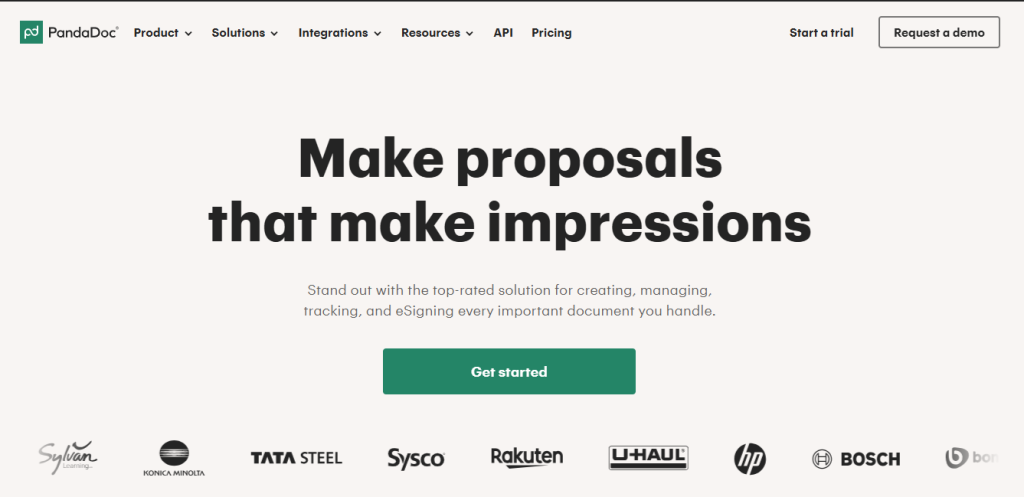
This platform has built-in features like drag-and-drop building, CRM integrations, real-time tracking, and secure e-signatures. These features help businesses automate workflows and close deals faster without waiting for any manual process.
Thus, PandaDoc helps you streamline the entire agreement lifecycle from creation to payment and helps you automate workflows and close deals faster.
Drawbacks of PandaDoc: Why Look For an Alternative?
If you are looking for a PandaDoc alternative, it’s important to know the major drawbacks of the platform to find a better replacement. Here are the PandaDoc limitations:
High Cost
The monthly package of PandaDoc starts at $35 USD/ user per month, which is pretty expensive, especially for a small business. And if you are on high-tier plans, the PandaDoc pricing becomes more expensive. If you check PandaDoc alternatives, you will get more extended features at a lower price.
Customization Limitations
PandaDoc has a drag-and-drop editor, which I highly appreciate. But this doesn’t give you full control over design. While designing a custom or complex document, you may feel restricted compared to other PandaDoc alternatives. Additionally, it has limited formatting options and a rigid template.
Editing Difficulty
Users of PandaDoc often complain about its difficult editing, especially in sections with multiple checkboxes. Even a small change can break the layout or affect the whole section, which can mess up your entire documentation.
Performance Issues with Large Documents
If you are working on very long or media-heavy documents that have lots of images, PandaDoc tends to show slow load/editt. Moreover, it also shows occasional editing lag.
Clunky Mobile App
Compared to the desktop version of PandaDoc, the mobile version is reported to be less intuitive. So, if you are planning to use the software on your mobile phone, switch to PandaDoc alternatives.
No In-App Negotiation
PandaDoc doesn’t have any built-in comment/chat negotiation feature within the document. So, if you want to edit or bring any change, it requires going back and forth by email or another chat tool for a discussion.
Learning Curve
For beginners, especially those unfamiliar with document automation software, the interface and features can feel complex at first. Setting up templates, workflows, and integrations may take extra time and training.
Limited Integration
PandaDoc does not have built-in direct integration to apps like CRMs, Slack, Sheets, etc.; instead, it requires Zapier as a middleman. Moreover, it doesn’t have a built-in direct integration with SharePoint.
Audit Trail Locked Behind the Business Plan
One of the most common complaints from PandaDoc users on G2 is that the audit trail, a complete log of who opened, viewed, and signed a document, is not accessible on the Essentials plan. For businesses sending vendor contracts, NDAs, or client agreements that need a verifiable record, this is a serious limitation. You either pay for the Business plan at $49/user/month or accept that you have no documented proof of the signing process.
Multi-Signer Workflows Restricted on Lower Plans
If you need to route a document through more than one signer in a specific order. For example, sending a contract through legal, then finance, then the client. PandaDoc limits this feature to its Essentials tier. Teams that regularly manage multi-party approvals have to upgrade to access sequential signing, which significantly increases the per-seat cost for smaller teams.
Quick Comparison Chart on Top 13 PandaDoc Alternatives
| Sl | Platform | Best For | Quotation | Invoice | Proposal | E-sign | Tracking & Analysis | Free Plan | G2 Rating | Starting Price |
|---|---|---|---|---|---|---|---|---|---|---|
| 1 | Taskip | All-in-one agency management | ✅ | ✅ | ✅ | ✅ | ✅ | Free forever | 4.6/5 | $12/Mo |
| 2 | GetAccept | Digital sales rooms & video proposals | ✅ | ✅ | ✅ | ✅ | ✅ | Limited free plan | 4.6/5 | $15/Mo |
| 3 | DocHipo | Visual & design-heavy proposals | ✅ | ❌ | ✅ | ✅ | ✅ | Free forever | 4.9/5 (Capterra) | $12/user/mo |
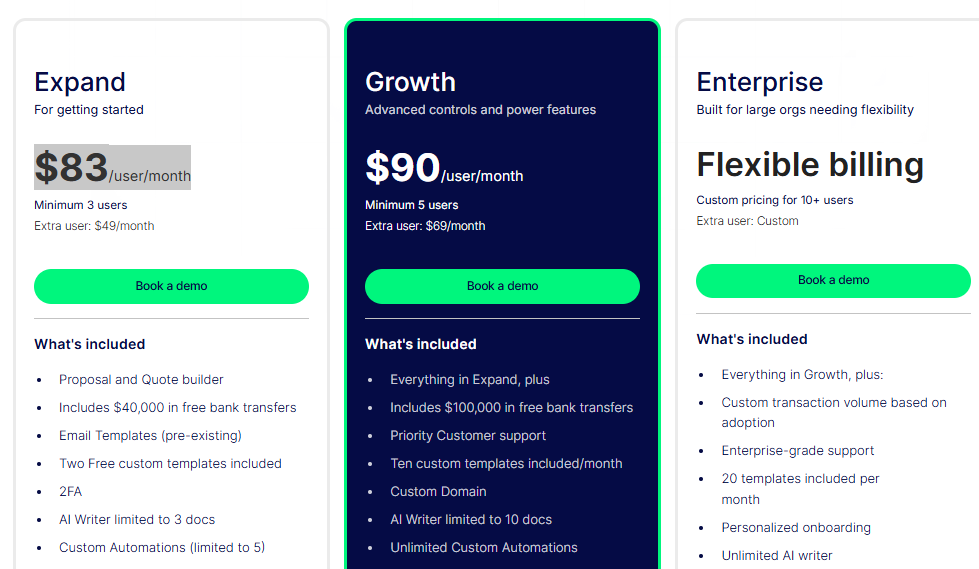
| 4 | Zomentum | MSP & IT service businesses | ✅ | ✅ | ✅ | ✅ | ✅ | No free plan | 4.6/5 | $83/user/mo |
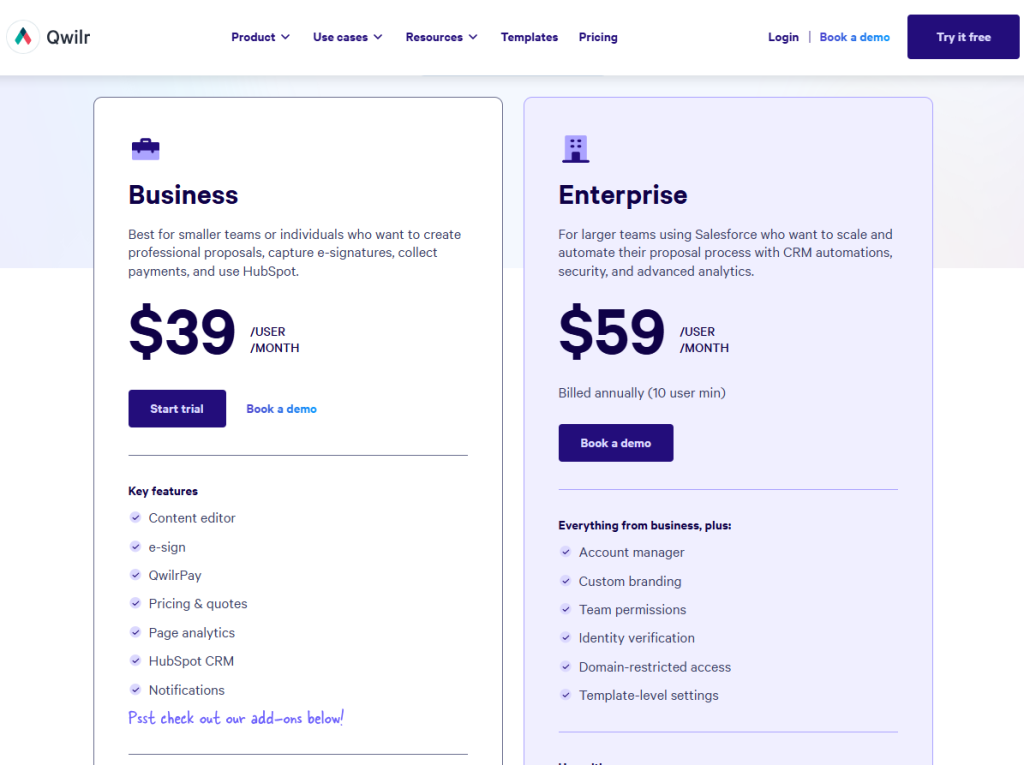
| 5 | Qwilr | Interactive web-based proposals | ✅ | ❌ | ✅ | ✅ | ✅ | 14-day trial | 4.6/5 | $39/user/mo |
| 6 | Proposify | Proposal analytics & sales teams | ✅ | ❌ | ✅ | ✅ | ✅ | 14-day trial | 4.6/5 | $29/mo |
| 7 | Dropbox Sign | Simple & affordable e-signatures | ❌ | ❌ | ❌ | ✅ | ✅ | 3 docs/month free | 4.7/5 | $15/Mo |
| 8 | Conga Composer | Salesforce document automation | ✅ | ✅ | ✅ | ✅ | ✅ | No free plan | 4.4/5 | Custom |
| 9 | DocuSign | Enterprise-grade e-signatures | ✅ | ✅ | ✅ | ✅ | ✅ | 3 docs/month free | 4.4/5 | $15/Mo |
| 10 | Adobe Sign | Adobe & Microsoft 365 ecosystem | ❌ | ❌ | ❌ | ✅ | ✅ | No free plan | 4.4/5 | $14.99/Mo |
| 11 | BoldSign | Unlimited e-signs on a budget | ❌ | ❌ | ❌ | ✅ | ✅ | 30-day trial | 4.7/5 | $15/Mo |
| 12 | Zoho Sign | Budget e-signs for Zoho users | ❌ | ❌ | ❌ | ✅ | ✅ | Free forever | 4.4/5 | $10/Mo |
| 13 | Better Proposals | Visual proposals for small teams | ✅ | ❌ | ✅ | ✅ | ✅ | 14-day trial | 4.3/5 | $19/Mo |
Best 13 PandaDoc Alternatives: Analysis of Features, Drawbacks, and Price
1. Taskip: Best for All-in-One Agency & Client Management
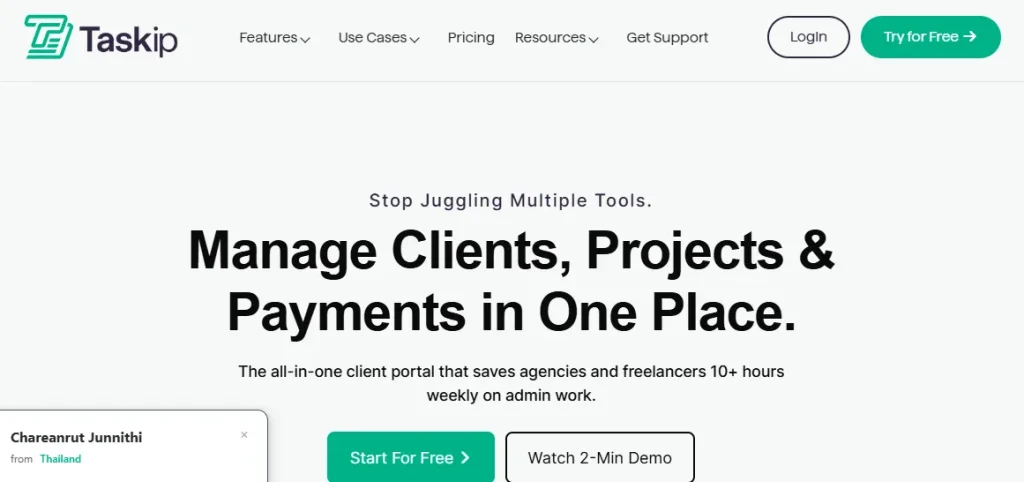
Taskip is an all-in-one client/project management software. If you want a PandaDoc alternative that is more than just creating proposals, quotations, invoices, and payments, Taskip is the ultimate go-to option!
You will get a built-in template for creating unlimited invoices, proposals, and quotations in this software. And document signing features of PandaDoc are also included in it. However, the best part is that the feature of Taskip goes beyond PandaDoc.
You will have an individual client profile for all your clients, generate leads, add documents, edit files, and share those, generating reports and analysis, booking meetings- all is possible with just a single application- Taskip.
Best Taskip Features as a PandaDoc Alternative
- Create & Share Documents
Organizing your documents and sharing them is now easier with Taskip. From a single dashboard, you can upload, edit, share with the team, update access, and publish your documents.
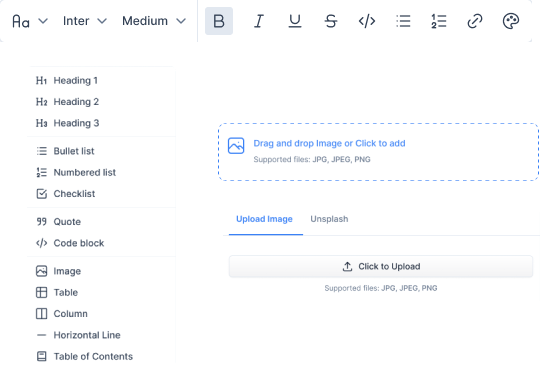
Moreover, you can add visual elements like headings, bullet points, numbered lists, images, tables, and code blocks to make your documents more interactive.
- Personalized Proposal
Taskip offers you a customized proposal creation facility where you can build your brand identity. You can easily adjust proposal colors, backgrounds, and sections to align with your or your client’s brand.
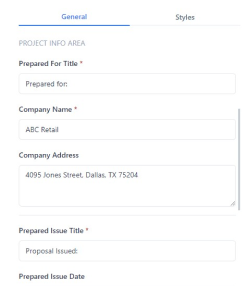
It further allows you to add your company name, address, issue date, and save it. This automates the proposal formatting and saves you time.
- Digital Signatures
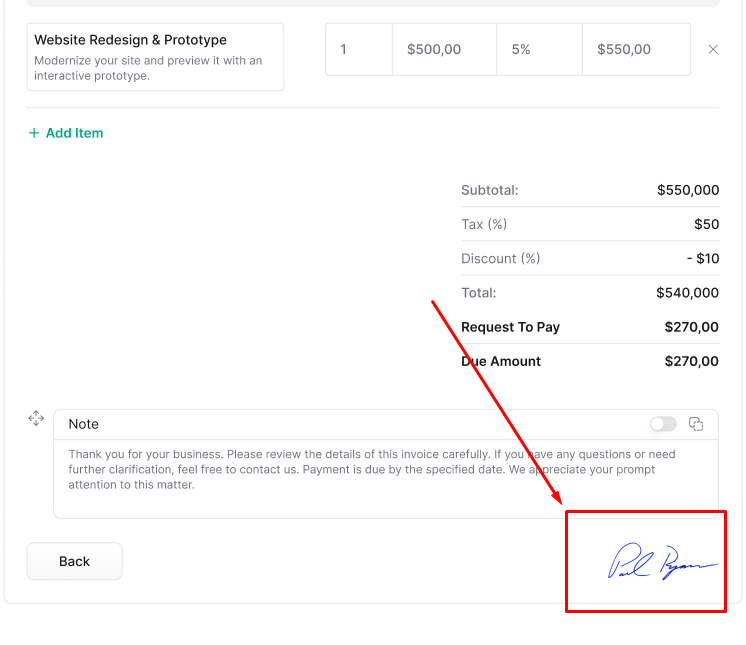
With Taskip, you can quickly obtain digital signatures for your proposals, business agreements, NDAs, and more. This makes the signing process fast, secure, and convenient, saving you hours!
- Agreement Templates
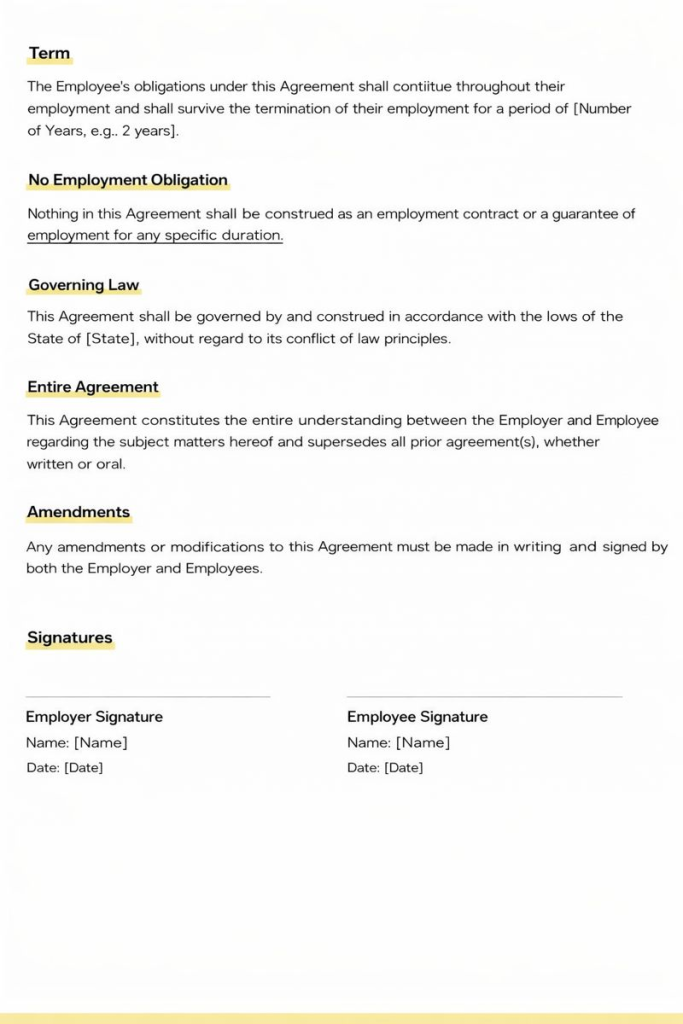
No need to spend hours on finding ideal agreement formats or samples. Taskip offers you agreement templates that you can customize and send to clients for closing deals effortlessly.
- Quotation
Taskip offers you quotation-generating features where you can add a subject line, choose the currency, and set an expiration date. Moreover, you can view detailed information about your quotations, including who created it, its current status, associated folders, and a description.
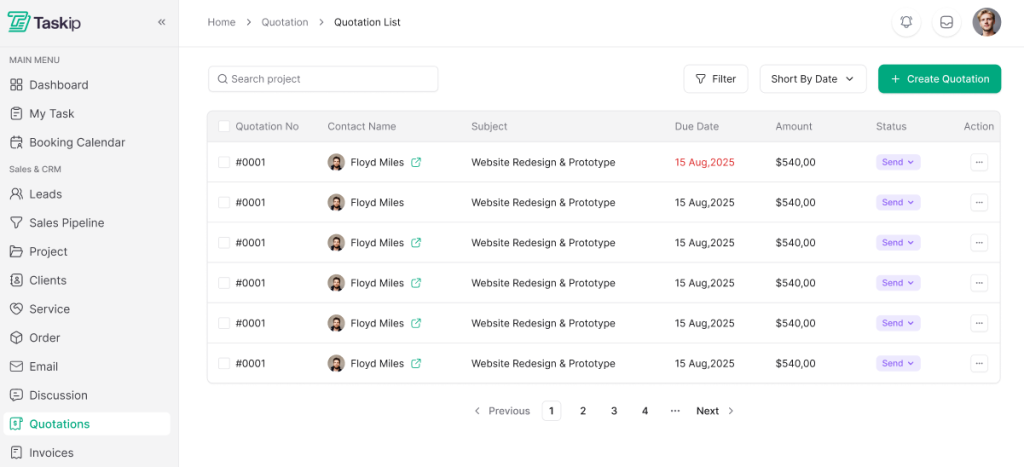
However, the best part here is that these quotations can be shared by email, downloaded as PDFs, or published online. You can even duplicate it or convert to invoices – all in one simple place.
- Fast Invoice Creation
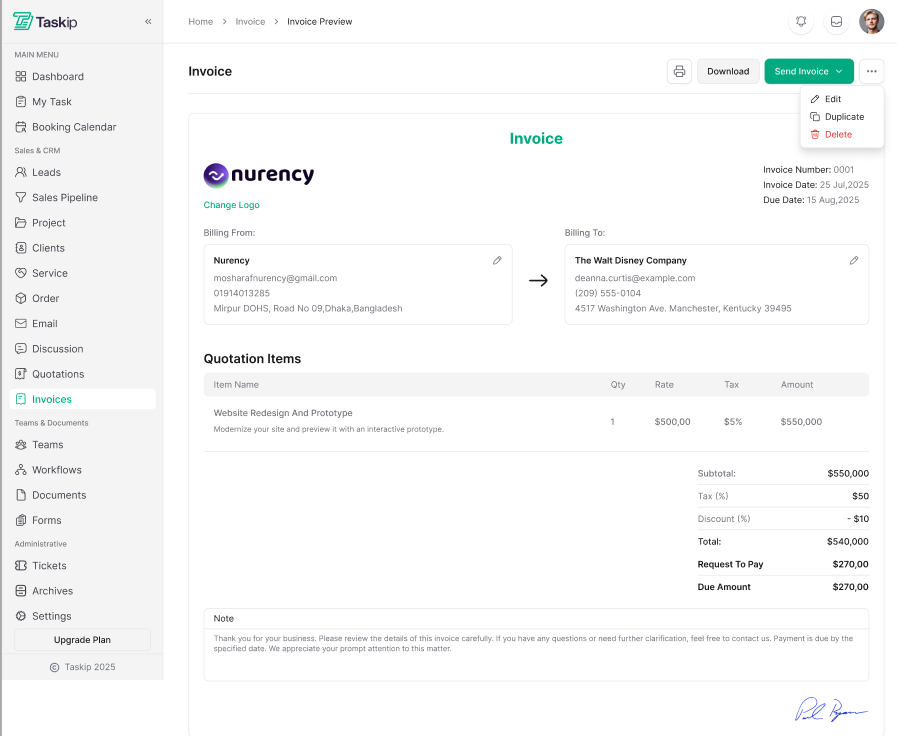
You can create professional-level invoices directly from the Taskip dashboard. Besides, the invoice preview page provides all the essential details; you can see who created the invoice, its recipient, the payment URL, due dates, paid/outstanding amounts, and the invoice status, whether partially or fully paid.
- Payment Processing
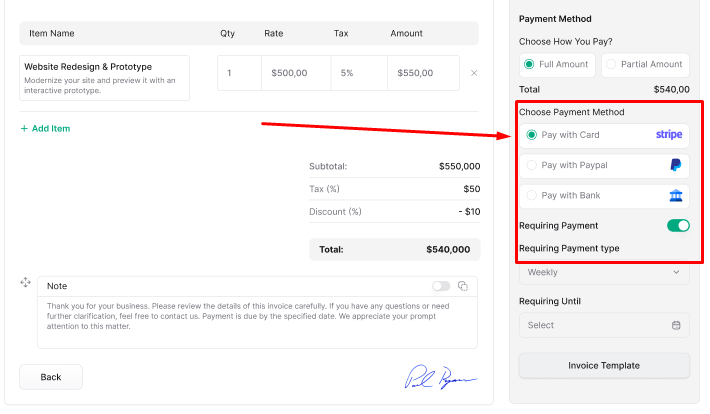
Taskip supports 100+ third-party integrations, including payment processors like PayPal, Stripe, etc. Thus, from a single platform, you can do all your documentation- from creating proposal, quotation, to payment processing.
- Workflow Automation
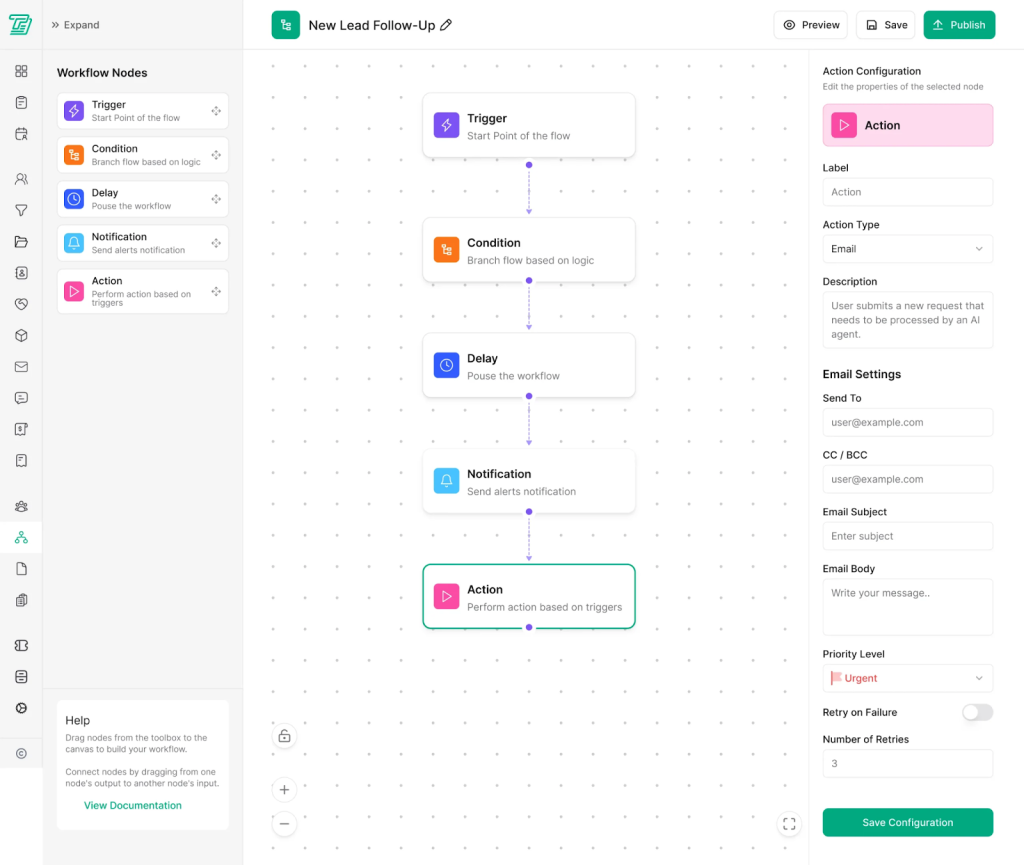
Say no to repetitive tasking with Taskip. It offers exclusive features like auto-replying, adding contacts, or triggering custom responses to task management, and more automation. Thus, with Taskip, you can execute multiple actions in a single workflow.
Taskip Limitations
- Limited offline functionality
- Ideal for basic e-sign and documentation, but you may not find complex contract lifecycle management
Supported Integrations
Taskip supports 100+ integrations, including Activepieces, Fastspring, Stripe, Paypal, Zoom, and more.
Taskip Pricing
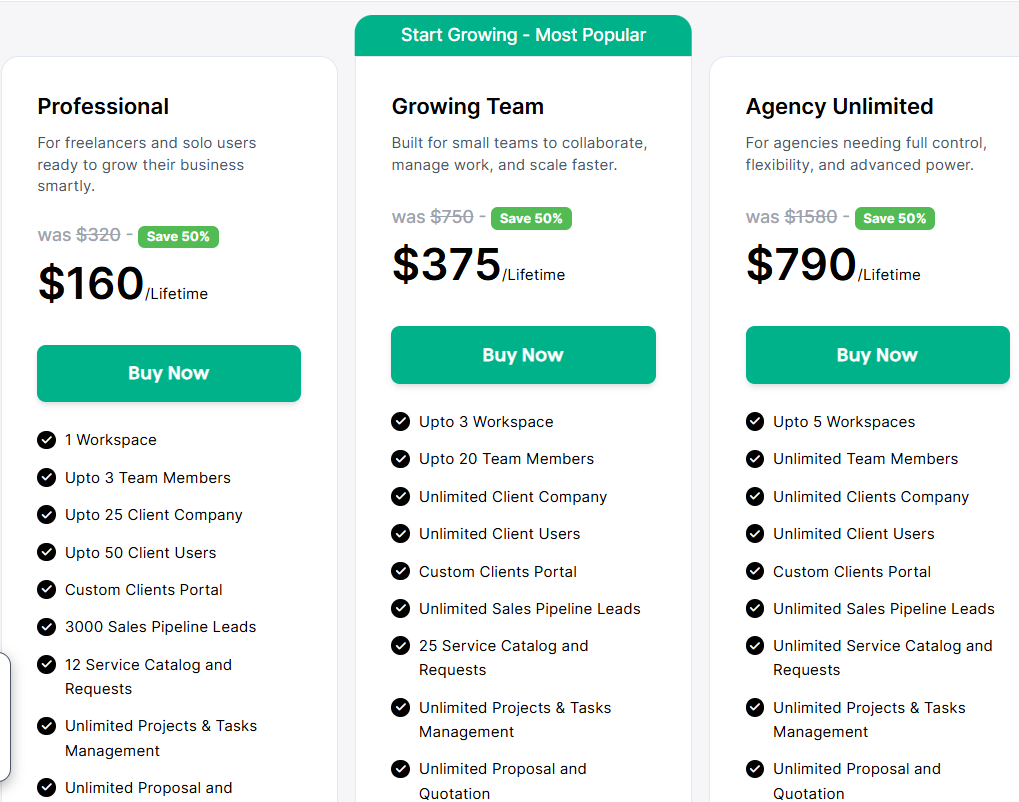
Apart from the free plan, Taskip has three paid plans. And the best part is that you get invoicing and quotation features for free, at $0/month!
Ratings & Reviews
G2 rating 4.8 out of 5
“
“As a freelance web developer, my day used to be a constant juggle between deep coding sessions and urgent client updates. Taskip has been a game-changer, streamlining my entire workflow. Now, monitoring project progress is effortless, allowing me to focus on what I do best without missing a beat. It truly feels like I’ve gained an extra set of hands to manage the administrative side of my business!”

2. GetAccept: Best for Digital Sales Rooms & Video Proposals
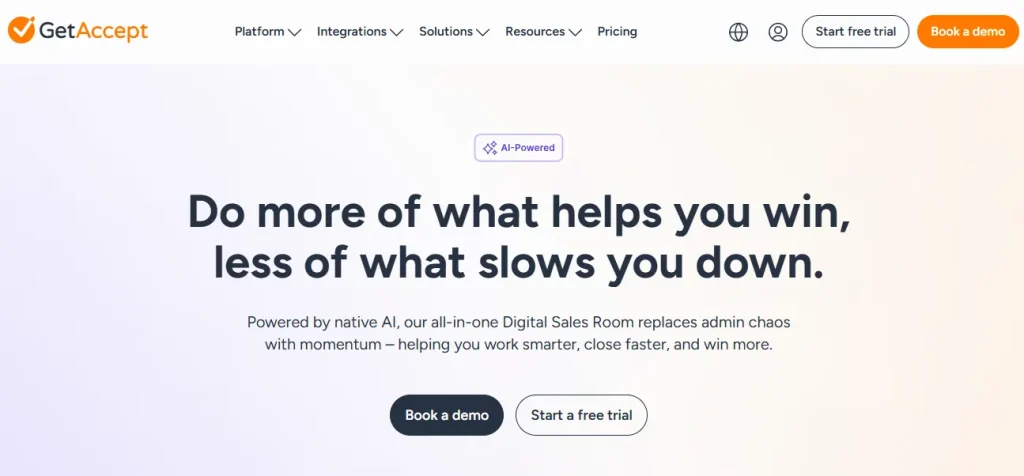
GetAccept is a digital sales room & sales engagement platform that helps teams share, track, and close deals from first pitch to final signature. This tool is very engaging as it features interactive proposals with real-time notifications, chat, buyer behavior insights, and more.
As a better PandaDoc alternative, it has some exceptional features that emphasize engagement and sales enablement rather than just document creation and workflow automation.
For instance, you can include a multimedia/ video message in a proposal and have real-time chat inside deals, which are missing in PandaDoc.
Best GetAccept Features as a PandaDoc Alternative
- Proposal & quotation
- Secure electronic signature
- Multimedia in proposals
- Real-time notifications & alerts
- Sales engagement insights & analytics
- CRM-first integrations (Salesforce, HubSpot, etc.)
- Automated follow-ups based on recipient behavior
- Buyer engagement tracking (know what recipients view)
- Chat & interactive communication inside documents
GetAccept Limitations
- Limited document customization options
- less intuitive editor & UI
- Longer loading time
Supported Integrations
With GetAccept, you get over 500 integrations & automations that automate entire workflows and save you time. Popular integration includes- Salesforce, Hubspot, SuperOffice, Gong, facebook, Google Analytics, and more.
GetAccept Pricing
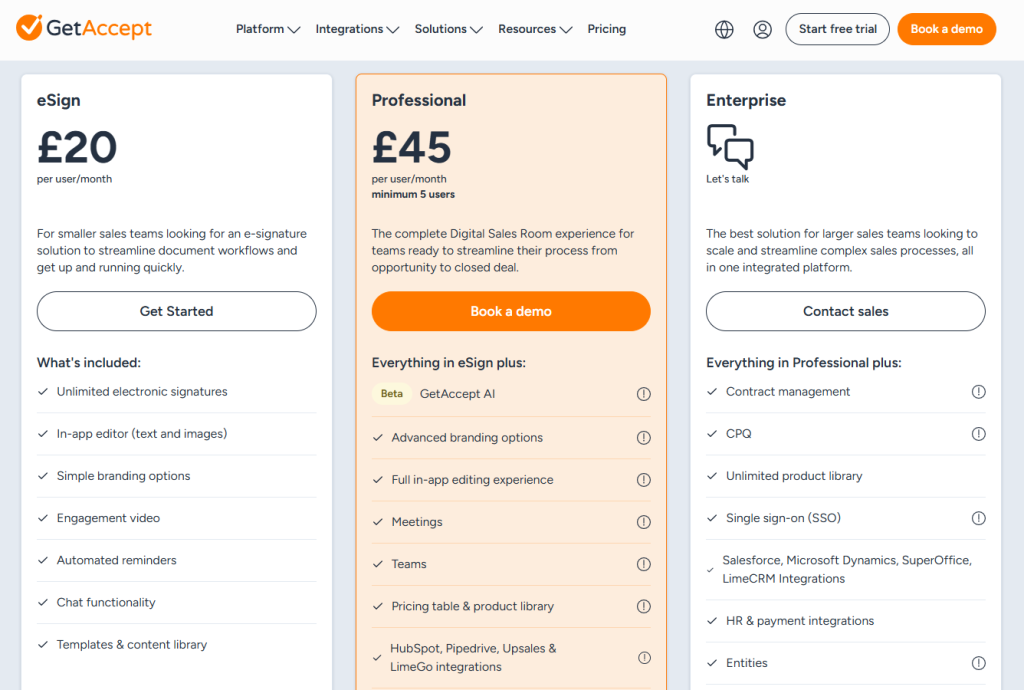
Ratings & Reviews
G2 rating 4.6 out of 5
“
GetAccept has made our sales process noticeably faster. The best part is the combination of e-signing, document tracking, and the built-in engagement data that shows exactly when and how long a recipient has viewed a proposal. That gives reps a real timing signal for follow-up.
The HubSpot integration is solid. deals, contacts, and document status sync cleanly, so we avoid manual double-work. Templates and the content library save us a lot of time on repetitive proposals, and the interface is intuitive enough that new users get up to speed quickly.
3. DocHipo: Best for Visual & Design-Heavy Proposals
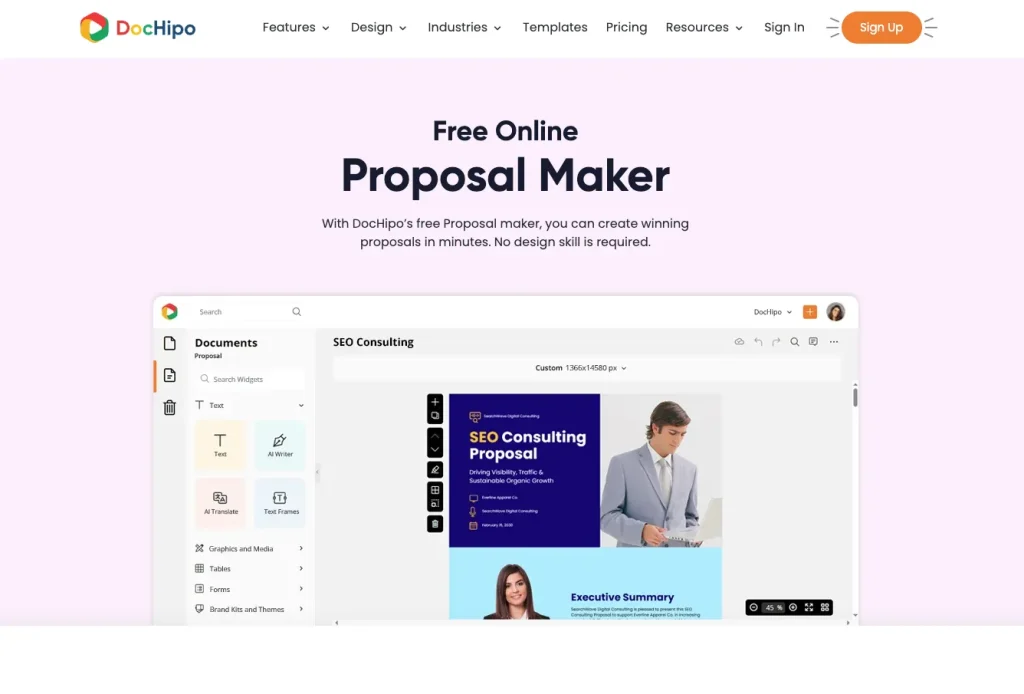
DocHipo Proposal Maker helps sales teams create visually impressive interactive proposals. It provides everything you need in one place – structure-focused templates, pre-defined sections, CRM integration, e-signature, and analytics to create proposals faster and more efficiently. It offers clarity-driven proposal templates across industries such as consulting, design, IT services, marketing, travel, events, and more.
You can easily manage items, usage units, currencies, taxes, and signature forms to streamline your proposal creation. Add e-signers, set an expiration date, enable follow-up reminders, and securely publish with a shareable link. You can review the proposal status and track the number of views, viewers, names, and time spent on each section, as well as the countries that viewed it.
Best DocHipo Features as a PandaDoc Alternative
- Industry-specific, professional, modern, webpage-style templates
- Clearly defined, structured sections for the Scope of Work, Timelines, and Pricing
- Easy to navigate, review, and accept proposals directly from the browser
- Digital signature facility from any device
- Simpler workflow than PandaDoc
- Smooth addition of case studies and portfolios
- Save and apply Brand Kit
- Secured proposal publishing with access control
- Real-time proposal tracking and analytics
- Intuitive interface without any complex initial setup
DocHipo Proposal Maker Limitations
- Available only as a web-based application
- Fewer integrations compared to other alternatives
Supported Integrations
DocHipo integrates with Zoho CRM to create proposals within the tool using data from Zoho CRM records.
DocHipo Pricing
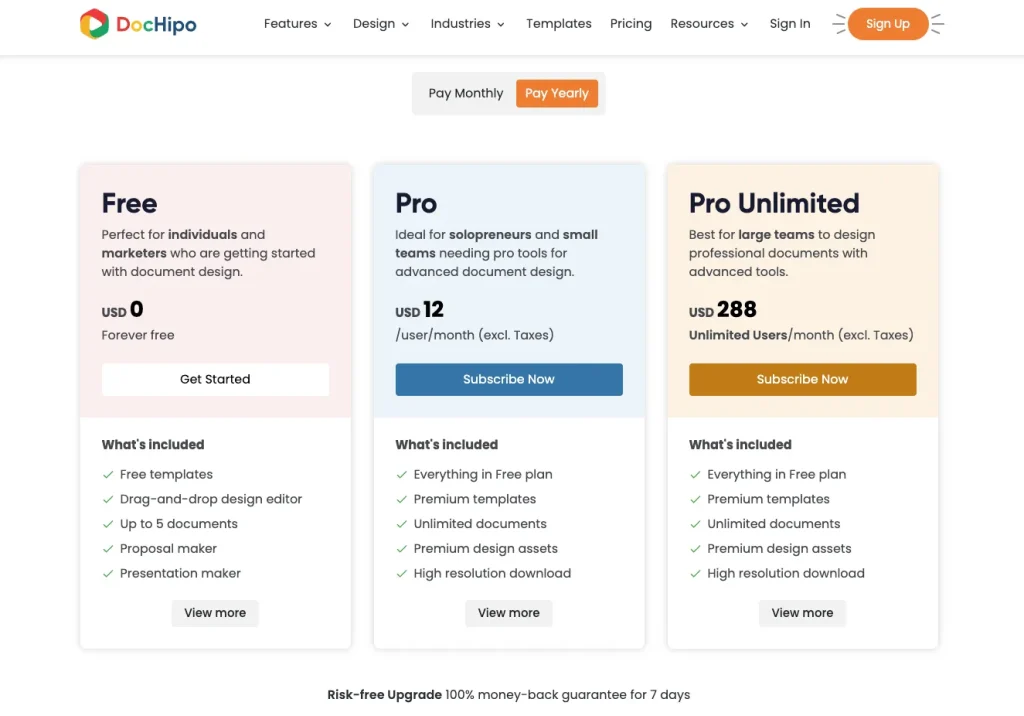
Ratings & Reviews
Capterra rating 4.9 out of 5
“
“My business has grown with Dochipo and I will continue to use it for my projects. I highly recommend this product, since it is user friendly and has excellent creative assets.”
4. Zomentum: Best for MSP & IT Service Businesses
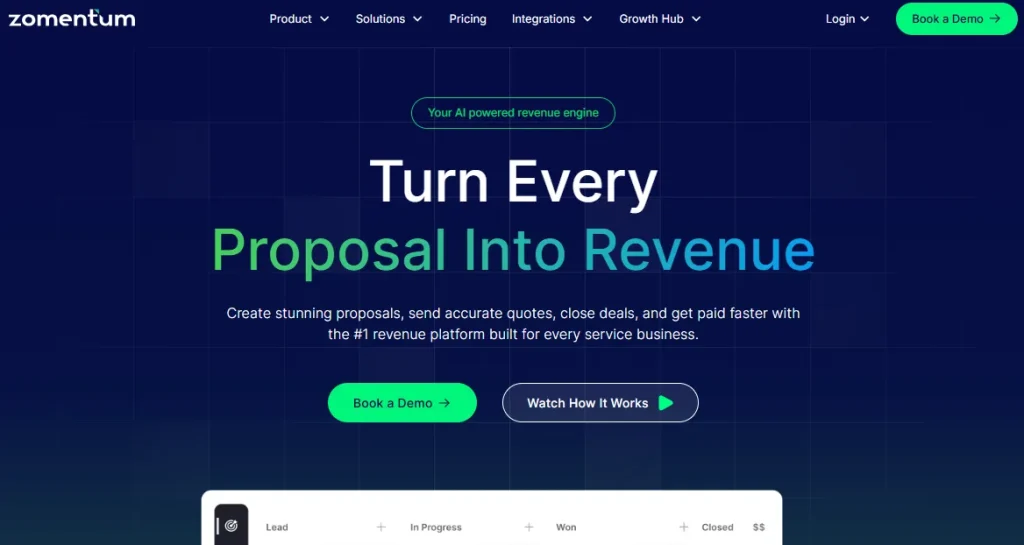
Zomentum is built for service businesses to create stunning proposals, send accurate quotes, close deals, and get paid faster. It claims to cut proposal and contract creation time by 70%!
With a strong built-in CRM, Zomentum manages the entire MSP sales process so nothing falls through the cracks. This allows you to automate approvals, renewals, and tasks.
It further features instant invoice importing from QuickBooks or Xero, giving you a unified place to view, track, and manage all billing activity. Thus, you can choose this platform as a better PandaDoc alternative.
Best Zomentum Features as a PandaDoc Alternative
- Create, customize, and send proposals
- 500+ ready-to-use, legally compliant templates for MSPs
- Automated quote to contract conversion
- Real-time collaborative negotiation portal.
- Flexible payment options: ACH, Visa, Mastercard, and Amex
- One-click client signature from any device
- Secure, cloud-stored signed copies.
Zomentum Limitations
- Highly expensive
- Limited field mapping flexibility
- No mobile app
- Learning curve for new users
Supported Integrations
Zomentum supports a wide range of integrations, categorized as CRM, sales, accounting, payment gateway, signature, and more.
Zomentum Pricing
Ratings & Reviews
G2 rating 4.6 out of 5
“
“Helps standardize quoting process. Set default margins at administrative level. Pulls product, pricing, and availability from each of our distributors. Won quotes sync to our PSA and financial system automatically. Excellent technical support.”
5. Qwilr: Best for Interactive Web-Based Proposals
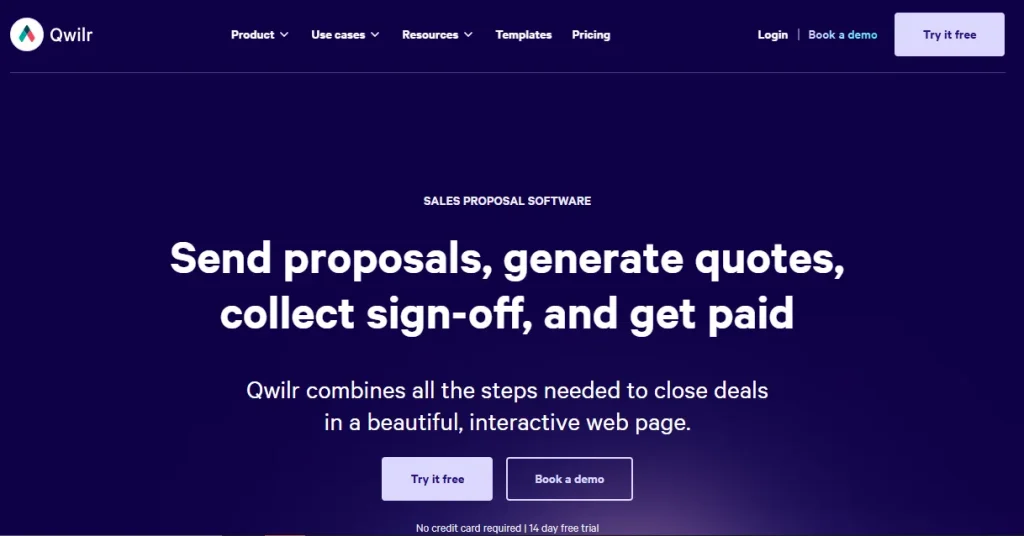
If you are looking for a better PandaDocs alternative, Qwilr is a great option to go for. It is an all-in-one proposal software solution designed to deliver interactive proposals and quotes that impress buyers. Besides, you can share these documents in a few clicks directly from a CRM.
It features a template option, where you can start designing your proposal from scratch. And the best feature that stands out Qwilr as an alternative to PandaDoc is its interactive element support: videos, GIFs, configurable pricing, and ROI calculators.
Moreover, Qwilr has advanced analytics that show you when proposals are viewed and how often buyers are viewing and interacting with your proposals. This way, you can easily track your business proposal.
Best Qwilr Features as a PandaDoc Alternative
- Web-based and mobile-responsive proposal creation
- 100+ professional proposal templates
- Real-Time Alerts and Notifications
- Share and collaborate on marketing assets
- eSignatures and Payment Integration
- 24hr customer support
Qwilr Limitations
- Cost-prohibitive for individuals, which seems expensive for small businesses or freelancers
- Limited offline access (web‑only experience)
Supported Integrations
Qwilr has easy integration with a wide range of sales software, including many popular CRMs like Hubspot, Slack & Salesforce; payment gateways like Stripe, QuickBooks, and a lot more.
Qwilr Pricing
Ratings & Reviews
G2 rating 4.6 out of 5
“
“I love how flexible it is to build different proposal blocks that I can simply drag and drop into my presentation. It also integrates really well with Hubspot. At $35/user/month, the pricing was a no-brainer for me. The LLM and AI elements genuinely speed things up and help my presentation look great. The program is very easy to use and reliably performs when I need it to. I also appreciate that it always saves my place if I get pulled away to another task. Support has been stellar and very responsive.“
6. Proposify: Best for Proposal Analytics & Sales Teams
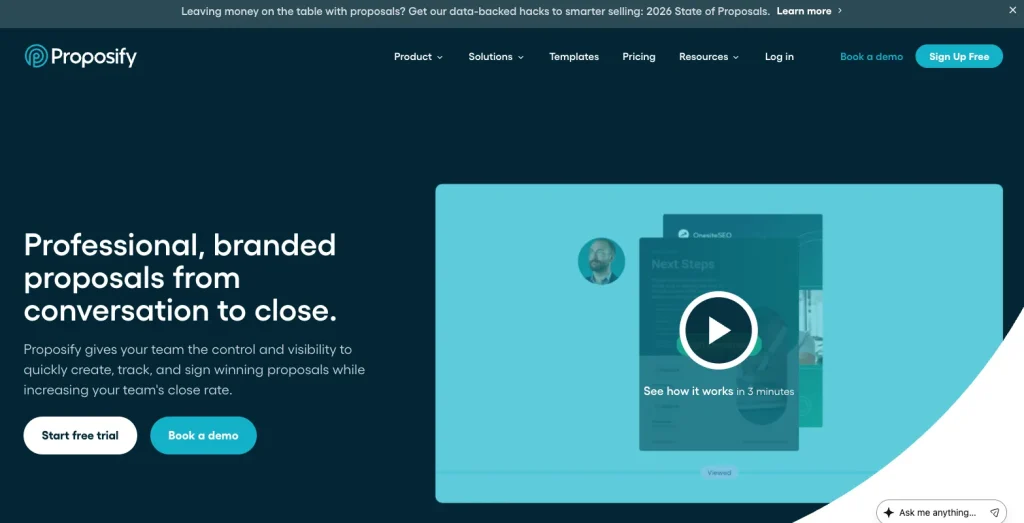
Proposify is a similar proposal software solution to PandaDoc. You can use this software to create, send, track, and e-sign proposals, contracts, and agreements. However, Proposify features stronger visuals and better data‑tracked proposals than PandaDoc.
Creating a proposal is super easy with Proposify; it takes only 17 minutes on average to create a proposal for your client. Besides, with the tracking feature, you can monitor the engagement of the proposal and get analytical reports on it.
Therefore, if your preference is proposal generation, you can definitely choose Proposify as a better alternative to PandaDoc.
Best Proposify Features as a PandaDoc Alternative
- User-friendly design editor
- 75+ templates
- Tracking and analytics of close rate, views, and dollar value
- Legally binding mobile-friendly signatures
- Document automation
- Built custom integration with API
- Workflow automation
- Client activity tracking
Proposify Limitations
- Text alignment issues
- Expensive individual plan costs
Supported Integrations
Proposift supports a wide category of integrations, including ActiveCampaign, Aspire, HubSpot, Google Drive, Dropbox, Gravity Forms, and more.
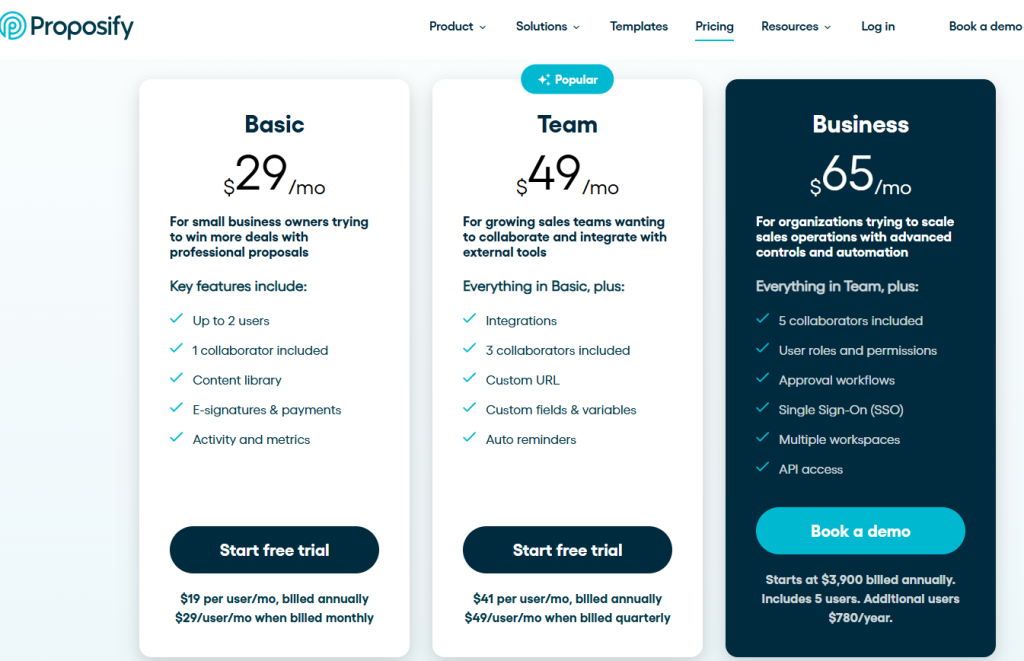
Proposify Pricing
Ratings & Reviews
G2 rating 4.6 out of 5
“
“The platform gave us all the necessary tools to create the playbook on our own which helps standardize quote flows across deal types and the successful training and guidance from the delivery team ensures we are totally independent when it comes to customizing our quotes and proposals.”
7. Dropbox Sign: Best for Simple & Affordable E-Signatures
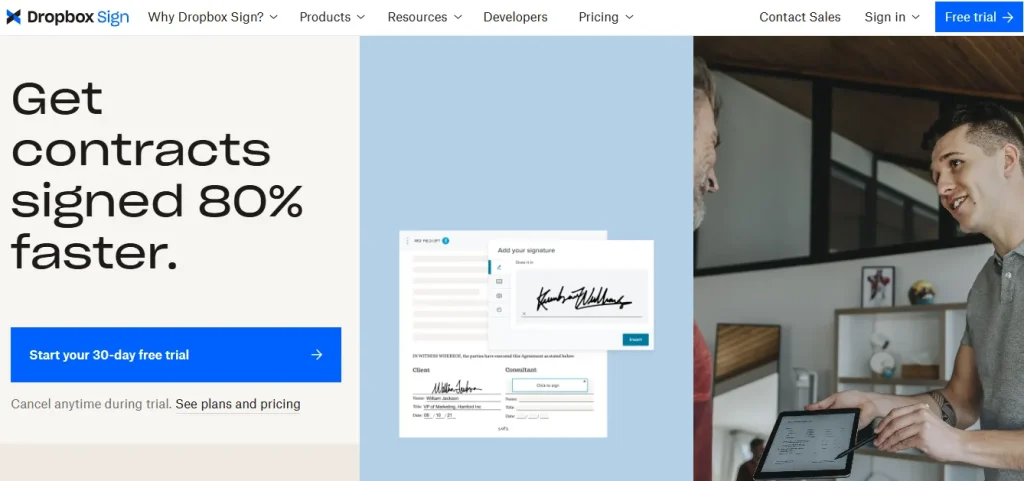
If you are looking for a PandaDoc alternative that offers simplicity, affordability, and smooth integration, Dropbox Sign is a good option to choose. Previously known as HelloSign, Dropbox Sign is built for easy contract and agreement signing.
Besides fast e-signing, this software automates follow-ups and ensures easy workflows. When it comes to security, Dropbox Sign is highly reliable with its legally binding feature.
Moreover, it is backed by Dropbox, which integrates seamlessly with popular tools like Google Drive, Slack, and Salesforce. Therefore, if you are looking for an alternative to PandaDoc for e-signature, Dropbox Sign is definitely your go-to choice.
Best Dropbox Sign Features as a PandaDoc Alternative
- Electronic signature
- Send a fax without a fax machine
- Choose or create templates
- Fill and sign PDFs
- Team management and admin controls
- API for custom integrations
- Custom branding options
Dropbox Sign Limitations
- Very limited features compared to other PandaDoc alternatives
- Minimal customization
- Customer support response time could be faster
Supported Integrations
Dropbox Sign integrates with the tools you already use and love, including Dropbox, Google Workspace, Salesforce, HubSpot, and more.
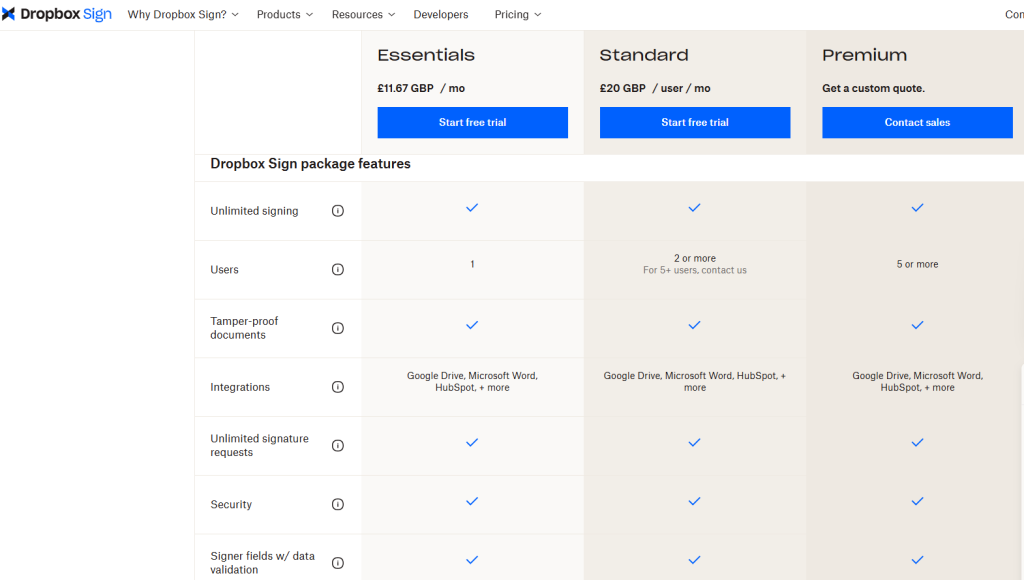
Dropbox Sign Pricing
Ratings & Reviews
G2 rating 4.7 out of 5
“
The Dropbox Sign is simple and efficient tool to make signature process easily.
Clear user interface with everything straight forward process doesn’t require additional training to process
Faster document workflows with smooth drop box integration
8. Conga Composer: Best for Salesforce Document Automation
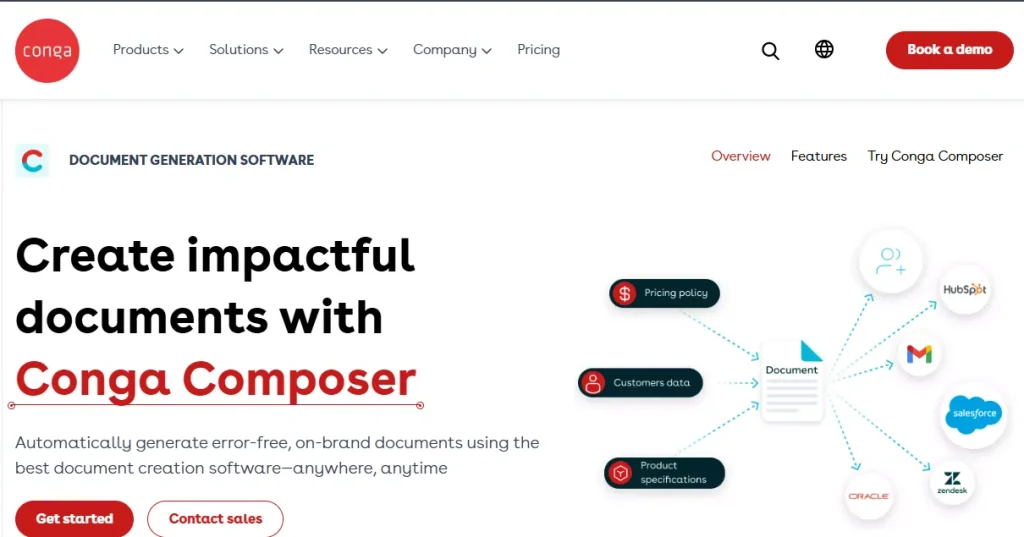
Conga Composer is a document generator that automates error-free doc creation. It supports any type of document generation. For example, you can create an Excel sheet or a PowerPoint from a Word document or a PDF. Thus, Conga Composer offers you the flexibility to present data in your preferable formate.
With this PandaDoc alternative, you can also create proposals, quotations, and e-signatures. Further, its CML feature automates the contract process with contract lifecycle management software integrated with AI.
Best Conga Composer Features as a PandaDoc Alternative
- Configure, price, and quote (CPQ) process
- Create customizable professional-level documents
- Extensive template library
- Automated billing
- Analytical report and scheduling
- Team collaboration
Conga Composer Limitations
- Dependency on Salesforce
- Limited format and file size
- Pricing is high for basic document creation
Supported Integrations
Conga Composer supports multiple integrations such as Adobe Sign, Google Drive, OneDrive, Amazon S3, Salesforce, and more.
Conga Composer Pricing
This platform offers a customized platform for your business. Contact the team for the price..
Ratings & Reviews
G2 rating 4.4 out of 5
“
“I use Conga Composer for creating customized letters and documents in our Salesforce instance using merge fields. Composer makes it easy for users to send customized documents without having to type them up, which is a fantastic use of automation. Once it is set up, it is very easy for the user, and updating the templates is easy for the admin. Also, the technical assistance from their team has been wonderful.”
9. DocuSign: Best for Enterprise-Grade E-Signatures
DocuSign is an Intelligent Agreement Management (IAM) platform that manages and signs documents electronically and automates workflows. The Contract Lifecycle Management feature of DocuSign automates the contract lifecycle process. Again, collecting data for fast deal closing is possible with the Web Form it provides.
No size limits with DocuSign- you can use DocuSign for electronic signatures in companies of all sizes. Therefore, DocuSign can be your ultimate PandaDoc alternative if you are looking for strong automation power.
Best DocuSign Features as a PandaDoc Alternative
- Create and manage agreements with IAM
- Secure e-signature and data storage
- Track documents
- Autoimatic contract lifecycle
- Built-in agreement AI
- Web forms to collect data
- Workflow automation
- 1000+ integration
- Mobile signing with dedicated iOS and Android apps
DocuSign Limitations
- Limited template and customization options
- Costs rise quickly with advanced features
Supported Integrations
With DocuSign, you get extensive third-party integration. This includes- Salesforce, CLEAR, Workday, Microsoft PowerAutomate, Google Workspace, and more.
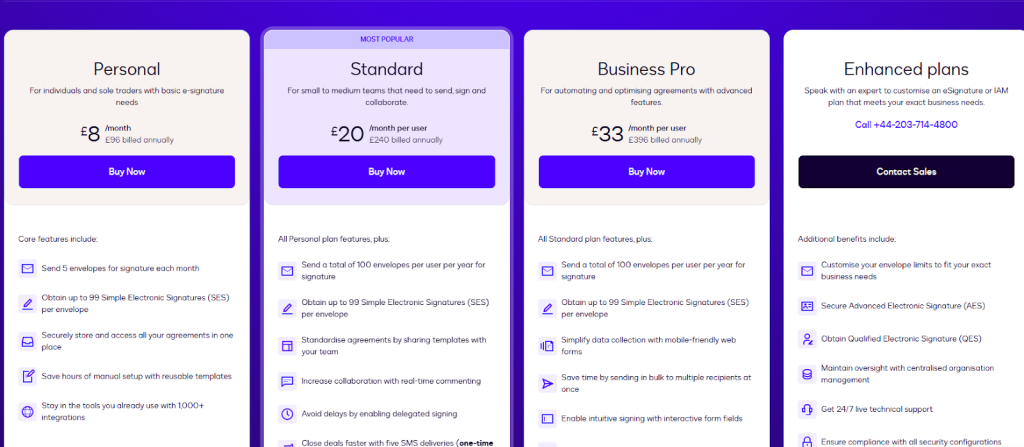
DocuSign Pricing
Ratings & Reviews
G2 rating 4.4 out of 5
“
I really like how Conga Composer automates the entire process of generating and distributing sales proposals directly within our CRM. It completely removes the manual burden from the sales team, allowing them to focus on closing deals. The software solves the issue of manual document errors and sales friction, eliminating any ‘copy-paste’ mistakes in proposals and ensuring 100% branding consistency. The feature that stands out to me the most is the conditional logic, which is a lifesaver. Templates can automatically include specific legal clauses or case studies based on the industry and region of the prospect. This means the sales team doesn’t have to remember to add them, saving time and reducing errors. It also streamlines repetitive tasks, cutting the time to generate a complex contract from over half an hour to just a single click.
10. Adobe Sign: Best for Teams in the Adobe & Microsoft 365 Ecosystem
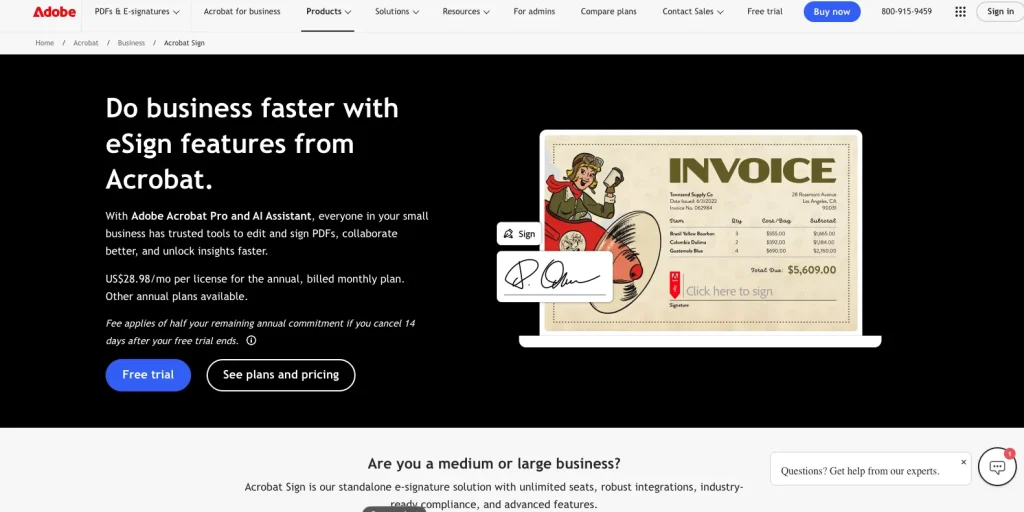
Adobe Acrobat Sign is Adobe’s electronic signature solution, embedded right into the tools your team already uses. If your business runs on Acrobat, Microsoft 365, or Salesforce, Adobe Sign fits into those workflows without any extra setup or file exporting.
As a PandaDoc alternative, Adobe Sign focuses purely on signing and document tracking. It’s built for businesses that send high volumes of contracts and need legally binding signatures with a full audit trail: on every paid plan, not locked behind a Business tier like PandaDoc.
It also supports mass mailing, letting you send the same contract to hundreds of recipients at once with personalized fields. So if compliant, high-volume signing is your priority, Adobe Sign is a strong PandaDoc replacement.
Best Adobe Sign Features as a PandaDoc Alternative
- Works natively inside Adobe Acrobat, Microsoft Word, Outlook, and Teams
- Send, sign, and track documents without switching apps
- Reusable templates for NDAs, SOWs, and recurring contracts
- Mass mailing/bulk send for high-volume contract delivery
- Real-time tracking and instant notifications on open, view, and signature
- Automatic document archiving after completion
- Full audit trail included on all paid plans
- eIDAS-compliant signatures for EU businesses
- API and webhook support for custom workflows
Adobe Sign Limitations
- No proposal builder or document design features — signing only
- Advanced features locked behind higher-tier plans
- More expensive than most standalone e-signature alternatives
- Less beginner-friendly for teams outside the Adobe ecosystem
Supported Integrations
Adobe Sign integrates with Microsoft 365 (Word, Outlook, Teams, SharePoint), Salesforce, Workday, ServiceNow, Google Drive, Box, Dropbox, and SAP. A REST API is also available for building custom signing workflows.
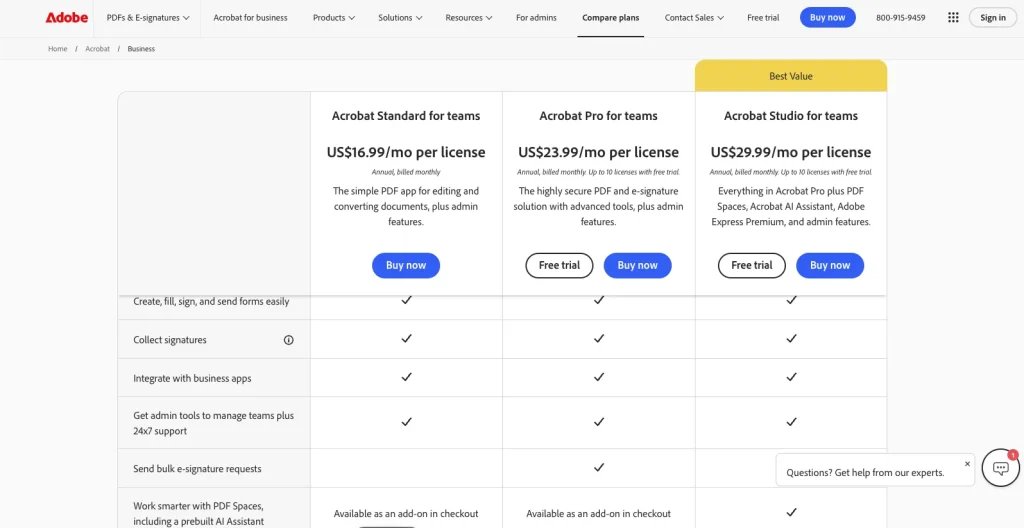
Adobe Sign Pricing
Ratings & Reviews
G2 rating 4.4 out of 5
“
What I like best about Adobe Acrobat Sign is it clean UI and smooth document signing experience. It integrates well with PDF workflows and other business tools, which make managing approvals much easier. The platform performs reliably, onboarding is straightforward, and it saves a lot of time compared to manual signing to manual signing processes. The automation and smart document features also improve overall productivity.
11. BoldSign: Best for Unlimited E-Signatures on a Budget
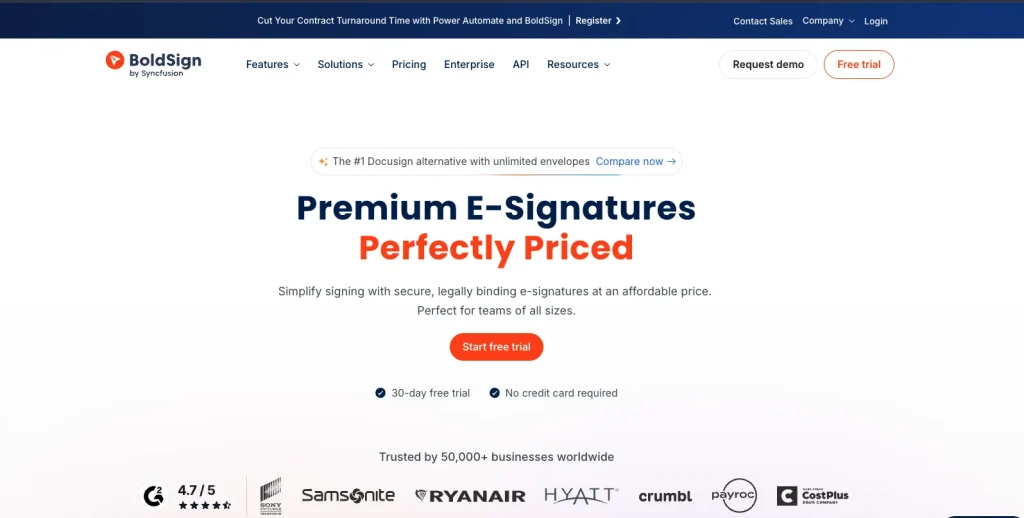
BoldSign is an e-signature platform by Syncfusion, built to give businesses a cleaner and more affordable way to send, sign, and manage documents. Trusted by 50,000+ businesses worldwide — including Sony, Ryanair, and Hyatt — it is one of the fastest-growing PandaDoc alternatives available today.
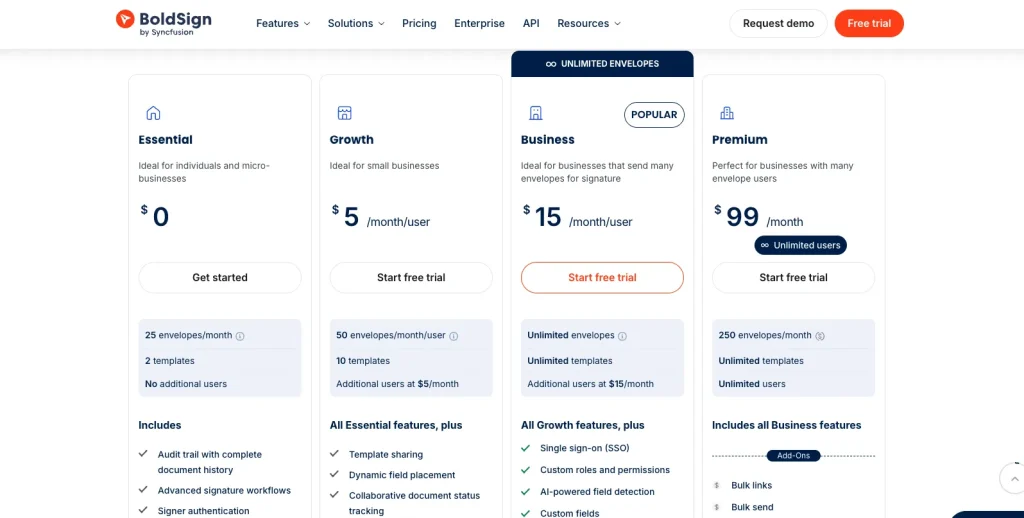
Where PandaDoc restricts document sends and locks the audit trail behind its Business plan, BoldSign includes unlimited envelopes, full audit trails, and AI-powered field detection on its standard paid plan. This makes it a cost-effective pick for teams that handle a high volume of documents every month.
It also delivers signing requests via email, SMS, or WhatsApp, so your recipients get notified through the channel they actually respond to. For businesses looking to cut e-signature costs without giving up features, BoldSign is worth a serious look.
Best BoldSign Features as a PandaDoc Alternative
- Unlimited envelopes and templates on the Business plan
- Multi-channel delivery via email, SMS, and WhatsApp
- AI-powered field detection for automatic form preparation
- Signer identity verification with government ID and selfie checks
- Bulk send to multiple recipients via CSV upload
- Custom branding on all signing pages and email notifications
- Full audit trail on all paid plans
- Two-factor authentication and SSO support
- Embedded signing via REST API for developers
BoldSign Limitations
- No proposal builder or document design — e-signature only
- Fewer native integrations compared to PandaDoc or DocuSign
- Smaller community and help resources as a growing platform
Supported Integrations
BoldSign integrates with Salesforce, HubSpot, Microsoft OneDrive, Google Drive, Zapier, Xero, Power Automate, and Dropbox. It also offers a full REST API with embedded signing support for custom workflows and product integrations.
BoldSign Pricing
Ratings & Reviews
G2 rating 4.7 out of 5
“
We love the functionality of BoldSign. We have a team of people and love that we can structure teams to share documents and to be able to check on documents when other team members may be absent. Training was easy and we like the option of being able to replace team members with new ones without having to create or pay for new seats. It’s also great to be able to see when customers view the documents.
12. Zoho Sign: Best for Budget-Friendly E-Signatures for Zoho Users
Zoho Sign is Zoho’s dedicated digital signature tool and one of the most affordable PandaDoc alternatives available today. It covers the full signing workflow: sending documents, collecting signatures, triggering reminders, and tracking status, without the complexity or price tag of PandaDoc.
If your business already uses Zoho CRM, Zoho People, Zoho Writer, or any other Zoho product, Zoho Sign connects with all of them natively. This makes it a seamless addition if you want e-signing inside your existing Zoho stack without introducing a separate tool or migration.
It also offers a genuine free plan, multi-language signing for international clients, and in-person signing on shared devices. For budget-conscious businesses that need reliable signing with no extras, Zoho Sign is a smart PandaDoc alternative.
Best Zoho Sign Features as a PandaDoc Alternative
- Legally binding electronic signatures
- Free plan for individuals and small teams
- Send, track, and manage documents from one dashboard
- In-person signing on shared devices
- Multi-language support for international signers
- Advanced signer authentication: SMS OTP, email OTP, offline access codes
- Bulk send for high-volume document delivery
- Custom branding on signing pages and email notifications
- Automated reminders and follow-ups
Zoho Sign Limitations
- No proposal creation features, signing only
- Advanced workflow customization is limited compared to PandaDoc
- Delivers the most value when used inside the broader Zoho ecosystem
- Interface feels less modern than newer alternatives
Supported Integrations
Zoho Sign integrates with Google Workspace, Microsoft Office 365, Dropbox, Box, OneDrive, Google Drive, and the full Zoho suite (CRM, People, Recruit, Forms, Flow, Writer, Mail). A REST API is also available for custom integrations.
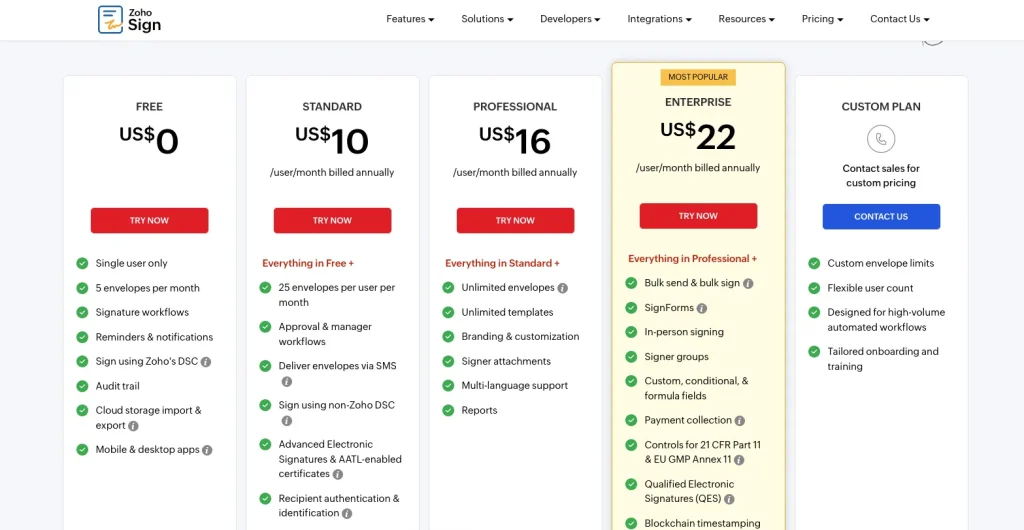
Zoho Sign Pricing
Ratings & Reviews
G2 rating 4.4 out of 5
“
I like that Zoho Sign is free. It’s really simple and easy to use, and it has worked seamlessly for me in the past. I also appreciate its clean interface, which makes it stress-free and dependable, like a knife that you know is going to get the job done.
13. Better Proposals: Best for Visual Proposals for Freelancers & Small Teams
Better Proposals is proposal software built specifically for freelancers, agencies, and small businesses that want to close deals with visually impressive proposals fast. Unlike PandaDoc’s corporate-leaning document editor, Better Proposals is designed to make proposals look great without needing any design skills at all.
Its editor automatically handles formatting, colors, and layout as you write, so you stay focused on the content and the client. With 250+ professionally designed templates across industries like marketing, consulting, web design, and accounting, you can build a polished proposal in minutes.
It also has one standout feature no other tool on this list offers — a live chat widget embedded directly inside the proposal, so prospects can ask questions while they’re reading without ever leaving the document. For small teams that compete on presentation and speed, Better Proposals is a strong PandaDoc alternative.
Best Better Proposals Features as a PandaDoc Alternative
- 250+ professionally designed proposal templates
- Auto-formatted editor: no design skills required
- Live chat embed inside proposals for real-time client communication
- Legally binding digital signatures
- Payment collection via Stripe, GoCardless, and PayPal
- Per-section proposal analytics to see exactly what clients read
- Automated follow-up reminders for unsigned proposals
- Custom branding and white-label domain support
- 40+ integrations with CRMs and payment tools
Better Proposals Limitations
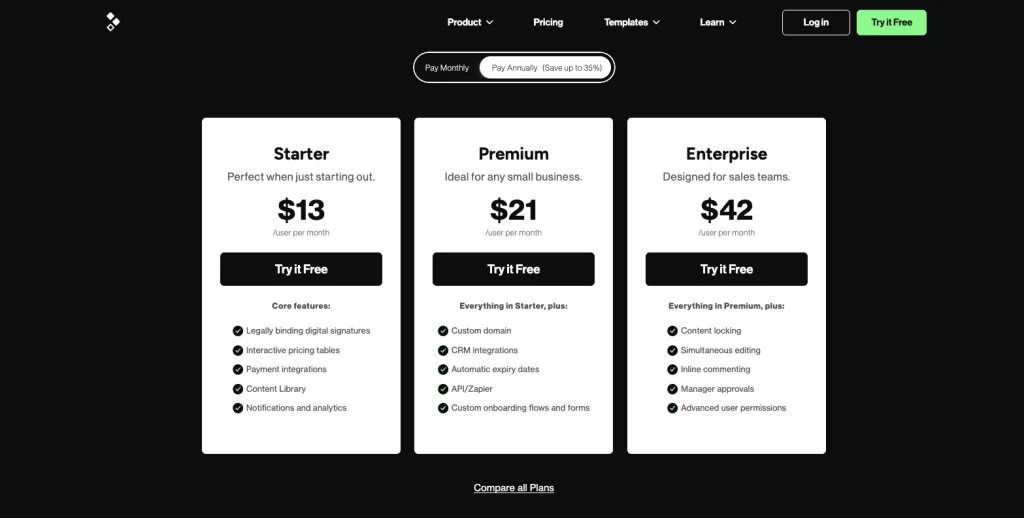
- Starter plan caps send at 10 proposals per month
- No invoice creation feature
- Fewer enterprise-level features compared to PandaDoc
- Smaller G2 review count than more established tools
Supported Integrations
Better Proposals integrates with HubSpot, Pipedrive, Zoho CRM, Salesforce, Stripe, GoCardless, PayPal, Zapier, and Slack. API access is included on the Premium plan and above.
Better Proposals Pricing
Ratings & Reviews
G2 rating 4.3 out of 5
“
It’s such an easy system to use. It’s great value for money and has completely changed the game for my business. It’s easily integrated with other softwares so has allowed me to automate a lot more than I could before. Highly recommend. It was so easy to create beautiful templates and start using right away!
Best Free PandaDoc Alternatives
PandaDoc does have a free eSign plan, but it comes with significant restrictions, no audit trail, no multi-signer workflows, and limited document customization. If you are looking for a free PandaDoc alternative that actually covers your needs, here are the best options:
Taskip (Free Forever)
Taskip’s free plan includes quotation generation, invoicing, proposal creation, and basic e-signatures, making it the most complete free PandaDoc alternative available. There is no document cap and no time limit. It is ideal for freelancers and small agencies that want a full document workflow without paying for it.
Zoho Sign (Free Forever)
Zoho Sign’s free plan covers basic electronic signing with no monthly document limit for individuals. It is a solid pick if your only requirement is sending and collecting signatures on simple agreements.
DocHipo (Free Forever)
DocHipo’s free plan includes proposal creation, design templates, and basic e-sign functionality. It is well-suited for solo users who need to send visually polished proposals without paying a monthly fee.
DocuSign (3 Documents/Month Free)
DocuSign offers a free tier that allows up to 3 envelope sends per month. It is enough for very low-volume signing, but impractical for regular business use. The free plan does not include templates or custom branding.
Dropbox Sign (3 Documents/Month Free)
Dropbox Sign’s free plan also caps you at 3 document sends per month. It works well for occasional signing, such as a monthly client agreement. However, it is too limited for teams sending proposals or contracts regularly.
How To Select the Right PandaDoc Alternative?: A Guideline
Identify the Features You Need Most
Before you pick a PandaDoc alternative, check what feature you need the most and make sure the platform you switch to has these features. For instance, consider features like-
- E-signature
- Proposal, invoice, and quote generation
- Ready templates
- Automations, etc.
User Friendliness & Speed
As PandaDoc has some bad reviews for its slow performance when working on large documents and editing issues, make sure the PandaDoc alternative you choose doesn’t cause problems. The alternative you choose should be easy to use for general users with a bare minimum of technical knowledge.
Whitelabeling
The PandaDoc alternative you pick should have a whitelabeling feature to highlight your brand identity during invoice, quote, and proposal generation. This offers you flexible customization.
Integration
The more third-party integrations your PandaDopc alternative supports, the more streamlined the process will be. So, pick wisely.
Workflow Management & Automation
Managing your work and tasks becomes easier with a PandaDoc alternative that has automation features.
Price Value
The starting price of PandaDoc is very high compared to its offered features. Instead, you can get a PandaDoc alternative like Taskip, which covers all PandaDoc features with many add-ons at an affordable price.
How to Switch from PandaDoc: A Step-by-Step Migration Guide
Switching from PandaDoc is simpler than most people expect. You don’t lose your work; you just need to export the right things before you cancel. Here’s how to do it cleanly:
Step 1: Export All Your Templates
Go to PandaDoc’s template library and export each template as a PDF or DOCX file. PandaDoc does not offer a bulk export option, so you will need to download them one by one. For teams with a large template library, PandaDoc’s API allows developers to extract templates in bulk using a custom script.
Step 2: Download All Signed and Completed Documents
Before canceling, download every completed agreement, contract, and signed proposal from your PandaDoc account. These are your legal records. Go to Documents → filter by “Completed” → download each as a PDF with the audit certificate attached. Store them in Google Drive, Dropbox, or your preferred cloud storage.
Step 3: Export Your Contacts
Export your recipient and contact list from PandaDoc’s People section as a CSV file. This saves you from manually re-entering client details into your new tool.
Step 4: Choose Your New Tool and Set Up Your Account
Sign up for your chosen alternative and complete the initial setup, add your company details, logo, brand colors, and payment information. Most tools like Taskip, Proposify, and BoldSign have an onboarding wizard that walks you through this in under 15 minutes.
Step 5: Recreate Your Templates in the New Tool
Use your exported DOCX or PDF files as a reference to rebuild your most-used templates in the new platform. Start with the 3–5 templates your team sends most frequently. Many alternatives like Taskip and Better Proposals have built-in template libraries, so you may find a near-ready version to customize instead of starting from scratch.
Step 6: Reconnect Your Integrations
Reconnect your CRM (HubSpot, Salesforce, Pipedrive), payment processors (Stripe, PayPal), and any automation tools (Zapier, Slack). Most alternatives support the same integrations PandaDoc does, and the connection process takes just a few clicks in the settings panel.
Step 7: Run a Test Before Going Live
Send a test document to yourself or a team member to confirm signatures, tracking, notifications, and any automation triggers are working correctly. Check that the document looks right on both desktop and mobile before rolling it out to clients.
Step 8: Cancel Your PandaDoc Subscription
Once everything is working in your new tool, cancel your PandaDoc plan before the next billing cycle. PandaDoc does not offer prorated refunds, so time your cancellation carefully. Your documents and account data remain accessible for a period after cancellation, depending on your plan.
Which PandaDoc Alternative Fits Your Business Size?
Freelancers & Solo Users
If you only send a few proposals each month, keep it simple. Tools like Taskip (free plan), Zoho Sign, or Better Proposals ($19/month) cover essentials like e-signatures and basic tracking without extra complexity.
Small Businesses (2–20 people)
You need something easy and fast for the whole team. Taskip, BoldSign ($15/user/month), and Proposify work well. Taskip is good for an all-in-one setup, while BoldSign is cost-effective, and Proposify focuses on polished proposals.
Mid-Market Teams (20–200 people)
At this stage, you need workflows, integrations, and analytics. GetAccept, Qwilr, and Proposify are strong choices. GetAccept suits long B2B sales cycles, while Qwilr is popular with agencies.
Enterprise (200+ people)
Large organizations need compliance and deep integrations. DocuSign, Adobe Sign, and Conga Composer are the main options, with DocuSign being the most widely adopted for global teams.
Closure: Which PandaDoc Alternative Should You Choose?
Not every tool on this list is right for every business. Here’s a quick decision guide to help you pick the best fit based on what you actually need:
| If you need… | Best pick |
|---|---|
| An all-in-one platform for proposals, invoices, CRM, and e-signature | Taskip |
| Interactive web-based proposals with embedded videos and ROI calculators | Qwilr |
| Deep proposal analytics to see exactly how clients engage with your documents | Proposify |
| A digital sales room with video messaging and stakeholder tracking | GetAccept |
| Visual, design-heavy proposals that impress clients without a designer | Better Proposals or DocHipo |
| Enterprise-grade e-signatures trusted globally | DocuSign |
| Unlimited e-signatures at the lowest cost | BoldSign |
| Budget e-signatures with a free forever plan | Zoho Sign |
| E-signatures built into Adobe Acrobat or Microsoft 365 | Adobe Sign |
| Proposal and quote automation for MSP and IT service businesses | Zomentum |
| Salesforce-native document generation and automation | Conga Composer |
The short version: if you want a PandaDoc alternative that handles more than just documents, Taskip is the best all-in-one pick. If you only need e-signatures, BoldSign or Zoho Sign will save you the most money. And if proposals are your priority, Qwilr or Better Proposals will give your documents a visual edge that PandaDoc’s editor simply can’t match.
But if you want one tool that brings everything together without forcing you to stitch multiple platforms, Taskip is the most balanced option.
FAQs on PandaDoc Alternatives
What key features should I look for in a PandaDoc alternative?
If you are looking for a PandaDoc alternative, the features to consider include E-signatures, custom templates, integrations with CRM, invoice, proposal, and quotation generation, AI integration, automation, and report analytics.
Are there free alternatives to PandaDoc?
Yes, Taskip, Dropbox Sign, and DocuSign have a free plan that comes at $0. However, some PandaDoc alternatives offer you a free trial option for a few days, but there is no plan designed for free use.
Is Taskip a good PandaDoc alternative?
Yes, for simple invoicing, proposal, quotation, and e-signature needs, Taskip is a good PandaDoc alternative. However, you may not get the advanced document automation and e-signature depth of PandaDoc in Taskip.
What key features should I look for in a PandaDoc alternative?
If you are looking for a PandaDoc alternative, the features to consider include e-signatures, custom templates, CRM integrations, invoice, proposal, and quotation generation, AI integration, automation, and report analytics. The right combination depends on whether you need a full document management platform or just a focused signing or proposal tool.
Are there free alternatives to PandaDoc?
Yes. Taskip, Zoho Sign, and DocHipo offer free plans with no time limit. Dropbox Sign and DocuSign both allow up to 3 document sends per month for free. If you need a full proposal workflow at no cost, Taskip is the strongest free option as it includes quotations, invoices, and proposals in its free tier.
What is the best free PandaDoc alternative?
Taskip is the best free PandaDoc alternative for teams that need more than just e-signatures. Its free plan includes quotation generation, invoicing, proposal creation, and client management, all without a credit card. For e-signature only, Zoho Sign’s free plan covers basic signing with no document caps on the entry tier.
What is the best PandaDoc alternative for small businesses?
For small businesses, the best PandaDoc alternatives are Taskip, Better Proposals, and Zoho Sign. Taskip covers the full workflow: proposals, quotes, invoices, and e-signatures, starting at $12/month. Better Proposals is ideal if your priority is sending visually impressive proposals quickly. Zoho Sign is the most affordable pure e-signature option at $10/user/month.
What is the cheapest PandaDoc alternative?
Zoho Sign is the cheapest paid PandaDoc alternative at $10/user/month (billed annually). BoldSign and Taskip both start at $12–$15/month and offer significantly more features per dollar than PandaDoc’s entry plan of $35/user/month. If budget is your main concern, any of these three will save you considerably.
Is there a PandaDoc alternative with no document limits?
Yes. BoldSign offers unlimited envelopes on its Business plan at $15/user/month: no caps, no overage charges. Taskip also has unlimited invoices, quotations, and proposals on its paid plans. In comparison, PandaDoc limits document sends on its lower tiers and restricts audit trail access unless you upgrade.
What proposal software integrates best with HubSpot and Salesforce?
GetAccept, Proposify, and Qwilr all offer native integrations with both HubSpot and Salesforce. GetAccept connects deeply with Salesforce for tracking deal engagement. Proposify integrates with HubSpot on its Team plan and Salesforce on the Business plan. Qwilr supports this on its Enterprise plan. For Salesforce-heavy teams, Conga Composer is purpose-built for Salesforce document automation.
Can I migrate my PandaDoc templates to another tool?
Yes, in two ways. You can export templates manually from PandaDoc as PDF or DOCX files and re-import or rebuild them in your new tool. For bulk migration, PandaDoc’s API allows developers to export templates programmatically and map them to another platform. Most alternatives like Taskip, Proposify, and GetAccept also have their own template libraries, so you may not need to migrate everything.
What is the best PandaDoc alternative for e-signatures only?
If you only need e-signatures without proposal or document creation features, DocuSign, BoldSign, and Dropbox Sign are the top picks. DocuSign is the most trusted globally and works for businesses of all sizes. BoldSign is the best value with unlimited envelopes at $15/month. Dropbox Sign is the simplest for low-volume signing, with a free plan for up to 3 documents per month.
Is Taskip a good PandaDoc alternative?
Yes, for simple invoicing, proposal, quotation, and e-signature needs, Taskip is a good PandaDoc alternative. It goes beyond PandaDoc in some areas, offering CRM features, a client portal, project management, and lead tracking, all from one platform at a lower price. However, if you need advanced contract lifecycle management or deep document automation, PandaDoc’s higher plans may still be more suited.




Get Summary On: