
Free Invoice Generator: Create, Download and Print Invoices Online
Make an invoice online in under a minute. Add your business details, client info and line items, and create invoices online free with tax and discounts calculated for you. Download the PDF or print it. No signup, no watermark.
Used by 50,000+ people · 1,850+ workspaces created by agencies and freelancers in 40+ countries. Rated 4.8/5 on G2 · Updated October 2026
PNG/JPG
PNG/JPG
Line Items
1,850+ workspaces created by agencies and freelancers in 40+ countries. Rated 4.8/5 on G2 No signup required to generate or download.
Your data stays in your browser until you choose to save it.
Your Business Name
you@yourbusiness.com
Invoice
#
Bill To
Client Name
Issue date -
Due date -
| Description | Qty | Rate | Amount |
|---|---|---|---|
| Item description | 1 | $0.00 | $0.00 |
Payment Terms
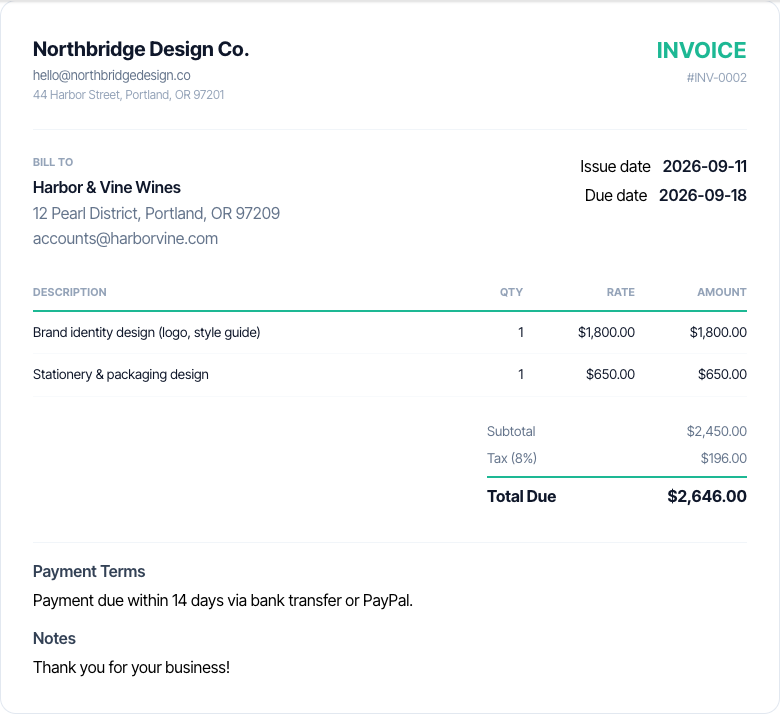
Payment due within 14 days via bank transfer or PayPal.
Notes
Thank you for your business!
What is a Invoice Generator?
A free invoice generator, also called an invoice maker or invoice creator, lets you create invoices online free: you enter your business, client and line-item details, and it turns them into a professional, ready-to-send invoice in under a minute, with tax, discounts and totals calculated automatically across 39 currencies. You can download the invoice as a PDF or print it, with no software to install and no signup.
How it works: you enter your business details, the client, and each line item. The invoice generator lays them out in a standard invoice format, numbers the invoice automatically, and recalculates the subtotal, discount, tax and amount due as you type. Then you download a PDF, print it, export a CSV, or save it to a free Taskip account.
Why use one instead of a Word or Excel file: invoice numbers stay in sequence, the math is always right, your logo and business details are remembered for next time, and every invoice follows the same professional layout that accounts teams expect.
Who uses it: freelancers, consultants, agencies, contractors and small businesses that need to bill a client today without paying for invoicing software.
Invoice Generator at a glance
- Price
- Free, no signup, no watermark
- Output
- PDF, CSV and print
- Numbering
- Automatic and sequential (INV-0001, INV-0002)
- Currencies
- 39, including USD, EUR, GBP, INR, AED, SGD
- Tax & pricing
- Any tax rate (VAT, GST, sales tax), % discount, tax ID field
- Details
- Logo, signature, PO number, due date, payment terms
- Privacy
- Runs in your browser; nothing is stored unless you save it
- Used by
- 50,000+ people
- Made by
- Taskip, client management and invoicing software for agencies and freelancers
How to Use the Invoice Generator
Add your business details
Your business info, logo and tax ID.
- Business name, address and email
- Tax ID or VAT/GST number, which tax invoices require
- Upload your logo and signature once; they are reused next time
- Tick "remember me" to keep your business details for your next invoice
Add invoice details and the client
Invoice number, dates and who you are billing.
- The invoice number increments automatically; edit it to match your own series
- Set the invoice date and a clear due date
- Add the client's PO number if they use one
- Client name, address and email
Add line items
Who you’re billing and what for: description, quantity, and rate per item.
- One line per product, service or block of hours
- For hourly work, enter hours as the quantity and your rate as the price
- Describe what was delivered, not just "services"
Set currency, tax, discount and terms
Pick your currency, tax rate, and any discount.
- Choose from 39 currencies
- Enter your tax rate; it is applied after the discount
- Write payment terms such as "Net 14 via bank transfer" (payment terms examples)
- Add notes, such as bank details or a thank you
Download, print or save
Print/save as PDF or CSV instantly, or save it to a free Taskip account to track payment status.
- Download a PDF with no watermark, or a CSV for your books
- Print directly from the browser
- Save to a free Taskip account to get paid online, track status and send reminders
Invoice Format: Sample Invoice Explained
A professional invoice follows the same basic format everywhere. Here is a sample invoice built with this invoice generator, with each required part numbered and explained. For more layouts, see the invoice format guide or download an invoice format in Word.
INVOICE
Invoice No.: INV-0042
- Issue date:
- 1 Oct 2026
- Due date:
- 15 Oct 2026
- PO number:
- PO-7781
From
Brightpath Consulting
221 Orchard Road, Singapore
billing@brightpath.co
GST Reg. No. 201912345K
Bill to
Harbor Foods Pte. Ltd.
Accounts Payable
10 Pasir Panjang Road, Singapore
| Description | Qty | Rate | Amount |
|---|---|---|---|
| Strategy workshop (half day) | 1 | SGD 1,800.00 | SGD 1,800.00 |
| Market research report | 1 | SGD 2,200.00 | SGD 2,200.00 |
| Consulting hours | 6 | SGD 180.00 | SGD 1,080.00 |
- Subtotal
- SGD 5,080.00
- GST (9%)
- SGD 457.20
- Amount due
- SGD 5,537.20
Payment terms
Net 14. Bank transfer or pay online.
Late payments incur 1.5% interest per month.
Payment details
Pay to: Brightpath Consulting
Reference: INV-0042
What each part of the invoice does
Title and invoice number
Label it "Invoice" and use a unique, sequential number. Tax authorities and your client's accounts team both rely on it.
Issue date, due date and PO number
The due date sets when payment is expected. Add the client's PO number if they use one, or the invoice can get stuck in approval.
Your business details and tax ID
Business name, address, email and tax registration number (GST, VAT, ABN or EIN), which is mandatory on tax invoices in most countries.
Bill-to details
The legal name and address of the company paying you, and the department or person handling payables.
Itemized charges
Each product, service or block of hours on its own line with quantity, rate and amount, so nothing needs explaining.
Subtotal, tax and amount due
Show the subtotal, any discount, tax at the correct rate, and the final amount due in bold.
Payment terms
Net 7, 14 or 30, accepted payment methods and any late fee policy, stated plainly.
Payment details
Exactly how to pay: bank details or a payment link, plus the reference to use so the payment is matched to this invoice.
Types of Invoices You Can Create
The invoice format stays the same. What changes is when you send it, what it covers, and what the client needs to see to pay.
Standard Invoice
The everyday invoice for goods or services already delivered, with a due date and payment terms.
- Who it is for
- Every business
- Why use it
- It is the formal request for payment and the record both sides keep for their books.
What to include
- Unique invoice number and due date
- Itemized charges
- Tax and amount due
- Payment details
Proforma Invoice
A preview of the final invoice, sent before delivery. Not a demand for payment. Proforma invoice template.
- Who it is for
- Exporters, custom orders, anyone taking an advance
- Why use it
- Lets the buyer pay a deposit, open a letter of credit or arrange import permits before you ship.
What to include
- "Proforma Invoice" title
- Validity date
- HS codes and Incoterm for exports
- Advance payment required
Interim or Progress Invoice
Bills part of a long project as each milestone is reached.
- Who it is for
- Agencies, contractors, consultants on long projects
- Why use it
- Keeps cash flowing instead of waiting months for one final invoice.
What to include
- Milestone or stage name
- Amount billed to date
- Remaining contract value
Final Invoice
Closes out a project, showing the total fee minus deposits and progress payments already received.
- Who it is for
- Anyone who took a deposit or billed in stages
- Why use it
- Shows the client exactly what is left to pay and prevents double charging.
What to include
- Total project value
- Less deposits and interim payments
- Balance due
Recurring Invoice
Billed on the same day each period for ongoing work or subscriptions.
- Who it is for
- Retainers, maintenance plans, subscriptions
- Why use it
- Predictable billing for you, predictable costs for the client.
What to include
- Billing period
- What is included each period
- Next billing date
Hourly or Timesheet Invoice
Lists dates, tasks and hours at your hourly rate. Hourly invoice template.
- Who it is for
- Consultants, developers, lawyers, tutors
- Why use it
- Clients paying by the hour want to see where the time went; a timesheet invoice gets approved faster.
What to include
- Billing period
- Date, task and hours per line
- Hourly rate
- Total hours
Tax Invoice (VAT or GST)
Meets your country's VAT or GST rules so the buyer can reclaim tax. Tax invoice format by country.
- Who it is for
- VAT or GST registered businesses
- Why use it
- Registered buyers cannot claim input tax without a valid tax invoice, so a missing field delays payment.
What to include
- Your VAT/GST number
- Tax rate and amount per rate
- Tax point or supply date
- Customer tax number where required
Commercial Invoice
Used for exported goods and customs clearance, with HS codes, origin and Incoterms.
- Who it is for
- Businesses shipping goods across borders
- Why use it
- Customs uses it to assess duties; errors hold shipments at the border.
What to include
- HS code and country of origin
- Incoterm
- Weights and package count
- Reason for export
How to Send an Invoice to a Client
Once your invoice is ready, these are the fastest ways to get it paid. Need the words? Copy an invoice email or payment reminder.
Email a PDF
Download the PDF and attach it to an email. Put the invoice number, amount due and due date in the subject line.
Print or export for your books
Print a paper copy, or download a CSV of the line items for your accounting spreadsheet.
Get paid online
Save the invoice to a free Taskip account to send it with an online payment link through Stripe, PayPal and more.
Follow up automatically
In Taskip, see when an invoice is paid and send payment reminders instead of chasing clients by hand.
GST, VAT and Sales Tax on Invoices
If you are registered for VAT or GST, your invoice usually has to qualify as a tax invoice so your client can reclaim the tax. Here is how to set it up in this invoice generator, and what each region requires. Full details: tax invoice format by country.
- Enter your VAT, GST, ABN or EIN in the tax ID field so it prints under your business details.
- Set the tax rate that applies. Tax is calculated on the subtotal after any discount.
- Keep invoice numbers sequential with no gaps. The generator increments them automatically.
- Choose your client's currency from 39 options, and note any reverse charge or exemption wording in the notes.
Invoice tax rules by region
United Kingdom (VAT)
- Show your VAT number, the invoice date and the time of supply if different.
- For each item: description, quantity, price excluding VAT and VAT rate; then total excluding VAT and total VAT.
- Standard rate 20%. Not VAT registered (turnover under £90,000)? Do not charge VAT.
- Simplified invoices are allowed for supplies up to £250 including VAT.
European Union (VAT)
- Sequential number, issue date, your VAT number and the date of supply.
- Taxable amount per rate, VAT rate and VAT amount. Standard rates range from 17% to 27%.
- Cross-border B2B services: show the customer's VAT number, charge 0% and write "Reverse charge".
- Invoices to consumers must make the VAT-inclusive price clear.
United States (sales tax)
- No federal VAT and no federal invoice format.
- Show state and local sales tax as a separate line where it applies; many services are not taxable.
- Keep resale or exemption certificates for tax-exempt buyers.
- Freelancers: US clients may ask for a W-9 (free W-9 generator).
India (GST)
- Show your GSTIN and the buyer's GSTIN if registered, and the place of supply.
- HSN or SAC code on each line; CGST + SGST within the state, IGST between states.
- Serial number unique for the financial year; state whether reverse charge applies.
- E-invoicing (IRN) applies above ₹5 crore turnover. Download the GST invoice format.
Australia, New Zealand and Canada
- Australia: title it "Tax invoice", show your ABN and the GST (10%). Needed for purchases over A$82.50.
- New Zealand: 15% GST; show your GST number.
- Canada: show your GST/HST registration number; 5% GST or 13% to 15% HST in participating provinces.
Gulf and Singapore
- UAE: 5% VAT; title it "Tax invoice" and show your TRN.
- Saudi Arabia: 15% VAT; e-invoicing (FATOORA) rules apply to VAT-registered businesses.
- Singapore: 9% GST; title it "Tax invoice" and show your GST registration number.
Tax rates and thresholds change. This is general information, not tax advice; confirm current rules with your accountant or local tax authority.
How to Write an Invoice: Wording That Gets You Paid
Knowing how to write an invoice is not the same as knowing how to make an invoice. The generator above handles the layout and the math. What follows is the wording, which is what actually decides how fast you get paid.
- Describe the work in the client’s language, not yours. "Homepage and 4 inner pages, design and build" beats "Phase 2 deliverables", because the person approving payment often did not brief the job.
- Put the amount due and the due date in the first third of the invoice. Finance teams scan, they do not read.
- Write payment terms as a date, not a duration. "Due 14 November 2026" is actioned faster than "Net 30", which forces the reader to do arithmetic.
- Name the payment methods you accept and give the exact details for each. Every question a client has to ask you adds days.
- Reference their purchase order or project code if they use one. Without it, accounts payable cannot match the invoice and it sits in a queue.
- State the late fee in plain words before it applies, not after. A line such as "A 2% monthly late fee applies after the due date" is enough, and it is only enforceable if it was in the agreement.
- Keep one invoice to one job or one period. Bundling unrelated work gives a client a reason to hold the whole invoice while they query one line.
Write the wording once, then save it to a free Taskip account and it is reused on every invoice after this one.
Create, Download and Print Invoices Online Free
Everything here runs in the browser, so you can create invoice online free without an account, a trial, or a card. An online invoice built this way is ready the moment you finish typing, with nothing to install and nothing to sync. When the preview looks right you have three ways out of it: download the invoice as a PDF, print it straight from the page, or copy a link to send the client. The PDF is the one to send by email, because it renders the same on every device and cannot be edited accidentally in transit. Printing is worth keeping in mind for trades and site work, where a paper invoice handed over at the end of a job gets paid noticeably faster than one that lands in an inbox a week later. There is no watermark on any of them and no limit on how many invoices you make.
Need a blank one to fill in by hand instead? Download a printable invoice template in Word, Excel or PDF from our invoice template library.
What Every Invoice Should Include
An invoice that gets paid on time covers more than just a total.
- A unique invoice number, sequential and never reused
- Issue date and a clear due date, not just "payment due promptly"
- Your full business details: name, address, contact info, and tax ID if applicable
- Complete client details: name, company, and billing address
- Itemized descriptions with quantity, unit price, and line totals, not a single lump sum
- A transparent breakdown of tax, discounts, and the final total
- Accepted payment methods and where to send payment
- Payment terms (e.g. Net 14, Net 30) stated explicitly
Invoice vs. Receipt vs. Quote vs. Proforma vs. Credit Note
These three documents get confused constantly, here’s what actually separates them.
| Document | When it’s sent | Purpose | Payment status |
|---|---|---|---|
| Quote / Estimate | Before work begins | A price offer the client can accept. Free quotation generator | No payment yet |
| Invoice | After work or delivery is complete | A formal request for payment owed | Payment due |
| Proforma invoice | After agreement, before delivery | A preview to collect an advance or clear customs. Proforma template | Advance may be requested |
| Receipt | After payment is received | Proof that payment was made. Free receipt generator | Payment complete |
| Credit note | After an invoice needs correcting | Reduces or cancels an invoice. Free credit note generator | Refund or credit |
In practice: quote, then (sometimes) proforma, then invoice, then receipt. Taskip Quotations turns an accepted quote into an invoice in one click, and Taskip Invoicing takes online payments and tracks what is paid. Prefer to work in Word or Excel? Download a free invoice template.
Best Practices for Invoices That Get Paid Faster
- Send the invoice the same day work is delivered, not weeks later
- State a specific due date, not vague terms like "payment due promptly"
- Break charges into itemized line items so the client can verify what they’re paying for
- Accept multiple payment methods to remove friction, then state them clearly on the invoice
- Follow up once, a few days after the due date, before assuming payment is lost
- Keep invoice numbers sequential; gaps or duplicates raise red flags with accountants and tax authorities
Invoicing by Profession
Every invoice has the same core format, but what you itemize, when you bill and which terms you use depend on your line of work.
Freelancers
Bill per project or milestone, and deduct the deposit on the final invoice.
Typical line items
- Deliverables or milestones
- Hours at your rate (if hourly)
- Less deposit paid
Pricing model: Fixed fee, milestones or hourly
Tip: Use Net 7 or Net 14 and state a late fee. See the freelance invoice template.
Consultants
Show the service period and each session or deliverable, so the client can match it to their records.
Typical line items
- Workshops or sessions
- Reports or deliverables
- Expenses at cost
Pricing model: Day rate, project fee or retainer
Tip: Bill expenses as separate lines with receipts available on request.
Agencies
Invoice by retainer or phase, with a summary of hours or deliverables used.
Typical line items
- Monthly retainer
- Out-of-scope work
- Media or third-party costs
Pricing model: Retainer plus project fees
Tip: Invoice retainers in advance on the same day each month.
Developers & IT services
Separate one-off build work from recurring hosting, licences and support.
Typical line items
- Development by sprint or milestone
- Hosting and licences
- Support hours
Pricing model: Milestones, time and materials, or monthly support
Tip: Use the hourly invoice template for time and materials work.
Contractors & trades
Separate labor and materials; material costs shift fast and clients expect the breakdown.
Typical line items
- Labor by hours or days
- Materials with quantities
- Equipment hire, permits, disposal
Pricing model: Itemized cost, progress billing on bigger jobs
Tip: Invoice progress payments at agreed stages rather than one bill at the end.
Creatives & photographers
State usage rights and delivery format, not just the shoot fee.
Typical line items
- Session or shoot fee
- Editing and retouching
- Licensing and usage rights
- Travel
Pricing model: Package price plus add-ons
Tip: Deliver final files once the invoice is paid, and say so on the invoice.
Product sellers & wholesale
Buyers reconcile against their purchase order line by line.
Typical line items
- Items by SKU with unit price
- Shipping and handling
- Discounts
Pricing model: Per unit with volume discounts
Tip: Always quote the buyer's PO number, or payment will stall.
Tutors, coaches & trainers
Bill per session or package, usually in advance.
Typical line items
- Sessions or package
- Materials
- Cancellation fees
Pricing model: Per session or prepaid packages
Tip: State your cancellation policy in the notes.
What You Get
- Auto-incrementing invoice numbers, editable per invoice
- Multi-currency support across 39 world currencies
- Automatic tax (VAT, GST, or sales tax) and discount calculation on the subtotal
- Custom logo upload, remembered automatically for your next invoice
- PDF and CSV download, plus direct browser printing
- Custom payment terms and notes fields
- Signature upload and PO number field
- Remembers your business details and logo for next time
Instant Tax & Discount Math
Set a tax rate and discount percentage; subtotal, tax, and total recalculate live as you edit line items.
Multi-Currency Ready
Choose from 39 world currencies, formatted correctly on every line item and total.
Branded With Your Logo
Upload your logo once; it's remembered in your browser and reused on every invoice you create after.
Three Ways to Deliver
Print directly, download a polished PDF, or export line items as CSV for your books.
Free Invoice Generator vs. spreadsheet template vs. paid invoicing software
| Free Invoice Generator | Spreadsheet Template | Paid Invoicing Software | |
|---|---|---|---|
| Cost | Free, no signup | Free, but manual formulas | $15-59/mo per user |
| Tax & discount math | Automatic | Manual formulas, error-prone | Automatic |
| Multi-currency | 39 currencies built in | Manual setup per currency | Usually included |
| Sequential numbering | Yes, auto-incrementing | Manual, easy to duplicate | Yes, automatic |
| Recurring invoices & reminders | Not in the free tool (upgrade to Taskip) | Not supported | Yes |
Common Mistakes to Avoid
✕ What Not to Do
✓ What to Do Instead
✕ What Not to Do
Reusing the same invoice number twice
Duplicate or skipped invoice numbers confuse bookkeeping and can violate local recordkeeping rules
✓ What to Do Instead
Let the generator auto-increment the number for you rather than typing one in manually each time.
✕ What Not to Do
No due date set
Client has no clear deadline, payment gets delayed by default
✓ What to Do Instead
Always set a due date, even if your terms are "due on receipt": state it explicitly.
✕ What Not to Do
Tax applied to the wrong base
Tax calculated on the pre-discount subtotal, overcharging the client
✓ What to Do Instead
This tool applies tax after the discount automatically; if you build one manually, always discount first, then tax.
✕ What Not to Do
Missing business tax ID where required
Invoice rejected by the client's accounts payable team
✓ What to Do Instead
Add your Tax ID in the Business section if you invoice B2B clients or operate in a VAT/GST jurisdiction.
✕ What Not to Do
Vague line-item descriptions
"Services rendered" gives the client nothing to verify
✓ What to Do Instead
Describe what was delivered and when, e.g. "Website redesign, homepage & 3 inner pages, July 2026."
✕ What Not to Do
No payment terms stated
Client assumes payment isn't due until reminded
✓ What to Do Instead
Fill in payment terms (e.g. "Net 14 via bank transfer or PayPal"); this tool pre-fills a sensible default you can edit.
What Taskip Customers Say
“I needed a professional invoice for a client the same afternoon, and this generator had it done in a few minutes. The tax and totals worked out automatically, and the PDF looked better than anything I’d made in Word.”
Sarah M.
Invoice generator user

“I bill three retainer clients every month, and I used to rebuild the same invoice in Excel each time. Now I fill it in here, add the tax, and send the PDF in under five minutes. My last client paid the next day.”
Lina
Invoice generator user
“The team is very personable and genuinely want you to have the best experience with the system. I look forward to streamlining all my client data, contracts, invoicing and reminders for business.”
Ramie C.
Owner, Kinetic Timing

“This serves as an all-in-one agency management solution for me. I enjoy communicating with clients and team members directly within this app.”
Bulbul Ahmed
Founder, BinaryFusion
“My day used to be a constant juggle between deep coding sessions and urgent client updates. Taskip has been a game-changer, streamlining my entire workflow.”
Subrata S.
Chief Executive Officer
Learn More
Want this automated end-to-end?
Taskip's Invoices tracks status, sends reminders, and converts to invoices, free to start.
Related Free Tools
Quotation Generator
Add your business details, client info, and line items. Get an instant quote with tax and discounts calculated live as you type. No signup, no watermark.
- Itemized line items with quantity, unit price, and automatic totals
- Tax and discount calculated automatically on the subtotal
- Multi-currency support across 39 world currencies, including USD, EUR, GBP, INR, AED and BDT
- 3 quotation templates (Modern, Minimal, Corporate) with 6 accent colors
- Logo and signature upload, reused automatically on your next quote
Expense Report Generator
Add company details and expense line items. Get an instant, downloadable expense report with categories and totals calculated for you. No signup, no watermark.
- Categorized line items: Travel, Meals, Lodging, Office Supplies, Software, Equipment, Other
- Auto-calculated total across all line items
- Multi-currency support for international teams and contractors
- Company logo upload, reused automatically on other Taskip tools
- PDF and CSV download, no watermark
Freelance Tax Calculator
Estimate your self-employment tax, federal income tax, and quarterly payments, for US freelancers & 1099 contractors. No signup, results in seconds.
- Full self-employment tax breakdown (Social Security + Medicare + Additional Medicare)
- 2026 federal income tax brackets, applied progressively
- Automatic quarterly payment split with IRS due dates
- Accounts for W-2 wages against the Social Security wage base
- Optional state tax add-on field
Agency Profit Margin Calculator
Calculate your gross margin, net margin, and markup, and know exactly where your money goes on every project. Free, instant, no signup.
- Gross margin, net margin, and markup calculated together for direct comparison
- Toggle between percentage-of-revenue and flat-dollar overhead
- Multi-project/multi-client portfolio view with blended totals
- Visual margin gauge for gross and net margin
- CSV export of the full portfolio breakdown
Service Pricing Calculator
Calculate the right price for any service: time-based, value-based, or packaged. Free, instant, no signup.
- Time-based pricing: hours × rate + expenses
- Value-based pricing: percentage of client outcome, with a built-in cost-based safety floor
- Packaged/tiered pricing with auto-suggested Basic/Standard/Premium multipliers
- Side-by-side comparison of value-based price vs. cost floor
- Editable feature checklist per pricing tier
Project Budget Calculator
A reusable project budget template that does its own math: add line items, phases, contingency, markup, and tax to get your final price. Free, instant, no signup.
- Repeatable line items grouped by optional project phase
- Contingency/buffer percentage on top of raw cost
- Markup percentage that becomes tracked profit
- Automatic tax calculation on the final client price
- Dual view: Client-facing (hides cost/markup) vs. Internal (shows full breakdown)
Explore More Free Tools
Legal & Agreements
Billing
Project Scoping
Finance & Tax
FAQs: Invoice Generator
How do I make an invoice?
Enter your business details, add the client, then add a line item for each piece of work with a quantity and rate. Set a tax rate and a due date, and the generator calculates the subtotal, tax and amount due for you. Download the PDF or print it. The whole process takes about a minute and needs no account.
How do I create an invoice online for free?
Use the generator at the top of this page. It runs entirely in your browser, so you can create invoices online free with no signup, no trial, no card and no watermark, and there is no limit on how many you create.
How do I write an invoice?
Describe the work in the client’s own language, show the amount due and the due date near the top, write payment terms as a calendar date rather than "Net 30", list the payment methods with full details, and include their purchase order number if they use one. The wording section on this page covers each of these with examples.
Can I download the invoice as a PDF?
Yes. Download is free and the PDF carries no watermark. It is the format to email a client, because it renders identically on every device and will not be altered in transit.
Can I print the invoice?
Yes, print directly from the page. A printable invoice is worth having for trades and on-site work, where handing one over as the job finishes is usually paid faster than emailing it later.
Is this invoice generator really free?
Yes, creating and downloading invoices is 100% free, with no signup, watermark, or limit on how many you create.
Is the invoice legally valid?
Yes, it includes the standard required elements (unique number, issue date, business and client details, itemized charges, tax, and total) accepted across most countries. Check your local requirements for anything jurisdiction-specific like mandatory tax ID fields.
Does it handle tax and multiple currencies?
Yes, set a tax rate (sales tax, VAT, GST, or any percentage) and pick from major world currencies. Tax and discounts are calculated automatically on the subtotal.
Is my invoice data sent to your servers?
No, everything stays in your browser while you build the invoice. Nothing is sent anywhere unless you click "Save to my account."
Can I add my logo and payment terms?
Yes, upload a logo (reused automatically next time) and set custom payment terms and notes shown on the invoice.
Can I track whether an invoice has been paid?
This free tool generates a one-off document. Save it to a free Taskip account to track sent/paid status, send payment reminders, and accept online payments via Stripe, PayPal, and more.
Does the invoice number increase automatically?
Yes, each new invoice you create in this browser gets the next number automatically (INV-0001, INV-0002, and so on). You can still edit it manually if you need to match an existing numbering scheme.
What is an invoice format?
An invoice format is the standard layout of an invoice: the word "Invoice" and a unique sequential number, issue and due dates, your business details and tax ID, the client billing details, itemized charges, the subtotal, tax and amount due, payment terms, and how to pay. The sample invoice on this page shows each part numbered and explained.
What are the different types of invoices?
The most common are standard invoices, proforma invoices (a preview sent before delivery), interim or progress invoices (for milestones), final invoices, recurring invoices (retainers and subscriptions), and tax invoices that meet GST or VAT rules. The same generator creates all of them; only the wording and dates change.
How do I send an invoice to a client?
Download the invoice as a PDF and email it with the invoice number and amount due in the subject line, or print it. To send it with an online payment link and automatic reminders, save it to a free Taskip account.
Who makes this invoice generator?
It is built by Taskip, a client management platform for agencies and freelancers that also covers quotations, invoicing with online payments, e-signatures, projects and a client portal. The free invoice generator has been used by more than 50,000 people and works without an account.
How should I number my invoices?
Use a unique, sequential number such as INV-0001, INV-0002, or a year prefix like 2026-001. Never reuse or skip numbers; if you need to cancel an invoice, issue a credit note. This generator numbers invoices for you.
Can I add a discount to an invoice?
Yes. Enter a percentage discount and it is applied to the subtotal before tax, so tax is calculated on the discounted amount.
Can I create recurring invoices?
The free generator creates one invoice at a time. For recurring invoices on a schedule, save to a free Taskip account, where recurring and partial billing are built in.
What is a proforma invoice?
A preliminary invoice sent before delivery, usually to request an advance payment or for customs. It is not a demand for payment. Download a free proforma invoice template from our template library.
Are free invoice generators safe to use?
This one runs in your browser: your invoice data is not sent to a server while you work, and nothing is stored unless you choose "Save to my account". Always check a tool's privacy approach before entering client data.
Can I see a sample invoice?
Yes. The sample invoice on this page shows every part of a finished invoice, numbered and explained, and you can download a filled sample invoice in Word or PDF from our invoice template library.
What if my client requires a PO number?
Add it in the Invoice Details section; it prints next to the invoice number so your client's accounts payable team can match it to their purchase order.