
Free Contract Maker: Create a Contract Online with AI
Contract creator for freelancers, agencies and small businesses. Pick one of 7 contract types, describe the deal, and get a full draft in under 30 seconds. Edit any clause, then download. Free, no login.
Trusted by 1,850+ agencies and freelancers · Rated 4.8/5 on G2 · Updated October 2026
Rated 4.8/5 on G2 (6 reviews) · No signup required to generate or download.
Nothing you type is stored unless you choose to save it. Generated contracts should be reviewed before signing.
Fill in the details and generate to see your contract here.
What is a Contract Generator?
A free contract maker, also called a contract generator or contract creator, turns your business, client and deal terms into a full contract draft in under 30 seconds, with 7 contract types and standard clauses such as scope, payment terms, confidentiality and termination written for you, ready to review and edit.
How it works: you pick a contract type and describe the deal in plain words. The AI drafts every section in that order, using your names, scope, value, duration and governing law, and you edit any clause before downloading.
What it is not: a lawyer. The draft is a strong starting point for routine client work, but it does not know your local law or your negotiation history. Read every clause, and have a lawyer review high-value or regulated agreements.
Prefer a file you fill in yourself? Download a contract template in Word or copy wording from the service contract format.
Contract Generator at a glance
- Price
- Free
- Signup
- None to generate or download
- Contract types
- 7, from service agreements to NDAs
- Languages
- English, Spanish, French, German, Portuguese
- Download
- Word (.docx), or PDF from the print window
- E-signature
- Save to a free Taskip account, then send
How to Use the Contract Maker
Choose a contract type
Service agreement, NDA, employment, partnership, vendor, consulting or licensing.
- Not sure which one? See "Which Contract Type Do You Need?" below.
Enter the deal details
Your business, the client, the scope of work, value, duration and governing law.
- List exact deliverables, not just a project name.
- Say when each payment is due: on signing, at a milestone or on completion.
Generate the draft
The AI drafts a full contract with standard sections: parties, scope, payment terms, confidentiality, termination and signatures.
Review, edit and download
Switch to Edit to change any clause, then download a Word (.docx) file or save a PDF from the print window. Or save it to a free Taskip account to send for e-signature.
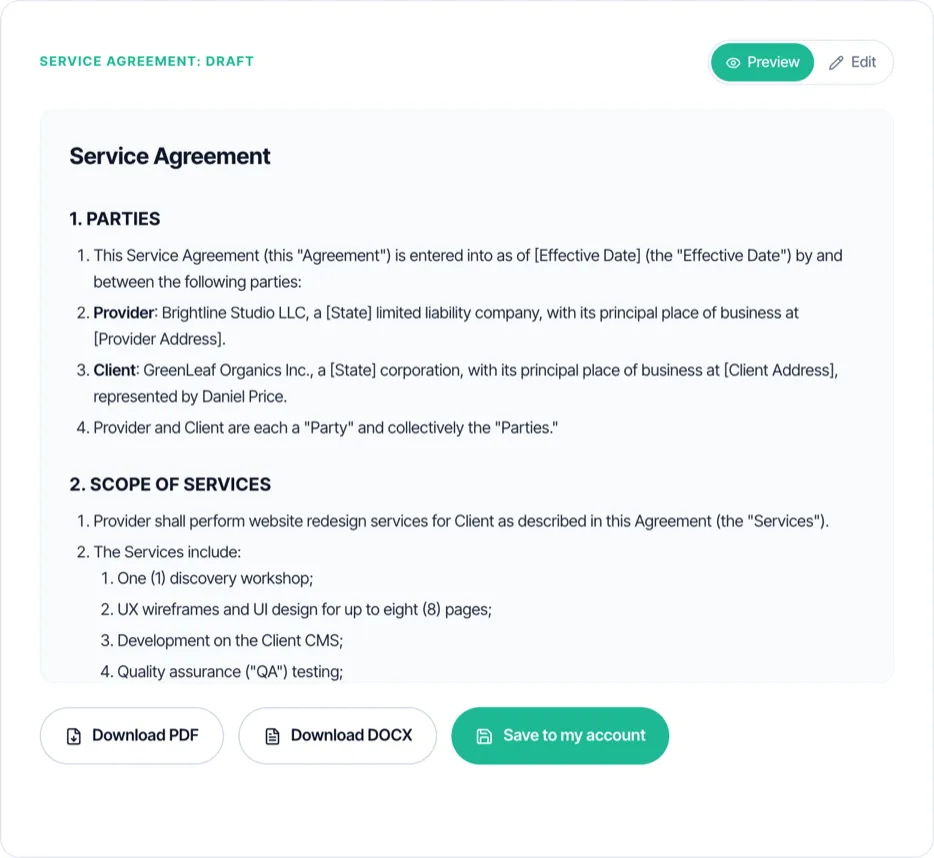
Sample Contract Created with the Contract Maker
The screenshot above is a real service agreement drafted for a website redesign. Here is what each of its main clauses does. This explains the draft in general terms and is not legal advice.
| Clause | What it says | Why it matters |
|---|---|---|
| Parties | Who is contracting: Brightline Studio LLC and GreenLeaf Organics Inc. | A contract binds the parties it names, so use full legal names |
| Scope of services | Discovery, UX and UI for 8 pages, development, QA, launch and training | Defines what is included, and by omission what is not |
| Deliverables and acceptance | What the client receives and how long they have to approve it | Stops a project from staying "almost done" forever |
| Fees and payment | USD 6,000 paid 40% on signing, 30% on design approval, 30% at launch | Ties cash flow to visible progress |
| Revisions | Two rounds per deliverable, then an hourly rate | Keeps a fixed fee from turning into unpaid extra work |
| Intellectual property | Ownership passes to the client on full payment | Protects you if the final invoice is never paid |
| Confidentiality | Both parties keep each other's information private | Covers logins, plans and data shared during the project |
| Termination | Either side can end it with written notice; completed work is paid | Makes ending early a process, not a dispute |
| Limitation of liability | Caps damages at the fees paid | Keeps the risk proportionate to the job |
| Governing law | The laws of the State of Texas apply | Decides which rules and courts apply to a dispute |
| Signatures | Names, titles and dates for both parties | Shows both sides agreed to the terms |
Essential Elements of a Legally Binding Contract
Rules vary by country, but most legal systems look for the same core elements before treating an agreement as a contract. This is general information, not legal advice.
- Offer: one party proposes specific terms, such as the work and the price.
- Acceptance: the other party agrees to those terms, usually by signing.
- Consideration: each side gives something of value, such as services in return for payment.
- Intention to create legal relations: both parties mean the agreement to be binding.
- Capacity: both parties are legally able to contract, for example adults or authorised company representatives.
- Lawful purpose: the subject of the contract is legal.
- Written form where required: some agreements, such as many real estate deals, must be in writing. See the Statute of Frauds link below.
Which Contract Type Do You Need?
The generator offers 7 contract types. Here is when to use each one and the clauses that matter most.
Service Agreement
You deliver defined work for a client for a fee. The most common contract for agencies and freelancers.
Key clauses
- Scope and deliverables
- Payment schedule
- Revisions and acceptance
Tip: Prefer a fixed template? Use the service contract template, or the agency retainer agreement for monthly work.
Consulting Agreement
You give advice or expertise, billed by the hour or on a retainer.
Key clauses
- Hourly or retainer fee
- Expenses
- Confidentiality and non-solicitation
Tip: See the consulting agreement template for a full example.
NDA
You need to share confidential information before or during a project.
Key clauses
- Definition of confidential information
- Exclusions
- Duration
Tip: For a dedicated tool, use the NDA generator, or download an NDA template in Word.
Employment Agreement
You are hiring an employee rather than an independent contractor.
Key clauses
- Role, pay and hours
- Benefits and leave
- Notice period
Tip: Employment law differs a lot by country, so a local review is worth it.
Vendor Contract
You are buying goods or services from a supplier.
Key clauses
- Specifications and delivery
- Price and payment terms
- Warranties and returns
Tip: Attach the supplier's quote so prices and specs match.
Partnership Agreement
Two or more parties run a venture or project together and share the results.
Key clauses
- Contributions
- Profit and loss split
- Decision making and exit
Tip: Agree how a partner can leave before you start, not after.
Licensing Agreement
You let someone use your creative work, software or other intellectual property.
Key clauses
- What is licensed
- Scope, territory and term
- Fees or royalties
Tip: Say clearly whether the licence is exclusive.
Hiring a freelancer? Use the freelance agreement generator. Need monthly terms? Try the retainer agreement generator, or define the work first with the scope of work generator.
Contracts by Industry
The same 7 types cover most businesses. These are the extra details to type into the description for each industry.
Marketing and creative agencies
Campaign or retainer work with many deliverables and approvals.
Add to your description
- Approval rounds per asset
- Who pays ad spend
- Who owns ad and social accounts
Web and software development
Projects paid in milestones with a launch date.
Add to your description
- Milestones and acceptance criteria
- Hosting and handover
- Bug-fix warranty period
Consulting
Advice billed by time or as a monthly retainer.
Add to your description
- Hourly rate or retainer
- Approved expenses
- Non-solicitation
Photography and video
Shoots with usage rights attached to the files.
Add to your description
- Shoot date and location
- Usage rights and licence term
- Delivery format and deadline
Construction and trades
Site work with materials, variations and safety duties.
Add to your description
- Materials and who supplies them
- Variation orders
- Site access and insurance
IT services and support
Ongoing support with response times.
Add to your description
- Support hours and response times
- What counts as urgent
- Monthly fee and extra hours
Contract Maker vs. Contract Template in Word
Both are free. They suit different situations.
| Contract maker (this tool) | Contract template in Word | |
|---|---|---|
| Best for | A new kind of contract, or wording built around one deal | Contracts you send often with the same wording |
| How you start | Describe the deal in a form | Download a .docx and replace placeholders |
| Wording | Drafted from your details | Fixed clauses you edit by hand |
| Where to get it | On this page | The contract template in Word page, or the service contract format for clause wording |
Contract vs. Agreement: Is There a Difference?
An agreement is any understanding between two or more parties. A contract is an agreement that has the elements needed to be enforceable: an offer, acceptance, something of value exchanged, and parties with the capacity to agree. Every contract is an agreement, but not every agreement is a contract. In business the two words are used interchangeably, so a service agreement and a service contract are usually the same document.
Tips for a Better AI-Generated Contract
The draft is only as specific as what you type. These details make the biggest difference.
- List the exact deliverables, with quantities, instead of a project name.
- Say when each payment is due and what triggers it.
- Name who owns the work and when ownership passes.
- Set a notice period for ending the contract early.
- Fill in the governing law, even though it is optional.
- Choose the language your client will sign in.
- Read every clause in Edit mode and remove anything that does not fit.
- Keep the signature block when you edit.
How to Send and Sign a Contract Online
Once the draft is ready, you have three ways to get it signed.
- Download the Word file or save a PDF, email it, and have both parties sign and return it.
- Upload the PDF to any e-signature tool you already use.
- Save it to a free Taskip account and send it for e-signature, then see when the client opens and signs it.
- Electronic signatures are generally recognised under ESIGN and UETA in the US and eIDAS in the EU.
- Exceptions exist: some documents, such as wills and certain real estate or court papers, may still need a handwritten signature depending on where you are.
Taskip keeps the signed contract on the client record next to the quote and invoices. See Taskip e-signatures.
When to Have a Lawyer Review Your Contract
A generated draft is fine for many routine jobs. Get a lawyer to review it when:
- The deal is large enough that a dispute would really hurt your business.
- You work in a regulated industry, such as healthcare, finance or education.
- It is an employment agreement, since employment law varies a lot between countries.
- The other party is in another country, or you are unsure which law applies.
- It transfers ownership of valuable IP, or involves equity in a company.
- It involves real estate, loans or guarantees.
Free Contract Templates
Prefer to start from a fixed template? These are free to download, with no email required.
- Contract format and templates: six contracts in Word and PDF, plus a filled sample.
- Contract template in Word: the same six as editable .docx files.
- Service contract format: the numbered format, a sample and wording for each clause.
- Freelance contract template: deposit, revisions and IP for freelancers.
- Legal contract template: a general business contract.
- Freelance NDA template: confidentiality before a project starts.
What You Get
- 7 contract types: service, employment, NDA, partnership, vendor, consulting, licensing
- Full editable draft with a live Preview/Edit toggle
- Word (.docx) download, plus PDF from the print window, no watermark
- 5-language output: English, Spanish, French, German, Portuguese
- Multi-currency deal value support
- No signup required to generate or download
No Signup, Unlike Most Contract Makers
Generate and download free. Many contract makers ask you to create an account before you can see a draft.
7 Contract Types in One Tool
Service agreements, NDAs, employment, vendor, consulting, licensing and partnership contracts, each with the right clause structure.
Edit Every Clause
Switch to Edit mode to adjust scope, payment terms or any clause before downloading.
Drafts in Under 30 Seconds
The AI drafts a full contract with standard sections, scope, payment terms, confidentiality and termination, ready to review.
AI Contract Generator vs. Contract Template vs. Hiring a Lawyer
| This Tool | Contract Template | Hiring a Lawyer | |
|---|---|---|---|
| Cost | Free | Free to low cost | Paid, by the hour or per document |
| Signup required | No | Varies by site | Not applicable |
| Turnaround | Under 30 seconds | Minutes to fill in | Days to weeks |
| Tailored to your deal | Yes, drafted from your details | No, generic wording you adapt | Yes |
| Download format | Word (.docx) or PDF | Usually Word or PDF | Varies |
| Legal review | Recommended for high-value deals | Recommended for high-value deals | Included |
Common Mistakes to Avoid
✕ What Not to Do
✓ What to Do Instead
✕ What Not to Do
Missing a termination clause
Unclear exit terms
✓ What to Do Instead
Every contract type here includes a termination section by default; review it and add a specific notice period if your deal needs one.
✕ What Not to Do
Vague scope of work language
Disputes over deliverables
✓ What to Do Instead
Be specific in the service description field, list exact deliverables, not just a project name, so the AI drafts a scope clause both sides understand.
✕ What Not to Do
No governing law or jurisdiction stated
Unclear which law applies
✓ What to Do Instead
Fill in the governing law field even though it is optional; disputes are harder to resolve without it.
✕ What Not to Do
Skipping payment trigger details
Late or disputed payments
✓ What to Do Instead
State exactly when payment is due, on signing, on milestone or on completion, in the service description.
✕ What Not to Do
Forgetting an IP clause for creative or dev work
Unclear who owns the deliverable
✓ What to Do Instead
Say who owns the work and when ownership passes in the description, or choose Consulting or Licensing Agreement, which include ownership language.
✕ What Not to Do
Sending the draft without a signature block
Contract never gets signed
✓ What to Do Instead
Every generated draft includes a signature block; do not delete it when editing.
What Taskip Customers Say
“The team is very personable and genuinely want you to have the best experience with the system. I look forward to streamlining all my client data, contracts, invoicing and reminders for business.”
Ramie C.
Owner, Kinetic Timing

“All in 1 business management CRM tool. I love using a client management system that lets me handle everything from contracts to invoices.”
Verified User
Information Technology & Services
Learn More
Want this automated end-to-end?
Taskip's Documents tracks status, sends reminders, and converts to invoices, free to start.
Related Free Tools
Independent Contractor Agreement Generator
Describe the project scope, compensation, and payment schedule. Get a full independent contractor or freelance agreement draft with IP and termination clauses. Editable, no signup.
- Full contract draft: scope, compensation, payment schedule, IP transfer, confidentiality, termination
- Payment schedule options: hourly, weekly, bi-weekly, monthly, per milestone, or upon completion
- IP transfer to the client upon full payment by default, editable if you want to retain or license rights
- Full editable draft with a live Preview/Edit toggle
- PDF and DOCX download, no watermark
Retainer Agreement Generator
Describe the ongoing scope, retainer fee, and payment schedule. Get a full retainer agreement draft. Editable, no signup.
- Full retainer draft: scope, fee, payment schedule, term, and renewal terms
- Payment schedule options: weekly, bi-weekly, monthly, or quarterly
- Covers consulting, marketing, legal, IT support, creative agency, and general professional services retainers
- Full editable draft with a live Preview/Edit toggle
- PDF and DOCX download, no watermark
NDA Generator
Choose mutual or unilateral, name the parties, describe the confidential information. Get a full NDA draft in seconds. Editable, no signup.
- Mutual or unilateral NDA, your choice
- Definition of confidential information, obligations, and standard exclusions written for you
- Duration options: 1, 2, 3, 5 years, or indefinite
- Full editable draft with a live Preview/Edit toggle
- Word (.docx) download, plus PDF from the print window, no watermark
Scope of Work Generator
Describe the project, deliverables, and success criteria. Get a full SOW draft with timeline and budget. Editable, no signup.
- Objectives, deliverables, and success criteria written from your project description
- Timeline and optional budget section
- Assumptions and sign-off block included by default
- Full editable draft with a live Preview/Edit toggle
- Word (.docx) download, plus PDF from the print window, no watermark
Proposal Generator
Describe the project, pick a type and tone, and get a full proposal draft with scope, deliverables, timeline and pricing. Edit it, then download Word or PDF. No signup.
- 7 proposal types: project, sales, service agreement, consulting, marketing, construction, IT
- Full editable draft with a live Preview/Edit toggle
- Word (.docx) download, plus PDF from the print window, no watermark
- 5-language output: English, Spanish, French, German, Portuguese
- Formatted pricing/investment section from a budget range
Project Timeline Generator
Describe your project, phases, and deliverables. Get a full phased timeline with a schedule table. Editable, no signup.
- Phased schedule with milestones and deliverables per phase
- Optional team members/roles and inter-phase dependencies factored into the plan
- Full editable draft with a live Preview/Edit toggle
- PDF and DOCX download, no watermark
- 5-language output: English, Spanish, French, German, Portuguese
Explore More Free Tools
Legal & Agreements
Billing
Project Scoping
Finance & Tax
FAQs: Contract Generator
Is this contract maker really free?
Yes. Generating, editing and downloading are free with no signup. A free Taskip account is only needed if you want to save the contract or send it for e-signature.
Do I need to sign up to create a contract?
No. Unlike most contract makers, you can generate a contract and download it without creating an account or logging in.
Can I download the contract in Word?
Yes. Download DOCX saves a Word file you can keep editing. Download PDF opens a clean print window where you choose Save as PDF. You can also save it to a free Taskip account.
Is a contract made with a contract generator legally binding?
It can be, if it has the elements of a valid contract, such as offer, acceptance, consideration, capacity and a lawful purpose, and both parties sign it. The tool drafts the document; it does not guarantee enforceability where you are. Have a lawyer review high-value or regulated agreements.
Can I write my own contract without a lawyer?
In most places, yes: there is no general rule that a lawyer must draft a contract. For complex, high-value or regulated deals, a review by a local lawyer is still worth it.
What contract types can I create?
Service agreements, employment agreements, NDAs, partnership agreements, vendor contracts, consulting agreements and licensing agreements, each with the clause structure that type needs.
Which contract type should I choose?
Doing work for a client: Service or Consulting Agreement. Protecting information: NDA. Hiring staff: Employment Agreement. Buying from a supplier: Vendor Contract. Running a venture together: Partnership Agreement. Letting someone use your work or IP: Licensing Agreement.
What is the difference between a contract and an agreement?
An agreement is any understanding between two parties. A contract is an agreement with the elements needed to be legally enforceable. In everyday business the words are used interchangeably, which is why this tool is also searched for as an agreement maker.
Can I edit the generated contract?
Yes. Switch from Preview to Edit and change any clause, add specifics or remove sections before you download.
Can I e-sign the contract?
Not inside the free generator. Save the contract to a free Taskip account to send it for e-signature, or download it and use any e-signature tool. Electronic signatures are generally recognised under ESIGN and UETA in the US and eIDAS in the EU, with some exceptions.
Does it support languages other than English?
Yes. Choose English, Spanish, French, German or Portuguese and the whole contract is drafted in that language.
Is my contract information stored?
No. The details you enter are sent to generate the draft and are not stored afterward. Nothing is saved unless you click "Save to my account," which creates a free Taskip workspace and stores the contract there.
Contract generator or contract template: which should I use?
A contract template in Word suits contracts you send often with the same wording. The generator suits a new kind of contract, or a deal where you want the clauses written around your specific scope and terms.
What are the limitations of an AI-generated contract?
It does not know local legal nuances, industry regulations or what you agreed in conversation, and it can miss deal-specific terms you did not type in. Read every clause before signing.
Can I use it for agreements in India?
Yes. Enter Indian law as the governing law and write fees in INR. Add GSTINs and GST treatment if relevant, and check stamp duty rules for your state. See the service contract format for India notes.
Who makes this contract maker?
Taskip, client management software for agencies and freelancers. Taskip handles quotes, invoices, contracts with e-signatures, proposals, a client portal and projects in one place.