
Free Quotation Generator & Quotation Maker: Create Free Quotations and Quotes Online
Add your business details, client info, and line items. Get an instant quote with tax and discounts calculated live as you type. No signup, no watermark.
Used by 50,000+ people · 1,850+ workspaces created by agencies and freelancers in 40+ countries. Rated 4.8/5 on G2 · Updated October 2026
PNG/JPG
PNG/JPG
Line Items
1,850+ workspaces created by agencies and freelancers in 40+ countries. Rated 4.8/5 on G2 No signup required to generate or download.
Your data stays in your browser until you choose to save it. Nothing is sent to our servers otherwise. Link/WhatsApp share encodes your quote details into the URL itself, so opening it works without an account.
Your Business Name
you@yourbusiness.com
Quotation
#
Prepared For
Client Name
Issue date -
Valid until -
| Description | Qty | Unit Price | Amount |
|---|---|---|---|
| Item description | 1 | $0.00 | $0.00 |
Terms & Notes
Payment due within 14 days of acceptance.
Authorized Signature (Provider)
What is a Quotation Generator?
A free quotation generator, also called a quote generator or quote maker, is a tool that turns your business, client, and line-item details into a professional, ready-to-send quote, with tax, discounts, and totals calculated automatically, and no software to install.
How it works: you type your business details, the client, and each line item. The quotation generator lays everything out in a standard quotation format and recalculates the subtotal, discount, tax and total every time you change a number. When the preview looks right, you download a PDF, copy a share link, send it on WhatsApp, or save it to a free Taskip account.
Why use one instead of a Word or Excel file: there are no formulas to break and no layout to fix, the math is always right, and every quote follows the same numbered, dated structure. That makes quotes faster to send, easier to track, and simple to turn into an invoice once the client says yes.
Who uses it: freelancers, agencies, consultants, contractors, wholesalers and small businesses that need a professional price quote in minutes without paying for quoting software.
Quotation Generator at a glance
- Price
- Free, no signup, no watermark
- Output
- PDF, CSV, print, share link, WhatsApp
- Designs
- 3 templates (Modern, Minimal, Corporate), 6 accent colors
- Currencies
- 39, including USD, EUR, GBP, INR, AED
- Tax & pricing
- Any tax rate (GST, VAT, sales tax), % discount, optional items
- Privacy
- Runs in your browser; nothing is stored unless you save it
- Used by
- 50,000+ people
- Made by
- Taskip, client management software for agencies and freelancers
How to Use the Quotation Maker
Add your business & client details
Enter your business name and the client you’re quoting.
- Business name, email, address and website
- Upload your logo and signature once; they are reused on your next quote
- Client name, company, email and address
- A quote number and today’s date are filled in for you; edit them to match your own numbering
Add line items
List what you’re quoting for with quantity and unit price. Mark any as optional add-ons.
- One line per product, service or project phase
- Enter quantity and unit price; the line amount calculates instantly
- Mark add-ons as optional: the client sees them, but they are not counted in the total
- Add or remove rows as the scope changes
Set currency, tax, discount & validity
Choose your currency, tax rate, discount, and how long the quote stays valid.
- Pick from 39 currencies
- Enter a tax rate (GST, VAT or sales tax); it is applied after the discount
- Add a percentage discount if you are offering one
- Set a "valid until" date, usually 15 to 30 days out
- Write payment terms and notes, such as the deposit and delivery time (copy ready-made terms)
Choose a design
Pick the template and brand color that fit your business.
- Modern, Minimal or Corporate layout
- One of 6 accent colors to match your brand
- The live preview shows exactly what your client will receive
Download, share or save
Print/save as PDF instantly, or save it to a free Taskip account to track and convert it to an invoice later.
- Download a PDF with no watermark, or a CSV of the line items
- Print straight from the browser
- Copy a shareable link or send the quote on WhatsApp
- Save to a free Taskip account to track its status and convert it to an invoice in one click
Quotation Format: Sample Quotation Explained
Every professional quotation follows the same basic format. Here is a sample quotation built with this quotation generator, with each required part numbered and explained.
QUOTATION
Quotation No.: QT-2026-014
- Issue date:
- 25 Sep 2026
- Valid until:
- 25 Oct 2026
From
Northwind Studio
12 King Street, London
hello@northwind.studio
VAT No. GB123456789
Quote for
Acme Retail Ltd.
Attn: Sarah Khan
88 Market Road, Manchester
| Description | Qty | Rate | Amount |
|---|---|---|---|
| Website design (8 pages) | 1 | £2,400.00 | £2,400.00 |
| Content migration | 1 | £450.00 | £450.00 |
| CMS training session (2 hrs) | 2 | £90.00 | £180.00 |
| Monthly maintenanceOptional | 3 | £150.00 | £450.00 |
- Subtotal
- £3,030.00
- Discount (5%)
- -£151.50
- VAT (20%)
- £575.70
- Total
- £3,454.20
Terms & Notes
50% deposit on acceptance, balance on launch.
Delivery in 4 weeks from deposit. Price valid for 30 days.
Acceptance
Accepted by: ____________
Signature & date: ____________
What each part of the quotation does
Title and quotation number
Label the document "Quotation" and give it a unique number so you and the client can reference it in emails, revisions and the final invoice.
Issue date and validity period
The validity date is how long your price is honored. 15 to 30 days is typical; go shorter when material costs move fast.
Your business details
Business name, address, email and tax registration (VAT, GST or TRN) where it applies. Add your logo so the quote is instantly recognizable.
Client details
The client company, address and the person the quote is addressed to, so it reaches the decision maker.
Itemized line items
Each deliverable on its own line with quantity, rate and amount. Optional add-ons are shown but not counted in the total.
Subtotal, discount, tax and total
Show the math openly: subtotal, any discount, tax at the correct rate, and the final amount the client will pay.
Payment terms and notes
Deposit, payment schedule, delivery timeline and what happens if the scope changes.
Acceptance and signature
A clear way to say yes: a signature line, an accept link, or instructions to reply. Without it, quotes sit unanswered.
Free Quotation Templates Included
Pick a template style in the quotation generator above. All three are free, watermark-free, and use your logo, signature and one of 6 accent colors.
Modern template
Bold business name with clean dividers. A good fit for agencies, designers and creative freelancers.
Minimal template
Light layout with a single accent rule that prints cleanly. A good fit for consultants and professional services.
Corporate template
Full-color header band in your brand color. A good fit for B2B suppliers, contractors and wholesale.
Prefer to work offline in Word or Excel? Download a free quotation template
Types of Quotations You Can Create
The quotation format stays the same. What changes is who you are quoting, how you price, and what the buyer needs to see before they say yes. Pick the type that matches your deal.
Sales Quotation
A priced offer for physical products, sent when a buyer asks what an order will cost.
- Who it is for
- Retailers, wholesalers, distributors and manufacturers
- Why use it
- Buyers compare suppliers line by line, so clear unit prices, quantity breaks and delivery terms win the order.
What to include
- Item name or SKU with unit price
- Quantity or volume discounts
- Shipping, delivery time and Incoterms for exports
- Stock availability and a validity date
Price Quotation
A formal fixed price for a defined scope, usually in reply to a request for quotation (RFQ). Price quotation format.
- Who it is for
- Suppliers answering procurement teams, tenders and RFQs
- Why use it
- Many companies cannot raise a purchase order until they have a written, dated price to approve.
What to include
- The RFQ or tender reference
- A fixed price per item or for the whole lot
- Payment terms such as Net 30
- A short validity period if your costs move
Service Quotation
A quote for work rather than goods, broken into phases, deliverables or hours. Service quotation format.
- Who it is for
- Agencies, consultants, freelancers, IT and marketing service providers
- Why use it
- Services are intangible. Itemizing phases and deliverables shows the client exactly what they are paying for and keeps scope creep in check.
What to include
- Phases or deliverables
- An hourly rate or fixed fee per line
- Revision rounds included
- Deposit and milestone schedule
Job or Work Quote
A quote for a specific job at a specific site, common in trades and home services. Construction quotation template.
- Who it is for
- Builders, plumbers, electricians, landscapers, cleaners and repair services
- Why use it
- Homeowners and property managers usually compare several quotes. A separate labor and materials breakdown builds trust and prevents disputes later.
What to include
- Site address and start date
- Labor, materials, equipment and permits
- Allowances for unknowns
- How changes to the job are priced
Business (B2B) Quotation
A quote from one company to another, often routed through a purchasing or finance team.
- Who it is for
- Companies selling to other businesses
- Why use it
- The buyer’s accounts team needs references, legal names and tax details before it can approve and pay.
What to include
- The buyer’s PO or reference number
- Both companies’ registered names and tax IDs
- Payment terms (Net 15, 30 or 60)
- A named contact for approval
Retainer or Subscription Quotation
A quote for an ongoing monthly service rather than a one-off project. Retainer and AMC quotation formats.
- Who it is for
- Agencies on retainer, maintenance and support providers, managed service providers
- Why use it
- It fixes the monthly price and what is included each month, so renewals and extra work are agreed before they come up.
What to include
- Monthly fee and billing date
- Hours or deliverables included per month
- Rate for work beyond the allowance
- Minimum term and notice period
GST or VAT Quotation
Any quote from a tax-registered business that shows tax the way the final invoice will. GST quotation format.
- Who it is for
- VAT or GST registered businesses in the UK, EU, India, Australia, the Gulf and beyond
- Why use it
- Registered buyers need to see the tax they will pay and reclaim. Showing it upfront avoids surprises at invoice time. See the tax rules by region below.
What to include
- Your VAT or GST number
- Tax rate and tax amount
- Totals before and after tax
- Place of supply (India GST)
How to Send a Quotation to a Client
Once your quote is ready, use the buttons under the quotation generator. Need the words? Copy a quotation email template or a formal quotation letter.
Email a PDF
Download the PDF and attach it to an email. Put the quotation number and total in the subject line so it is easy to find later.
Share a link
Copy a link that opens the exact quotation you built, ready for the client to view, print or save as PDF.
Send on WhatsApp
Send a one-line summary with the total, the validity date and the link straight to your client on WhatsApp.
Track and follow up
Save the quote to a free Taskip account to track its status, remind the client before it expires, and convert it to an invoice once accepted.
GST, VAT and Sales Tax on Quotations
Tax rules differ by country. A quotation is not a tax invoice, but it should show tax the way your final invoice will, so the buyer can budget for the full cost. Here is how to set it up in this quotation generator, and what to show in each region.
- Enter the tax rate that applies. Tax is calculated on the subtotal after any discount.
- Add your VAT, GST, TRN or sales tax registration number to your business address field so it prints on the quote.
- Quote in your client’s currency. 39 currencies are built in.
- Once the client accepts, issue a proper tax invoice with the free invoice generator.
Tax rules by region
European Union (VAT)
- Show your VAT number, and the customer’s VAT number for cross-border B2B sales.
- Standard VAT rates range from 17% (Luxembourg) to 27% (Hungary). Use the rate of the country where the supply is taxed.
- For B2B services to a business in another EU country, VAT is usually reverse charged: quote the net price and add "Reverse charge: VAT to be accounted for by the recipient".
- When quoting consumers, show the final price including VAT, as EU consumer price rules require.
United Kingdom (VAT)
- Standard rate 20%, reduced rate 5%, zero rate 0%.
- Show your VAT registration number if you are registered.
- If you are not VAT registered (taxable turnover under the £90,000 threshold), do not add VAT to your quote.
United States (sales tax)
- There is no federal VAT. Sales tax is set by states and local jurisdictions, and Alaska, Delaware, Montana, New Hampshire and Oregon have no statewide sales tax.
- Most goods are taxable, while many services are not. The rules vary state by state.
- Because the rate depends on where the buyer takes delivery and where you have nexus, many businesses quote the pre-tax price and add "plus applicable sales tax".
- Buyers who resell the goods may give you a resale or exemption certificate. Note it on the quote and do not charge tax.
India (GST)
- Show your GSTIN, and the buyer’s GSTIN if they are registered.
- Add the HSN code (goods) or SAC code (services) in each line item description.
- Intra-state supply: CGST + SGST. Inter-state supply: IGST. Most items now fall in the 5% or 18% slabs after the September 2025 rate reform.
- Mention the place of supply. Or download the ready-made GST quotation format in Excel or Word.
Canada, Australia and New Zealand
- Canada: 5% GST federally, or HST of 13% to 15% in participating provinces. Some provinces add a separate PST.
- Australia: 10% GST. Show your ABN on the quote.
- New Zealand: 15% GST. Show your GST number if registered.
Gulf and Asia
- UAE: 5% VAT. Show your TRN (tax registration number).
- Saudi Arabia: 15% VAT.
- Singapore: 9% GST for GST-registered businesses.
Tax rates and thresholds change. This is general information, not tax advice; confirm current rules with your accountant or local tax authority.
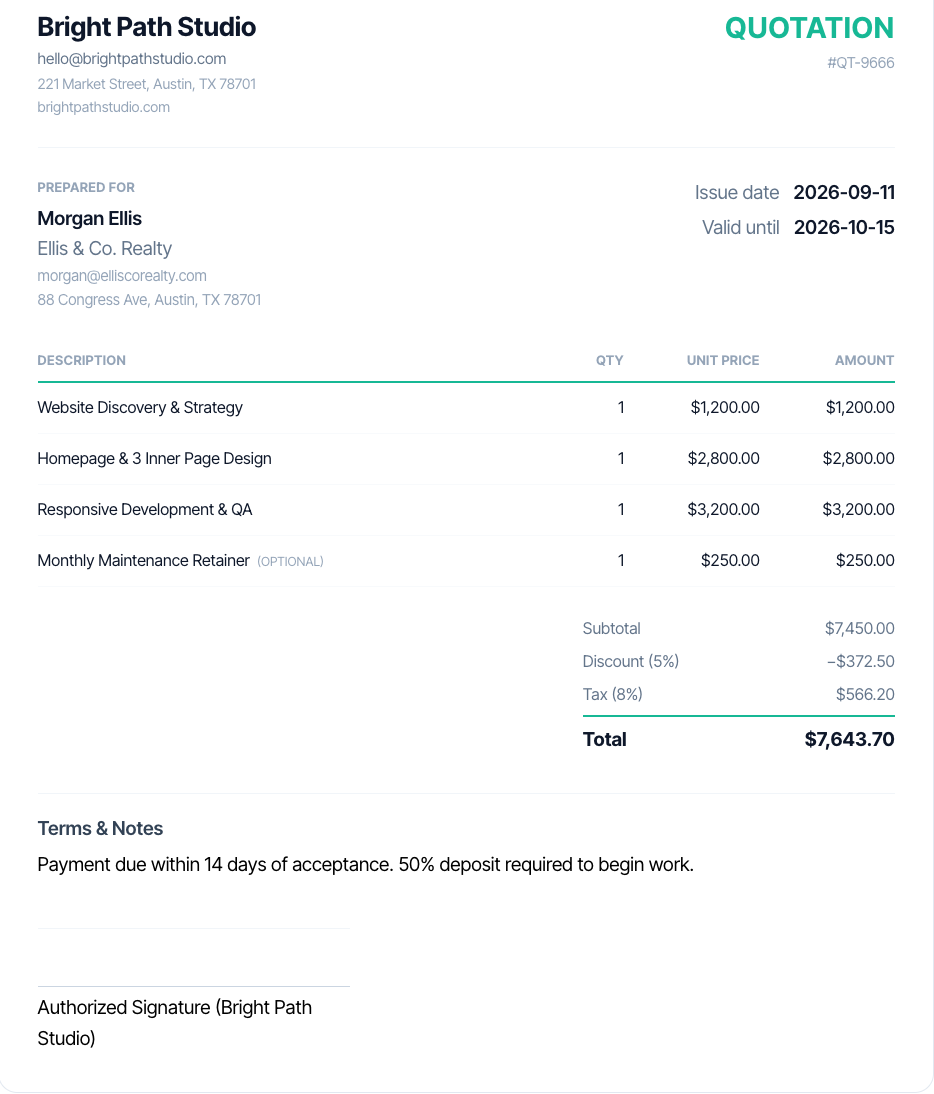
What Every Professional Quotation Should Include
A quote that wins work covers more than a price; it removes every reason for a client to hesitate.
- A unique quotation number, so both sides can reference it later
- Issue date and a clear validity period (how long the price is honored)
- Your full business details: name, address, contact info, and tax registration if applicable
- Complete client details: name, company, and billing address
- Itemized descriptions with quantity, unit price, and line totals, not a single lump sum
- A transparent breakdown of tax, discounts, and the final total
- Payment terms and any deposit requirements
- Delivery timeline or project start/end expectations
- Terms and conditions covering scope changes and cancellation
- A clear next step: how the client accepts the quote
Quotation vs. Estimate vs. Proforma Invoice vs. Invoice
These four documents get confused constantly. Here is what actually separates them, and where each one sits in your sales process.
| Document | When it’s sent | Binding? | Purpose |
|---|---|---|---|
| Estimate | Very early, before full scope is known | No | Rough ballpark to gauge interest |
| Quotation | After scope is defined, before work starts | Usually, until it expires | Fixed-price offer the client can accept |
| Proforma Invoice | After a quote is accepted, before delivery | No, informational | Preview of the invoice for customs/advance payment |
| Invoice | After work or delivery is complete | Yes, a payment demand | Formal request for payment owed. Make one with the free invoice generator |
In practice they follow each other: estimate, then quotation, then sometimes a proforma, then the invoice. Taskip Quotations turns an accepted quote into an invoice in one click with every line item carried over, and Taskip Invoicing takes it from there with online payments and payment reminders. Only need a one-off invoice? The free invoice generator works just like this tool.
Best Practices for Quotes That Get Accepted
- Send it fast: quotes delivered within hours convert far better than ones that arrive days later
- Personalize the intro line with the client’s name and project instead of a generic template
- Break pricing into clear line items so clients see exactly what they’re paying for
- State your terms and conditions plainly, including what happens if scope changes
- Set an expiration date: open-ended quotes get deprioritized and forgotten
- Follow up once, a few days before it expires, instead of waiting silently
- Make acceptance effortless: a one-click "Accept" beats "reply to confirm"
Quoting by Industry
The quotation format is the same everywhere, but what you itemize, how you price and how long the quote stays valid change a lot from one industry to the next. Here is how to adapt your quote.
Agencies & Freelancers
Clients buy outcomes, so break the project into phases instead of one project fee.
Typical line items
- Discovery and strategy
- Design and build, per deliverable
- Revision rounds included
- Monthly retainer or maintenance (optional)
Pricing model: Fixed fee per phase, or hourly with a cap
Tip: Mark add-ons like extra pages or ad management as optional, so the client can upgrade without asking for a new quote.
Construction & Trades
Homeowners compare several quotes, so transparency on labor and materials wins the job.
Typical line items
- Labor by trade or by hours
- Materials with quantities
- Equipment hire
- Permits, disposal and cleanup
Pricing model: Itemized cost plus markup
Tip: Keep validity short (7 to 14 days) because material prices move, and state how unforeseen site conditions will be priced. See our construction quotation templates.
Consulting & Professional Services
Quote the engagement, not just the hours, and say what triggers extra billing.
Typical line items
- Assessment or audit
- Workshops or sessions
- Report or final deliverable
- Ongoing advisory retainer
Pricing model: Per phase, day rate or monthly retainer
Tip: List expenses such as travel as separate lines, or state that they are billed at cost.
IT & Software Development
Scope changes are normal, so the quote must define what is in and what is out.
Typical line items
- Requirements and design
- Development by module or sprint
- Testing and deployment
- Hosting, licences and support plan
Pricing model: Fixed price per milestone, or time and materials
Tip: Separate one-off build costs from recurring costs like hosting and support, so the client sees the true yearly cost.
E-commerce & Wholesale
Buyers care about unit price, quantity breaks and delivery.
Typical line items
- Products by SKU and unit price
- Volume discount
- Shipping and packaging
- Duties or import taxes for cross-border orders
Pricing model: Per unit with tiered discounts
Tip: Quote in the buyer’s currency. This tool supports 39 of them natively.
Events, Photography & Creative Services
Packages sell better than a list of hours.
Typical line items
- Package: coverage hours and deliverables
- Travel and venue fees
- Add-ons: extra hours, prints, second shooter
- Booking deposit to secure the date
Pricing model: Package price with optional add-ons
Tip: Ask for a booking deposit and put the cancellation policy in the notes.
Cleaning, Maintenance & Facility Services
Recurring work needs a clear per-visit or monthly price.
Typical line items
- Service per visit or per area
- Frequency: weekly, fortnightly or monthly
- Supplies and equipment
- One-off deep clean or extra tasks
Pricing model: Per visit or monthly contract
Tip: State the frequency and minimum term so the monthly total cannot be misread.
Manufacturing & Custom Orders
Cost depends on volume and specifications, so tie the price to both.
Typical line items
- Unit price at each quantity tier
- Tooling or setup fee
- Samples or prototypes
- Lead time and shipping
Pricing model: Tiered unit pricing plus a one-off setup fee
Tip: List the specs the price is based on (material, size, finish), so any change is clearly re-quoted.
What You Get
- Itemized line items with quantity, unit price, and automatic totals
- Tax and discount calculated automatically on the subtotal
- Multi-currency support across 39 world currencies, including USD, EUR, GBP, INR, AED and BDT
- 3 quotation templates (Modern, Minimal, Corporate) with 6 accent colors
- Logo and signature upload, reused automatically on your next quote
- Share by link or WhatsApp, or download as PDF or CSV
- Optional add-on line items shown separately from the base total
- One-click PDF download, no watermark
- Save to a free Taskip account to track status and convert to an invoice
Not Gated Like Most Quote Tools
Generate and download free, no signup wall required.
Multi-Currency Built In
Price in any of 39 currencies, from USD and EUR to INR, AED and BDT, without a paid plan.
Optional Add-Ons
Mark any line item optional so clients see upgrade pricing without it forcing the total up.
One-Click Quote-to-Invoice
Save a quote to a free Taskip account and convert it to an invoice in one click once it’s accepted.
Quote Generator vs. Spreadsheet vs. Paid Quoting Software
| This Tool | Spreadsheet Template | Paid Quoting Software | |
|---|---|---|---|
| Cost | Free | Free | Monthly subscription |
| Turnaround | Under a minute | Minutes, if the template is set up | Minutes, once configured |
| Tax & discount math | Calculated automatically | Manual formulas, error-prone | Calculated automatically |
| Multi-currency | Yes, 39 currencies | Manual conversion | Usually yes |
| Quote-to-invoice conversion | Yes, one click, free account | No, separate document | Yes, often gated to a higher plan |
Common Mistakes to Avoid
✕ What Not to Do
✓ What to Do Instead
✕ What Not to Do
Math errors in totals, tax, or discounts
Client loses trust before reading the scope
✓ What to Do Instead
Let the tool calculate tax and discounts automatically instead of computing them by hand in a spreadsheet.
✕ What Not to Do
No expiration date on the quote
Old pricing gets renegotiated weeks later
✓ What to Do Instead
Always set a validity period; expired pricing protects you from cost changes.
✕ What Not to Do
Lumping everything into one price
Client can’t see what they’re actually paying for
✓ What to Do Instead
Break the quote into itemized line items with quantity and unit price, not a single total.
✕ What Not to Do
Hiding optional add-ons inside the base total
Client feels upsold after accepting
✓ What to Do Instead
Mark add-ons as optional line items so they’re visible but not forced into the total.
✕ What Not to Do
Sending a quote instead of an invoice, or vice versa
Confusion about whether payment is due
✓ What to Do Instead
A quote is an offer before work starts; an invoice is a payment request after. Use the right document for the stage you’re at.
✕ What Not to Do
No clear way for the client to accept
Quote sits unanswered
✓ What to Do Instead
End with a specific next step, reply to confirm, sign, or a link, so the client knows exactly how to say yes.
✕ What Not to Do
Missing or outdated client details
Looks copy-pasted from another job
✓ What to Do Instead
Double-check the client name, address, and contact info before sending; stale details are the fastest way to look careless.
✕ What Not to Do
Vague scope language
Leaves room for disputes about what was actually promised
✓ What to Do Instead
Name the specific deliverables in each line item instead of a single vague description covering the whole job.
What Taskip Customers Say
“I send quotes to new clients every week, and this generator turned a 30-minute job into five minutes. The optional add-ons and the WhatsApp share link made it easy for my client to say yes the same day.”
Anthony
Quotation generator user

“The team is very personable and genuinely want you to have the best experience with the system. I look forward to streamlining all my client data, contracts, invoicing and reminders for business.”
Ramie C.
Owner, Kinetic Timing

“All in 1 business management CRM tool. I love using a client management system that lets me handle everything from contracts to invoices.”
Verified User
Information Technology & Services
“Taskip offers great features at a low cost, streamlining workflows, boosting team collaboration, and ensuring smooth client communication.”
Kurban Ali
Founder, NexaBD
“Taskip has transformed how we manage projects. Its intuitive tools streamline workflows, save hours weekly, and make client handovers seamless.”
Nurul Amin
Founder, Bitcommerz
Learn More
Want this automated end-to-end?
Taskip's Quotations tracks status, sends reminders, and converts to invoices, free to start.
Related Free Tools
Invoice Generator
Make an invoice online in under a minute. Add your business details, client info and line items, and create invoices online free with tax and discounts calculated for you. Download the PDF or print it. No signup, no watermark.
- Auto-incrementing invoice numbers, editable per invoice
- Multi-currency support across 39 world currencies
- Automatic tax (VAT, GST, or sales tax) and discount calculation on the subtotal
- Custom logo upload, remembered automatically for your next invoice
- PDF and CSV download, plus direct browser printing
Expense Report Generator
Add company details and expense line items. Get an instant, downloadable expense report with categories and totals calculated for you. No signup, no watermark.
- Categorized line items: Travel, Meals, Lodging, Office Supplies, Software, Equipment, Other
- Auto-calculated total across all line items
- Multi-currency support for international teams and contractors
- Company logo upload, reused automatically on other Taskip tools
- PDF and CSV download, no watermark
Contract Generator
Contract creator for freelancers, agencies and small businesses. Pick one of 7 contract types, describe the deal, and get a full draft in under 30 seconds. Edit any clause, then download. Free, no login.
- 7 contract types: service, employment, NDA, partnership, vendor, consulting, licensing
- Full editable draft with a live Preview/Edit toggle
- Word (.docx) download, plus PDF from the print window, no watermark
- 5-language output: English, Spanish, French, German, Portuguese
- Multi-currency deal value support
Proposal Generator
Describe the project, pick a type and tone, and get a full proposal draft with scope, deliverables, timeline and pricing. Edit it, then download Word or PDF. No signup.
- 7 proposal types: project, sales, service agreement, consulting, marketing, construction, IT
- Full editable draft with a live Preview/Edit toggle
- Word (.docx) download, plus PDF from the print window, no watermark
- 5-language output: English, Spanish, French, German, Portuguese
- Formatted pricing/investment section from a budget range
Service Pricing Calculator
Calculate the right price for any service: time-based, value-based, or packaged. Free, instant, no signup.
- Time-based pricing: hours × rate + expenses
- Value-based pricing: percentage of client outcome, with a built-in cost-based safety floor
- Packaged/tiered pricing with auto-suggested Basic/Standard/Premium multipliers
- Side-by-side comparison of value-based price vs. cost floor
- Editable feature checklist per pricing tier
Project Budget Calculator
A reusable project budget template that does its own math: add line items, phases, contingency, markup, and tax to get your final price. Free, instant, no signup.
- Repeatable line items grouped by optional project phase
- Contingency/buffer percentage on top of raw cost
- Markup percentage that becomes tracked profit
- Automatic tax calculation on the final client price
- Dual view: Client-facing (hides cost/markup) vs. Internal (shows full breakdown)
Explore More Free Tools
Legal & Agreements
Billing
Project Scoping
Finance & Tax
FAQs: Quotation Generator
Is this quotation generator really free?
Yes, creating and downloading quotations with this tool is 100% free, with no signup, watermark, or hidden limits on how many you create.
What’s the difference between a quotation and an invoice?
A quotation is an offer you send before work begins, giving a client a price estimate to approve. An invoice is a request for payment sent after the work or delivery is complete. This tool can be paired with Taskip’s one-click quote-to-invoice conversion once you save your quotes to an account.
Does it handle tax and multiple currencies?
Yes, set a tax rate (GST, VAT, sales tax, or any percentage) and pick from 39 world currencies, including USD, EUR, GBP, CAD, AUD, INR, AED, SGD and ZAR. Discounts are applied to the subtotal first, then tax is calculated on the discounted amount.
Can I add optional line items?
Yes, mark any item as optional so clients can see add-on pricing without it being forced into the total, useful for offering upgrade packages alongside a base quote.
Is my data sent to your servers?
No, everything you type stays in your browser while you’re building the quote. Nothing is sent anywhere unless you click "Save to my account," which creates a free Taskip workspace and stores the quote there.
Can I save quotations and reuse client details?
Yes, save a quote to a free Taskip account and it’s stored in your workspace, where you can track its status, duplicate it for repeat clients, and convert it to an invoice in one click.
What is a quotation format?
A quotation format is the standard layout of a quote: a title and unique quotation number, issue and validity dates, your business details, the client details, itemized line items with quantity and rate, the subtotal, discount, tax and total, payment terms, and an acceptance or signature line. The sample quotation on this page shows each part numbered and explained.
What are the different types of quotations?
The most common are sales quotations (products), price quotations (a fixed price for a defined scope), service quotations (agencies, consultants, freelancers), job or work quotes (trades and contractors), business or B2B quotations, and GST or VAT quotations. They all use the same format; only the pricing detail changes.
Is a quotation legally binding?
A quotation on its own is an offer, not a contract. Once the client accepts it in writing, most jurisdictions treat the accepted quote as a binding agreement, so keep the scope, price and terms as precise as you would in a contract, and always set a validity date. This is general information, not legal advice.
How do I write a quotation for a job?
Add your business and client details, give the quote a number and a validity date, list each part of the job as its own line item (labor, materials, extras), set your tax rate and any discount, then add payment terms such as a deposit and a clear way to accept. With this quotation generator that takes a couple of minutes.
How do I send a quotation to a client?
Download it as a PDF and attach it to an email, copy a shareable link to the quote, or send a summary with the total and link over WhatsApp. To track whether the client has viewed or accepted it, save the quote to a free Taskip account.
Is this a quotation maker online free without login?
Yes. You can create, preview, print and download quotations without creating an account or logging in. An account is only needed if you want to save quotes, track their status, or convert them to invoices.
Can I download the quotation in Word or Excel?
This generator exports a PDF, or a CSV of the line items that opens in Excel or Google Sheets. If you would rather work offline, download our free quotation template in Word, Excel or PDF from the Taskip templates library (standard, service, construction and GST versions).
Who makes this quotation generator?
It is built by Taskip, a client management platform for agencies and freelancers that also covers CRM, quotations, invoicing, e-signatures, projects and a client portal. The free quotation generator has been used by more than 50,000 people and works without an account.
Can I use it for EU VAT or US sales tax quotes?
Yes. Enter the VAT rate that applies (EU standard rates range from 17% to 27%) or your state and local sales tax rate, and add your VAT number in the business details. For EU cross-border B2B services, quote the net price and add a reverse charge note. Many US businesses quote the pre-tax price with "plus applicable sales tax". This is general information, not tax advice.
Is a "quote" the same thing as a "quotation"?
Yes, "quote" and "quotation" mean the same document, a fixed-price offer sent before work begins. "Quote" is the more common everyday term, "quotation" the more formal one used in accounting and legal contexts. This tool generates the same document either way, so use whichever term your client expects.