
Taskip vs One Suite: The Best Project Management Tool for Streamlining Your Workflows
Seriously, who hasn’t felt like their main job is just wrangling a million different work tools? One for project updates, another for invoicing, plus email chains that never seem to end. It’s enough to make anyone scream into their morning coffee.
That’s why project management tools like Taskip and One Suite are getting so much love. Taskip cuts through the noise, offering a straightforward, efficient platform for digital agencies, SMBs, and freelancers to streamline their workflows. Meanwhile, One Suite packs a punch with its all-in-one setup, combining project management, CRM, invoicing, and client communication. If you’re ready to ditch the tool chaos and find something that actually works for your business, keep reading—we’re about to sort this out.
let’s explore Taskip vs. One Suite: Best Project Management Tool for Teams
Taskip vs OneSuite: Comparison Table
Finding the right platform to manage your business isn’t always easy, but comparing them side by side can clear things up. Below, we’ve outlined the key features, strengths, and ideal use cases for Taskip and OneSuite. Both are powerful all-in-one tools designed for digital agencies, freelancers, and small to medium-sized businesses, offering project and client management, task tracking, invoicing, and integrations. Take a quick scan of Taskip vs One Suite: the best project management tool for teams
see which one aligns with your workflow needs.
| Feature | Taskip | OneSuite |
| Client Management (CRM) | Store client details, automate follow-ups, client portal, messaging, and categorization. | Manage leads and clients, customizable client portal, document sharing, and secure communication. |
| Project Management | Kanban board, folder-based organization, project priorities, and task statuses. | Kanban & list views, task assignments, project templates, archiving, and real-time tracking. |
| Task Management | Create, assign, track tasks with subtasks, switch between task views. | Task-specific comments, assign tasks, internal & client notifications, advanced filtering. |
| Invoicing & Payments | Create/send invoices, recurring payments, track payment statuses, integration with PayPal and Stripe. | Create/send invoices, recurring invoices, payment links, integration with Stripe, QuickPay. |
| Quotations | Create and manage quotations, automatically convert to invoices. | Not explicitly mentioned. |
| Proposals | Create, manage, send proposals for digital signatures. | Not explicitly mentioned. |
| Business Inbox | Centralized inbox for client communications, tagging, automated follow-ups. | Not explicitly mentioned. |
| Communication & Collaboration | Real-time team/client discussions, task sharing, document sharing. | Real-time collaboration, task assignment, customizable roles, and permissions. |
| Meeting Scheduler | Built-in scheduler, customizable time slots, automatic email confirmations. | Not explicitly mentioned. |
| Forms | Custom forms for surveys, client onboarding, etc. | Not explicitly mentioned. |
| Reporting & Insights | Business performance tracking, limited reports available. | Customizable dashboards, project progress and deadlines tracking. |
| Workflow Automation | Automate tasks and processes for efficiency. | Not explicitly mentioned. |
| Integrations | Slack, Google Meet, PayPal, FastSpring, Stripe, WhatsApp, Google Calendar. | Stripe, QuickPay, API for integrations, migration from Nifty. |
| Target Audience | Digital marketing agencies, content agencies, design agencies, SMBs, freelancers. | Digital marketing agencies, design agencies, software development agencies, freelancers. |
| Pricing | Various tiers: Tier 1 (Professional), Tier 2 (Team), Tier 3 (Agency), with lifetime deals. | Freelancer plan: $29/month, Solopreneur: $59/month, Growing Agency: $149/month, Large Agency: $239/month. |
| Storage | Tier-based storage limits, e.g., 1TB for Tier 1, 5TB for Tier 2, 20TB for Tier 3. | Freelancer plan: 10GB, Solopreneur: 30GB, Growing Agency: 60GB, Large Agency: 100GB. |
| Support | Not explicitly mentioned. | Priority support for all plans, responsive customer support. |
Taskip vs OneSuite: A Deep-Dive into Two All-in-One Business Platforms
Alright, so you’re trying to figure out which platform – Taskip or OneSuite – is the right fit for your business. We get it. It’s not just about features and functions, is it? It’s about finding something that actually clicks with how you and your team work.
So, Taskip and OneSuite are both in the running. They both say they can streamline things and make collaboration easier for digital agencies, freelancers, and smaller businesses. But how do you cut through the jargon and figure out which one will actually make your life easier?
Well, we’ve been digging around under the hood of both of them. We’ve looked at how they handle projects, how they help you keep clients happy, how they deal with invoices (because, let’s be honest, that’s pretty important!), and even how well they play with other tools you might be using. Basically, we’ve done the homework, so you don’t have to wade through endless tech specs. We’re just trying to lay it all out in a way that makes sense, so you can find that perfect ‘pair of shoes’ for your business.

What Do Taskip and OneSuite Have in Common?
Taskip and OneSuite are all-in-one platforms designed to cut down on the chaos of switching between multiple tools. Both cater to small teams, agencies, and freelancers with a focus on:
- Project Management to keep workloads organized and on track.
- Client Management (CRM) for building stronger client relationships.
- Task Tracking to boost productivity and accountability.
- Invoicing and Payments to streamline the financial side of things.
- Integrations with popular communication, payment, and scheduling tools.
Where they differ is in how they execute these features. Let’s dig into the details.
Project Management That Keeps You Moving
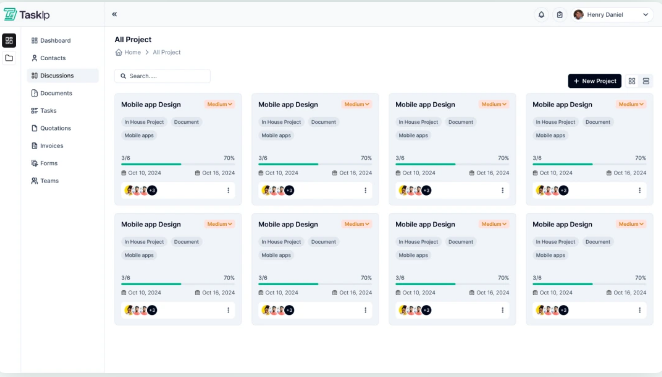
The foundation of any work management tool is its project management capabilities. Taskip and OneSuite both make it easy to organize and track projects, but their approaches have unique strengths.
Taskip’s Project Management Features
- Organizes projects using a folder-based system.
- Uses intuitive Kanban boards for clear visual progress tracking. You can drag and drop tasks from “To Do” to “Done” with ease.
- Assigns team members, sets priorities, and customizes task statuses to fit specific workflows.
- Focuses on streamlined simplicity, making it perfect for teams that prefer a clean, straightforward interface.
Picture this: Your team is working on a digital marketing campaign. With Taskip, you can lay out every task—from keyword research to ad design—in clearly defined buckets on the Kanban board. Need to switch priorities? All it takes is a quick click and drag.
OneSuite’s Project Management Features
- Offers Kanban and list views to match different working styles.
- Adds advanced features like progress tracking, project profitability monitoring, and detailed project timelines.
- Provides project templates and duplication for recurring workflows.
- Supports project archiving, keeping completed work easily accessible.
- Includes the ability to pin important projects for quick access.
If your projects require layers of reporting or if you’re juggling multiple long-term clients, OneSuite’s deeper tracking options will leave you impressed.

What Sets Them Apart:
Taskip’s simplicity and user-friendliness make it great for teams wanting a quick setup and clean design. OneSuite steps up for bigger teams and detailed planners with its extra tracking and reporting options.
Building Stronger Client Relationships
A good CRM can mean the difference between a satisfied client and one who’s ready to move on. Here’s how Taskip and OneSuite approach client management.
Taskip’s CRM Highlights
- Features a dedicated client portal, where your clients can log in to view tasks, invoices, and project updates.
- Automates follow-ups so you don’t lose track of important conversations.
- Stores all client details in one easily accessible location.
- Seamlessly shares tasks and updates directly with clients for transparency.
Whether you’re working on a big web redesign or a simple logo, Taskip makes it easy to keep your clients in the loop.

OneSuite’s CRM Highlights
- Provides a customizable and white-labeled client portal, giving your clients a branded experience.
- Manages leads and pipelines, helping you track potential clients and onboard them seamlessly.
- Allows clients to view milestones, pay invoices, and engage in self-service tasks.
- Tracks communication history and organizes leads with tags and categories to stay on top of follow-ups.
Imagine having a new lead checking out your services. With OneSuite, you can tag their inquiry, track their pipeline progress, and convert them into a client as soon as they’re ready to sign on. The experience feels streamlined, professional, and personalized.
Final Takeaway:
Taskip makes client collaboration simpler, while OneSuite enhances client satisfaction with advanced branding and lead tracking features.
Streamlining Your Financial Workflows
Invoices and payments don’t have to be a hassle anymore! Here’s how both platforms make financial management easier.
Taskip for Finance
- Lets you create professional invoices and convert quotes into invoices instantly.
- Supports recurring payments for ongoing clients (think of long-term contracts or subscription-based services).
- Tracks payment statuses and integrates smoothly with PayPal and Stripe for easy transactions.
OneSuite for Finance
- Automates your invoicing process, including recurring invoices for monthly retainers or repeat clients.
- Tracks invoice statuses, provides an activity log, and generates email payment links to get paid faster.
- Works with QuickPay and Stripe and hints at onboarding even more gateways for added flexibility.
Whether you prefer simplicity or advanced automation, both platforms ensure invoicing is one less thing to worry about.
Key Difference:
Taskip is all about keeping processes simple and clean; OneSuite goes a step further with automation and activity logs that add extra visibility to your payment process.
Collaboration for Teams and Clients
Working as a team? Taskip and OneSuite offer great ways to stay in sync and keep communication flowing.
Taskip’s Collaboration Features
- Real-time discussions within the platform to keep everyone on the same page.
- A business inbox to centralize client messages and replies.
- A built-in meeting scheduler so team members and clients can instantly book time slots that work for them.
It’s like having your entire communication workflow integrated in one platform.
OneSuite’s Collaboration Features
- Allows assigning tasks to multiple team members, making it great for group projects.
- Features multilingual support, ideal for international teams.
- Tracks daily workloads through a team overview, ensuring projects stay on schedule.
- Offers task-specific comments for real-time updates and feedback.
Who’s It For?
Taskip is great for managing client and team communication in smaller teams, while OneSuite excels in collaboration for larger, more distributed teams.
Powerful Integrations to Tie It All Together
If you’re already using other tools, integrations can make or break your experience.
Taskip’s Integration Options
- Connects with Slack for quick team communication.
- Uses Google Meet and Google Calendar for easy scheduling and collaboration.
- Processes payments with PayPal and Stripe.
Need to schedule a call or quickly create a collaboration space? Taskip has what you need.
OneSuite’s Integration Options
- Offers a REST API for custom integrations to tailor the platform to your specific needs.
- Includes tools for migrating data from other platforms like Nifty.
- Adds document features like PDF export and e-signatures for seamless client approvals.
What Stands Out?
Taskip keeps things simple with essential tool integrations, while OneSuite caters to users looking for customizations and heavier backend compatibility.
The Verdict
Ultimately, both Taskip and OneSuite are impressive platforms that deliver on their promises. Choosing the better fit comes down to your priorities:
- Go with Taskip if you want a simple, practical platform for managing clients, projects, and finances without unnecessary complexity. Ideal for solo entrepreneurs, freelancers, and smaller teams.
- Opt for OneSuite if you value customization, advanced tracking, and deeper collaboration tools. Perfect for growing teams or businesses that handle complex workflows and projects.
Whichever you choose, both platforms will empower you to manage your business more effectively. The best part? Both are designed to simplify rather than complicate your everyday work life. After all, your tools should work for you, not the other way around!
Use Cases and Scenarios for Taskip and OneSuite
- Digital Marketing Agency Managing Campaigns
Marketing agencies often handle multiple projects across teams.
- Taskip lets agencies organize campaigns with Kanban boards, assign tasks, set priorities, and keep clients updated via the client portal. It also simplifies invoicing by connecting to payment platforms like Stripe or PayPal.
- OneSuite offers project profitability tracking and streamlined collaboration through its client portal, helping agencies identify successful campaigns and manage resources effectively.
- Freelancer Handling Clients and Projects
Freelancers wear many hats, and streamlined tools make their lives easier.
- Taskip helps freelancers manage tasks, send professional proposals, and automate recurring invoices. A designer, for example, can assign deadlines, track progress, and share project updates with clients using its client portal.
- OneSuite supports freelancers with lead tracking, automated reminders for invoices, and a secure document hub to manage deliverables like contracts or finished work.
- Small Business Managing Services
Small businesses benefit from centralized operations.
- Taskip assists boutiques with task assignments, internal communication, and meeting scheduling. For example, a graphic design studio could use it to break projects into manageable stages and keep clients informed.
- OneSuite offers a robust CRM to track client interactions, automate invoices, and monitor deadlines, making it a reliable option for growing businesses offering subscription or project-based services.
Both platforms simplify operations, enhance productivity, and foster transparency, giving businesses more time to focus on clients and growth.
Taskip vs OneSuite: Pricing
Ok, let’s talk money – the part that really matters when you’re trying to run a smart business. When you’re eyeing platforms like Taskip and OneSuite to get your ducks in a row, figuring out how they actually cost is a big deal.
Both of these guys get that different businesses have different needs (and different budgets!). Taskip seems to like offering those “pay once and you’re done” kind of deals, plus they’ve got different levels you can jump between as you grow. OneSuite, on the other hand, keeps things pretty straightforward with monthly plans, and they even give you a test drive with a free trial before you commit, which is always nice, right?
So, to help you make sense of it all and see which one will give you the most bang for your buck, we’ve broken down how they price things.
| Plan | Taskip | OneSuite |
| Freelancer | Tier 1: Likely similar to a “Professional” plan | $29/month (or less with yearly billing) |
| – Limited teams (3) & members (5) | – Suitable for a single user | |
| – 1 workspace, 10,000 contacts, 3 email aliases, 10 meetings | – Unlimited projects and clients | |
| – 1TB storage | – 3,000 leads, 10 GB storage | |
| – Core features: tasks, invoicing, proposals, payments, etc. | – Includes unlimited invoices, client portal, white-labeling | |
| Solopreneur | Tier 2: Likely similar to a “Team” plan | $59/month (or less with yearly billing) |
| – Higher limits for teams, team members, and workspaces | – Designed for up to 5 members | |
| – Unlimited contacts, 5TB storage | – Unlimited projects, clients, and 10,000 leads | |
| – Unlimited meetings | – 30 GB storage | |
| Growing Agency | Tier 3: Likely similar to an “Agency” plan | $149/month (or less with yearly billing) |
| – Unlimited teams, members, and workspaces | – Suitable for up to 20 members | |
| – 20TB storage | – Unlimited projects, clients, leads, and 60 GB storage | |
| Large Agency | Not explicitly detailed | $239/month (or less with yearly billing) |
| – Suitable for up to 50 members | ||
| – Unlimited projects, clients, leads, and 100 GB storage | ||
| Free Trial | Lifetime deal options available via AppSumo/Earlybird | 14-day free trial with no credit card required |
| Support | Not explicitly mentioned. | Priority support for all plans, responsive customer support. |
The Bottom Line (Our Take): Taskip vs One Suite
If you’re the kind of person who likes the idea of a one-time payment and the flexibility to scale up later, Taskip’s lifetime deals and tiered plans might be right up your alley – especially if you’re a smaller team or see your business evolving.
But if you prefer knowing exactly what you’re paying each month and like the security of trying before you buy, OneSuite’s clear monthly subscriptions with that free trial could be a solid, no-fuss option.
Here’s the thing, both Taskip and OneSuite seem pretty good at the core stuff – managing projects, sending invoices, and keeping your clients happy. So, when it really comes down to it, the best choice for you will probably hinge on what kind of pricing structure makes the most sense for your business and your wallet.

Conclusion
Taskip and OneSuite are powerful tools designed to simplify and enhance the way businesses manage their daily operations. From project management and client collaboration to invoicing and profitability tracking, both platforms offer tailored features that cater to freelancers, agencies, and small businesses alike. Whether you need Taskip’s versatile client portal and proposals or OneSuite’s advanced project profitability and collaborative dashboards, these platforms enable you to focus on serving your clients and growing your business. Explore their unique capabilities, try out a free trial or demo, and discover the one that aligns perfectly with your needs.
FAQs– Taskip vs One Suite
What types of businesses benefit most from Taskip and OneSuite?
Taskip is ideal for digital agencies, freelancers, and service-based businesses looking to consolidate client and project management with features like proposals, task tracking, and client portals. OneSuite is better suited for agencies and teams who need advanced project profitability tools, in-depth lead management, and centralized collaboration.
Can I use these platforms if I don’t have a large team?
Absolutely! Both platforms are designed to cater to small teams, solopreneurs, and even freelancers. Taskip and OneSuite offer pricing and features that scale with your business, making them a good fit regardless of team size.
What integrations do they support?
Taskip integrates with platforms like Slack, Google Meet, Stripe, PayPal, and more, streamlining communication, payments, and scheduling. Similarly, OneSuite features integrations with tools like QuickPay, Stripe, and document-sharing systems to enhance efficiencies and workflows.
How do their pricing structures compare?
Taskip offers flexible plans often bundled as lifetime deals or monthly subscriptions with features tailored to teams of varying sizes. OneSuite, on the other hand, has a clear multi-tiered pricing setup, with options for freelancers to large agencies. Both offer affordable solutions depending on your business requirements, and free trials are available.
Are these platforms easy to set up?
Yes, both Taskip and OneSuite are designed with user-friendly interfaces. They provide onboarding help, tutorials, and support to ensure a smooth setup process so you can get started quickly without technical expertise.

Get Summary On: