Top 7 Productivity Tools for a Freelancer (2026 Edition)
Freelancing in 2026 feels freeing, but to be honest, it can also feel messy.
One minute you’re deep in creative work, the next you’re drowning in emails, chasing invoices, and switching between ten different apps just to keep up.
If that sounds familiar, you’re not alone.
The good news? The right productivity tools can quietly take the chaos away and give you back hours every week.
In this fresh 2026 edition, we’ve picked the top 7 productivity tools that actually make sense for solo freelancers like you, designers, writers, developers, consultants, and coaches.
These aren’t fancy enterprise tools. They’re simple, practical ones that help you handle client work, scheduling, time tracking, proposals, and even repetitive writing without burning you out.
Let’s explore which ones deserve a spot in your workflow this year.
The Only 7 Productivity Tools Freelancers Need in 2026 (Updated Guide)
Well, you don’t need dozens of apps to run a successful freelance business; you just need the right ones. In 2026, smart freelancers keep their stack small, simple, and super effective.
We’ve updated this guide with the top 7 productivity tools that help solo workers handle proposals, client communication, time tracking, and repetitive writing without overwhelm.
These tools play nicely together and actually save real time. Let’s dive into the ones worth adding to your workflow today.
1. Taskip – Best for all-in-one freelance operations
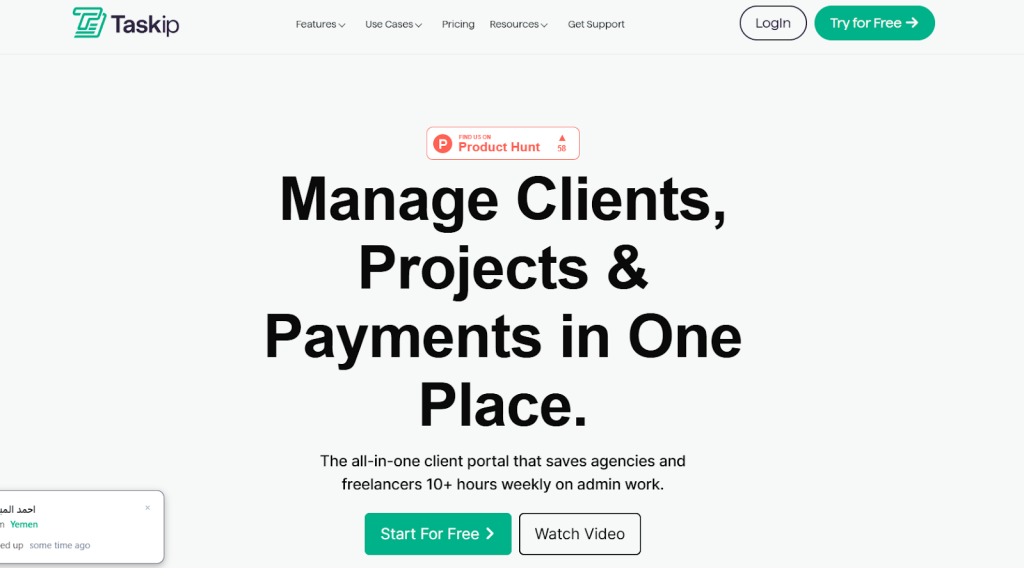
Taskip acts as a central hub built just for freelancers.
Usually, it solves the scattered-workflow problem, where you jump between emails, spreadsheets, and separate apps for proposals, tasks, and payments.
Freelancers who juggle multiple clients love it because everything lives in one clean dashboard.
In real life, a graphic designer might book a client call, create a proposal inside Taskip, assign tasks with deadlines, track hours on the project, and send an invoice with one click.
No more copying details from one tool to another. Small teams or solo creators benefit from its simple setup that feels personal rather than corporate.
For example, a writer can store client feedback threads and Loom videos right next to tasks, keeping context close. It reduces tool-switching fatigue and helps maintain professional communication without extra effort.
So, How it help?
- Proposal and onboarding automation. You build templates once and send polished proposals fast. Clients get a smooth start with forms and agreements in the same flow.
- Task management with deadlines. Break projects into clear steps and see progress at a glance. It keeps you from missing small details.
- Built-in time tracking. Log hours directly on tasks so billing matches actual work without separate apps.
- Client communication threads. Keep all messages and files organized per project instead of hunting through email.
- One-click invoicing. Turn tracked time into ready invoices and send them instantly.
- Centralized dashboard. View all active clients, tasks, and payments on one screen for quick daily checks.
- Project templates. Reuse successful workflows for similar client work and save setup time.
- Feedback collection tools. Gather client input in tasks to avoid back-and-forth emails.
- Calendar integration. Sync meetings and auto-create follow-up tasks after calls.
- Document storage per task. Attach references or videos without leaving the platform.
- Reporting on project status. See completion rates and spot delays early.
- Simple team sharing if you grow. Add helpers without complicated permissions.
- Mobile access. Check tasks or send updates from anywhere when you are on the go.
- Automation rules. Set basic triggers like task reminders or status changes to reduce manual work.
Taskip Pricing & Features
- Freelancer – $12/month
Best for solo users. Includes 1 user, 100GB storage, and core business tools.
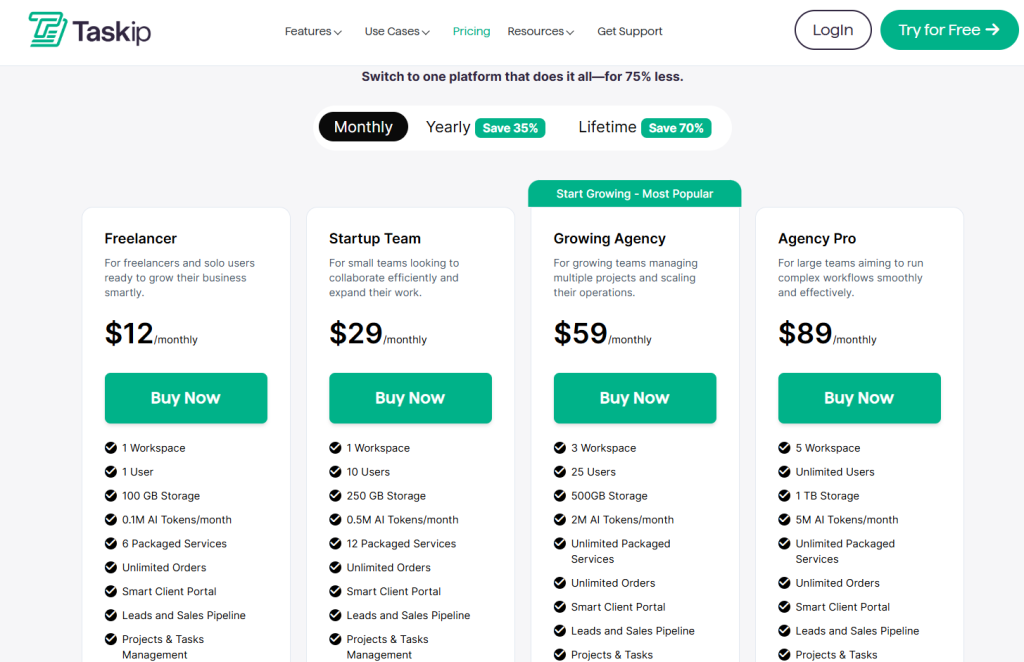
- Startup Team – $29/month
For small teams. Up to 10 users, 250GB storage, and branding options.
- Growing Agency – $59/month (Most Popular)
For growing teams. 25 users, 500GB storage, APIs, and priority support.
- Agency Pro – $89/month
For large teams. Unlimited users, 1TB storage, and full advanced features.
Best for
Freelancers who want to stop switching between five different apps. It shines for designers, writers, developers, and coaches who need proposals, task tracking, and payments together. If you spend too much time on admin, Taskip pulls it all into one place and saves hours each week.
Why it is a strong pick?
- Everything stays in one dashboard, so you see the full picture quickly.
- Built for freelancers rather than big teams, which keeps it simple.
- Time tracking links directly to invoicing for accurate bills.
- Fast setup with a little learning curve.
- Reduces chasing clients for payments or feedback.
- Supports professional templates that make you look organized.
- Grows with you as client numbers increase.
Limitations
- Third-party integrations are still growing compared to older platforms.
- Advanced team features may feel extra for pure solo users.
2. Slashit App: Best for speeding up repetitive writing
Slashit App works as a smart text expander that lives quietly in the background on your computer.
It turns short triggers into full messages, emails, or proposals while adding a touch of AI to polish or expand your thoughts.
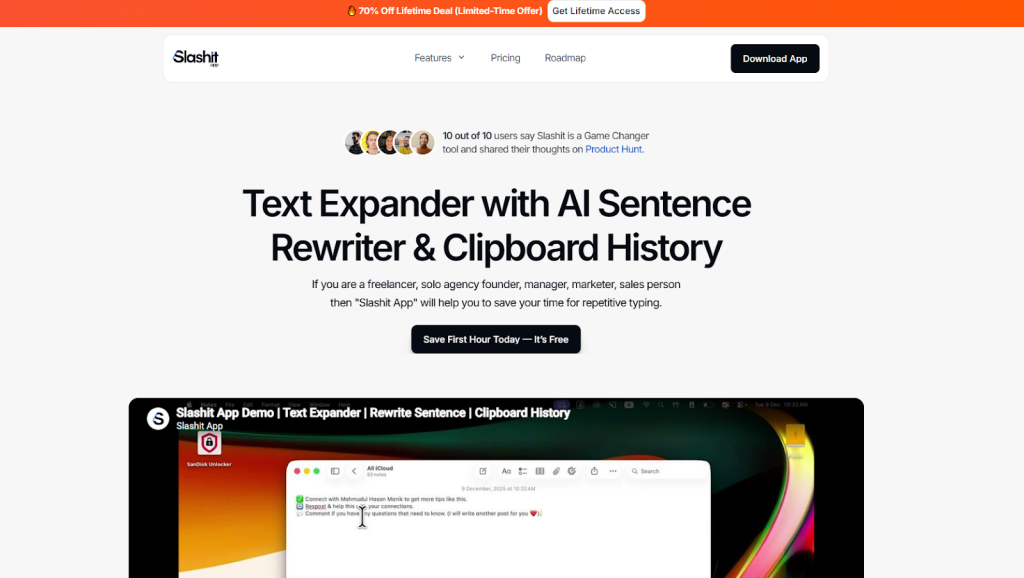
The main problem it solves is the constant drain of typing the same things over and over:
- Client kickoff emails
- Proposal intros
- Status updates
- Thank-you notes
- Content outlines.
Instead of copying from old files or rewriting from scratch, you create once and reuse forever with simple slash commands.
Freelancers who write a lot each day get the biggest lift. A copywriter might set up a trigger like “/kickoff” that expands into a complete project start message with placeholders for the client name, project type, and next steps.
A web designer can type “/proposal” and instantly get a structured template, then use AI to adjust the tone for a more confident or friendly feel.
The beauty is that it works inside any app you already use: Gmail, Notion, Google Docs, Slack, or even your CRM. You never break your flow by switching tabs or opening another window.
In fact, small creators and solo freelancers benefit because it keeps their communication consistent and professional without extra mental effort.
Suppose you finish a client call. You type a quick slash command in your email, then your follow-up is ready with all the right details.
Or you open LinkedIn. You drop a few rough ideas into a template. AI turns it into a clean post that still sounds like you.
All in all, Slashit helps you type less. It keeps your writing clear and polished. Even on busy days when you handle many clients.
How it helps?
- Text snippets and shortcuts. You save common phrases or blocks of text and expand them instantly by typing a short trigger word. This cuts down on thousands of keystrokes every month.
- Dynamic templates with variables. Create reusable templates that include placeholders like client name, date, project details, or price. The app fills them in automatically when you use the command.
- AI sentence rewriter. Highlight any text and use a slash command or hotkey to rewrite it for better clarity, tone, or length while keeping your original meaning.
- Clipboard history. Access your recent copies with a simple shortcut so you never lose something you copied earlier in the day.
- Slash commands for fast activation. Type a forward slash followed by your custom keyword anywhere you type, and the expansion happens right there in place.
- Works across apps system-wide. Use it seamlessly in email clients, document editors, browsers, chat apps, or project tools without any extra setup.
- Custom command creation. Build your own library of shortcuts tailored to your freelance services, such as different proposal types or contract clauses.
- AI-powered suggestions and expansion. Feed short ideas into a template and let AI help expand them into full paragraphs or outlines while you stay in your main document.
- Lightweight and fast performance. The app runs quietly in the background with almost no impact on your computer speed, even during long work sessions.
- Native Mac support with Windows version available. It works smoothly on Apple Silicon and Intel Macs, and the Windows app covers most freelancer setups.
- Magical access feature. Select text and use a custom hotkey to instantly improve or rephrase it based on your saved instructions, all without leaving your current app.
- Reduces typing fatigue significantly. Many users report saving several hours per week on routine communication, giving them more time for creative client work.
- Consistent professional messaging. Your templates help maintain the same clear, friendly tone across all clients so you always look organized and reliable.
- Lifetime deal options available. Pay once instead of monthly subscriptions, making it affordable for long-term freelance use.
Slashit App Pricing & Features
Monthly Plan – $5/user/month
Good for individuals who want flexible billing. Includes unlimited templates, snippets, AI access, and use on up to 3 devices.
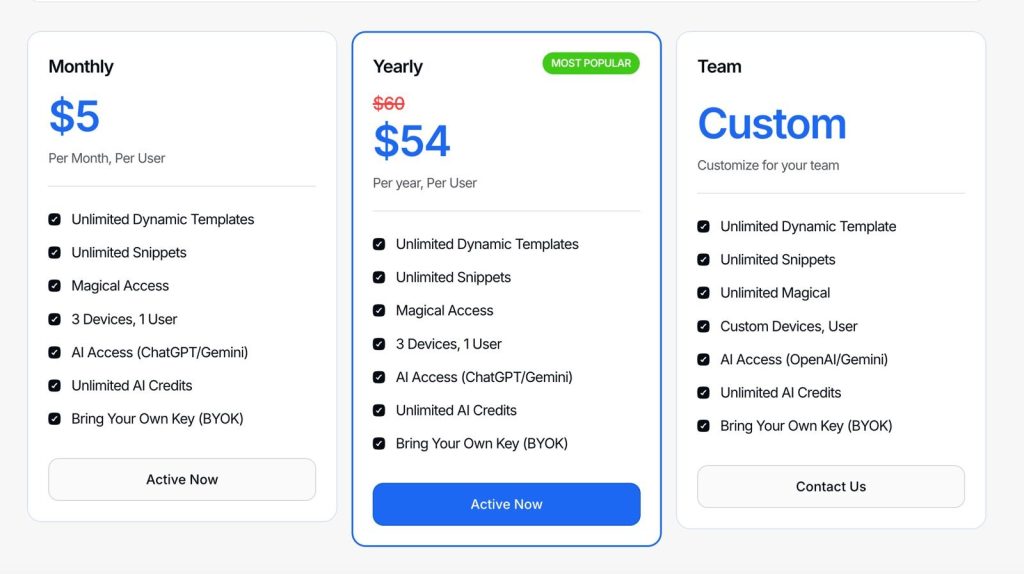
Yearly Plan – $54/user/year (Most Popular)
Save more with yearly billing. You get the same features as the monthly plan, including unlimited templates, snippets, AI access, and 3-device support.
Team Plan – Custom Pricing
Best for teams that need more flexibility. Includes unlimited templates, snippets, AI access, custom devices, and BYOK support. Contact the team for a custom quote.
Best for
Great for freelancers, writers, and marketers who send repeat messages often. It also works really well for copywriters, consultants, designers, and developers who want to write faster, keep their own voice, and avoid jumping between different tools.
Why it is a strong pick?
- Saves real hours every week by eliminating repetitive typing.
- Works directly inside the apps you already use every day.
- Combines simple shortcuts with helpful AI without feeling complicated.
- Lightweight design keeps your computer running smoothly.
- Lifetime pricing makes it a one-time investment for heavy users.
- Helps keep your communication consistent and professional.
- Quick to set up and grows naturally as you add more templates.
Limitations
- Building a useful library of templates takes some initial time and thought.
- Currently stronger and more polished on Mac, though Windows support is solid.
- No deep team collaboration features since it focuses on individual productivity.
3. Notion: Best for flexible workspace and knowledge base
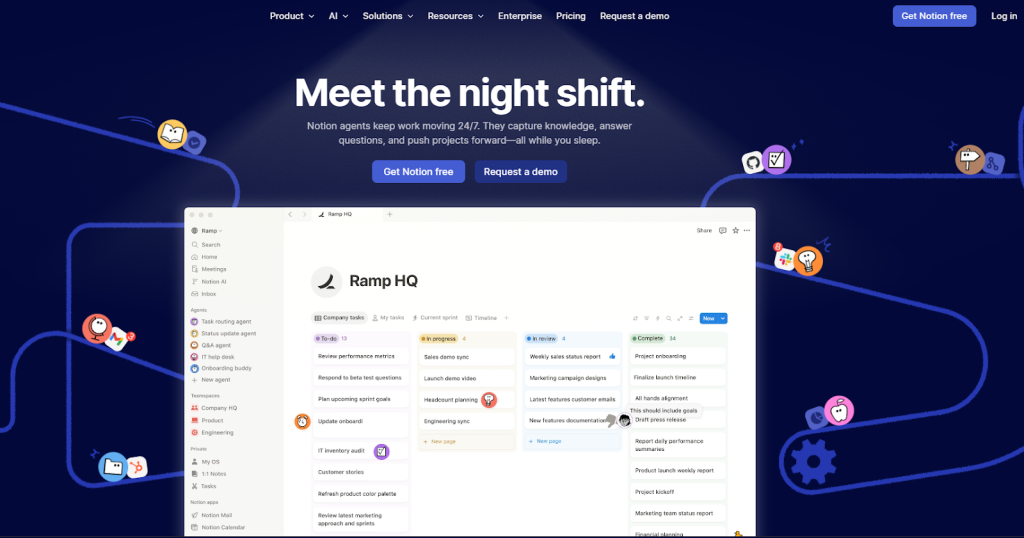
Notion gives you a blank canvas that turns into whatever you need.
It solves the problem of disorganized notes, client info, and project plans spread across docs and folders. Freelancers use it to build custom databases for clients, project timelines, and personal wikis.
However, in daily life, a consultant might create a page for each client with linked task lists, meeting notes, and resource links.
Small creators or solo operators love how one workspace handles everything from idea brainstorming to final deliverables without extra cost for basics.
Imagine a content freelancer setting up a content calendar database that links to draft pages and client feedback sections. It keeps ideas flowing without rigid structures.
How it helps?
- Custom databases for clients and projects. Organize details in tables that connect to other pages.
- Page templates for repeated work. Duplicate setups for proposals or reports in seconds.
- Collaborative editing. Share specific pages with clients for real-time input if needed.
- Embedded files and links. Bring in calendars, docs, or videos inside your workspace.
- Task and checklist features. Turn any page into a simple to-do list with due dates.
- Wiki-style knowledge base. Store reusable info like brand guidelines or past project learnings.
- Calendar and timeline views. Visualize deadlines across all projects.
- Mobile app support. Edit notes or check tasks from your phone.
- Free personal use with generous limits. Build complex systems without paying early.
- AI features in paid plans. Generate summaries or ideas inside pages.
- Web clipper integration. Save articles or research directly into your workspace.
- Export options. Pull out data when you need it elsewhere.
Notion Pricing & Features
- Free – $0/month
Best for personal use. Includes basic tools, databases, forms, and a trial of AI features.
- Plus – $10/month
For small teams. Includes unlimited uploads, charts, collaboration, and basic integrations.
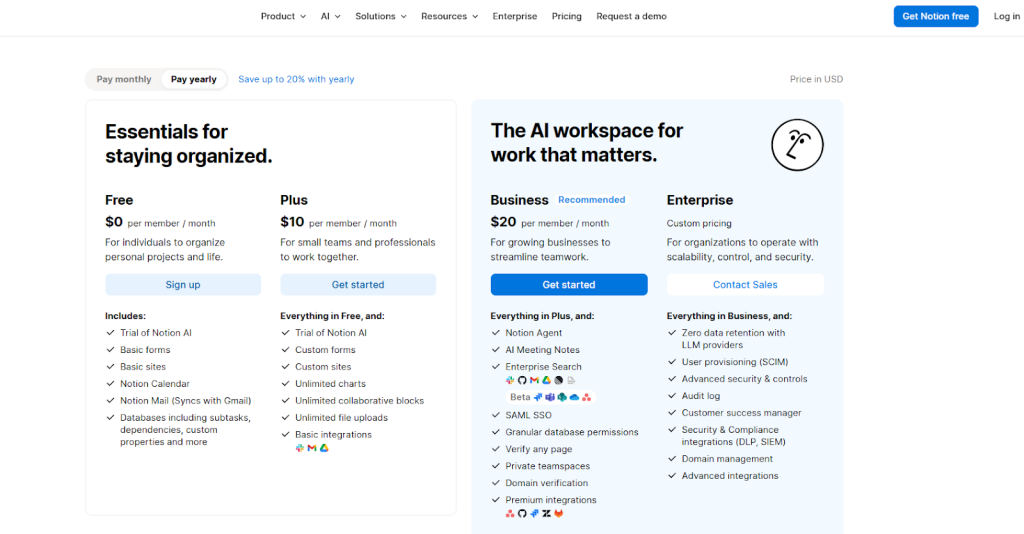
- Business – $20/month (Recommended)
For growing teams. Includes AI tools, meeting notes, private spaces, and advanced permissions.
- Enterprise – Custom Pricing
For large companies. Includes advanced security, admin controls, and dedicated support.
Best for
Freelancers who like building their own systems. Writers, designers, and consultants use it to create tailored project hubs and personal dashboards that evolve with their business.
Why it is a strong pick?
- Complete flexibility lets you shape it exactly to your workflow.
- Free tier covers most solo needs without limits on content.
- Links everything together so information stays connected.
- Great for long-term knowledge building as your freelance business grows.
- Sharing is straightforward for client collaboration.
- Regular updates add useful features without extra cost.
Limitations
- Setup can take time if you want advanced databases.
- No native invoicing or time tracking built in.
- Performance slows with very large workspaces.
4. Calendly: Best for automated meeting scheduling
Calendly removes the endless email chains when setting up calls. It solves availability confusion by letting clients pick slots based on your real calendar.
Freelancers share a simple link and let clients book without back-and-forth.
Also, in practice, a coach shares their Calendly link in proposals so new clients can book discovery calls instantly. Small teams or creators use it to protect focus time while still appearing responsive.
For example, a developer can set different meeting types for quick check-ins versus deep strategy sessions with custom buffers and reminders.
How it helps?
- Personalized booking links. Create different links for specific services or durations.
- Calendar sync with Google or Outlook. Prevents double bookings automatically.
- Automated reminders and confirmations. Reduces no-shows with email or text alerts.
- Custom meeting types. Set rules for different call lengths or questions clients answer upfront.
- Buffer times between meetings. Build in breathing room to stay prepared.
- Team scheduling options. Route meetings to the right person if you collaborate.
- Integration with video tools. Auto-create Zoom or Google Meet links.
- Analytics on booking patterns. See which times work best for your clients.
- Payment collection for paid calls. Charge for consultations directly.
- Workflow automations. Trigger tasks or emails after a booking.
- Mobile-friendly booking page. Clients book easily from any device.
Calendly Pricing & Features
- Free – $0/month
Best for personal use. Includes 1 event type, 1 calendar, and basic scheduling tools.
- Standard – $10/month
For professionals. Includes unlimited event types, multiple calendars, integrations, and automation.
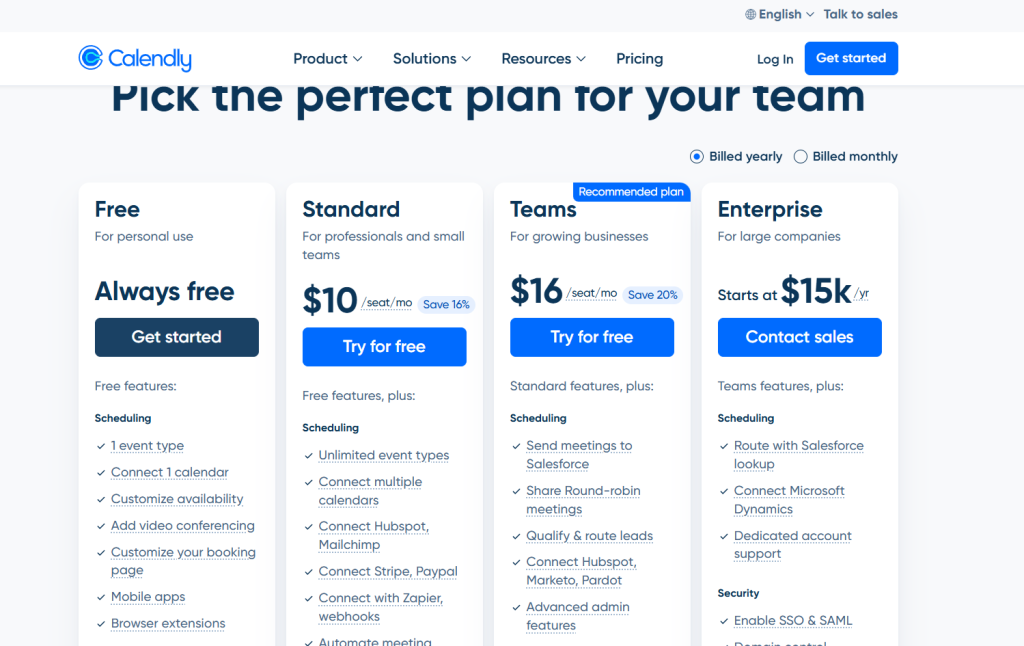
- Teams – $16/month
For growing teams. Includes round-robin scheduling, lead routing, and advanced admin tools.
- Enterprise – Custom Pricing
For large companies. Includes advanced security, SSO, domain control, and dedicated support.
Best for
Freelancers who spend too much time coordinating meetings. It frees up mental space for actual client work.
Why it is a strong pick?
- Saves hours every week by eliminating scheduling emails.
- Professional appearance builds client trust from the first contact.
- Reliable calendar protection prevents overbooking.
- Easy to customize for different services.
- Strong integrations with tools you already use.
- Scales from solo to small team use.
- Consistent updates improve the experience.
Limitations
- Free plan restricts advanced features quickly.
- Can feel salesy if not set up thoughtfully.
- Limited built-in CRM or project follow-up.
- Relies on clients actually using the link.
5. Toggl Track: Best for accurate time tracking and insights
Toggl Track makes logging hours simple and useful instead of a chore.
Basically, it solves the guesswork in billing by showing exactly where your time goes. Freelancers start a timer or log manually and get clear reports for clients.
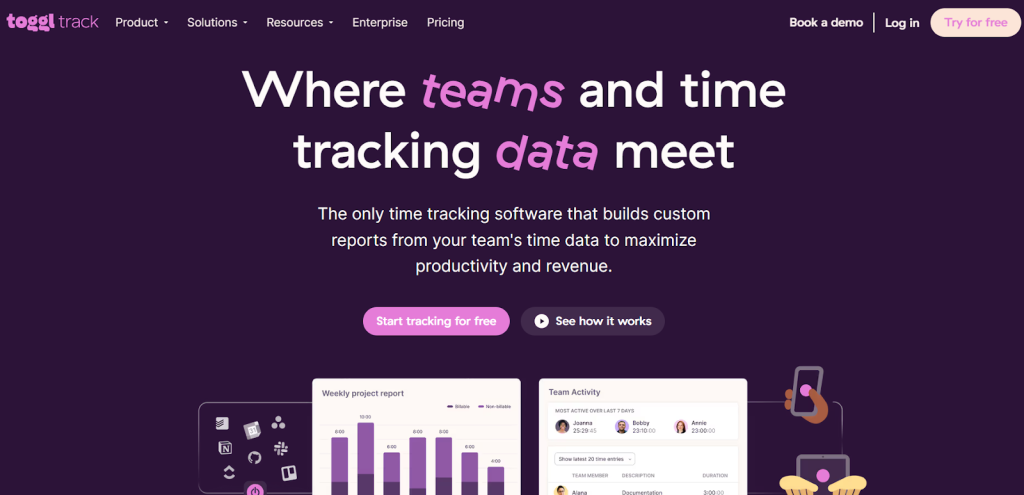
In real life, a marketer tracks time across projects and spots which tasks eat more hours than expected. Small creators use the visual breakdowns to price future work better or negotiate rates.
For instance, after a month you see project profitability at a glance and adjust your approach.
How it helps?
- Billable rate settings. Calculate earnings directly from tracked time.
- Idle detection alerts. Reminds you if the timer runs without activity.
- Browser extensions. Track time while working in other apps.
- Exportable data. Pull reports into invoices or spreadsheets.
- Team tracking if needed. Add collaborators later without hassle.
- Calendar integration. See how meetings affect your logged time.
- Pomodoro-style focus timers. Build better work habits alongside tracking.
- Offline mode support. Log time even without the internet.
- Detailed breakdowns by date or task. Spot inefficiencies fast.
- Saved time entries. Reuse common descriptions to speed up logging.
- API access for advanced users. Connect to custom workflows.
Toggl Track Pricing & Features
- Free – $0/month
Best for individuals or small teams. Includes time tracking, reports, and basic integrations (up to 5 users).
- Starter – $10/month
For small teams. Includes billable rates, project tracking, and team productivity reports.
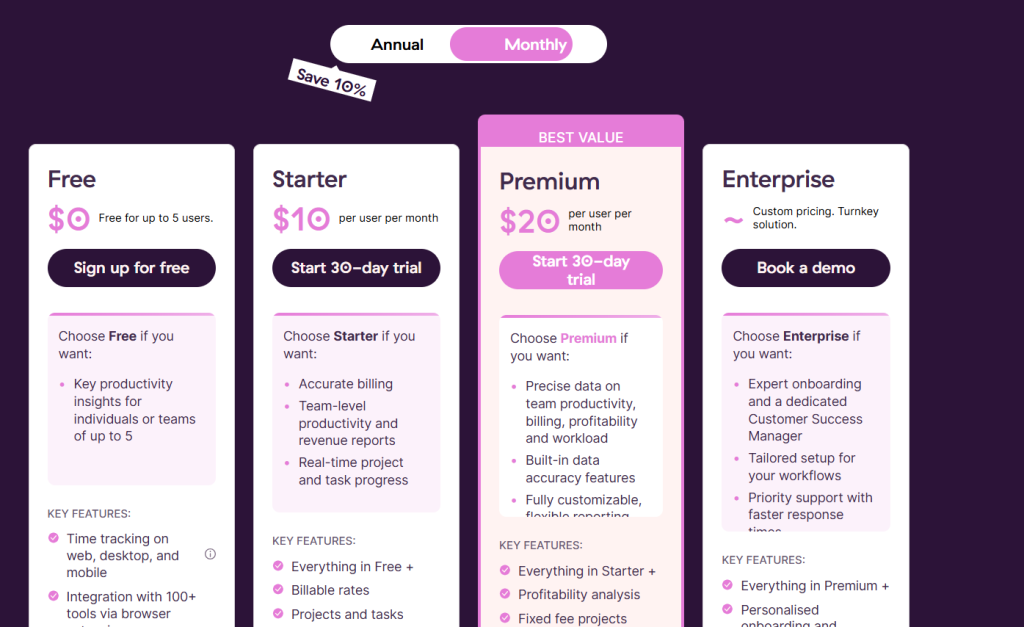
- Premium – $20/month (Best Value)
For growing teams. Includes advanced reports, profitability tracking, and custom features.
- Enterprise – Custom Pricing
For large teams. Includes dedicated support, custom setup, and advanced security features.
Best for
Freelancers who bill by the hour or want better visibility into their workday.
Why it is a strong pick?
- Clean interface makes tracking feel effortless.
- Powerful reports turn data into actionable insights.
- Works across all your devices seamlessly.
- Free tier is genuinely useful for solos.
- Accurate data helps with fair client billing.
- Regular improvements keep it fresh.
- Strong focus on privacy and simplicity.
Limitations
- Advanced reporting requires paid plans.
- No built-in invoicing in the core tool.
- Can feel basic if you need heavy automation.
6. Loom: Best for async video communication
Loom lets you record quick videos instead of long meetings or confusing emails. It solves unclear instructions by showing exactly what you mean on screen.
Freelancers record walkthroughs or feedback and share a link. In daily work, a designer sends a Loom explaining revisions so the client sees cursor movements and voice notes.
However, small creators or remote workers use it to keep momentum without scheduling calls.
For example, after a client request, you record a short update that answers questions visually and saves everyone time.
How it helps?
- Screen and camera recording. Capture your face plus the desktop for clear explanations.
- Instant shareable links. Clients watch without signing up or downloading.
- Editing tools for trimming. Cut mistakes and keep videos short.
- Drawing and highlighting on screen. Point out exact details during recording.
- Transcription features. Turn spoken words into text for easy reference.
- Viewer analytics. See if clients watched and how much.
- Browser-based recording. No heavy software installation needed.
- Team workspaces. Organize videos by project or client.
- Integration with other tools. Embed links in tasks or emails.
- Custom branding options. Add your logo for a professional feel.
- Reaction buttons for viewers. Get quick feedback without extra messages.
- Audio-only mode. Record voice notes when screen sharing is not needed.
Loom Pricing & Features
- Starter – $0/month
Best for individuals. Includes up to 25 videos, 5-minute recordings, and basic features with transcriptions.
- Business – $18/month
For professionals. Includes unlimited videos, unlimited recording time, basic editing, and no branding.
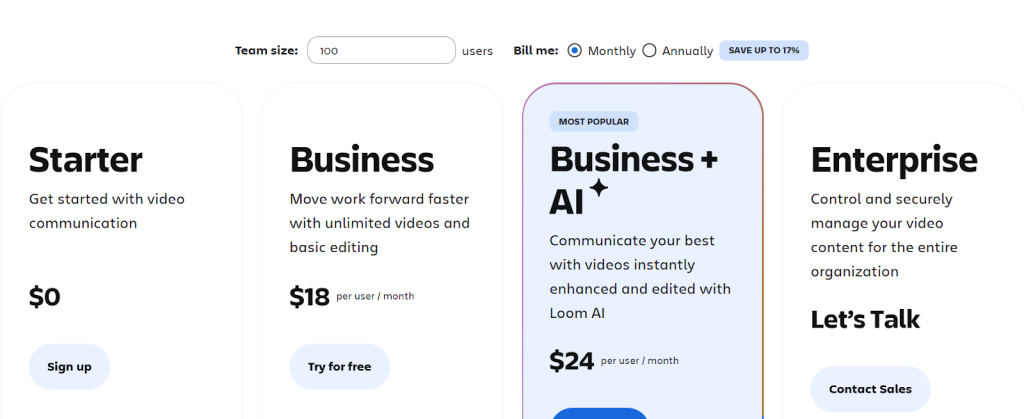
- Business + AI – $24/month (Most Popular)
For advanced users. Includes AI editing, auto notes, video summaries, and smart automation.
- Enterprise – Custom Pricing
For large teams. Includes advanced security, admin controls, integrations, and dedicated support.
Best for
Freelancers who explain visual work or want to cut meeting time.
Why it is a strong pick?
- Makes communication faster and clearer than text alone.
- Builds stronger client relationships with personal touch.
- Reduces meeting fatigue significantly.
- Easy for non-tech clients to use.
- High-quality recordings with minimal setup.
- Saves time on both sides of the conversation.
Limitations
- Free plan has strict limits on videos.
- Needs decent internet for smooth uploads.
- Not ideal for very long or complex discussions.
- Transcription accuracy varies with accents or background noise.
7. ClickUp: Best for customizable project management
ClickUp brings powerful task and project tools in one flexible platform. It solves overload from too many simple apps by letting you customize views and automations.
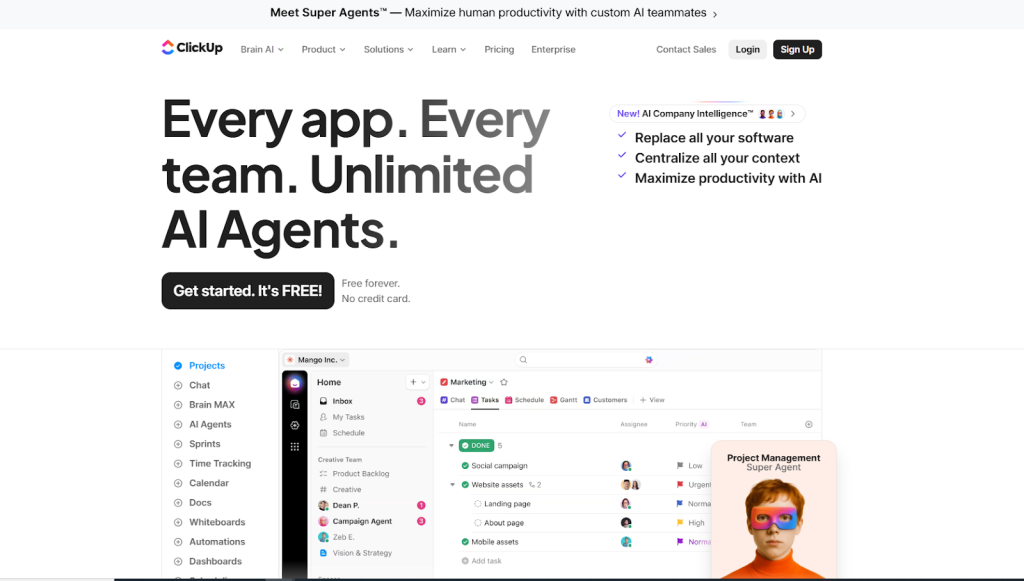
By using it, freelancers set up spaces for each client or project with tasks, docs, and goals. In practice, a web developer creates a board for ongoing maintenance work with automated status updates.
Also, growing freelancers use its hierarchy to keep everything organized without feeling overwhelmed.
For example, you link tasks to time entries and see workload across all clients in custom dashboards.
How it helps?
- Multiple views like list, board, and calendar. Choose what fits each project.
- Custom fields and statuses. Track exactly what matters for your freelance work.
- Task dependencies and subtasks. Manage complex client deliverables.
- Built-in docs and wikis. Keep project notes connected to tasks.
- Automation recipes. Set rules to move tasks or send notifications.
- Time tracking inside tasks. Log hours without leaving the platform.
- Goal and dashboard tracking. Monitor overall business progress.
- Client sharing options. Give limited access for feedback.
- AI assistance for task creation. Generate ideas or summaries.
- Integrations with many tools. Connect calendars, email, and more.
- Mobile app for updates. Stay on top of work while traveling.
ClickUp Pricing & Features
- Free Forever – $0/month
Best for personal use. Includes unlimited tasks, docs, boards, and basic features with limited storage.
- Unlimited – $7/month
For small teams. Includes unlimited storage, integrations, time tracking, and advanced tools.
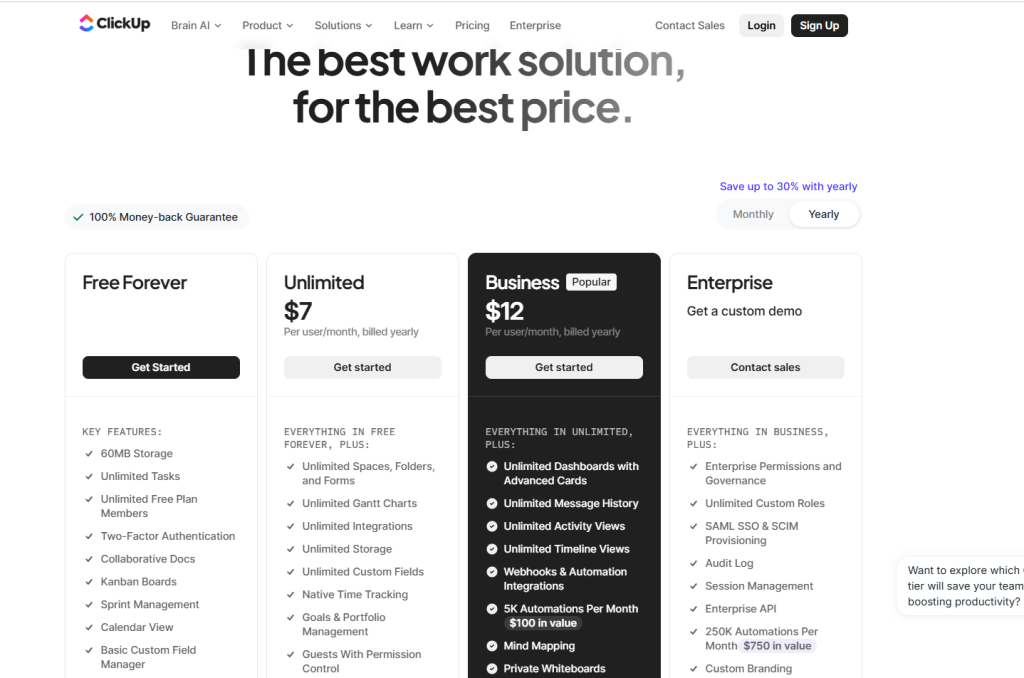
- Business – $12/month (Popular)
For growing teams. Includes dashboards, automation, advanced reporting, and workload management.
- Enterprise – Custom Pricing
For large teams. Includes advanced security, custom roles, automation, and dedicated support.
ClickUp AI Pricing
- Free AI Trial – $0
Try AI features with limited access.
- Brain AI – $9/month
Includes AI chat, writing, and access to multiple AI models.
- Everything AI – $28/month (Recommended)
Includes advanced AI tools, automation, image generation, and higher AI limits.
Best for
Freelancers handling multiple complex projects who want one tool that adapts as they grow.
Why it is a strong pick?
- Extreme customizability fits unique freelance workflows.
- Free plan supports serious solo use.
- All-in-one approach reduces app count.
- Strong automation saves repetitive clicks.
- Scales nicely when you add occasional help.
Limitations
- Can feel overwhelming with so many options at first.
- Setup time is higher than that of simpler tools.
- Some advanced features sit behind higher plans.
- Interface has many elements to learn.
Wrapping it up
These seven productivity tools can genuinely transform how you run your freelance business in 2026.
Instead of feeling scattered and overwhelmed, you’ll have a smoother, calmer workflow that lets you focus on the work you actually enjoy.
So, start small and then pick just one or two tools that solve your biggest daily headache right now.
Maybe, it’s organizing client projects, speeding up your writing, or protecting your time; the right combination makes freelancing feel lighter and more rewarding.
Remember, the best system is the one you actually use consistently. Experiment, adjust, and build a simple stack that fits your unique style. You’ve got this.
Here’s to less stress and more creative freedom in 2026!
FAQs
Can I use Taskip with my current tools?
Yes! Taskip is built to work alongside tools like Notion, Loom, Calendly, and Toggl.
Is Taskip beginner-friendly?
Absolutely. Most freelancers are up and running in under 20 minutes.
Can I send proposals and invoices with Taskip?
Yes. Taskip has built-in proposal templates and invoicing with time tracking support.
Is this setup suitable for all freelancers?
Yes. Whether you’re a designer, writer, developer, or coach—this toolkit can work for you.
What is the best productivity tool for freelancers?
We believe Taskip is the most complete option, with task management, proposals, and invoicing built-in.
How do I use Taskip with Calendly, Notion, or Loom?
You can embed links, automate tasks post-meeting, and add reference docs to each task in Taskip.


Get Summary On: