Best CRM for Creative Agencies in 2026: 9 Expert‑Recommended Tools to Streamline Clients, Projects, and Sales
Creative agencies in 2026 face fragmented workflows across clients, projects, and sales, but top CRMs deliver 29% higher sales and 34% productivity gains through integrated automation and AI. With 91% of firms using 10+ employees adopting CRM, rising to 94% in tech/services: expert picks best CRM for creative agencies like Taskip, HubSpot, and NetHunt streamline operations for advertising and digital teams.
Quick Comparison Table: 10 Best CRM for Creative Agencies
| CRM Platform | Best For | Starting Price | Team Size | Ease of Use |
| Taskip | All-in-one agency management | $600/year (3 users) | Agencies of 3-50 | ⭐⭐⭐⭐⭐ |
| HubSpot CRM | Marketing-heavy agencies | Free (basic) / $50/user/mo | 1–1,000+ | ⭐⭐⭐⭐ |
| Pipedrive | Sales pipeline focus | $15/user/mo | 5–500 | ⭐⭐⭐⭐⭐ |
| Zoho CRM | Custom workflows & affordability | €45/user/mo | 5–1,000+ | ⭐⭐⭐⭐ |
| NetHunt CRM | Gmail-native agencies | $24/user/mo | 2–200 | ⭐⭐⭐⭐⭐ |
| Freshworks CRM | Feature-rich, user-friendly | $15/user/mo | 1–500 | ⭐⭐⭐⭐ |
| Salesforce Sales Cloud | Enterprise-level agencies | Custom pricing | 100+ | ⭐⭐⭐ |
| Monday.com CRM | Visual workflow lovers | €15/user/mo | 5–500 | ⭐⭐⭐⭐⭐ |
| Insightly | Project + CRM hybrid | $29/user/mo | 5–300 | ⭐⭐⭐⭐ |
| Salesflare | AI-powered sales efficiency | $35/user/mo | 3–100 | ⭐⭐⭐⭐⭐ |
Why Creative Agencies Need a Purpose-Built CRM
Creative agencies operate differently from traditional sales organizations. Your challenges include:
- Multi-layered client relationships – Managing creative directors, procurement teams, and stakeholders simultaneously
- Complex project timelines – Juggling scope changes, revisions, and delivery milestones
- Service-based pricing – Proposals, estimates, and quote management require flexibility
- Team collaboration demands – Designers, copywriters, account managers, and strategists need unified visibility
- Documentation overhead – Contracts, NDAs, approvals, and e-signature workflows are non-negotiable
Generic CRMs like Salesforce aren’t built for this reality. They prioritize high-velocity, transactional sales. Creative work requires transparency, collaboration, and project visibility alongside traditional sales pipeline management.
The best CRM for creative agencies balances three priorities:
- Client Management – Comprehensive contact profiles, communication history, and collaboration tools
- Project Visibility – Real-time status updates, deliverable tracking, and approval workflows
- Sales Efficiency – Quick quote generation, pipeline tracking, and proposal management
What to Look for in a Creative Agency CRM
Before diving into specific platforms, evaluate any CRM against these criteria:
1. Client Portal & Transparency
Can clients access project status, files, and updates without direct access to internal workflows? Does it reduce support tickets through self-service?
2. Integration Ecosystem
Does it work with Slack, Google Workspace, Microsoft 365, Zapier, and other agency staples? Fragmented tools create data silos.
3. Customization Without Code
Can you build custom pipelines, fields, and workflows for your unique process? Or does everything require developer involvement?
4. Automation Capabilities
Does the CRM automate repetitive tasks like lead assignment, follow-ups, email sequences, and proposal generation?
5. Mobile-First Design
Can your team manage relationships and projects on mobile? Or are key features locked to the desktop?
6. Pricing Transparency
Does pricing scale with team size or do “add-ons” inflate costs? Is there a free tier for testing?
7. Onboarding & Support
How quickly can you get your team productive? Is there built-in guidance or do you need expensive consultants?
8. Reporting & Insights
Does the CRM surface actionable insights (pipeline health, win rates, project profitability) or just raw data?
The 10 Best CRM Solutions for Creative Agencies in 2026
1. Taskip – The All-in-One Creative Agency Platform
Best For: Creative agencies seeking integrated client management, project oversight, and sales pipeline tracking without switching between tools.
Overview:
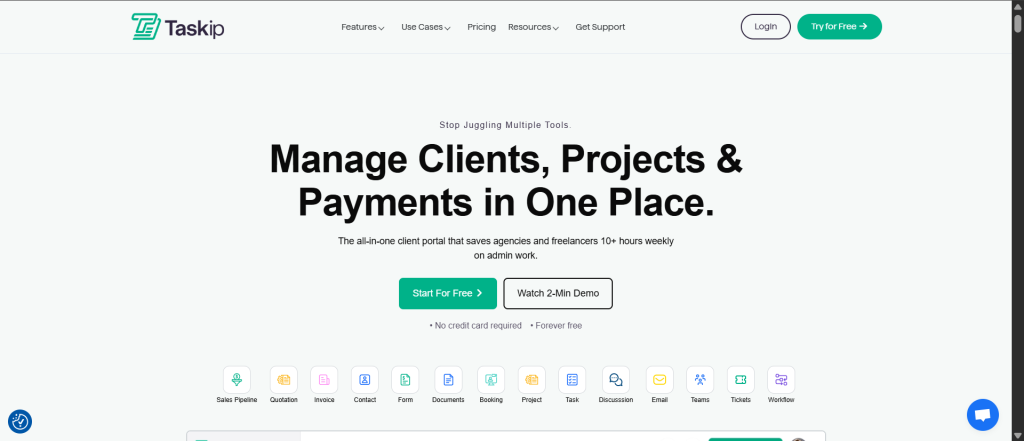
Taskip is purpose-designed for creative agencies and freelancers. It consolidates client portals, project management, sales pipelines, quote generation, and team collaboration into one unified platform. Instead of juggling Trello, Zoho, Calendly, and DocuSign, your entire business operates in Taskip.
Key Features:
| Feature | Details |
| All-in-One Client Portal | Clients access project updates, files, and status without internal clutter; builds transparency and trust |
| Quick Quote & Proposal Creation | Generate estimates, send for signature, auto-convert to invoices; no separate tools needed |
| Sales Pipeline Management | Track deals, forecast revenue, manage sales conversations in one space |
| Contact Management | Centralized client profiles with communication history, linked tasks, invoices, and tickets |
| Ticket Management | Clients raise issues in real-time; teams respond immediately for seamless communication |
| Meeting Scheduling | Clients book available time slots; automatic email confirmations for both parties |
| Document Collaboration | Keep all documents organized and accessible to clients or internal teams |
| Custom Forms | Design personalized intake forms with conditional fields and public sharing options |
| Workflow Automation | Email-to-contact automation, ticket management, project workflows; less manual work |
| Integrated Task Management | Assign tasks, track progress, keep team aligned on deliverables and deadlines |
| Real-Time Discussions | Team communication without leaving the platform; context stays in one place |
Pros:
| Pro | Benefit |
| Truly all-in-one | Replace 8+ fragmented tools; single source of truth for all client data |
| Client-centric design | Transparent portal reduces support tickets and increases client satisfaction |
| No steep learning curve | Intuitive interface means faster team adoption vs. complex enterprise CRMs |
| Quote-to-invoice workflow | Seamlessly convert proposals to contracts to invoices; reduces administrative overhead |
| Affordable for growing agencies | Significantly cheaper than assembling best-of-breed tools separately |
Cons:
| Con | Mitigation |
| Newer platform | Smaller user community vs. Salesforce/HubSpot; however, rapid development and agency-focused roadmap |
| Limited app marketplace | Fewer third-party integrations; however, Zapier support covers most gaps |
| Mobile app launching soon | Currently web-only; mobile app (iOS/Android) announced for 2026 |
2. HubSpot CRM & Sales Hub – Best for Marketing-Driven Agencies
Best For: Marketing agencies that want best-in-class marketing automation alongside sales pipeline management.
Overview:
HubSpot dominates the marketing automation space. If your agency relies heavily on email campaigns, lead nurturing, and content marketing, HubSpot’s ecosystem (CRM + Marketing Hub + Sales Hub) provides deep integration.
Key Features:
| Feature | Details |
| Smart CRM | AI-powered contact insights, automatic contact enrichment, predictive lead scoring |
| Marketing Automation | Email workflows, landing pages, form builders, lead nurturing sequences |
| Sales Hub | Deal pipelines, email tracking, calling, meeting scheduling, proposals |
| AI Meeting Assistant | Automatic meeting recordings, transcripts, and next-step recommendations |
| Unified Dashboard | Single view of customer journey across sales, marketing, and service teams |
| Extensive Integrations | Works with Slack, Google Workspace, Zapier, and 1,300+ apps |
| Advanced Reporting | Custom dashboards, attribution modeling, forecasting |
Pros:
| Pro | Benefit |
| Industry-leading marketing automation | Unmatched email campaign sophistication; perfect for content-driven agencies |
| Free tier available | Start without investment; upgrade as you scale |
| Excellent documentation & training | HubSpot Academy offers free certifications; large user community |
| Built-in AI (Breeze) | Automated prospect research, email drafting, task prioritization |
| Seamless sales-to-marketing alignment | Same platform means no data silos or integration headaches |
Cons:
| Con | Mitigation |
| Pricing complexity | Features split across multiple hubs (CRM, Sales, Marketing); costs escalate quickly |
| Hidden costs | “Free” CRM feels limited once you need automation; expensive add-ons for advanced features |
| Steep learning curve | Rich feature set requires training; setup time for agencies with complex workflows |
| Limited project management | No native project tracking; third-party integration (Asana, Monday) required for agencies managing deliverables |
| Overkill for small agencies | Over-featured for teams under 5 people |
3. Pipedrive – Best for Sales-Focused Agencies
Best For: Agencies prioritizing deal tracking, sales pipeline visibility, and straightforward sales workflows without enterprise complexity.
Overview:
Pipedrive is built by salespeople for salespeople. It takes a fundamentally different approach than HubSpot: beautiful, intuitive pipeline visualization and ruthless focus on deal progression. If your agency’s primary goal is winning new business, Pipedrive excels.
Key Features:
| Feature | Details |
| Visual Sales Pipeline | Kanban-style deal board showing every stage; drag-and-drop deal progression |
| Deal Insights | AI-powered deal scoring, next-action suggestions, probability forecasting |
| Activity Automation | Automatic contact enrichment, meeting sync from calendar, email integration |
| Email Sequences | Automated follow-up sequences via “Campaigns by Pipedrive” add-on |
| Reporting & Forecasting | Win rates, sales velocity, pipeline health dashboards |
| Mobile App | First-class mobile experience; manage pipeline from anywhere |
| Marketplace | 400+ integrations including Zapier, Slack, Google Workspace |
Pros:
| Pro | Benefit |
| Fastest onboarding | New users productive within days; intuitive interface requires minimal training |
| Best-in-class mobile app | Manage deals, log activities, close business from mobile; rated 6.6/10 (G2 industry benchmark 5/10) |
| Affordable for small teams | $15/user/month for essential features; no surprise add-on costs |
| Customizable pipelines | Build multiple pipelines for different services (web design, branding, content marketing) |
| Strong reporting | Visual pipeline health, deal stage analysis, and sales forecasting |
Cons:
| Con | Mitigation |
| Limited project management | No native task tracking, deliverable timelines, or resource planning for creative work |
| No marketing automation | Email sequences are basic; designed for sales outreach, not nurture campaigns |
| Client portal lacks depth | Clients can view deals but can’t collaborate on projects or access files |
| Limited customization | Workflows are sales-centric; agencies needing creative workflow automation may feel restricted |
| Integration costs | Beyond basic integrations, add-ons like email campaigns require separate pricing |
4. Zoho CRM – Best for Customization & Affordability
Best For: Agencies with complex workflows, multi-team setups, or limited budgets that can dedicate time to setup and configuration.
Overview:
Zoho offers enterprise-grade CRM functionality at SMB pricing. Its Zia AI assistant and Blueprint workflows enable agencies to build highly customized pipelines and automations without developer involvement.
Key Features:
| Feature | Details |
| Customizable Pipelines | Build unlimited pipelines for different service lines (campaigns, design, copywriting) |
| Zia AI Assistant | Predictive lead scoring, email sentiment analysis, trend forecasting |
| Blueprint Workflows | Visual workflow builder for structured, compliant sales processes |
| Omnichannel Communication | Email, phone, live chat, social media in one unified dashboard |
| Zoho One Suite | Access to accounting (Books), HR (People), projects (Projects), and more from one account |
| Advanced Reporting | Custom KPIs, multi-app reporting, data storytelling |
| Integration Ecosystem | Connects with Google Workspace, Microsoft 365, Slack, Zapier (deep integrations) |
Pros:
| Pro | Benefit |
| Exceptional value | €45/user/mo for comprehensive functionality; often ⅓ the cost of competitors |
| Unlimited customization | Build workflows, fields, and modules without developer involvement |
| Zoho ecosystem | Add accounting, HR, projects within one ecosystem; unified data across all apps |
| Omnichannel support | Email, chat, phone, social media in one interface; critical for agency communication |
| AI-powered insights | Zia provides predictive analytics and automation suggestions |
Cons:
| Con | Mitigation |
| Steep learning curve | Powerful but complex; requires investment in setup and team training |
| UI less intuitive than competitors | Feature-rich but not as visually polished as Pipedrive or HubSpot |
| Setup requires expertise | Best results come from proper configuration; may need consultant for complex workflows |
| Documentation gaps | Community support strong, but official documentation lags behind competitors |
| Implementation time | Expect 4–8 weeks for full deployment vs. Pipedrive’s 1–2 weeks |
5. NetHunt CRM – Best for Gmail-Native Agencies
Best For: Agencies using Google Workspace (Gmail, Google Meet, Google Docs) who want CRM inside their email without platform switching.
Overview:
NetHunt is a Gmail-native CRM that lives directly inside Gmail, Outlook, and Google Workspace. Instead of email becoming a silo separate from CRM data, NetHunt unifies email, contact management, and pipeline tracking in your inbox.
Key Features:
| Feature | Details |
| Gmail Integration | CRM lives inside Gmail; no tab switching between email and pipeline |
| Email Pipeline | Convert emails into deals; track deal progression right from your inbox |
| Contact Management | All-in-one contact profiles with communication history, deals, tasks |
| Messenger Integrations | WhatsApp, Instagram, Facebook Messenger, Telegram in one client record |
| Workflow Automation | Automate lead assignment, follow-ups, and status updates based on rules |
| Google Workspace Sync | Seamless integration with Sheets, Docs, and Drive for document collaboration |
| Customizable Pipelines | Build pipelines for different service lines (content, design, strategy) |
| Reporting & Analytics | Campaign performance, sales forecasting, team productivity dashboards |
Pros:
| Pro | Benefit |
| No context switching | CRM lives in Gmail; never leave email to access pipeline or contact history |
| Fast adoption | Team already uses Gmail; minimal training required |
| Unified messaging | Manage email, WhatsApp, Instagram, Messenger in one inbox; all communication centralized |
| Affordable ($24/user/mo) | Lower cost than Zoho or HubSpot for similar functionality |
| Customization without code | Fully customizable pipelines, fields, and permissions |
Cons:
| Con | Mitigation |
| Limited project management | No native deliverable tracking, timelines, or resource planning |
| No client portal | Clients can’t track project status or access files (unlike Taskip or Freshworks) |
| Gmail-dependent | If your team uses Outlook or other email, functionality is limited |
| Smaller community | Fewer integrations and templates compared to HubSpot or Pipedrive |
| Mobile app limitations | Mobile experience not as polished as Pipedrive or native apps |
6. Freshworks CRM – Best for Feature-Rich, User-Friendly Design
Best For: Agencies seeking a balance between feature depth and ease of use; particularly strong for customer service integration.
Overview:
Freshworks (formerly Freshsales) is built for companies that need deep CRM functionality without enterprise complexity. Known for intuitive UI, extensive features, and strong customer service tools.
Key Features:
| Feature | Details |
| Freddy AI | AI-powered insights, lead scoring, and workflow recommendations |
| Unified Customer Timeline | 360° view of all customer interactions across channels |
| Sales Automation | Workflow builder, email sequences, activity automation |
| Phone & SMS Integration | Native calling and SMS; no separate tool required |
| Contact Management | Comprehensive profiles with interaction history, deals, tasks |
| Customer Portal | Basic client access to ticket status and knowledge base |
| Advanced Reporting | Sales forecasting, team productivity, deal analysis |
| Marketplace | 300+ integrations including Slack, Zapier, Google Workspace |
Pros:
| Pro | Benefit |
| Excellent UX | More intuitive than Zoho; easier to adopt than enterprise platforms |
| Strong feature set | Phone, SMS, automation, and AI all included; no hidden add-ons |
| Freddy AI | Helpful recommendations for next actions and deal prioritization |
| Affordable ($15/user/mo) | Same price as Pipedrive but with more features included |
| Built-in customer service tools | Ticket management, knowledge base, and support automation |
Cons:
| Con | Mitigation |
| Limited project management | No native deliverable tracking or resource planning |
| Client portal lacks collaboration | Clients can view tickets but can’t collaborate on projects or access files |
| Setup time | More configuration required than Pipedrive; expect 2–3 weeks for full deployment |
| Customization limits | Not as flexible as Zoho; some workflows require workarounds |
| Smaller user base | Fewer community templates and integrations than HubSpot/Pipedrive |
7. Salesforce Sales Cloud – Best for Enterprise Agencies
Best For: Large enterprises, agencies with $10M+ ARR, or complex multi-team structures requiring advanced customization and compliance features.
Overview:
Salesforce is the industry standard for enterprise sales organizations. Its power, customization, and integration depth are unmatched—but so is its complexity and cost. For most creative agencies, Salesforce is overkill.
Key Features:
| Feature | Details |
| Advanced Customization | Build custom objects, workflows, and automation without limits |
| Einstein AI | Predictive lead scoring, deal forecasting, and automated workflows |
| Omnichannel Support | Phone, email, chat, social media, and third-party integrations |
| Advanced Reporting | Custom dashboards, forecasting, and analytics; unlimited reporting depth |
| Enterprise Security | Field-level encryption, audit trails, compliance automation |
| Scalability | Handles 1000+ users across multiple teams and geographies |
| AppExchange Marketplace | 5,000+ third-party apps and integrations |
Pros:
| Pro | Benefit |
| Unlimited customization | Build virtually any workflow or data model required |
| Enterprise-grade security | FedRAMP, SOC2, HIPAA compliance; audit trails for regulatory requirements |
| Proven at scale | Trusted by Fortune 500 companies; reliable for mission-critical operations |
| Deep integrations | Works with virtually any enterprise tool; mature integration ecosystem |
| Extensive training & support | Certified consultants, training programs, and vendor support |
Cons:
| Con | Mitigation |
| Prohibitive cost | $150–$500/user/month depending on features; often $100k+/year for small agencies |
| Steep learning curve | Requires dedicated Salesforce admins and developers; not a “plug and play” solution |
| Overkill for most agencies | 95% of agencies don’t need this level of customization |
| Implementation time | 3–6 months typical deployment; requires external consultants |
| Vendor lock-in | Once deeply integrated, migrating becomes expensive and time-consuming |
8. Monday.com CRM – Best for Visual, Customizable Workflows
Best For: Agencies that love visual project management and want to combine CRM with campaign tracking in one platform.
Overview:
Monday.com started as a project management platform and added CRM capabilities. It’s perfect for creative teams that think visually and want to blend client management with campaign tracking.
Key Features:
| Feature | Details |
| Visual Workflows | Kanban boards, Gantt charts, timeline views for pipelines and projects |
| Customizable Workspaces | Build CRM, project tracking, and campaign management in one workspace |
| Automation Studio | AI-powered automation; identify repetitive tasks and automate them |
| AI Copilot | Email generation, task suggestions, and workflow optimization |
| Integration Hub | 200+ native integrations; Zapier support for unlimited integrations |
| Collaboration Tools | Comments, file sharing, mentions for seamless team communication |
| Mobile App | First-class mobile experience; manage CRM and projects from anywhere |
Pros:
| Pro | Benefit |
| Excellent for visual thinkers | Kanban, Gantt, and timeline views are intuitive for creative teams |
| CRM + Project Management | Blend client pipeline with campaign tracking in one platform |
| Strong automation | AI automation reduces manual task entry and follow-ups |
| Affordable starting point | €15/user/mo for basic features; scales with advanced capabilities |
| Beautiful design | More visually polished than Zoho or NetHunt |
Cons:
| Con | Mitigation |
| Pricing escalates quickly | Add-ons and advanced features increase cost significantly |
| No built-in communication tools | Phone, SMS, or video calling require third-party integrations |
| Limited client portal | Clients can’t collaborate on projects or access files directly |
| Setup complexity | Flexibility requires configuration; not as “ready to go” as Pipedrive |
| Smaller CRM user base | More known for project management; CRM ecosystem not as mature |
9. Insightly – Best for Project-Centric Agencies
Best For: Agencies that need deep project management alongside CRM; especially strong for agencies managing multiple concurrent campaigns.
Overview:
Insightly combines CRM, project management, and marketing automation. It’s purpose-built for agencies managing complex projects with multiple stakeholders and touchpoints.
Key Features:
| Feature | Details |
| Integrated Project Management | Projects, tasks, timelines, and resource allocation tied to deals |
| Contact & Organization Management | Comprehensive profiles with communication history and linked projects |
| Customizable Pipelines | Build pipelines for different service lines or regions |
| Marketing Automation | Email campaigns, lead scoring, and nurture sequences |
| Collaboration Tools | Comments, file uploads, and team discussions within projects |
| Reporting & Analytics | Project profitability, pipeline health, and team utilization |
| Mobile App | Manage projects and deals from mobile; offline mode available |
| API & Integrations | RESTful API; integrates with Zapier, Slack, Google Workspace, and more |
Pros:
| Pro | Benefit |
| Integrated project management | Seamlessly blend CRM and project tracking; no platform switching |
| Project profitability tracking | Connect deals to projects and track margins; understand which clients are profitable |
| Marketing automation | Email sequences and lead scoring included; no separate tool required |
| Collaboration features | Comments, file sharing, and discussions keep project context centralized |
| Affordable for mid-size agencies | $29/user/mo provides comprehensive functionality |
Cons:
| Con | Mitigation |
| Smaller user base | Fewer templates, integrations, and community resources than HubSpot/Pipedrive |
| Mobile experience not best-in-class | Works well on mobile but not as polished as Pipedrive or native apps |
| Setup time required | Customization options mean configuration before team can be productive |
| Limited omnichannel communication | No native phone, SMS, or video calling integration |
| Pricing scalability | Costs add up quickly for large teams (25 users + typically costs $20k+/year) |
10. Salesflare – Best for AI-Powered Sales Efficiency
Best For: Agencies prioritizing AI-driven sales productivity, automated data entry, and contact enrichment without manual configuration.
Overview:
Salesflare is positioned as the “AI-native sales CRM.” It automates tedious data entry tasks (email tracking, meeting detection, contact enrichment) so teams focus on relationships, not administration.
Key Features:
| Feature | Details |
| AI Contact Enrichment | Automatic detection of new contacts, email detection, social profile sync |
| Meeting & Email Automation | Automatic calendar sync, meeting notes, email tracking without manual logging |
| Smart Insights | AI recommendations for next actions, deal priorities, and close probability |
| Sales Automation | Email sequences, follow-up reminders, and activity suggestions |
| Mobile-First Design | First-class mobile experience; manage pipeline from anywhere |
| Simple Setup | Minimal configuration; most features work out of the box |
| Integrations | Slack, Google Workspace, Zapier, and 300+ apps |
Pros:
| Pro | Benefit |
| Best-in-class AI automation | Detects new contacts, syncs meetings, enriches data without manual entry; saves 5+ hours/week per rep |
| Mobile-first design | Beautiful mobile app; equals or exceeds desktop experience |
| Easy onboarding | Minimal configuration; team productive within days |
| Predictive insights | AI recommendations help prioritize deals and suggest next steps |
| Affordable ($35/user/mo) | Mid-tier pricing with advanced AI features included (not reserved for premium plans) |
Cons:
| Con | Mitigation |
| Limited project management | No native deliverable tracking or campaign management |
| No client portal | Clients can’t track project status or access files |
| Limited customization | Workflows are somewhat standardized; less flexibility than Zoho or Salesforce |
| Smaller ecosystem | Fewer integrations and templates compared to HubSpot or Pipedrive |
| No marketing automation | Designed for sales; email campaigns are basic and limited |
Comparison: Pros & Cons Summary
Taskip vs. Competitors: Quick Reference
| Feature | Taskip | HubSpot | Pipedrive | Zoho | Freshworks |
| All-in-One | ✅ | ⚠️ | ❌ | ⚠️ | ⚠️ |
| Client Portal | ✅ | ❌ | ⚠️ | ❌ | ⚠️ |
| Project Management | ✅ | ❌ | ❌ | ⚠️ | ❌ |
| Quote to Invoice | ✅ | ❌ | ❌ | ⚠️ | ❌ |
| Ease of Use | ⭐⭐⭐⭐⭐ | ⭐⭐⭐⭐ | ⭐⭐⭐⭐⭐ | ⭐⭐⭐⭐ | ⭐⭐⭐⭐ |
| Starting Price | $600/yr | Free | $15/user/mo | €45/user/mo | $15/user/mo |
| Team Size Match | 3–50 | 1–1000+ | 5–500 | 5–1000+ | 1–500 |
How to Choose the Right CRM for Your Agency
Step 1: Define Your Priority Matrix
Rate these factors on importance (1 = Nice to have, 5 = Critical):
- Client Portal/Transparency – Does your client expect project visibility?
- Project Management – Do you manage complex, multi-phase deliverables?
- Sales Efficiency – Is rapid deal closure your top metric?
- Marketing Automation – Do you run email campaigns or nurture sequences?
- Ease of Use – Can your team adopt the platform without extensive training?
- Budget – What’s your annual software budget for CRM?
- Integration Needs – What tools must connect (Slack, Google Workspace, accounting)?
- Customization Depth – Do you have unique workflows that require customization?
Step 2: Match Your Team Profile
| Team Size | Recommended CRM | Rationale |
| 1–3 people | Taskip, Pipedrive, Freshworks | Start simple; scale features as you grow |
| 3–10 people | Taskip, NetHunt, Monday.com | All-in-one reduces platform switching; lower cost per person |
| 10–30 people | Pipedrive, Zoho, HubSpot | Scale up automation and reporting; team specialization |
| 30–100 people | HubSpot, Zoho, Insightly | Advanced workflows, multi-team visibility, deep integrations |
| 100+ people | Salesforce, Zoho | Enterprise scale, customization, compliance |
Step 3: Prioritize by Use Case
Scenario 1: Sales-Driven Agency
- Primary goal: Win new business fast
- Recommended: Pipedrive or Salesflare
- Why: Ruthless focus on pipeline, deal tracking, and sales efficiency
Scenario 2: Project-Heavy Agency
- Primary goal: Deliver complex campaigns on time and on budget
- Recommended: Taskip or Insightly
- Why: Integrated project management + CRM; tie deals to project profitability
Scenario 3: Marketing Agency
- Primary goal: Nurture leads, run campaigns, support clients with content
- Recommended: HubSpot or NetHunt
- Why: Email automation, lead scoring, and content marketing tools built-in
Scenario 4: Small Agency or Solo Freelancer
- Primary goal: Manage relationships and pipelines without complexity
- Recommended: Taskip or Pipedrive
- Why: Fast onboarding, affordable per-user pricing, intuitive UI
Scenario 5: Enterprise/Complex Workflows
- Primary goal: Deep customization, compliance, and enterprise integrations
- Recommended: Salesforce or Zoho
- Why: Unlimited customization, advanced automation, and enterprise support
Step 4: Run a Free Trial (Minimum 14 Days)
- Import real data – Use actual clients, prospects, and opportunities from your CRM
- Build a test pipeline – Recreate your exact sales process and workflow
- Invite your team – Get feedback from salespeople, project managers, and admins
- Test integrations – Verify that Slack, Google Workspace, and accounting tools sync properly
- Measure onboarding time – How long before your team is genuinely productive?
Pricing Comparison: Annual Cost for 10-Person Team
| CRM | Per User/Month | Annual (10 Users) | Hidden Costs | Total Estimated Annual |
| Taskip | Special pricing | $600–$1,200 (bundles) | Minimal | $1,000–$1,500 |
| Pipedrive | $15–$49 | $1,800–$5,880 | Campaigns: +$300–500 | $2,500–$6,500 |
| HubSpot | $20–$120 | $2,400–$14,400 | Marketing Hub, Sales Hub, Sequences: +$3,600 | $6,000–$18,000+ |
| Zoho CRM | €45 | €5,400 (~$6,000) | CRM Plus, API: +$1,200 | $7,000–$8,000 |
| Freshworks | $15–$49 | $1,800–$5,880 | Phone/SMS, advanced automation: +$400–800 | $2,500–$6,500 |
| NetHunt | $24 | $2,880 | Minimal | $2,880–$3,200 |
| Monday.com | €15–€50 | €1,800–€6,000 (~$2,000–$6,500) | Advanced features: +$1,200–$2,400 | $3,500–$9,000 |
| Insightly | $29–$99 | $3,480–$11,880 | Marketing automation, advanced reporting: +$1,200 | $4,700–$13,000 |
| Salesforce | $150–$300 | $18,000–$36,000 | Consultants, apps, data: +$10,000–$30,000 | $28,000–$66,000 |
| Salesflare | $35–$59 | $4,200–$7,080 | Minimal | $4,200–$7,500 |
Key Insight: Taskip offers the lowest total cost of ownership for small-to-mid teams while bundling features (client portal, project management, quote generation) that typically require separate tools elsewhere.
🎯 Expert Verdict: Taskip – The All-in-One Creative Agency Platform
Why Taskip Stands Out for Creative Agencies:
Taskip is purpose-built for agencies seeking an integrated solution without the complexity of traditional CRMs. Unlike fragmented tool stacks, Taskip consolidates 8+ essential business tools into one seamless platform.
Taskip’s Core Capabilities:
Client Portal & Collaboration
- Unified client workspace with real-time project updates
- Secure file sharing and document collaboration
- Client visibility without overwhelming detail
Sales & Revenue Growth
- Quick quote and proposal generation with e-signature support
- Integrated sales pipeline for deal tracking and forecasting
- Automated invoice creation from quotations
Project & Client Management
- Centralized contact management across teams
- Multi-channel communication (email, tickets, messaging)
- Meeting scheduling with automated confirmations
Team Productivity
- Efficient task assignment and tracking
- Real-time collaboration and discussions
- Custom form creation for client data capture
- Workflow automation to eliminate manual processes
Why Choose Taskip Over 8 Separate Tools?
| Replaced Tools | Annual Cost (Est.) | Taskip Cost | Savings |
| Trello + Zoho CRM + Front + HelpCrunch + Calendly + Typeform + DocuSign + Invoice Ninja | $2,400–$4,800 | $600–$1,200/year for 3 users | 50–70% reduction |
Conclusion: The Best CRM for Your Creative Agency
Here’s the Final Recommendation Framework:
Choose Taskip If:
- You want an integrated platform (no tool switching)
- Client transparency and project management are priorities
- Budget is a concern (50–70% cheaper than tool stacks)
- You need quick onboarding and adoption
- You manage complex sales + project workflows simultaneously
Choose Pipedrive If:
- Your primary goal is winning deals fast
- Your team prioritizes sales pipeline visibility
- You want the fastest onboarding
- You need a mobile-first experience
- You’re open to adding specialized tools for project management
Choose HubSpot If:
- Marketing automation is central to your agency model
- You need deep email campaign and content marketing integration
- You have a larger team (10+) across sales and marketing
- You’re willing to pay a premium for ecosystem depth
Choose Zoho If:
- You need deep customization without developer involvement
- Budget is a primary concern
- You want omnichannel communication (email, chat, phone, social)
- Your workflows are complex and require flexible configuration
Choose Insightly If:
- Project management and CRM must be deeply integrated
- You manage multiple concurrent client projects
- You want to track project profitability tied to deals
- Your team has 10–30 people
Getting Started: Implementation Checklist
Month 1: Selection & Setup
- [ ] Run 14-day free trials of 2–3 shortlisted platforms
- [ ] Map your current sales process and workflows
- [ ] Identify required integrations (Slack, Google Workspace, accounting)
- [ ] Estimate team adoption timeline
Month 2: Data Migration & Configuration
- [ ] Import existing contacts, deals, and history
- [ ] Configure pipelines, fields, and stages to match your process
- [ ] Set up automations for repetitive tasks
- [ ] Establish user permissions and team roles
Month 3: Training & Rollout
- [ ] Train sales, account management, and admin team
- [ ] Establish CRM hygiene standards (data entry, pipeline discipline)
- [ ] Set up reporting dashboards for leadership visibility
- [ ] Plan ongoing support and optimization
FAQs: CRM Selection for Creative Agencies
What Makes a CRM Ideal for Creative Agencies?
Creative agencies need CRMs with integrated project management, client portals, visual sales pipelines, and AI-driven automation to handle custom workflows like design feedback and proposals without tool-switching.
Top 5 Expert-Recommended CRM Tools?
Experts recommend Taskip for all-in-one agency operations, Pipedrive for visual pipelines, Productive for profitability tracking, ManyRequests for client portals, and Breakcold for AI features tailored to creatives.
What Are Typical Pricing Plans?
Pricing starts affordably: Taskip Professional at $39/user/month, Pipedrive from $15/user/month, ManyRequests Growth at $29/user/month (annual), with enterprise options up to $99/user/month for advanced needs.
How to Choose the Right CRM?
Assess agency size, workflow complexity, and needs like customization or mobile access; small agencies favor simple tools like Taskip or Pipedrive, while larger ones opt for scalable options like Salesforce or Zoho.

Get Summary On: