Quick answer: The best Mavenlink (Kantata) alternative for most professional services teams is Taskip, because it combines CRM and PSA in one platform starting at $12/month with transparent, published pricing. For enterprise resource forecasting, Scoro is the closest like-for-like replacement. For agencies that bill on retainers, Productive.io is the strongest fit.
Mavenlink is now called Kantata, following its 2021 merger with Kimble Applications. The platform is powerful, and it is built for large professional services organizations, which means smaller teams often pay for capability they will not use and wait weeks on implementation before seeing value.
We evaluated 10 alternatives across 7 criteria and tested each one with a live project. Below is what we found, including real pricing, G2 and Capterra scores with review counts, and a step-by-step guide to migrating your data out of Kantata.
- Mavenlink became Kantata after merging with Kimble Applications; the two products are Kantata OX and Kantata SX.
- Kantata does not publish pricing. Third-party estimates put it in the $19 to $69 per user per month range, plus implementation fees.
- The three most-cited reasons teams switch are complex setup, hidden pricing, and a steep learning curve.
- Taskip starts at $12/month with CRM and PSA in one platform and no quote required.
- Migrating from Kantata takes roughly 2 to 4 weeks for most teams; the export path is covered in section 9 below.
Table of Contents
Mavenlink Alternatives Compared at a Glance
| Tool | Best for | Starting price | Billing | Min seats | Free plan | G2 rating |
|---|---|---|---|---|---|---|
| Taskip | CRM and PSA in one platform | $12/mo | Monthly rate, annual is cheaper | 1 to unlimited users | Yes | 4.8/5 |
| Scoro | End-to-end quote-to-cash | $17/user/mo | Monthly rate; annual is cheaper | 5 users | No | 4.5/5 (503 reviews) |
| Productive.io | Agency profitability and margin | $9/user/mo | Billed annually | None | No | 4.6/5 (76 reviews) |
| Accelo | Automating the client work lifecycle | Not published | Quote only | Not published | No | 4.3/5 (685 reviews) |
| Bitrix24 | Whole-company CRM on a flat fee | $49/org/mo | Billed annually | Flat, 5 users included | Yes | 4.1/5 (612 reviews) |
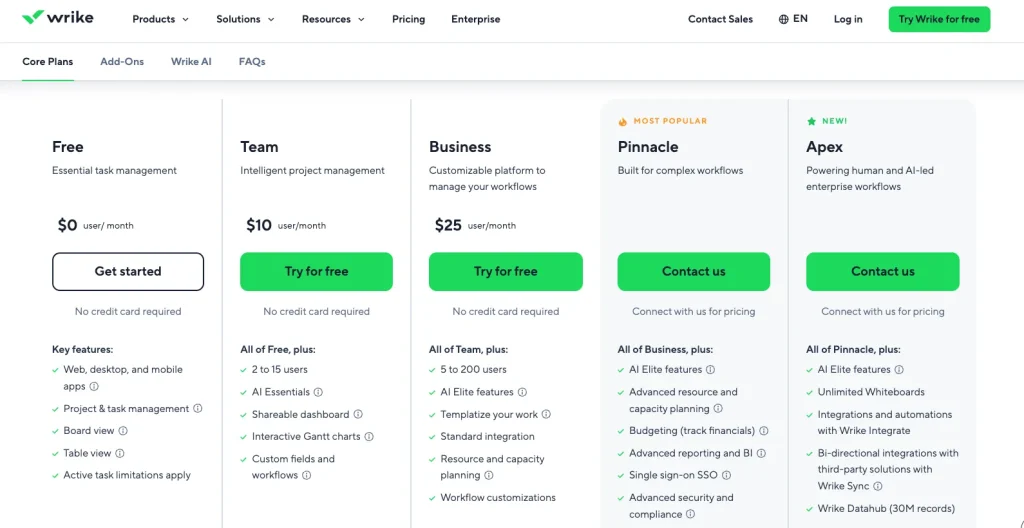
| Wrike | Enterprise cross-team work management | $10/user/mo | Annual only | 2 to 15 on Team tier | Yes | 4.2/5 (4,538 reviews) |
| ClickUp | Most features per dollar | $7/user/mo | Billed annually | None | Yes | 4.6/5 (14,279 reviews) |
| Runn | Resource forecasting and capacity | $7/seat/mo | Monthly rate | 20 seats | No | 4.8/5 on Capterra (33 reviews) |
| Rocketlane | Client onboarding and implementation | $49/member/mo | Annual only | 5 members | No | 4.7/5 (870 reviews) |
| Smartsheet | Spreadsheet-native work management | $9/member/mo | Billed annually | Pro capped at 10 | No | 4.4/5 (22,745 reviews) |
We evaluated each Mavenlink alternative on seven criteria: core PSA features, CRM and sales, project financials, ease of use, pricing transparency, client-facing capabilities, and verified user sentiment. Each tool received a 0–5 score per criterion, and only platforms scoring 65% or higher made the list. Pricing was verified on vendor websites on September 21, 2026, including costs at 10, 25, and 50 seats where available.
What is Mavenlink? – Is Mavenlink the Same as Kantata?
Mavenlink is a professional services automation platform, now called Kantata, that combines project management, resource planning, time and expense tracking, project accounting, and financial forecasting in one system. It is built for agencies, consultancies and services firms that need to connect delivery work directly to billing and profitability.
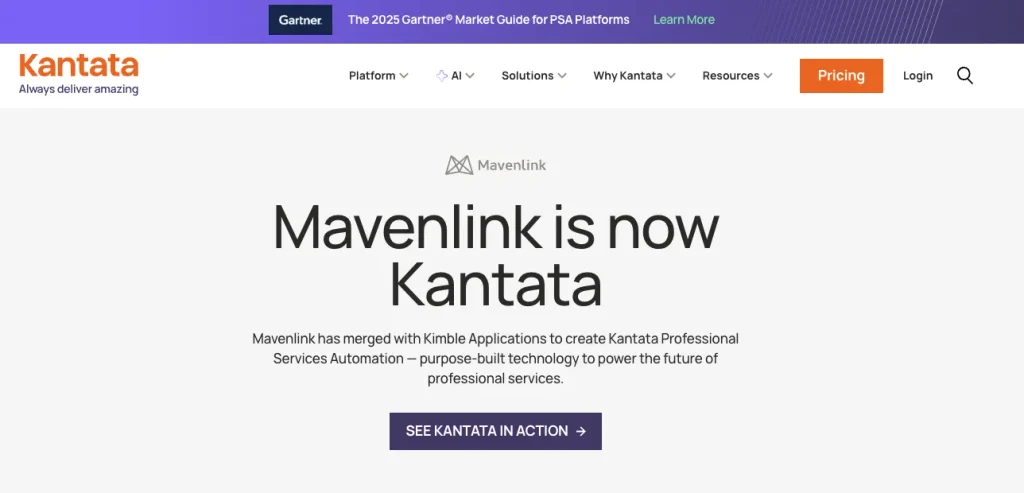
Mavenlink merged with the UK-based professional services software company Kimble Applications, and the combined business rebranded as Kantata. That created two products people often confuse:
- Kantata OX is the former Mavenlink platform, and the direct continuation of the product most people mean when they search for Mavenlink.
- Kantata SX is the former Kimble platform. It runs natively on Salesforce and suits organisations already operating inside Salesforce.
Kantata is privately held, backed by Accel-KKR, and operates from Irvine, California, and London. It holds 4.2 out of 5 from 1,572 reviews on G2 and 4.2 out of 5 from 628 reviews on Capterra.
If you are searching for Mavenlink alternatives, you are searching for Kantata alternatives. Every tool in this guide replaces both.
How Much Does Mavenlink (Kantata) Actually Cost?
Kantata does not publicly disclose its pricing. There is no published per-seat rate, self-serve checkout, or pricing table on its website. Buyers need to request a custom quote, and contracts are typically annual rather than monthly.
That makes it difficult for teams to estimate costs before speaking with sales. Public pricing figures come mainly from third-party sources and customer-reported quotes, so they should be treated as estimates rather than official Kantata prices.
What Buyers Report Paying
Since Kantata does not publish official rates, publicly available figures vary by team size, plan, contract terms, and included features. Use these figures as a starting point for budgeting, not as confirmed pricing.
Why Teams Switch Away From Mavenlink (Kantata)?
Kantata scores 4.2 out of 5 on both G2 and Capterra, so this is not a story about bad software. It is a story about fit. Across 1,572 G2 reviews, the most frequently raised themes are dashboard creation difficulty, learning curve, interface design, and manual task management. Here is what users actually say, in their own words.
Complex Interface
While testing the Mavenlink (present Kantata) software, I found the interface complex. The navigation of the dashboard is not as simple as its competitors. It requires multiple clicks and sometimes slows down when updating projects. This makes the update and overall process a bit time-consuming.
“An overall lack of configurability make this very difficult to recommend to anyone as a tool, when things like Salesforce PSA exists. A UX overhaul is needed in order to make this product intuitive. The first rule of UX is to not make the user think.”
PSA-Centric Design
Mavenlink has a Professional Services Automation (PSA) centered design, which makes it inflexible for teams that want simple project management. Most of its features focus on billable work and service delivery.
Therefore, if you are someone who needs a simple task management system for general purposes, this tool may seem complicated for your team.
Steep Learning Curve: Complex Initial Setup
Where other Manvelink alternatives can start with simple tasks, Manvelink requires you to learn the financial and resource logic to start a basic project. In simple words, it needs a lot of configuration at the beginning, including setting up rates, utilization targets, and forecasting rules.
So, it has a steeper learning curve that makes it difficult for non-tech users and teams without PSA experience to operate the application.
G2Verified user reviewRead on G2 →“It was purchased as a time tracking and PM tool before I joined. Rolling out the process has been much more difficult than with other systems.”
HHarvey H.Computer Software
Limited Team Collaboration
Manvelink is not the ideal platform for daily team collaboration. It is mainly designed for tracking finances and managing service work. You won’t find the conversations in Manvelink closely connected to individual tasks.
As a result, team members need to go back and forth to the conversation box and task section to solve any issues.
Limited Dashboard Customization and Reporting
Though Mavenlink has built-in reports and dashboards, customization is limited. It is challenging to change reports and display data for tailoring needs. So, if you are looking for a custom reporting feature, you may need to look for a Mavenlink alternative.
Moreover, the dashboards also rely on predefined metrics, which may not work well for every team or role.
Delayed Response From Support Team
Users report slow response from the Mavenlink support team. Support often works through tickets and documentation, which can cause delays during urgent work.
Hidden Pricing
Mavenlink doesn’t show its pricing on its website. You need to talk to their representative and discuss the price for the customized features you want. This makes the decision-making process much slower.
“Resource planning was made 1000% better by using the Mavenlink product. It is an intuitive modern UI that is feature-rich across the board.”
Heather H., VP Professional Services, Information Technology and Services. Capterra review, 31 October 2021.
“Scheduling, capacity, status tracking, project health tracking, budget, etc all in one place. Tons of data available and a pretty robust API.”
Trevor S., Technical Director, Information Technology and Services. Capterra review, 24 August 2021.
If you run a 200-person consultancy with dedicated operations staff and a Salesforce-based revenue process, Kantata is probably the right tool, and you do not need this article. The alternatives below are for everyone else.
The 10 Best Mavenlink Alternatives (Reviewed)
1. Taskip
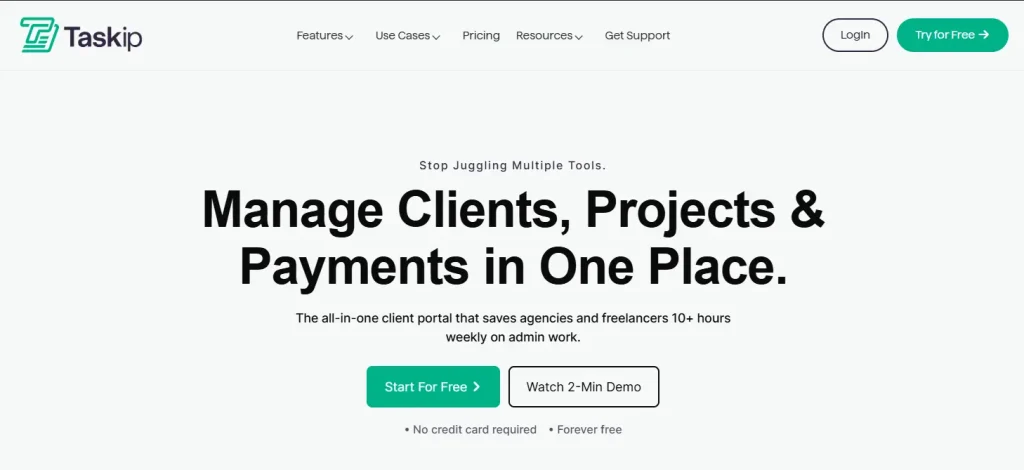
Taskip is an all-in-one client managemnet software that offers a well-organized system for businesses, agencies, and freelancers to streamline their projects. From lead generation to payment processing, you get all done in Taskip. Where Mavenlink only focuses on PSA, Taskip offers you both a CRM and PSA solution.
Moreover, as a Mavenlink competitor, it covers all the limitations that you are currently facing in Mavenlink. For instance, Taksip has clear pricing, a very simple interface, and requires no technical knowledge to operate the application, unlike Mavenlink.
Best Features of Taskip
- CRM + PSA Solution
Taskip is designed as a Client Relation Management (CRM) software, but it also has PSA features. In contrast, Mavelink or Kantata is only focused on PSA.
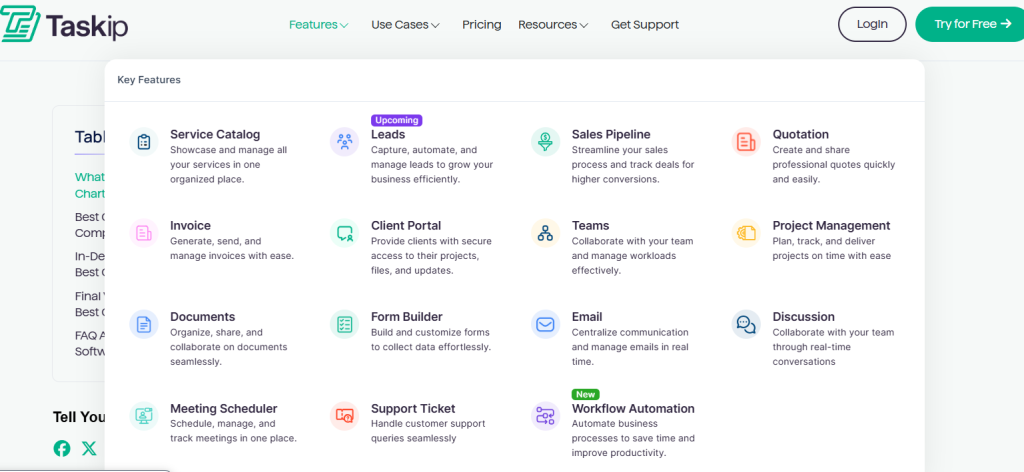
Image: Taskip features
With proper analysis of the Taskip features, you will get assurance that Taskip is an all-in-one platform.
| Taskip CRM Features | Taskip PSA Features |
| – Client portal – Sales pipeline – Lead capture – Meeting scheduling – Document sharing – Team collaboration – Support ticket – Email automation | – Service Catalog – Project Management – Gantt Chart – Form Builder – Workflow Automation – Task Management – Time Tracking – Proposal, Quotation & Invoicing |
- Service Catalog
Taskip has a service catalog feature to productize your services and offer clear and more organized pricing and packages to your customers. With this feature, you can showcase your products in an organized way so that clients can make a direct purchase. However, Mavenlink lacks this feature.

Image: Taskip service catalog
- Proposal, Quotation, & Invoicing
In Taskip, you will get proposal, quotation, and invoice creation features. It offers you customizable templates, which you can tailor to your branding and automate the proposal, quotation, and invoicing process.
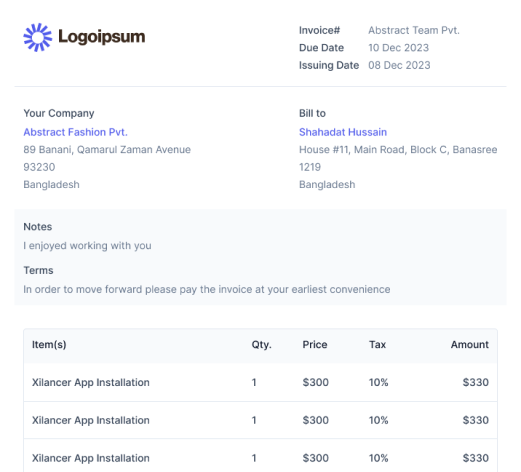
Image: Takip invoice creation with template
In contrast, Mavenlink or Kantata does not offer a traditional built‑in quotation & proposal module as part of its core PSA product. However, the invoicing or billing feature is supported by Mavenlink as its core feature.
- Lead Generation & Sales Pipeline
Taskip has a built-in lead generation feature. You can track from which platform you are getting most of the leads and convert them to sales accordingly by sending an email or scheduling a meeting. Besides, starting a new deal and tracking its progress is easy with the Taskip sales pipeline.
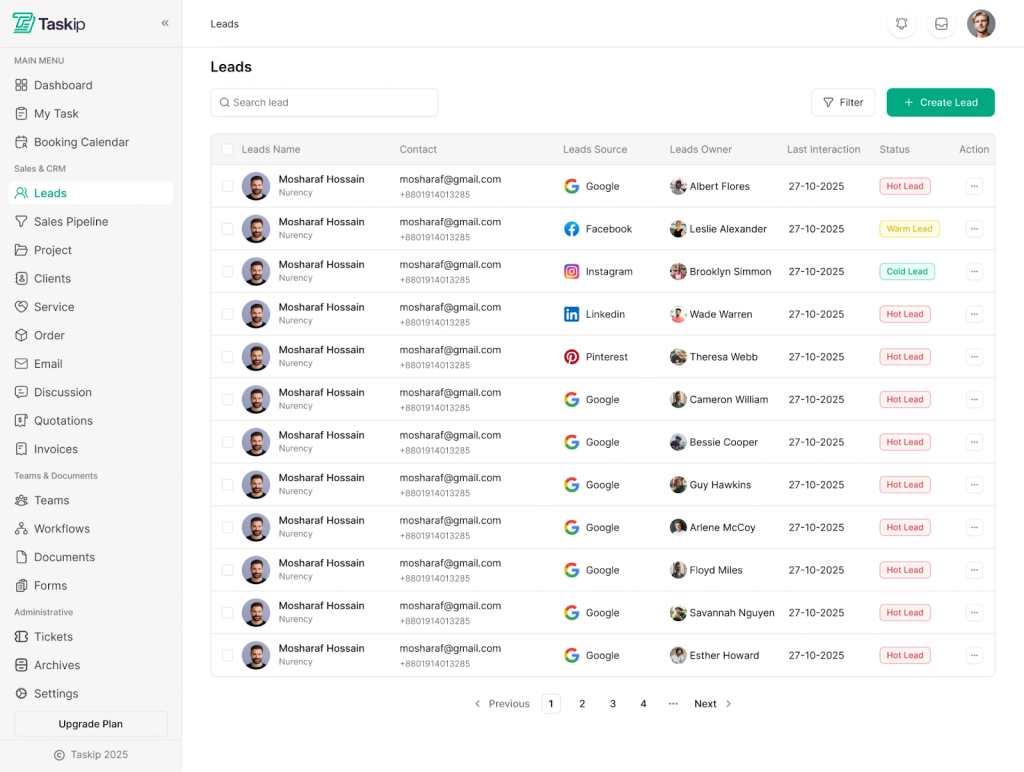
Image: Taskip Leads
In contrast, Mavenlink doesn’t have a built-in lead or sales pipeline feature. It depends on a CRM, such as Salesforce, for such features.
- Documentation
You can create and share documents with your teams and clients within the Taskip dashboard. Taskip also has e-signature features, with which you can get approval and send documents directly to the client with zero manual hassle. It supports PDF downloading and sharing; moreover, it allows you to publish documents to the web for global access.
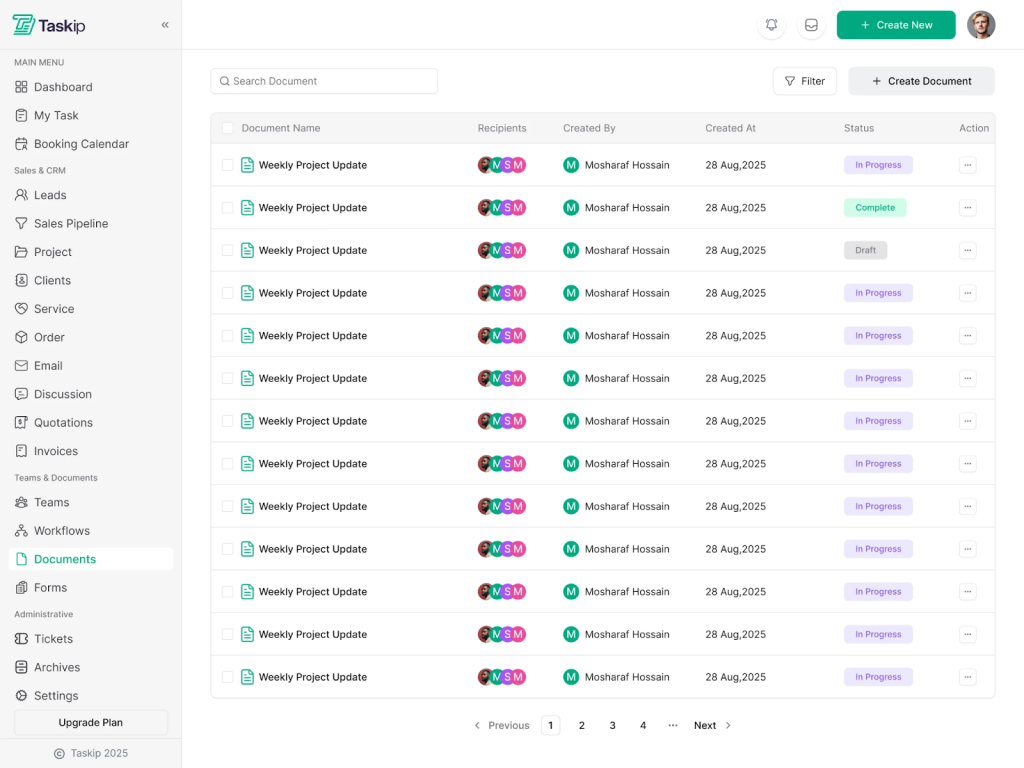
Image: Taskip Documentation
- Support Ticket
Taskip features a built-in ticket system where clients can submit a complaint or request help directly in the client portal. This makes the Taskip support system much stronger.
On the other hand, Taskip doesn’t have a built-in support ticket system. It requires integration from third-party tools like Zapier to offer such a feature.
Taskip Limitation
- Unlike Mavenlink, Taskip lacks advanced resource planning and forecasting
- Its PSA capabilities are more basic compared to Kantata’s enterprise‑focused automation.
Taskip Pricing
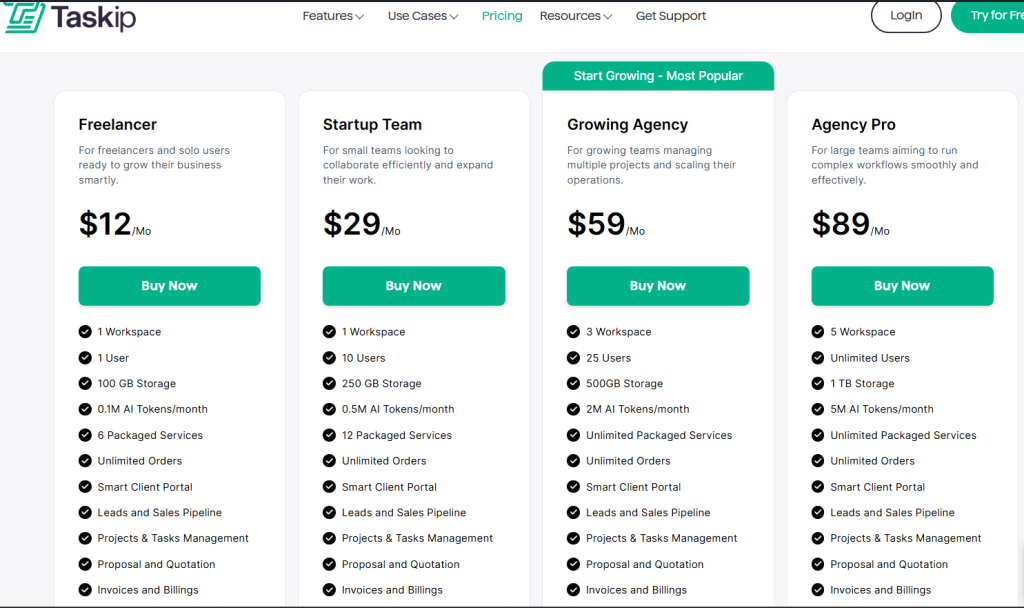
Source: Taskip Pricing
Ratings & Review
| Platform | Rating | User Feedback |
| G2 | 4.3/5 | “As a freelance web developer, my day used to be a constant juggle between deep coding sessions and urgent client updates. Taskip has been a game-changer, streamlining my entire workflow. Now, monitoring project progress is effortless, allowing me to focus on what I do best without missing a beat. It truly feels like I’ve gained an extra set of hands to manage the administrative side of my business!” SUBRATA S. |
| Trustpilot | 3.7/5 | “Fantastic, I’m using this software last 8 month and this is awesome. Specially its invoicing system and from builder. I also like Project Management part. I love this and thanks.” – Nurul Amin |
2. Scoro

Mavenlink alternative, Scoro is also a PSA software, which is designed to manage projects, resources, and finances in a single system. Here, you will get a complete project management solution from quote to cash.
The best feature of Scoro is that it has a built-in AI integration that understands natural language and interprets complex business data into simple language. Thus, you can make data-driven decisions faster.
Best Features Of Scoro
- Project management
- Quotation and budgeting
- Sales and CRM
- Resourcing and capacity
- Reporting and dashboard
- Quotation and budgeting
- Time tracking
- Cost management
- Invoicing
- Collaboration
- AI insights
Scoro Limitation
The limitations of Scoro are as follows:
- No built-in form builder
- The mobile version lacks the desktop version’s features
- No built-in e-signature
Scoro Pricing
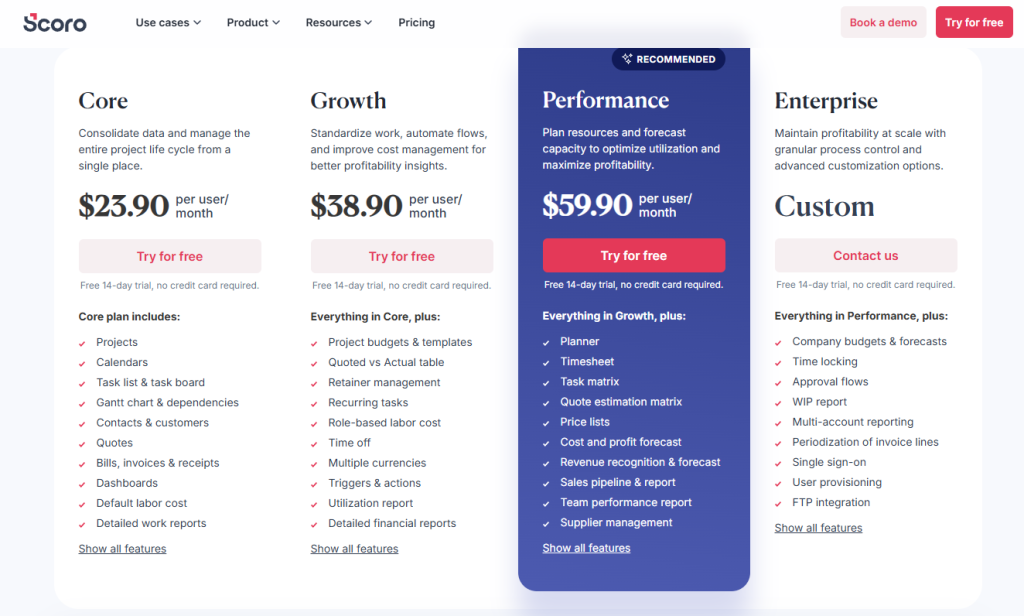
Source: Scoro Pricing
Ratings & Reviews
| Platform | Rating | User Feedback |
| G2 | 4.6/5 | “A few new things I’ve come to appreciate about Scoro are its continuous interface improvements, enhanced automation tools, and growing integration ecosystem. The updated UI feels cleaner and more intuitive, making it easier to navigate between projects, finances, and tasks. I’ve also found the expanded automation rules incredibly helpful—they reduce repetitive admin work by automating status updates, notifications, and data syncing. Finally, the increasing number of native integrations, especially with accounting and productivity tools, has made Scoro even more central to our workflow. These updates show that the platform is evolving in ways that genuinely improve day-to-day efficiency.” – Rebecca B. |
| Trustpilot | 3.3/5 | “One of the best products out there for everything a basic company needs. Calendar, task list, dashboards, reports, quoting and budgeting, billing, and so on. Very customizable. Also, they have a very good customer service.” – L P |
3. Accelo
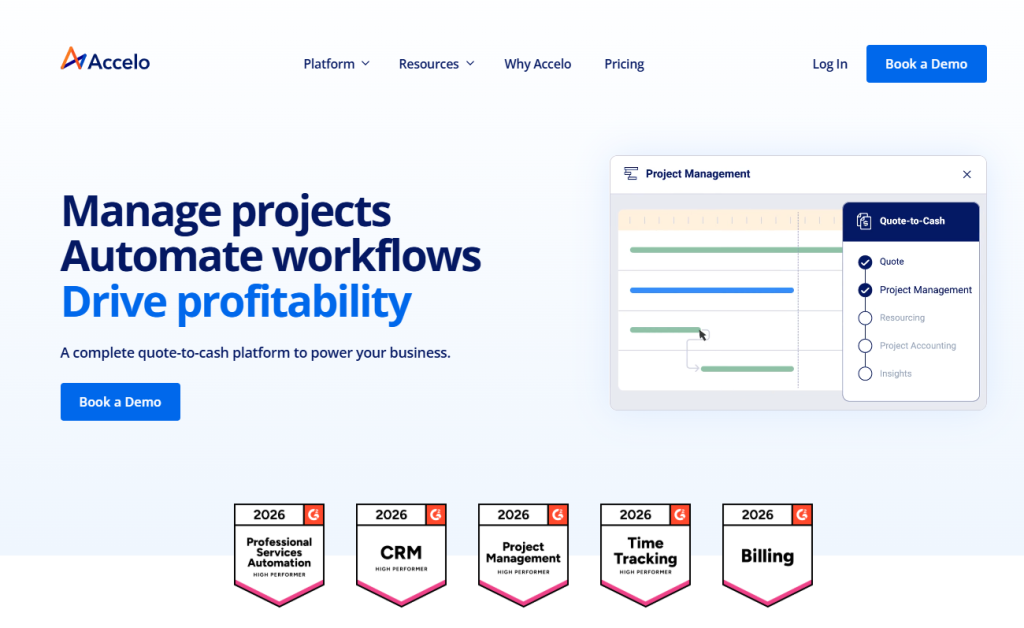
Accelo is a complete quote-to-cash platform to power your business. It covers client, project, resource, and finance management solutions under a single dashboard.
As a better Mavenlink alternative, Accelo has an intuitive and easier onboarding process compared to Mavenlink. Moreover, both platforms are PSA focussed, but Accelo has a built-in CRM that Mavenlink lacks.
Best Features Of Accelo
- Manage clients
- Tracking projects, tasks, time, and expenses
- 360-degree view of client updates
- Advanced scheduling
- Resource management
- Optimize invoicing, billing, retainers, and payment processing
- Powerful analytics for business insights
- Extended integration
Accelo Limitation
- Hidden pricing
- No built-in service catalog
- Steep learning curve
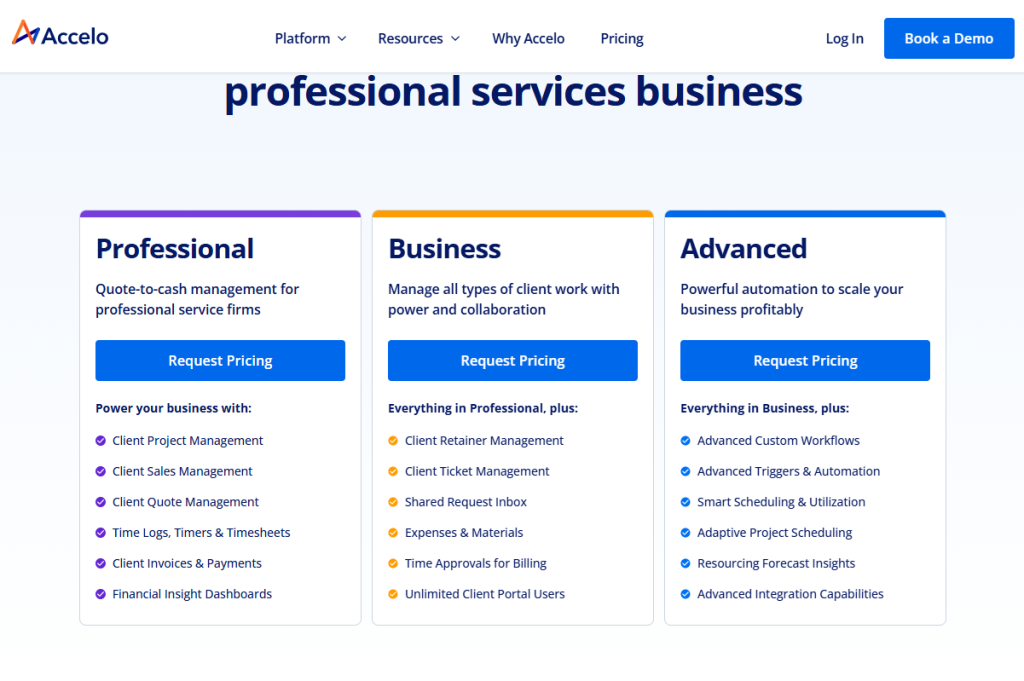
Accelo Pricing
The pricing of Accelo plans is not publicly mentioned on its website; you need torequest a price for your desired plan.
Ratings & Reviews
| Platform | Rating | User Feedback |
| G2 | 4.4/5 | “Being able to assign clients their own job boards, tasks with assignees, communication features in general stream, task streams, checklists per task as well as being able to track time per task – along with lists that are customizable to track everything literally. It’s ALL here and it’s quite useful. We used it extensively as our job management system and ticket system for various products for over 3 years.” – Curran M. |
| Trustpilot | 2.9/5 | “Accelo simplified everything for our agency – since getting started, we’ve never looked back. It streamlines so much for our team, and gives us the insight we need to make good decisions.” – Ryan Draving |
4. Bitrix24
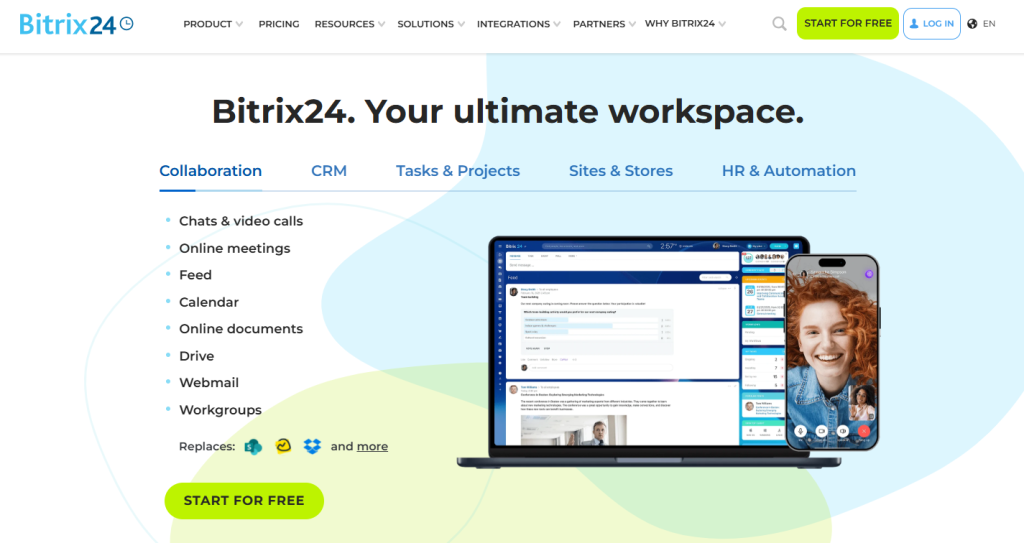
Bitrix24 offers you a full set of task and project management tools. Thus, you can replace a multitude of services and apps with a single online workspace.
Apart from just managing tasks and clients, Bitrix24 has a website builder. So, you can create a website, sell products, manage customers, and process payments – all with this software.
However, its best feature is the free AI assistant, Copilot. You can get this AI integration in your Bitrix24 CRM, chats, video calls, tasks, feeds, sites, and stores.
Best Features Of Bitrix24
- Sales management and team collaboration
- Marketing campaign with email, SMS, and social media ads
- E-signature, invoices, and payments
- Website builder (Templates, free CMS, AI-generated image and text)
- Integrated AI assistant: Copilot
- Online document and file storage
Bitrix24 Limitation
- Has steep learning curve
- No unified client portal
- PSA capabilities are very basic
- No strong native e‑signature capability
Bitrix24 Pricing
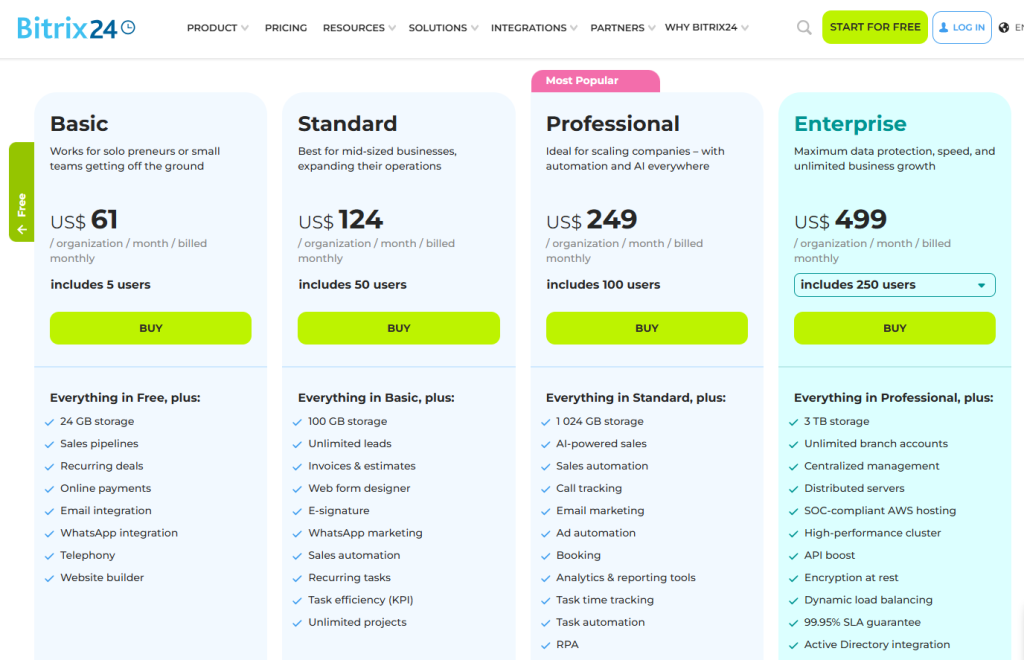
Source: Bitrix24 pricing
Ratings & Reviews
| Platform | Rating | User Feedback |
| G2 | 4.1/5 | “Everything I need is conveniently located in one place—CRM, tasks, chats, calls, and files are all accessible from a single platform. I no longer have to switch between different apps, which makes my work both faster and more organized. Additionally, the free plan offers a wide range of tools.” Adil K. |
| Trustpilot | 2.3/5 | “The most affordable feature-rich collaboration tool around. Everything in one place, from CRM, communication, project management, website builder, document management, and so much more. And if it’s not there, you can use the API to develop it.”Philip Pretorius |
5. Productive.io
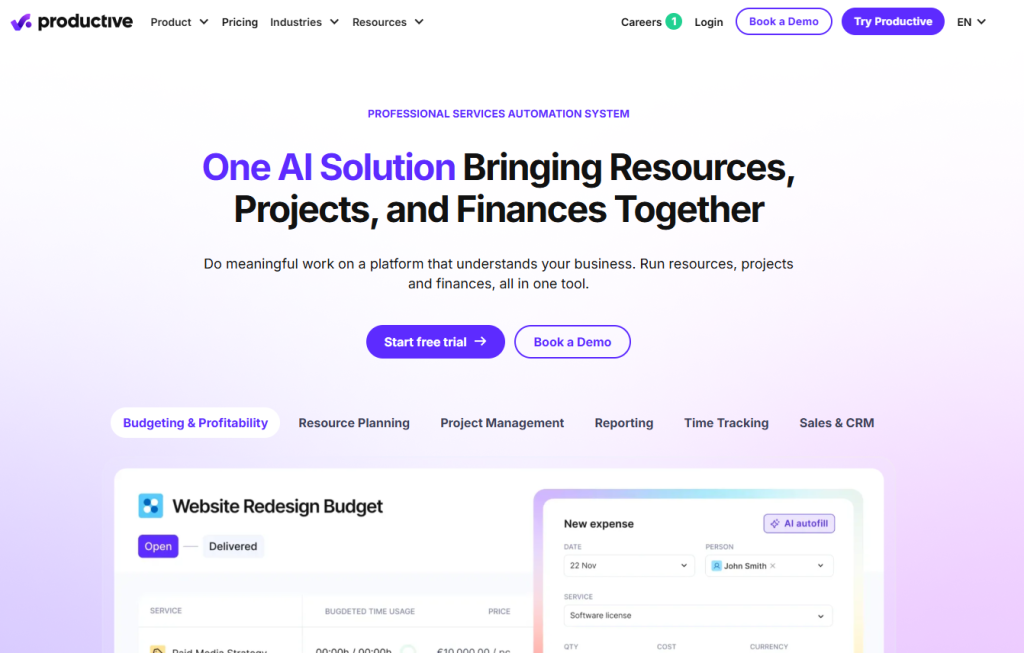
Productive.io is a popular client management platform that is designed to boost productivity many times. With the AI integration feature, you can ask AI to build reports from scratch with insights on costs, revenue, and margins. Such automation makes your day-to-day tasks easier.
And the best part of Productive.io is its super-fast custom support; it has an average response time of just 3 minutes and 16 seconds!
Best Features Of Productive.io
- Resource planning
- Time tracking
- Project management
- Gantt charts
- Budgeting and profitability
- Revenue recognition
- Invoicing
- Forecasting
- Automations & AI
Productive.io Limitation
- No service catalog
- No order & customized intake forms
- Slow customer support
Productive.io Pricing
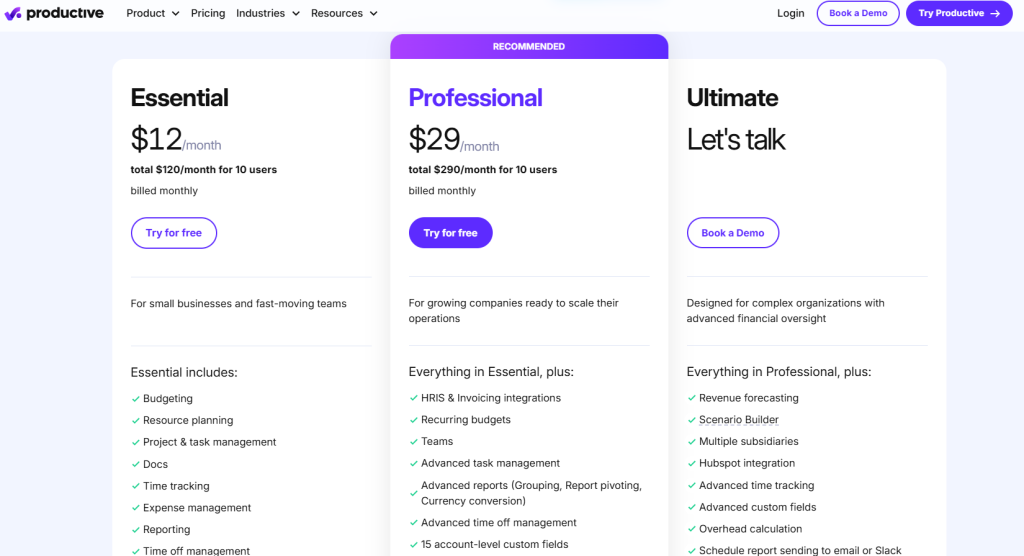
Source: Productive.io pricing
Ratings & Reviews
| Platform | Rating | User Feedback |
| G2 | 4.7/5 | “I really appreciate the breadth of features that ClickUp offers, which helps me manage short-term tasks throughout the week and more complex, months-long projects. It makes collaboration and communication with other team members seamless, which takes the clutter and chaos out of projects. I appreciate being able to keep track of what tasks I’m responsible for and their urgency easily, making my daily workflow simple.” –Shannon W. |
| Trustpilot | 3.6/5 | “ClickUp keeps my projects dancing! It’s fast, flexible, and helps me turn chaos into clarity. Less stress, more productivity – love it!” –Stanislav Lunák |
6. Wrike
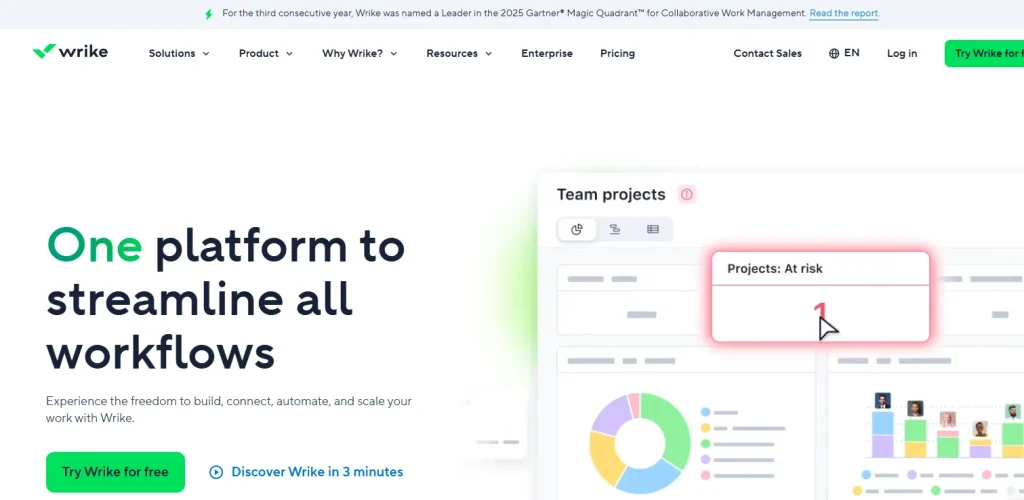
Wrike gives you work management built for organisations where requests come in from every direction. You can set up custom request forms so that marketing, legal, and operations all submit work the same way, and it lands in the right queue automatically.
What sets it apart from most Mavenlink alternatives is the approval and proofing layer. You can mark up creative files directly, route them through multi-stage approvals, and keep every version tied to the original task.
However, Wrike is work management rather than professional services automation. There is no CRM and no sales pipeline, so if you picked Mavenlink to connect deals to delivery, you will need a second tool alongside it.
Best Features Of Wrike
- Custom request forms and automated intake routing
- Multi-stage approvals with visual proofing and file versioning
- Unlimited spaces for separate offices or business units with shared templates
- Gantt charts, workload view, and time tracking
- Dashboards and custom reporting
- 400+ integrations including HubSpot, Teams and Salesforce
- Wrike AI agents for task generation and summaries
Wrike Limitation
- No CRM or sales pipeline
- Interface slows down on very large projects
- Reporting is less flexible than dedicated PSA tools
- Steep learning curve compared to simpler tools
- Published plans are billed annually only, with no monthly rate
- Team plan caps at 15 users, forcing an early jump to Business at $25
Wrike Pricing
Ratings & Reviews
| Platform | Rating | User Feedback |
| G2 | 4.2/5 (4,538 reviews) | “The best feature of Wrike is that we can create unlimited spaces for different offices/HQs, and all teams can still work together using the same blueprints/templates. On top of that, you can add many collaborators to your workspace while keeping their access limited, which helps extend the software’s reach without losing control.” Akshay S., Project Manager, Mid-Market, June 2026 |
| Trustpilot | 3.3/5 (219 reviews) | “Wrike has helped us go from multiple forms of project management to one source of truth. Our experience has helped us to keep a near real time updates and progress of all our project portfolio, from simple to very complex projects.” Kevin Thalacker, June 2025 |
7. ClickUp
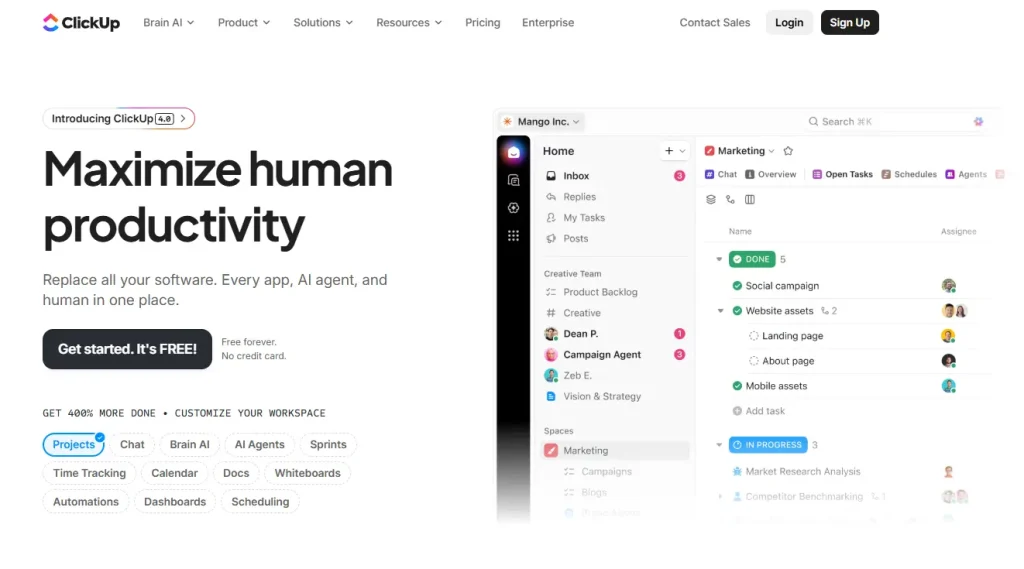
ClickUp packs more features per dollar than anything else on this list. You get tasks, docs, goals, whiteboards, time tracking, and dashboards on a single plan, which means you can retire several smaller subscriptions at once.
The view flexibility is what most teams notice first. You can switch the same set of tasks between List, Board, Calendar, Gantt and Table without rebuilding anything, so different people on the same project can work the way they prefer.
Keep in mind that ClickUp is not a PSA platform. There is no invoicing, no CRM and no true client portal, so it fits teams that used Mavenlink mainly for project tracking rather than billing. Teams shopping for Mavenlink replacements often review ClickUp pricing for budget benchmarking. Lark delivers an all‑in‑one workspace combining messaging, collaborative docs, and project workflows for cross‑functional teams.
Best Features Of ClickUp
- Tasks, docs, goals, whiteboards and chat in one workspace
- Multiple views on the same data: List, Board, Calendar, Gantt, Table
- Custom fields, custom statuses and automation recipes
- Native time tracking with billable flags
- Dashboards with 50+ widget types
- ClickUp Brain AI for summaries, task generation, and search
- The most generous free plan of any Mavenlink alternative
ClickUp Limitation
- No invoicing or billing
- No CRM or sales pipeline
- Guest access only, with no dedicated client portal
- Performance slows on large workspaces and complex dashboards
- Setup is time-consuming, and the volume of settings creates its own learning curve
- AI features are priced as separate add-ons
ClickUp Pricing
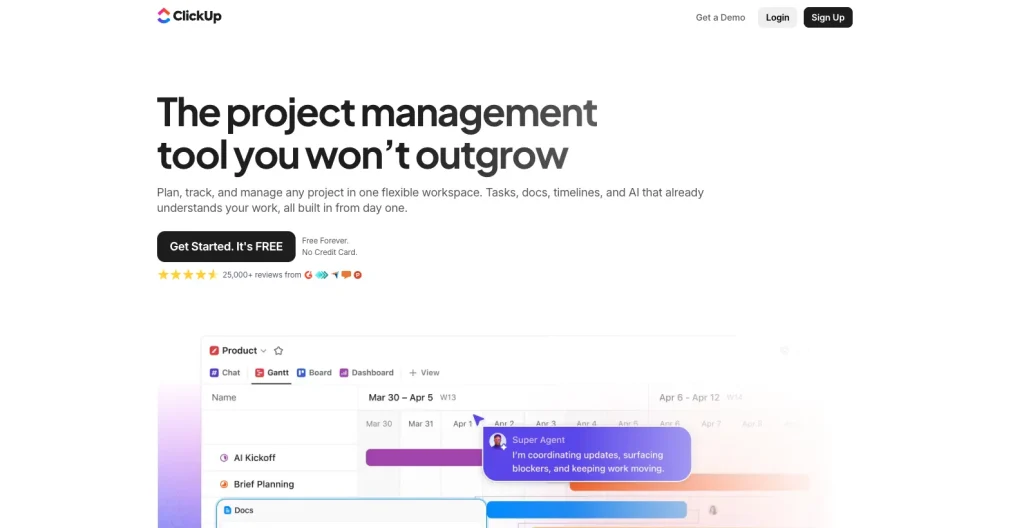
AI add-ons priced separately: Brain AI at $9 per user/month, Everything AI at $28 per user/month. Source: ClickUp pricing
Ratings & Reviews
| Platform | Rating | User Feedback |
| G2 | 4.6/5 (14,279 reviews) | “What I like best about ClickUp is its flexible, all-in-one approach. It replaces multiple tools by combining task management, docs, goals, and time tracking in a single platform, which simplifies my workflow. Customization is a major strength, custom fields, statuses, and automations allow me to design workflows exactly how I need them.” Shivam G., Fullstack Developer, Small-Business, May 2026 |
| Trustpilot | 4.2/5 (697 reviews) | “ClickUp has made things so much easier for our business and continues to do so with their new features and integrations!” Martin Hiriart, September 2026 |
8. Runn
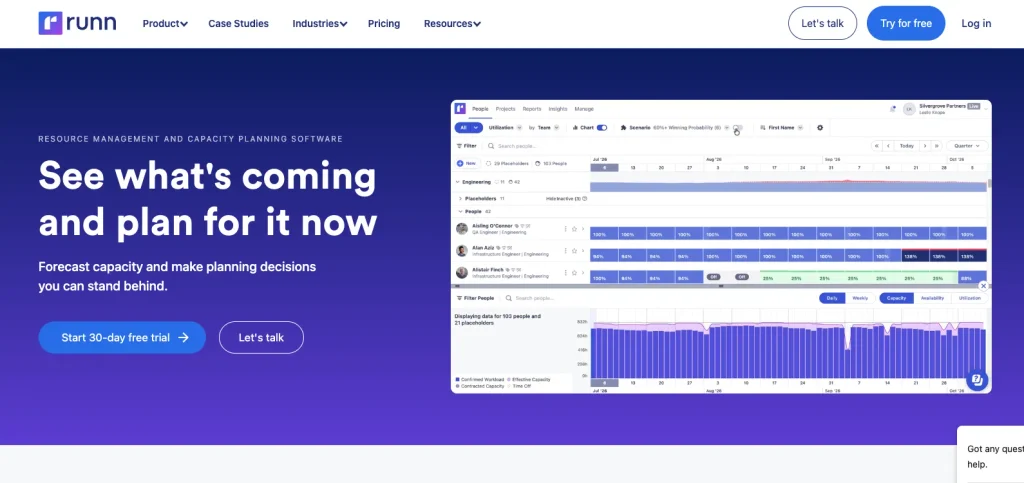
Runn does one job and does it properly: it shows you who is available, when, and what that means for your project margins. If resource planning was the reason you bought Mavenlink, this is the most focused replacement you will find.
You plan people against projects first and let the tasks follow, which is the opposite of how most project tools work. That makes capacity gaps and overbookings visible weeks ahead instead of after they have already caused a problem.
It is worth noting that Runn stops at planning. There is no invoicing and no CRM, so you will pair it with a billing tool rather than replacing your whole stack with it.
Best Features Of Runn
- Capacity planning across your whole team on one timeline
- Project forecasting with scenario planning
- Utilisation and billable rate tracking
- Timesheets that feed back into the forecast
- Placeholder roles for work you have not staffed yet
- Charts for capacity, workload and project financials
- 30-day free trial, the longest in this comparison
Runn Limitation
- Minimum of 20 resource seats, so small teams pay for capacity they do not use
- No invoicing or billing
- No CRM or sales pipeline
- Reporting options are limited, though data exports cleanly
- Permission and security profiles are less flexible than enterprise tools expect
Very small review base compared to established platforms
Runn Pricing
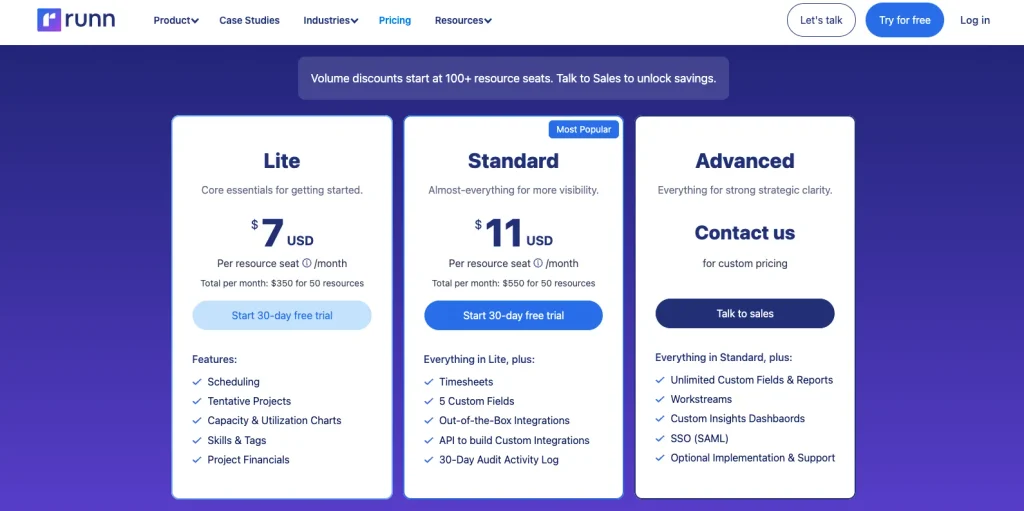
30-day free trial. Source: Runn pricing
Ratings & Reviews
Runn has no Trustpilot page and only one review on G2, so Capterra is the meaningful source here.
| Platform | Rating | User Feedback |
| Capterra | 4.8/5 (33 reviews) | “It’s really simple to set up and we can quickly see the value it will bring to have visibility of our teams capacity and will enable us to schedule work efficiently. The views are easy to adapt too. It allows our team to see how their time is being planned. The customer support team is responsive and helpful.” Kim S., Head of Operations, Marketing and Advertising, March 2026 |
| Capterra | 4.8/5 (33 reviews) | “While I would like better reporting, they make it easy to export data and when I have a unique reporting need I can move the data to a spreadsheet. Therefore, the biggest area of improvement I see for Runn would be more security profiles.” Joyce K., Business Manager, Management Consulting, January 2024 |
9. Rocketlane

Rocketlane is built for one specific kind of professional services work: onboarding and implementation projects that your client actually participates in. If your delivery model is getting customers live on your product, it fits better than any general PSA tool.
The client portal is the difference. Your customer gets their own view with their tasks, their deadlines, and automated reminders, so you stop chasing people over email for the documents you need.
You also get resourcing, time tracking, and financial management, so it covers the PSA basics rather than only the customer-facing layer.
Best Features Of Rocketlane
- Purpose-built client portal with customer task assignment
- Project templates and playbooks for repeatable onboarding
- Automated client reminders and nudges
- Resourcing and staffing with utilisation tracking
- Time tracking and financial management
- Real-time reporting for services leaders
- Slack, CRM and product integrations
Rocketlane Limitation
- Highest entry price in this comparison at $49 per member per month
- Five-member minimum, so roughly $245 per month to start
- Custom reporting is limited and hard to format for sharing
- Newer software, so occasional glitches with field sorting and integration delays
- The volume of customisation creates a learning curve of several weeks
- Narrow fit if your projects are not client onboarding
Rocketlane Pricing
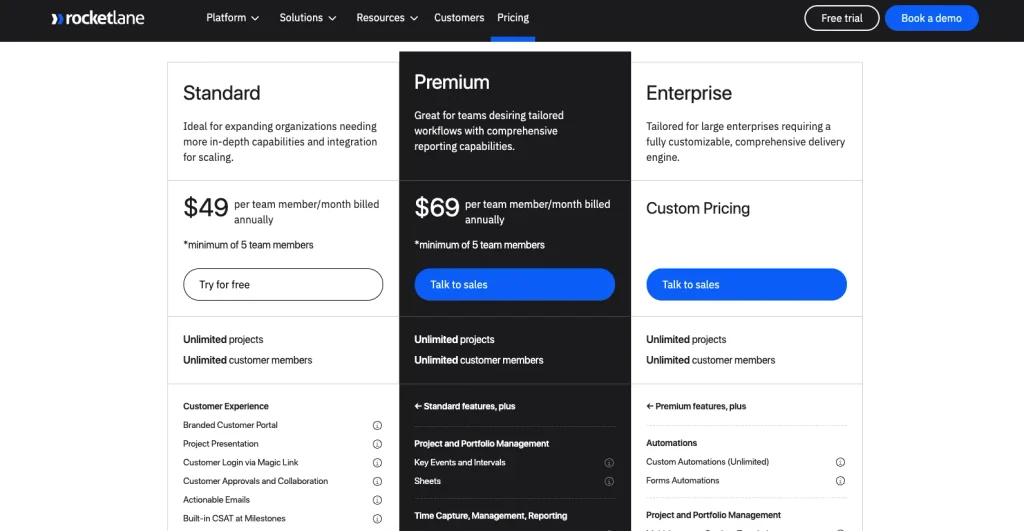
AI Fills add-on at $29 per user/month. 14-day free trial. Source: Rocketlane pricing
Ratings & Reviews
| Platform | Rating | User Feedback |
| G2 | 4.7/5 (871 reviews) | “It’s a true end-to-end PSA tool that provides real-time reporting for PS leaders to run their business, while also being highly customizable to fit their specific business needs. Rocketlane is leading the way in automation and the use of AI to differentiate their product from competitors.” Kristen R., Sr. Manager Professional Services Operations & Strategy, Mid-Market, April 2026 |
| G2 | 4.7/5 (871 reviews) | “Having one platform for both our internal team and our clients has been huge. Clients are automatically reminded about their tasks, which has helped us streamline delivery without having to chase people down manually.” Janae H., Project Manager, Small-Business, April 2026 |
10. Smartsheet
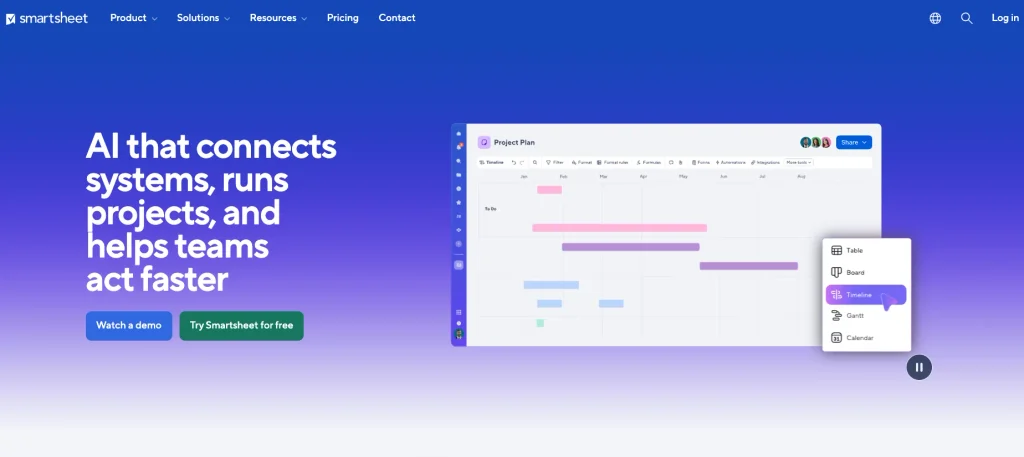
Smartsheet works the way a spreadsheet works, which is exactly why teams that resisted Mavenlink often take to it straight away. Your finance and operations people can start on day one without training, because rows and columns are already familiar.
Underneath the grid, you get automation, approval workflows, dashboards, and forms, so it scales well past what a spreadsheet can handle while still looking like one.
Bear in mind that resource management comes as a separate product rather than a built-in module, so your real cost climbs once you need capacity planning.
Best Features Of Smartsheet
- Spreadsheet-style grid with Gantt, card and calendar views
- Automation for approvals, reminders and status updates
- Forms for structured data collection
- Dashboards and portfolio reporting
- AI tools for building dashboards and reports
- Enterprise governance, permissions and audit controls
- The largest review base of any tool in this comparison
Smartsheet Limitation
- Pro plan caps at 10 members, forcing an upgrade as you grow
- Resource management is a separate paid product, not a core module
- No CRM, sales pipeline, or invoicing on the core platform
- Advanced features sit behind higher-priced enterprise plans and paid add-ons
- Advanced functionality becomes complex and less intuitive for new users
- Costs add up quickly once add-ons are included
Smartsheet Pricing
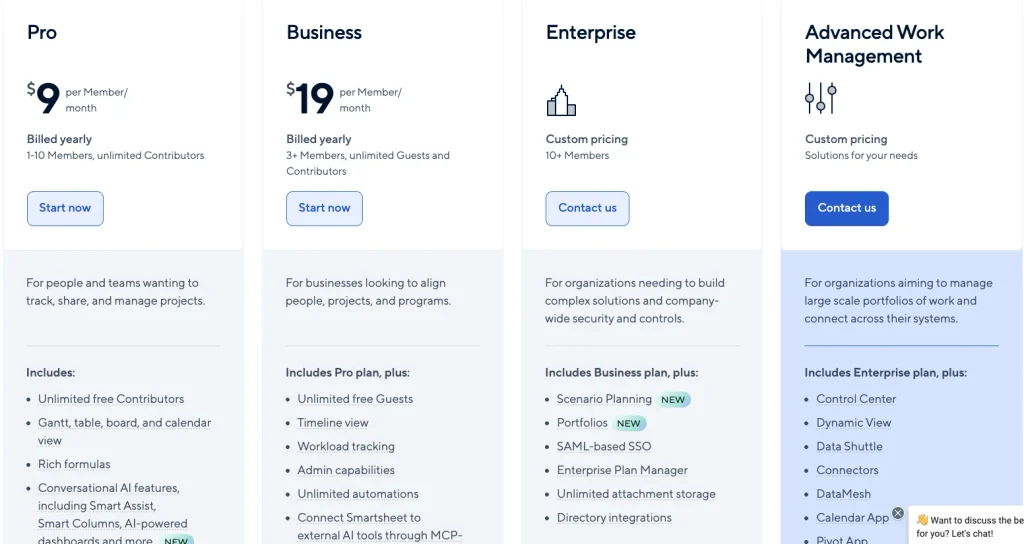
No free plan. Source: Smartsheet pricing
Ratings & Reviews
| Platform | Rating | User Feedback |
| G2 | 4.4/5 (22,745 reviews) | “The time saved with automations and transparency of information across multiple teams. The introduction of the AI tool saved me and my team even more time when creating dashboards, graphs, reporting in general.” Audrey T., Operations Coordinator, Mid-Market, March 2025 |
| Capterra | 4.5/5 (3,548 reviews) | “Smartsheet allows multiple team members to collaborate with ease but I also like that I can set up automations allowing me to manage tasks more efficiently. Their customer support is also good and whenever I’ve had questions I am able to speak to a human being quickly.” Pupp R., Owner, Events Services, July 2026 |
Other Mavenlink Alternatives Worth Considering
Other Mavenlink alternatives or Kantata alternatives to consider include:
- ProofHub: Flat-fee pricing with unlimited users, which suits teams that grew past per-seat economics.
- Celoxis: Project portfolio management for organisations running many concurrent projects.
- Hub Planner: Organisation-wide resource pools. Note that hubplanner.com now redirects to Milient Software, where it is offered as Resource Flow.
- Avaza: Strong on recurring invoicing, recurring expenses, and credit notes.
- Parallax: Forecasting and analytics for software services firms.
- Ravetree: Client portals for agencies.
- Hive: Collaboration-first project management.
- Dayshape: AI-driven scheduling for large accounting and audit firms.
- monday.com: General work management with a large template library.
- Screendragon: Workflow automation for marketing operations.
Features to Consider For Picking The Best Mavenlink Alternatives
Before you choose the best Kantata or Mavenlink alternative, here are the features you must ensure to cover:
- CRM Capabilities: The Mavenlink alternative you choose must have CRM features like lead capture, sales pipeline, sales reporting, and automated follow-ups & reminders.
- Professional Services Automation (PSA): As Mavenlink is a PSA software, the alternative you choose must have a robust PSA system. For instance, it should support project/task management, time and expense tracking, billing, invoicing, etc.
- Workflow Automation: Automating repetitive tasks reduces manual labour and boosts your productivity many times. So, the Mavenlink alternative you pick should have workflow automation features. Such as: automating triggers/actions (status changes, notifications), time entry reminders, etc.
Quoting, Proposals & Contracting: Proposal builder & templates, quote creation & versioning bring sales and delivery closer together. Give preference to these features. - Transparent Pricing: Mavenlink doesn’t offer clear pricing on its website. You must look for a better option that has transparent pricing to ensure you are getting your services at a justified value.
- Extended Integration: Third-party integration widens your platform’s capabilities beyond its native features. This allows you to connect sales, finance, support, HR, and collaboration tools into one seamless workflow. For instance, Taskip supports 100+ third-party integrations.
- Essential Features: Apart from the above core features, here are some crucial features that you must consider while picking a better Mavenlink alternative; these are as follows:
- E-signature
- Service catalog
- Multi-currency support
- Built-in client portal
- Whitelabeling: Custom domain, email, logos & colors
- Payment gateway integration
How to Migrate From Mavenlink (Kantata) to a New Platform?
Most teams can complete a Kantata migration in three to four weeks. Start by auditing what needs to move, closing open financial items, reviewing integrations and custom fields, and checking your contract renewal date. Clients, projects, tasks, team members, and time entries usually migrate easily, while invoices, historical rate cards, attachments, reports, and approval history often require extra work.
A practical four-week plan is:
- Week 1: Audit data, choose a history cutoff, and assign owners.
- Week 2: Export data and map old fields to the new platform.
- Week 3: Run both systems in parallel for one billing cycle and compare invoices.
- Week 4: Cut over at the start of a billing period and train users on daily workflows.
Involve delivery, finance, and IT from the start. Delivery owns project history, finance validates financial data and billing, and IT handles integrations and SSO.
Best Mavenlink Alternative by Use Case
Best Mavenlink alternative for agencies
Productive.io is a strong fit for agencies that need margin, utilisation, forecasting, and resource planning in one system. It starts at $9 per user per month when billed annually and is rated 4.6 out of 5 on both G2 and Capterra. Pick: Productive.io.
Best Mavenlink alternative for consulting firms
Scoro connects quoting, project delivery, time tracking, and invoicing, making it suitable for consultancies that want a connected quote-to-cash workflow. Plans start at $17 per user per month with a five-user minimum, and it has a 4.5 out of 5 G2 rating from 503 reviews. Pick: Scoro.
Best Mavenlink alternative for small teams
Taskip combines CRM and project management at $12 per month, with no minimum seat requirement or sales call required to get started. Its lower entry cost makes it a practical option for smaller teams that may not need the breadth of Kantata. Pick: Taskip.
Best Mavenlink alternative for resource planning
Runn focuses on capacity planning, resource allocation, and project forecasting, making these capabilities central rather than secondary features. It starts at $7 per resource seat per month with a 20-seat minimum, although you will need a separate billing tool because Runn does not handle invoicing. Pick: Runn.
Best free Mavenlink alternative
ClickUp offers a Free Forever plan with unlimited members and tasks, while Bitrix24 adds CRM capabilities and Wrike provides another free option with more limitations. None is a full PSA replacement with built-in invoicing, so pick ClickUp for the broadest free starting point.
Best Mavenlink alternative with a client portal
Rocketlane’s client portal is designed for customer participation in onboarding and implementation projects, rather than simply providing project visibility. It starts at $49 per team member per month when billed annually, with a five-member minimum, and has a 4.7 out of 5 rating from 870 G2 reviews. Pick: Rocketlane.
Why Is Taskip a Better Mavenlink Alternative: Taskip Vs. Mavenlink
If you are looking for an all-in-one solution that will help you capture leads, sell products, manage clients, track project progress, and complete payments, Taskip is the best platform.
However, Mavenlink focuses only on automating the service process that deals with billing, finances, project management, and collaboration. It is designed to provide enterprise‑grade PSA with deep resource and portfolio planning.
Therefore, if you want a simple and straightforward centralized solution, Taksip is best, and for advanced financial forecasting and utilization analytics, Mavenlink excels.
| Sl. | Criteria | Taskip | Mavenlink (Kantata) | Winner |
| 1 | Core Features | It is a CRM (Customer Relationship Management) system, but it also covers PSA features. | Mavenlink is a Professional Services Automation (PSA); it integrates with CRM systems like Salesforce. | Taskip |
| 2 | Pricing | Transparent pricing | Hidden price | Taskip |
| 3 | Learning Curve | Easy to use; very simple interface | Steep learning curve | Taskip |
| 4 | Client Portal | Built‑in client portal with access to projects, files, proposals, and invoices. | Limited client access; no fully native client portal. | Taskip |
| 5 | Advanced Resource Planning & Forecasting | Basic task assignments only | Enterprise resource planning, utilization, forecasting | Mavenlink |
| 6 | Financial Forecasting & Reporting | Basic invoicing & project financials | Budgeting, revenue recognition, and margin forecasting | Mavenlink |
| 7 | Service Catalog / Productized Services | Yes | No native feature | Taskip |
| 8 | Proposal & Quoting | Built-in proposals & quotes | Not native; requires CRM/CPQ integration | Taskip |
| 9 | E-sginature | Yes | No | Taskip |
| 10 | Best Fit Use Case | Great for agencies, SMBs, and service teams needing CRM + PSA in one platform. | Best for mid‑to‑large enterprises needing deep PSA, resource planning, and forecasting. | Tie |
Final Verdict: Which Mavenlink Alternative Should You Choose?
There is no single best Mavenlink alternative, because the teams leaving Kantata are leaving for different reasons. Match your reason to the column below.
| If you left Kantata because… | Choose | Starting price |
| You wanted CRM and PSA together without a second subscription | Taskip | $12/mo |
| It cost too much for your team size | ClickUp | $7/user/mo annually |
| Only the resource forecasting mattered to you | Runn | $7/seat/mo, 20 seat min |
| You needed agency margin and utilisation reporting | Productive.io | $9/user/mo annually |
| You wanted the same breadth at a published price | Scoro | $17/user/mo, 5 user min |
| The learning curve was the dealbreaker | Smartsheet | $9/member/mo annually |
| Your clients need to see the project | Rocketlane | $49/member/mo annually |
If you are still unsure, start with the seat count. Below 20 people, Kantata’s depth is very hard to justify against a published-price alternative. Above 100 people with dedicated operations staff, Kantata may well still be the right answer, and this article has done its job by helping you confirm that.
Frequently Asked Questions About Mavenlink Alternatives
What are the best alternatives to Mavenlink?
The main Mavenlink alternatives are Taskip, Scoro, Productive.io, Accelo, Bitrix24, Wrike, ClickUp, Runn, Rocketlane, and Smartsheet. Taskip suits teams that want CRM and PSA capabilities together from $12 per month, while Scoro offers a broader quote-to-cash workflow at a published starting price of $17 per user per month.
Is Mavenlink the same as Kantata?
Yes. Mavenlink merged with Kimble Applications in December 2021, and the combined company became Kantata. The former Mavenlink platform is now Kantata OX, while Kimble’s Salesforce-native platform became Kantata SX.
What is the new name for Mavenlink?
Mavenlink is now called Kantata, and its former platform is called Kantata OX. The merger with Kimble Applications closed on December 15, 2021, and the combined company officially launched as Kantata on May 16, 2022.
When did Mavenlink become Kantata?
Mavenlink became part of Kantata when the merger with Kimble Applications closed in December 2021, while the Kantata brand officially launched in May 2022. The former Mavenlink product became Kantata OX, and Kimble’s Salesforce-native product became Kantata SX.
Why did Mavenlink change its name to Kantata?
Mavenlink changed its name as part of its merger with Kimble Applications, creating a new combined company and product portfolio under the Kantata brand. The two products continued as distinct platforms, Kantata OX and Kantata SX.
What is the difference between Kantata OX and Kantata SX?
Kantata OX is the former Mavenlink platform and uses an open infrastructure, while Kantata SX is the former Kimble platform and is Salesforce-native. In practice, OX is the standalone option, while SX is designed for organizations already operating heavily within Salesforce.
What is Mavenlink used for?
Mavenlink, now Kantata OX, is professional services automation software used for project management, resource planning, financial management, time and expense tracking, and business intelligence. It is designed for professional services organizations that need to connect project delivery with financial and resource management.
How much does Mavenlink cost?
Kantata does not publish standard pricing on its website. Buyers are directed to request a personalized demo, so the final cost depends on the product, organization, configuration, and commercial terms.
Does Kantata offer a free trial?
Kantata’s current website promotes personalized demos rather than a self-serve free trial. Buyers can request a demo to evaluate the platform, but Kantata does not advertise a standard self-serve trial period on its current site.
Is there a free Mavenlink alternative?
Yes. ClickUp, Bitrix24, and Wrike all offer free plans, although their free tiers differ in features and limitations. ClickUp is geared toward general project management, while Bitrix24 adds CRM, so neither should be treated as a complete replacement for Kantata’s PSA capabilities.
Can I export my data out of Kantata?
Yes. Kantata OX provides account administrators with data-export tools and an API, and its current documentation supports exporting specific datasets with selectable columns. Project information can be exported as CSV or XLSX, including project details, budgets, time, expenses, invoicing totals, and custom fields.
How long does it take to switch from Kantata to another platform?
A three- to four-week migration is a practical planning window for teams with manageable data and integrations. Use week one for auditing, week two for exporting and field mapping, week three for a parallel billing-cycle test, and week four for cutover and training.
What is the best Mavenlink alternative for small teams?
Taskip is a lower-cost option for small teams that want CRM and PSA capabilities together, starting at $12 per month without a minimum seat requirement. ClickUp can be cheaper if you mainly need project management, while tools such as Runn and Rocketlane have minimum-seat requirements that can increase the entry cost.