
Simple & Affordable CRM Software for Small Business (2026 Update)
What if affordable CRM software for small businesses could increase your sales by 29%? For small businesses, that’s exactly what simple CRM software for small business can do.
The challenge? Deciding which of the many CRM options is the right CRM for your small business. Do you prioritize simple CRM solutions, affordable CRM platforms, or CRM software packed with automation? To make the right choice, it’s important to understand what features truly matter. This guide on must-have CRM features for client onboarding breaks down exactly what to look for especially if you’re aiming for a smooth, scalable client experience from day one.
Consider this your shortcut to clarity. We’re putting the spotlight on some of the top CRM software for small businesses, including Taskip, HubSpot, Zoho, and Salesforce. We’ll break down what makes each a strong contender and offer a straightforward comparison to guide you to the CRM solution that will truly drive your business forward. But before diving in, it’s essential to understand why small businesses need CRM in the first place, so you can make an informed, strategic choice.

Why Small Businesses Choose CRM: Real Use Cases
Small businesses often face a common set of challenges limited manpower, chaotic client communications, and a lack of visibility into customer pipelines. A CRM tailored for small businesses solves these pain points by:
- Helping freelancers organize client follow-ups, project milestones, and invoices in one place.
- Assisting agencies with tracking leads from multiple channels, managing team tasks, and improving collaboration.
- Supporting eCommerce brands by syncing customer data, tracking purchase history, and automating support or sales flows.
If you’re looking for a simple CRM for a small business, ease of use and time-saving automations are essential, exactly what platforms like Taskip aim to deliver. You can explore more about setting up such a system in our CRM Setup Guide for Small Business.
Why Simplicity and Affordability Matter for Small Businesses
For small businesses, every dollar counts and so does every minute. Choosing a CRM that is both affordable and easy to use helps business owners stay focused on growth instead of getting bogged down by complex systems. In this guide, we’ll explore the best simple CRM software for small businesses that also fit tight budgets.
If you’re searching for affordable CRM software for your small business, we’ve done the research to save you time and money. For those exploring options beyond the popular platforms, don’t miss our detailed guide on CRM alternatives to HubSpot and Zoho it highlights budget-friendly, scalable solutions tailored for startups and growing teams.
The Ultimate CRM Cheat Sheet for 2026
- Introduction
- Why small businesses can’t thrive without CRM
- How CRM boosts sales by up to 29%
- The CRM Dilemma
- Why choosing the right CRM feels overwhelming
- Top factors to focus on (simplicity, cost, automation, scalability)
- Battle of the Best CRMs
- Taskip
- HubSpot
- Zoho
- Salesforce
- Your CRM Matchmaker Guide
- Pinpointing features that suit your goals
- Ensuring your decision stands the test of time
- Closing Thoughts
- Why the right CRM is your key to growth in 2026
- Recap of the best CRMs and their standout strengths
What Should You Look for in a Simple Client Relationship Management (CRM)?
If you’re rocking a small business, you know how crazy things can get. So, when you’re on the hunt for a Customer Relationship Management (CRM) system, it shouldn’t feel like you’re trying to crack some ancient code or put together IKEA furniture without the instructions.
But let’s be real, there are so many CRMs out there, right? How do you even choose the right one? Don’t stress it – we’ve totally got your back.
The sweet spot for a simple CRM? It’s gotta be super easy to use, have some cool automation built in to handle the boring stuff, be able to grow as you grow, not cost a fortune, and play nice with all your other favorite business tools. We’re going to break down everything you need to know to pick a CRM that actually makes a real difference for your business. Let’s find that perfect fit together!
Why Choose a Simple CRM Over Complex Tools?
Have you ever opened a new tool and been overwhelmed by a hundred buttons, menus, and endless features? That’s a sign it’s not the user-friendly CRM you deserve. Simplicity isn’t just a nice-to-have; it’s essential.
A simple CRM software should be intuitive right from the start. Look for features like drag-and-drop tools, clean interfaces, and dashboards that show everything at a glance. You shouldn’t need hours of training or a manual the size of a novel just to get started.
Picture this: You log into your new CRM and are instantly greeted by an easy-to-navigate dashboard. Your tasks for the day? Right there. Customer interactions from the last week? Highlighted and ready for review. Pipeline stages? Presented in a clear visual format. A good CRM spells everything out so you can hit the ground running.
If your CRM feels more complicated than using a regular spreadsheet, it may be time to look elsewhere.
CRM With Automation to Save Time and Energy For your Small Business
Running a small business often feels like juggling ten tasks at once. Repetitive tasks like follow-up emails, appointment scheduling, and manual data entry can drain your energy. That’s where a CRM with automation shines.
Here’s how automation simplifies your day:
- Just finished a client call and need to send a follow-up email? Your CRM can handle that automatically.
- Want reminders sent before subscription renewals or upcoming deadlines? It’s all queued up for you.
- Need customer records updated after every interaction? That happens instantly, without you lifting a finger.
Think of automation as your personal admin assistant, helping you focus on growth instead of drowning in repetitive work. A CRM with automation ensures no detail falls through the cracks and keeps your team running efficiently.
Scalability to Grow With Your Business
Whether you’re a solopreneur or managing a growing team, your CRM needs to grow with you. Today, you might be tracking 50 leads. A year from now, that number could triple. A scalable CRM for small businesses ensures you’re ready for what’s next, no matter how big your business becomes.
Take a small local florist, for example. Today, they manage one shop and a handful of orders. But within a year, they expand to three locations and need to track thousands of customer preferences, delivery schedules, and interactions. A scalable CRM adapts seamlessly, keeping their operations organized no matter how fast they grow.
When choosing your simple CRM software, make sure it supports more users, data, and workflows so you’ll never outgrow your system.
Affordable CRM Solutions That Don’t Break the Bank
Budgets are tight when you’re running a small business, so you need a simple CRM software that offers value without inflating costs. But affordable doesn’t mean settling for less. Look for CRMs that provide starting plans packed with essential tools and the flexibility to upgrade as you grow.
Many affordable CRM solutions offer flexible pricing tiers. For instance, if you’re a small team needing just the basics, you can start with a low-cost plan. Need more advanced features later, like enhanced reporting or additional integrations? Upgrading should be just as easy.
Think of it this way: You wouldn’t rent a truck if all you need is a compact car. The same principle applies to CRMs. Pick an affordable option that meets your current needs without overloading you with features you may never use.
CRM Integrations for Seamless Workflows
Your CRM should work harmoniously with all your existing tools. Switching between multiple platforms for emails, project management, or invoicing eats up your valuable time. That’s why CRM integrations are crucial. The more seamlessly your CRM connects with your everyday software, the smoother your operations will be. If you’re looking to simplify and unify your toolset, check out our guide on streamlining your workflow with client management software.
For example, if you run a retail business and use an email marketing tool for customer promotions, a CRM with integrations allows you to handle campaigns, track responses, and manage follow-ups all in one place. It keeps everything connected, reducing duplication and effort.
Other essential integrations might include links with accounting platforms, calendars, marketing software, and analytics tools. When your CRM acts as the central hub for your operations, your entire team benefits.
Bringing It All Together
Choosing the best CRM software for small business isn’t about finding the one with the longest list of features. It’s about choosing a tool that fits your needs, enhances your workflows, and makes your day a little easier.
By prioritizing a user-friendly CRM with built-in automation, scalability, affordability, and seamless CRM integrations, you’re setting your business up for long-term success.
Imagine spending less time on manual tasks and more time connecting with customers, growing your team, and focusing on what you do best. That’s the power of a great CRM. Choose wisely, and watch how it transforms your workday.
Taskip vs Competitors: Finding the Best CRM Software for Small Businesses
When searching for the best CRM software for small business, the right choice often comes down to understanding your unique needs and priorities. Whether it’s simplicity, affordability, scalability, or advanced features, every popular CRM has its strengths and weaknesses. Taskip, a CRM tailored to small businesses, brings a lot to the table, but how does it compare with market leaders like HubSpot, Zoho, and Salesforce?
We will break down what you need to know about these CRMs to help you decide which one fits your business best. Remember, there isn’t a universal “winner”; instead, the key is finding the right tool to support your goals.
Why Small Businesses Need the Right CRM
Customer Relationship Management software isn’t just about storing contact information. It’s about nurturing relationships, streamlining workflows, and scaling operations with ease. The right CRM can make day-to-day operations smoother by automating repetitive tasks, managing customer interactions, and providing actionable insights about your business.
For small businesses, finding a CRM that balances usability, affordability, and scalability is essential. Overly complex systems can slow you down, while limited solutions may stunt your growth. The following analysis will help you weigh the potential options.
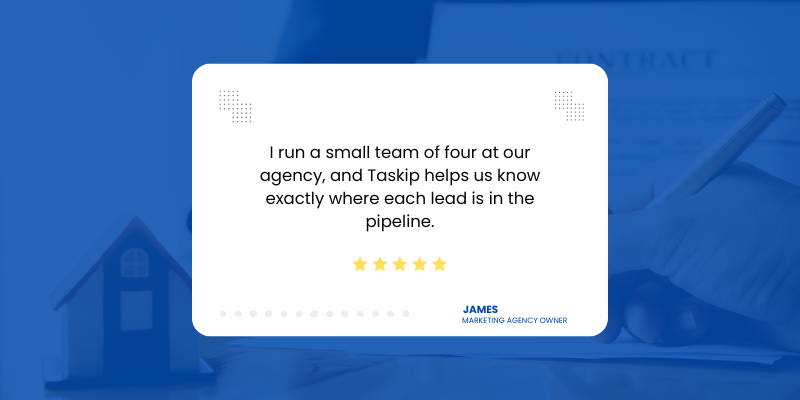
Real Voices from Small Business Owners
Here’s what some small business users have said about their CRM experience:
Top Affordable CRM Software for Small Businesses in 2026
This guide will focus on the following factors when comparing Taskip, HubSpot, Zoho, and Salesforce:
- Ease of Use
- Affordability
- Automation Features
- Scalability
- CRM Integrations
Each section includes detailed breakdowns of strengths and drawbacks, as well as examples to guide your decision.
1. Ease of Use
For small business owners, ease of use is often the top priority when selecting a CRM. A system that’s complicated or requires extensive onboarding can cost valuable time and resources.
Taskip
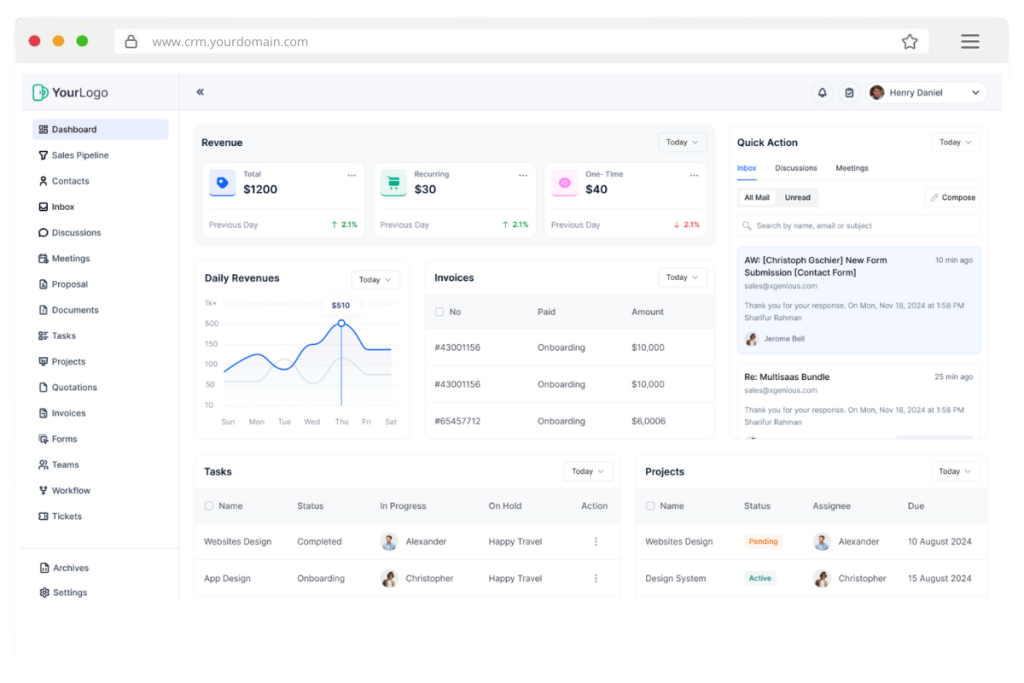
Taskip is designed with simplicity at its core, making it ideal for small teams or businesses just starting with CRM tools. The interface is clean and intuitive, with drag-and-drop features and visual dashboards that make navigation straightforward.
For example, if you’re a service provider managing customer appointments, Taskip’s “at a glance” daily task view makes it effortless to track appointments, follow-ups, and pending deals without multiple clicks or lengthy tutorials.
HubSpot

HubSpot is also known for being user-friendly. Its polished interface is particularly appealing to those in marketing and sales. However, its free version primarily caters to marketing needs, and while the layout is beginner-friendly, small businesses outside the marketing sphere may find the navigation less relevant to their tasks.
Zoho

Zoho promises a user-friendly interface but comes with more challenges during the initial setup. Its wide breadth of features can feel overwhelming if you’re new to CRM usage. Once up and running, however, Zoho’s dynamic dashboard becomes easier to manage, offering customizable layouts for specific business needs.
Salesforce

Salesforce’s interface is powerful but caters to enterprise users, offering significant customization at the cost of simplicity. Small teams often find themselves navigating a sea of features, which can make onboarding a hurdle without professional guidance.
When to Choose Each:
- Taskip: If you need an easy-to-use CRM you can adopt immediately with minimal training.
- HubSpot: If your business focuses on sales and marketing and you value polished, guided workflows.
- Zoho: If you want customization but don’t mind a steeper learning curve upfront.
- Salesforce: If you prioritize large-scale configuration options and have the resources to manage complex tools.
2. Affordability
Budget-friendly CRM solutions often top the list for small businesses. This section focuses on the costs of each platform, including hidden expenses or limitations.
Taskip
Taskip excels at providing affordable CRM solutions by offering budget-friendly plans scaled to your business size. Its transparent pricing ensures there are no surprise charges. For instance, small businesses can start with core CRM features and add functionality as needed, keeping costs predictable and manageable.
HubSpot
HubSpot’s free plan makes it an appealing entry point, but advanced functionalities like automation and reporting are locked behind its paid tiers. Costs expand significantly for growing teams or businesses requiring premium features, which may not align with tighter budgets.
Zoho
Zoho offers competitive tiered pricing plans that cater to businesses of varying sizes. While affordable on the surface, some add-ons or integrations may require extra fees. Balancing what’s included in your subscription versus what’s extra can require careful consideration.
Salesforce
Salesforce has a reputation for being one of the more expensive CRM platforms, with costs reflecting its robust feature set and enterprise focus. The entry-level packages may still be out of reach for budget-conscious businesses, and higher-tier pricing escalates quickly.
When to Choose Each:
- Taskip: If affordability and transparent costs are non-negotiable.
- HubSpot: If you’re working with the basics, but are prepared to upgrade down the road.
- Zoho: If you need a mid-range solution with scalable pricing.
- Salesforce: If you’re an established business with the budget to invest in a feature-rich solution.
3. Automation Features
Automation can simplify scheduling, follow-ups, and other repetitive tasks, allowing you to focus on core business activities.
Taskip
Taskip delivers a straightforward, built-in CRM with automation features that simplify workflows. It handles time-consuming tasks like automatic email follow-ups, reminders, and task assignments. For example, if a customer misses a payment deadline, Taskip can send a friendly automatic reminder, keeping your operations on track with minimal effort.
HubSpot
HubSpot offers robust automation tools, particularly for marketing campaigns. However, advanced automation workflows are gated behind higher-paid plans, making them inaccessible to small businesses using the free tier.
Zoho
Zoho shines in automation flexibility, allowing you to create customized workflows that align with your business requirements. While this is a strength, the higher degree of customization often means spending more time setting things up correctly.
Salesforce
Salesforce provides enterprise-grade automation, capable of tackling even the most complex workflows. However, setting these up can require technical know-how and resources, making it more suitable for larger organizations with dedicated IT support.
When to Choose Each:
- Taskip: If you need quick, out-of-the-box automation for tasks like follow-ups and reminders.
- HubSpot: If you focus on marketing-heavy automation and are willing to invest in higher plans.
- Zoho: If you want advanced customization options and are comfortable configuring them.
- Salesforce: If your operations are highly complex and require enterprise-level automation.
4. Scalability
Your CRM should grow as your business expands. Scalability ensures you won’t outgrow your platform as your needs evolve.
Taskip
Taskip is a scalable CRM designed to grow alongside small businesses. Whether you’re a solo entrepreneur or managing a growing team, Taskip adapts to handle increased customer data, team collaboration, and task complexity without becoming overwhelming.
HubSpot
HubSpot scales effectively but comes with a price. Costs rise as you add more users or advanced features, which might outpace a small business budget.
Zoho
Zoho’s scalability is one of its strengths, but managing an increasing number of tools within its ecosystem can become unwieldy over time.
Salesforce
Salesforce is built for scale, and it excels in managing enterprise-level operations. However, small businesses may find the platform much more than they actually require, and the costs can become significant.
When to Choose Each:
- Taskip: If scalability with simplicity and cost control is your priority.
- HubSpot: If you’re comfortable with rising costs as you expand.
- Zoho: If you want a highly scalable option but can manage its complexity.
- Salesforce: If your business expects rapid enterprise-level growth.
5. CRM Integrations
Seamless integrations can save time and create a smoother workflow by connecting your CRM with existing tools.
Taskip
Taskip ensures essential CRM integrations with popular tools like email platforms, calendars, and accounting systems. These integrations are easy to set up, making your overall operations more efficient without needing technical expertise.
HubSpot
HubSpot integrates well with marketing and sales tools, particularly those focused on inbound strategies. More advanced integrations may come with additional costs.
Zoho
Zoho is excellent for businesses already using its ecosystem, offering intuitive integration across its wide variety of applications. Integrating with third-party tools, however, may require extra work.
Salesforce
Salesforce has vast integration capabilities, supporting connections with hundreds of platforms. However, given the technical expertise required, these integrations may prove more challenging for smaller businesses.
When to Choose Each:
- Taskip: If simple integrations with everyday tools are your focus.
- HubSpot: If you rely primarily on marketing and sales tools.
- Zoho: If your business uses the Zoho suite extensively.
- Salesforce: If you need enterprise-level integrations across multiple systems.
Best CRM with Cheap Price: Our Top Picks
Here’s a quick comparison of the most popular CRM tools for small businesses that are either free or budget-friendly:
| CRM Tool | Free Plan | Price (Starting) | Simplicity Score | Best For |
|---|---|---|---|---|
| HubSpot CRM | ✅ | $0 | ⭐⭐⭐⭐☆ | Beginners, all-in-one marketing |
| Zoho CRM Free | ✅ | $0 (3 users) | ⭐⭐⭐☆☆ | Small sales teams |
| Pipedrive | ❌ | $14/user/mo | ⭐⭐⭐⭐☆ | Sales-focused teams |
| Less Annoying CRM | ❌ | $15/user/mo | ⭐⭐⭐⭐⭐ | Simplicity-first businesses |
| OnePageCRM | ✅ | $9.95/user/mo | ⭐⭐⭐⭐☆ | Fast setup, visual workflows |
| Bitrix24 | ✅ | $0 | ⭐⭐⭐☆☆ | Teams needing all-in-one solution |
Summary Table
| Taskip | HubSpot | Zoho | Salesforce |
| Intuitive with minimal setup. | Beginner-friendly for marketing users. | Customizable but setup-heavy. | Overwhelming for small teams. |
| Transparent, affordable pricing. | Free options, but paid plans add up. | Competitive but with potential hidden costs. | Expensive; geared toward enterprises. |
| Simplifies workflows with easy automation. | Robust for paid plans, limited for free. | Highly flexible but can be complex to set up. | Advanced but overly technical. |
| Grows while staying simple and cost-effective. | Scales well, but costs increase rapidly. | Scalable but may become unwieldy. | Best for large enterprises. |
| Easy connection with key tools. | Great for sales/marketing platforms. | Designed for Zoho ecosystem. | Broad but technically demanding. |
How to Choose the Right CRM for Your Business
When selecting a CRM, focus on three core aspects: simplicity, affordability, and scalability.
Key questions to ask:
- Can my team start using it without heavy training?
- Does it offer essential features like contact management, reminders, and email sync?
- Is it priced affordably for ongoing use?
For businesses just starting out, tools like Less Annoying CRM or Zoho Free CRM provide simple solutions with little to no upfront cost. If you want more robust pipeline automation, Pipedrive or OnePageCRM are great options to explore.
Looking for a CRM with AI suggestions, full reporting, and pipeline automation? Consider exploring tools like Bitrix24.
Step-by-Step: How to Set Up a CRM for Your Business
Whether you’re a freelancer or an agency owner, here’s how you can quickly set up a CRM. Start by exploring some of the best client management systems for freelancers that align with how you work.
1. Create Your Workspace
Set up your business profile and invite team members if needed.
2. Add Your Contacts
Manually upload contacts or import them from your Gmail/CSV. Add custom tags like “Lead,” “Client,” or “Prospect.”
3. Define Your Pipeline
Create stages such as:
- New Lead
- Contacted
- Proposal Sent
- Deal Won / Lost
4. Automate Follow-Ups
Set reminders or automation rules to follow up after X days of no reply.
5. Track Deals and Activities
Use a Kanban or List view to manage deals. Log all notes, emails, and meetings under each contact.
CRM Feature Checklist: What to Look For
Before committing to a CRM, ensure it includes:
- Contact & Lead Management
- Deal Tracking (with pipeline stages)
- Email integration or activity tracking
- Task Reminders & Follow-up Scheduling
- Reporting or Analytics Dashboard
- Affordable pricing with free trial
- Mobile-friendly UI for on-the-go use
Final Thoughts
When choosing the best CRM for your small business, don’t let brand names alone guide your decision. Instead, focus on what truly matters:
- Features that align with your daily operations
- Pricing that fits your current stage of growth
- Ease of setup and a minimal learning curve for your team
Ultimately, the ideal CRM depends on your unique business needs.
- Choose Taskip if you’re looking for a solution that’s affordable, easy to use, and built for everyday small business workflows.
- Go with HubSpot if your business relies heavily on inbound marketing and you want strong lead-nurturing tools.
- Opt for Zoho if you need a flexible, customizable CRM and are comfortable navigating a more complex setup.
- Select Salesforce if your business demands advanced features and you have the resources for enterprise-level implementation.
By aligning your CRM choice with your specific goals, you’ll set your business up for better productivity, stronger client relationships, and sustainable growth.
Ready to try a simple CRM that doesn’t overwhelm or overcharge? Start with Taskip today and discover how easy client management can be.
FAQs
Which CRM is the best for small businesses just starting out?
The best CRM for new small businesses depends on your priorities. Taskip is an excellent choice for its simplicity and affordable pricing tailored to small teams, while HubSpot’s free tier is great for marketing-heavy startups. If you need more customization, Zoho is worth considering, but it may require more setup. Salesforce, while powerful, might be overwhelming for those just starting.
How do pricing structures vary between Taskip, HubSpot, Zoho, and Salesforce?
Taskip offers transparent, budget-friendly pricing designed for small businesses, making it a great option for cost-conscious owners. HubSpot has a free tier but charges steeply for advanced features. Zoho provides competitively priced plans, though some customizations require extra fees. Salesforce is the most expensive, designed for enterprises, and may exceed the budgets of most small businesses.
Which CRM is the easiest to use for a non-technical team?
Taskip stands out for its intuitive interface and minimal learning curve, making it perfect for non-technical teams. HubSpot is beginner-friendly, especially for marketing professionals, while Zoho’s customization options may overwhelm less tech-savvy users. Salesforce, with its complex features, is better suited for teams with more technical expertise or IT support.
How do these CRMs handle automation for repetitive tasks?
Taskip provides straightforward automation tools for tasks like follow-ups and reminders, ideal for small businesses. HubSpot offers robust automation, but key features are locked behind premium plans. Zoho allows for highly customizable workflows but requires more setup effort. Salesforce offers advanced automation for large-scale needs but can be too complex for small teams.
What kind of integrations can I expect with these CRMs?
Taskip simplifies integrations with popular tools like Gmail, Google Calendar, and QuickBooks, ensuring a smooth workflow. HubSpot shines with marketing-related integrations but may restrict some to paid users. Zoho integrates seamlessly within its own ecosystem, though external tools might need extra configuration. Salesforce offers extensive integration options but often requires technical resources to set up and manage effectively.
What is the most affordable CRM software for small businesses?
Less Annoying CRM offers flat pricing at $15/user/month with no tiers, while Zoho CRM and HubSpot CRM provide free plans with essential features.
What is the simplest CRM software to use?
Less Annoying CRM and OnePageCRM are designed for simplicity. They require minimal setup and are ideal for non-technical users.
Are there any completely free CRM tools?
Yes! HubSpot CRM, Zoho Free CRM, and Bitrix24 offer free versions with generous limits for startups and small teams.
Do these CRMs integrate with email and calendars?
Most modern CRMs, including Pipedrive, Zoho, and OnePageCRM, offer Gmail/Outlook integration, calendar sync, and task reminders.
Can I migrate from spreadsheets to a CRM easily?
Yes. All the listed CRMs allow CSV imports or integrations from tools like Google Sheets and Excel.

Get Summary On: