Top 5 Mavenlink Alternatives: Best PSA & CRM Solutions for 2026
This guide brings you the best Mavenlink alternatives that cover your PSA and CRM needs.
Mavenlink has some lacking features that you can overcome with the five alternatives suggested below:
| Mavenlink is now Kantata. Mavenlink merged with another professional services software company, Kimble Applications, and the combined business was rebranded as Kantata in May 2022. |
What is Mavenlink?
Mavenlink, presently known as Kantata, is a cloud-based project management and Professional Services Automation (PSA) software platform.
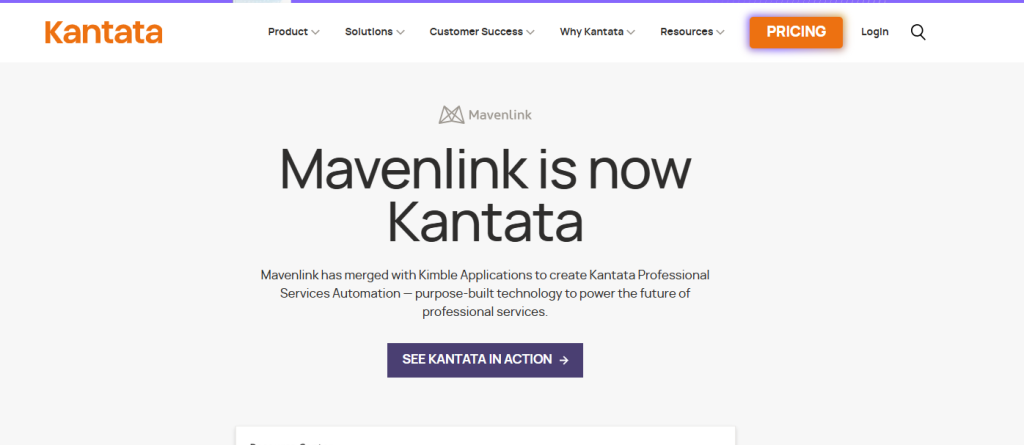
This platform helps businesses and agencies manage clients, projects, and workflow to streamline their day to day task. You will have some amazing features in Mavenlink, like tracking time and expenses, allocating resources, and collaborating with teams and clients.
Kantata or Mavenlink offers two categories of services/products:
- Kantata OX: It is a stand‑alone PSA platform designed for service teams that want a powerful PSA without reliance on a specific CRM platform.
It offers features like project management, resource planning, financial management, time & expense tracking, billing/invoicing, dashboards/reports, collaboration, and AI‑driven insights to help teams deliver services and improve operational outcomes.
- Kantata SX: It is a Salesforce‑native PSA solution, built directly on top of the Salesforce platform and tightly integrated with Sales Cloud, Service Cloud, and Revenue Cloud. It offers you advanced financial workflows, compliance controls, predictive forecasting, resource optimization, and collaboration hubs for clients and teams.
Limitations of Mavenlink: Why Look For Alternatives?
❌Complex Interface
While testing the Mavenlink (present Kantata) software, I found the interface complex. The navigation of the dashboard is not as simple as its competitors. It requires multiple clicks and sometimes slows down when updating projects. This makes the update and all over process a bit time-consuming.
❌PSA-Centric Design
Mavenlink has a Professional Services Automation (PSA) centered design, which makes it inflexible for teams that want simple project management. Most of its features focus on billable work and service delivery.
Therefore, if you are someone who need simple task management system for general purposes, this tool may seem complicated for your team.
❌Steep Learning Curve: Complex Initial Setup
Where other Manvelink alternatives can start with simple tasks, Manvelink requries to learn the financial and resource logic to start a basic project. In simple words, it needs a lot of configuration at the beginning, including setting up rates, utilization targets, and forecasting rules.
So, it has a steeper learning curve that makes it difficult for non-tech users and teams without PSA experience to operate the application.
❌Limited Team Collaboration
Manvelink is not the ideal platform for daily team collaboration. It is mainly designed for tracking finances and managing service work. You won’t find the conversations in Manvelink closely connected to individual tasks.
As a result, team members need to go back and forth to the conversation box and task section to solve any issues.
❌Limited Dashboard Customization and Reporting
Though Mavenlink has built-in reports and dashboards, customization is limited. It is challenging to change reports and display data for tailoring needs. So, if you are looking for a custom reporting feature, you may need to look for a Mavenlink alternative.
Moreover, the dashboards also rely on predefined metrics, which may not work well for every team or role.
❌Delayed Response From Support Team
Useres reports of slow response from the Mavenlink support team. Support often works through tickets and documentation, which can cause delays during urgent work.
❌Hidden Pricing
Mavenlink doesn’t show its pricing on its website. You need to talk to their representative and discuss the price for the customized features you want. This makes the decision-making process much slower.
Quick Comparison of Top 5 Mavenlink Alternatives
| Platforms | Best For | CRM | PSA | Client Portal(Built-in)) | E-signature | Proposal, Quotation, & Invoicing | Service Catalog(Built-in) | Starting Pricing |
| Mavenlink | Professional services automation, resource management | ❌ | ✅ | ❌ | ❌ | ⚠️ Invoicing Only | ❌ | Get a Quote |
| Taskip | All-in-one client & agency management | ✅ | ✅ | ✅ | ✅ | ✅ | ✅ | $12/Mo |
| Scoro | End-to-end business + project + financials | ✅ | ✅ | ⚠️ Limited | ❌ | ✅ | ✅ | $23.90per user/month |
| Accelo | Quote-to-cash PSA automation | ✅ | ✅ | ✅ | ❌ | ✅ | ❌ | Get a quote |
| Bitrix24 | All-in-one CRM + collaboration | ✅ | ✅ | ⚠️ Limited | ❌ | ✅ | ✅ | $61/organization/month |
| Productive.io | Agency/consultancy operations | ✅ | ✅ | ✅ | ✅ | ✅ | ❌ | $12/month |
Top 5 Mavenlink Alternatives: A Comprehensive Analysis
1. Taskip
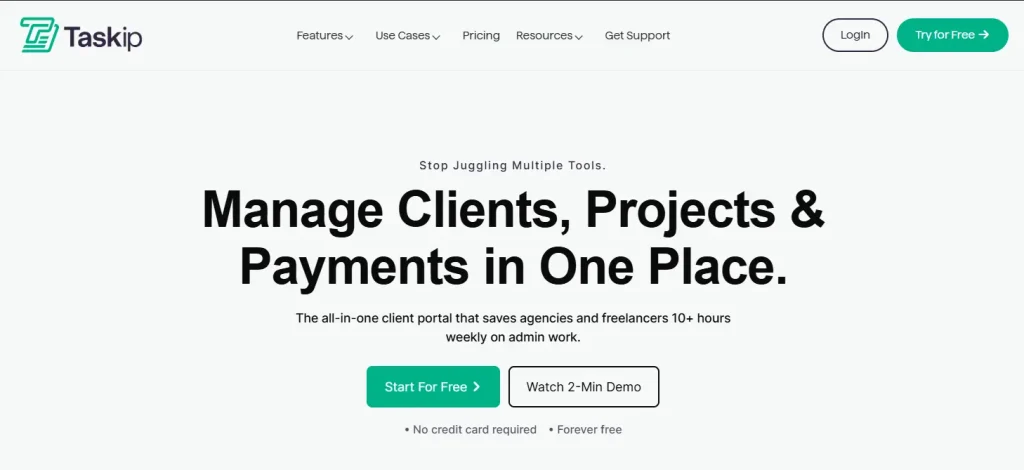
Taskip is an all-in-one client managemnet software that offers a well-organized system for businesses, agencies, and freelancers to streamline their projects. From lead generation to payment processing, you get all done in Taskip. Where Mavenlink only focuses on PSA, Taskip offers you both a CRM and PSA solution.
Moreover, as a Mavenlink competitor, it covers all the limitations that you are currently facing in Mavenlink. For instance, Taksip has clear pricing, a very simple interface, and requires no technical knowledge to operate the application, unlike Mavenlink.
Best Features of Taskip
- CRM + PSA Solution
Taskip is designed as a Client Relation Management (CRM) software, but it also has PSA features. In contrast, Mavelink or Kantata is only focused on PSA.
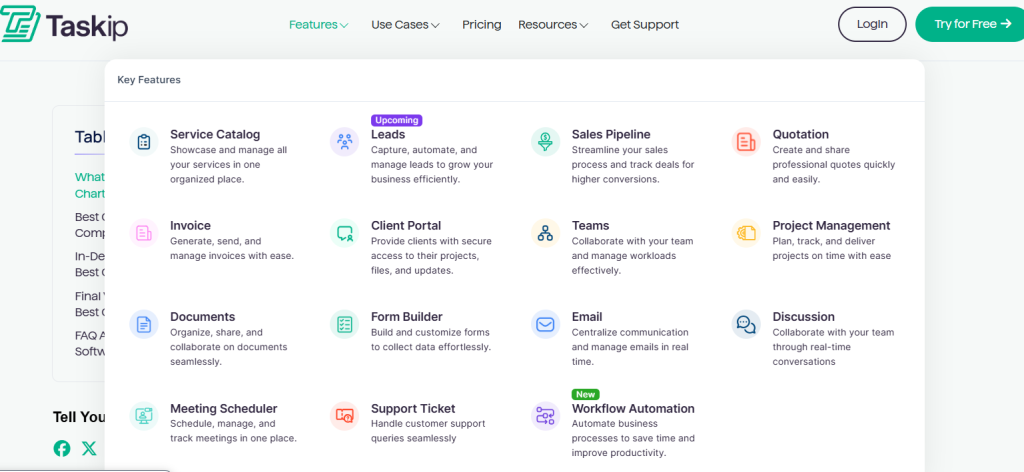
Image: Taskip features
With proper analysis of the Taskip feature, you will get assurance that Taskip is an all-in-one platform.
| Taskip CRM Features | Taskip PSA Features |
| – Client portal – Sales pipeline – Lead capture – Meeting scheduling – Document sharing – Team collaboration – Support ticket – Email automation | – Service Catalog – Project Management – Gantt Chart – Form Builder – Workflow Automation – Task Management – Time Tracking – Proposal, Quotation & Invoicing |
- Service Catalog
Taskip has a service catalog feature to productize your services and offer a clear and more organized pricing and package to your customers. With this feature, you can showcase your products in an arranged way so that the clients can make a direct purchase. However, Mavenlink lacks this feature.

Image: Taskip service catalog
- Proposal, Quotation, & Invoicing
In Taskip, you will get proposal, quotation, and invoice creation features. It offers you customizable templates, which you can tailor to your branding and automate the proposal, quotation, and invoicing process.
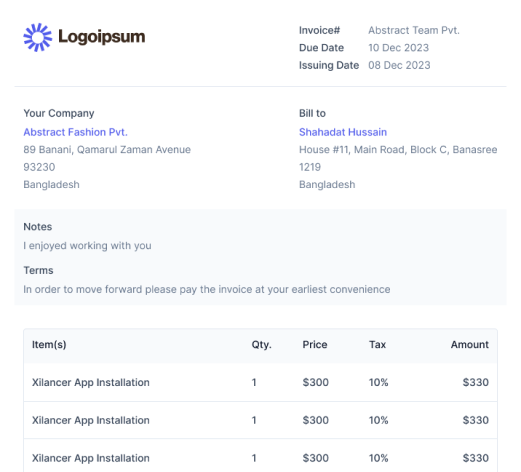
Image: Takip invoice creation with template
In contrast, Mavenlink or Kantata does not offer a traditional built‑in quotation & proposal module as part of its core PSA product. However, the invoicing or billing feature is supported by Mavenlink as its core feature.
- Lead Generation & Sales Pipeline
Taskip has a built-in lead generation feature. You can track from which platform you are getting most of the leads and convert them to sales accordingly by sending an email or schedulinga meeting. Besides, starting a new deal and tracking its progress is easy with the Taskip sales pipeline.
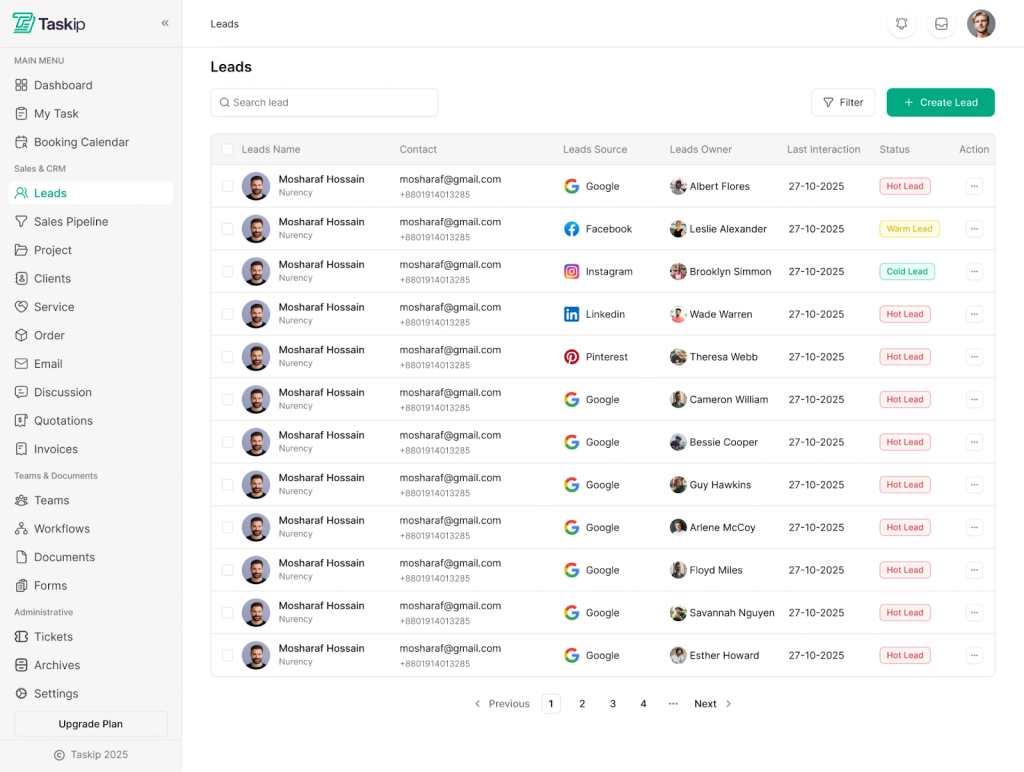
Image: Taskip Leads
In contrast, Mavenlink doesn’t have a built-in lead or sales pipeline feature. It depends on CRM, Salesforce, for such features.
- Documentation
You can create and share documents with your teams and clients within the Taskip dashboard. Taskip further has e-signature features, with which you can get approval and send documents directly to the client with zero manual hassles. It supports PDF downloading and sharing; moreover, it allows you to publish documents to the web for global access.
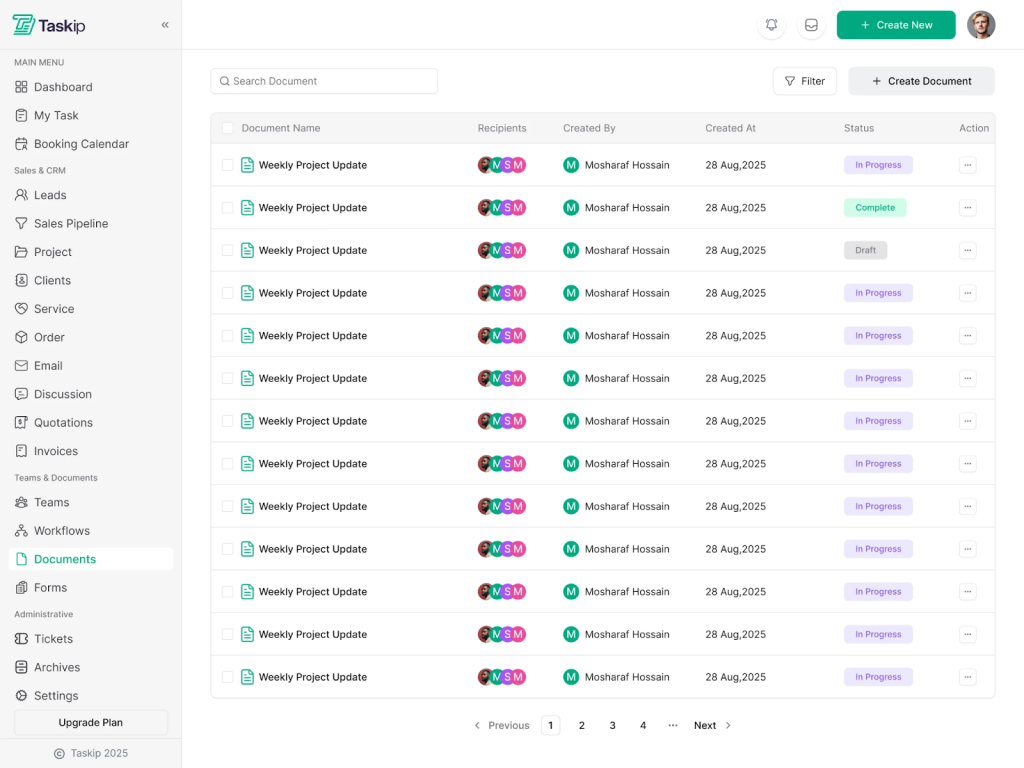
Image: Taskip Documentation
- Support Ticket
Taskip features a built-in ticket system where clients can submit a complaint or request help directly in the client portal. This makes the Taskip support system much stronger.
On the other hand, Taskip doesn’t have a built-in support ticket system. It requires integration from third-party tools like Zapier to offer such a feature.
Taskip Limitation
- Unlike Mavenlink, Taskip lacks advanced resource planning and forecasting
- Its PSA capabilities are more basic compared to Kantata’s enterprise‑focused automation.
Taskip Pricing
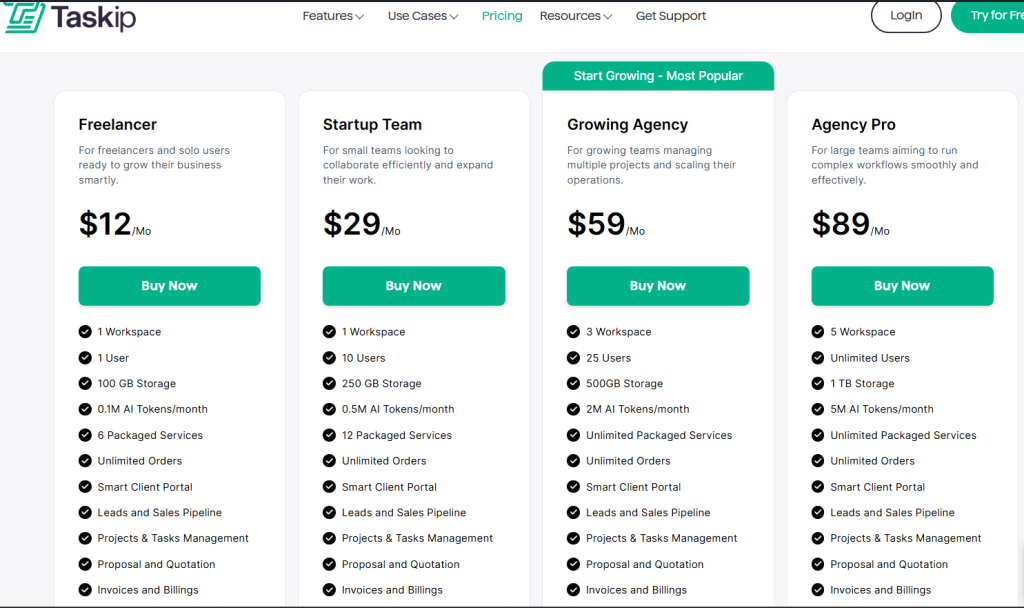
Source: Taskip Pricing
Ratings & Review
| Platform | Rating | User Feedback |
| G2 | 4.3/5 | “As a freelance web developer, my day used to be a constant juggle between deep coding sessions and urgent client updates. Taskip has been a game-changer, streamlining my entire workflow. Now, monitoring project progress is effortless, allowing me to focus on what I do best without missing a beat. It truly feels like I’ve gained an extra set of hands to manage the administrative side of my business!” SUBRATA S. |
| Trustpilot | 3.7/5 | “Fantastic, I’m using this software last 8 month and this is awesome. Specially its invoicing system and from builder. I also like Project Management part. I love this and thanks.” – Nurul Amin |
2. Scoro

Mavenlink alternative, Scoro is also a PSA software, which is designed to manage projects, resources, and finances in a single system. Here, you will get a complete project management solution from quote to cash.
The best feature of Scoro is that it has a built-in AI integration that understands natural language and interprets complex business data into simple language. Thus, you can take data-driven decisions faster.
Best Features Of Scoro
- Project management
- Quotation and budgeting
- Sales and CRM
- Resourcing and capacity
- Reporting and dashboard
- Quotation and budgeting
- Time tracking
- Cost management
- Invoicing
- Collaboration
- AI insights
Scoro Limitation
The limitations of Scoro are as follows:
- No built-in form builder
- The mobile version lacks the desktop version’s features
- No built-in e-signature
Scoro Pricing
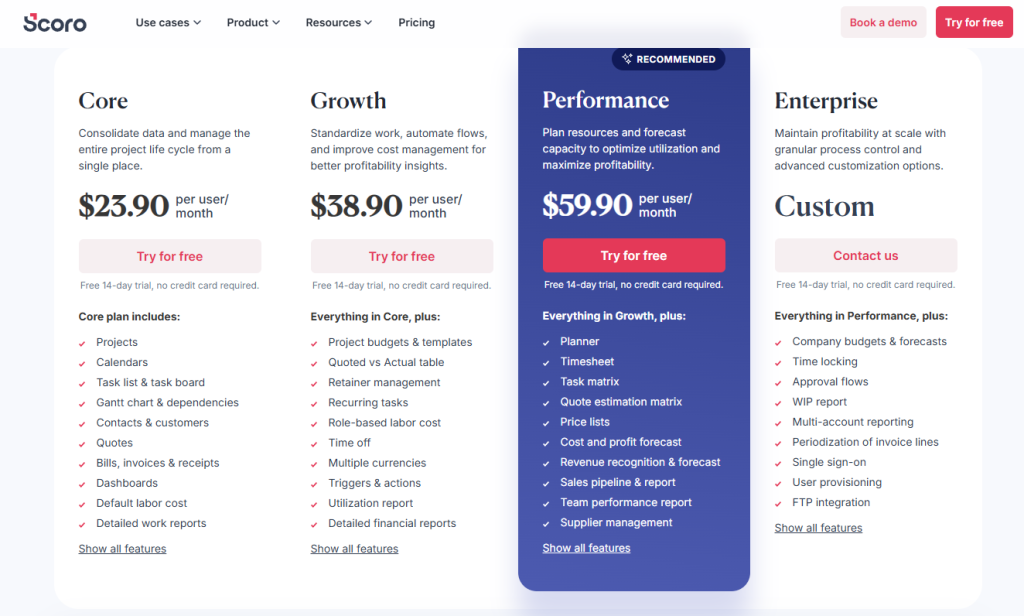
Source: Scoro Pricing
Ratings & Reviews
| Platform | Rating | User Feedback |
| G2 | 4.6/5 | “A few new things I’ve come to appreciate about Scoro are its continuous interface improvements, enhanced automation tools, and growing integration ecosystem. The updated UI feels cleaner and more intuitive, making it easier to navigate between projects, finances, and tasks. I’ve also found the expanded automation rules incredibly helpful—they reduce repetitive admin work by automating status updates, notifications, and data syncing. Finally, the increasing number of native integrations, especially with accounting and productivity tools, has made Scoro even more central to our workflow. These updates show that the platform is evolving in ways that genuinely improve day-to-day efficiency.” – Rebecca B. |
| Trustpilot | 3.3/5 | “One of the best products out there for everything a basic company needs. Calendar, task list, dashboards, reports, quoting and budgeting, billing, and so on. Very customizable. Also, they have a very good customer service.” – L P |
3. Accelo
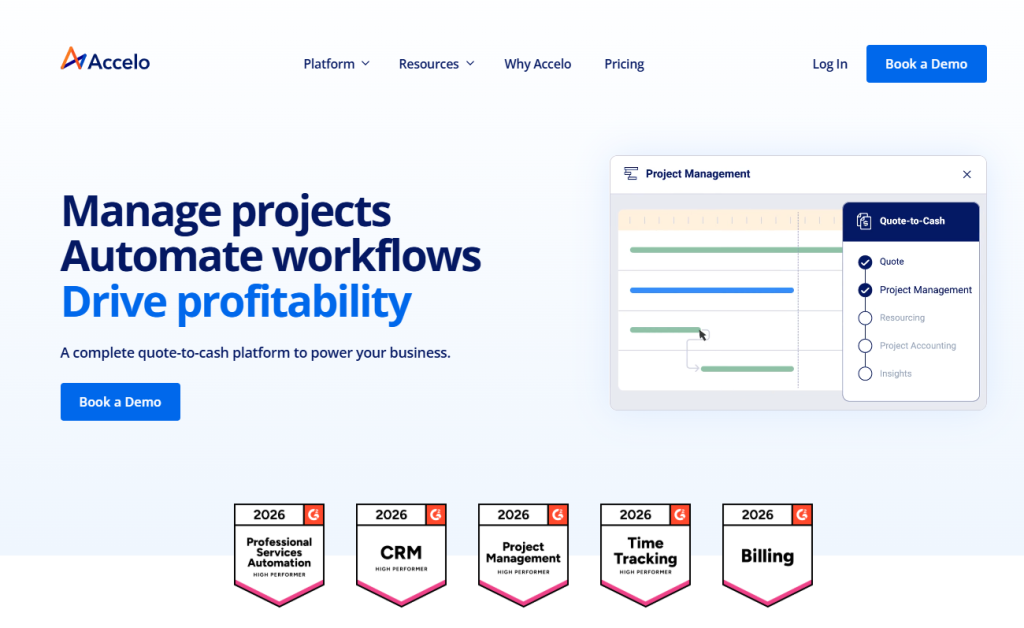
Accelo is a complete quote-to-cash platform to power your business. It covers client, project, resource, and finance management solutions under a single dashboard.
As a better Mavenlink alternative, Accelo has an intuitive and easier onboarding process compared to Mavenlink. Moreover, both platforms are PSA focussed, but Accelo has a built-in CRM that Mavenlink lacks.
Best Features Of Accelo
- Manage clients
- Tracking projects, tasks, time, and expenses
- 360-degree view of client updates
- Advanced scheduling
- Resource management
- Optimize invoicing, billing, retainers, and payment processing
- Powerful analytics for business insights
- Extended integration
Accelo Limitation
- Hidden pricing
- No built-in service catalog
- Steep learning curve
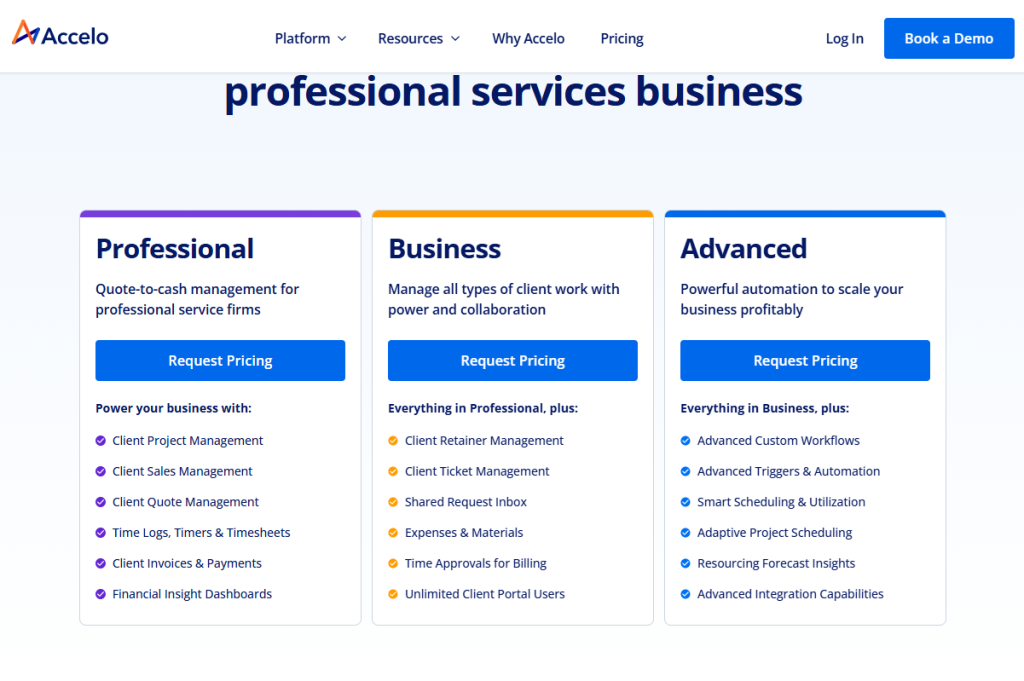
Accelo Pricing
The pricing of Accelo plans is not publicly mentioned on its website; you need torequest a price for your desired plan.
Ratings & Reviews
| Platform | Rating | User Feedback |
| G2 | 4.4/5 | “Being able to assign clients their own job boards, tasks with assignees, communication features in general stream, task streams, checklists per task as well as being able to track time per task – along with lists that are customizable to track everything literally. It’s ALL here and it’s quite useful. We used it extensively as our job management system and ticket system for various products for over 3 years.” – Curran M. |
| Trustpilot | 2.9/5 | “Accelo simplified everything for our agency – since getting started, we’ve never looked back. It streamlines so much for our team, and gives us the insight we need to make good decisions.” – Ryan Draving |
4. Bitrix24
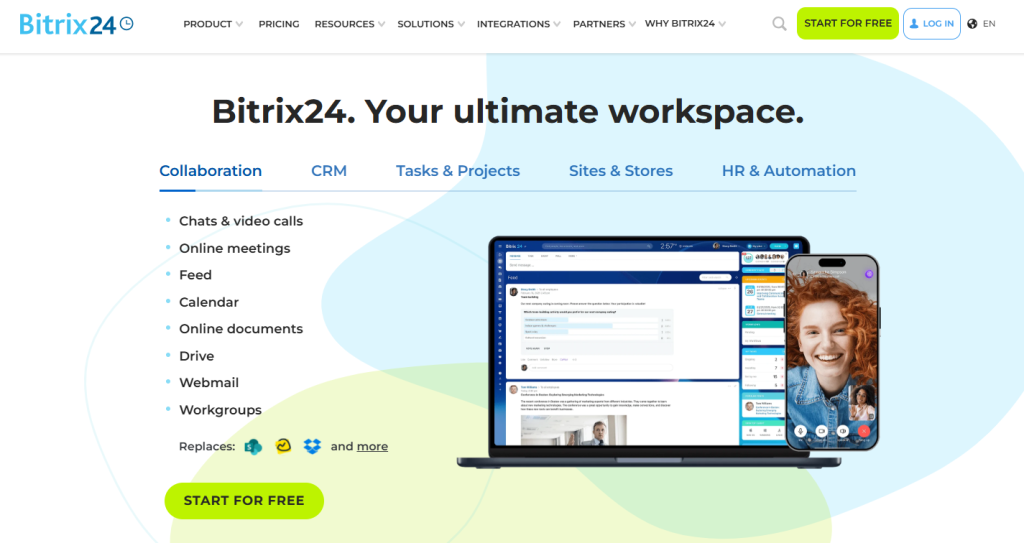
Bitrix24 offers you a full set of task and project management tools. Thus, you can replace a multitude of services and apps with a single online workspace.
Apart from just managing tasks and clients, Bitrix24 has a website builder. So, you can create a website, sell products, manage customers, and process payments – all with this software.
However, its best feature is the free AI assistant, Copilot. You can get this AI integration in your Bitrix24 CRM, chats, video calls, tasks, feeds, sites, and stores.
Best Features Of Bitrix24
- Sales management and team collaboration
- Marketing campaign with email, SMS, and social media ads
- E-signature, invoices, and payments
- Website builder (Templates, free CMS, AI-generated image and text)
- Integrated AI assistant: Copilot
- Online document and file storage
Bitrix24 Limitation
- Has steep learning curve
- No unified client portal
- PSA capabilities are very basic
- No strong native e‑signature capability
Bitrix24 Pricing
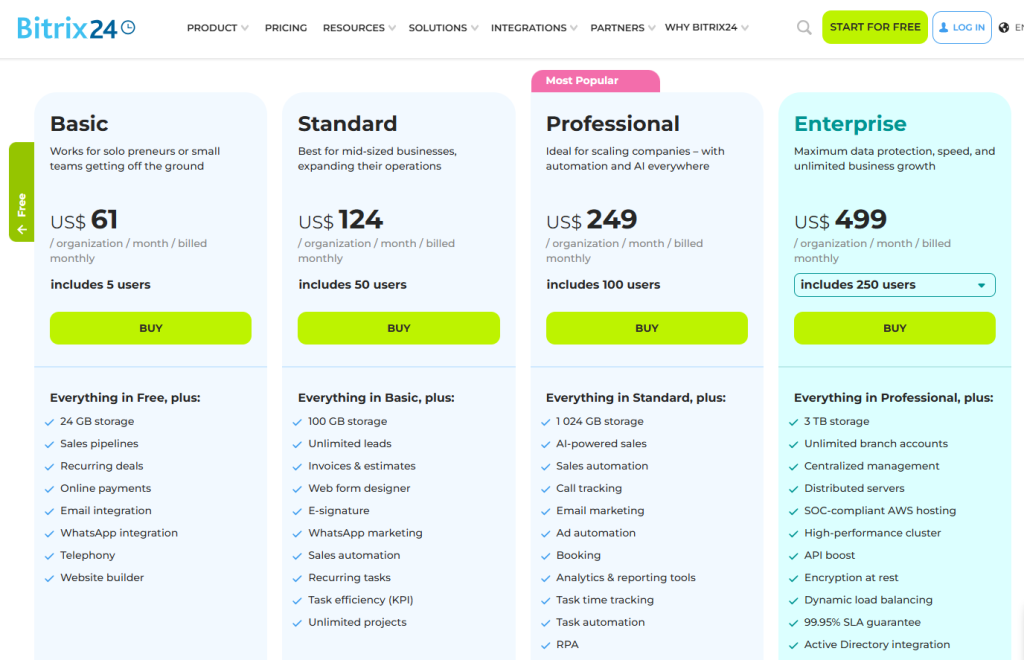
Source: Bitrix24 pricing
Ratings & Reviews
| Platform | Rating | User Feedback |
| G2 | 4.1/5 | “Everything I need is conveniently located in one place—CRM, tasks, chats, calls, and files are all accessible from a single platform. I no longer have to switch between different apps, which makes my work both faster and more organized. Additionally, the free plan offers a wide range of tools.” Adil K. |
| Trustpilot | 2.3/5 | “The most affordable feature-rich collaboration tool around. Everything in one place, from CRM, communication, project management, website builder, document management, and so much more. And if it’s not there, you can use the API to develop it.”Philip Pretorius |
5. Productive.io
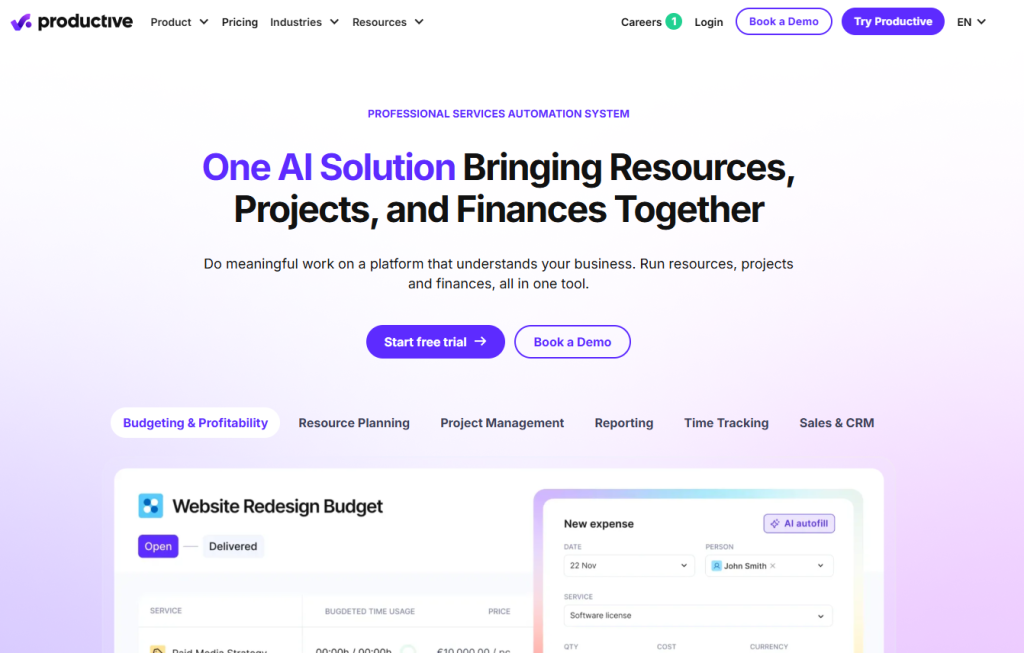
Productive.io is a popular client management platform that is designed to boost productivity many times. With the AI integration feature, you can ask AI to build reports from scratch with insights on costs, revenue, and margins. Such automation makes your day-to-day tasks easier.
And the best part of Productive.io is its super-fast custom support; it has an average response time of just 3 minutes and 16 seconds!
Best Features Of Productive.io
- Resource planning
- Time tracking
- Project management
- Gantt charts
- Budgeting and profitability
- Revenue recognition
- Invoicing
- Forecasting
- Automations & AI
Productive.io Limitation
- No service catalog
- No order & customized intake forms
- Slow customer support
Productive.io Pricing
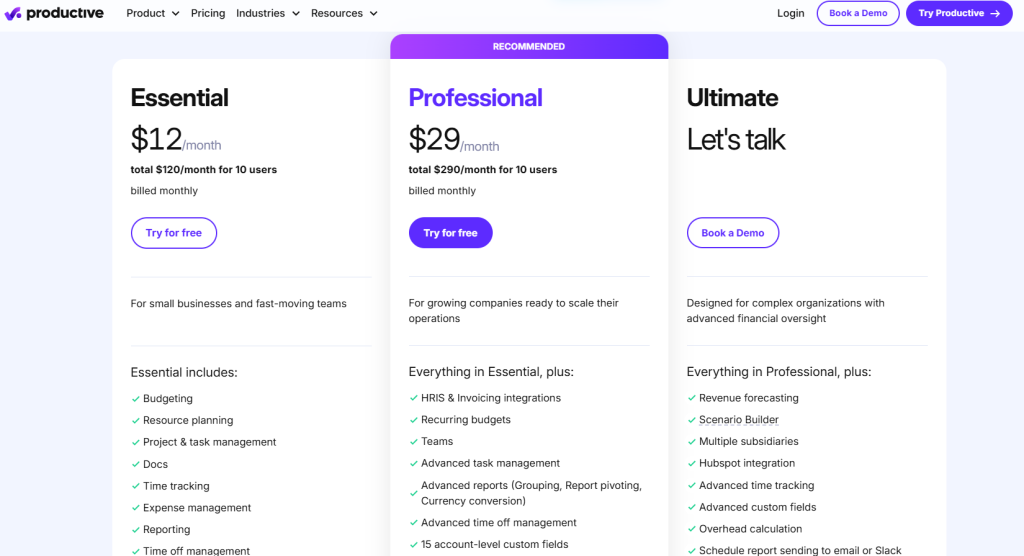
Source: Productive.io pricing
Ratings & Reviews
| Platform | Rating | User Feedback |
| G2 | 4.7/5 | “I really appreciate the breadth of features that ClickUp offers, which helps me manage short-term tasks throughout the week and more complex, months-long projects. It makes collaboration and communication with other team members seamless, which takes the clutter and chaos out of projects. I appreciate being able to keep track of what tasks I’m responsible for and their urgency easily, making my daily workflow simple.” –Shannon W. |
| Trustpilot | 3.6/5 | “ClickUp keeps my projects dancing! It’s fast, flexible, and helps me turn chaos into clarity. Less stress, more productivity – love it!” –Stanislav Lunák |
Features to Consider For Picking The Best Mavenlink Alternatives
Before you choose the best Kantata or Mavenlink alternative, here are the features you must ensure to cover:
- CRM Capabilities: The Mavenlink alternative you choose must have CRM features like lead capture, sales pipeline, sales reporting, and automated follow-ups & reminders.
- Professional Services Automation (PSA): As Mavenlink is a PSA software, the alternative you choose must have a robust PSA system. For instance, it should support project/task management, time and expense tracking, billing, invoicing, etc.
- Workflow Automation: Automating repetitive tasks reduces manual labour and boosts your productivity many times. So, the Mavenlink alternative you pick should have workflow automation features. Such as: automating triggers/actions (status changes, notifications), time entry reminder, etc.
- Quoting, Proposals & Contracting: Proposal builder & templates, quote creation & versioning bring sales and delivery closer together. Give preference to these features.
- Transparent Pricing: Mavenlink doesn’t offer clear pricing on its website. You must look for a better option that has a transparent price to ensure you are getting your services at a justified value.
- Extended Integration: Third-party integration widens your platform’s capabilities beyond its native features. This allows you to connect sales, finance, support, HR, and collaboration tools into one seamless workflow. For instance, Taskip supports 100+ third-party integrations.
- Essential Features: Apart from the above core features, here are some crucial features that you must consider while picking a better Mavenlink alternative; these are as follows:
- E-signature
- Service catalog
- Multi-currency support
- Built-in client portal
- Whitelabeling: Custom domain, email, logos & colors
- Payment gateway integration
Why Is Taskip a Better Mavenlink Alternative: Taskip Vs. Mavenlink
If you are looking for an all-in-one solution that will help you capture leads, sell products, manage clients, track project progress, and complete payments, Taskip is the best platform.
However, Mavenlink focuses only on automating the service process that deals with billing, finances, project management, and collaboration. It is designed to provide enterprise‑grade PSA with deep resource and portfolio planning.
Therefore, if you want a simple and straightforward centralized solution, Taksip is best, and for advanced financial forecasting and utilization analytics, Mavenlink excels.
| Sl. | Criteria | Taskip | Mavenlink (Kantata) | Winner |
| 1 | Core Features | It is a CRM (Customer Relationship Management) system, but it also covers PSA features. | Mavenlink is a Professional Services Automation (PSA); it integrates with CRM systems like Salesforce. | Taskip |
| 2 | Pricing | Transparent pricing | Hidden price | Taskip |
| 3 | Learning Curve | Easy to use; very simple interference | Steep learning curve | Taskip |
| 4 | Client Portal | Built‑in client portal with access to projects, files, proposals, and invoices. | Limited client access; no fully native client portal. | Taskip |
| 5 | Advanced Resource Planning & Forecasting | Basic task assignments only | Enterprise resource planning, utilization, forecasting | Mavenlink |
| 6 | Financial Forecasting & Reporting | Basic invoicing & project financials | Budgeting, revenue recognition, and margin forecasting | Mavenlink |
| 7 | Service Catalog / Productized Services | Yes | No native feature | Taskip |
| 8 | Proposal & Quoting | Built-in proposals & quotes | Not native; requires CRM/CPQ integration | Taskip |
| 9 | E-sginature | Yes | No | Taskip |
| 10 | Best Fit Use Case | Great for agencies, SMBs, and service teams needing CRM + PSA in one platform. | Best for mid‑to‑large enterprises needing deep PSA, resource planning, and forecasting. | Tie |
Closer: Best Mavenlink Alternatives
To pick the best Kantata or Mavenlink alternative, you must first know the features that it lacks. This will help you find an alternative that covers all its drawbacks and provides you with a better business management solution.
The top five Mavenlink alternatives suggested in this guide are practically examined and trusted. However, if you ask for the best option, I would suggest you take Taksip. With taskip you will get both CRM and PSA solutions. Moreover, it is easy to use and has a straightfporward pricing unlike Mavenlink.
Frequently Asked Question
What are the alternatives to Mavenlink?
Taskip, Scoro, Accelo, Bitrix24, and Productive.io are good alternatives to Mavenlink.
What is the new name for Mavenlink?
The new name for Mavenlink is Kantata. The company rebranded after merging with Kimble Applications, and today the combined professional services automation platform is known as Kantata.
When did Mavenlink become Kantata?
Mavenlink rebranded as Kantata after merging with Kimble Applications in May 2022, with the combined company adopting the Kantata name.
What is Mavenlink used for?
Mavenlink (now Kantata) is used as a Professional Services Automation (PSA) platform to manage projects, resources, time tracking, finances, and reporting for service-based teams.
How much does Mavenlink cost?
Mavenlink/Kantata pricing is not publicly listed; it is usually sold on a quote basis and varies by features and number of users (enterprise pricing). You need to contact sales for exact pricing.




Get Summary On: