Hello Bonsai Vs Honeybook: Which is the Best CRM for Small Agencies?
Hello Bonsai vs HoneyBook is a popular comparison to make as it has quite similar features and both target small agencies and solopreneurs.
In this guide, I am going to give you a feature-wise comparison so you can understand the differences and choose the ideal one for your needs:
Hello Bonsai Vs HoneyBook: Overview
Bonsai
Hello Bonsai, mostly known as Bonsai, is a unified platform for service businesses. It is an easy-to-use platform that consolidates your projects, clients, and billing into a single integrated system.
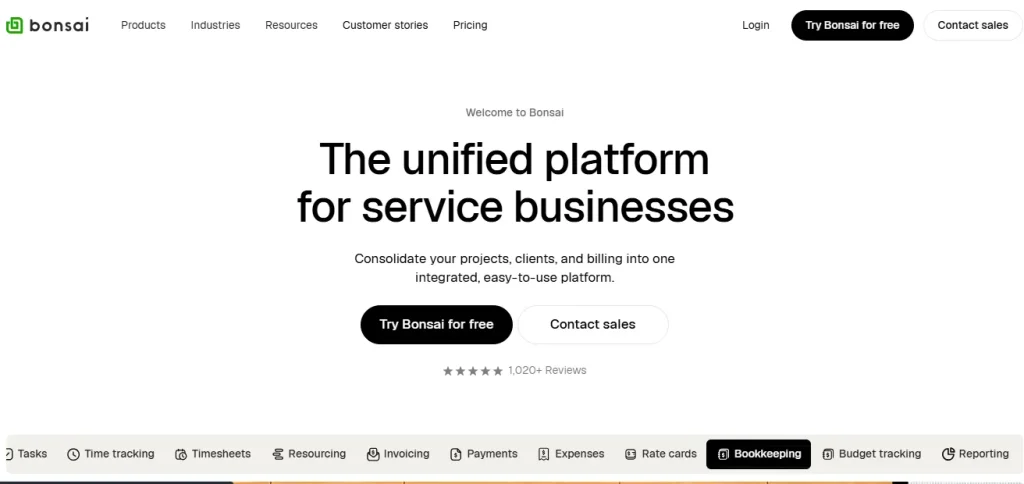
It is a very affordable software that is ideal for freelancers and small businesses. Besides project and client management, Bonsai also has financial management features. You can track the budget, expenses, payments, invoicing, and more from a single interface.
Advantage & Limitations of Bonsai
| Pros | Cons |
| User-frinedly interference Professional templates Automated workflow Budget tracking Accounting integration Time tracking | Per-user pricing Payment processing delays Geographic & feature restrictions |
HoneyBook
HoneyBook is a popular all-in-one business centralization tool among design, creative, marketing, and personal services. It features schedules, proposals, contracts, automation, and integration.

Moreover, there are pre-built templates that you can use to create beautiful and professional invoices, proposals, and contracts.
Advantage & Limitations of HoneyBook
| Pros | Cons |
| Automation HoneyBook AI CRM Meeting scheduling Finance management | Very Expensive Limited advanced Workflow automation |
Quick Feature Breakdown of Hello Bonsai Vs HoneyBook
| Feature | Bonsai | HoneyBook |
| Free Trial | ✅ | ✅ |
| Staring Price | $15/user/month | $39/month |
| Refund Policy | 2 months | 2 weeks |
| Referral Program (per referral) | $100 cash | One month of membership |
| Team Members + Permissions | ✅ | ✅ |
| Zoom Integration | ❌ | ✅ |
| QuickBooks Online Integration | ✅ | ✅ |
| Questionnaires | ❌ | ✅ |
| Time Tracking | ✅ | ✅ |
| Chrome Extension | ✅ | ✅ |
| Gratuity | ✅ | ✅ |
| Automatic Payment Reminders | ✅ | ✅ |
Bonsai Vs HoneyBook: Detailed Feature Comparison
1. Client Portals: Bonsai Vs HoneyBook
Bonsai
It has a clean and simple client portal that gives direct access to invoices and payment options. Moreover, it offers real-time project visibility, including progress updates, time tracking, and billing information. With this document-focused client portal, clients get self-service access to important files and billing without back-and-forth emails.
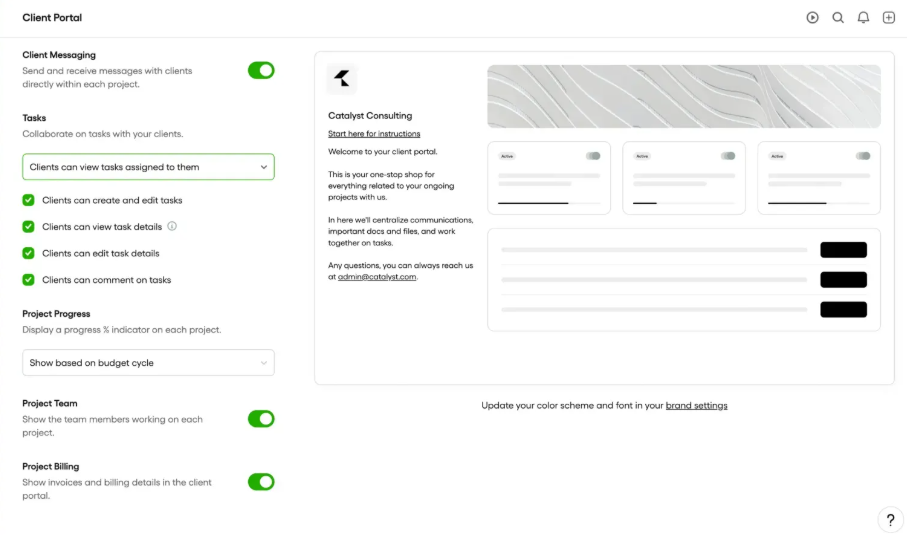
Image: Bonsai Client Portal
HoneyBook
HoneyBook also offers a branded client portal where clients can view communications, contracts, files, invoices, and upcoming payments in a single place. Here, files and documents are shared via encrypted links that connect clients straight into their portal.
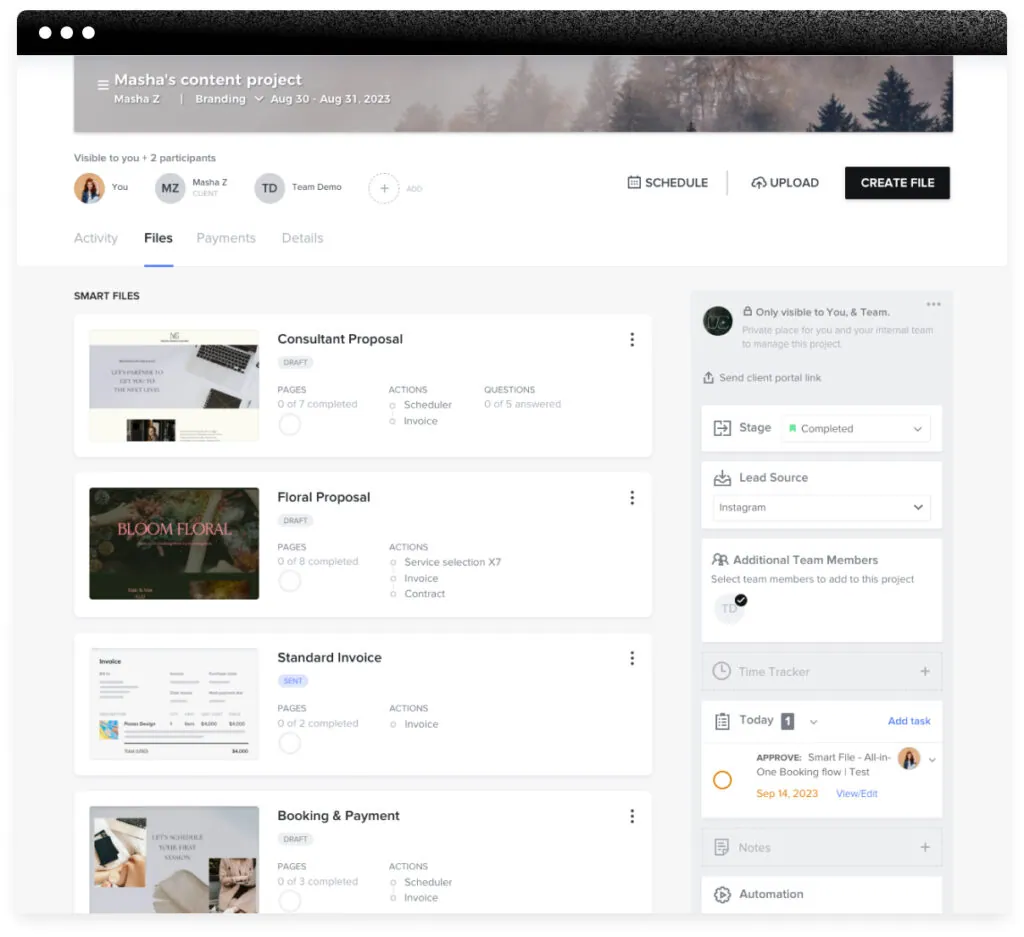
Image: HoneyBook Client Portal
| Winner: HoneyBook HoneyBook has a more user-friendly client portal experience as it combines communications, files, payments, and scheduling in one place. While Bonsai gives good access to project info and billing transparency, HoneyBook’s portal feels more intuitive and cohesive from the client’s perspective. |
2. Invoicing/Billing Tools: Bonsai Vs HoneyBook
Bonsai
Bonsai offers robust invoicing and billing tools to create professional, branded invoices with custom fields and designs. This automates the process by transforming tracked time and project expenses into invoices.
Besides, Bonsai also supports recurring billing, multi-currency handling, and integrations with QuickBooks Online and Xero to sync your accounting data.
HoneyBook
HoneyBook provides built-in invoicing and payment capabilities with customizable templates that match your brand. And the best part is that HoneyBook has its own payment processing system.
It also offers automation tools like payment reminders and syncing with QuickBooks Online for bookkeeping. However, it doesn’t have multi-currency support.
| Winner: Bonsai The billing feature of Bonsai is more advanced than HoneyBook. It includes multi-currency support, recurring invoices, and deeper accounting integrations. |
3. Messaging and Email Notifications: Bonsai Vs HoneyBook
Bonsai
Though Bonsai has solid in-app messaging, its email notification options are more limited. It gives notifications for proposals sent, viewed, or accepted, and for invoices due or paid, but deeper automation isn’t that robust.
To extend these notification features, you can add Zapier integration, but it requires extra setup.
HoneyBook
The built-in messaging of HoneyBook is combined with highly customizable email notifications. You can trigger emails based on specific events such as project milestones, a client viewing a proposal, a signed contract, or upcoming deadlines. These triggers automatically send emails or updates on project status without requiring manual follow-ups.
| Winner: HoneyBook HoneyBook has more advanced email notification tools and event-based triggers. This makes messaging and client updates smoother and more automated compared to Bonsai’s more basic built-in notifications. |
4. Document Uploads and Storage: Bonsai Vs HoneyBook
Bonsai
No worries about storage limit with Bonsai. It provides unlimited file storage to upload and store all your documents, files, and project assets. Thus, you can easily organize and share files with clients and centralize the scattered documents across emails or external drives within the platform.
HoneyBook
HoneyBook allows you to upload and store documents and files and share them with clients through the client portal. However, if you are on low tiers, you will have less space. And to get more space, you need to upgrade to a higher tier with more money.
| Winner: Bonsai Bonsai wins for document uploads and storage due to its unlimited file storage. It gives you more flexibility for saving and sharing documents without worrying about storage tied to plan levels. |
5. Client Intake Forms: Bonsai Vs HoneyBook
Bonsai
You can create custom client intake forms, project questionnaires, and feedback surveys with Bonsai’s built-in form builder. Moreover, these forms can be embedded on your website, shared via link or email, and you can also collect responses directly into your CRM from these forms. Thus, the client’s info is automatically organized.
HoneyBook
HoneyBook also offers client intake and questionnaire templates for gathering basic client information before onboarding. These forms can be easily customized with drag-and-drop templates, so you can quickly collect information for project needs, goals, and background.
Once the clients submit the form, it sends info into your project pipeline and workflows. This automation helps you qualify leads and move toward booking.
| Winner: Tie Both HoneyBook and Bonsai provide effective tools for creating client intake forms. They have customizable templates, which make essential client information gathering easier. |
6. Lead Creation: Bonsai Vs HoneyBook
Bonsai
Bonsai lets you create custom contact and lead capture forms for sharing via email, link, or on your website. When someone fills out a form, their details are saved in your Bonsai client list so you can follow up and start the onboarding process. You can also use this lead and automate actions like sending a message or scheduling a meeting.
However, Bonsai’s lead tools don’t include built-in actions like instant booking or payment capture right from the form itself.
HoneyBook
HoneyBook has an advanced lead-capturing feature; you can capture, qualify, and even start bookings straight from a shared link. Besides, you can include additional actions, such as scheduling meetings or requesting payments.
Moreover, you will get a pipeline view where you can see the progress of your leads. You can also use automations to send follow-ups, questionnaires, or reminders based on lead behavior.
| Winner: HoneyBook HoneyBook wins as its lead generation feature are more advanced than Bonsai. |
7. Project Management: Bonsai Vs HoneyBook
Bonsai
Bonsai includes real project management features to organize your work. You can create projects, track time, set milestones, log tasks, and view progress in the client portal.
Besides, you can view projects in multiple formats like list view, board (Kanban), and Gantt/timeline charts. It also supports time tracking, milestones, and connections between projects, contracts, and billing. This makes it easier for you to manage deliverables and client expectations all in one place.
HoneyBook
HoneyBook focuses more on workflow stages and the client journey (lead → contract → booking → payment → completion). It shows you the progress of your project and automates task triggers based on stage changes.
However, it does not offer task views like Gantt charts, detailed task lists, or timelines. Therefore, you can say, HoneyBook’s project tracking is more stage-based and less robust for managing detailed team task assignment.
| Winner: Bonsai Bonsai offers actual project management tools in contrast to the workflow status-focused HoneyBook. It further has an advanced project viewing option, a Gantt chart that HoneyBook lacks. |
8. Proposal: Bonsai Vs HoneyBook
Bonsai
You will get a wide range of proposal templates in Bonsai, including proposal templates for freelancer bids, collaboration, spec sheet proposal, creative retainer proposal, and more. All these templates have a customizable logo, fonts, and contract details, to give you flexible branding.
Bonsai contracts further contracts, also supports eSignatures, and allows one cosigner per contract. However, it lacks smart fields for dynamically inserting client or project info. Moreover, combining contracts with invoices is possible, but not as seamlessly as HoneyBook.
HoneyBook
HoneyBook offers attorney-reviewed contract templates that you can quickly customize and start using with clients. There are both general contract templates as well as specific agreements like NDAs, liability waivers, model releases, and proof sign-offs.
One of HoneyBook’s biggest advantages is smart fields that Bonsai lacks. This automatically gathers client and project information, such as names, dates, and even company info like payment terms. You can also combine contracts with other documents, like invoices, creating a unified client experience.
| Winner: HoneyBook While both platforms offer strong contract tools, HoneyBook takes the lead due to smart fields for dynamically populating client/project info. |
9. Workflows Automation: Bonsai Vs HoneyBook
Bonsai
Bonsai offers workflow automation tools that help streamline your processes. You can automate actions like sending forms, assigning tasks, generating invoices, and sending reminders. Moreover, it also automates emails based on triggers. For example, when a client signs a contract or completes a form, an email is sent automatically to the client.
Bonsai’s workflows are flexible and tie into deals, projects, and client activity. However, the automation builder is not as advanced or visual as some competitors, and it can take extra setup to connect actions across multiple steps.
HoneyBook
HoneyBook’s automation tools are one of its strongest features for reducing manual follow‑ups. It has a robust workflow automation that lets you automate entire sequences of actions based on specific triggers.
For example, you can automatically send a contract after a lead submits a form, send reminders for upcoming payment due dates, or trigger follow-up emails after a client views a proposal.
Moreover, in HoneyBook, workflows are easy to set up with drag‑and‑drop logic.
| Winner: HoneyBook Automating complex client journeys and reducing repetitive tasks is easier with honeyBook’s visual and powerful tool. In contrast, Bonsai’s automation is more basic and can require more manual configuration. |
10. Payments: Bonsai Vs HoneyBook
Bonsai
The payment process of Bonsai is pretty simple with its built-in payment processor. You can send invoices via email with a secure payment link with “Pay Now” buttons. Clicking on the button, clients can complete their payment with credit cards, bank transfers, and other payment methods.
Moreover, it supports multi‑currency payments for international clients and integrates with accounting tools like QuickBooks and Xero to keep your books in sync.
| Bonsai Payment Fees | ||
| Payment Method | Availability | Fees |
| Bonsai Payments | US, UK, Canada, Australia | Credit/Debit Cards: 2.9% + $0.30American Express: 3.25% + $0.30Bank Transfer (ACH): 1.0% ($1 minimum)Instant Payouts: +1.5% fee |
| Stripe Payments | Any country supported by Stripe | |
| PayPal | Global | Typically 2.9% + $0.30 (varies by country) |
| Third-party platform fee | US, UK, Canada, Australia | 1% additional fee on Stripe/PayPal transactionsAmerican Express via Stripe: 1.35% |
| Foreign Exchange (FX) fee | International payments | 2.5% of invoice amount |
HoneyBook
HoneyBook also offers built‑in payment processing, allowing clients to pay via secure payment links in invoices. It supports major card payments and bank transfers, and you can attach payment requests to proposals, contracts, or forms so clients can pay as part of the booking process.
HoneyBook’s payment features include automated payment reminders, scheduled payment plans, and the ability to sync with QuickBooks for bookkeeping.
| HoneyBook Payment Fees | ||||
| ACH Payments (received from clients) | Visa and Mastercard payments | AMEX and Discover payments | Card-on-file payments | Cash or check (outside HoneyBook) |
| 1.5% of payment total (flat fee) | 2.9% of payment total + $0.25 | 3.4% of payment total + $0.09 | 3.4% of payment total + $0.09 | No fee |
*For card-on-file payments, HoneyBook charges 3.4% + $0.09 per transaction.
| Winner: Tie Both Bonsai and HoneyBook provide strong payment capabilities that let you accept and manage client payments without needing a separate system. |
11. Reporting: Bonsai Vs HoneyBook
Bonsai
Bonsai gives real insights into project updates in its reports, replacing endless spreadsheets. The unified dashboard allows you to see project performance, financial health, and team productivity with live data updates across your entire business. Types of reports it offers include:
- Profitability tracking
- Financial performance analytics
- Resource utilization reports
- Time tracking analytics
- Client performance insights
- Budget vs actual tracking
- Revenue forecasting
HoneyBook
HoneyBook includes reporting tools focused on business performance and pipeline analysis. You can view metrics such as booked revenue, expected revenue, conversion rates, proposal acceptance rates, and financial snapshots filtered by project stage or date ranges.
Moreover, its reporting is tied into its CRM/pipeline, giving insight into how leads move through your process, how much income is coming in, and where bottlenecks may occur. The reports are designed to help you understand your sales cycle and financial health at a glance, especially for client‑driven service businesses.
| Winner: HoneyBook HoneyBook’s reporting tools not only offer financial summaries but also pipeline and performance analytics tied directly to your client workflow. |
12. File Templates: Bonsai Vs HoneyBook
Bonsai
Bonsai offers a variety of templates, and all of these templates are designed separately for different industries like marketing, designing, photography, and more. Template category Bonsai offers are as follows:
- Proposals
- Quotes
- Estimates
- Forms
- Contracts
HoneyBook
You will get a wide range of templates in HoneyBook from lead generation to project closer, including:
- Lead forms
- Questionnaires
- Invoices
- Contracts
- Proposals
- Pricing and services guides
- Sales brochures
- Scheduling forms
- Welcome packets
- Project closure files
These templates can be saved, duplicated, or customized to match your brand and workflow. Moreover, you can build workflow templates that include multiple documents in sequence.
| Winner: HoneyBook HoneyBook has a larger variety of templates, smart field support, and the ability to bundle templates into workflows that automatically trigger in the client journey. Bonsai’s templates are strong and highly customizable, but HoneyBook’s combination of quantity, polish, and automation gives it a slight advantage. |
13. Scheduling: Bonsai Vs HoneyBook
Bonsai
Bonsai’s scheduler also integrates with Google Calendar and iCloud, letting you:
- Create event types and set availability
- Require payment before booking, which is fully seamless
- Send automatic meeting reminders
- Brand the scheduler with custom colors and logos
The pre-payment integration makes Bonsai especially convenient for freelancers or service providers who want to ensure clients pay before confirming appointments.
HoneyBook
HoneyBook allows you to sync Google, Microsoft, or Apple calendars to see all meetings and appointments in one place. You can set availability, create session types, and share booking links with clients. Clients can select an open slot without back-and-forth emails.
- Supports individual bookings via links
- Can include payment before scheduling through lead forms or scheduling templates, but setup is less seamless
- Limitations: no group scheduling or direct rescheduling by clients
| Winner: Bonsai Bonsai edges out HoneyBook for scheduling because of its seamless pre-payment feature, flexible calendar integration, and branding options. This makes it more efficient for service-based businesses that want to secure payment upfront. |
14. Mobile App: Bonsai Vs HoneyBook
Bonsai
Bonsai’s mobile app is a condensed version of its web platform. You can:
- Pull reports
- Track basic client and project progress
However, creating new projects or accessing detailed data can be cumbersome. The app is more suited for monitoring existing work rather than full-scale business management on the go.
HoneyBook
The HoneyBook mobile app offers more robust on-the-go business management compared to Bonsai. You can:
- View your project pipeline and task list
- Manage your calendar and share your scheduler link
- Send and edit files, contracts, and invoices
- Receive customizable notifications for messages, file views, signed contracts, payments, and upcoming tasks
- Track time for hourly services and directly create invoices from tracked hours
While the app is slightly less full-featured than the desktop version, it’s a strong companion for managing most aspects of your business remotely.
| Winner: HoneyBook HoneyBook wins in mobile functionality because it offers a broader set of tools, better workflow management, and time tracking, making it more useful for running your business remotely. Bonsai’s mobile app is functional but limited to basic tracking and reporting. |
15. Integrations: Bonsai Vs HoneyBook
Bonsai
Bonsai supports a range of integrations that help extend functionality, especially when paired with Zapier to connect to many other tools. Out‑of‑the‑box, Bonsai integrates with:
- Google Calendar and Gmail
- QuickBooks Online for accounting sync
- Calendly for scheduling
- Slack for team communication
Zapier, which lets you connect Bonsai with dozens of apps like ClickUp, Trello, Xero, Asana, Mailchimp, and more via automated workflows
These integrations help you link Bonsai with your scheduling, CRM, accounting, and collaboration tools.
HoneyBook
HoneyBook offers a broader set of direct integrations that help streamline your business systems. Some key integrations include:
- Email & Calendar (Gmail, Outlook, Apple Mail, iCloud) for syncing communications and appointments
- QuickBooks Online for bookkeeping
- Calendly for advanced scheduling connections
- Zoom for video conferencing
- Pic‑Time (for photographers)
- Zapier to connect with thousands of other apps like Asana, Google Drive, Slack, and more
HoneyBook’s integrations cover communication, scheduling, accounting, marketing tools, and productivity apps, making it easier to centralize workflows.
| Winner: HoneyBook HoneyBook wins for integrations because it offers more built‑in connections across key business systems like email providers, calendars, bookkeeping, and video tools. It further supports Zapier for extended app connections. Bonsai has a solid integration set as well, especially via Zapier, but HoneyBook’s direct, native integrations are broader and more varied out of the |
16. Customer Support: Bonsai Vs HoneyBook
Bonsai
Bonsai provides customer support through:
- In-app chat
- Online help center
Bonsai combines self-service resources with responsive email and chat support. Users generally find email support helpful and timely, and the help center is full of articles to solve common issues. Bonsai users rate support 4.3 stars on Capterra.
However, there is no phone support, and some complex problems may require closer assistance.
HoneyBook
HoneyBook offers more extensive support options:
- Chat
- Phone support (available for higher-tier subscriptions)
- Online help center
HoneyBook’s help center is as detailed as Bonsai’s, but phone support provides an extra layer of assistance. Customer reviews rate HoneyBook support highly, with 4.7 stars on Capterra, reflecting strong satisfaction with responsiveness and helpfulness.
| Winner: HoneyBook HoneyBook wins in customer support due to its broader range of channels, including phone support for premium plans, higher user ratings, and robust self-service resources. Though Bonsai is solid for email and chat but lacks phone support, which may be a limitation for complex issues. |
17. Pricing: Bonsai Vs HoneyBook
Bonsai
Bonsai has four plans that comes in a monthly and annual basis:
| Sl. | Bonsai Plan | Storage | Price | |
| Monthly Pack | Yearly Pack | |||
| 1 | Basic | 10 GB | $15/user/month | $9/user/month |
| 2 | Essentials | 100 GB | $25/user/month | $19/user/month |
| 3 | Premium | 500 GB | $39/usr/month | $29/user/month |
| 4 | Elite | 500 GB | $59/user/month | $49/user/month |
For detailed Bonsai price understanding, read this: Bonsai Pricing: Features, Costs & Hidden Fees Exposed.
HoneyBook
HoneyBook has three plans:
| Plan | Starter | Essentials | Premium |
| Price (Monthly) | $36 | $59 | $129 |
| Price (Monthly, Billed Yearly) | $29 | $49 | $109 |
Go through this guide to get a deeper analysis of HoneyBook pricing: HoneyBook Pricing 2026: 89.5% Price Hike – Stay or Switch?
| Winner: Bonsai Bonsai has more packages to offer and is much more affordable than HoneyBook. |
HoneyBook Vs Bonsai: Where Does Each CRM Shine?
| Feilds | CRM Platform |
| User-friendly client portal | HoneyBook |
| Robust invoicing and billing tools | Bonsai |
| In-app messaging and email notification | HoneyBook |
| Storage | Bonsai |
| Client intake form and templates | Tie ( Bonsai + HoneyBook) |
| Lead creation features | HoneyBook |
| Project Management | Bonsai |
| Proposals | HoneyBook |
| Payment Processing | Tie ( Bonsai + HoneyBook) |
| Reporting | Honeybook |
| File Templates | HoneyBook |
| Scheduling | Bonsai |
| Mobile app | HoneyBook |
| Integration | HoneyBook |
| Customer support | HoneyBook |
| Pricing (Money Value) | Bonsai |
What are the Similarities Between Hello Bonsai And HoneyBook?
- Both Bonsai and HoneyBook have an intuitive and user-friendly interface.
- Offers basic project tracking tools, such as task lists, that help organize workflows.
- Both has mobile app
- They offer templates for proposals, contracts, and invoices
- Have integrated scheduling tools
- Have lead management and CRM
HoneyBook Vs Hello Bonsai: Ratings & Customer Review
G2 Rating & Review Bonsai
Rating: 4.3 out of 5
Positive Review
“Very user-friendly while still robust software for small businesses. It makes my business look more professional towards my clients. I love the fact that I can send a proposal, contract and invoice from within one platform. Automatic invoice reminders and their management are a great feature as well.”
- L P.
Small-Business (50 or fewer emp.)
Negative Review
“There are lots of aspects of Bonsai that I either do not use or do not know if they make sense for me to use. I wish you could select features and pay a discounted amount if you do not need to use the additional features. Also, I had issues with using Google Meet through the scheduling feature, but since I’ve purchased an annual Zoom subscription I haven’t had any issues and it works seamlessly with the scheduling feature in Bonsai.”
- Verified User in Consulting
Small-Business (50 or fewer emp.)
G2 Rating & Review HoneyBook
Rating: 4.4 out of 5
Positive Review
“I like that there are so many integrations. I use this specifically to manage my real estate client, and we use FloDesk and Canva, and I can integrate her email marketing contacts easily and can use templates we’ve already decide and import them but make sending out custom showing proposals, open houses, etc. automated while still keeping the branding the same. With real estate having so many different types of leads and coming from other sources, it’s really nice to have everything in one place and organized.”
- Regina M.
Account Coordinator
Small-Business (50 or fewer emp.)
Negative Review
“I do wish the portal was more user customizable and able to upload more documents, and even project files. A way for the clients to track the progress of the project would be ideal.”
- Sean M.
Founder/Creative Director/Photographer
Small-Business (50 or fewer emp.)
Taskip Vs Bonsai Vs HoneyBook: Why Choose Taskip Over Bonsai And HoneyBook?
Taskip is an all-in-one client management platform that centralizes your projects, tasks, proposals, invoices, and payments. Besides, it integrates with third-party applications like Zoom, WhatsApp, etc., so you don’t need to juggle from one app to another for meetings or communication.
Taskip has better features than Bonsai, and HoneyBook is what makes it a better alternative. Moreover, Taskip is much cheaper than both.
It has a free forever version, plus you will get a free trial of 14 days on all paid plans. Whereas, Bonsai and HoneyBook have no free plan and offer a trial for only 7-days.
Taskip further has a service catalog with which you can showcase your services and individual pricing in an organized way. Bonsai and HoneyBook don’t offer you this feature.
The chart below shows you a feature comparison between Taskip, Bonsai, and HoneyBook, where you will get a clear idea of why Taskip is the best choice:
| Taskip Vs Bonsai Vs HoneyBook | |||
| Feature | Taskip | Bonsai | HoneyBook |
| Free Plan | ✅ Forever free | ❌ No | ❌ No |
| Free Trial | 14 days | 7 days | 7 days |
| Starting price | $12/m | $15/user/m | $39/mo |
| Pricing Model | Flat per workspace | Per user | Tier-based pricing |
| Number of plans | 4 | 3 | 3 |
| Team Member Limits | Freelancer = 1Startup Team = 10Growing Agency = 25Agency Pro = Unlimited | Pay for each member (The highest tier requires at least 3 members) | Starter = 1Essentials = 2Premium = Unlimited |
| CRM & Sales Pipeline | Advanced CRM + pipeline | Basic CRM | Strong pipeline view |
| Support Ticketing | ✅ Built-in | ❌ | ❌ |
| Service Catalog | ✅ | ❌ | ❌ |
| Client Portal | Full client workspace | Document-focused portal | Branded, workflow-based portal |
| AI Tools | Built-in | Limited | Some |
| Global Availability | Worldwide | Worldwide | US & Canada only |
Closer: Bonsai Vs HoneyBook: Which is the Best?
Comparing Bonsai Vs HoneyBook, we find they both have strengths and limitations in individual fields. For instance, HoneyBook is more user-friendly and has a robust reporting system, but the billing and project management features of Bonsai are stronger than those of HoneyBook. Therefore, you need to analyze what features you need the most and then choose the ideal one wisely.
However, if you are looking for the best solution that two at an affordable price, Taskip is your go-to solution. It not only has better features but is highly affordable. Its starting price is just $12/m compared to $15/user/mo and $39/m of Bonsai and HoneyBook.
Both feature-wise and price-wise, Taskip is the better alternative to Bonsai and HoneyBook. So, go through the Taskip plans and get your suitable plan now!
FAQs on Bonsai Vs HoneyBook
Which is easier to set up: Bonsai or HoneyBook?
HoneyBook is generally easier and faster to set up due to its intuitive templates and user-friendly workflows. You can start sending proposals and invoices within 1–2 days. In contrast, Bonsai has a steeper learning curve, often taking up to 1–2 weeks to configure workflows, forms, and automations properly.
Is sending and collecting payments possible with HoneyBook and Bonsai?
Yes, both platforms have their own payment processors and accept payment via card, bank, and third-party.
How do Bonsai and HoneyBook handle document uploads and storage?
Bonsai offers unlimited file storage included with the platform, which is great for storing many documents without worry. Whereas, HoneyBook allows file uploads and sharing via the client portal, but storage may be limited depending on the plan.


Get Summary On: