The Best CRM for Web Design Agencies in 2026: Complete Buyer’s Guide
Your web design agency is growing creatively. But behind the scenes? Your team is drowning in spreadsheets, juggling three different platforms for client communication, and losing track of who said what and when.
You’re not alone.
Web design agencies face a unique CRM challenge: you need to manage client relationships, track project timelines, handle invoicing, capture proposals, and maintain a client portal—all without losing your mind switching between tools.
A generic CRM built for B2B sales doesn’t understand your workflow. A project management tool alone leaves critical client relationship data scattered across email.
The best CRM for web design agencies isn’t just CRM software—it’s a unified platform that combines client management, project delivery, invoicing, and collaboration in one integrated space.
This guide walks you through exactly what to look for, compares the top solutions available today, and shows you how to pick the CRM that will actually reduce your workload instead of adding to it.
Why Web Design Agencies Need a Different Kind of CRM
Before we get into specific solutions, let’s be clear about why a standard CRM often fails for design agencies.
The Web Design Agency Problem
Traditional CRMs like Salesforce or HubSpot were built for sales teams. They excel at tracking leads, managing pipelines, and automating follow-ups. But when you’re a web design agency:
- Your deals don’t move linearly. A project starts with a web design proposal, moves through design phases, revisions, content uploads, and finally deployment. Sales CRMs weren’t built to track this complexity.
- Your team isn’t just sales. Designers, developers, account managers, and project managers all need visibility into the same client information—but from different angles. A sales pipeline view is useless to a developer waiting on client feedback.
- Your revenue model is different. You’re not chasing high-volume leads. You have fewer, higher-value clients requiring deep relationship management and seamless project delivery.
- Client experience matters as much as sales. Web design clients expect a professional portal to track progress, upload files, and approve revisions. Generic CRMs don’t include this.
- You’re juggling multiple operational needs simultaneously. You need CRM, project management, invoicing, proposal generation, document signatures, and client communication—all in one place.
According to a 2025 analysis by agencies using integrated solutions, teams that combined CRM with project management saw a 40% reduction in time spent managing client relationships and 35% fewer communication miscommunications compared to agencies using separate tools.
What’s Missing from Traditional CRM for Web Design Agencies
A standard CRM checks some boxes but leaves critical gaps:
| Feature | Traditional CRM | Agency Needs | Impact |
| Sales Pipeline | ✓ Basic | ✓ Proposal tracking + project phases | Misses entire delivery workflow |
| Client Portal | ✗ None | ✓ Essential | Clients can’t self-serve updates |
| Project Management | ✗ None | ✓ Tasks, timelines, revisions | Teams duplicate work across systems |
| Invoicing | ✗ None | ✓ Built-in billing | Manual data entry, invoicing errors |
| Document Management | ✗ Limited | ✓ Contracts, proposals, e-signatures | Contracts scattered across email |
| Time Tracking | ✗ None | ✓ Billable hours, project profitability | Can’t measure project profitability |
| Team Collaboration | ✗ Basic | ✓ Comments, feedback, approvals | Teams lose context switching platforms |
The solution? An all-in-one platform designed specifically for agencies—one that understands your workflow and eliminates the integration headaches.
7 Essential Features to Look for in a CRM for Web Design Agencies
When evaluating a CRM for web design agencies, prioritize these non-negotiable features:
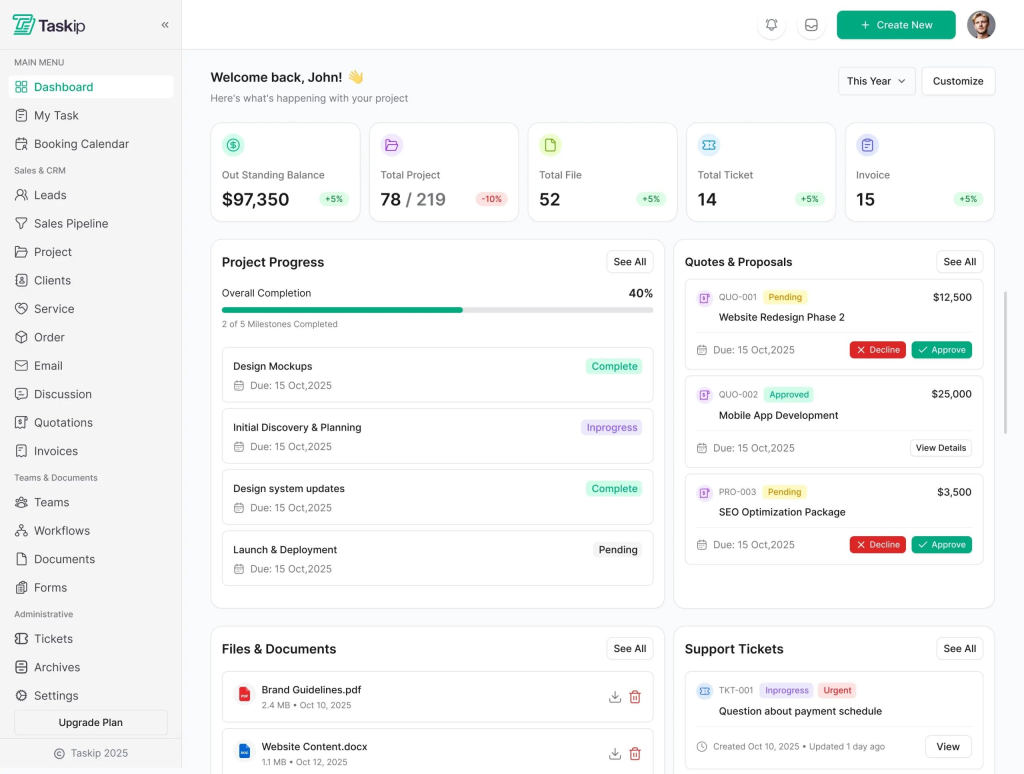
1. Integrated Project Management (Not Just Leads)
Your CRM needs to handle the entire project lifecycle from initial quote through final delivery without switching to a separate tool.
What to look for:
- Visual task boards (Kanban or list views)
- Milestone tracking tied to client contracts
- Revision tracking and approval workflows
- Time tracking for billable projects
- Dependencies and timeline management
Why it matters: When designers finish work, that task automatically updates the client portal. When clients approve revisions, the project status updates instantly. No manual updates, no miscommunications.
2. Unified Client Portal
A white-labeled client portal is no longer a “nice to have”—it’s essential for professional web design agencies.
What to look for:
- Branded portal under your domain (not agency’s branded subdomain)
- Real-time project visibility
- File upload and download capabilities
- Revision request and approval workflows
- Invoice viewing and payment options
- Secure communication without leaving the portal
Why it matters: Clients stop emailing you asking “where’s my project?” They log in, see it themselves. You eliminate 30-40% of status update emails and phone calls.
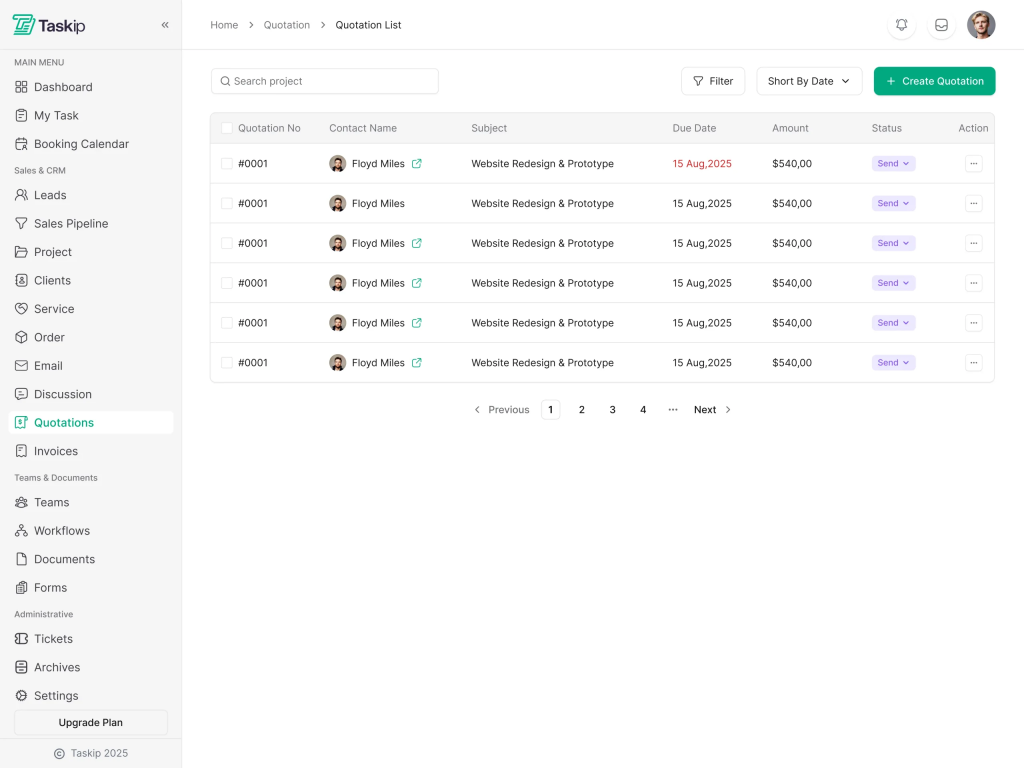
3. Quote-to-Invoice Workflow
The ability to create proposals, convert them to projects, and automatically generate invoices saves hours per client engagement.
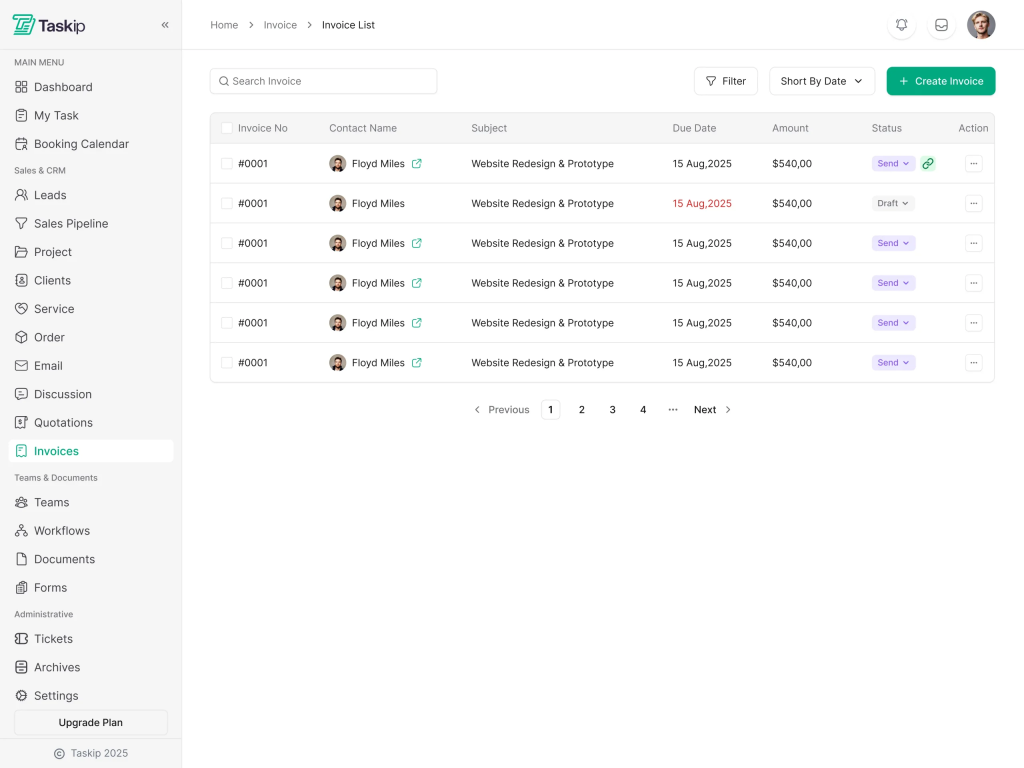
What to look for:
- Template-based quote generation
- One-click conversion from quote to project
- Automatic invoice creation from completed projects
- Payment tracking and follow-ups
- Integration with payment gateways
- Customizable proposal branding
Why it matters: A single proposal in January becomes a tracked project in February and an invoice in March. Everything flows automatically. No re-entering data three times.
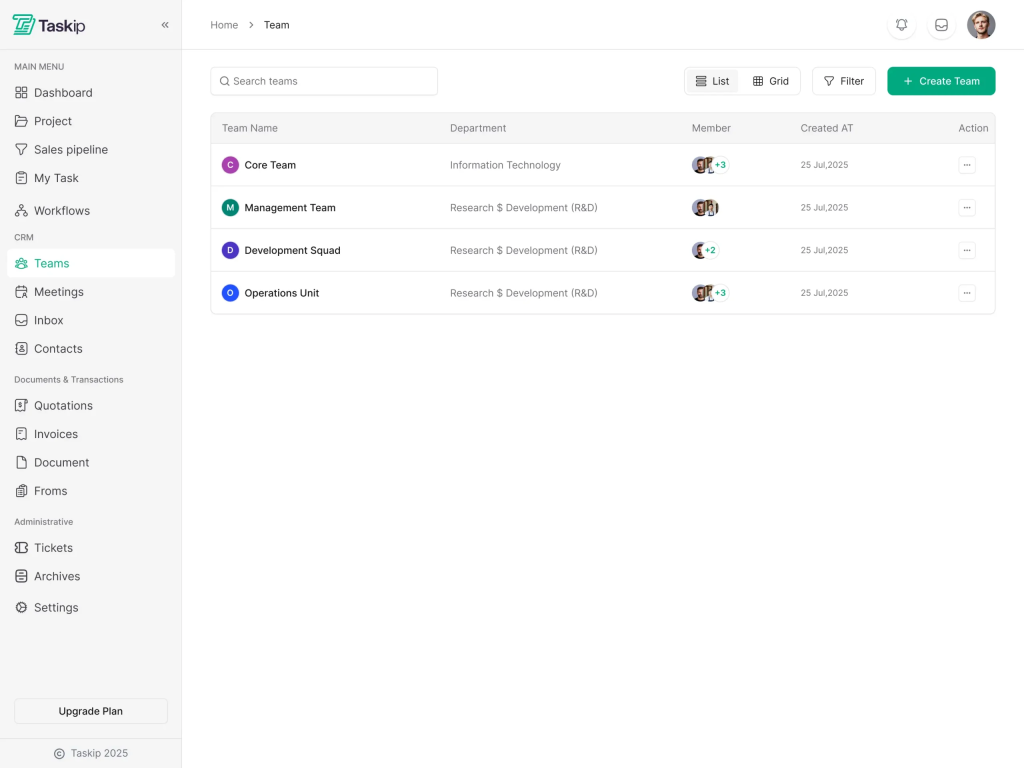
4. Deep Team Collaboration Tools
Your designers, developers, and project managers need to work together seamlessly.
What to look for:
- Comments and mentions on tasks
- Real-time notifications
- Document collaboration (shared notes, brand guidelines, etc.)
- Mobile app for on-the-go updates
- Integration with communication tools (Slack, Gmail)
- Role-based permissions
Why it matters: When a designer comments “@john – need copywriting for homepage,” John gets notified in Slack, sees the context in the CRM, and responds without checking email. Context is preserved, decisions are documented.
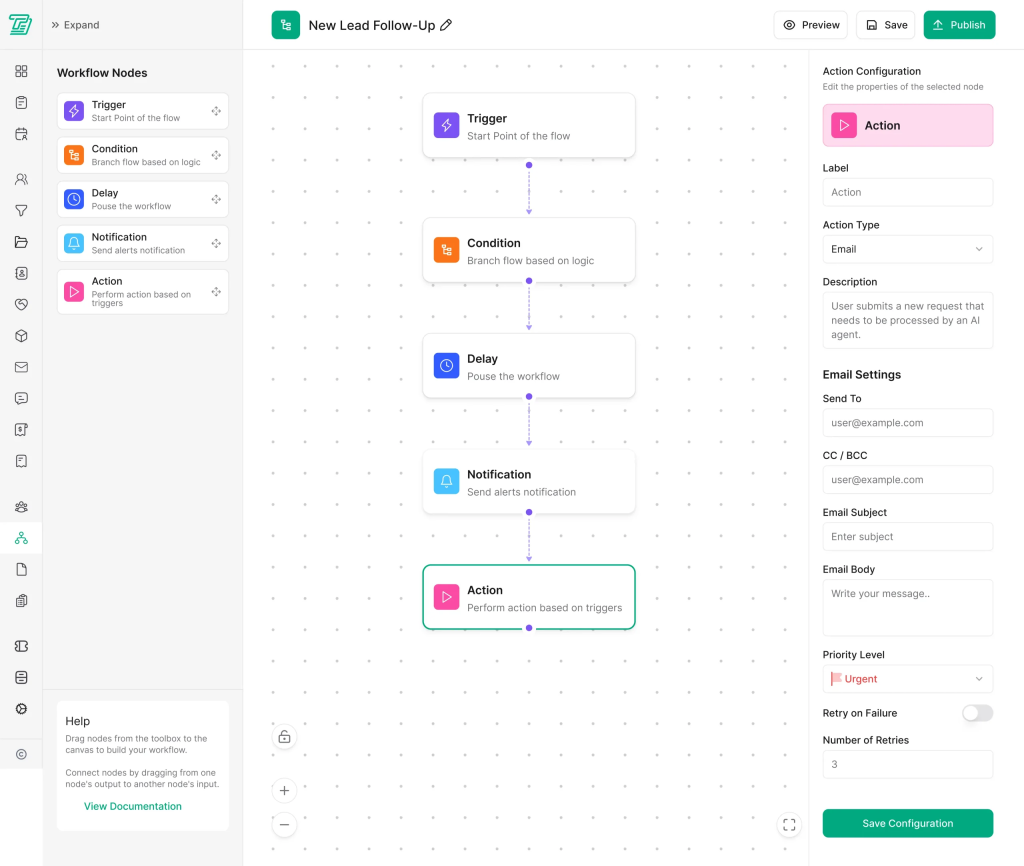
5. Automation That Saves Time
The right CRM reduces manual, repetitive work with smart workflow automation, especially email follow-ups and administrative tasks.
What to look for:
- Automatic email workflows (proposal follow-ups, payment reminders)
- Task automation (create follow-up tasks when projects complete)
- Lead-to-project conversion automation
- Customizable triggers and actions
- Integration with email platforms
- Saved email templates
Why it matters: Agencies using workflow automation report saving 15+ hours per week on manual administrative work. That’s one entire FTE recovered.
6. Seamless Integrations
No agency uses just one tool. Your CRM needs to integrate with the ecosystem you already depend on.
What to look for:
- Native integrations with Gmail, Outlook, Slack, Zapier
- Integration with payment processors (Stripe, PayPal)
- Integration with accounting software (QuickBooks, Wave)
- Integration with design tools (Figma, Adobe)
- Integration with calendar tools (Google Calendar, Outlook)
- Open APIs for custom integrations
Why it matters: Data syncs automatically between tools. Client emails appear in the CRM. Invoices sync to accounting. No data entry, fewer sync errors, single source of truth.
7. Scalable Pricing & Architecture
As your agency grows, the CRM should grow with you, along with afforadable price and flat rate, however, with a free trial as well.
What to look for:
- Flat-rate pricing (not per-user fees that multiply costs)
- Unlimited clients, projects, and contacts
- Pricing that scales with team size, not usage
- No expensive add-ons for core functionality
- Transparent pricing with no surprise fees
- Free tier or trial period to test before committing
Why it matters: Some CRMs charge $100+ per user per month. A 10-person agency pays $12,000+ annually just for the base platform. Flat-rate models often cost 1/3 the price while providing more features.
Top CRM Solutions for Web Design Agencies
Now that we know what matters, let’s examine the best options available:
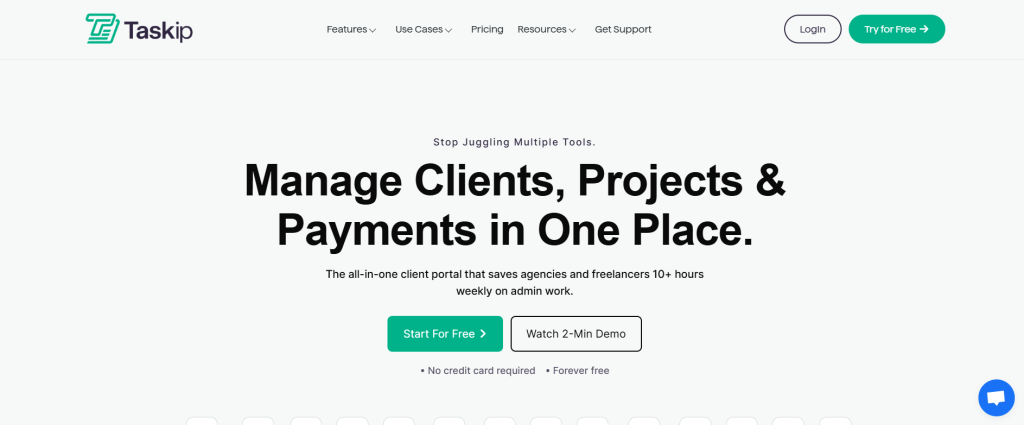
1. Taskip – Best All-in-One Platform for Web Design Agencies
Pricing: $29-99/month (all users included)
What Makes Taskip Stand Out
Taskip is built specifically for agencies and freelancers. It’s not a generic CRM forced to do project management—it’s a platform that understands the agency workflow because it was built by people who lived it.
Core Features:
- All-in-One Client Portal – White-labeled portal where clients view updates, access files, and stay in sync. Reduces status update requests by up to 40%.
- Quote-to-Invoice Pipeline – Create quotes in minutes, convert them to projects automatically, generate invoices from completed work. Everything flows without re-entry.
- Visual Project Management – Kanban boards, milestone tracking, and timeline views that designers and developers actually enjoy using.
- Integrated Team Collaboration – Comments, @mentions, file sharing, and real-time notifications keep everyone aligned without email chains.
- Workflow Automation – Automatically generate invoices from quotes, send payment reminders, create follow-up tasks, and more.
- Contact Management – Organize clients, leads, and vendors. Share invoices, tasks, and support tickets with specific contacts.
- Proposal & Document Management – Create professional proposals with e-signature support. Convert approved proposals to projects instantly.
- Meeting Scheduling – Customizable booking calendar. Clients pick available times; both parties get confirmations.
- Custom Forms – Design conditional forms, collect lead information, auto-populate CRM data.
- Support Tickets – Clients raise issues in-portal; team responds in real-time.
- Sales Pipeline – Track opportunities from inquiry to signed contract with visual pipeline management.
Why Taskip Wins for Web Design Agencies
- Unified Workspace – Everything lives in one platform. Designers see projects. Accountants see invoices. Clients see progress. No context switching.
- Client Experience – Your white-labeled portal replaces dozens of status update emails. Clients stay informed without bothering you.
- Flat-Rate, All-Users Model – Unlike per-user pricing that scales with team growth, Taskip’s pricing includes all users. A 20-person team costs the same monthly rate, just higher tier.
- Specifically Designed for Agencies – Not a sales CRM with PM bolted on. Built by people who understand proposal-to-delivery workflows.
- Seamless Quote-to-Invoice – Create a quote in January → Convert to project February → Generate invoice March. Automatic. Error-free.
- Client Portal Included – Most CRMs charge extra for portals. Taskip includes professional white-labeled portal in every plan.
Ideal For
- Web design agencies (5-50+ person teams)
- Freelance designers managing multiple clients
- Agencies running retainer-based business models
- Teams tired of paying per-user fees for basic CRM
Realistic Drawbacks
- Less robust for very large enterprises (500+ users)
- Fewer third-party integrations than some competitors
- Smaller user community compared to Salesforce
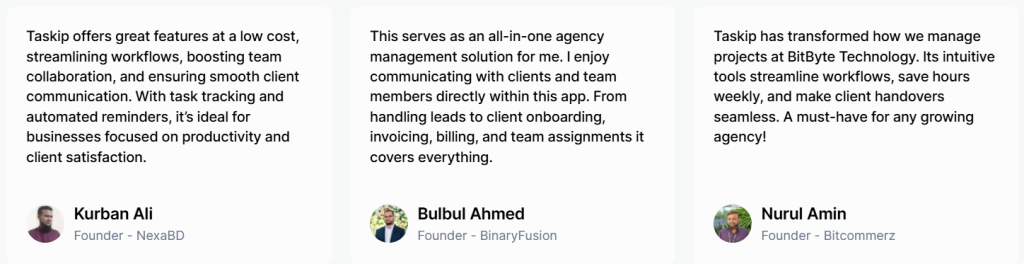
Customer Review Snapshot
2. monday.com – Best for Visual Teams (But Pricier)
Pricing: $12-24/user/month
What Makes monday.com Great
monday.com is the favorite of creative teams because it looks and feels visual. Kanban boards, timeline views, and calendar integration make it appealing to designers and project managers.
Strengths:
- Highly visual interface (perfect for creative teams)
- Excellent integrations with Adobe Creative Suite and Figma
- Beautiful dashboards and automation workflows
- Strong mobile app
- Excellent customization options
Weaknesses:
- Per-user pricing gets expensive fast (20 users = $5,760/year minimum)
- Missing built-in invoicing and quoting
- No white-labeled client portal (you need add-ons)
- Steeper learning curve for non-technical teams
- Client portal feature requires additional purchases
Cost Reality Check
A 10-person team at $14/user/month = $1,680/month ($20,160/year) for just the base platform. Add invoicing add-on, client portal, and you’re closer to $25,000/year.
Best For
Visual teams who prioritize design and are willing to pay premium pricing; agencies already using Adobe Creative Cloud heavily.
3. Zoho CRM – Best for Budget-Conscious Agencies
Pricing: $18-45/user/month (free tier available)
What Makes Zoho Good
Zoho is incredibly affordable and feature-rich. The free tier supports up to 3 users with substantial functionality. Paid tiers offer AI-powered Zia assistant, workflow automation, and extensive customization.
Strengths:
- Extremely affordable for small teams
- AI-powered sales assistant (Zia)
- Extensive customization options
- Strong reporting and analytics
- Integrates with most popular business tools
- Specialized tools for agencies (Zoho Projects, Zoho Invoice)
Weaknesses:
- Requires learning curve—Zoho has many options
- Client portal is limited without Zoho Projects add-on
- Separate invoicing (need Zoho Invoice subscription)
- Not purpose-built for agencies (more general CRM)
- Projects and invoicing require separate modules with additional cost
Cost Reality Check
Base Zoho CRM + Zoho Projects + Zoho Invoice = approximately $25-40/user/month when all components are licensed.
Best For
Agencies with technical teams, tight budgets, and a willingness to integrate multiple Zoho products; startups testing CRM before scaling.
4. Copper CRM – Best for Google Workspace Users
Pricing: $23-99/user/month
What Makes Copper Stand Out
If your entire agency runs on Google Workspace (Gmail, Google Drive, Google Calendar), Copper integrates so deeply that it feels native to your workflow.
Strengths:
- Seamless Gmail integration (manage CRM from email)
- Deep Google Calendar and Drive integration
- Task management in Gmail
- Excellent for Gmail-first workflows
- Mobile app integrations well with Google ecosystem
- Good automation capabilities
Weaknesses:
- Primarily built for Gmail (less ideal if using Outlook)
- Limited native project management
- No invoicing built-in
- No client portal included
- Per-user pricing model
- Project delivery workflow not a focus
Best For
Google Workspace-dependent agencies; teams that live in Gmail; agencies with 5-15 people on tight budgets.
5. Insightly – Best for Project-Centric Workflows
Pricing: $29-99/user/month
What Makes Insightly Valuable
Insightly bridges CRM and project management more effectively than competitors. Visual pipelines, Kanban boards, and strong project tracking make it appealing for agencies.
Strengths:
- Strong project management features alongside CRM
- Visual Kanban pipelines
- 250+ integrations
- Good customization options
- Automated workflows
- Time tracking capabilities
Weaknesses:
- Per-user pricing (expensive for large teams)
- Client portal requires add-on purchase
- No invoicing included (use separate tool)
- Steeper learning curve
- Advanced features locked to higher tiers
Cost Reality Check
10-person team at $29/user/month = $290/month ($3,480/year) for base. Add project management features, client portal, and you’re at $5,000+/year.
Best For
Project-heavy agencies; teams needing strong project and CRM integration; agencies with 8-20 people.
Comparison Chart: CRM Solutions for Web Design Agencies
| Feature | Taskip | monday.com | Zoho | Copper | Insightly |
| Pricing Model | Flat-rate | Per-user | Per-user | Per-user | Per-user |
| Base Price (10 people) | $290-990/mo | $1,400-2,400/mo | $180-450/mo | $230-990/mo | $290-990/mo |
| Client Portal | ✓ Included | ✗ Add-on | ✗ Add-on | ✗ None | ✗ Add-on |
| Quote-to-Invoice | ✓ Built-in | ✗ Integration | ✗ Separate module | ✗ No | ✗ No |
| Project Management | ✓ Full suite | ✓ Excellent | ✗ Separate module | ✗ Basic | ✓ Strong |
| Team Collaboration | ✓ Native | ✓ Excellent | ✓ Good | ✓ Good | ✓ Good |
| Automation | ✓ Workflow-based | ✓ Powerful | ✓ Good | ✓ Good | ✓ Good |
| Mobile App | ✓ Full featured | ✓ Excellent | ✓ Good | ✓ Good | ✓ Good |
| Integrations | ✓ Key tools | ✓ 250+ | ✓ 500+ | ✓ Google focus | ✓ 250+ |
| Learning Curve | Low | Medium | Steep | Low | Medium |
| Best For | Agencies | Creative teams | Budget | Google users | Projects |
How to Choose CRM for Web Design Agencies
Not sure which CRM is right for your specific situation? Use this framework:
Choose Taskip if:
- You want everything in one platform (no add-ons, no integrations required)
- Your team is 5-100+ people and you want predictable monthly costs
- You need a professional client portal as a core feature
- You’re tired of per-user pricing models
- You want quote-to-invoice automation
- You value simplicity and setup speed
- You need both strong CRM and project management equally
- You’re building long-term client relationships where professional experience matters
Choose monday.com if:
- Your team is highly visual and design-focused
- You’re already deep in Adobe Creative Suite / Figma ecosystem
- You have budget for premium pricing
- Visual Kanban boards and timeline views are non-negotiable
- You don’t mind using separate tools for invoicing/proposals
- You want maximum customization and workflow flexibility
Choose Zoho if:
- You have a tight budget and small team (under 5 people)
- Your team is technical enough to handle multiple integrations
- You need a free or very cheap tier to start
- You’re comfortable using separate Zoho products (Projects, Invoice, CRM)
- You want maximum customization at low cost
- You plan to integrate multiple business tools
Choose Copper if:
- Your entire company runs on Google Workspace
- You want to manage CRM from Gmail
- You have 5-15 people
- You don’t need built-in invoicing or project management
- You want tight Gmail integration above all else
Choose Insightly if:
- Project management is equally important to CRM
- You have 8-20 people
- You need strong visual pipeline tracking
- You want 250+ third-party integrations
- You’re willing to pay per-user for advanced features
The Real Cost of Choosing Wrong
It’s tempting to pick the cheapest CRM, but the true cost includes hidden expenses:
Per-User Pricing Model (monday.com, Zoho, Copper, Insightly)
- 10 people at $25/user/month = $3,000/month ($36,000/year)
- When you hire person 11, it’s +$300/month automatically
- Add client portal feature (+$5/user) = $50/month per person
- When your needs grow, you upgrade tiers (+$10-15/user)
Total 3-year cost for 10-person agency: ~$108,000
Flat-Rate Model (Taskip)
- All-in-one: $290-990/month depending on features
- Add 10 more people: same cost
- No per-user fees ever
- Unlimited projects, clients, invoices
Total 3-year cost for 10-person agency: ~$10,500-35,700
Plus hidden costs of per-user models:
- Time integrating multiple tools ($10,000-30,000 in labor)
- Data duplication and manual entry (5-10 hours/month wasted)
- Client portal add-ons ($5-15/user/month extra)
- Missing automation opportunities (15+ hours/week manual work that could be automated)
Implementation Checklist: Getting Started with Your New CRM
Once you’ve chosen your CRM, follow this checklist to ensure smooth adoption:
Week 1: Planning & Data Audit
- Audit your current client data (spreadsheets, old CRM, documents)
- Identify data inconsistencies and clean them up
- Get executive buy-in and assign a CRM champion
- Document your current workflow (how quotes become projects become invoices)
- List all tools that need to integrate with CRM
Week 2: Setup & Configuration
- Complete CRM setup and company profile
- Configure client portal branding
- Set up user accounts and permission levels
- Create client, contact, and opportunity record structures
- Upload historical client data
- Test all user roles and permissions
Week 3: Customization & Integration
- Customize proposal and invoice templates
- Set up email automation workflows
- Configure integrations (Gmail, Slack, accounting software, etc.)
- Create custom fields for your agency’s unique data
- Set up reporting dashboards
- Configure notification preferences
Week 4: Training & Soft Launch
- Conduct hands-on training with each team member
- Start with one client (soft launch) to test processes
- Gather feedback and adjust workflows
- Document standard operating procedures
- Create video tutorials for team reference
- Schedule live Q&A sessions
Month 2: Full Launch
- Roll out to all clients
- Monitor adoption rates and support issues
- Optimize automation workflows based on real usage
- Schedule 30-day review meeting
- Plan next phase improvements
Month 3+: Optimization
- Review KPIs (time saved, client satisfaction, revenue impact)
- Identify bottlenecks and adjust workflows
- Train new team members on CRM processes
- Plan advanced feature rollout
- Schedule quarterly reviews for continuous improvement
ROI: What You Can Expect from Your CRM Investment
Based on agency-wide data, teams implementing an agency-focused CRM typically see:
Time Savings
- 40% reduction in time spent on client status updates (via client portal)
- 15+ hours/week saved on manual administrative work (via automation)
- 5 hours/month saved on quote and invoice generation (via templates)
- 3 hours/week saved on meeting scheduling and calendar coordination
Total: 30-40 hours/month recovered per 10-person team
Revenue Impact
- 25-35% fewer proposals lost to miscommunication (unified platform)
- 20% faster quote turnaround (template-based generation)
- 10-15% increase in project profitability (time tracking, scope management)
- 30% reduction in client churn (improved communication via portal)
Total: 5-15% revenue uplift for most agencies within 6 months
Cost Savings
- Eliminate 2-3 other tools ($200-500/month in SaaS eliminations)
- Reduce billing errors by 95% (automatic invoicing)
- Save 100+ hours/year on manual data entry
Total: $2,400-6,000 in annual savings plus labor value
Net Impact
For a 10-person agency at $50,000+ average project value:
- Recover $75,000-120,000 in labor productivity annually
- Generate $50,000-150,000 in additional revenue
- Save $2,400-6,000 in tool/operational costs
Three-year investment ROI: 300-500%
Common CRM Implementation Mistakes to Avoid
1. Choosing Based on Price Alone
The cheapest CRM becomes expensive when you factor in add-ons, integrations, and lost productivity. Taskip’s flat-rate model often beats per-user alternatives by 60-70% on total cost of ownership.
2. Expecting Instant Adoption
Teams resist change. Build adoption into your timeline (4 weeks minimum). Train thoroughly. Celebrate early wins. Your CRM is only as valuable as your team’s willingness to use it.
3. Ignoring Data Quality
Garbage in, garbage out. Before migrating to your new CRM, audit and clean your existing data. Duplicate contacts, incomplete records, and inconsistent naming conventions will sabotage your system.
4. Not Setting Up Integrations Properly
Don’t just say “we’ll integrate with email later.” Set integrations up during implementation. Automated data flow is where the real ROI happens.
5. Over-Customizing Before Understanding the System
Don’t customize everything immediately. Use the CRM in its standard form for 2-3 weeks first. Understand what actually needs customization.
6. Skipping Client Portal Training
Your clients need to understand how to use the portal. Without proper training, adoption is slow. Create simple video tutorials. Walk key clients through it personally.
7. Not Measuring Success
Track KPIs before and after CRM implementation. Which metrics matter?
- Time spent on admin tasks
- Project profitability
- Client satisfaction scores
- Quote-to-close time
- Revenue per client
Without baseline measurements, you won’t know if your CRM is working.
Final Verdict: Best CRM for Web Design Agencies in 2025
If you had to choose one CRM right now, here’s our recommendation:
For Most Web Design Agencies: Taskip
Taskip wins for web design agencies because it’s purpose-built for exactly what you do: manage client relationships, deliver projects, and get paid—all in one unified platform.
Why Taskip beats the alternatives:
- All-in-one platform – No add-ons, no integrations required for core functionality
- Flat-rate pricing – Scales with your team without per-user cost multiplication
- Client portal included – Professional, white-labeled portal built in (not an add-on)
- Quote-to-invoice automation – Completely removes manual data re-entry
- Built for agencies – Every feature solves real agency problems
- Fast implementation – Setup in days, not weeks
- ROI-focused – Saves 30-40 hours/month on administrative work
The bottom line: You’ll spend $290-990/month and save $75,000-120,000/year in recovered productivity. That’s a 75-400x ROI.
If Your Situation Is Different:
- If you’re 100+ person enterprise: Salesforce
- If you’re design-first team with big budgets: monday.com
- If you’re Google Workspace-only: Copper CRM
- If you’re technical and budget-conscious: Zoho
But for the typical web design agency (10-50 people, balance of sales/delivery, client relationships matter), Taskip is the clear winner.
Next Steps: Get Started Today
Ready to transform how your agency manages clients and projects?
Step 1: Try It Free
Sign up for Taskip’s free trial (no credit card required). You’ll experience firsthand how it consolidates CRM, project management, invoicing, and client collaboration in one workspace.
Step 2: Migrate One Client
Don’t migrate your entire client base immediately. Start with one active project. Move the client, their project, and associated documents. See how the workflow actually works.
Step 3: Measure Baseline Metrics
Before full implementation, measure:
- Hours spent on administrative tasks this week
- Time from quote creation to invoice sending
- Number of status update emails received
- Client satisfaction on project visibility
Step 4: Full Implementation
Once you’ve validated the core workflow, plan your 4-week implementation timeline following our checklist above.
Conclusion
Your web design agency’s success depends on executing projects brilliantly and managing client relationships professionally. A CRM built specifically for agencies removes friction from both.
Taskip (and platforms like it) enable you to spend less time on administration and more time on creative work. Your clients get a professional experience with real-time project visibility. Your team gets context and automation instead of chaos and spreadsheets. Your business gets profitability through clarity.
The best CRM for your web design agency isn’t the most expensive or the most powerful—it’s the one that understands your actual workflow and eliminates the specific pain points holding you back.
For most agencies, that’s exactly what Taskip delivers.
FAQ: CRM for Web Design Agencies
Q: Can we switch CRMs later without losing data?
A: Yes, but it’s painful. Most CRMs support CSV exports. Plan to re-enter some data and clean inconsistencies. Choosing right the first time beats migrating later. That said, major CRM vendors (including Taskip) can assist with data migration if you decide to move.
Q: How long does CRM implementation really take?
A: 4 weeks for full adoption is realistic. Setup takes 3-5 days. Configuration (templates, automation, integrations) takes 1-2 weeks. Training and soft launch takes 1 week. Full rollout and optimization happens during month 2.
Q: Will our clients understand how to use the portal?
A: Most do intuitively. A 3-minute walkthrough call covers it. For less tech-savvy clients, create a simple video tutorial. Taskip’s portal is designed to feel familiar (like Dropbox or Google Drive), so adoption is usually smooth.
Q: What if we hate it after implementing?
A: You’ll know within 2-3 weeks. Most agencies fall in love after 30 days when they see hours being recovered. If it’s truly not working, you can switch to another platform (though data migration is a hassle). That’s why free trials and soft launches matter.
Q: Is CRM overkill for a 3-person agency?
A: No. Even small agencies benefit from professional client portals, automation, and invoicing. Taskip’s pricing scales down to small teams, and the ROI is still strong. At 3 people, a spreadsheet is chaos. At 3+ people, a CRM becomes obvious.
Q: Can we use CRM for anything besides client projects?
A: Absolutely. Most agencies use CRM for vendor/partner relationships, partnership tracking, and even internal initiatives. The platform supports any relationship you want to track professionally.
Q: How do we measure CRM success?
A: Track: (1) Time saved on admin, (2) Project profitability improvement, (3) Client satisfaction scores, (4) Revenue per client, (5) Quote-to-close speed. Establish baselines before implementation. Review monthly during first quarter, then quarterly.
Ready to get started?
This article was last updated in January 2025. CRM features, pricing, and integrations change frequently. We update this guide quarterly to reflect the latest platform updates.

Get Summary On: