How much does Moxie cost? Moxie has three paid plans: Starter at $12/month, Pro at $25/month, and Teams at $40/month for up to 5 members. Billed annually those drop to $10, $20, and $32 per month, which works out to $120, $240, and $385 per year. There is no free plan. Every tier comes with a 14-day free trial and no credit card is required to start it.
This guide is about Moxie pricing, an all-in-one business management platform for freelancers and agencies, available at withmoxie.com. It launched as Hectic and rebranded in 2023.
Let’s analyze the Moxie pricing and features thoroughly to examine its price value and see if there are better alternatives to Moxie or not:
Moxie offers three plans: Starter at 12/m, Pro at $25/m, and Teams at $40/m. It is mainly designed for freelancers, and team collaboration is a major concern in Moxie when it comes to scaling.
Moxie Price List 2026 (Every Plan, Monthly and Annual)
Here’s the complete Moxie price list as of July 2026, straight from withmoxie.com.
| Criteria | Starter | Pro | Teams |
|---|---|---|---|
| Monthly price | $12/mo | $25/mo | $40/mo |
| Annual price | $10/mo | $20/mo | $32/mo |
| Total billed yearly | $120 | $240 | $385 |
| Annual saving | $24 | $60 | $95 |
| Team members | 1 | 1 | Up to 5 |
| Cost per seat (annual) | $10 | $20 | $6.40 |
| Free trial | 14 days | 14 days | 14 days |
| Card required for trial | No | No | No |
| Free plan | None | None | None |
Moxie also offers scholarships for qualified applicants; it’s worth checking eligibility before assuming the listed price is your only option.
Table of Contents
What Is Moxie? – Quick Overview
Moxie is an all-in-one business managemnet platform designed for freelancers. The features on Moxie software provide a centralized solution for freelancers that lets them manage their projects, clients, contracts, and invoices, track time, schedule meetings, and do much more.
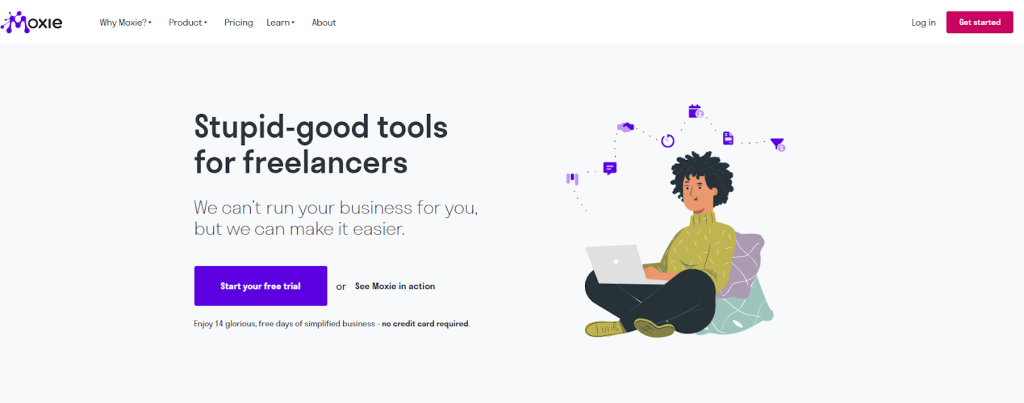
Moxie is a great platform for freelancers, solopreneurs, creative professionals, coaches, consultants, digital Marketers, graphic designers, web developers, and virtual assistants.
Moreover, it integrates with payment gateways like PayPal and Stripe; the bank connector Plaid; accounting software such as QuickBooks, Xero, and QuickBooks Online Accountant; and automation tools like Zapier.
How Much Is Moxie a Month?
Moxie costs $12/month for Starter, $25/month for Pro, and $40/month for Teams, billed monthly (annual plans run $10–$32/month).
Paying month to month, Starter is $12, Pro is $25, and Teams is $40 for up to 5 people. Switch to annual billing and the effective monthly rate falls to $10, $20, and $32. That’s a saving of roughly 17 to 20 percent, though you pay the full year upfront.
For most solo freelancers, the real number is $25 a month, not $12. Starter looks like the headline price, but it has no workflow automation, no API integrations, no custom domain, and no white-labeled client portal. If you want any of those, and most people running a client-facing business eventually do, you’re on Pro.
For a team, the honest per-seat maths looks better than the sticker price suggests. Teams at $40 a month across 5 members works out to $8 per person, or $6.40 on annual billing. That’s competitive. The catch is the hard cap at 5. There is no tier above Teams, so the sixth person is a migration, not an upgrade.
Moxie Monthly Cost at a Glance
| Plan | Monthly billing | Annual billing (per month) | Billed yearly | Seats |
|---|---|---|---|---|
| Starter | $12 | $10 | $120 | 1 |
| Pro | $25 | $20 | $240 | 1 |
| Teams | $40 | $32 | $385 | Up to 5 |
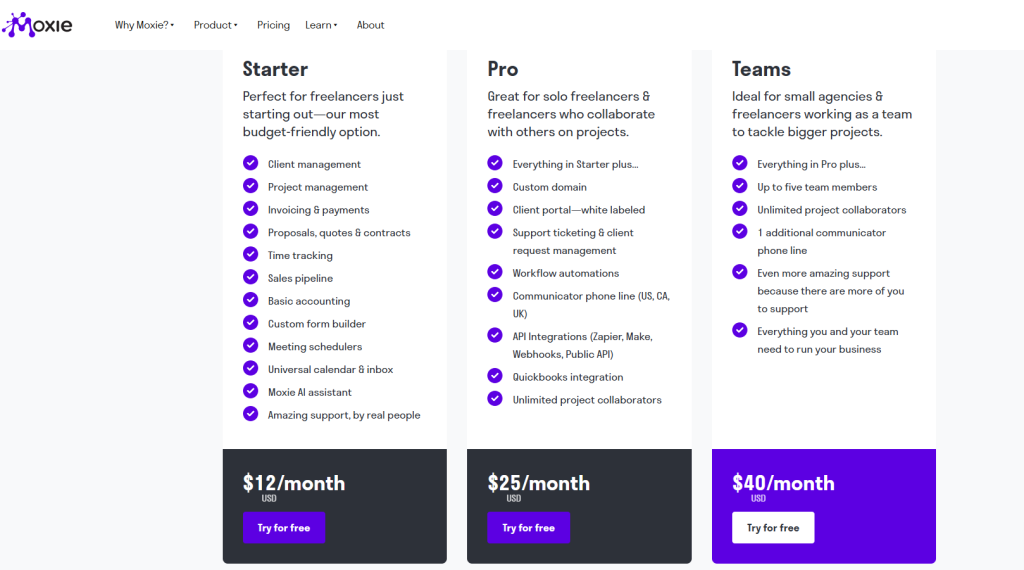
Moxie Plans: Pricing & Feature Comparison Table
| Features | Moxie Pricing For All Three Plans | ||
| Starter | Pro | Team | |
| Pricing Monthly | $12/month | $25/month | $40/month |
| Pricing Annually | $120/year | $240/year | $385/year |
| Client and Project Management | ✅ | ✅ | ✅ |
| Team Members | ❌ | ❌ | Up to 5 |
| Basic Accounting | ✅ | ✅ | ✅ |
| AI Assistant | ✅ | ✅ | ✅ |
| Time Tracking | ✅ | ✅ | ✅ |
| Proposals, Quotes & Contracts | ✅ | ✅ | ✅ |
| Project Collaborators | ❌ | Unlimited | Unlimited |
| White-Labeled Client Portal | ❌ | ✅ | ✅ |
| Workflow Automation | ❌ | ✅ | ✅ |
| API Integrations | ❌ | ✅ | ✅ |
| Communicator phone line (US, CA, UK) | ❌ | 1 Line | 2 Lines |
Is there a Free Moxie Plan?
Moxie doesn’t have a free forever plan. However, it offers a free trial on all its plans for 14 days. And the best part is that the free trial doesn’t require a credit card. So, you can test the features with convenience and decide whether to go for a paid plan or not.
Monthly Vs. Annual Moxie Pricing 2026
You will get a monthly and annual payment structure in Moxie pricing. The monthly plan is convenient because you can cut off the plan at any month and are not bound to continue the service until the year ending. But when it comes to money value, switching from a monthly plan and jumping to an annual plan is a wise decision, as it comes at a more affordable price.
| Plan | Monthly Price | Annual Price | Savings On Annual Plan | |
| Saving Per Month | Saving Per Year | |||
| Starter | $12/month | $120/year($10/month) | $2/month | $24/year |
| Pro | $25/month | $240/year($20/month) | $5/month | $60/year |
| Team | $40/month | $385/year($32/month) | ~$8/month | ~$95/year |
From the above Moxie CRM pricing breakdown, it is clear that the annual plans are more cost-effective compared to the monthly plan.
Moxie Pricing Plans: In-Depth Breakdown & Value Analysis
1. Starter at $12/month
The Starter plan is the lowest tier of Moxie pricing. It includes all the basic features that a freelancer usually needs to manage projects and clients.
Price Breakdown
| Moxie Starter Pricing | |
| Monthly Pack | Yearly Pack |
| $12/month | $120/year |
Who This Plan Is Best For?
The Moxie Starter plan is perfect for freelancers and solo entrepreneurs who are just at the beginning level of their business.
Key Features Included
- Client & project management
- Freelance invoicing software & payment tools
- Proposals, quotes, & contracts
- Time tracking
- Sales pipeline
- Basic accounting
- Custom form builder
- Meeting schedulers
- Universal calendar & inbox
- Moxie AI assistant
- Amazing support by real people
Limitation
- Doesn’t support project collaborators
- No workflow automation
- No API integration
- Doesn’t have a whitelabeling client portal
Better Money Value: Moxie Starter Vs. Taskip Freelancer
Both the plan, Moxie Starter, and Taskip Freelancer are designed to focus on freelancers, and both have the same monthly price.
However, when you look at the annual pricing, Taskip Freelancer is more affordable and cost-effective than Moxie Starter. Where the Moxie pricing for Starter comes at a $120/year, Taskip Freelancer costs only $95/year! That is, you can save $25/year with Taskip!
Is this just about the price? What about money value?
Taskip Freelancer plan offers you more extended features than the Moxie Starter. So, paying the same monthly rate, you are getting a better money value with Taskip Freelancer. Check out the head-to-head comparison between the plans:
| Features | Moxie Starter | Taskip Freelancer |
| Pricing Monthly | $12/month | $12/month |
| Pricing Annually | $120/year | $95/year |
| Proposals, Quotes, & Invoicing | ✅ | ✅ |
| Sales pipeline | ✅ | ✅ |
| Form Builder | ✅ | ✅ |
| Time Tracking | ✅ | ✅ |
| Calender & Inbox | ✅ | ✅ |
| Meeting Scheduler | ✅ | ✅ |
| Built-in Service Catalog | ❌ | ✅ |
| Support Ticket System | ❌ | ✅ |
| AI Assistant | ✅ | ✅ |
| Zapier & Webhooks Integration | ❌ | ✅ |
| Best Money Value: Taskip Freelancer | ||
2. Pro at $25/month
The Pro plan is the mid-level package of Moxie. It has more added features compared to the Starter plan.
Price Breakdown
| Moxie Pro Pricing | |
| Monthly Pack | Yearly Pack |
| $25/month | $240/year |
Who This Plan Is Best For?
The Pro plan is designed for solo freelancers & freelancers who collaborate with others on projects. Here, you will get unlimited project collaboration within a single dashboard that streamlines your project management and makes your day-to-day tasks easier.
Key Features Included
- Everything in Starter plus
- Custom domain
- Whitelabel client portal
- Support ticketing & client request management
- Workflow automation
- Communicator phone line (US, CA, UK)
- API Integrations (Zapier, Make, Webhooks, Public API)
- Quickbooks integration
- Unlimited project collaborators
Limitation
- No service catalog
- No team member is adding
Better Money Value: Moxie Pro Vs. Taskip Startup Team
The pricing of Moxie Pro and Taskip Starter Team is almost identical; Taskip’s plan comes at only a few dollars more than Moxie Pro. However, it offers up to ten team member addition where Moxie Pro allows no team members; only one user.
Let’s compare the two plans side-by-side:
| Features | Moxie Pro | Taskip Startup Team |
| Pricing Monthly | $25/month | $29/month |
| Pricing Annually | $240/year | $299/year |
| User(s) | 1 | Up to 10 |
| Service Catalog | ❌ | ✅ |
| Project Collaborator | ✅ | ✅ |
| API Integrations (Zapier, Webhooks, Public API) | ✅ | ✅ |
| Custom Domain | ✅ | ✅ |
| White-Label Branding | ✅ | ✅ |
| Portal SEO | ❌ | ✅ |
| Built‑in Phone Line | ✅(US, CA, UK) | ❌ |
| Google Drive Integration | ✅ | ✅ |
| Time Tracking | ✅ | ✅ |
| Winner: Taskip Pro | ||
3. Teams at $40/month
Teams is the highest tier of Moxie pricing. It covers up the previous tier brining better features. Where the Starter and Pro plans don’t support any team member addition, Teams allows up to five members.
Price Breakdown
| Moxie Pro Pricing | |
| Monthly Pack | Yearly Pack |
| $40/month | $385/year |
Who This Plan Is Best For?
The identical feature of Moxie Teams is that it allows up to five team members. This makes the plan ideal for small agencies & freelancers working as a team to tackle bigger projects.
Key Features Included
- Everything in Pro plus
- Up to five team members
- Unlimited project collaborators
- 1 additional communicator phone line than the Pro plan
- Even more amazing support because there are more of you to support
- Everything you and your team need to run your business
Limitation
- Supports only 5 team members; not ideal for large teams
- Lacks advanced filtering or tags
- Has regional restrictions
Better Money Value: Moxie Teams Vs. Taskip Growing Agency
Though Taskip Growing Agency is a bit expensive compared to Moxie Teams, it is more suitable for growing teams.
Despite the name suggesting, Moxie ‘Team’, it only supports five team members. So, in case your team is growing or your business is scaling, you need to switch to another platform, leaving Moxie.
In contrast, Taskip Growing Agency supports up to 25 team members, which is indeed ideal for large teams and starting agencies. It also has a team performance analysis tool. So, if you are looking for a platform that offers features and team support, Taskip Growing Agency is better than Moxie Teams.
| Features | Moxie Teams | Taskip Growing Agency |
| Pricing Monthly | $40/month | $59/month |
| Pricing Annually | $385/year | $459/year |
| Team Member | 5 | 25 |
| Team Performance Analytics | ❌ | ✅ |
| Global Support | Limited | ✅ |
| Priority Support | ✅ | ✅ |
| AI-Powered Tools | Only a basic AI Assistant | AI email writing, Task recommendations, Doc summarization |
| Centralized Client Portal with Real-Time Updates | Limited to invoices/contracts/progress | ✅ |
| Custom Workflows | Limited control | ✅ |
| Winner: Taskip Growing Agency | ||
Is Moxie a CRM? : Moxie CRM Pricing Explained
Moxie’s CRM tools are built into every plan starting at $12/month, there’s no separate CRM pricing tier. You get CRM features with the Starter ($12/month), Pro ($25/month), and Teams ($40/month) plans.
Moxie positions itself as a business management platform rather than a traditional CRM. Unlike CRM-first platforms such as HubSpot or Pipedrive, which focus on lead management and sales pipelines, Moxie combines client management with project management, invoicing, contracts, time tracking, and scheduling. The CRM is one part of a broader business management suite.
Here’s what each plan includes for CRM users:
| Plan | CRM Features |
|---|---|
| Starter ($12/month) | Client records, sales pipeline, forms, meeting scheduler, proposals, and contracts |
| Pro ($25/month) | Everything in Starter, plus a white-label client portal, custom domain, API integrations, and QuickBooks sync |
| Teams ($40/month) | Everything in Pro, shared across up to five team members |
One limitation is that Moxie doesn’t include a service catalog or support ticketing. If your business sells packaged services online or relies on structured client support workflows, you’ll likely need additional tools. Freelancers may never notice these gaps, but agencies with higher client volumes often will.
If your priority is a dedicated, sales-focused CRM, Moxie may include more business management features than you need. However, if you want a single platform that combines CRM, projects, contracts, invoicing, and client management, its bundled approach offers good value.
Moxie Pricing & Feature Limitations
When comparing Moxie pricing to its competitors, it has a very affordable price point. However, some feature limitations in Moxie are quite essential; these are as follows:
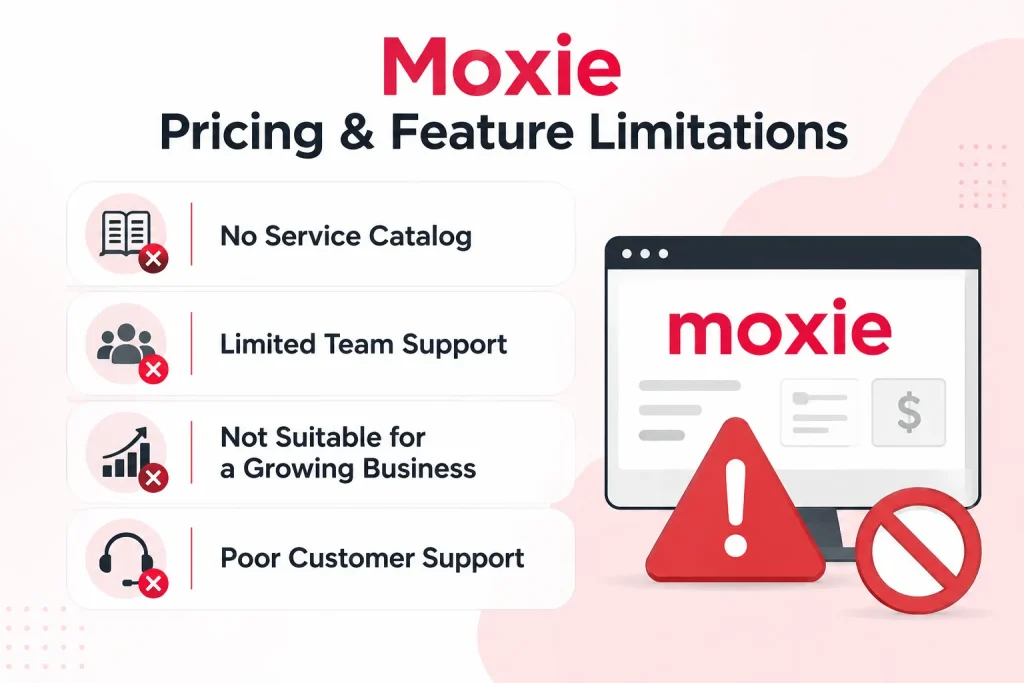
No Service Catalog
A built-in service catalog allows you to showcase all your services in an organized way, from which the customers can directly make a purchase or buy services. But unfortunately, Moxie doesn’t have a built-in service catalog in any of its plans.
Limited Team Support
The Starter and Pro plans don’t support team member addition. Team members are allowed only in the highest tier, Team. Yet it supports only up to five members at a price of $40/month.
This is expensive if you are preferring team working, as other alternatives like Taskip allow more users at low tiers.
Not Suitable for a Growing Business
Moxie is mainly built for freelancers, not large teams or agencies. As you scale your business, team members are added, and here comes the necessity of team collaboration.
Unfortunately, Moxie has strict team collaboration limitations, which makes is unsuitable for growing businesses and large teams.
Poor Customer Support
Moxie has a bad reputation for poor customer support. It lacks Facebook group interaction, which is the major complaint from customers. Moreover, the Starter plan doesn’t have a support ticket system. And the priority support is available only for the highest tier, Teams.
The Communicator Phone Line is Region-Locked
It only works in the US, Canada, and the UK. If you’re billing clients from anywhere else, you’re paying for a feature you can’t switch on.
Does Moxie (withmoxie.com) Have Hidden Costs?
Moxie has three costs not listed on its pricing page: Stripe fees (2.9% + $0.30), a $1 ACH fee per payment, and a $149 migration fee.
⚠️ Moxie has no hidden platform fees, but there are extra costs worth knowing before you buy.
Transaction Fees: Payment Processing is Separate
Moxie doesn’t add its own transaction fee to card payments, but getting paid still has a cost. Payments are processed through Stripe or PayPal, so standard processor fees apply. The only additional Moxie-specific charge is a $1 fee for each ACH payment to cover Plaid bank verification.
For example, if you invoice $5,000 per month, Stripe’s standard 2.9% + $0.30 card processing fee works out to about $147. Add the $25 Pro subscription, and your total monthly cost is around $172. For businesses that invoice regularly, payment processing will usually cost far more than the software subscription itself.
Migration Help Costs $149
Moving from another platform with a specialist is a one-time $149 fee. It’s optional, but if you’re bringing across years of client records and invoices, doing it by hand is a weekend you won’t get back. You need to provide your own data, and the specialist will set up your account for you.
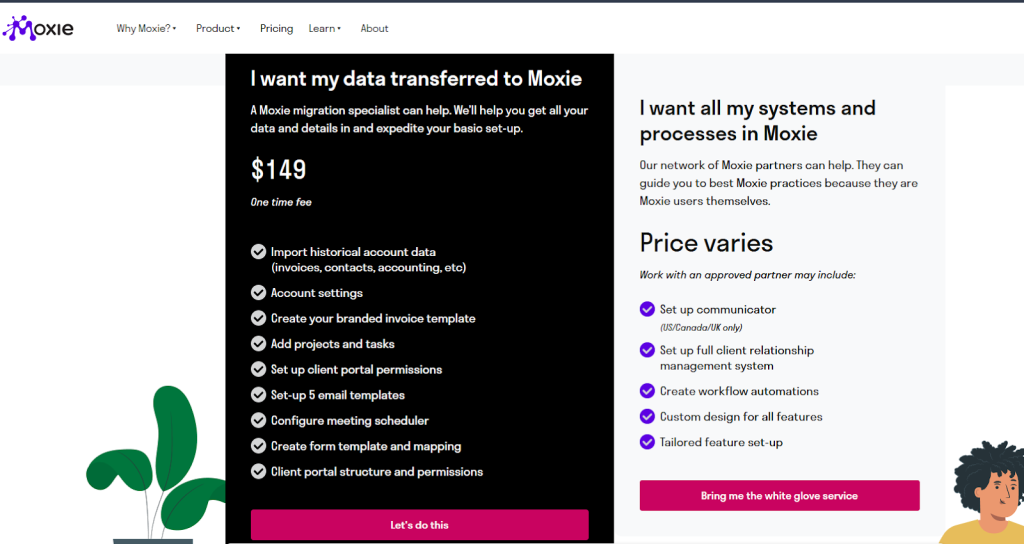
Note: This support is only available to bring data into Moxie (from another app), not for exporting to other platforms.
Upgrading Due to Limits or Platform Switching
Moxie, although designed for freelancers, scaling is an issue here when you begin to work with teams. To add team members, you need to opt for the highest moxie tier, which is expensive.
Moreover, the highest tier only supports 5 team members, so you need to request a customized package (if they consider it) that will cost more. Another option is to change the platform and shift to alternatives, which is obviously a hassle.
Why Is Moxie So Expensive?
Moxie isn’t priced high by the numbers, it’s expensive relative to what each tier includes, like team seats on Starter and Pro. At $12 to $40 a month, it undercuts Dubsado, HoneyBook, and most of the freelance-platform category. The complaint usually isn’t about the total, it’s about what each tier withholds.
When it comes to money value, Moxie scores 3 out of 5 in Capterra. Three things drive the perception.
Automation is a Pro feature
Workflow automation is the reason most people buy an all-in-one platform in the first place. On Moxie it’s locked out of Starter entirely, so the $12 plan is closer to a manual record-keeping tool. Anyone who signed up at $12 expecting to automate their onboarding ends up paying $25.
You pay $25 a month for a single seat
Pro gives you the custom domain, the white-label portal, and the API, but it’s still one person. Collaborators are limited. Compared to tools where $25 buys a small team, a solo seat at that price feels steep.
Teams stops dead at 5 people
This is the one that actually costs money. There is no tier above Teams. Hit six people and you aren’t upgrading, you’re migrating: exporting data, rebuilding workflows, retraining everyone, and paying for a new tool. Moxie’s Capterra rating reflects this. The overall score is 4.0 out of 5, but value for money sits at 3.0, and that gap is where the frustration lives.
Costs that aren’t on the pricing page
Stripe takes 2.9% plus $0.30 of every payment you collect. Assisted migration is $149. Neither is unusual, but neither is in the $12 figure that brought you here.
If the price itself is the problem, look at what you’re getting per seat rather than per month. If the 5-person ceiling is the problem, that’s not a pricing issue, it’s a reason to pick a different platform now instead of in eighteen months.
User Reviews On Moxie
Moxie holds a 4.0/5 rating on Capterra and 4.8/5 on G2, though reviewers consistently score its value for money lower (3.0/5) than its features.
Capterra Rating: 4.0 out of 5
In Capterra, Moxie has a 4.0 out of 5 overall rating. However, the money value rating is only 3.0. The poor customer support and feature performance are the reasons for the low money value rating.
The platform offers a good set of tools to improve delivery of services to patients. It´s possible to create a customized website, have access to integrated AI powered EMR, telemedicine, and appointment scheduling all within the system.
The major drawback is the platform’s limited availability being restricted to India, this geographic constraint limits its potential for professionals outside of India. Clear communication regarding its geographic limitations on the main page is essential to avoid misunderstandings.
G2 Rating: 4.5 out of 5
Moxie has a high rating of 4.8 on G2. However, their poor customer service is a fact that customers are complaining about. It is mostly due to the unavailability of Facebook group support.
I love how Moxie replaces so many other stand-alone tools, and does it in such a thoughtful way. There are so many delightful little features that just make my life so much easier.
I can’t think of one specific feature I like best; they’re all incredible and save tons of time!
Their mobile app is very basic, and some tasks aren’t intuitive. I actually avoid using it because it feels like there’s very little I can do in it. The design also looks outdated; it reminds me of when the Google website was basically a barebones input box with no styling.
Who Should NOT Use Moxie
Moxie isn’t a fit for teams larger than 5 people or businesses that need phone support outside the US, Canada, and UK — the Teams plan has a hard cap and there’s no higher tier. Moxie is built for solo freelancers, and it shows. Before you commit to a paid plan, here is who will likely outgrow or struggle with Moxie:
Teams larger than 5 people
Even on the highest plan at $40/month, Moxie caps team members at 5. There is no enterprise tier or custom plan for larger teams. If your agency is growing or you already have more than 5 people, you will hit this wall fast and be forced to switch platforms entirely.
Businesses that need advanced reporting
Moxie’s reporting is basic. If you need pipeline analytics, revenue forecasting, or team performance tracking, Moxie does not have it. You would need a separate tool or a platform that includes this out of the box.
Users outside the US, Canada, and UK
The Communicator phone line feature, which is one of Moxie’s more unique selling points, is only available in the US, Canada, and the UK. If you are based elsewhere, you are paying for a plan that includes a feature you cannot use.
Freelancers planning to scale
Moxie is designed around the solo freelancer workflow. The moment you start adding team members, hiring contractors, or managing multiple client accounts at scale, the platform starts to feel limiting. Switching platforms later costs time and money, so it is worth choosing one that grows with you from the start.
Anyone who needs strong customer support
Moxie scores only 3.0 for value for money on Capterra, and poor customer support is the most common complaint. There is no Facebook group community, priority support is locked to the highest tier, and the Starter plan has no support ticket system at all.
Does Moxie Have a Lifetime Deal?
Not anymore. Moxie is subscription-only in 2026. If you’re finding pages that advertise a Moxie lifetime deal, they’re describing an AppSumo campaign that has since sold out.
That deal ran on AppSumo starting at $39 for a single seat, with higher tiers at 10 and 25 seats, all with a 60-day money-back guarantee. The AppSumo listing now shows “Sold out” and the deal is unavailable. Some tier holders still have their accounts, which is why you’ll see people in forums mentioning lifetime Moxie access, but there is no way to buy in today.
So your options are $12, $25, or $40 a month, or the annual equivalents, and that’s it.
Worth knowing if you’re specifically hunting a lifetime deal: the reason they’re rare on established platforms is that recurring revenue is the whole business model. A tool that sold lifetime seats in its early days usually doesn’t repeat it once it has traction. Moxie hasn’t.
 Taskip
Still Want a Lifetime Deal? Go For Taskip
Pay once, use forever, no monthly bill. It covers the same ground as Moxie’s paid tiers plus a service catalog, support tickets, and a team cap that doesn’t stop at five people.
No credit card is required!
Best Moxie Freelance Software Pricing Alternatives: Best Deal
Taskip is the closest lower-cost alternative to Moxie, running as low as $95/year for a single user versus $120/year on Moxie’s Starter plan.
Though Moxie pricing is very affordable, its value for money is low considering the features and scalability. You can find better Moxie alternatives at a similar price range, such as Taskip, OneSuite, Productive.io, Dubsado, and ClickUp.
| Moxie Alternative | Starting Price | Free Plan | Team Members | Best For |
| Taskip | $12/mo | Yes (forever) | Up to unlimited | Freelancers and agencies |
| Dubsado | $20/mo | No | Unlimited | Creative service businesses |
| OneSuite | $19/mo | No | Up to 5 | Small freelance teams |
| Productive.io | $9/user/mo | No | Unlimited | Mid-size agencies |
| ClickUp | Free | Yes | Unlimited | Project tracking only |
1. Taskip — $12/month
Taskip has the same starting price as Moxie Starter, but with more features included. The annual plan costs $95/year versus Moxie’s $120/year, saving you $25 per year. Unlike Moxie, Taskip has a free forever plan, supports up to unlimited team members on higher tiers, and includes a service catalog and support ticket system from the start.
2. Dubsado — $20/month
Dubsado costs $8/month more than Moxie Starter but includes workflow automation, smart fields, and deeper client onboarding tools that Moxie locks behind its Pro plan at $25/month. If you are already considering Moxie Pro, Dubsado is worth comparing at a similar price point. It also offers a free plan limited to 3 clients, so you can test it before paying.
3. OneSuite — $19/month
OneSuite sits between Moxie Starter and Pro in price. It covers the core freelance workflow, including invoicing, proposals, and project tracking, and supports up to 5 team members on its base plan, where Moxie requires you to jump to the $40/month Teams plan for the same. A good pick if team access is important, but you do not want to pay Moxie’s top-tier price.
4. Productive.io — $9/user/month
Productive.io looks cheap at $9/user/month, but costs add up fast with team size. A team of 5 would pay $45/month, more than Moxie Teams at $40/month. However, you get significantly better reporting, resource planning, and profitability tracking that Moxie simply does not offer. Best suited for established agencies rather than solo freelancers, watching costs.
5. ClickUp — Free to $7/user/month
ClickUp has the most generous free plan of any tool on this list, with unlimited tasks and members on the free tier. However, it is a project management tool, not a freelance CRM. It has no built-in invoicing, contracts, or client portal. If you only need task and project tracking, ClickUp is hard to beat on price. For full freelance business management, pair it with a dedicated invoicing tool or choose one of the other options above.
Taskip’s Freelance plan and Moxie Starter plan both cost $12/month. But you can get a better deal if you get an annual plan in Taskip Freelance that costs only $95/year compared to the $120/year rate of the Moxie annual plan.
Apart from pricing, the Taskip Freelancer plan also offers better features that the Moxie Starter lacks. For instance, it has a support ticket system, service catalog, and Zaiper & Webhook integration that Moxie Starter doesn’t have.
Besides, the highest tier of Taskip also stays ahead of the Moxie plan. Where Moxie offers only three pricing options, Taskip offers four. So, whether you are going solo or running an agency with multiple teammates, Taskip has a plan for every need.
In contrast, Moxie is designed to focus on freelancers and solo entrepreneurs only; it is not suitable for large teams or growing businesses.
Read this for detail understating: Taskip vs. Moxie: A Comprehensive Comparison.
Final Verdict: Is Moxie Worth It in 2026?
Moxie pricing is designed for freelancers and is very affordable. However, the major issue here is that it is not suitable for teamwork. As you grow your business, team collaboration becomes difficult with Moxie, as it supports no team member adding in its Starter and Pro plans. Though the highest tier Team supports member adding, but only up to five.
Therefore, if you are aiming at the long term, alternatives like Tasip are your go-to choice. It not only offers you better features and scalability but also has a competitive price point.
If Moxie fits your current needs, the 14-day free trial is a no-risk way to test it. If you are already thinking about scaling or need more features at the same price, Taskip is worth comparing before you commit. Check the Taskip pricing now.
FAQs on Moxie Pricing
Can I cancel my Moxie plan at any time?
Yes. You can cancel your Moxie paid subscription anytime without penalty. However, your plan stays active until the end of your current billing cycle.
How is WithMoxie Pricing Calculated?
Moxie pricing is based on the plan you choose (Starter, Pro, or Teams), with higher tiers unlocking more features like collaborators, automations, integrations, and team members. You can pay monthly or yearly (yearly usually gives a discount).
How many built-in integrations does Moxie offer?
Moxie offers built-in integration for the following: PayPal, Plaid, QuickBooks, Online Accountant, Stripe, Xero, and Zapier.
Is Moxie worth it for freelancers?
Moxie is worth it for solo freelancers who need basic client and project management at a low price. The Starter plan at $12/month covers invoicing, proposals, contracts, time tracking, and a meeting scheduler. However, it lacks workflow automation, API integrations, and a white-label client portal unless you upgrade to Pro at $25/month. If you are a solo freelancer with simple needs, it works. If you need more features or plan to grow, alternatives like Taskip offer better value at the same price point.
Does Moxie have a free plan?
No. Moxie does not offer a free forever plan. It provides a 14-day free trial on all plans with no credit card required, so you can test the features before committing. If you need a free plan long term, Taskip has a free forever option in addition to a 14-day trial on paid plans.
What is the cheapest Moxie plan?
The cheapest Moxie plan is the Starter at $12/month, or $120/year ($10/month) when billed annually. It includes client and project management, invoicing, proposals, contracts, time tracking, and a meeting scheduler. It does not include workflow automation, API integrations, or a white-label client portal.
Can Moxie handle teams larger than 5 people?
No. Moxie’s highest plan, Teams at $40/month, supports a maximum of 5 team members. There is no higher tier that accommodates larger teams. If your team is growing beyond 5 people, you would need to switch platforms entirely. Taskip’s Growing Agency plan supports up to 25 members, and the Agency Pro plan supports unlimited members, making it a much better fit for scaling businesses.
What are the best Moxie alternatives?
The best Moxie alternatives in 2026 are Taskip, Dubsado, HoneyBook, Bonsai, and OneSuite. Among these, Taskip is the closest match on price. Its Freelancer plan also starts at $12/month but includes a service catalog, support ticket system, and Zapier integration that Moxie’s Starter plan lacks. On the annual plan, Taskip Freelancer costs $95/year compared to Moxie’s $120/year, saving you $25 per year for more features.
Was Moxie freelancer platform formerly Hectic?
Yes. Moxie was formerly Hectic, the freelancer business management platform. The company rebranded from Hectic to Moxie in early 2023, but the product remained the same. Existing features, customer accounts, and data carried over, with the new Moxie brand replacing the former Hectic name.
Why did Hectic rebrand to the Moxie freelance platform?
Hectic rebranded to the Moxie freelance platform because the company believed the original name created confusion. Founder Geoff Mina explained that “Hectic” was intended to imply making freelance work less hectic, but many users interpreted it negatively. The rebrand focused on better representing the confidence and independence of freelancers while keeping the platform’s core features and subscription pricing largely unchanged.
What is Moxie software?
Moxie is an all-in-one SaaS business management platform for freelancers and small agencies. The Moxie platform combines CRM, project management, proposals, contracts, invoicing, time tracking, client portals, scheduling, and AI tools in one application.
Is Moxie project management software?
Yes, Moxie includes project management features, but project management is only one part of the Moxie business platform. It’s designed as freelancer business management software, making it a better fit for managing clients, projects, and billing together than for enterprise-level project planning.
Is Moxie CRM pricing different from its regular plans?
No, Moxie’s CRM tools (client management, pipeline, contact records) are built into every plan, starting at $12/month for Starter. There’s no separate CRM tier or add-on cost; you get more CRM-adjacent features (like the white-labeled client portal and workflow automation) as you move up to Pro ($25/month) and Teams ($40/month).
Is there a Moxie lifetime deal in 2026?
No. Moxie’s AppSumo lifetime deal, which started at $39, is sold out and no longer available. Moxie is subscription-only.
How many people can use Moxie?
Starter and Pro are single-user plans. Teams supports up to 5 members and is the largest plan available. Moxie has no tier above Teams, so teams larger than 5 need a different platform.
Is Moxie the same as Hectic?
Yes. Hectic rebranded to Moxie in early 2023. It is the same product and the same company, now at withmoxie.com.
What is the cheapest way to use Moxie?
Annual billing on the Starter plan at $120 per year, or $10 per month. Be aware that Starter excludes workflow automation, API integrations, custom domains, and the white-labeled client portal.
Does Moxie offer discounts or scholarships?
Yes, Moxie offers scholarships for qualified applicants, in addition to the standard discount for paying annually. Check withmoxie.com/pricing for current eligibility.