Bonsai Pricing 2026: $15–$59/User/Month – All 4 Plans Compared
Bonsai offers four paid plans: Basic ($15/user/mo), Essentials ($25/user/mo), Premium ($39/user/mo), and Elite ($59/user/mo). There’s no free plan and the pricing is set in per user basis. .
Now the question arises, is the Bonsai pricing really worth it, considering the features it is offering?
Let’s have a thorough breakdown of Hello Bonsai pricing and features to come to a conclusion if it’s a good deal to invest in, or if there are better alternatives:
TL;DR
- 4 paid plans: Basic ($15), Essentials ($25), Premium ($39), Elite ($59) — all per user/month
- No free plan; 7-day trial requires a credit card
- Solo freelancers → Essentials is the only plan worth it
- Teams → costs scale fast due to per-user pricing
- Hidden costs: payment processing fees, Bonsai Tax add-on, no AI features on any plan
- Cheaper alternative: Taskip starts at $12/month for up to 3 users with more features included
Table of Contents
What Is Bonsai? – Quick Overview
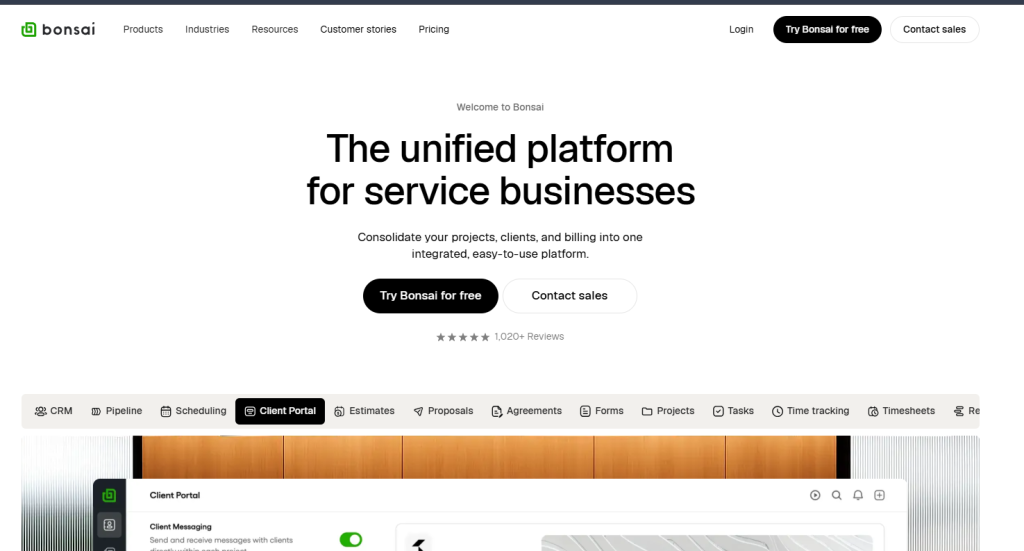
Hello Bonsai, mostly known as Bonsai, is an all-in-one business management solution that offers you a unified platform for business services. It features CRM, a client portal, pipeline management, scheduling, a form builder, time tracking, and other project management tools. This way, you can streamline your services and run agencies smoothly.
Bonsai Pricing Overview: All Plans at a Glance
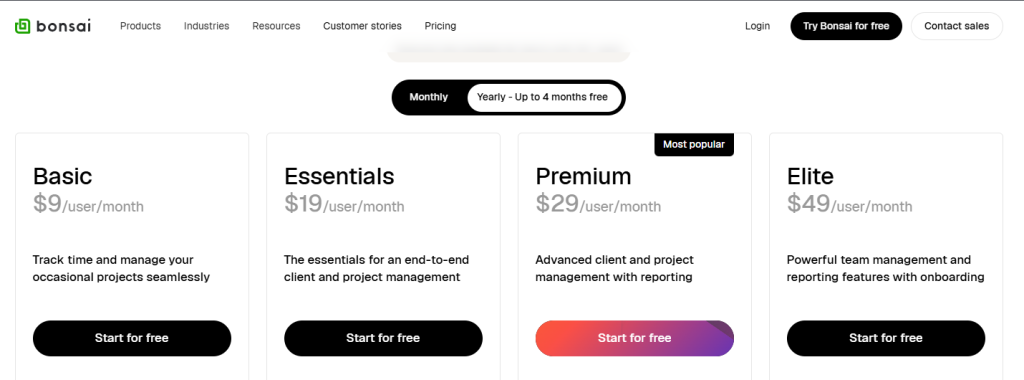
Bonsai pricing offers four plans with varying feature add-ons. The price increases as you upgrade from low to high tiers. The four Bonsai plans are as follows:
- Basic
- Essentials
- Premium
- Elite
Is there a Free Bonsai plan?
No, Bonsai pricing doesn’t offer any free plan that you can use forever with no cost. However, it offers a free trial for every plan.
The free trial is available only for 7 days. During this period, you have full, unlimited access to all features of the subscription plan you choose to trial.
| Note: You need to provide credit card information before trying out a free Bonsai plan. |
Monthly Vs. Annual Bonsai Pricing
For each Bonsai plan, you will get two pricing options: on a monthly basis and on an annual basis.
However, don’t get overwhelmed with the ‘4 months free’ tag with the yearly plans- it states the reduced cost compared to the monthly plans, not an actual free four months of use.
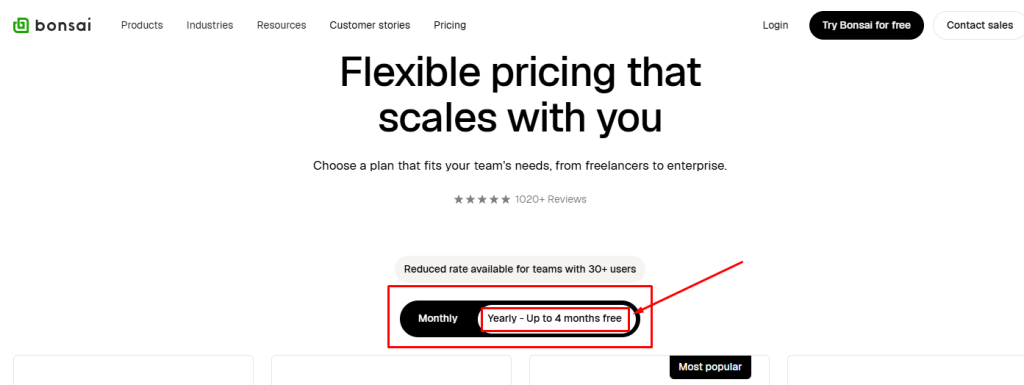
Monthly Bonsai pricing lets you pay plan fees every month and gives you more flexibility, but the drawback here is that you need to go through a higher per-month cost.
However, if you switch to annual Bonsai pricing, it requires you to pay for the full year’s cost at once, but at a much lower per month costing. This reduced pricing effectively gives you “free” months in the pricing math when you compare it to the monthly basis pricing.
Bonsai Plans: Pricing Comparison Table
| Sl. | Bonsai Plan | Storage | Price | |
| Monthly Pack | Yearly Pack | |||
| 1 | Basic | 10 GB | $15/user/month | $9/user/month |
| 2 | Essentials | 100 GB | $25/user/month | $19/user/month |
| 3 | Premium | 500 GB | $39/user/month | $29/user/month |
| 4 | Elite | 500 GB | $59/user/month | $49/user/month |
Bonsai Pricing Plans: In-Depth Breakdown & Value Analysis
1. Basic at $15/user/month
Basic is the lowest tier of Bonsai pricing. It includes some primary features essential for a CRM solution. You won’t get the advanced features in the Basic plan; for that, upgrading to a higher tier is required.
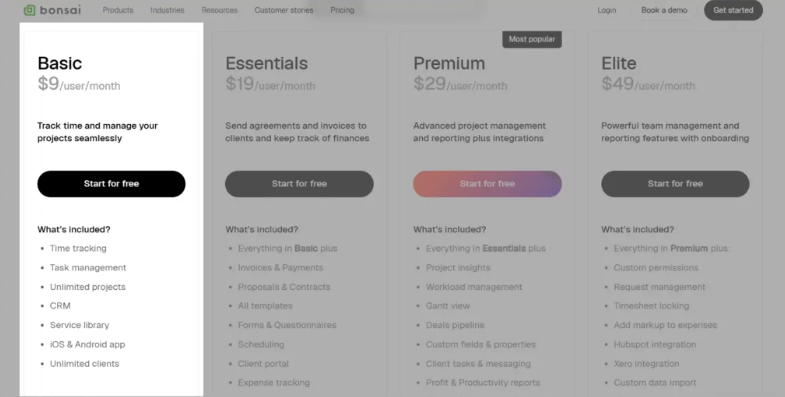
Price Breakdown
| Bonsai Basic Pricing | |
| Monthly Pack | Yearly Pack |
| $15/user/month | $9/user/month |
Who This Plan Is Best For?
Solo freelancers or solopreneurs who mainly need basic tasks, time tracking, simple project organization, and managing clients without billing or contracts.
Key Features Included
- 10 GB storage
- Unlimited projects
- Kanban View
- CRM
- Service library
- iOS & Android app
- Unlimited clients
- Data Exports
- Unlimited Time tracking
- Unlimited Task management
Limitation
❌No invoicing, payments, proposals, or contracts
❌No client portal or scheduling features
❌Limited reporting and automation capabilities.
❌Not ideal for agencies needing collaboration & client billing tools.
Better Money Value: Bonsai Basic Vs. Taksip Professional
| Criteria | Bonsai Basic | Taskip Professional |
| Price (Monthly) | $15/user/month | $12/month |
| User | Pay per user (e.g., 3 uses cost = $15×3= $450) | Up to 3 |
| Storage | 10 GB | 100 GB |
| Client portal | ❌ | ✅ |
| Service Catalog | ❌ | ✅ |
| Invoice & Proposal | ❌ | ✅ |
| Multi-currency Billing | ❌ | ✅ |
| Kanban View | ✅ | ✅ |
| Gantt View | ❌ | ✅ |
| Time Tracking | ✅ | ✅ |
| Scheduling | ❌ | ✅ |
| Deals Pipeline | ❌ | ✅ |
| Form | ❌ | ✅ |
| Online Payment | ❌ | ✅ |
As you can see, the Taskip Professional plans bring you more features, user access, and storage at a low cost. And if you switch to the yearly plan, the cost is reduced to 50%!
| Winner: Taskip Spending less in the Taskip lowest plan, you are getting mid-tier features of Bonsai- this is definitely a winning deal! |
2. Essentials at $25/user/month
Essential is the second-lowest plan of Bonsai that includes all the Basic features with some additional features. This plan is designed to offer an end-to-end client and project management.
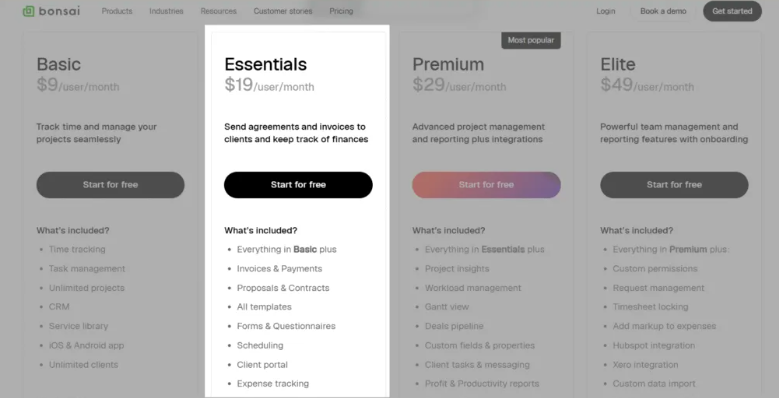
Price Breakdown
| Bonsai Essentials Pricing | |
| Monthly Pack | Yearly Pack |
| $25/user/month | $19/user/month |
Who This Plan Is Best For?
Freelancers, creatives, and consultants who want a complete business workflow from proposal to payment. It is also suitable for small teams that need basic internal collaboration and client management tools.
Key Features Included
- Everything in Basic plus
- Invoices & Payments
- Proposals & Contracts
- All templates
- Forms & Questionnaires
- Scheduling
- Client portal
- Expense tracking
- Income tracking
- Capacity Tracking
- Billable / Non-billable Time Split
- Gantt View
- Custom Task Statuses and Forms
- Online Payments
Limitation
❌ Limited advanced project views
❌ No white‑label/brand removal
Better Money Value: Bonsai Essential Vs. Taksip Professional
| Criteria | Bonsai Essential | Taskip Professional |
| Price (Monthly) | $25/user/month | $12/month |
| User | Pay per user (e.g., 3 uses cost = $15×3= $45) | Up to 3 |
| Storage | 100 GB | 100 GB |
| Client portal | ✅ | ✅ |
| Custom Domain | ❌ | ✅ |
| Deals Pipeline | ❌ | ✅ |
| VAT & Tax Management | ❌ (needs Bonsai Tax add‑on) | ✅ |
| Custom Fields | ❌ | ✅ |
| Time Tracking | ❌ | ✅ |
| Automations | ❌ | ✅ (Workflow, Invoicing & Reminders) |
| Zapier Integration | ❌ | ✅ |
| White-Label Branding | ❌ | ✅ |
3. Premium at $39/user/month
The premium Bonsai plan falls on high-tier category. It is designed with reporting features, which are ideal for advanced client and project management.
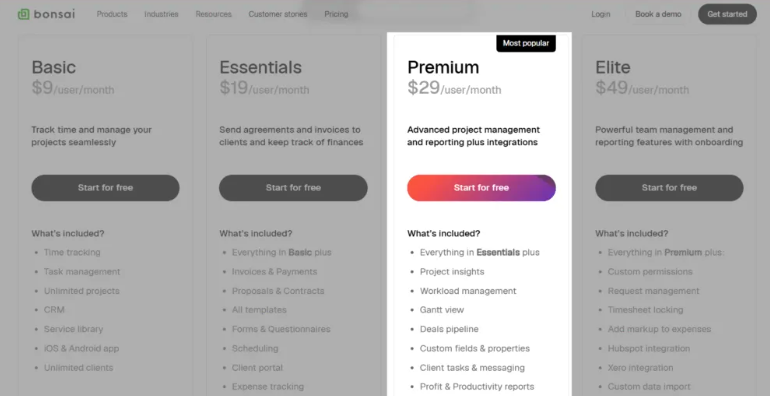
Price Breakdown
| Bonsai Premium Pricing | |
| Monthly Pack | Yearly Pack |
| $39/user/month | $29/user/month |
Who This Plan Is Best For?
The Premium Hello Bonsai pricing is a great deal for freelancers and small teams who want better project and client management and need advanced reporting, automation, and collaboration tools.
Key Features Included
- Everything in Essentials plus
- 500 GB
- Project insights
- Workload view and management
- Gantt view
- Deals pipeline
- Custom fields & properties
- Client tasks & messaging
- Profit & productivity reports
- Remove Bonsai branding
- Resourcing – Staffing
- Integrations (QuickBooks, Zapier, Calendly, Google)
Limitation
❌ More expensive per user as teams grow
❌ Deep automation features are still limited
❌ Integrations fewer compared to specialized tools
Better Money Value: Bonsai Premium Vs. Taksip Growing Team
| Criteria | Bonsai Premium | Taskip Growing Team |
| Price (Monthly) | $29/user/month | $29/month |
| User | Pay per user (e.g., 20 uses cost = $29×20= $580) | Up to 20 |
| Storage | 500 GB | 1TB |
| Workspace | 1 | Up to 3 |
| AI Email Assistant | ❌ | ✅ |
| AI Task Recommendations | ❌ | ✅ |
| AI Document Summarization | ❌ | ✅ |
| Support Ticket | ❌ | ✅ |
| Languages | Only English | 10+ Languages |
| Built-in Inbox | ❌ | ✅ |
| Discussion | ❌ | ✅ |
4. Elite at $59/user/month
Elite is the highest tier of Bonsai pricing. It is designed for powerful team management and reporting features, with onboarding.
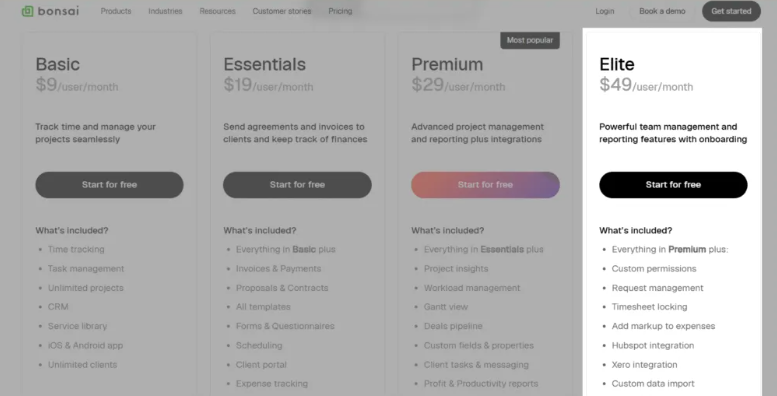
Price Breakdown
| Bonsai Elite Pricing | |
| Monthly Pack | Yearly Pack |
| $59/user/month | $49/user/month |
Note: This plan should have a minimum of 3 users.
Who This Plan Is Best For?
Bonsai Elite is best for agencies and growing teams that need advanced project controls, team permissions, and full business workflows from proposals to billing.
Key Features Included
- Everything in Premium plus
- Custom permissions
- Timesheet locking
- Add markup to expenses
- Xero integration
- Custom data import
- Resourcing – staffing
- Custom Roles
Limitation
❌ AI features are not included natively
❌ Workflow automation is basic compared with dedicated tools
❌ Tax reporting tools (advanced tax management) require separate add-ons
Better Money Value: Bonsai Elite Vs. Taksip Agency Unlimited
| Criteria | Bonsai Elite | Taskip Agency Unlimited |
| Price (Monthly) | $59/user/month | $59/month |
| User | Pay per user (e.g., 10 uses cost = $59×10= $590) | Unlimited |
| Storage | 500 GB | 5 TB |
| Workspace | 1 | Up to 5 |
| AI Features | ❌ | ✅ |
| Support Ticket | ❌ | ✅ |
| Workflow automation | Limited | More built-in |
| Invoicing & Payments | ✅ | ✅ |
| Client Self-Service | Basic | Enhanced |
| Expense Tracking | ✅ | ✅ |
| Time Tracking | ✅ | ✅ |
| Mobile App | ✅ | ✅ |
Bonsai Pricing: Hidden Costs & Limitations to Know
- No Free Plan: Be Careful with the Free Trial Option
Firstly, Bonsai doesn’t offer any free plan. And secondly, though it has a free trial period, it comes only for seven days.
The fact to be concerned about is that you need to enter your credit or debit card information to try the free plan. And after seven days, if you don’t want to continue and forget to cancel within 7 days, the system will automatically cut charges from your credit card.
- Add-Ons that Increase Cost
Some advanced tools (like Bonsai Tax) are separate paid add‑ons, not included in core plans. So, you need to pay extra to have these features. Moreover, extra costs can come from third‑party integrations or premium support options. These “soft costs” mean your total spend can be higher than the price you first expect.
- Scaling Issues with Per-User Pricing
Bonsai uses a per‑user pricing system, so adding more team members directly increases your monthly bill. This makes scaling expensive.
- Online Payment Fees
Bonsai’s listed subscription prices do not include online payment processing fees. When clients pay invoices using credit cards, ACH, PayPal, Stripe, or other gateways, standard transaction fees are applied.
This means your actual cost is higher than the subscription alone, making it a hidden expense for businesses that frequently accept online payments.
- Integration & Automation Limits
Advanced automation and some third-party integrations may require higher-tier plans or extra tools, adding more hidden expenses if your workflow depends on them.
Bonsai Pricing for Freelancers: Which Plan Makes Sense?
Freelancers have different needs than agencies. In freelancing, you’re likely working solo or with one or two collaborators, billing clients directly, and juggling contracts, invoices, and project tracking without a dedicated ops team. So which Bonsai plan actually fits that reality?
Here’s a straightforward breakdown by freelancer type:
Just Starting Out? Basic ($15/user/month) Falls Short
If you’re a new freelancer looking to manage clients and track time, the Basic plan seems affordable but it’s missing the most essential freelance features: invoicing, contracts, and proposals. These aren’t extras for freelancers; they’re the core workflow. You’d be paying $15/month for a task and time tracker, which you can get free elsewhere.
Verdict
Not recommended for freelancers. You’ll outgrow it immediately.
Solo Freelancers: Essentials ($25/user/month) Is the Sweet Spot
The Essentials plan is where Bonsai becomes genuinely useful for freelancers. At $25/user/month (or $19/year), you get the full client workflow:
- Send proposals and contracts
- Accept online payments
- Track billable hours
- Share a client portal
- Use scheduling and forms
If you’re a solo freelancer handling 3–10 active clients, this is the plan that covers your day-to-day without overpaying for features you won’t use.
Verdict
Best fit for most solo freelancers.
Growing Freelancers with a Small Team: Consider Premium ($39/user/month)
If you’ve started hiring contractors or have a small team helping you deliver work, Premium adds:
- Workload and capacity tracking
- Project profit reports
- Deals pipeline
- White-label (remove Bonsai branding from client-facing docs)
- Integrations with QuickBooks, Zapier, and Calendly
However, keep in mind that the per-user pricing kicks in hard here. A two-person team on Premium pays $78/month that’s $936/year just for project management.
Verdict
Useful for freelancers scaling to a small team, but costs add up fast.
Elite ($59/user/month): Overkill for Freelancers
The Elite plan is built for agencies, not solo freelancers. Features like custom roles, timesheet locking, custom data imports, and Xero integration are aimed at multi-team operations. And at a minimum of 3 users required, that’s a floor of $177/month just to access the plan.
Verdict
Skip it unless you’re running a proper agency.
The Real Problem with Bonsai Pricing for Freelancers
Even on the Essentials plan, Bonsai’s per-user model creates a ceiling. The moment you bring on a part-time assistant or a second contractor, your bill doubles. There’s no free tier, the trial requires a credit card, and add-ons like Bonsai Tax cost extra on top of your subscription.
For freelancers who want similar features without the per-seat penalty, Taskip’s Professional plan at $12/month covers up to 3 users with invoicing, client portal, proposals, and a service catalog — all included. That’s less than half the cost of Bonsai Essentials for a solo user, with more users included.
| Criteria | Bonsai Essentials | Taskip Professional |
|---|---|---|
| Price | $25/user/month | $12/month (up to 3 users) |
| Invoicing & Payments | ✅ | ✅ |
| Client Portal | ✅ | ✅ |
| Contracts & Proposals | ✅ | ✅ |
| Free Plan Available | ❌ | ✅ |
| White-Label | ❌ | ✅ |
| AI Features | ❌ | ✅ |
For most freelancers, Bonsai Essentials works but you’re paying a premium for a solo-friendly tool that charges you per seat the moment you grow.
Taskip Pricing vs Bonsai Pricing: Which Offers Better Value?
To examine the money value, we must compare the feature bothe the platform are brining us ic compare to the pricing.
1. Taskip Free Plan Advantage at Zero Cost
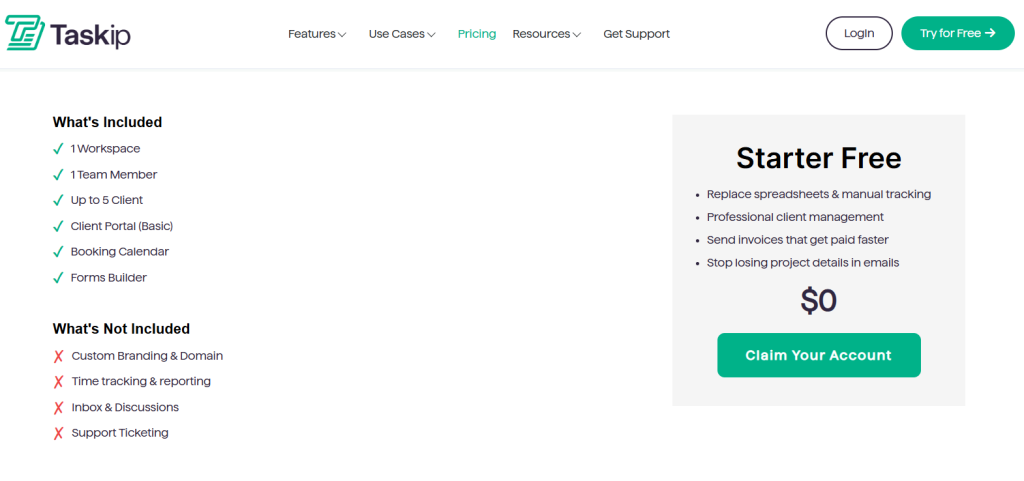
Firstly, Taskip has a free plan that offers you up to 5GB of storage, 5 clients, an invoice, quotation, form builder, sales pipeline, and multi-currency support at $0 all life. Moreover, it offers you a basic client portal, which you do not get at Bonsai with its Basic plan, which comes at $15/user/month. Therefore, for beginners who don’t want to invest in tools, can easily use the Taskip free plan for basic client management features.
2. Bonsai Per User-Based Price Vs. Taskip Price System
Bonsai has a per-user pricing system, which makes it expensive when working in a team. How? Let’s compare the lowest tier of Taskip, Professional, to the lowest tier of Bonsai; the price stands at $12/month vs. $15/user/month.
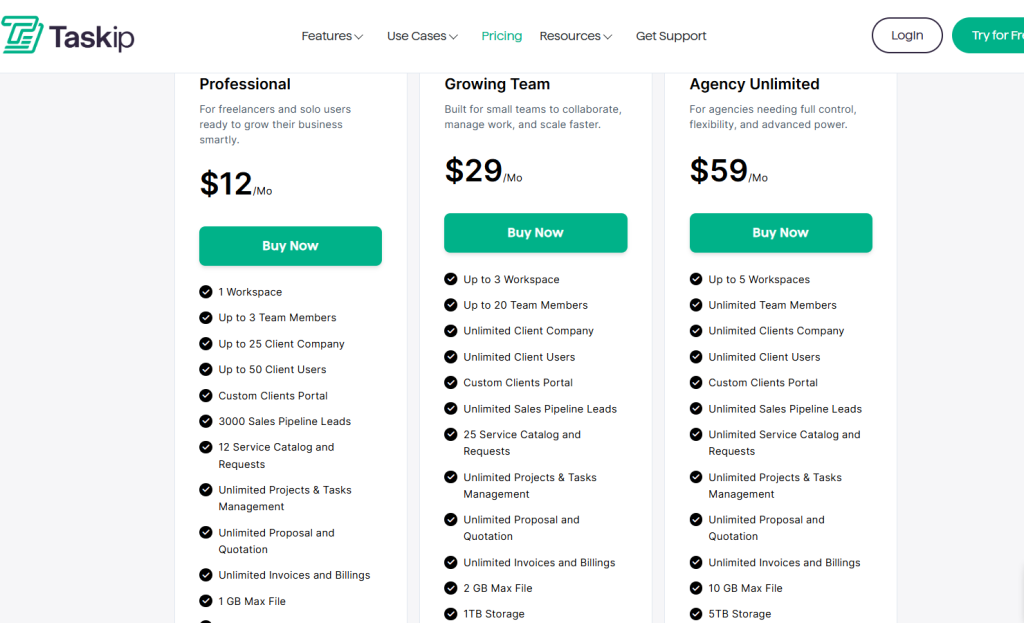
Taskip Professional allows up to 3 team members with will be covered for $12/month. In contrast, each user has to pay $15/month to get the same deal in Bonsai.
That is, for three users in the lowest tier, the costing will be:
Taskip = 3 users at $12/month
Bonsai = One user = $15/month
Three users = $15 x 3 = $45/month
Thus, Taskip’s pricing system is much cheaper compared to Bonsai.
3. CRM & Lead Management Comparison
Taskip includes a built-in CRM that lets you track leads, clients, and ongoing deals in one place.
- Capture leads using built-in forms
- Track lead status from inquiry to conversion
- Maintain client communication without switching tools
With Bonsai, CRM functionality is very basic and mainly focused on existing clients. Moreover, lead tracking and automation are limited and often require manual updates. In this case, Taskip saves time by centralizing leads and clients inside one workflow.
4. Automated Client Onboarding
Bonsai does not offer a fully automated onboarding flow. For this, you need to manually create clients, send proposals separately, and manage follow-ups yourself.
In contrast, with Taskip, you get an automated client onboarding by combining the intake forms, service selection, task creation, and client communication. Thus, it reduces repetitive admin work for freelancers and agencies.
5. Forms, Documentation & Collaboration
One major area where Taskip outperforms Bonsai is internal operations. For example, Taskip includes:
- Built-in form builder
- Documentation feature for SOPs & processes
- Centralized collaboration
On the contrary, Bonsai lacks documentation tools and offers limited form customization. So, if you want a complete workspace for your agency, Taskip is the best option to choose.
6. Overall Feature Review Vs Price
Taskip offers you robust built-in features compared to Bonsai, which is also at a very affordable price. For instance, all paid Taksip plans have a service catalog; in contrast, Bonsai doesn’t have this feature.
Again, Taskip has built-in AI features, ticket support, border white-labeling, and more robust automation than Bonsai. That is, Taskip is offering you better features, and the price point is also lower than Bonsai.
| Criteria | Bonsai | Taskip |
| Free Plan | ❌ | ✅(Forever free, $0 all life) |
| Lowest Tier Cost | $15/user/month | $12/month |
| Highest Tier Cost | $59/user/month | $59/month |
| Workspace | 1 for all plans | Free plan = 1 Professional = 1Growing Team = 3Agency Unlimited = 5 |
| Service Catalog | ❌ | ✅(Available in all paid plans) |
| CRM | Basic CRM | Built-in CRM with lead tracking |
| Client Portal | Essentials + Premium+ Elite (Not available in the Basic plan) | ✅(Available in all paid plans) |
| Multi-currency Billing | Essentials + Premium+ Elite (Not available in the Basic plan) | ✅(Available in all paid plans) |
| Buli-in Documentation | ❌ | ✅ |
| AI Features | ❌ | ✅ |
| Support Ticket | ❌ | ✅ |
| Workflow automation | Limited | More built-in |
Final Verdict: Is Bonsai Pricing Worth It?
Analysing Bonsai pricing, we find that its alternative Taskip not only offers a lower price but also better features. You are getting scalability, multiple team members, and a workspace with Tasip. Besides, it has a free plan, and the lowest tier of Taskip is cheaper than the lowest tier of Bonsai CRM pricing.
Therefore, if you are thinking of team collaboration, better built-in features, and scalability, Taskip is obviously offering you better money value than Bonsai pricing.
FAQs On Bonsai Pricing
Does Bonsai offer a free plan?
No, Bonsai doesn’t have a free plan. However, it offers you a free trial for all its paid plans that lasts only for 7 days.
Is Bonsai an affordable option for agencies?
Bonsai is a good business management solution for agencies, but when it comes to affordability, it’s per user based pricing system is a crucial factor to consider. In agencies, teamwork is required, and in Bonsai, each team member needs a paid seat to access key features. This makes it expensive.
Is Bonsai pricing per user?
Yes, Bonsai pricing is per user. That is, if you are a team of three using the Basic plan at $15/user/month, each of the member should pay $15/month; total cost = $45/month.
What’s the best Bonsai alternative?
Taskip is the best alternative to Bonsai. It has a free plan that offers features like a client portal (basic), which is even included in the paid plan (Basic), the Bonsai plan. Taskip also has features like service catalog, built-in documentation, AI features, and more that Bonsai lacks. Moreover, it has a cheaper pricing system compared to Bonsai. All these make Taskip the best Bonsai alternative.
Is Taskip cheaper than Bonsai?
Yes, Taskip is cheaper than Bonsai. It has a free starter plan that Bonsai doesn’t have. Again, the lowest tier of Bonsai comes at $15/user/month compared to the $12/month Taskip lowest tier. And the heist tier of both the plan is the same $59. But the game-changing fact is, Bonsai has a per-user-based system, which makes it more expensive to scale in comparison to Taskip.
How much does Bonsai cost per month?
Bonsai pricing starts at $15/user/month on the Basic plan and goes up to $59/user/month on the Elite plan. If you pay annually, costs drop to $9–$49/user/month. There is no free plan — only a 7-day trial.
Does Bonsai have a free trial?
Yes, Bonsai offers a 7-day free trial on all plans. However, you must enter your credit card details before starting. If you don’t cancel within 7 days, you’ll be charged automatically.
What is the cheapest Bonsai plan?
The cheapest Bonsai plan is Basic at $15/user/month (or $9/user/month billed annually). However, it doesn’t include invoicing, contracts, or proposals — so most freelancers will need to upgrade to Essentials at $25/user/month to get a usable feature set.
Does Bonsai integrate with Upwork?
No, Bonsai does not have a native Upwork integration. You can connect them indirectly via Zapier, but that requires a Premium plan or higher.
What are Bonsai’s payment processing fees?
Bonsai doesn’t charge its own payment fee, but standard third-party processing fees apply when clients pay invoices. Stripe charges ~2.9% + $0.30 per transaction, and PayPal has similar rates. These fees are on top of your monthly Bonsai subscription and are easy to overlook when budgeting.


Get Summary On: