Moxie Pricing 2026: All 3 Plans, Hidden Costs & Cheaper Alternatives
Moxie pricing starts at $12/month, making it one of the more affordable tools for freelancers. But affordable does not always mean good value. The Starter plan lacks workflow automation and API integrations, team support caps at 5 members, even on the highest tier, and customer support ratings are low. This guide breaks down every plan, hidden costs, and whether Moxie is actually worth it in 2026.
International Freelancer?
Moxie’s Communicator phone line is restricted to the US, Canada, and the UK. If you are based elsewhere, see our alternatives section for tools with no geographic restrictions.
Let’s analyze the Moxie pricing and features thoroughly to examine its price value and see if there are better alternatives to Moxie or not:
TL;DR: Moxie Pricing Summary
Moxie offers three plans: Starter at 12/m, Pro at $25/m, and Teams at $40/m. It is mainly designed for freelancers, and team collaboration is a major concern in Moxie when it comes to scaling.
| Criteria | Starter | Pro | Teams |
|---|---|---|---|
| Monthly | $12/mo | $25/mo | $40/mo |
| Annual | $10/mo | $20/mo | $32/mo |
| Team Members | 1 | 1 | 5 max |
| Automation | No | Yes | Yes |
| White-label Portal | No | Yes | Yes |
| Free Trial | 14 days | 14 days | 14 days |
Table of Contents
What Is Moxie? – Quick Overview
Moxie is an all-in-one business managemnet platform designed for freelancers. The features on this platform provide a centralized solution for freelancers that lets them manage their projects, clients, contracts, and invoices, track time, schedule meetings, and do much more.
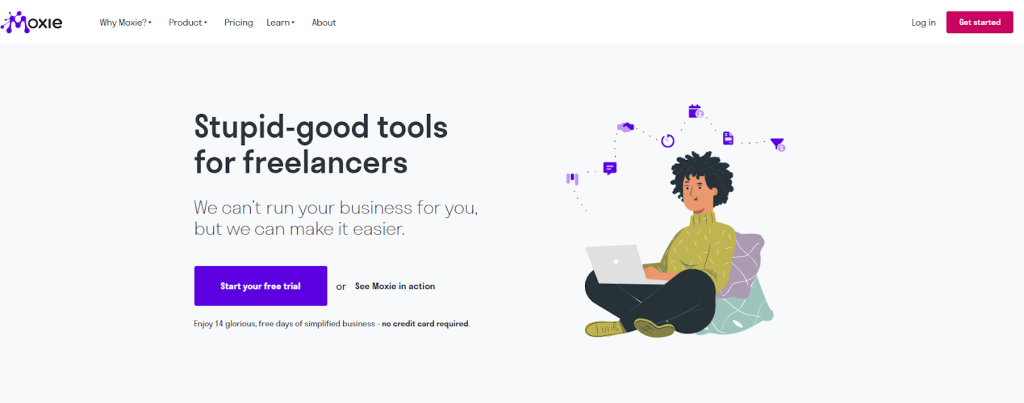
Moxie is a great platform for freelancers, solopreneurs, creative professionals, coaches, consultants, digital Marketers, graphic designers, web developers, and virtual assistants.
Moreover, it integrates with payment gateways like PayPal and Stripe; the bank connector Plaid; accounting software such as QuickBooks, Xero, and QuickBooks Online Accountant; and automation tools like Zapier.
Moxie Pricing 2026: All Plans at a Glance
Moxie, in total, has three plans: Starter, Pro, and Teams. Compared to other platforms, Moxie pricing is quite affordable. The pricing is designed on a monthly and yearly basis.
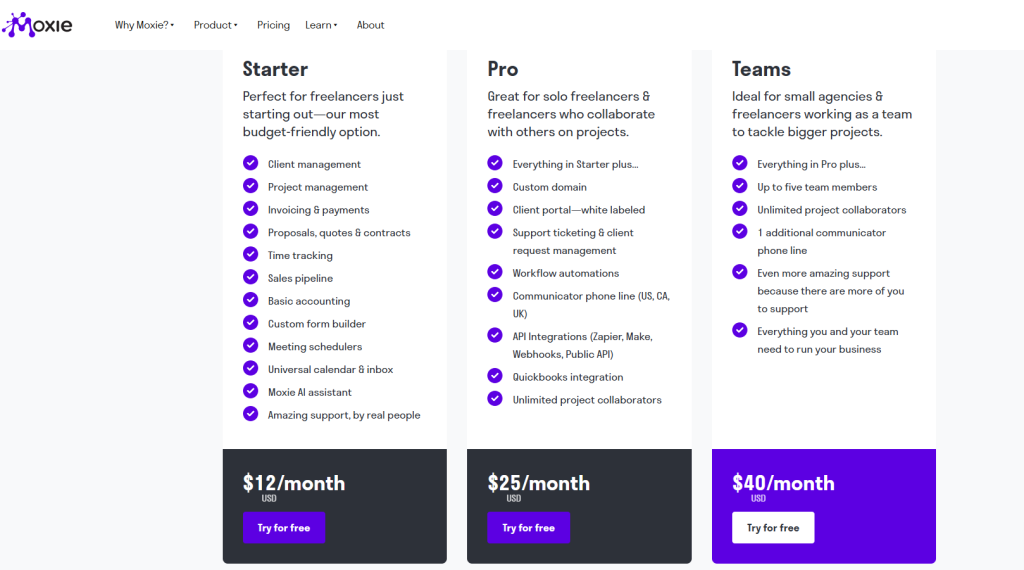
Moxie Plans: Pricing & Feature Comparison Table
| Features | Moxie Pricing For All Three Plans | ||
| Starter | Pro | Team | |
| Pricing Monthly | $12/month | $25/month | $40/month |
| Pricing Annually | $120/year | $240/year | $385/year |
| Client and Project Management | ✅ | ✅ | ✅ |
| Team Members | ❌ | ❌ | Up to 5 |
| Basic Accounting | ✅ | ✅ | ✅ |
| Time Tracking | ✅ | ✅ | ✅ |
| Proposals, Quotes & Contracts | ✅ | ✅ | ✅ |
| Project Collaborators | ❌ | Unlimited | Unlimited |
| White-Labeled Client Portal | ❌ | ✅ | ✅ |
| Workflow Automation | ❌ | ✅ | ✅ |
| API Integrations | ❌ | ✅ | ✅ |
| Communicator phone line (US, CA, UK) | ❌ | 1 Line | 2 Lines |
Is there a Free Moxie Plan?
Moxie doesn’t have a free forever plan. However, it offers a free trial on all its plans for 14 days. And the best part is that the free trial doesn’t require a credit card. So, you can test the features with convenience and decide whether to go for a paid plan or not.
Monthly Vs. Annual Moxie Pricing 2026
You will get a monthly and annual payment structure in Moxie pricing. The monthly plan is convenient because you can cut off the plan at any month and are not bound to continue the service waiting for year ending. But when it comes to money value, switching from a monthly plan and jumping to an annual plan is a wise decision, as it comes at a more affordable price.
| Plan | Monthly Price | Annual Price | Savings On Annual Plan | |
| Saving Per Month | Saving Per Year | |||
| Starter | $12/month | $120/year($10/month) | $2/month | $24/year |
| Pro | $25/month | $240/year($20/month) | $5/month | $60/year |
| Team | $40/month | $385/year($32/month) | ~$8/month | ~$95/year |
From the above Moxie CRM pricing breakdown, it is clear that the annual plans are more cost-effective compared to the monthly plan.
Moxie Pricing Plans: In-Depth Breakdown & Value Analysis
1. Starter at $12/month
The Starter plan is the lowest tier of Moxie pricing. It includes all the basic features that a freelancer usually needs to manage projects and clients.
Price Breakdown
| Moxie Starter Pricing | |
| Monthly Pack | Yearly Pack |
| $12/month | $120/year |
Who This Plan Is Best For?
The Moxie Starter plan is perfect for freelancers and solo entrepreneurs who are just at the beginning level of their business.
Key Features Included
- Client & project management
- Freelance invoicing software & payment tools
- Proposals, quotes, & contracts
- Time tracking
- Sales pipeline
- Basic accounting
- Custom form builder
- Meeting schedulers
- Universal calendar & inbox
- Moxie AI assistant
- Amazing support by real people
Limitation
- Doesn’t support project collaborators
- No workflow automation
- No API integration
- Doesn’t have a whitelabeling client portal
Better Money Value: Moxie Starter Vs. Taskip Freelancer
Both the plan, Moxie Starter, and Taskip Freelancer are designed to focus on freelancers, and both have the same monthly price.
However, when you look at the annual pricing, Taskip Freelancer is more affordable and cost-effective than Moxie Starter. Where the Moxie pricing for Starter comes at a $120/year, Taskip Freelancer costs only $95/year! That is, you can save $25/year with Taskip!
Is this just about the price? What about money value?
Taskip Freelancer plan offers you more extended features than the Moxie Starter. So, paying the same monthly rate, you are getting a better money value with Taskip Freelancer. Check out the head-to-head comparison between the plans:
| Features | Moxie Starter | Taskip Freelancer |
| Pricing Monthly | $12/month | $12/month |
| Pricing Annually | $120/year | $95/year |
| Proposals, Quotes, & Invoicing | ✅ | ✅ |
| Sales pipeline | ✅ | ✅ |
| Form Builder | ✅ | ✅ |
| Time Tracking | ✅ | ✅ |
| Calender & Inbox | ✅ | ✅ |
| Meeting Scheduler | ✅ | ✅ |
| Built-in Service Catalog | ❌ | ✅ |
| Support Ticket System | ❌ | ✅ |
| AI Assistant | ✅ | ✅ |
| Zapier & Webhooks Integration | ❌ | ✅ |
| Best Money Value: Taskip Freelancer | ||
2. Pro at $25/month
The Pro plan is the mid-level package of Moxie. It has more added features compared to the Starter plan.
Price Breakdown
| Moxie Pro Pricing | |
| Monthly Pack | Yearly Pack |
| $25/month | $240/year |
Who This Plan Is Best For?
The Pro plan is designed for solo freelancers & freelancers who collaborate with others on projects. Here, you will get unlimited project collaboration within a single dashboard that streamlines your project management and makes your day-to-day tasks easier.
Key Features Included
- Everything in Starter plus
- Custom domain
- Whitelabel client portal
- Support ticketing & client request management
- Workflow automation
- Communicator phone line (US, CA, UK)
- API Integrations (Zapier, Make, Webhooks, Public API)
- Quickbooks integration
- Unlimited project collaborators
Limitation
- No service catalog
- No team member is adding
Better Money Value: Moxie Pro Vs. Taskip Startup Team
The pricing of Moxie Pro and Taskip Starter Team is almost identical; Taskip’s plan comes at only a few dollars more than Moxie Pro. However, it offers up to ten team member addition where Moxie Pro allows no team members; only one user.
Let’s compare the two plans side-by-side:
| Features | Moxie Pro | Taskip Startup Team |
| Pricing Monthly | $25/month | $29/month |
| Pricing Annually | $240/year | $299/year |
| User(s) | 1 | Up to 10 |
| Service Catalog | ❌ | ✅ |
| Project Collaborator | ✅ | ✅ |
| API Integrations (Zapier, Webhooks, Public API) | ✅ | ✅ |
| Custom Domain | ✅ | ✅ |
| White-Label Branding | ✅ | ✅ |
| Portal SEO | ❌ | ✅ |
| Built‑in Phone Line | ✅(US, CA, UK) | ❌ |
| Google Drive Integration | ✅ | ✅ |
| Time Tracking | ✅ | ✅ |
| Winner: Taskip Pro | ||
3. Teams at $40/month
Teams is the highest tier of Moxie pricing. It covers up the previous tier brining better features. Where the Starter and Pro plans don’t support any team member addition, Teams allows up to five members.
Price Breakdown
| Moxie Pro Pricing | |
| Monthly Pack | Yearly Pack |
| $40/month | $385/year |
Who This Plan Is Best For?
The identical feature of Moxie Teams is that it allows up to five team members. This makes the plan ideal for small agencies & freelancers working as a team to tackle bigger projects.
Key Features Included
- Everything in Pro plus
- Up to five team members
- Unlimited project collaborators
- 1 additional communicator phone line than the Pro plan
- Even more amazing support because there are more of you to support
- Everything you and your team need to run your business
Limitation
- Supports only 5 team members; not ideal for large teams
- Lacks advanced filtering or tags
- Has regional restrictions
Better Money Value: Moxie Teams Vs. Taskip Growing Agency
Though Taskip Growing Agency is a bit expensive compared to Moxie Teams, it is more suitable for growing teams.
Despite the name suggesting, Moxie ‘Team’, it only supports five team members. So, in case your team is growing or your business is scaling, you need to switch to another platform, leaving Moxie.
In contrast, Taskip Growing Agency supports up to 25 team members, which is indeed ideal for large teams and starting agencies. It also has a team performance analysis tool. So, if you are looking for a platform that offers features and team support, Taskip Growing Agency is better than Moxie Teams.
| Features | Moxie Teams | Taskip Growing Agency |
| Pricing Monthly | $40/month | $59/month |
| Pricing Annually | $385/year | $459/year |
| Team Member | 5 | 25 |
| Team Performance Analytics | ❌ | ✅ |
| Global Support | Limited | ✅ |
| Priority Support | ✅ | ✅ |
| AI-Powered Tools | Only a basic AI Assistant | AI email writing, Task recommendations, Doc summarization |
| Centralized Client Portal with Real-Time Updates | Limited to invoices/contracts/progress | ✅ |
| Custom Workflows | Limited control | ✅ |
| Winner: Taskip Growing Agency | ||
Moxie Pricing & Feature Limitations
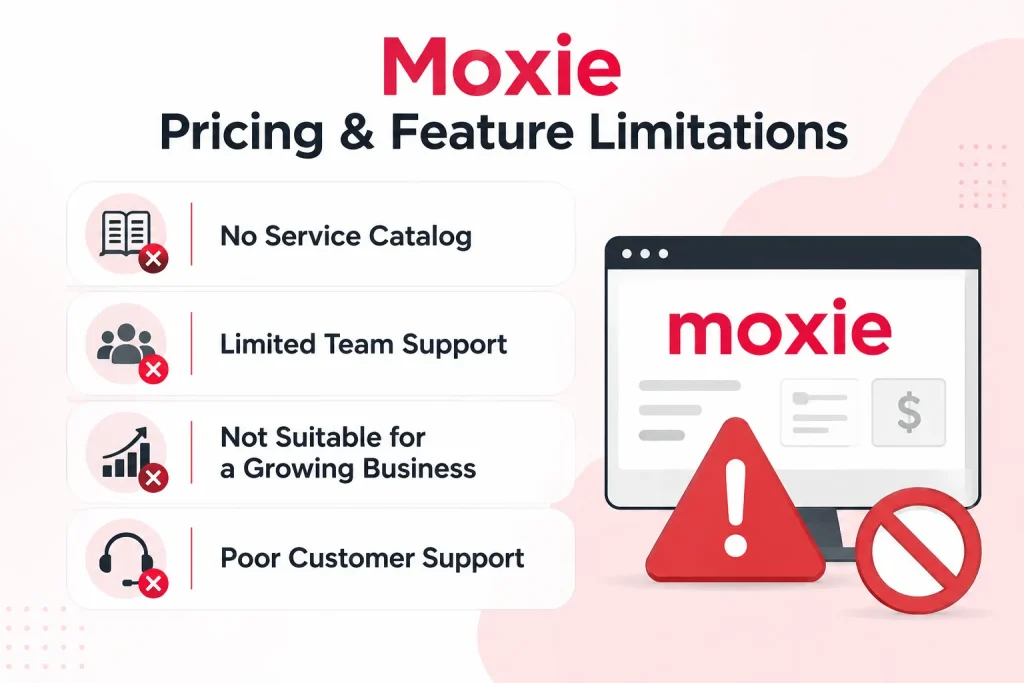
When comparing Moxie pricing to its competitors, it has a very affordable price point. However, some feature limitations in Moxie are quite essential; these are as follows:
No Service Catalog
A built-in service catalog allows you to showcase all your services in an organized way, from which the customers can directly make a purchase or buy services. But unfortunately, Moxie doesn’t have a built-in service catalog in any of its plans.
Limited Team Support
The Starter and Pro plans don’t support team member addition. Team members are allowed only in the highest tier, Team. Yet it supports only up to five members at a price of $40/month.
This is expensive if you are preferring team working, as other alternatives like Taskip allow more users at low tiers.
Not Suitable for a Growing Business
Moxie is mainly built for freelancers, not large teams or agencies. As you scale your business, team members are added, and here comes the necessity of team collaboration.
Unfortunately, Moxie has strict team collaboration limitations, which makes is unsuitable for growing businesses and large teams.
Poor Customer Support
Moxie has a bad reputation for poor customer support. It lacks Facebook group interaction, which is the major complaint from customers. Moreover, the Starter plan doesn’t have a support ticket system. And the priority support is available only for the highest tier, Teams.
Does Moxie Pricing Have Hidden Costs?
Moxie pricing is very transparent and doesn’t have any hidden costs. However, there are some costs that you need to bear, but these can’t be exactly characterised as hidden costs. Yet, it’s better to count them in your list:
⚠️ Moxie has no hidden platform fees, but there are extra costs worth knowing before you buy.
Transaction Fees
Moxie does not charge additional transaction fees for its own platform. However, you must pay the payment processors like Stripe or PayPal for your transaction, which is applicable for all platforms, not just Moxie.
When using integrated Stripe, standard processing fees of 2.9% + $0.30 per successful charge apply. These fees are paid to the processor, not Moxie. So, it’s not actually a hidden charge, yet you should know about this extra cost.
Moxie Migration Fees
Though it’s not a mandatory cost to bear for anyone who is migrating to Moxie, you can get specialist help to do the task by paying Moxie migration fees, a one-time fee of $149. You need to provide your own data, and the specialist will set up your account for you.
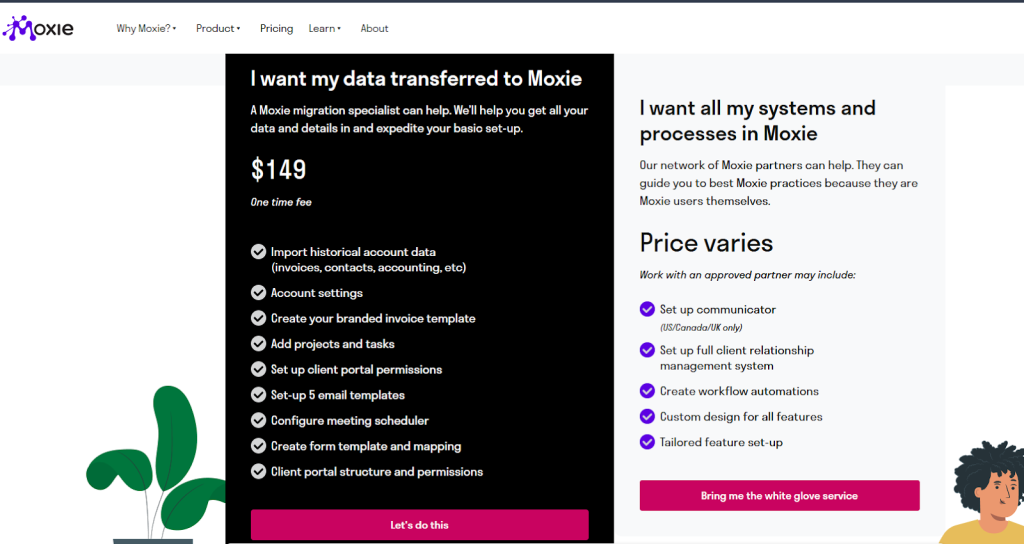
Note: This support is only available to bring data into Moxie (from another app), not for exporting to other platforms.
Upgrading Due to Limits or Platform Switching
Moxie, although designed for freelancers, scaling is an issue here when you begin to work with teams. To add team members, you need to opt for the highest moxie tier, which is expensive.
Moreover, the highest tier only supports 5 team members, so you need to request a customized package (if they consider it) that will cost more. Another option is to change the platform and shift to alternatives, which is obviously a hassle.
User Reviews On Moxie
Capterra Rating: 4.0 out of 5
In Capterra, Moxie has a 4.0 out of 5 overall rating. However, the money value rating is only 3.0. The poor customer support and feature performance are the reasons for the low money value rating.
“
The platform offers a good set of tools to improve delivery of services to patients. It´s possible to create a customized website, have access to integrated AI powered EMR, telemedicine, and appointment scheduling all within the system.
Critical Review
“
The major drawback is the platform’s limited availability being restricted to India, this geographic constraint limits its potential for professionals outside of India. Clear communication regarding its geographic limitations on the main page is essential to avoid misunderstandings.
G2 Rating: 4.5 out of 5
Moxie has a high rating of 4.8 on G2. However, their poor customer service is a fact that customers are complaining about. It is mostly due to the unavailability of Facebook group support.
“
I love how Moxie replaces so many other stand-alone tools, and does it in such a thoughtful way. There are so many delightful little features that just make my life so much easier.
I can’t think of one specific feature I like best; they’re all incredible and save tons of time!
Critical Review
“
Their mobile app is very basic, and some tasks aren’t intuitive. I actually avoid using it because it feels like there’s very little I can do in it. The design also looks outdated; it reminds me of when the Google website was basically a barebones input box with no styling.
Who Should NOT Use Moxie
Moxie is built for solo freelancers, and it shows. Before you commit to a paid plan, here is who will likely outgrow or struggle with Moxie:
Teams larger than 5 people
Even on the highest plan at $40/month, Moxie caps team members at 5. There is no enterprise tier or custom plan for larger teams. If your agency is growing or you already have more than 5 people, you will hit this wall fast and be forced to switch platforms entirely.
Businesses that need advanced reporting
Moxie’s reporting is basic. If you need pipeline analytics, revenue forecasting, or team performance tracking, Moxie does not have it. You would need a separate tool or a platform that includes this out of the box.
Users outside the US, Canada, and UK
The Communicator phone line feature, which is one of Moxie’s more unique selling points, is only available in the US, Canada, and the UK. If you are based elsewhere, you are paying for a plan that includes a feature you cannot use.
Freelancers planning to scale
Moxie is designed around the solo freelancer workflow. The moment you start adding team members, hiring contractors, or managing multiple client accounts at scale, the platform starts to feel limiting. Switching platforms later costs time and money, so it is worth choosing one that grows with you from the start.
Anyone who needs strong customer support
Moxie scores only 3.0 for value for money on Capterra, and poor customer support is the most common complaint. There is no Facebook group community, priority support is locked to the highest tier, and the Starter plan has no support ticket system at all.
Best Moxie Pricing Alternatives: Best Deal
Though Moxie pricing is very affordable, its value for money is low considering the features and scalability. You can find better Moxie alternatives at a similar price range, such as Taskip, OneSuite, Productive.io, Dubsado, and ClickUp.
| Moxie Alternative | Starting Price | Free Plan | Team Members | Best For |
| Taskip | $12/mo | Yes (forever) | Up to unlimited | Freelancers and agencies |
| Dubsado | $20/mo | No | Unlimited | Creative service businesses |
| OneSuite | $19/mo | No | Up to 5 | Small freelance teams |
| Productive.io | $9/user/mo | No | Unlimited | Mid-size agencies |
| ClickUp | Free | Yes | Unlimited | Project tracking only |
1. Taskip — $12/month
Same starting price as Moxie Starter, but with more features included. The annual plan costs $95/year versus Moxie’s $120/year, saving you $25 per year. Unlike Moxie, Taskip has a free forever plan, supports up to unlimited team members on higher tiers, and includes a service catalog and support ticket system from the start.
2. Dubsado — $20/month
Dubsado costs $8/month more than Moxie Starter but includes workflow automation, smart fields, and deeper client onboarding tools that Moxie locks behind its Pro plan at $25/month. If you are already considering Moxie Pro, Dubsado is worth comparing at a similar price point. It also offers a free plan limited to 3 clients, so you can test it before paying.
3. OneSuite — $19/month
OneSuite sits between Moxie Starter and Pro in price. It covers the core freelance workflow, including invoicing, proposals, and project tracking, and supports up to 5 team members on its base plan, where Moxie requires you to jump to the $40/month Teams plan for the same. A good pick if team access is important, but you do not want to pay Moxie’s top-tier price.
4. Productive.io — $9/user/month
Productive.io looks cheap at $9/user/month, but costs add up fast with team size. A team of 5 would pay $45/month, more than Moxie Teams at $40/month. However, you get significantly better reporting, resource planning, and profitability tracking that Moxie simply does not offer. Best suited for established agencies rather than solo freelancers, watching costs.
5. ClickUp — Free to $7/user/month
ClickUp has the most generous free plan of any tool on this list, with unlimited tasks and members on the free tier. However, it is a project management tool, not a freelance CRM. It has no built-in invoicing, contracts, or client portal. If you only need task and project tracking, ClickUp is hard to beat on price. For full freelance business management, pair it with a dedicated invoicing tool or choose one of the other options above.
Why Taskip Is the Best Moxie Alternative?
Taskip’s Freelance plan and Moxie Starter plan both cost $12/month. But you can get a better deal if you get an annual plan in Taskip Freelance that costs only $95/year compared to the $120/year rate of the Moxie annual plan.
Apart from pricing, the Taskip Freelancer plan also offers better features that the Moxie Starter lacks. For instance, it has a support ticket system, service catalog, and Zaiper & Webhook integration that Moxie Starter doesn’t have.
Besides, the highest tier of Taskip also stays ahead of the Moxie plan. Where Moxie offers only three pricing options, Taskip offers four. So, whether you are going solo or running an agency with multiple teammates, Taskip has a plan for every need.
In contrast, Moxie is designed to focus on freelancers and solo entrepreneurs only; it is not suitable for large teams or growing businesses.
Read this for detail understating: Taskip vs. Moxie: A Comprehensive Comparison.
Final Verdict: Is Moxie Worth It in 2026?
Moxie pricing is designed for freelancers and is very affordable. However, the major issue here is that it is not suitable for teamwork. As you grow your business, team collaboration becomes difficult with Moxie, as it supports no team member adding in its Starter and Pro plans. Though the highest tier Team supports member adding, but only up to five.
Therefore, if you are aiming at the long term, alternatives like Tasip are your go-to choice. It not only offers you better features and scalability but also has a competitive price point.
If Moxie fits your current needs, the 14-day free trial is a no-risk way to test it. If you are already thinking about scaling or need more features at the same price, Taskip is worth comparing before you commit. Check the Taskip pricing now.
FAQs on Moxie Pricing
Can I cancel my paid plan at any time?
Yes. You can cancel your Moxie paid subscription anytime without penalty. However, your plan stays active until the end of your current billing cycle.
How is WithMoxie Pricing Calculated?
Moxie pricing is based on the plan you choose (Starter, Pro, or Teams), with higher tiers unlocking more features like collaborators, automations, integrations, and team members. You can pay monthly or yearly (yearly usually gives a discount).
How many built-in integrations does Moxie offer?
Moxie offers built-in integration for the following: PayPal, Plaid, QuickBooks, Online Accountant, Stripe, Xero, and Zapier.
Is Moxie worth it for freelancers?
Moxie is worth it for solo freelancers who need basic client and project management at a low price. The Starter plan at $12/month covers invoicing, proposals, contracts, time tracking, and a meeting scheduler. However, it lacks workflow automation, API integrations, and a white-label client portal unless you upgrade to Pro at $25/month. If you are a solo freelancer with simple needs, it works. If you need more features or plan to grow, alternatives like Taskip offer better value at the same price point.
Does Moxie have a free plan?
No. Moxie does not offer a free forever plan. It provides a 14-day free trial on all plans with no credit card required, so you can test the features before committing. If you need a free plan long term, Taskip has a free forever option in addition to a 14-day trial on paid plans.
What is the cheapest Moxie plan?
The cheapest Moxie plan is the Starter at $12/month, or $120/year ($10/month) when billed annually. It includes client and project management, invoicing, proposals, contracts, time tracking, and a meeting scheduler. It does not include workflow automation, API integrations, or a white-label client portal.
Can Moxie handle teams larger than 5 people?
No. Moxie’s highest plan, Teams at $40/month, supports a maximum of 5 team members. There is no higher tier that accommodates larger teams. If your team is growing beyond 5 people, you would need to switch platforms entirely. Taskip’s Growing Agency plan supports up to 25 members, and the Agency Pro plan supports unlimited members, making it a much better fit for scaling businesses.
What are the best Moxie alternatives?
The best Moxie alternatives in 2026 are Taskip, Dubsado, HoneyBook, Bonsai, and OneSuite. Among these, Taskip is the closest match on price. Its Freelancer plan also starts at $12/month but includes a service catalog, support ticket system, and Zapier integration that Moxie’s Starter plan lacks. On the annual plan, Taskip Freelancer costs $95/year compared to Moxie’s $120/year, saving you $25 per year for more features.



Get Summary On: