Moxo Pricing 2026: Is It Overpriced or Truly Worth It?
Moxo pricing is controversial, as users often regard it as overpriced. However, compared to the advanced features that it brings in, the Moxo pricing can be justified. But the question is, is a starting price of $200/month really worth it for all types of businesses?
Where most of Moxo’s alternatives offer three to four plans, Moxo currently has only two plans: Business, starting at $200/month, and Enterprise, which comes with customizable pricing.
Now, let’s explore whether investing such an amount will be effective for you or not:
What is Moxo? – Quick Overview
Moxo is an AI-powered platform that offers workflow automation and client collaboration to streamline business, manage clients, and thus provide a secure digital workspace. The uses of Moxo include:
- Client onboarding
- Project delivery
- Document collection
- Financial approvals
- Vendor or partner management
The powerful AI integration makes the use of this tool super easy. You can simply describe your process, and Moxo will generate a workflow for you automatically.
Moxo Pricing & Plan: Quick Sumup
Moxo at present offers two plans:
- Business (Starts at $200/month)
- Enterprise (Custom pricing)
In the past, a mid-tier, namely Business Pro, was available, but currently, Moxo doesn’t show that plan on its website.
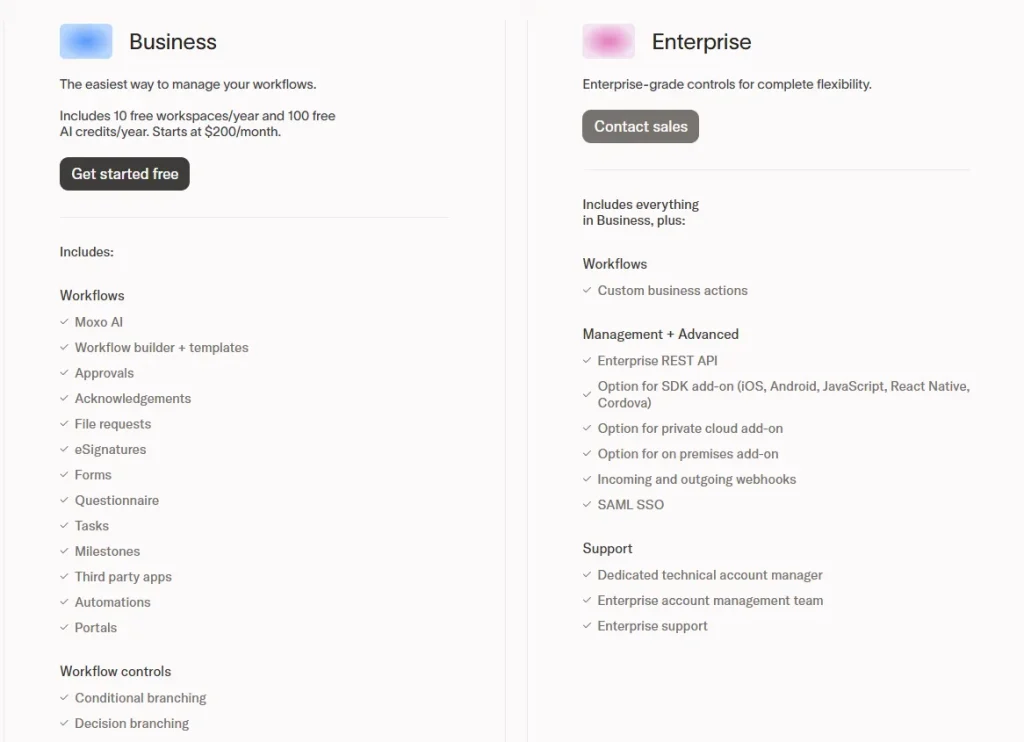
Image: Moxo Pricing
Is There a Free Moxo Plan?
On Moxo’s official pricing page, there’s a “Get started free” button shown under the Business plan section, which can be confusing. However, this typically means you can start the signup process or request access/demo, not that you get a permanently free tier with full features.

On opening an account, you will get to test some basic features and a video tutorial on how Moxo works.
Comparison of Moxo Plan Pricing
| Criteria | Moxo Plans | |
| Plan | Business | Enterprise |
| Pricing | Starts at $200/month | Customized Pricing |
| Storage | 10 GB | 1 TB |
| Management | Basic | Advanced |
| AI Usage | Fixed (100 credits/year) | Custom → scalable and flexible |
| Dedicated Support | ❌ | ✅ |
| API/SDK Access | ❌ | ✅ |
| Private Cloud Options | ❌ | ✅ |
Moxo Pricing: Pros & Cons
| Pros | Cons |
| Strong workflow automation Centralizes communication, files, and tasks Scales for mid-market and enterprise teams Advanced features available in higher tiers (API, SSO, branding) | High cost for small teams or simple needs Steep learning curve and setup effort Limited integrations in lower tiers Mixed user feedback on support Redundant/mixed feedback on integrations (can be improved in clarity) |
Moxo Pricing: In-Depth Breakdown & Value Analysis
A. Business Starting at $200/month
The Business plan is the lowest tier of Moxo that starts at $200/month. Here you will get all the basic features to automate workflow and client communication. It includes 10 free workspaces/year and 100 free AI credits/year.
This plan mostly focuses on the workflow creation and control. The main feature of the Moxo Business plan covers the following:
Key Features
- 10 GB storage
- 10 free workspaces/year
- 100 free AI credits/year
- Workflow automation (approvals, file requests, eSignatures)
- Shared client workspaces
- Task and milestone management
- Forms and questionnaires
- Workflow branching and business rules
- Moxo AI assistance
- Third-party integrations
- Reporting and admin dashboard
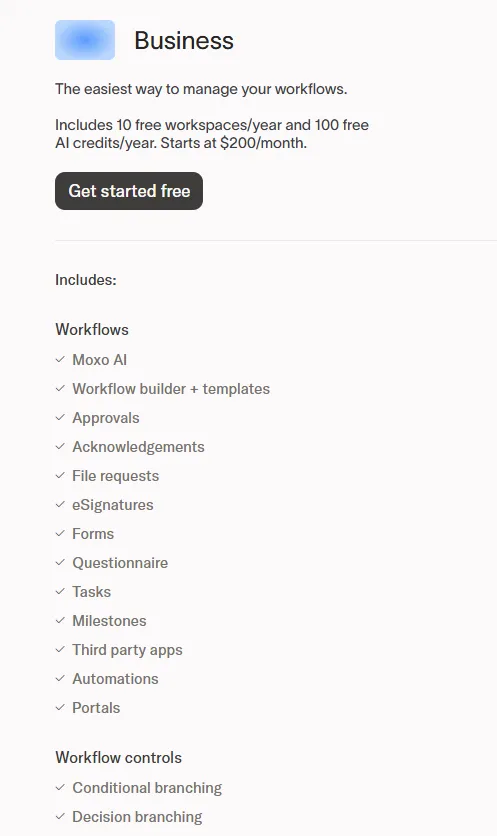
Image: Moxo Business Pricing
Limitations
❌No client portal
❌CRM is too basic
❌High cost for small teams
Moxo Business Vs Taskip Freelancer
| Feature | Moxo Business | Taskip Freelancer |
| Price | Starts at $200/month | $12/monthly |
| Pricing Model | Custom / workspace-based | Flat pricing |
| AI Usage | 100 AI credits/year | 0.1M tokens/month |
| Storage | 10 GB per user | 100 GB |
| Client Portal | ✅ | ✅ |
| Workflow Automation | ✅(advanced) | ✅ |
| Workflow Controls | ✅ (branching, rules, subflows) | ❌ Limited |
| Conditional Branching | ✅ | ❌ |
| Third-party Apps | ✅ | ✅ |
| CRM / Lead Management | ❌ | ✅ Built-in CRM |
| Invoice & Proposal | ❌ | ✅ |
| eSignatures | ✅ | ✅ |
| Support / Ticketing | ❌ | ✅ |
| Winner: Moxo Business Vs Taskip Freelancer Taskip Freelancer is a very affordable CRM platform compared to Moxo Business, which offers all the basic features you need to manage clients. However, the workflow automation features of Moxo are more advanced. If you need an overall solution at a cheaper rate, Taskip Freelancer is the best option. But if you need advanced workflow automation features, go for Moxo Business. |
B. Enterprise at Customized Pricing
Enterprise is the highest tier of the Moxo plan. Unlike the Business plan, Enterprise doesn’t offer any clear or transparent pricing. You need to request a custom price. It is mainly designed for large enterprises that require advanced customization, security, and scalability.
The Enterprise plan offers you a digital ecosystem. For full control over your data, the Enterprise plan offers private cloud or on-premises deployment.
If your business needs advanced customization, top-level security, and scalable user access, the Moxo Enterprise plan provides the flexibility and tools to meet your unique requirements.
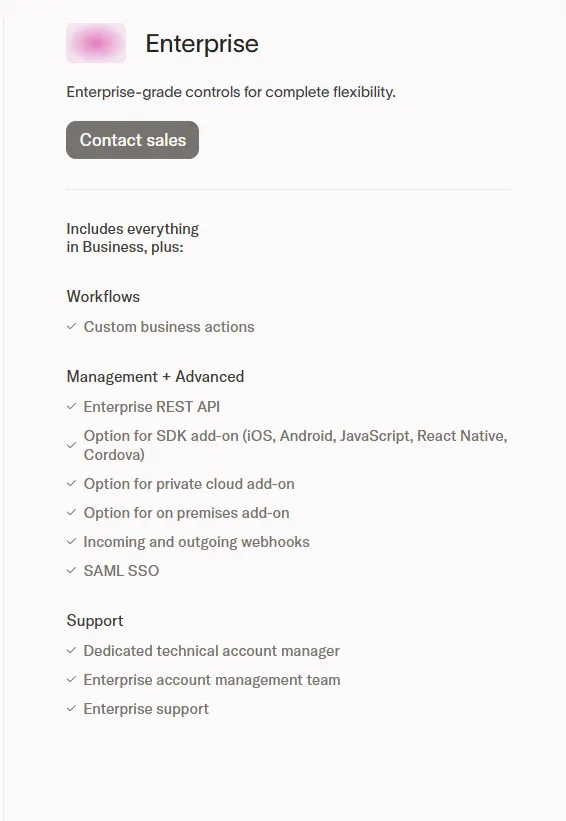
Image: Moxo Enterprise
Key Features
- 250 GB of secure storage
- Enterprise REST API
- Full API and SDK access
- Offers private cloud or on-premises deployment
- Custom workflow creation
- Incoming and outgoing webhooks
- SAML SSO
Limitations
❌No transparent pricing
❌Very high cost
❌Complex setup & implementation
❌Learning curve for teams
Moxo Enterprise Vs Taskip Agency Pro
| Feature | Moxo Enterprise | Taskip Agency Pro |
| Price | Custom enterprise pricing (contact sales) | $89/month |
| Pricing Model | Custom/contract | Flat plan |
| AI Usage | Custom enterprise AI allocation (scalable) | 5M AI tokens/month |
| Storage | Scalable / custom (up to 1 TB) | 1 TB |
| CRM / Lead Management | ❌ (not core) | ✅ Built-in CRM & sales pipeline |
| Client Portal | ✅ External & internal portals | ✅ Smart client portal |
| Workflow Automation | ✅ Advanced enterprise workflows | ❌ Basic / no advanced workflow engine |
| API Access | ✅ | ✅ |
| Custom Branding / White-label | ✅ | ✅ |
| Support / Ticketing | ❌ | ✅ |
| Dedicated Support | ✅ | ✅ |
| SSO / Enterprise Security | ✅ SAML SSO & advanced security | ❌ Not available |
| Winner: Moxo Enterprise Vs Taskip Agency Pro Moxo Enterprise is best for advanced workflow automation, security, and scalability, making it ideal for large organizations. Taskip Agency Pro offers better value with CRM, invoicing, and client management tools at a lower cost, making it ideal for agencies. |
Factors Affecting Moxo Pricing
Plan Tier
The Moxo pricing depends on the tier you choose. The lowest tier, Moxo Business, costs less than the customized Enterprise plan.
Number of Users
The Moxo pricing model is designed for a specific number of users. The Business plan supports 10 users. If you want to add more users, you need to switch to the Enterprise plan, which charges more.
Storage
Each plan comes with a specific amount of storage: 10 GB for Business and 1 TB for Enterprise (customizable). If you need more storage, this will also affect the final price.
Custom Features
For large-scale businesses, Moxo provides tailored solutions such as private cloud deployment and expanded integration options. These features are designed based on specific requirements and usually require consultation with the sales team to finalize pricing and setup.
Does Moxo Have Hidden Costs?
Though Moxo provides clear pricing, there are some additional costs that you may need to go through. These include:
Adding an Extra Member
Moxo packages are planned for a specific number of users. If you want to add more users, you need to pay an additional fee. For example, the Business plan is designed for 10 users; if your team has 12 members, you need to pay an extra amount for the two. However, you can minimize the process by talking to the team.
Private Cloud or On-Premises Hosting
Additional costs are involved if you take the Enterprose plan, requiring private cloud or on-premises deployment. As such, custom setups need high security and control; they are often expensive.
Payment Processing Fees
Moxo connects with third-party tools like DocuSign, which may involve extra transaction charges based on the service you use.
For instance, when handling payments through DocuSign along with Stripe, standard processing fees apply, usually around 2.9% plus $0.30 per credit card transaction.
These costs are not included in Moxo’s pricing and can increase over time, especially if your business relies heavily on these integrations.
It’s important to factor in these additional fees when estimating your overall expenses with Moxo.
Real User Reviews on Moxo Pricing
Captera Review
Rating: 4/5
Users often complain about the hidden cost that Moxo brings in. A review of Captera on Moxo pricing is as follows:
| “Pricing is kept hidden and secretive. They don’t list it, won’t disclose it, wont’ discuss it and keep trying to avoid it until they sell you on everything they want to know about you. really ridiculously hidden. I played with the product for a client of mine and it was nothing spectacular, and a little hard to use. branding and setting up their personal site took longer than expected” – Perry G. Owner Information Technology and Services |
G2 Review
Rating: 4.5/5
Users often find the pricing of Moxo high and inappropriate for small or new businesses. A real review on G2 shows:
| “Moxo is designed to handle problems for large enterprises, making it costs inefficient for small companies. We struggle to integrate the tool with multiple third parties tools.” – Mikes L. Senior Accountant Information Technology and Services Small-Business (50 or fewer emp.) |
Value Analysis: Is Moxo Pricing Worthy Enough For You?
Whether Moxo is worth it or not depends on your requirements and uses.
When Moxo is worth it:
Moxo can deliver a strong ROI if your business handles complex, multi-step workflows involving multiple people (clients, vendors, teams).
Businesses running repetitive processes (like onboarding or compliance workflows) often see efficiency gains because automation reduces manual follow-ups. As mid-size & enterprise teams handle high volumes of structured processes, they benefit the most from Moxo.
When Moxo is not worth it:
Moxo may not be a good fit if your needs are simple or your budget is limited. Many users say the pricing feels high and is better suited for larger companies rather than small teams. If your processes are basic (like file sharing or internal task management), Moxo’s advanced features may be unnecessary. So, paying such a high amount per month is not worth it in such a case.
Top 3 Moxo Alternatives: Moxo Pricing vs Competitors
Here are the top three best Moxo alternatives:
1. Taskip
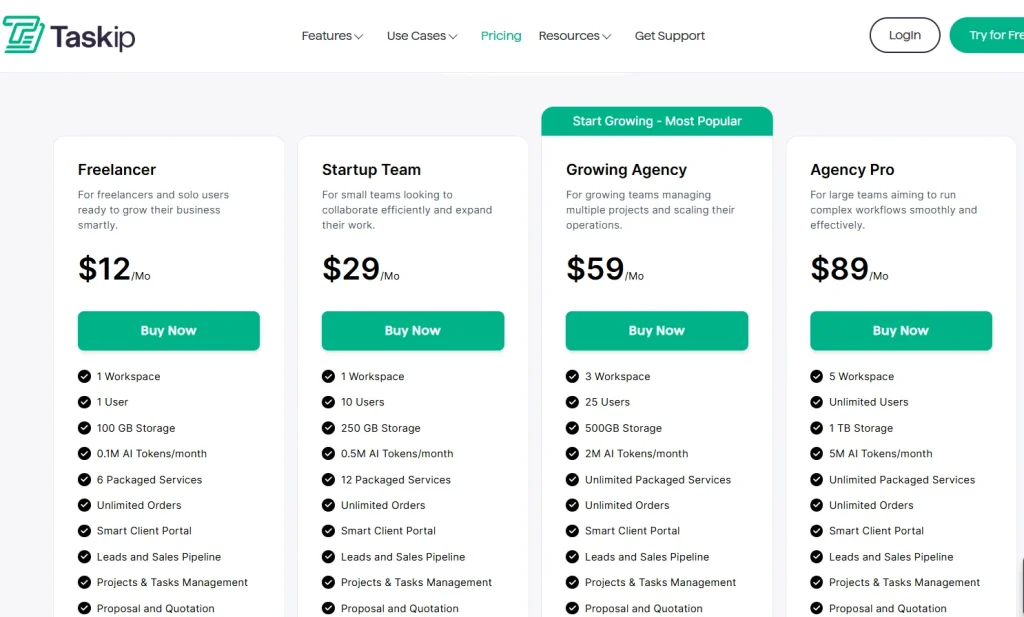
Taskip is the most affordable and efficient alternative to Moxo. It is an all-in-one client portal that focuses not only on workflow automation but also on the entire client management process. Where Moxo offers you only two plans, Taskip offers you four, and the pricing starts at just at $12/month.
And the most amazing fact is that the highest tier of Taskip, Agency Pro, is much cheaper (only $89/month) than the starting tier of Moxo ($200/month). Thus, Taskip is an affordable alternative to Moxo.
Best Taskip Features
- Workflow automation
- Service catalog
- Whitelabeled client portal
- Lead generation
- Team collaboration and discussion
- Proposal, quotation, and proposal
- Documentation and file sharing
- Built-in time tracking & reporting
- Integrates with popular tools (Slack, Google Workspace, etc.)
- Built-in time tracking & reporting
Taskip Price
2. ManyRequests
ManyRequests is another Moxo alternative trusted by 1800+ agencies, offering you a branded client portal.
Best ManyRequest Feature
- Whitelabeled client portal
- Team time tracking
- Customizable request forms
- Real-time reporting
- Automate recurring payments
- Strong CRM
- Design & Video Proofing
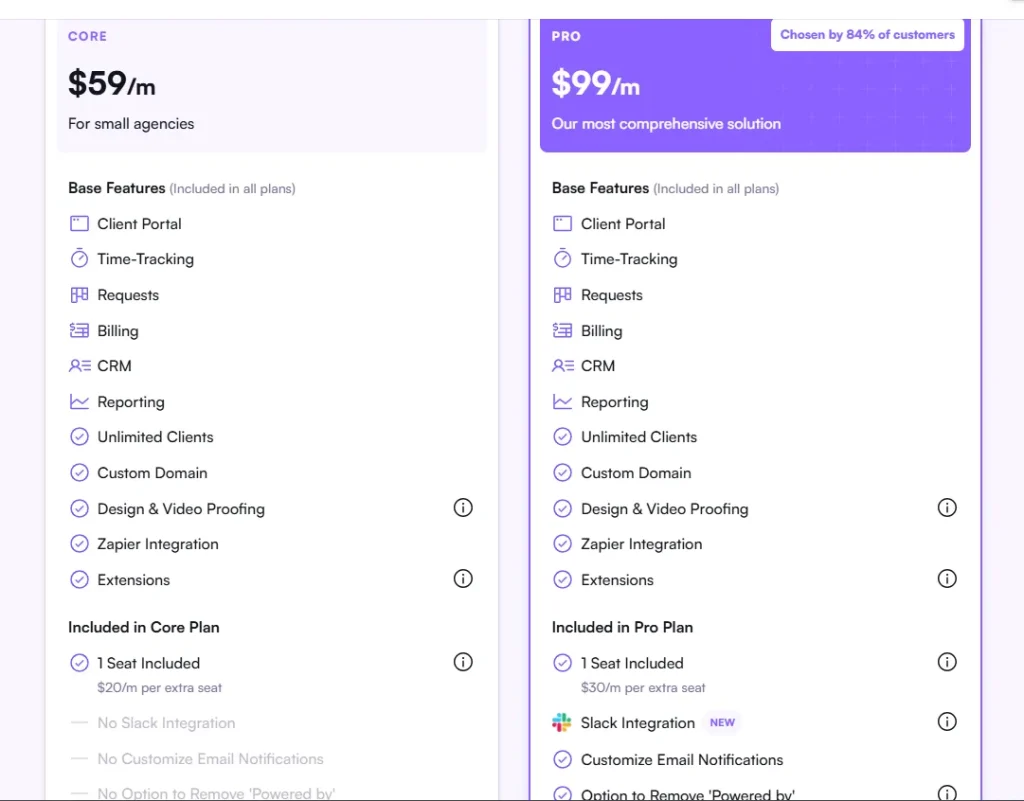
ManyRequest Pricing
3. Productive.io
One of the most amazing features that stands out about Productive.io is its AI-powered forecasting reports. Besides, AI filtering and shift priorities enable you to manage your team’s availability and time off so that you get better visibility into project allocation.
Productive.io Best Features
- Customizable & macro view
- Internal chat tool
- Secure file-sharing integration
- Mute notifications
- Add task via email
- AI-powered forecasting reports
- Budgeting and profitability
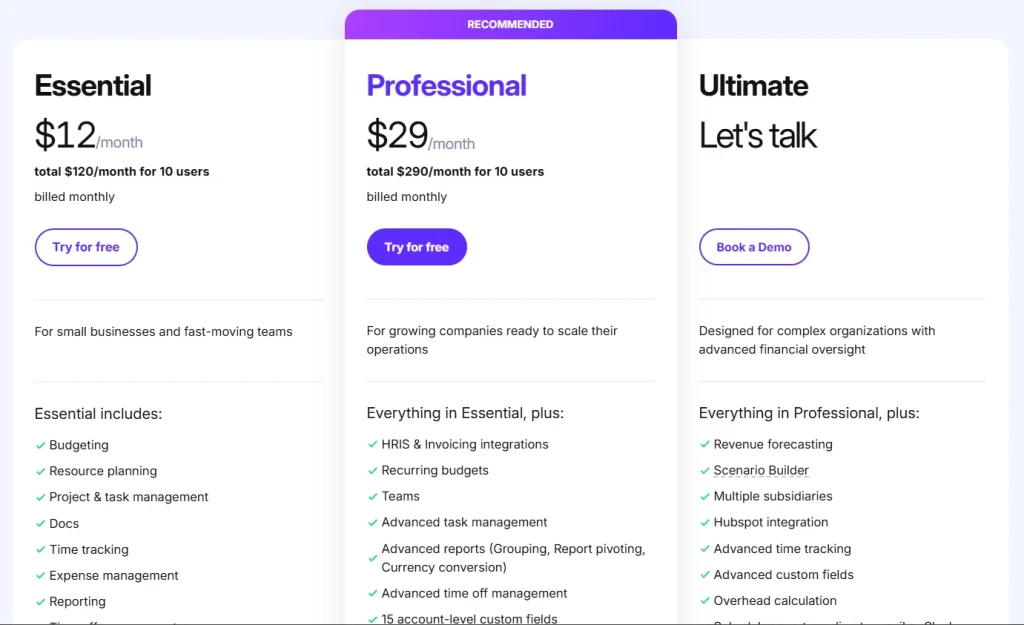
Productive.io Pricing
The Bottom Line
Moxo is a great platform for mid to enterprise-level agencies or businesses, as it brings advanced features with extended automations required for large and bulk tasks. However, when it comes to small businesses, Moxo pricing can be too expensive. And if you only need basic automation and client management features, going for Moxo is not a wise decision.
In this case, you can look for Moxo alternatives, and the best choice is Taskip. It offers you all the essential features you need to handle clients and business in an organized way. And the good news is that Taskip offers four affordable packages aside from a free version. So, explore Taskip and get a plan right now!
FAQs on Moxo Pricing
How much does Moxo cost?
Moxo’s Business plan starts at around $200/month, while higher plans (like Enterprise) require custom pricing.
Does Moxo offer a free plan or trial?
Moxo offers a free starting option/demo, but full features require a paid plan.
Is Moxo pricing scalable?
Yes, Moxo is designed to scale with your business, meaning costs increase as your usage, users, and workflows grow.


Get Summary On: