
SuiteDash Reviews (2026): Brilliant White-Labeling, But Is It Too Complex?
SuiteDash is known for its robust customization facilities, whitelabeling, and advanced automations. But what about the complex and time-consuming configuration process? Is it worth it for you to invest in a tool that takes you 20 hours to set up and understand the workflows?
Table of Contents
In this guide, I am going to share with you my personal SuiteDash reviews from my long six months of using experience and analysing reviews from Reddit, Capterra, and G2. So, let’s dive deep into the real SuiteDash user experience and reviews:
The TL;DR: Quick Verdict
| – SuiteDash is a powerful all-in-one platform (CRM, client portal, projects, invoicing, automation) – Highly customizable and can replace multiple tools – Best for agencies and service-based businesses needing full control – Steep learning curve and time-consuming setup – Not ideal for users who want quick, simple onboarding Taskip Advantage: – Taskip is a simpler alternative with faster setup, ready-to-use templates, and more affordable pricing – Taskip is better for users who value speed, ease of use, and simplicity |
What is SuiteDash?
SuiteDash is designed to provide an all-in-one platform for small- to medium-sized businesses to streamline and automate their tasks. It combines CRM, project management, client portals, invoicing, file sharing, email marketing, and even a built-in learning management system (LMS) into a single platform. Thus, it replaces multiple tools so you can work smoothly with no juggling from one tool to another.
This Saas tool is available at three pricing tiers: Start ($19/month), Thrive ($49/month), and Pinnacle ($99/month). One of its most talked-about features is the “per-workspace” pricing model, meaning you are not charged per user or per client. This stands as a massive advantage for growing agencies.
SuiteDash is used most commonly by marketing and advertising professionals, IT service providers, consultants, and real estate professionals. Moreover, it supports multiple languages, including English, Arabic, Dutch, French, German, and Spanish.
SuiteDash Core Features
The main SuiteDash features include the following:
- CRM (Client Management)
- Client Portal (White-Label)
- Project & Task Management
- Invoicing & Billing
- Proposals & Contracts (eSignature)
- Automation (Flows)
- Email Marketing
- Secure Messaging
- File Sharing
- Scheduling / Appointments
- Support Tickets
- Role-Based Permissions
- LMS (Learning Management System)
- Custom Fields
- Dashboards & Reporting
- Integrations (e.g., Zapier, Stripe)
My Personal SuiteDash Reviews: 6 Months Of User Experience
1. Complex Configuration: Why Setup Took Me 20+ Hours
I’ll be honest: my first 14 days were exhausting. It took me over 20 hours to get the system ready for real clients. You have to build everything from scratch; there are no “plug-and-play” defaults. You need to set up the following, which takes up configuration time:
- White-label domain and branding
- Build your Circle permission groups
- Create your client portal pages manually
- Configure invoice templates
- Build project templates
- Set up onboarding Flows
- Test every client-facing touchpoint
That is, there is too much to do. And it was not just me who went through this complexity. When I went through Capterra reviews, I found users having the same experience.
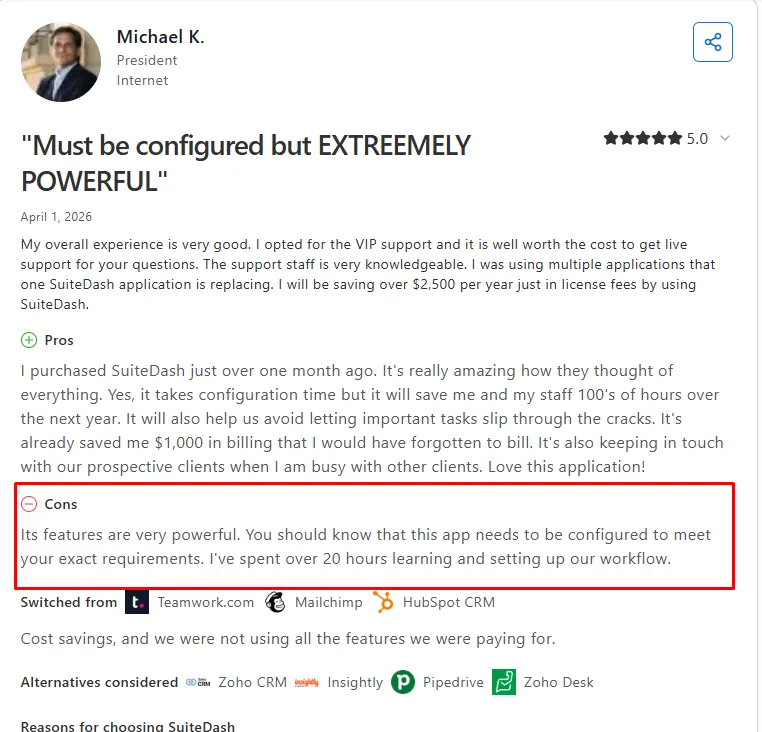
Image: SuiteDash setup Complexity review
Therefore, if you don’t have two weeks to spare for a “configuration marathon,” you’ll find the hidden cost of your time and mental energy of SuiteDash very high.
| Taskip Approach: Taskip is built to be operational quickly. With a clean interface, intuitive onboarding, and pre-built templates that let freelancers and agencies start managing clients and projects within 2 hours. |
2. UI/UX Analysis
SuiteDash’s interface has improved significantly with the SuiteDash 2.0 update. On the surface, it looks modern and well-designed. But after I spent more than a few days inside the platform, I found that the features are deeply nested inside menus. Terminology is inconsistent, and takes real mental effort to map out the relationship between Circles, Flows, Portal Pages, and Dashboards.
This is not a beginner-friendly interface. If you hand SuiteDash to a new team member without training, they will be lost within minutes. You will need SOPs and internal training before rolling it out to staff.
However, not everything about SuiteDash’s UI is difficult. Once you get past the initial learning curve, some parts of the platform work really well. For example, task editing is quick and responsive. Besides, you can customize dashboards and create different portal layouts for different client groups (Circles). This adds a lot of flexibility once you understand how the system works.
3. The Speed Test: Is SuiteDash Slow?
Speed is SuiteDash’s most consistent weak point. Page loads are noticeably slower than competing tools like Taskip. There is a “click-lag”, a brief but perceptible delay of 4 to 10 seconds between clicking a menu item and the page rendering, which compounds frustration during high-volume workdays.
The platform has improved load times over the past year, but it remains one of the slower all-in-one business software tools in its category. Across Capterra, G2, and AppSumo, slow performance is the single most cited complaint in negative reviews.
4. What I Loved: The Features That Actually Impressed Me
Here are the features I loved the most about SuiteDash:
a. The “One-Login” White-Labelling
I tested the white-label client portal with three active clients over six months, and the reaction is consistent: every single client is impressed.
They log into a portal that looks completely custom-built for my agency offering:
- Branded colors
- Customized domain
- Branded logo
Such branding is available in clients’ projects, files, and invoices. There is no third-party or SuiteDash branding anywhere. At this price point, the depth of white-labeling SuiteDash offers is genuinely hard to match.
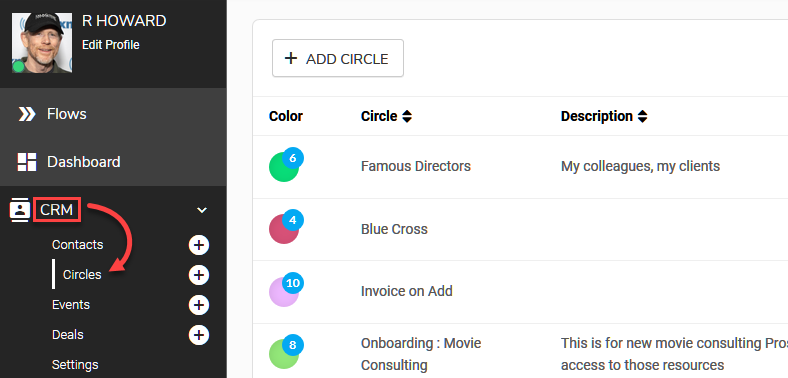
b. Granular Control with Client Circles
In SuiteDash, a Circle is the group permissioning & assignment structure for Clients and Prospects. Instead of manually sharing files or project boards with every single person, you simply assign those resources to a specific Circle (like “VIP Clients” or “Onboarding”).
Any client you drop into that Circle instantly sees everything they need, while the rest of the portal stays hidden. It’s a massive win for brand authority because it keeps the client’s view clean and professional
c. The “No Success Tax” Pricing Model
SuiteDash charges a flat fee per workspace, not per client, per user, or as a percentage of payments processed. As your client base grows from 10 to 50, your SuiteDash cost stays the same. For scaling agencies, this saves meaningful money compared to per-client pricing models.
5. SuiteDash Features That Didn’t Meet the Mark
- Not Beginner-Friendly
Too many custom setting requirements make the configuration complex for beginners. You get a blank canvas to figure out the order, though it is great for customized needs. For users preferring easy usage, the setup is not suitable.
- Over-Engineered Automation
The Flows automation builder is powerful but not intuitive. Building a multi-step automation, triggering a welcome email, creating a project, and granting portal access upon a new client payment, you require navigating multiple settings screens and understanding how Circles interact with Flows. At the same time, you can handle similar automations with far less friction in Taskip.
- Speed Too Slow
As I already stated in the speed test, SuiteDash is slow, and this is one of the facts I didn’t like.
- Admin Experience is Weak on Phones
The client portal works fine on mobile, but the admin side doesn’t. Managing tasks, projects, or settings from a phone feels cramped and inefficient. It’s clearly built for desktop-first use.
- No Built-in Messenger
SuiteDash does include a built-in messaging tool for client communication, but in practice, it feels more like email than real-time chat.
Messages are not always centralized in a way that supports quick back-and-forth conversations. This can lead to missed updates or the need to switch between tools to keep communication flowing smoothly.
In contrast, Taskip has a built-in inbox where you can have a back-and-forth conversation and also share documents, voice messages, or images.
- Limited Proposal Features
When I tried building proposals, the customization options felt limited. It lacks support for more advanced needs, like complex pricing structures or multi-step proposal workflows. For simpler use cases, it works. But as soon as your process becomes more detailed, the limitations start to show.
6. The Support Reality
SuiteDash’s support system is really impressive. You will get a vast documentation, video tutorials, and a large community for help.
| Support option | Description |
| Detailed Documentation (The Academy) | This is SuiteDash’s strongest asset. The SuiteDash Academy is a massive, Netflix-style library of videos and articles. If you’re a “DIY” person, you’ll find an answer for 95% of your problems here without ever needing to open a ticket. |
| Multiple Support Channels | You have access to a standard ticket system, an AI-powered help bot, and a private Discord server (for higher-tier plans). However, while there are many ways to reach out, human response times typically hover around 24 to 48 hours. |
| Onboarding Options (The “Sensei” Sessions) | Because the 20-hour setup is such a hurdle, SuiteDash offers paid “Sensei” onboarding. These are 1-on-1 sessions where an expert helps you build your client onboarding flow. It’s effective, but it’s an extra “Implementation Tax” that many competitors don’t require. |
| Community Forum | In 2026, the SuiteDash Community (powered by their own “Communities” toolkit) is very active. It’s the best place to find “workarounds” from other agency owners who have already solved the logic puzzles you’re currently facing. |
Real SuiteDash Reviews on Different Platforms
Reddit SuiteDash Reviews
The most upvoted advice on Reddit is consistent: “Do not buy this if you need to be up and running by tomorrow.”
This happens because the platform doesn’t come with “pre-built” templates for every workflow; you have to build your logic from scratch. If you enjoy setting up complex logic, you’ll love it. If you just want to send an invoice and get back to work, you might find yourself posting a “Help!” thread within 48 hours.
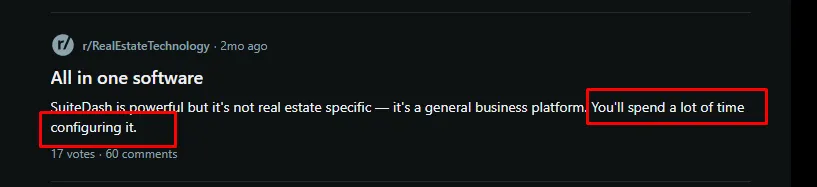
Image: Reddit suitedash review
Capterra SuiteDash Reviews
On Capterra, SuiteDash maintains a high rating of 4.8 out of 5 stars based on over 600 verified reviews.
| Criteria | Capterra Rating | Number of reviews |
| Ease Of Use | 4.6 out of 5 | Based on 612 reviews |
| Value-for-Money | 4.9 out of 5 | Based on 584 reviews |
| Customer Service | 4.8 out of 5 | Based on 572 reviews |
| Features | 4.8 out of 5 | Based on 612 reviews |
The SuiteDash reviews in Capterra also bring positive light to its feature-rich criteria and mostly white-labeling. But also, the bad reviews are found about steep learning and complex configuration.
Positive SuiteDash Reviews:
| “SuiteDash is extremely customizable, allowing you to create multiple dashboards that reflect the current status of each project.“ – Koen K Webdesigner |
Negative SuiteDash Reviews:
| “Overall, the amount of time it would have taken to set up 3 different tools and the cost associated with licensing and integration was 8-10 times more than it took for us to use suitedash, which encompassed all of the functionality the 3 other tools needed to manage the business.” – Michael B Program Manager |
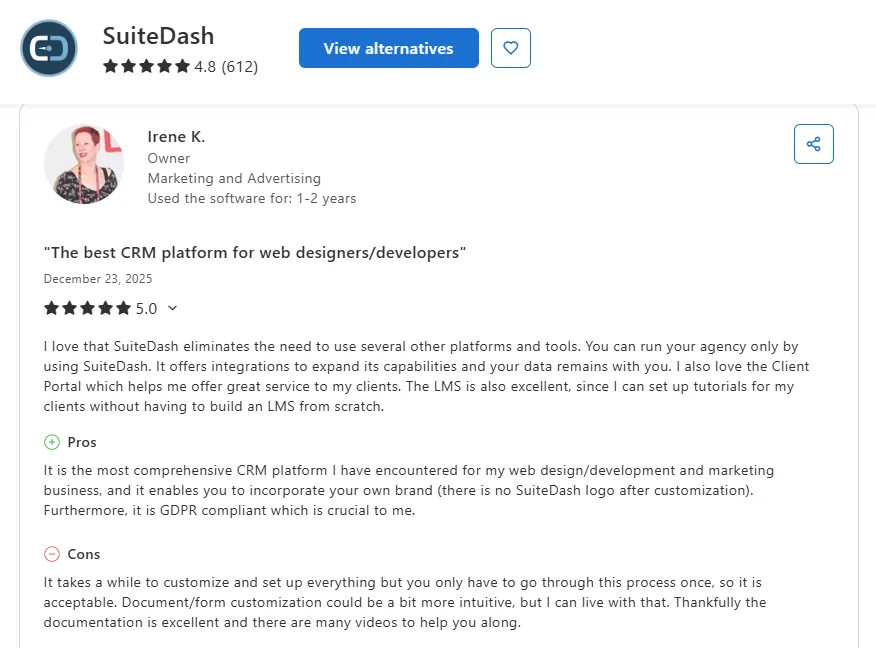
Image: Capterra Review
G2 SuiteDash Reviews
In G2, SuiteDash has a 4.8 rating out of 5. Though one of the major concerns for SuiteDash users is its steep learning curve due to customization requirements from scratch, designers and branding professionals are found to adore this feature in G2 reviews.
Positive SuiteDash Reviews:
“
“Having so many of the administrative tools for my business in one place helps me focus and feel streamlined in my work. I really value the customisation of the UI, which has so many options. I’m a web designer, SEO, and branding guy (at Digital Magnetism), and it suits me great. Highly recommended for those who like a customisable and focused control centre for their business.”
Negative SuiteDash Reviews:
Critical Review
“
“The initial learning curve can feel a bit steep, especially with all the features available. It took me a little time to fully explore everything and set it up the way I wanted. Some UI sections could be a bit more intuitive, but once you get the hang of it, it’s totally worth it.”
Who Should (and Shouldn’t) Use SuiteDash?
From analytical research of the past three years, it has been found that SuiteDash is mostly used by small businesses rather than freelancers or solopreneurs.
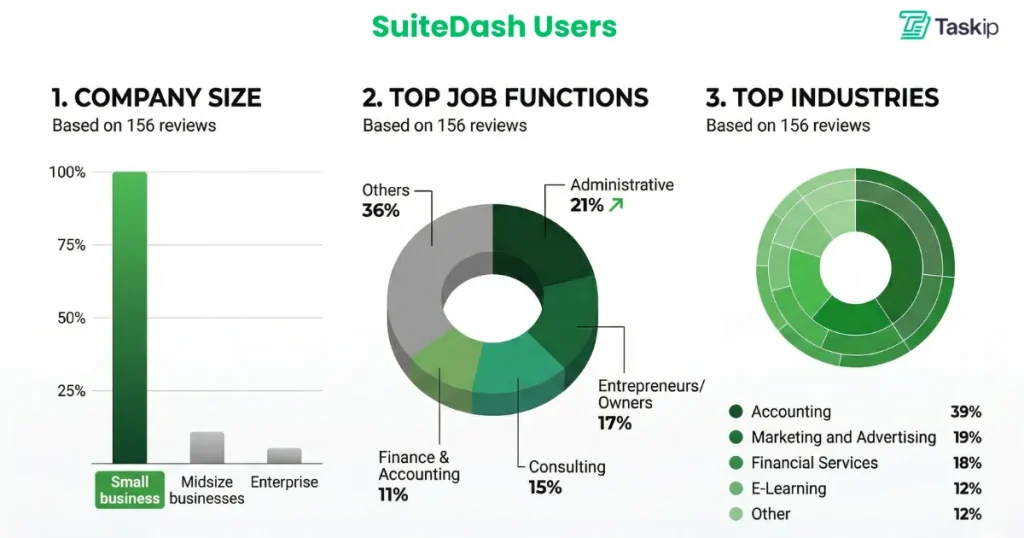
Source: Capterra SuiteDash Software Review
SuiteDash Is Best For
If you’re running a service-based business like an agency, consultancy, or freelance setup, the platform can be a strong fit. It’s designed to bring everything (clients, projects, invoices, files) into one place, which reduces tool overload significantly.
It also works well if:
- You manage multiple clients and ongoing projects
- Want a white-labeled client portal to look more professional
- Prefer a single all-in-one system instead of juggling tools
- You’re okay investing time upfront to set up workflows and automation properly
SuiteDash Is Not Suitable For
If you need something that works right out of the box, this isn’t it. The learning curve is real, and many users report needing time (or training) to get comfortable with the system.
It may not be the right choice if:
- You want a simple, plug-and-play tool
- Your team is non-technical or short on time
- You rely heavily on mobile usage
- Your workflow changes frequently (SuiteDash prefers structured systems)
- You need best-in-class features in specific areas (like proposals, scheduling, or messaging)
How to Use SuiteDash? – A Beginner’s Workflow
Getting started with SuiteDash takes a bit of setup, but once configured, it can streamline your entire workflow. Here’s a quick step-by-step guide.
Step 1: Create Your Account
- Sign up using your email
- Verify your email address
- Set your profile details
- Access your dashboard and begin setup
Step 2: Customize Your Branding
- Add your logo and company details
- Adjust colors and platform appearance
- Customize email notifications (SMTP or domain sending)
- Set up a custom domain for your client portal
Step 3: Set Up Projects
- Enable the project dashboard
- Customize what clients can see (progress, files, updates)
- Add welcome messages and branding to the client portal
Step 4: Add Your Team
Assign roles based on responsibilities:
- Super Admin (full access)
- Admin (most features)
- Office Manager (projects + CRM)
- Teammate / Freelancer (limited access)
Step 5: Configure Email Marketing
- Import or build your contact list
- Set up email campaigns or drip sequences
- Schedule and automate communication
Step 6: Set Up Invoicing & Payments
- Create branded invoices
- Connect payment gateways (Stripe, PayPal)
- Enable recurring billing if needed
Step 7: Monitor & Optimize
- Track performance from your dashboard
- Adjust workflows and settings over time
Step 8: Integrate Other Tools
- Connect tools like Zapier, QuickBooks, Zoom, or Slack
- Use integrations to streamline workflows
SuiteDash Pricing Breakdown
SuiteDash offers three plans with monthly, yearly, and lifetime pricing. The features you get in these plans are as follows:
| Plans | Start | Thrive | Pinnacle |
| Pricing | $19/month$180 yearly$2,240/century | $49/month$480 yearly$3,940/century | $99/month$960 yearly$6,840/century |
| Storage Space | 100 GB | 500 GB | 2 TB |
| Client Portals | ✅ | ✅ | ✅ |
| White Label Branding | ✅ | ✅ | ✅ |
| Proposals Feature | ❌ | ✅ | ✅ |
| Email Drip Campaigns | ❌ | ✅ | ✅ |
| Automation Features | ❌ | ❌ | ✅ |
| Onboarding Tools (FLOWs) | ❌ | ❌ | ✅ |
| Learning Management (LMS) | ❌ | ❌ | ✅ |
| Support Ticket System | ❌ | ❌ | ✅ |
| Task Dependencies | ❌ | ❌ | ✅ |
Want a detailed analysis of SuiteDash pricing and to know if it is worth investing in? Check this: SuiteDash Pricing.
Top 3 SuiteDash Alternatives
If you’re ready to switch, see our full list of SuiteDash alternatives with pricing and comparisons. However, I have listed the best three picks for you right here:
1. Taskip Vs SuiteDash
In contrast to the complex SuiteDash settings, Taskip is an all-in-one client management platform designed for rapid deployment. Its “ready-to-go” configuration allows you to onboard clients within 2 hours, making it a favorite for teams that don’t have a week to spend on software setup.
It is highly versatile, serving freelancers, solopreneurs, and large agencies alike. A major advantage is the Service Catalog, which lets you productize your offerings, a feature that SuiteDash currently lacks. With four affordable paid tiers and a Forever Free version, Taskip is significantly more accessible for growing businesses.
| Features | SuiteDash | Taskip |
| Setup Time | High (20+ Hours) | Low (1–2 Hours) |
| Ease of Use | Steep Learning Curve | Intuitive / User-Friendly |
| Free Plan | ❌ | ✅ |
| Staring Price | $19/mo | $12/mo |
| Service Catalog | ❌ | ✅ |
| Multi currency | Limited | Supported |
| Best For | Agencies needing deep customization | Freelancers, agencies, and teams need simplicity |
2. ManyRequest Vs SuiteDash
ManyRequests is built specifically for agencies that sell defined packages (like design, SEO, or writing services). It offers a much cleaner, more modern client dashboard that feels like an e-commerce store for your services and is best for selling service packages.
3. Bitrix24 Vs SuiteDash
With Bitrix24, you get a more advanced CRM along with a fully built-in communication system, including chat, video calls, audio calls, and team collaboration tools.
It also comes with AI-powered features like CoPilot, which help automate tasks and streamline workflows, reducing manual effort.
Because of this, Bitrix24 stands out if your priority is strong CRM capabilities combined with real-time communication and automation.
Final Review: What Do We Think About SuiteDash?
After using and analysing SuiteDash reviews, it is clear that SuiteDash is a solid platform for its features and customization flexibility. However, tailoring from scratch makes the configuration process much more complex and time-consuming. So, if you are looking for simplicity and speed, SuiteDash is not the ideal option for you to choose.
In this case, Taskip is your go-to option. Why? Taskip is easy to use, comes with ready-made templates, supports white-labeling, and requires minimal configuration. Compared to SuiteDash, it removes much of the setup complexity and gets you started much faster.
It’s also more affordable, making it suitable for freelancers and small agencies who want essential features without the learning curve. So why wait anymore? Check Taskip features and get your plan now!
FAQs on SuiteDash Review
What is SuiteDash used for?
SuiteDash is an all-in-one business hub. It replaces separate tools for CRM, project management, invoicing, and client portals by putting them all under one roof.
How does SuiteDash handle client communication?
In SuiteDash, everything stays inside a secure, branded portal. You can send automated email notifications, share files, and use SuiteAi to draft messages or automate replies.
Is SuiteDash good for Accounting, Legal, or Consulting firms?
Yes. These firms use it as practice management software because it offers secure document storage, custom permissions (Circles), and professional white-labeling.
SuiteDash is ideal for whom?
SuiteDash is ideal for growing agencies and service firms with 10+ clients. It’s ideal for those who want to stop paying for multiple subscriptions and consolidate into one flat-rate tool.
Can I fully white-label it?
SuiteDash is known for branding flexibility. You can use your own Custom URL (CNAME), logo, and brand colors. Moreover, it allows you to offer a white-labeled mobile app that clients can download.
Is SuiteDash worth it in 2026?
Yes, but only if you have the time to set it up. It’s a powerful “Business Operating System,” but if you need something that works in minutes, you might prefer a simpler alternative like Taskip.




Get Summary On: