Stop Losing Leads in Chat History
Managing clients in Taskip, activating the WhatsApp integration takes under 5 minutes! Comes at $10/month with all Taskip plans.
If your team manages leads through WhatsApp, you’ve probably experienced missed messages, duplicate replies, or follow-ups that never happen. These communication gaps can slow down your sales process and cost you valuable clients.
A WhatsApp CRM integration solves this by bringing conversations, contacts, and your sales pipeline into one centralized workspace, so your team stays aligned, and every lead gets tracked.
In this article, we’ll explore six WhatsApp CRM features that help agencies and freelancers manage client communication more efficiently and close more deals.
A WhatsApp CRM integration is not just a notification forwarding tool. The basic idea sounds simple: connect WhatsApp to your CRM; that’s it. But the difference between a shallow integration and a real one is significant.
A shallow integration might push new messages into a feed. A real WhatsApp CRM integration gives your team:
Without these things, you just have a notification system. With them, WhatsApp becomes a proper client communication channel that your whole team can manage, the same way you manage email.
You can add the WhatsApp CRM integration for just $10/month to connect your WhatsApp conversations directly to your sales pipeline, keeping your team aligned and ensuring every lead is tracked from first message to closed deal.
Before getting into individual features, it helps to understand how Taskip thinks about WhatsApp CRM integration as a whole. I call it the Taskip WhatsApp CRM Stack, four layers that work together:
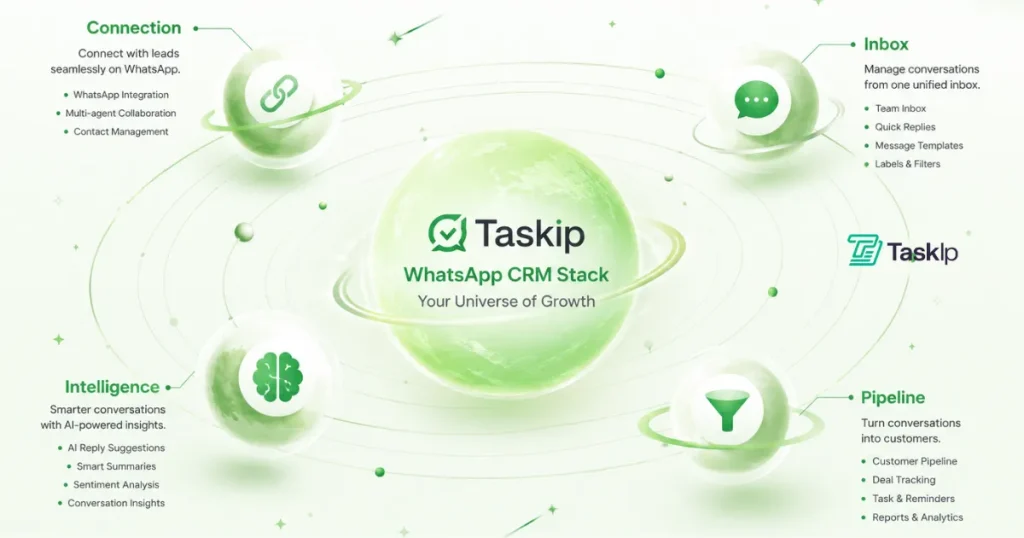
Link your personal WhatsApp or WhatsApp Business account via QR code. No API approval needed, no technical setup.
All conversations land in a shared team inbox with Open, Pending, and Closed statuses. Everyone on your Taskip account has access to this.
AI summarizes conversations and drafts replies. Team members can assign chats, add internal notes, and tag contacts without the client ever seeing any of it.
Any conversation can become a CRM Lead or Contact in one click, with the chat history, notes, and tags already attached.
Each layer feeds the next. The connection is only useful if there is a shared inbox. The inbox is only useful if your team can coordinate inside it. The coordination only pays off if warm conversations actually make it into your pipeline.
With that structure in mind, here are the 6 smart features that make this WhatsApp CRM integration work in practice.
If you have a CRM solution, a WhatsApp integration not only makes your client management more convenient but also ensures you never miss a conversation that affects your business. Here are the top six Taksip WhatsApp CRM features that will make your day-to-day tasks easier:
The single biggest problem with WhatsApp for teams is visibility. One person holds the phone, and everyone else is guessing.
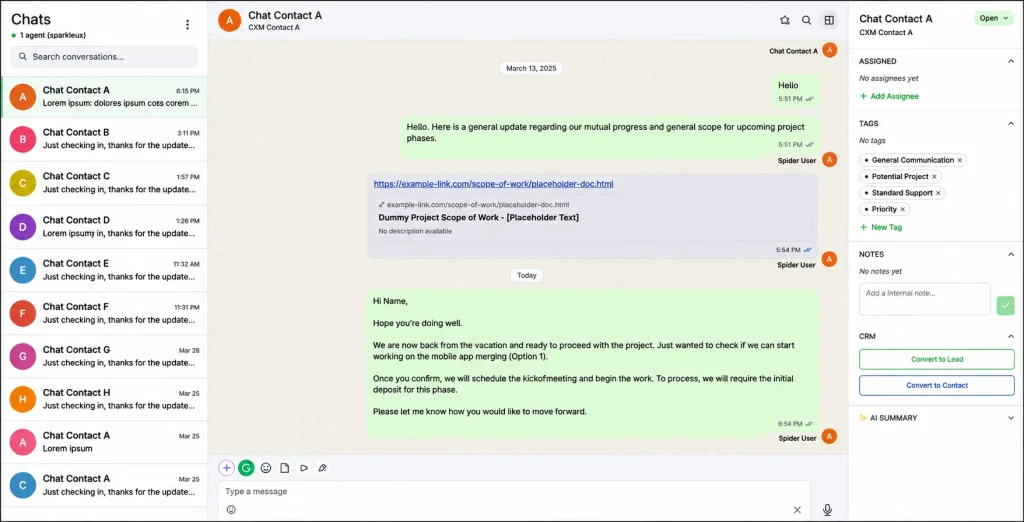
Taskip’s WhatsApp CRM integration gives every member of your Taskip account access to a unified inbox. Conversations are organized by status: Open, Pending, or Closed. Therefore, at a glance, anyone can see what needs attention and what is already handled.
This alone removes the “did someone reply to this?” problem that kills deals. You stop having two people send duplicate replies. You stop missing messages because they were on the wrong phone. The WhatsApp CRM integration makes the inbox a shared resource, not a personal one.
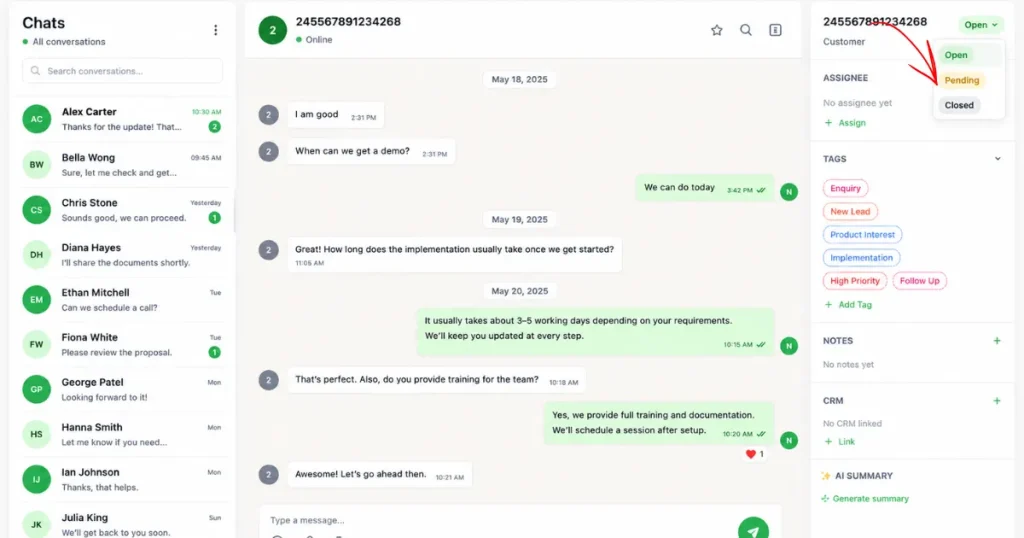
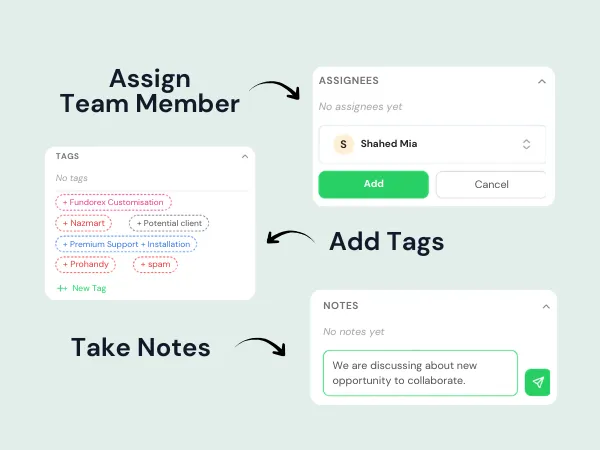
Knowing a message exists is not enough; someone needs to own it. Taskip’s WhatsApp CRM integration lets you assign any conversation to a specific team member with one click, so accountability is clear and nothing sits in a limbo state.
Alongside an assignment, you can add internal notes to any conversation. These notes are only visible to your team inside Taskip. The client never sees them. This matters more than it sounds.
When team members can communicate inside a conversation thread without the client seeing it, handoffs get smoother, context does not get lost, and the client experience stays clean. This is what separates a real WhatsApp CRM integration from a simple message forwarding tool.
This is the feature that saves the most time once you start using it regularly.
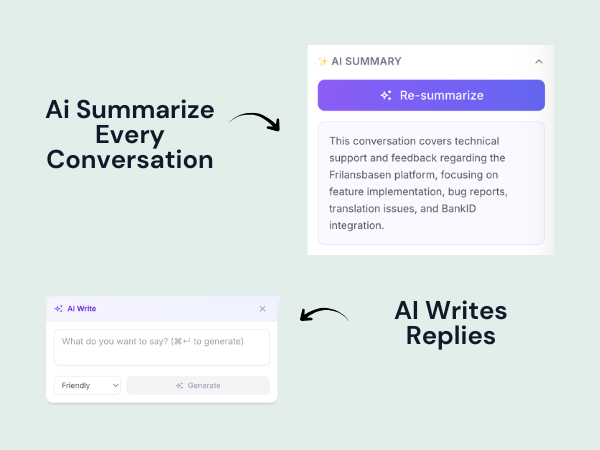
Long WhatsApp threads are exhausting to catch up on. A 40-message conversation with a client can take 5 minutes just to read before you can respond intelligently. Taskip’s WhatsApp CRM integration uses AI to summarize any conversation in seconds, giving anyone on your team instant context without reading the whole thread.
The second AI feature is reply drafting. You type a rough direction (“tell them the project starts Monday and ask for the contract deposit”) and the AI writes a polished reply in your tone. You review, edit if needed, and send.
This is not about replacing your voice; you stay in control of every message. But drafting replies is a real-time cost, especially when you are managing 20 or 30 active WhatsApp conversations simultaneously. AI-assisted writing in a WhatsApp CRM integration like this can cut reply time by more than half on routine messages.
This is where WhatsApp CRM integration pays for itself. Most WhatsApp conversations with potential clients never make it into a CRM. The intent to log them is there, but manually copying a name, number, conversation summary, and context into a separate system is slow work. So it does not happen, and leads evaporate.
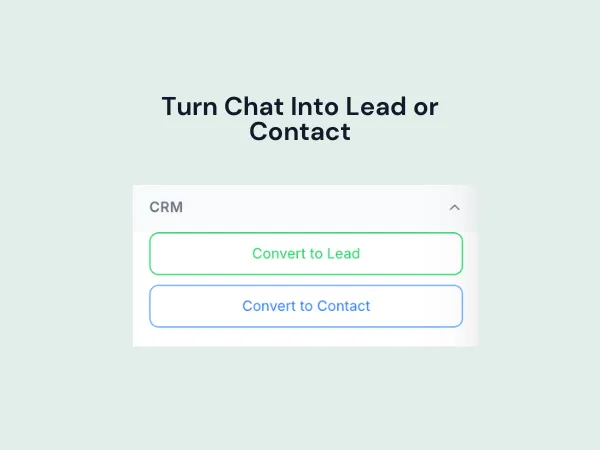
Taskip solves this with a single button. From any WhatsApp conversation, you can convert the contact into a CRM Lead or Contact, and all of the following come with it automatically:
When a lead reaches your sales pipeline, your team already has context. They do not start from zero. They know what was discussed, what the client wants, and what the agreed next step was. That context is the difference between a warm handoff and a cold restart.
This is the feature that closes the loop between conversation and pipeline. Without it, your WhatsApp CRM integration is a better inbox. With it, it is a genuine revenue tool.
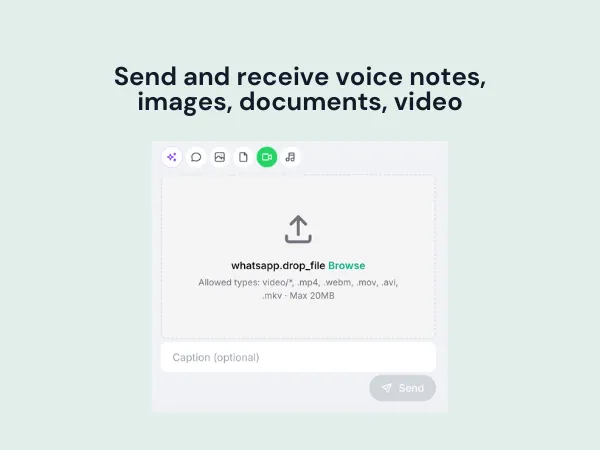
WhatsApp is a rich media channel. Clients send voice notes instead of typing long messages. They share photos of a space that needs work, screenshots of a problem, PDFs of a brief, or short video walkthroughs. A WhatsApp CRM integration that only handles text messages is not really a WhatsApp integration.
Taskip handles the full range of media natively inside the dashboard:
This matters for agencies in particular. A design agency client might send reference images. A construction client might send a voice note explaining scope changes. A legal client might share a contract draft for review. If your WhatsApp CRM integration strips media out or requires you to go back to your phone to view it, you lose half the value of the channel.
Not every small agency has a WhatsApp Business account. Many freelancers and consultants run everything through a personal WhatsApp number. Taskip’s WhatsApp CRM integration supports both, and you choose which one to connect at setup.
This is worth highlighting because most WhatsApp integrations in the market either require the official WhatsApp Business API (which has an application process, monthly fees, and message template restrictions) or only support WhatsApp Business accounts.
Taskip uses a QR code connection. You scan once with your phone, and your inbox is live in minutes. No API approval. No IT ticket. No waiting.
For agencies and freelancers who want a WhatsApp CRM integration without enterprise-grade friction, this matters. You get a professional shared team inbox without changing the number your clients already have saved.
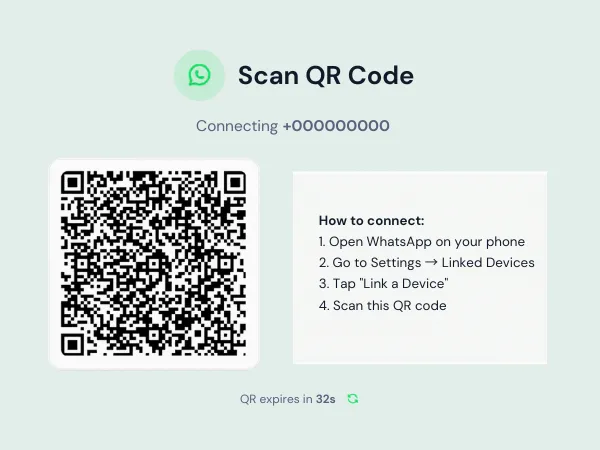
You can easily set up Whatsapp integration in your Taskip dashboard in few steps:
Step 1: Access the WhatsApp Section
Go to the left navigation menu → Click WhatsApp, or go to Settings → Integrations → WhatsApp.
Step 2: Activate WhatsApp
Click the Activate WhatsApp button to start the setup.
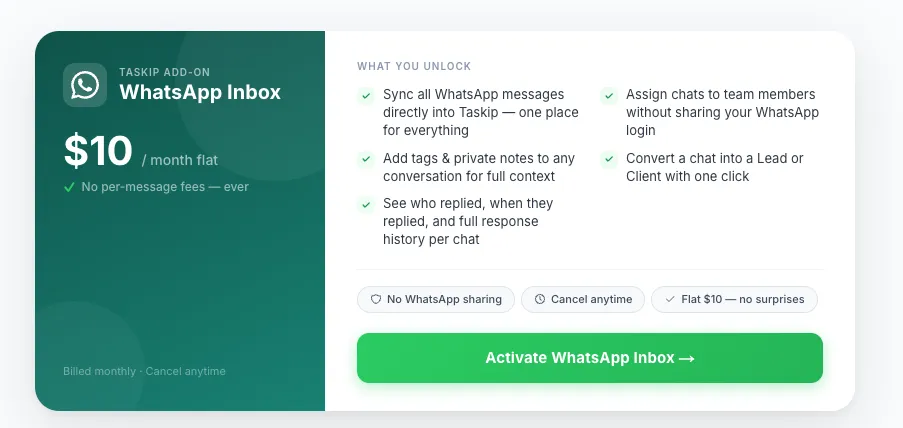
Step 3: Complete Payment
Pay $10/month to unlock the integration. After payment, you’ll be redirected to connect your WhatsApp via QR code. Both personal and business accounts are supported.
Step 4: Scan And Go Live
A QR code appears on screen. Open WhatsApp on your phone, go to Linked Devices, and scan. Your inbox populates immediately. From there, you can invite your team (every team member on your Taskip account gets access), set up tags, and start assigning conversations. Most teams are fully operational within the same day they activate.
If you are already managing leads and contacts inside Taskip, the WhatsApp integration connects directly to that system. So the CRM conversion button immediately puts new leads into the right place.
Step 5: Manage Conversations
Your WhatsApp dashboard will let you:
Taskip’s WhatsApp integration is a $10/month add-on on top of your existing Taskip plan. There are no setup fees, no per-message charges, and no contracts. It is just a flat monthly subscription you can cancel anytime from your account settings.
There are no usage limits. Whether your team handles 10 conversations a month or 500, the price stays the same. You can also go for the solo plan, Freelance plan just at $12/month. For team work the Startup Team is available just at $29/month. Just adding $10/month, you can have Whatsapp integration in any Taskip plan.
If you are not on Taskip yet, get a plan. The WhatsApp integration can be activated from Settings once you are inside. However, if you hesitate, try the Taskip free plan before purchasing.
 Taskip
Stop juggling client chats across personal phones and scattered inboxes. Connect WhatsApp to Taskip and manage conversations, leads, and your sales pipeline from one place.
Sign Up for FREE!No credit card is required!
WhatsApp is already the main communication channel for many agencies and freelancers, but it was never built for team-based sales. As a result, leads get missed, replies overlap, and follow-ups fall through the cracks.
A WhatsApp CRM integration fixes this by turning scattered chats into a structured system. With Taskip’s WhatsApp CRM, your conversations connect directly to a shared inbox and sales pipeline, giving your team clarity, control, and accountability.
The six features in this article work together to help you manage conversations better and convert more leads without losing track of them.
Start using Taskip today and turn every WhatsApp conversation into a trackable lead in your CRM. Try the WhatsApp CRM integration now and never lose a client in chat again.
Managing clients in Taskip, activating the WhatsApp integration takes under 5 minutes! Comes at $10/month with all Taskip plans.
A WhatsApp CRM integration connects your WhatsApp account to a CRM platform, so your team can manage conversations, assign chats, track status, and convert contacts into leads. All these are available without leaving the CRM dashboard. Instead of managing WhatsApp on a phone that only one person has access to, the whole team works from a shared inbox. Taskip’s WhatsApp CRM integration includes a shared inbox, AI summaries, team assignment, internal notes, and one-click lead conversion.
With Taskip, you don’t need the WhatsApp Business API for WhatsApp integration. The official API requires an application process, approved message templates, and ongoing per-message costs. But Taskip connects via QR code, the same method you use to link WhatsApp Web. Therefore, there is no application, no approval wait, and no per-message fees. You pay $10/month flat, regardless of volume.
Yes. Every team member on your Taskip account gets full access to the shared WhatsApp inbox. You can assign conversations to specific people, add internal notes only your team can see, and track who replied to what. Clients only ever see the messages you send; Taskip is completely invisible to them.
No, messages appear as completely normal WhatsApp messages. There is no Taskip branding, no “sent via” label, nothing. From your client’s perspective, they are just messaging you on WhatsApp as usual.
Your existing WhatsApp history stays on your phone as normal. New conversations that come in after you activate the WhatsApp CRM integration will appear in Taskip’s shared inbox and be stored there. Going forward, your team manages conversations from Taskip rather than the phone.
Yes, this is one of the core features of Taskip’s WhatsApp CRM integration. From any conversation, click the convert button, and a new Lead or Contact is created in your CRM with the full conversation history, internal notes, and tags already attached. No manual data entry required.
Yes. Taskip supports both personal WhatsApp and WhatsApp Business accounts. You choose at activation. Many freelancers and small agencies use personal numbers because that is already where their clients reach them. Taskip’s WhatsApp CRM integration works exactly the same either way.



Get Summary On: