Taskip vs Moxie: Built for Growth vs Built for Freelancers
Choosing between Taskip vs Moxie comes down to one question: Are you building a freelance business or a growing agency?
Moxie focuses on freelancers and solopreneurs who need a simple all-in-one workspace. In contrast, Taskip is mainly built for agencies and teams that need collaboration, automation, client portals, and room to scale. However, it also has a dedicated freelance plan for solo users.
In this comparison, we’ll break down the features, pricing, strengths, and limitations of both tools so you can quickly decide which one is the better fit for your business.
TL;DR
If you need accounting and expense tracking, Moxie works well, starting at $12/month.
But Taskip also starts at $12/month and gives you significantly more: client portal, support tickets, WhatsApp inbox, and lead management all included. Besides, it scales to unlimited users (the highest plan), making Taskip suitable for an agency and a growing team. In contrast, caps at 5 team members, even on its highest plan.
Therefore, whether you are a freelancer or running an agency, Taskip covers more ground at every price point.
Table of Contents
What Is Taskip?
Taskip is an all-in-one agency management platform built for service businesses that need more than just task management. You get project management, invoicing, CRM, client portal, WhatsApp inbox, support tickets, and workflow automation under one roof. There is a free plan to start, and paid plans scale from $12/month all the way to unlimited users at $89/month. It is built to grow with your business, not slow it down.
What Is Moxie?
Moxie is a freelance business management tool designed for solo professionals and small teams. It covers the essentials well, such as invoicing, proposals, contracts, time tracking, and basic accounting, without overcomplicating things. Plans start at $12/month, though the highest tier caps at 5 team members. If you work alone and want a clean, focused tool, Moxie is a solid choice.
Taskip vs. Moxie: At a Glance
| Feature | Taskip | Moxie |
| Free plan | ✅ | ❌ |
| Mobile app (iOS and Android) | ✅ | ✅ |
| Project management | ✅ | ✅ |
| Kanban, List, Gantt, Calendar views | ✅ | ✅ |
| Task management with subtasks | ✅ | ✅ |
| Time tracking | ✅ | ✅ |
| Invoicing, Quotations, Proposals | ✅ | ✅ |
| E-signatures | ✅ | ✅ |
| Recurring billing | ✅ | ✅ |
| Multiple currencies | ✅ 100+ | ✅ |
| VAT and tax management | ✅ | ❌ |
| Client portal | ✅ All plans | ✅ Pro+ only |
| White label | ✅ Growing Agency ($59+) | ✅ Pro ($25+) |
| Sales pipeline | ✅ | ✅ |
| Lead management (CRM) | ✅ | ❌ |
| Support tickets | ✅ | ✅ Pro+ only |
| Meeting scheduler | ✅ | ✅ |
| Forms with conditional logic | ✅ | ✅ |
| Document management | ✅ | ✅ |
| WhatsApp inbox | ✅ | ❌ |
| Workflow automation | ✅ | ✅ Pro+ only |
| Service catalog | ✅ | ❌ |
| AI assistant | ✅ Taspi AI | ✅ Moxie AI |
| Accounting and bookkeeping | ❌ | ✅ |
| QuickBooks integration | ❌ | ✅ Pro+ |
| Zapier integration | ✅ All plan | ✅ Pro+ |
| Google Drive integration | ✅ | ❌ |
| Business phone line | ❌ | ✅ Pro+ (US/CA/UK only) |
| GDPR compliant | ✅ | ❌ (Listed) |
| EU data hosting | ✅ | ❌ |
| Max team members | Unlimited(Agency Pro) | 5(Teams plan) |
Taskip vs. Moxie: Category-by-Category Comparison
Both tools cover a wide range of features, and there is real overlap between them. However, the key differences show up in the details: which plan a feature is locked behind, how deeply it is built out, and who it is actually designed for. Let’s go through it category by category.
Project Management
Taskip gives you four views to work with: Kanban, List, Gantt, and Calendar, so you can manage projects however it fits your team. Everything is organized in a folder-based structure that works well when you are juggling multiple clients at once.
Moxie covers project management with similar views and is particularly smooth for solo users managing individual projects from start to finish. Both tools let you control what clients can see inside their projects.
| Feature | Taskip | Moxie |
| Kanban board | ✅ | ✅ |
| List view | ✅ | ✅ |
| Gantt chart view | ✅ | ✅ |
| Calendar view | ✅ | ✅ |
| Folder-based organization | ✅ | ❌ |
| Project templates | ❌ | ✅ |
| Unlimited projects | ✅ | ✅ |
| Client visibility controls | ✅ | ✅ |
| Team performance analytics | ✅ | ❌ |
| Google Drive integration | ✅ | ❌ |
Winner: Tie
Both tools offer the same four project views. Taskip adds team analytics and Google Drive, while Moxie brings project templates. Pick whichever extra matters more to you.
Task Management
Task management is solid on both tools. They both allow you to create tasks, assign them to team members, add subtasks, set priorities, and track progress. Taskip includes custom fields and custom statuses, which give your team more flexibility when workflows get complex.
In contrast, Moxie handles the basics cleanly and adds time logging at the task level, which connects directly to invoicing. Though it is a nice touch for anyone billing by the hour, if you consider flexibility, Taksip is better. with its custom fields.
| Feature | Taskip | Moxie |
| Custom task statuses | ✅ | ✅ |
| Priority levels | ✅ | ✅ |
| Subtasks | ✅ | ✅ |
| Task assignment | ✅ | ✅ |
| Due dates and reminders | ✅ | ✅ |
| Custom fields | ✅ | ❌ |
| Time logging per task | ✅ | ✅ |
| Task dependencies | ❌ | ❌ |
Winner: Taskip
Taskip’s custom fields and custom statuses give your team more flexibility as workflows get complex. In contrast, Moxie covers the basics well, but does not go as deep into team-based work.
Sales Pipeline and Lead Management
This is where the gap opens up. Taskip gives you a full sales pipeline alongside a dedicated leads module with unlimited leads on every plan. You can capture leads, move them through custom stages, convert them into clients, and manage the entire journey in one place.
On the other hand, Moxie has a pipeline feature for tracking opportunities, but it does not include a lead management module. If you are actively growing your client base, Taskip gives you the proper infrastructure to do it.
| Feature | Taskip | Moxie |
| Visual sales pipeline | ✅ | ✅ |
| Custom pipeline stages | ✅ | ✅ |
| Deal tracking | ✅ | ✅ |
| Lead capture and management | ✅ | ❌ |
| Unlimited leads | ✅ | ❌ |
| Convert lead to client | ✅ | ❌ |
| Lead import and export | ✅ | ❌ |
Winner: Taskip
Taskip gives you a full CRM with unlimited lead capture, pipeline stages, and one-click conversion to clients. Moxie has a pipeline but no lead management module at all.
Time Tracking
Both tools include time tracking. Taskip’s time tracking is built into its project and task system, so your team can log hours directly against specific tasks or projects. Moxie’s time tracking is similarly integrated and connects tightly to invoicing, making it easy to generate billable invoices directly from logged hours. Either way, you are covered.
| Feature | Taskip | Moxie |
| Built-in time tracking | ✅ | ✅ |
| Log time per task | ✅ | ✅ |
| Log time per project | ✅ | ✅ |
| Timer (real-time tracking) | ✅ | ✅ |
| Manual time entry | ✅ | ✅ |
| Time reports | ✅ | ✅ |
| Billable hours | ✅ | ✅ |
| Time linked to invoicing | ✅ | ✅ |
Winner: Tie
Both tools track time at the task and project level, connect it to invoicing, and support billable hours. There is no meaningful difference here.
Invoicing and Quotations
Both tools handle invoicing and quoting well. You can generate branded invoices, send quotes, set up recurring billing, and accept payments through Stripe and PayPal on either platform.
However, Taskip goes further with bank transfer support, VAT and tax management, 100+ currencies, and zero transaction fees, all included on every plan. These features matter especially if you work with international clients or need to handle tax compliance inside your billing tool.
| Feature | Taskip | Moxie |
|---|---|---|
| Invoice generation | ✅ | ✅ |
| Quotations | ✅ | ✅ |
| Recurring billing | ✅ | ✅ |
| Stripe and PayPal | ✅ | ✅ |
| Bank transfer | ✅ | ❌ |
| No transaction fees | ✅ | ❌ |
| VAT and tax management | ✅ | ❌ |
| Multiple currencies (100+) | ✅ | ✅ |
| Payment reminders | ✅ | ✅ |
| Automated invoicing | ✅ | ✅ |
Winner: Taskip
Bank transfers, VAT management, and zero transaction fees give Taskip a real edge for international billing. Whereas Moxie covers the basics but does not go that deep on the tax and payment side.
Proposals and E-Signatures
Both tools let you create and send proposals with e-signature support. Taskip includes proposals and e-signatures across all plans, which means you do not need to upgrade to start sending professional agreements to clients.
Moxie also handles proposals and contracts well, and includes legally vetted contract language and branded templates out of the box. Therefore, both are strong here.
| Feature | Taskip | Moxie |
| Proposals | ✅ | ✅ |
| E-signatures | ✅ | ✅ |
| Contract templates | ✅ | ✅ |
| Branded proposals | ✅ | ✅ |
| Available on the entry plan | ✅ | ✅ |
| Embedded in the client portal | ✅ | ✅ |
Winner: Tie
Both tools include proposals, e-signatures, and contract templates on every plan. You are equally covered on either side.
Client Portal
Taskip includes a client portal on every single plan, including the free one. Your clients can log in, view projects, access invoices, sign proposals, and communicate with your team all in one branded space.
Moxie’s client portal is solid, but it is locked behind the Pro plan ($25/month). White labeling requires the Growing Agency plan ($59/month) on Taskip and the Pro plan ($25/month) on Moxie.
| Feature | Taskip | Moxie |
| Available on the free plan | ✅ | ❌ |
| Available on all paid plans | ✅ | ✅ Pro+ |
| White label | ✅ $59+ | ✅ $25+ |
| Custom domain | ✅ | ✅ Pro+ |
| File sharing | ✅ | ✅ |
| Project visibility | ✅ | ✅ |
| Invoice access | ✅ | ✅ |
| Client-side team access | ✅ | ✅ |
| Onboarding screens | ✅ | ❌ |
Winner: Taskip
Taskip includes the client portal on the free plan. Moxie locks it behind the Pro plan at $25/month. If you want clients in your workspace without paying more, Taskip wins easily.
Support Ticket System
Taskip’s support ticket system is available across plans. You can create, assign, and track client requests through to resolution, which is genuinely useful for agencies providing ongoing support after project delivery.
Moxie includes support ticketing too, but only from the Pro plan upward ($25/month). If support management is part of your service, Taskip makes it accessible without forcing a plan upgrade.
| Feature | Taskip | Moxie |
| Built-in support tickets | ✅ | ✅ Pro+ |
| Ticket assignment | ✅ | ✅ |
| Status tracking | ✅ | ✅ |
| Client-facing updates | ✅ | ✅ |
| Available on the free plan | ✅ | ❌ |
| Available on an entry paid plan | ✅ | ❌ |
Winner: Taskip
The same support ticketing functionality is available on Taskip’s free plan. Moxie requires a Pro plan upgrade at $25/month to access it.
Meeting Scheduler
Taskip’s meeting scheduler lets you set your availability, share a booking link, and get automatic confirmations without the back-and-forth. Moxie’s scheduler works similarly and adds a couple of extras: payment collection for paid appointments and buffer time between meetings.
Both sync with Google Meet and support multiple meeting types. If you charge for your time, Moxie’s payment-linked scheduling is a helpful addition.
| Feature | Taskip | Moxie |
| Custom availability | ✅ | ✅ |
| Booking link | ✅ | ✅ |
| Auto confirmations | ✅ | ✅ |
| Calendar sync | ✅ | ✅ |
| Multiple meeting types | ✅ | ✅ |
| Google Meet integration | ✅ | ✅ |
| Payment for bookings | ❌ | ✅ |
| Buffer time settings | ❌ | ✅ |
Winner: Moxie
Both schedulers cover the basics well, but Moxie goes further with payment collection for appointments and buffer time between meetings. If you charge for your time, that extra functionality gives Moxie a clear edge here.
Forms and Document Management
Taskip’s form builder includes conditional logic, custom fields, branded forms, and embedded forms you can put directly on your website. Documents are organized by project and support e-signature collection.
Moxie’s form builder is similarly capable and includes file upload support and signature capture. Both tools cover what you need for client onboarding and data collection.
| Feature | Taskip | Moxie |
| Custom form builder | ✅ | ✅ |
| Conditional logic | ✅ | ✅ |
| Embedded forms | ✅ | ✅ |
| File uploads in forms | ✅ | ✅ |
| Signature capture | ✅ | ✅ |
| Document creation | ✅ | ✅ |
| Document storage and sharing | ✅ | ✅ |
| Templates for invoices and quotes | ✅ | ✅ |
Winner: Tie
Both tools include conditional logic, file uploads, signature capture, and document storage. There is no meaningful gap between them here.
WhatsApp Inbox
This one is unique to Taskip. The WhatsApp inbox lets you manage every client WhatsApp conversation directly inside the platform. You do not need to switch between your phone and your work tools, and nothing gets lost across different apps.
Moxie does not offer WhatsApp integration at all. For businesses where clients communicate over WhatsApp regularly, this is a meaningful differentiator.
| Feature | Taskip | Moxie |
| WhatsApp integration | ✅ | ❌ |
| Manage chats in the platform | ✅ | ❌ |
| Message history | ✅ | ❌ |
Winner: Taskip
Taskip is the only tool here that lets you manage WhatsApp conversations inside the platform. Moxie has no WhatsApp integration at all.
Workflow Automation
Taskip’s workflow automation is available across plans and lets you set up triggers and actions to handle repetitive work automatically. Moxie also has automation, but it is locked to the Pro plan and above.
However, Moxie connects to Zapier, Make, and Webhooks, which opens up more advanced cross-tool automation for those with complex tech stacks. Taskip includes Zapier integration, too, so you are not limited.
| Feature | Taskip | Moxie |
| Built-in automation | ✅ | ✅ Pro+ |
| Zapier integration | ✅ | ✅ Pro+ |
| Make integration | ❌ | ✅ Pro+ |
| Webhooks | ✅ Growing Agency+ | ✅ Pro+ |
| Public API | ✅ Growing Agency+ | ✅ Pro+ |
| Available on the entry plan | ✅ | ❌ |
Winner: Taskip
Taskip’s automation is available on all plans, while Moxie locks it to Pro and above. Both support Zapier, but if you want automation without a plan upgrade, Taskip is the better choice.
Service Catalog
Taskip’s service catalog lets you list, organize, and sell your services directly from the platform. Clients can browse your offerings, select packages, and even check out. It is a clean way to standardize your service offerings and make it easy for clients to know what they are buying.
Moxie does not have a service catalog feature. This is a genuine advantage for agencies with a defined set of services.
| Feature | Taskip | Moxie |
| Service catalog | ✅ | ❌ |
| Service packages and add-ons | ✅ | ❌ |
| One-time and subscription services | ✅ | ❌ |
| Client-facing checkout | ✅ | ❌ |
Winner: Taskip
Taskip lets you list, package, and sell your services with a client-facing checkout built in. Whereas Moxie does not have a service catalog feature.
Unified Inbox
Taskip’s unified inbox brings your email and WhatsApp conversations into one central workspace. You can tag conversations, search message history, and track follow-ups without jumping between apps.
Moxie’s Communicator feature offers a business phone line in addition to a unified inbox, which is a nice extra. Nevertheless, the Communicator is only available in the US, Canada, and the UK, which makes it a non-option for international teams.
| Feature | Taskip | Moxie |
| Email inbox | ✅ | ✅ |
| WhatsApp messages | ✅ | ❌ |
| Message tagging | ✅ | ❌ |
| Search message history | ✅ | ✅ |
| Follow-up tracking | ✅ | ❌ |
| Business phone line | ❌ | ✅ Pro+ (US/CA/UK only) |
Winner: Taskip
Taskip combines email and WhatsApp in one inbox with tagging and follow-up tracking. However, Moxie’s Communicator adds a phone line, but only for US, Canada, and UK users.
Accounting and Bookkeeping
This is where Moxie pulls ahead. It includes built-in expense tracking, vendor management, and profit and loss reports, things Taskip simply does not offer.
Moreover, Moxie connects to QuickBooks and Plaid, so your finances stay synced without manual work. If you need a full picture of your business finances beyond just invoicing, Moxie is the stronger choice here.
| Feature | Taskip | Moxie |
|---|---|---|
| Expense tracking | ❌ | ✅ |
| Profit and loss reports | ❌ | ✅ |
| Vendor management | ❌ | ✅ |
| QuickBooks integration | ❌ | ✅ Pro+ |
| Plaid integration | ❌ | ✅ |
Winner: Moxie
Taskip handles billing and tax well, but it has no bookkeeping tools. If tracking expenses and running financial reports matter to you, Moxie is the only option between the two.
Mobile App
Both tools have mobile apps available on iOS and Android. You can manage tasks, check projects, communicate with clients, and stay on top of your work from anywhere. This is no longer a differentiator between the two.
| Feature | Taskip | Moxie |
| iOS app | ✅ | ✅ |
| Android app | ✅ | ✅ |
Winner: Tie
Both Taskip and Moxie have iOS and Android apps. No difference here.
Taskip vs. Moxie: Pricing Plans
Taskip Pricing
| Plan | Monthly Price | Users | Storage | Key Extras |
| Starter | Free | 1 | Limited | Invoicing, quotations, meeting scheduler, forms |
| Freelancer | $12/month | 1 | 100 GB | All core features, AI assistant |
| Startup Team | $29/month | 10 | 250 GB | Priority support |
| Growing Agency | $59/month | 25 | 500 GB | White label, webhooks, public API, 3 workspaces |
| Agency Pro | $89/month | Unlimited | 1 TB | White label, early feature access, 5 workspaces |
Annual billing saves 35% across all paid plans.
Moxie Pricing
| Plan | Monthly Price | Annual Price | Users | Key Extras |
| Starter | $12/month | $10/month | 1 | Invoicing, proposals, time tracking, pipeline, AI |
| Pro | $25/month | $20/month | 1 + unlimited collaborators | Client portal, support tickets, automation, Communicator, API |
| Teams | $40/month | $32/month | Up to 5 | Team member access, extra phone line |
Though Moxie seems cheap, considering features and scaling facilities, whether Moxie’s pricing is worthy or not remains questionable.
Key Differences in Taskip Vs. Moxie Pricing
– Taskip has a free forever plan, but Moxie offers only a 14-day trial before you pay
– Both tools start at $12/month for the first paid tier, so the entry cost is identical
– At the team level, Taskip’s Startup Team plan ($29/month) gives you 10 users, Moxie’s Teams plan ($40/month) gives you only 5. – White label is available on Taskip from $59/month with 25 users, Moxie unlocks it at $25/month but limits teams to 5 people
– Taskip’s Agency Pro at $89/month gives you unlimited users, but Moxie has no equivalent plan
Taskip vs Moxie at $12/Month: Which Offers Better Value for Freelancers?
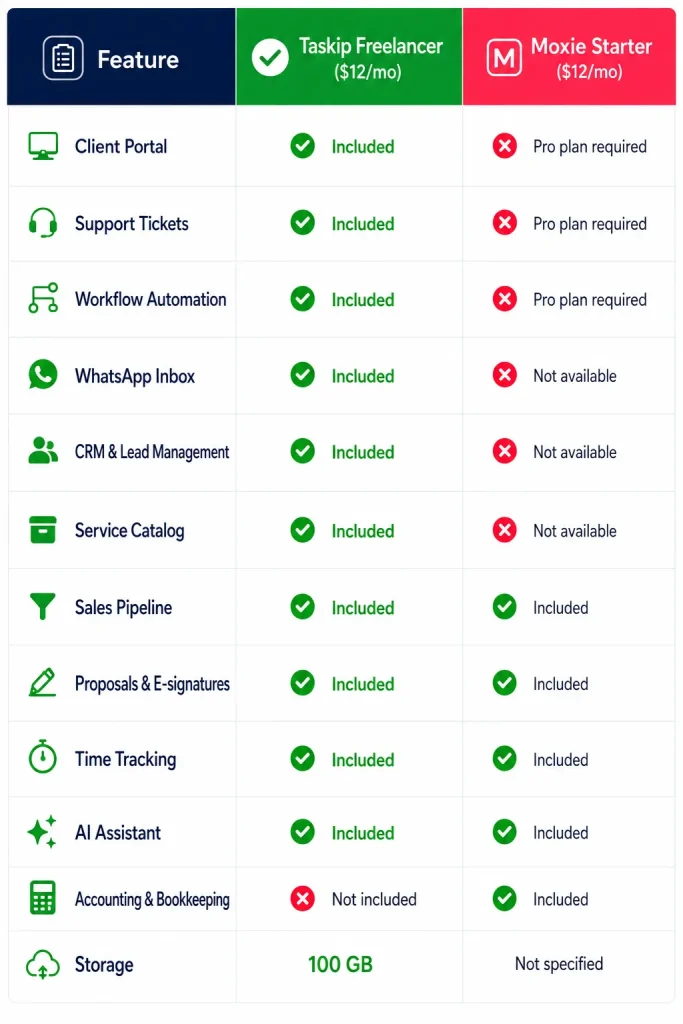
At first glance, Taskip Freelancer ($12/month) and Moxie Starter ($12/month) cost exactly the same. However, the features included at that price are very different.
The Takeaway
If your priority is accounting and bookkeeping, Moxie Starter has an advantage. But if you need an all-in-one platform for managing clients, leads, projects, communication, and billing, Taskip delivers significantly more functionality at the same $12/month price point, making it the better value for freelancers planning to grow into an agency.
Taskip vs. Moxie: Which One Should You Choose?
Choose Taskip if you need:
- Unlimited team members for a growing agency
- Built-in CRM and lead management
- A free plan with client portal, invoicing, proposals, and e-signatures
- WhatsApp communication in the same workspace
- Service catalog and client checkout pages
- VAT support and billing in 100+ currencies
- GDPR-compliant EU data hosting
- An all-in-one platform for clients, projects, and billing
Choose Moxie if you need:
- A platform built for freelancers or solo businesses
- Built-in accounting and expense tracking
- QuickBooks and Plaid integrations
- Profit and loss reporting
- A business phone line for the US, Canada, or the UK
- A simple solution for teams of up to five members
Final Verdict: Taskip vs. Moxie
Moxie is a solid tool if you are a freelancer who needs built-in accounting and expense tracking. It does that job well.
But here is the thing: Taskip has a dedicated Freelancer plan too, and it gives you more at the same price. Client portal, support tickets, lead management, WhatsApp inbox, and workflow automation are all included from day one. Whether you are a solo freelancer or running a full agency, Taskip scales with you without switching tools.
Moxie is built for one type of user, whereas Taskip is built for all of them.
Frequently Asked Questions (FAQs)
Does Taskip have a free plan?
Yes. Taskip’s Starter plan is completely free, forever. It includes invoicing, quotations, proposals, e-signatures, a meeting scheduler, and forms. No credit card is required to get started.
Does Moxie have a free plan?
No. Moxie offers a 14-day free trial, but there is no permanent free plan. After the trial, you need a paid subscription starting at $12/month.
Does Taskip have time tracking?
Yes. Taskip includes built-in time tracking across all plans. You can log time per task or project, run time reports, and connect tracked hours directly to invoicing.
Does Taskip have a mobile app?
Yes. Taskip has both an iOS and Android app, so you can manage your work on the go just like you can with Moxie.
How many users can I add on Taskip vs. Moxie?
Taskip supports up to 10 users on the Startup Team plan ($29/month), 25 users on the Growing Agency plan ($59/month), and unlimited users on the Agency Pro plan ($89/month). Moxie’s highest plan caps at 5 team members ($40/month).
Does Taskip have WhatsApp integration?
Yes. Taskip includes a dedicated WhatsApp inbox so you can manage all client WhatsApp conversations inside the platform. Moxie does not have WhatsApp integration.
Is Taskip GDPR compliant?
Yes. Taskip is GDPR compliant and hosts data on EU servers, which is important for businesses working with clients in Europe or anywhere that requires data residency compliance.

Get Summary On: