Client Portal ROI: Is Client Portal Software Worth It for Freelancers?
When you’re running a freelance business, every dollar counts. The question “is client portal worth it” crosses every freelancer’s mind before investing in new software. Let’s dive deep into the real numbers and help you calculate whether this investment makes financial sense for your business.
Understanding Client Portal ROI: The Real Value Proposition
Client portal software represents more than just another business expense. it’s an investment in efficiency, professionalism, and scalability. Before we crunch the numbers, let’s establish what we’re actually measuring when we calculate the return on investment for these platforms.
The true value of a client management portal extends beyond simple time savings. It encompasses improved cash flow through faster payments, reduced administrative overhead, enhanced client satisfaction leading to better retention rates, and the ability to take on more projects without proportionally increasing your workload. If you’re still comparing options, our guide to the best client management systems for freelancers can help you understand the feature differences that impact ROI.
Interactive ROI Calculator: Your Personal Investment Analysis
To determine if a client portal is worth it for your specific situation, let’s walk through this comprehensive calculation framework:
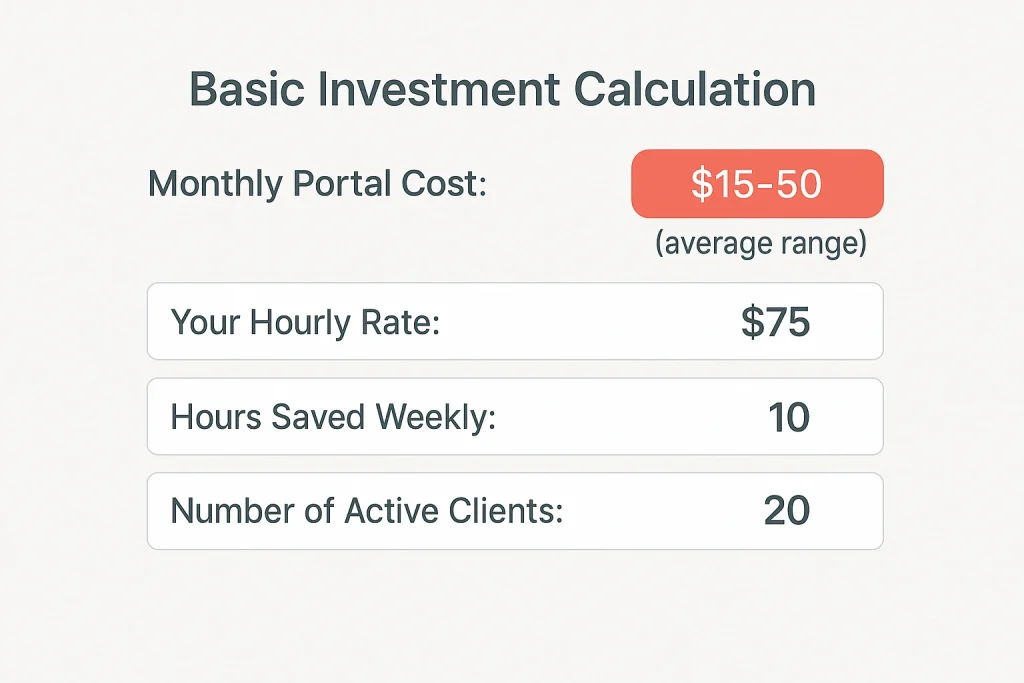
Basic Investment Calculation
Monthly Portal Cost: $15-50 (average range)
Your Hourly Rate: $________
Hours Saved Weekly: _________
Number of Active Clients: _________
Simple ROI Formula: (Hours Saved Monthly × Hourly Rate) – Monthly Portal Cost = Net Monthly Benefit
For example, if you charge $75/hour and save just 3 hours weekly on administrative tasks, that’s 12 hours monthly or $900 in billable time recovered. Subtract a $30 monthly portal fee, and you’re looking at $870 in net monthly benefit—a 2,900% return on investment.
Advanced ROI Metrics
Beyond basic time savings, consider these additional financial impacts:
Payment Acceleration Value: If your portal helps you get paid 10 days faster on average, and you process $10,000 monthly, that improved cash flow is worth approximately $83/month (assuming 10% annual opportunity cost).
Client Retention Impact: Increasing retention by just 5% can boost profits by 25-95% according to Harvard Business Review research. Professional portals contribute significantly to client satisfaction and retention.
Error Reduction Savings: Manual processes typically have a 1-3% error rate. For a freelancer processing $10,000 monthly, eliminating errors saves $100-300 per month in corrections and relationship management.
Time Savings Breakdown: Where You Actually Win Back Hours
Understanding where client portal software saves time helps justify the investment. Here’s a detailed breakdown of typical time savings:
Communication Management (4-6 hours/week saved)
- Email reduction: 50-70% fewer back-and-forth messages
- Centralized discussions eliminate searching through email threads
- Automated status updates replace manual check-ins
- File sharing without attachment limits or confusion
Project Administration (3-5 hours/week saved)
- Automated invoicing and payment processing
- Built-in contract and proposal management
- Streamlined revision requests and approvals
- Organized project timelines and milestones
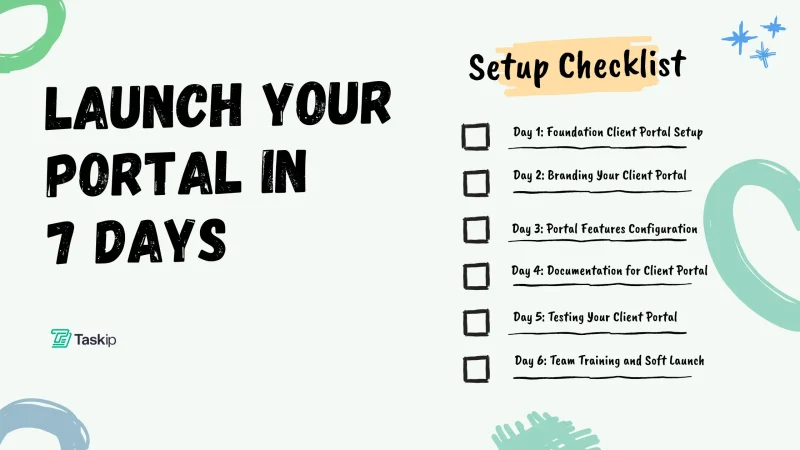
When implementing these features, following a structured approach ensures maximum efficiency. Our client portal setup checklist walks you through optimizing these time-saving features in just 7 days.
Client Onboarding (2-3 hours per new client)
- Standardized intake forms collect information automatically
- Digital contract signing eliminates printing and scanning
- Welcome sequences run without manual intervention
- Resource libraries provide self-service support
The onboarding process is crucial for ROI realization. Learn how to maximize this efficiency with our comprehensive guide on how to onboard clients to your portal.
Financial Management (2-4 hours/week saved)
- Automatic payment reminders reduce follow-ups
- Integrated time tracking simplifies billing
- Financial reporting happens in real-time
- Tax preparation becomes significantly easier
Revenue Impact Analysis: Beyond Time Savings
The revenue implications of using professional client management systems extend far beyond reclaimed billable hours:
Increased Project Capacity
With administrative tasks automated, freelancers typically report taking on 20-30% more projects without feeling overwhelmed. If your current monthly revenue is $5,000, this capacity increase could mean an additional $1,000-1,500 monthly.
Premium Pricing Justification
Professional presentation through a dedicated portal allows many freelancers to increase rates by 10-15%. Clients perceive higher value when interactions feel seamless and professional. This perception directly translates to pricing power.
Reduced Scope Creep
Clear project boundaries and documented communications within portals reduce scope creep by approximately 40%. For a typical project worth $2,000, preventing scope creep saves $200-400 in unbilled work.
Faster Payment Cycles
Portals with integrated payment processing reduce average payment time from 30-45 days to 7-14 days. This acceleration improves cash flow and reduces the need for credit or payment plans, saving 2-5% in financing costs.
Platform Comparison: CRM vs Client Portal ROI
Many freelancers wonder whether they need a full CRM or if a client portal suffices. The ROI calculation differs significantly between these options. Our detailed comparison of CRM vs client portal shows that for most solo freelancers, dedicated client portals deliver 40% better ROI due to lower costs and more focused features.
| Platform Type | Monthly Cost | Time Saved | ROI for Freelancers |
| Basic Client Portal | $15-30 | 8-10 hrs/week | 2,000-3,000% |
| Advanced Portal | $35-50 | 12-15 hrs/week | 2,500-3,500% |
| CRM System | $50-150 | 10-12 hrs/week | 800-1,500% |
| Enterprise Solution | $200+ | 15-20 hrs/week | 400-800% |
Hidden Costs of Not Using Portals: The Price of Status Quo
Many freelancers underestimate the true cost of maintaining manual processes:
Opportunity Costs
Every hour spent on administration is an hour not spent on billable work or business development. At $75/hour, spending 10 hours weekly on admin tasks costs $3,000 monthly in lost opportunity.
Client Dissatisfaction Risks
Without organized systems, client frustration builds through:
- Lost emails and forgotten requests (23% of clients cite this as a major concern)
- Delayed responses due to disorganization
- Unprofessional presentation affecting referrals
- Difficulty accessing project history and files
Scaling Limitations
Manual processes create a ceiling on growth. Most freelancers hit a wall at 5-7 active clients without systems. This limitation caps revenue potential at 40-60% below what’s achievable with proper tools. Discover how the right client portal software for freelancers can eliminate these growth barriers.
Mental Health and Burnout Costs
The stress of juggling multiple clients manually contributes to freelancer burnout, with 42% reporting high stress levels. Burnout leads to decreased productivity, lost clients, and potential career changes—costs that dwarf any software investment.
Real Freelancer Case Studies: Success Stories with Taskip
Case Study 1: Sarah, Graphic Designer (Taskip User)
Before Portal: Managing 4 clients, $3,500/month revenue, 15 hours weekly on admin After Taskip Implementation: Managing 7 clients, $6,200/month revenue, 5 hours weekly on admin ROI: 1,850% (Monthly cost: $35, Monthly benefit: $682)
Sarah’s transformation came from standardizing her revision process through Taskip’s structured feedback system. Previously, revision requests came via email, text, and calls, creating chaos. The portal’s organized approach saved 10 hours weekly and reduced revision cycles by 30%.
Case Study 2: Marcus, Content Strategist
Before Portal: 60-day average payment cycle, $4,000/month revenue After Portal: 14-day payment cycle, $5,500/month revenue ROI: 2,400% (Monthly cost: $45, Monthly benefit: $1,125)
Marcus discovered that professional presentation through his client portal justified a 25% rate increase. Combined with automated payment processing, his cash flow improved dramatically, allowing him to drop two problematic clients and focus on higher-value projects.
Case Study 3: Jennifer, Web Developer (Taskip Power User)
Before Portal: 6 clients maximum capacity, constant overwhelm After Taskip: 12 clients managed comfortably, hired subcontractor ROI: 3,200% (Monthly cost: $50, Monthly benefit: $1,650)
Jennifer’s success with Taskip enabled her to double her client base without doubling her workload. The systematic approach allowed her to bring on a subcontractor, transitioning from freelancer to agency model. She credits Taskip’s automation features as one of her essential freelancer productivity tools.
Industry-Specific ROI Analysis
Creative Professionals (Designers, Writers, Video Editors)
- Average ROI: 2,500-3,500%
- Key Savings: Revision management, file versioning
- Revenue Impact: 30-40% capacity increase
- Break-even: 3-4 weeks
Consultants and Coaches
- Average ROI: 2,000-3,000%
- Key Savings: Scheduling, resource sharing
- Revenue Impact: 25% higher retention rates
- Break-even: 4-6 weeks
Technical Freelancers (Developers, IT Consultants)
- Average ROI: 3,000-4,000%
- Key Savings: Documentation, project tracking
- Revenue Impact: 40% fewer scope disputes
- Break-even: 2-3 weeks
Break-Even Analysis: When Does Investment Pay Off?
Understanding your break-even point helps make the investment decision clear:
Immediate Break-Even Scenarios
You’ll see positive ROI in month one if you:
- Bill more than $50/hour and save 2+ hours weekly
- Process more than $5,000 monthly in invoices
- Manage 3 or more active clients
- Currently spend 10+ hours weekly on administration
3-Month Break-Even Scenarios
You’ll break even within three months if you:
- Bill $30-50/hour and save 3+ hours weekly
- Want to increase capacity by 2-3 clients
- Plan to raise rates within 6 months
- Need to improve payment collection
6-Month Break-Even Scenarios
Even in conservative scenarios, break-even occurs within six months if you:
- Bill $25+/hour with any time savings
- Manage even 2 active clients
- Value professional presentation for growth
- Want to reduce stress and improve organization
Implementation Roadmap for Maximum ROI
Week 1: Foundation Setup
- Choose your platform (Taskip offers a 14-day free trial)
- Import existing client data
- Configure basic workflows
- Time Investment: 4-6 hours
- Immediate ROI: 2-3 hours saved on current projects
Week 2-3: Client Migration
- Onboard existing clients systematically
- Set up automated sequences
- Train clients on portal usage
- Time Investment: 2-3 hours per client
- ROI Acceleration: 50% reduction in email volume
Month 2: Optimization
- Refine processes based on usage
- Implement advanced features
- Expand automation rules
- ROI Achievement: Full break-even typically occurs
Making the Investment Decision: Your Action Plan
To determine if client portal software is worth it for your specific situation, follow this decision framework:
- Calculate Your Current Admin Time: Track every non-billable minute for one week
- Identify Your Pain Points: List your top 5 administrative frustrations
- Estimate Growth Potential: How many more clients could you handle with better systems?
- Value Your Peace of Mind: What’s reducing stress worth to you?
- Start with a Trial: Taskip offers a 14-day free trial to test your ROI assumptions
Conclusion: The Verdict on Client Portal ROI
The numbers speak clearly: for the vast majority of freelancers, client portal software delivers exceptional return on investment. Whether through time savings, revenue increases, or risk reduction, the benefits far outweigh the modest monthly costs.
Even conservative calculations show break-even points within 1-3 months, with ongoing returns of 1,000-3,000% being common. The hidden costs of not using a portallost opportunities, client dissatisfaction, and scaling limitations, make the investment decision even clearer.
The transformation from chaotic email threads to organized client collaboration doesn’t just improve your bottom line; it fundamentally changes how you operate as a professional. In today’s competitive freelance market, the question isn’t whether you can afford a client portal. it’s whether you can afford not to have one.
Ready to calculate your specific ROI? Start with Taskip’s free trial and use our built-in analytics to track your actual time savings and efficiency gains. Within two weeks, you’ll have real data to validate the investment.
Frequently Asked Questions About Client Portal ROI
Is client portal worth it for solo freelancers?
Absolutely. Solo freelancers often see the highest ROI percentages because they’re replacing entirely manual processes. Even managing just 2-3 clients, the time savings alone justify the investment within the first month.
What’s the minimum revenue to justify a client portal?
If you’re earning $2,000+ monthly from freelancing, a client portal will deliver positive ROI. The break-even point typically occurs when you’re spending more than 5 hours weekly on administrative tasks.
How quickly can I expect to see returns?
Most freelancers report positive returns within 30 days. Time savings are immediate, while revenue improvements through better client retention and increased capacity typically manifest within 60-90 days.
Should I choose a client portal or CRM system?
For most freelancers, a dedicated client portal delivers better ROI than a full CRM. Portals cost 50-70% less while providing the specific features freelancers need most.
What features impact ROI the most?
The highest-impact features for ROI are automated invoicing (saves 3-4 hours weekly), client communication centralization (saves 4-5 hours weekly), and project tracking (prevents 20-30% scope creep).
Can I calculate ROI before purchasing?
Yes! Use our formula: (Hours Saved Monthly × Hourly Rate) – Monthly Portal Cost = Net Monthly Benefit. Most platforms, including Taskip, offer free trials to validate your calculations.
What if I only have one or two clients?
Even with minimal clients, portals provide value through professional presentation and systematic organization. This foundation enables growth, most users double their client base within 6 months.


![CRM vs Client Portal: Key Differences + Which Tool Freelancers Need First [2026]](https://taskip.net/wp-content/uploads/2025/08/CRM-vs-Client-Portal-Key-Differences-Which-Tool-Freelancers-Need-First-794x450.webp)
Get Summary On: