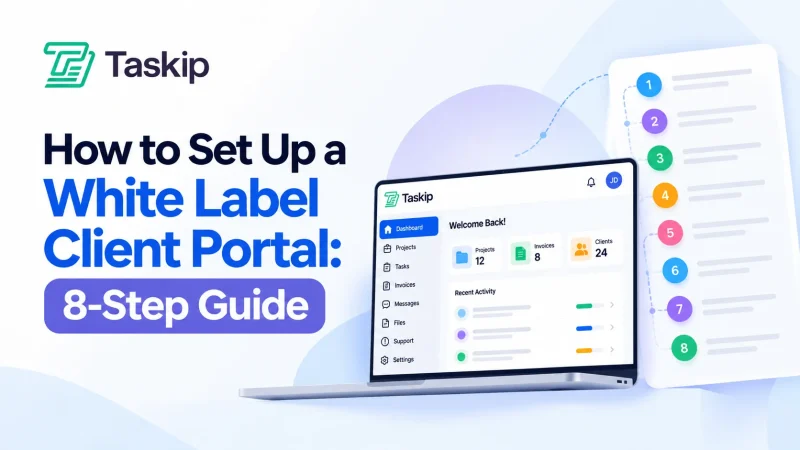
A CRM (Customer Relationship Management) helps businesses manage leads, customers, and sales, while a client portal provides clients with a secure space to collaborate, share files, track projects, and communicate with your business.
A CRM is primarily an internal business tool, whereas a client portal is designed for your clients. While they may share a few overlapping features, they solve different business challenges and often work best together.
In this guide, you’ll learn CRM vs client portal- their differences, features, advantages, limitations, and when to use each.
| Feature | CRM | Client Portal |
| Primary Purpose | Manage customer relationships and sales | Improve collaboration with existing clients |
| Primary Users | Sales, marketing, customer success, and management teams | Clients and customers |
| Access | Internal employees | External users through secure login |
| Lead Management | ✅ | ❌ |
| Sales Pipeline | ✅ | ❌ |
| Contact Management | ✅ | Limited |
| Project Management | Limited | ✅ |
| Task Tracking | Limited | ✅ |
| File Sharing | Basic | ✅ |
| Client Messaging | Internal communication | Direct client communication |
| Invoices & Payments | Sometimes | Frequently included |
| Reporting | Advanced business insights | Project and client activity |
| Best For | Managing sales and customer relationships | Delivering a better client experience |
Key Takeways
- A CRM helps your team attract, manage, and retain customers.
- A client portal gives clients a secure place to communicate and collaborate.
- A CRM focuses on the sales journey before and during the customer relationship.
- A client portal focuses on transparency and collaboration after a client has been onboarded.
- Service-based businesses often achieve the best results by using both together.
Table of Contents
What Is a CRM?
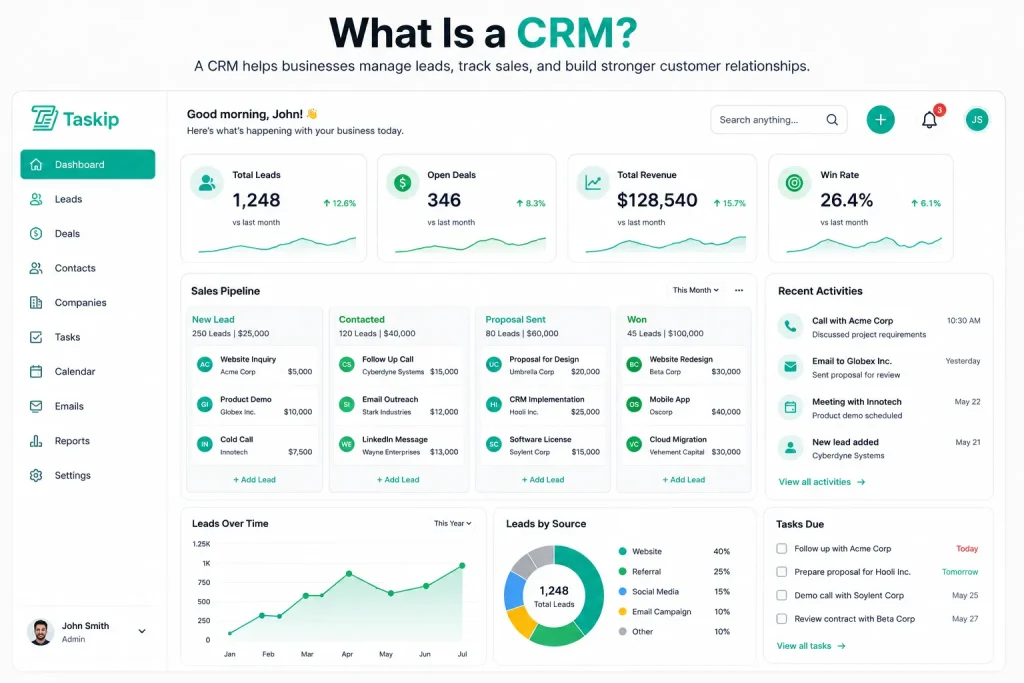
A Customer Relationship Management (CRM) system is software that helps businesses organize, track, and manage every interaction with leads and customers. Instead of relying on spreadsheets, emails, or scattered notes, a CRM stores customer information in one centralized location, making it easier for teams to manage relationships throughout the sales cycle.
Beyond sales, modern CRM platforms also support marketing campaigns, customer service, reporting, and workflow automation. This makes them an essential tool for businesses looking to improve efficiency, increase revenue, and build stronger customer relationships.
Core Features of CRM Software
Most CRM platforms include features such as:
- Lead management
- Sales pipeline
- Opportunity tracking
- Customer management
- Email integration
- Workflow automation
- Sales forecasting
- Reporting and analytics
Pros & Cons of Using a CRM
A CRM is an essential tool for managing customer relationships, sales activities, and business growth. However, like any software, it has both strengths and limitations. Understanding these can help you determine whether a CRM is the right solution for your business.
| Pros | Cons |
| • Centralizes customer information in one place | • Not designed for direct client collaboration |
| • Organizes leads and sales pipelines | • Clients typically cannot access the system |
| • Automates repetitive sales and follow-up tasks | • Limited file sharing and document collaboration |
| • Improves team productivity and coordination | • Basic project management capabilities |
| • Provides detailed reports and sales insights | • May require additional tools for client communication |
| • Integrates with email, marketing, and business applications | • Setup and customization can take time |
| • Scales with growing teams and businesses | • Subscription costs can increase as your business grows |
What Is a Client Portal?
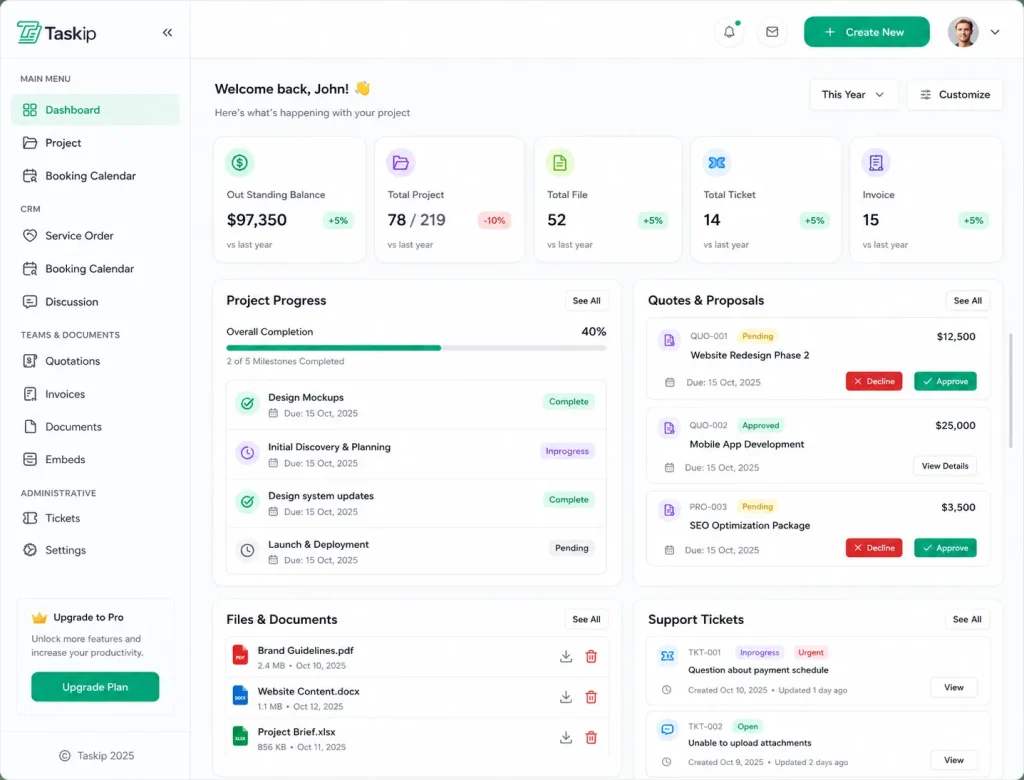
A client portal is a secure online workspace that allows businesses and their clients to collaborate in one centralized location. Instead of relying on long email threads or multiple communication tools, clients can log in to access important information, communicate with your team, share documents, track project progress, and manage ongoing work.
Unlike a CRM, which is primarily designed for internal business operations, a client portal focuses on improving the client experience. It gives clients controlled access to the information and resources they need while allowing businesses to maintain security through user permissions and role-based access.
Client portals are commonly used by agencies, consultants, law firms, accountants, software companies, marketing teams, and other service-based businesses that work closely with clients over an extended period.
Core Features of a Client Portal
A modern client portal typically includes:
- Secure client login
- Client dashboard
- File sharing
- Document management
- Client messaging
- Invoicing and payments
- Progress tracking
Pros & Cons of Using a Client Portal
| Pros | Cons |
| • Provides clients with a secure, centralized workspace | • Does not include advanced lead management |
| • Simplifies file sharing and document management | • Limited sales pipeline functionality |
| • Improves client communication and collaboration | • Basic marketing and automation features |
| • Increases transparency with project updates | • Less detailed business reporting than a CRM |
| • Reduces reliance on long email threads | • May require a CRM for customer relationship management |
| • Supports role-based access and permissions | • Some platforms offer limited customization |
| • Enhances the overall client experience | • Can require client onboarding and training |
CRM vs Client Portal: What’s the Difference?
Although both CRMs and client portals help businesses build stronger customer relationships, they are designed for different purposes. A CRM helps your internal team manage leads, customers, and sales activities, while a client portal gives clients a secure place to communicate, access information, and collaborate with your business.
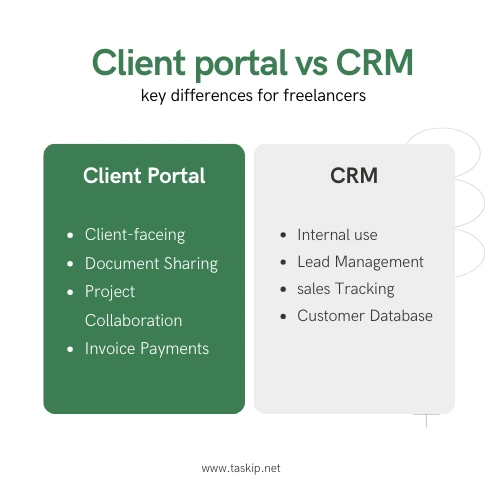
The sections below compare the two across the areas that matter most.
1. Primary Purpose CRM Vs Client Portal
CRM
The primary purpose of a CRM is to help businesses attract, manage, and retain customers. It centralizes customer information, tracks sales opportunities, and helps teams manage every stage of the sales process, from the first interaction to long-term customer relationships.
Client Portal
A client portal is designed to improve the client experience after a customer has been onboarded. It provides a secure online workspace where clients can communicate with your team, access documents, monitor project progress, and complete everyday tasks without relying on email.
| Criteria | CRM | Client Portal |
| Primary purpose | Manage customer relationships | Enable client collaboration |
| Business focus | Sales and customer management | Client service and communication |
| Main objective | Increase revenue and improve customer relationships | Improve client experience and transparency |
| Typical use | Before and throughout the customer lifecycle | After client onboarding and during service delivery |
2. CRM Vs Client Portal: Who Uses It?
CRM
A CRM is primarily used by internal teams, including sales representatives, marketers, customer success managers, and business owners. It helps employees stay organized while managing customer interactions.
Client Portal
A client portal is designed for external users. Clients, customers, vendors, or partners can securely log in to access shared resources and communicate with your business whenever they need to.
| Criteria | CRM | Client Portal |
| Primary users | Sales teams, marketers, customer success teams | Clients and customers |
| Access type | Internal users | External users |
| Main audience | Employees | Clients, partners, and vendors |
| Daily activities | Managing leads, contacts, and sales | Viewing projects, files, invoices, and messages |
3. Internal vs External Access: CRM Vs Client Portal
CRM
A CRM is an internal business system. Access is limited to employees and authorized team members who need customer information to perform their jobs.
Client Portal
A client portal provides secure external access. Every client receives their own login and only sees the projects, files, invoices, and conversations that are relevant to them.
| Criteria | CRM | Client Portal |
| Primary users | Internal teams | Clients and external users |
| Login access | Employee accounts | Secure client accounts |
| Information access | Customer records, sales data, and internal workflows | Projects, documents, invoices, and shared resources |
| Visibility | Internal business operations | Client-specific information only |
| Permission model | Department and role-based permissions | Client-specific and role-based permissions |
4. Sales Management vs Client Collaboration: CRM Vs Client Portal
CRM
CRM software helps businesses manage the entire sales process. Teams can capture leads, qualify prospects, monitor opportunities, automate follow-ups, and close deals more efficiently.
Client Portal
A client portal focuses on collaboration rather than sales. It helps businesses work with existing clients by organizing communication, project updates, documents, approvals, and shared tasks in one place.
| Criteria | CRM | Client Portal |
| Primary focus | Sales management | Client collaboration |
| Main purpose | Generate and convert leads | Deliver services and improve communication |
| Key activities | Lead tracking, pipeline management, follow-ups | Project updates, file sharing, messaging |
| Business outcome | Increased sales and customer retention | Better client experience and transparency |
| Best suited for | Sales and marketing teams | Service delivery teams and clients |
5. Customer Data Management: CRM Vs Client Portal
CRM
A CRM stores detailed customer information, including contacts, leads, sales activities, communication history, and purchase records. This information helps businesses understand customer relationships and make informed sales decisions.
Client Portal
A client portal stores information that clients need during ongoing work, such as project files, contracts, invoices, messages, and task updates. Its focus is on transparency and collaboration rather than sales management.
| Criteria | CRM | Client Portal |
| Primary data | Leads, contacts, and customers | Projects, files, and client resources |
| Business records | Deals, opportunities, and sales activities | Contracts, invoices, and shared documents |
| Interaction history | Calls, emails, meetings, and follow-ups | Messages, project updates, and approvals |
| Data ownership | Managed by internal teams | Shared between the business and clients |
| Primary purpose | Build and manage customer relationships | Support ongoing client collaboration and service delivery |
6. Communication Methods: CRM Vs Client Portal
CRM
Communication within a CRM is primarily internal. Teams use notes, activity logs, reminders, and email integrations to coordinate customer interactions and sales follow-ups.
Client Portal
Communication in a client portal happens directly between the business and its clients. Messages, comments, project discussions, and notifications are organized in one secure workspace, reducing reliance on email.
| Criteria | CRM | Client Portal |
| Communication type | Internal communication | Business-to-client communication |
| Primary users | Sales and support teams | Clients and project teams |
| Common channels | Notes, email integration, activity logs | Messages, comments, notifications |
| Communication goal | Coordinate internal activities | Keep clients informed and engaged |
| Typical use | Sales follow-ups and customer management | Project discussions and document sharing |
7. Security & Permission Controls: CRM Vs Client Portal
CRM
CRM platforms use role-based permissions to control which employees can access customer records, reports, or administrative settings. This protects sensitive business information while allowing teams to collaborate effectively.
Client Portal
Client portals also use role-based permissions, but their primary focus is ensuring clients only access their own projects, documents, invoices, and conversations. This improves security while protecting confidential client information.
| Criteria | CRM | Client Portal |
| User permissions | Employee and department roles | Client-specific roles and permissions |
| Data access | Internal customer and sales data | Client projects and shared documents |
| Security focus | Protect business information | Protect client information |
| Visibility | Internal teams only | Restricted to authorized clients |
| Access control | Role-based employee access | Secure client workspaces with role-based access |
8. Reporting & Business Insights: CRM Vs Client Portal
CRM
One of the biggest strengths of a CRM is reporting. Businesses can monitor sales performance, lead conversion rates, revenue forecasts, customer activity, and team productivity through detailed dashboards.
Client Portal
Client portals provide insights related to ongoing work rather than sales. Businesses can monitor project progress, task completion, document activity, invoice status, and client engagement.
| Criteria | CRM | Client Portal |
| Reporting focus | Sales performance and customer analytics | Project progress and client activity |
| Key metrics | Revenue, conversion rates, pipeline health | Task completion, project status, invoice status |
| Primary users | Managers and sales teams | Project managers and clients |
| Business insights | Customer behavior and sales forecasting | Collaboration and project performance |
| Decision support | Strategic sales decisions | Service delivery and project management |
9. Integration with Other Business Tools: CRM Vs Client Portal
CRM
CRM software often integrates with email platforms, marketing automation tools, accounting software, calendars, communication platforms, and customer support systems to streamline business operations.
Client Portal
Client portals commonly integrate with project management tools, cloud storage, invoicing systems, video conferencing platforms, e-signature software, and payment gateways to improve collaboration.
| Criteria | CRM | Client Portal |
| Common integrations | Email, marketing, accounting, customer support | Project management, cloud storage, and payment gateways |
| Business purpose | Streamline sales and customer management | Improve collaboration and service delivery |
| Workflow support | Sales automation and customer engagement | Project execution and client communication |
| Typical integrations | Calendar, CRM plugins, marketing tools | File storage, video meetings, e-signatures |
| Primary benefit | Increased productivity for internal teams | Seamless collaboration with clients |
10. CRM Vs Client Portal: Which Businesses Benefit Most?
CRM
A CRM is ideal for businesses that prioritize customer acquisition, sales management, and long-term relationship building. It is especially valuable for organizations with dedicated sales or marketing teams.
Client Portal
A client portal is best suited for businesses that work closely with clients after a sale. It improves communication, increases transparency, and simplifies collaboration throughout project delivery and ongoing support.
| Criteria | CRM | Client Portal |
| Best for | Businesses focused on sales and customer relationships | Businesses providing ongoing client services |
| Primary goal | Acquire and manage customers | Collaborate with and support clients |
| Ideal industries | SaaS, real estate, retail, B2B sales | Agencies, consultants, accountants, law firms |
| Team structure | Sales and marketing teams | Project and client service teams |
| Recommendation | Choose a CRM if sales growth is your priority | Choose a client portal if client collaboration is your priority |
For many service-based businesses, the choice isn’t CRM or a client portal. A CRM helps you win clients, while a client portal helps you retain them by delivering a smoother, more transparent experience.
Feature Comparison: CRM vs Client Portal
The table below summarizes the core capabilities of each platform and highlights where they overlap.
| Feature | CRM | Client Portal |
| Contact management | ✓ | Basic |
| Lead management | ✓ | ✗ |
| Sales pipeline | ✓ | ✗ |
| Opportunity tracking | ✓ | ✗ |
| Customer management | ✓ | Basic |
| Project management | Basic | ✓ |
| Task management | ✓ | ✓ |
| File sharing | Basic | ✓ |
| Document management | Basic | ✓ |
| Client messaging | Limited | ✓ |
| Team collaboration | ✓ | ✓ |
| Invoicing & payments | Basic | ✓ |
| Progress tracking | Limited | ✓ |
| Reporting & analytics | Advanced | Basic |
| Workflow automation | ✓ | Limited |
| Calendar & scheduling | ✓ | ✓ |
| Role-based permissions | ✓ | ✓ |
| Mobile access | ✓ | ✓ |
| Third-party integrations | ✓ | ✓ |
Although they serve different purposes, both platforms include several shared features that help businesses stay organized.
– Contact management
– Task management
– Team collaboration
– Calendar and scheduling
– Role-based permissions
– Mobile access
– Third-party integrations
– Notifications
When Should You Choose a CRM?
A CRM is the right choice when your business is focused on attracting new customers, managing relationships, and increasing sales. It helps organize customer information, automate repetitive tasks, and provides your team with the tools needed to close more deals. If sales growth is a priority, a CRM should be one of the first business systems you implement.
Choose a CRM if you need to:
- Capture and manage leads
- Build and track a sales pipeline
- Organize customer and contact information
- Automate follow-ups and reminders
- Monitor sales opportunities
- Forecast revenue and sales performance
- Improve collaboration between sales and marketing teams
- Generate detailed reports and business insights
- Manage customer relationships throughout the sales lifecycle
When Should You Choose a Client Portal?
A client portal is ideal for businesses that regularly work with clients after a sale. Instead of relying on email, messaging apps, or multiple software tools, it provides one secure workspace where clients can access everything they need. This improves communication, increases transparency, and creates a more professional client experience.
Choose a client portal if you need to:
- Share files and documents securely
- Communicate with clients in one place
- Manage client projects and tasks
- Track project progress
- Share contracts and collect approvals
- Send invoices and payment information
- Schedule meetings and appointments
- Reduce email back and forth
- Provide clients with 24/7 access to important information
Do You Need Both a CRM and a Client Portal?
For many businesses, the answer is yes.
A CRM and a client portal are not competing tools. They solve different problems and complement each other throughout the customer lifecycle. A CRM helps your team attract leads, manage customer relationships, and close deals. Once a prospect becomes a client, a client portal takes over by providing a secure workspace for collaboration, communication, document sharing, project tracking, and ongoing support.
Using both systems together creates a seamless experience for your team and your clients. Instead of switching between disconnected tools, you can manage the entire client journey from the first inquiry to long-term customer success.
A typical workflow looks like this:
Lead → CRM → Proposal → Customer → Client Portal → Project → Invoice → Ongoing Support
Businesses such as marketing agencies, software companies, consulting firms, law firms, accounting firms, and IT service providers often benefit the most from combining both solutions.
 Taskip
Get a CRM with a Built-in Client Portal
Manage leads, projects, files, invoices, and client communication from one platform. Taskip brings your entire client journey together in a single workspace.
No credit card is required!
Common Mistakes Businesses Make
Choosing the wrong software or using the right software incorrectly can create unnecessary complexity, reduce productivity, and lead to a poor client experience. Here are some of the most common mistakes businesses make.
Mistake 1: Using a CRM as a Client Portal
Many businesses assume a CRM can also serve as a client portal. While some CRM platforms offer limited client-facing features, they are primarily built for internal use. Clients generally cannot access projects, download files, approve documents, or collaborate with your team as easily as they can through a dedicated client portal.
Mistake 2: Managing Everything Through Email
Email is useful for communication, but it quickly becomes difficult to manage when projects involve multiple conversations, files, approvals, and deadlines. Important information gets buried in long email threads, making it harder for both your team and your clients to stay organized.
Mistake 3: Sharing Files Without Secure Access
Using email attachments or public cloud storage links to share sensitive documents can create security risks and version control issues. A client portal provides secure, permission-based access, ensuring clients only see the information intended for them while keeping documents organized in one place.
Mistake 4: Buying Too Many Separate Tools
Many businesses purchase one tool for customer management, another for project management, another for invoicing, another for file sharing, and yet another for communication. While each tool may solve a specific problem, constantly switching between multiple applications reduces productivity, increases subscription costs, and creates disconnected workflows. Whenever possible, choose software that integrates these functions into a unified experience.
How to Choose the Right Solution
Choosing between a CRM and a client portal depends on how your business operates and where your biggest challenges lie. If your priority is generating leads, managing customer relationships, and improving sales performance, a CRM is the better choice. If your focus is delivering services, collaborating with clients, and providing a seamless customer experience, a client portal will offer greater value.
Many service-based businesses discover that the best solution isn’t choosing one over the other. Instead, they combine both to manage the entire customer journey, from the first inquiry to project delivery and ongoing support.
Questions to Ask Before Buying
Before investing in any software, ask yourself the following questions:
- Do you need to generate and manage leads?
- Does your sales team require a structured sales pipeline?
- Do clients need secure access to projects or documents?
- Do you frequently exchange files, contracts, or invoices with clients?
- Are you managing long-term client projects?
- Do you want to reduce email communication?
- Do you need detailed sales reports and business insights?
- Would an all-in-one solution simplify your workflow?
Your answers will quickly indicate whether a CRM, a client portal, or a combination of both is the right fit.
Decision Checklist
Use this simple checklist to identify which solution best matches your business needs.
| Business Need | Recommended Solution |
| Manage leads and prospects | CRM |
| Track sales opportunities | CRM |
| Build customer relationships | CRM |
| Share files securely | Client Portal |
| Collaborate with clients | Client Portal |
| Manage client projects | Client Portal |
| Improve communication | Client Portal |
| Handle the complete client lifecycle | CRM + Client Portal |
CRM vs Client Portal Decision Table
| If You Want To… | Choose |
| Generate more leads | CRM |
| Manage customer relationships | CRM |
| Improve sales performance | CRM |
| Share project updates with clients | Client Portal |
| Store and organize client documents | Client Portal |
| Reduce email communication | Client Portal |
| Manage projects after closing a deal | Client Portal |
| Handle everything from sales to project delivery | Both |
Why Modern Businesses Prefer an All-in-One Platform
Today’s businesses expect software to work together rather than in isolation. Managing customer relationships in one application, projects in another, documents in a third, and communication in several more creates unnecessary complexity and slows teams down. An all-in-one platform simplifies operations by bringing essential business tools together in a single workspace.
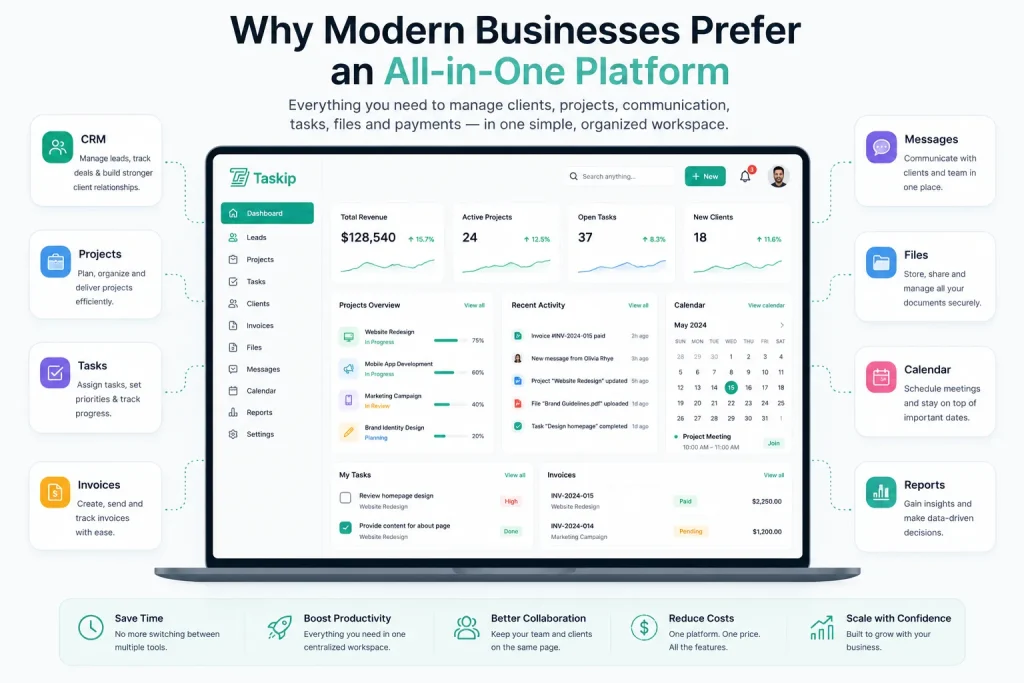
Eliminate Tool Switching
Switching between multiple applications wastes time and increases the chance of missing important information. An integrated platform keeps customer data, projects, communication, documents, and tasks connected, allowing your team to work more efficiently.
Improve Team Collaboration
When every department uses the same platform, information is easier to access, and workflows become more consistent. Sales, customer success, project managers, and support teams can collaborate without duplicating work or searching across different systems.
Deliver a Better Client Experience
Clients appreciate having one secure place where they can communicate with your team, review project updates, access files, pay invoices, and track progress. A centralized experience builds trust and reduces confusion.
Scale Without Adding More Software
As your business grows, your software should grow with it. An all-in-one platform reduces the need to purchase separate tools for CRM, project management, file sharing, invoicing, scheduling, and client communication, helping your business scale without increasing operational complexity.
Rather than forcing businesses to manage multiple disconnected tools, Taskip combines CRM and client portal functionality into one unified workspace.
With Taskip, you can manage leads, contacts, projects, tasks, invoices, files, client communication, documentation, and team collaboration from a single platform. This allows your team to manage the complete client journey, from the first conversation to project completion, without constantly switching between different applications.
Whether you’re a marketing agency, consultant, freelancer, software company, accounting firm, or professional service provider, Taskip helps simplify operations while delivering a more organized and professional client experience.
Final Thoughts On CRM Vs Client Portal
CRM software and client portals are often compared, but they are designed to solve different business challenges. A CRM helps businesses build stronger customer relationships by managing leads, contacts, and sales activities. A client portal improves the customer experience by giving clients a secure place to communicate, collaborate, access documents, and monitor ongoing work.
If your priority is sales and customer acquisition, a CRM is the right choice. If your business depends on delivering services and maintaining long-term client relationships, a client portal becomes equally important.
For many modern businesses, especially agencies, consultants, law firms, accountants, and software companies, combining both solutions creates the most efficient workflow and delivers the best experience for both teams and clients.
Frequently Asked Questions
What is the difference between a CRM and a client portal?
A CRM helps businesses manage customer relationships, leads, and sales activities, while a client portal provides clients with secure access to projects, documents, communication, and other shared resources. A CRM is designed for internal teams, whereas a client portal is built for external users.
Can a CRM replace a client portal?
Not completely. While some CRM platforms include limited client-facing features, they generally lack dedicated client workspaces, secure document sharing, project collaboration, and self-service capabilities offered by a client portal.
Can a client portal replace a CRM?
No. A client portal focuses on collaboration after a client has been onboarded. It does not provide advanced lead management, sales pipeline tracking, marketing automation, or customer relationship management features that are available in a CRM.
Do small businesses need both?
It depends on the business model. Companies focused primarily on sales may only need a CRM, while service-based businesses that collaborate closely with clients often benefit from using both a CRM and a client portal.
Is a customer portal the same as a client portal?
Yes. The terms “customer portal” and “client portal” are often used interchangeably. Both refer to a secure online platform where customers or clients can access information, communicate with a business, and manage ongoing work.
Which industries benefit most from a client portal?
Client portals are especially valuable for marketing agencies, consulting firms, software companies, accounting firms, law firms, architects, IT service providers, freelancers, and other businesses that collaborate regularly with clients.
What features should a client portal include?
A modern client portal should include secure login, project management, file sharing, document management, client messaging, task tracking, invoicing, notifications, role-based permissions, and integrations with other business tools.
Can freelancers benefit from a CRM?
Yes. Freelancers who actively manage leads, proposals, and customer relationships can benefit from using a CRM. As their client base grows, a CRM helps organize contacts, automate follow-ups, and manage sales opportunities more efficiently.
Is project management software the same as a client portal?
No. Project management software focuses on planning and managing work, while a client portal provides clients with secure access to projects, communication, files, invoices, and other shared resources. Some platforms combine both capabilities.
Does Taskip include both CRM and client portal features?
Yes. Taskip combines CRM, client portal, project management, task management, invoicing, document sharing, scheduling, and team collaboration into a single platform, making it easier to manage the complete client lifecycle.