
Client Portal for Agencies
One branded login where every client sees their projects, approves work, shares files and pays, without another email thread.
Free plan available · 7-day trial of paid features · No credit card · 30-day money-back on paid plans
4.6/5 from 9 reviews on G21,850+ workspaces created by agencies and freelancers in 40+ countries
What an agency client portal does
A client portal for agencies is a private, branded workspace where each client logs in to see their own projects, files, approvals, invoices and messages. It sits on your domain and carries your logo, so the client deals with your agency and not with a third-party tool.
Without one, client work spreads across email, chat, shared folders and payment links. Status questions pile up, approvals get lost in long threads and invoices wait on a reminder. A portal gives every client one place to check, and it gives your team one place to answer. The client sees progress without asking, signs off in writing, and pays from the same screen.
Taskip builds the portal on top of the tools an agency already needs: projects, tasks, a client pipeline, quotations, invoices, e-signature and a shared inbox. That means the portal is not a separate product you maintain. It is the client-facing side of the workspace your team already uses.
Where agency client work breaks down
Four problems show up at almost every agency once the client list grows. A portal fixes each one at the source.
Clients ask for status in email and chat
Each client opens their own project view and sees tasks, due dates and progress. The question never reaches your inbox, and your project manager keeps the hours for the work itself.
Approvals get buried in a long thread
Proposals, quotations and contracts go out for e-signature, so sign-off is a dated record attached to the client and not a sentence in message number 47.
Invoices wait on a reminder
The invoice sits in the portal next to the project it belongs to. The client pays by card, PayPal or bank transfer without leaving the login, and recurring invoices arrive on schedule.
Files live in five different places
Briefs, drafts and final deliverables are shared in the client portal, so the latest version is the one in the client record and nobody searches old emails for an attachment.
Everything your clients need in one login
Six things clients ask for most often, each one handled inside the portal.
Project status
Clients see where their project stands without asking you.
Kanban, list, Gantt and calendar views, with the tasks you choose to show them.
Learn moreFile sharing
Every brief, draft and final file lives in one place instead of an inbox.
Share files with clients inside their portal, up to the file size cap of your plan.
Learn moreApprovals and e-signature
Sign-off arrives in writing and you can find it later.
Send proposals, quotations and contracts for e-signature from the same workspace.
Learn moreInvoices and payment
Clients pay from the portal, so invoices stop waiting on a reminder email.
Stripe, PayPal or bank payment. Taskip adds no transaction fees on top of your gateway.
Learn moreConversation and tickets
Questions and requests stay attached to the client and the project.
Client conversation and a support ticketing system sit inside the same login.
Learn moreOnboarding and forms
New clients arrive with the details you need on day one.
Onboarding screens plus order and public forms with conditional logic.
Learn moreWhat your client sees after they log in
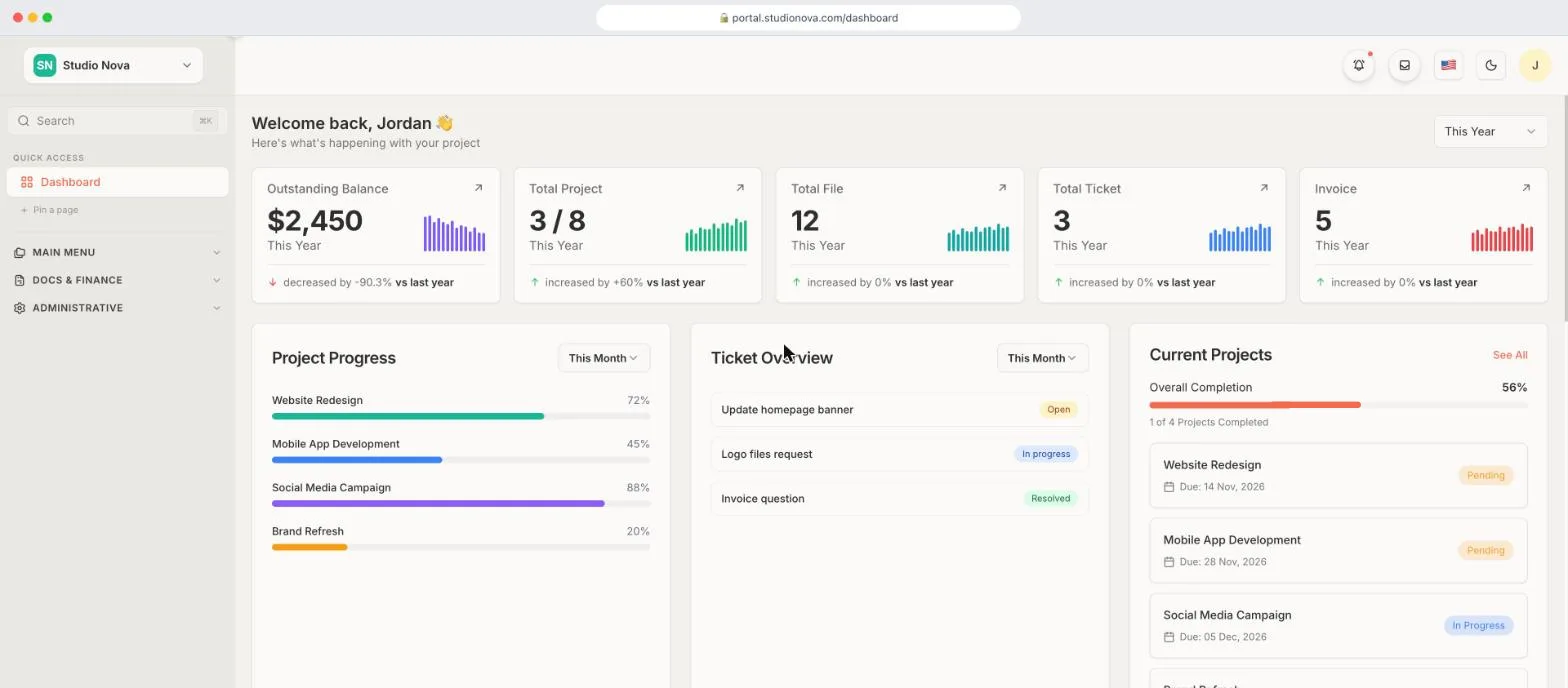
The first screen is a dashboard for that one client. It shows the outstanding balance, how many projects are done out of the total, the number of shared files, open support tickets and invoices. Below those figures sit the project progress bars, the ticket list with its status, and the current projects with their due dates. A client can answer most of their own questions in a few seconds, without a call.
From there they open a project to follow the work, open a file to download it, open a ticket to ask for a change, or open an invoice to pay it. Everything they touch is scoped to their own account, so one client never sees another client's work. You decide what each client can see, and the portal menu can be shown or hidden to match the way you sell.
For you, the same client appears as a record inside Taskip with the conversation, files, quotations and invoices in one place. When a client calls, you open that record and see the whole relationship instead of searching four tools. That is the practical gain of a portal that is built into your workspace and not bolted on beside it.
White-label on your own domain
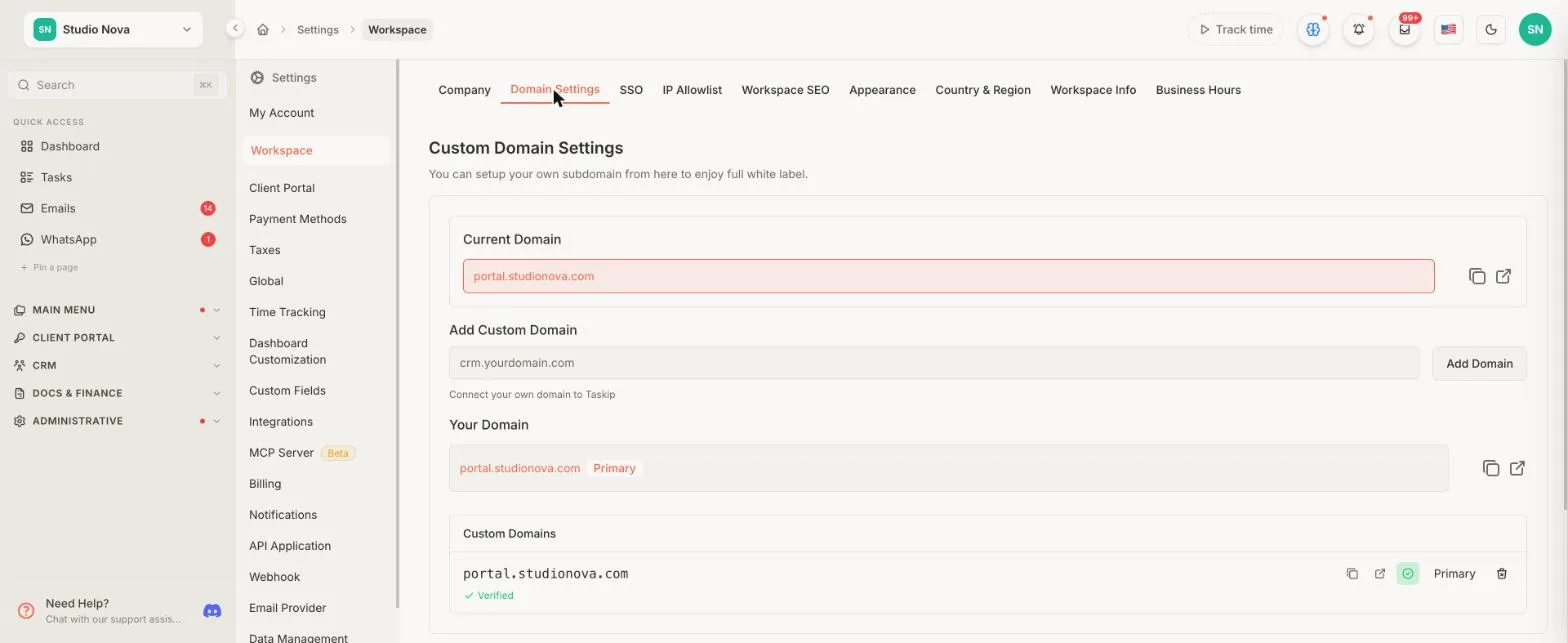
Your clients should see your agency, not ours. Connect a subdomain such as portal.youragency.com and the client portal loads there, with your logo and colors.
- Custom domain, custom email, SMTP and portal sign-in settings on every plan.
- Full white-label branding and portal customization included on Growing Agency and Agency Pro.
- Freelancer and Startup Team can add white-label branding and portal customization as a paid add-on.
With the custom domain and your own SMTP server, portal emails such as invoices and notifications arrive from your agency too. Read the full detail on the white-label client portal software page.
Built for how agencies actually work
Retainers and recurring invoices
Most agency revenue repeats, so the billing should too. Set up an invoice once, choose how often it recurs, and each cycle lands in the client portal on schedule. The client sees the balance, pays by card, PayPal or bank transfer, and the invoice marks itself paid. You stop writing the same reminder every month, and the client never has to dig through email for last month’s invoice to see what the retainer covers.
Teams and several workspaces
Agency work is shared work. Growing Agency gives you 3 workspaces and 25 team users, and Agency Pro gives you 5 workspaces with unlimited users, so a larger agency can separate brands or departments without buying a second tool. Your team users are the only seats that count against a plan. Client accounts are unlimited on every plan, which means adding a client never changes your bill.
Service catalog for productized work
If you sell fixed offers such as a brand audit, a landing page or a monthly content package, list them in the service catalog with packages and either one-time or subscription pricing. A new client can pick a service, check out and land in the portal with their order already attached. That turns a repeated sales conversation into a page you publish once, and it gives every new client the same clear start.
Proposals and quotations that turn into invoices
Win the work in the same system that delivers it. Build a proposal or quotation, send it to the client, and collect an e-signature when they agree. Once a quotation is accepted, it converts to an invoice, so the scope the client approved is the scope you bill. Nobody retypes line items, and the paper trail from first offer to final payment sits in one client record.
Taspi AI for summaries and replies
Taspi is the built-in AI agent. It drafts replies, summarizes long threads and recommends next actions across the workspace, using the monthly AI credits that come with your plan. Use it to catch up on a client conversation before a call or to draft a first answer you then edit. You stay in control of what gets sent, and the client only sees the message you approve.
Client onboarding that starts on day one
The first week sets the tone for the whole engagement, and most of it is paperwork: who the contact is, what the brief says, which login to use. Taskip handles that inside the portal. Onboarding screens walk a new client through the first steps, and forms collect the details you need before work starts. Forms support conditional logic, so a client only answers the questions that apply to them, and you can embed a form on your own website so submissions still land inside Taskip.
If you sell productized work, the service catalog adds a checkout. A client picks a package, pays and arrives in the portal with the order attached, which removes the back-and-forth of a manual quote. If you sell custom work, send a proposal or quotation first, collect the e-signature, and convert the accepted quotation into the first invoice. Either way, the client record is created once and every later project, file and invoice attaches to it.
Security for client data
Clients share briefs, contracts and invoices with you. These are the controls Taskip lists for protecting that information.
Two-factor authentication
Two-factor authentication is available on every plan, for your team and for the accounts you give to clients.
Each client sees only their own work
A client logs in to their own space. Their projects, files, invoices and messages belong to that account, and no other client can open them.
IP whitelisting and SSO on Agency Pro
Agency Pro lets you restrict workspace access to approved IP ranges and sign your team in through your company SSO provider.
Your own mail server and domain
Send portal email through your own SMTP server and custom domain, so notifications and invoices come from your agency and not from a shared sender.
This page does not claim any compliance certification. If a client needs a specific standard, ask the team before you commit.
Pricing that does not charge per client
Unlimited client accounts on every plan. You pay for your team and workspaces, so a bigger client list never raises the price.
| Plan | Monthly price | Workspaces | Team users | White-label branding |
|---|---|---|---|---|
| Starter Free | Free forever, no credit card required. See the price plan page for what it includes. | |||
| Freelancer | $12/mo, or $95/yr | 1 | 1 | Paid add-on |
| Startup Team | $29/mo, or $229/yr | 1 | 10 | Paid add-on |
| Growing Agency | $59/mo, or $459/yr | 3 | 25 | Included |
| Agency Pro | $89/mo, or $695/yr | 5 | Unlimited | Included |
Prices are read from the same plan data as the price plan page, which also lists storage, AI credits, file upload caps and every feature by plan.
Which plan fits your agency
Solo or a very small studio
The Freelancer plan gives you one workspace and one user with a 100 MB upload limit, which is enough to run a portal for your first clients. Startup Team raises that to 10 users and a 250 MB upload limit for a small group sharing one workspace.
A growing agency with several clients
Growing Agency is the plan most agencies land on. It has 3 workspaces, 25 users, 500 GB of storage, a 500 MB upload limit and white-label branding included. You can run a separate workspace for a brand or a department without a second subscription.
A larger agency with stricter needs
Agency Pro has 5 workspaces, unlimited users, 1 TB of storage and a 1 GB upload limit, and it is the plan with IP whitelisting and SSO. Pick it when a client will not sign off without those controls, or when your team has outgrown 25 users.
How Taskip compares to other agency client portals
Every competitor cell comes from that vendor's own page. Where a page does not say, the cell reads Not listed. For other products, compare Taskip to alternatives.
| Feature | Taskip | SuiteDash | ManyRequests | AgencyPro | Assembly | Wayfront |
|---|---|---|---|---|---|---|
| Pricing model | Flat plans, no per-client fee | Flat per account, not per user | Flat tiers, seats included | Flat plans, extra seats from $15/mo | Tiers capped by contacts, users and apps | Flat tiers, no transaction fees |
| Cheapest paid plan | $12/mo billed monthly (Freelancer), plus a free plan | $19/mo billed monthly (Start), 30-day trial | $39/mo billed monthly (Core), 14-day trial | $39/mo billed monthly (Basic), 14-day trial | $29/mo billed annually (Starter), plus a free plan | $99/mo billed yearly (Base), 14-day trial |
| Unlimited clients | Yes, every plan | Yes, every plan | Yes, every plan | Yes, every plan | Unlimited active contacts on Advanced and Enterprise only | Yes, from the Base plan |
| White-label | Custom domain on every plan. Full white-label from Growing Agency, add-on below | All plans | Custom domain and branding on all plans | Custom domain on every plan. Branded email and no "Powered by" on Plus | Custom domain from Professional | Fully white-label from Base |
| Built-in invoicing | Yes | Yes | Yes | Yes, with Stripe and PayPal | Yes | Yes |
| E-signature | Yes, every plan | Yes | Not listed | Yes, in documents on Pro | Not listed | Yes, in forms |
| Project views | Kanban, list, Gantt and calendar | Project and task management, views not listed | Kanban, list and queue | List and Kanban | Not listed | Project and task management, views not listed |
| Mobile apps | iOS and Android apps | Branded web app (PWA) | Client web app (PWA) | Not listed | Not listed | Web app (PWA) |
| AI assistant | Taspi AI agent, every plan | AI agents and skills | AI automations and an MCP server | Yes, every plan | AI app builder | AI assistant on Base |
Checked November 2026 on each vendor's own pricing or home page, linked in the column headers. Each price shows the cheapest paid plan with the billing period the vendor listed it under, so read the billing note before comparing. Vendors change prices, so confirm on their site before you decide.
Where the others are stronger: ManyRequests is built around a request queue with credits and retainers for productized services, and lists design and video proofing. AgencyPro lists design and video annotation and versioned proofing on its Pro plan. Assembly lets you build custom portal apps with an AI app builder and prebuilt apps. Wayfront's Pro plan includes a portal template editor. If one of those is the main thing you need, look at them first.
When another tool may fit better
Taskip covers the path from proposal to project to invoice, and that suits most agencies. It is not the best answer for every agency. If your main need is frame-accurate video review or pinned comments on design files, check the proofing tools that ManyRequests and AgencyPro list on their pricing pages. If you want to build custom portal apps with an AI app builder, look at Assembly. If you run a pure request queue with credit packs, ManyRequests is designed around that model.
If you want one workspace where the client portal, quotations, invoices, e-signature, projects, a shared inbox and an AI agent work from the same client record, that is where Taskip is strongest. The free plan and the 7-day trial let you test that with a real client before you pay for anything.
Set up your agency portal in 4 steps
- 1
Add your clients
Create each client in Taskip with their company and contact details. You can add as many as you need, because client accounts are unlimited on every plan.
- 2
Brand the portal
Open Settings, then Workspace, then Domain Settings, and connect a subdomain such as portal.youragency.com. Add your logo and colors so the login looks like your agency.
- 3
Invite your clients
Send each client an invitation. They sign in to their own space and see only their own projects, files and invoices.
- 4
Share the first project or invoice
Make one project visible and send one invoice. Clients learn the portal fastest when the first thing inside it is real work.
Client portals by agency type
Each page below shows the workflow for one kind of agency.
Working solo? See the client portal for freelancers. Browse every industry on the use cases page.
Agency client portal FAQs
What is a client portal for agencies?
A client portal for agencies is a private, branded workspace where each client logs in to see their projects, files, approvals, invoices and messages. It replaces scattered email threads and shared folders with one place, so clients stop asking for status and you stop chasing approvals and payments.
Can I white-label the client portal with my own domain?
Yes. A custom domain, custom email, SMTP and portal sign-in settings are available on every plan. Full white-label branding and portal customization are included on Growing Agency and Agency Pro, and can be added as a paid add-on on Freelancer and Startup Team.
Do my clients pay to use the portal?
No. The portal is free for your clients, and Taskip makes no client seat charges on any plan. They only pay you for the work, through the invoices you send them. Your plan price depends on your team users and workspaces, never on how many clients you have.
How many clients can I add?
There is no client limit. Taskip offers unlimited client accounts on every plan. The limits on each plan apply to your own team users, workspaces, storage and AI credits, so you can keep adding clients as the agency grows without moving to a higher plan.
Can clients pay invoices inside the portal?
Yes. Clients can pay an invoice from their portal through the payment methods you connect, which include Stripe, PayPal and bank payment. Taskip does not charge transaction fees. You only pay the standard processing fee of your own payment gateway.
Is client data secure?
Two-factor authentication is available on every plan. IP whitelisting and SSO are available on Agency Pro only. Taskip does not claim any compliance certification on this page, so check the legal pages and ask the team if your clients need a specific standard before you commit.
Can I move from another client portal to Taskip?
Yes. On paid plans, the Taskip team moves your clients, projects, invoices and workflows for free. You can book a migration call from the migration page, tell the team what you use today, and agree what to bring across before you switch your clients over.
How do I create a client portal for my agency?
Create a workspace, add your clients, connect a custom domain and your logo, then invite each client and share a first project or invoice. With Taskip the portal is part of the workspace, so there is nothing to build or connect. Most agencies are set up the same day.
Is there a free client portal for agencies?
Taskip has a free plan with no credit card, and a 7-day trial of the paid features so you can test the portal with a real client. White-label branding and portal customization are included on Growing Agency and Agency Pro, and are a paid add-on on lower plans.
Does Taskip work on mobile?
Yes. Taskip has iOS and Android apps, and the portal itself works in a mobile browser. Your clients can check a project, read a message or pay an invoice from a phone, and you can answer from yours without opening a laptop.
Moving from another tool? See the free migration page.
Give every client one login
Start on the free plan, or try paid features for 7 days. No credit card needed.