
CRM vs Client Portal: Key Differences + Which Tool Freelancers Need First [2026]
Client portal vs CRM systems serve completely different purposes in your freelance business, yet 73% of freelancers confuse their functions. A client portal vs CRM comparison reveals that portals handle active project collaboration while CRMs manage your sales pipeline. Understanding the difference between the client portal and CRM helps you invest in the right tool first, saving thousands annually.
Quick Answer: Client portals are project collaboration spaces where clients access their work, while CRM systems manage your sales pipeline and client relationships behind the scenes. Most freelancers start with a client portal for immediate project efficiency, then add a CRM as they scale.
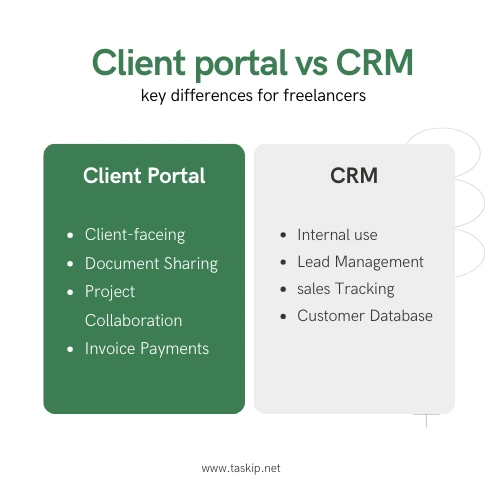
Quick Decision Framework
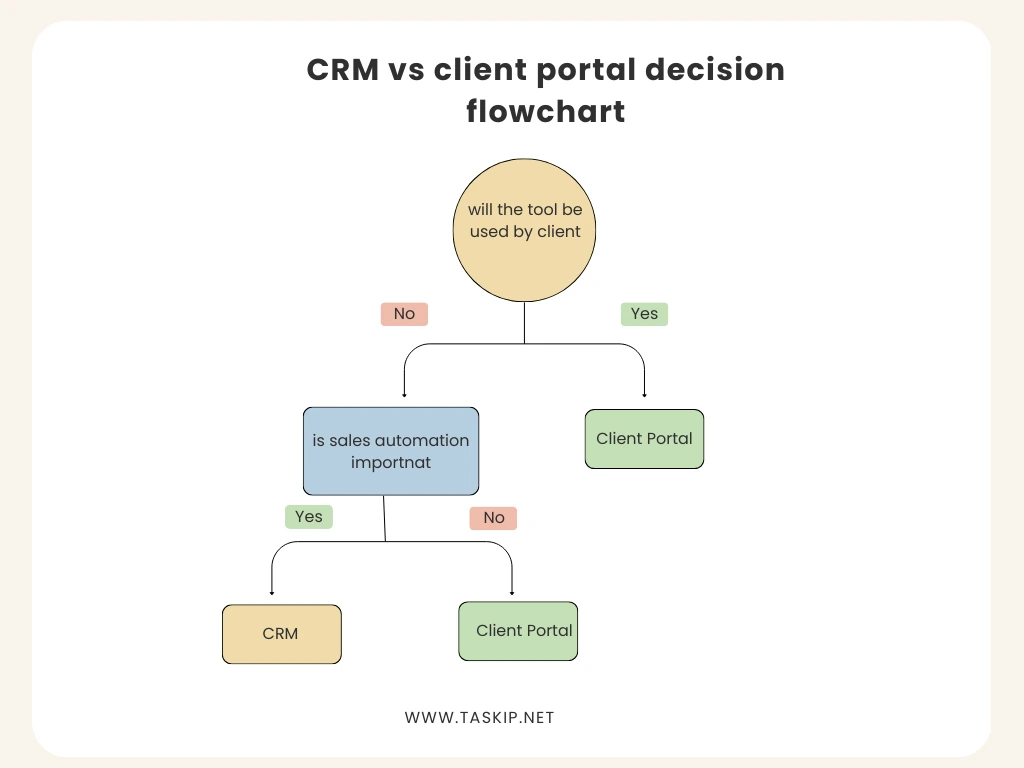
Choose a Client Portal if you:
- Juggle multiple active projects
- Waste hours on status update emails
- Share large files frequently
- Need professional client collaboration
- Budget: $15-100/month
- Setup time: 2-3 days
Choose a CRM if you:
- Struggle to follow up with leads
- Want to track your sales pipeline
- Need to nurture long-term relationships
- Plan to scale your business
- Budget: $12-150/month
- Setup time: 1-2 weeks
Consider both if you:
- Have a steady project flow
- Want to optimize growth AND delivery
- Manage complex client relationships
- Run a premium freelance business
- Combined budget: $50-200/month
Not sure if the investment is worth it? Use our ROI calculator to see if client portal software makes financial sense for your specific situation.
Client Portal vs CRM: Understanding the Core Differences
The client portal vs CRM debate isn’t new, but it’s become more critical as freelance tools multiply. When comparing CRM vs client portal solutions, remember they solve different problems. This comprehensive client portal vs CRM guide examines both tools in detail.
Think of it this way: A client portal is like a private office where you meet with clients to work on projects together. A CRM is like your personal assistant who keeps track of everyone you’ve ever met, what you talked about, and when to follow up.
What Is a Client Portal?
A client portal is a secure, branded online workspace where you and your clients collaborate on active projects. Instead of drowning in email threads, everything project-related lives in one organized space—files, feedback, approvals, and communications.
Real-world example: Sarah, a web designer, uses client portal software to manage her projects. When her client logs in, they see their website mockups, can leave feedback directly on designs, approve milestones, and pay invoices, all without a single email.
Popular Client Portal Tools:
- Taskip (Starting at $29/month): Purpose-built for freelancers with an intuitive client experience
- Moxie ($19-39/month): All-in-one with built-in CRM features
- Client Portal.io ($39-99/month): White-label focused
- Bonsai ($21-52/month): Great for creative freelancers
- Practice Ignition ($35-146/month): Ideal for consultants
- Plutio ($19-39/month): Comprehensive project management
Ready to launch your portal quickly? Our 7-day client portal setup checklist walks you through everything step-by-step.
What Is a CRM System?
A Customer Relationship Management (CRM) system is your command center for managing every interaction with current and potential clients from first contact through years of completed projects. It’s primarily an internal tool that helps you track leads, manage your sales pipeline, and systematically grow your business.
Real-world example: Mark, a marketing consultant, uses HubSpot CRM (free tier) to track 50+ leads. His CRM automatically reminds him to follow up after proposals, tracks email opens, and shows him that clients from LinkedIn convert 3x better than cold emails, data that helped him double his rates.
Popular CRM Tools for Freelancers:
- HubSpot (Free-$45/month): Comprehensive with free tier
- Pipedrive ($14-99/month): Visual pipeline management
- Folk ($20-40/month): Modern, simple interface
- Copper ($25-119/month): Integrates with Google Workspace
- Streak ($15-69/month): Lives inside Gmail
For a comprehensive comparison of both portals and CRMs, check out our guide to the best client management systems for freelancers.
CRM vs Client Portal: Detailed Feature Comparison
| Aspect | Client Portal | CRM System |
| Who uses it? | You + active clients | Just you (and your team) |
| Primary purpose | Project collaboration & delivery | Sales, lead tracking & relationship management |
| Client access | ✅ Direct login and participation | ❌ Behind-the-scenes only |
| File sharing, task tracking, feedback, and invoicing | During active projects | Entire client lifecycle |
| Key features | Contact management, pipeline tracking, and email automation | Contact management, pipeline tracking, email automation |
| Typical setup time | 2-3 days | 1-2 weeks |
| Learning curve | Moderate (clients need training too) | Moderate to steep (internal only) |
| ROI timeline | Immediate (saves 5-8 hours/week) | 3-6 months (29% better conversion rates) |
| Average cost | $15-100/month | $12-150/month |
| Storage focus | Project files & deliverables | Contact data & communication history |
When Freelancers Need a Client Portal (With Examples)
1. You’re Managing Multiple Concurrent Projects
Scenario: Alex, a freelance developer, manages 4 active projects. Before using a portal, he spent 2 hours daily just organizing emails and sharing files.
Solution: With a proper client portal, each client has their own space. Project A clients can’t see Project B work. Alex saves 10+ hours weekly on admin tasks.
2. Large File Sharing Is a Nightmare
The problem: Email attachments cap at 25MB. Google Drive links get messy. Version control is chaos.
Portal solution: Unlimited file storage, automatic version tracking, and clients can upload their assets directly.
3. You Need Professional Credibility
Enterprise clients expect structured collaboration. Using only email can appear unprofessional and create security concerns.
Real impact: Julia increased her rates by 40% after implementing a professional client portal—clients perceived her as more established.
4. Status Update Requests Are Killing Your Productivity
Before portal: “What’s the status?” emails every other day. After portal: Clients check progress independently with visual progress bars and milestone tracking
Once you decide on a portal, the next challenge is getting clients to actually use it. Our step-by-step guide to onboarding clients to your portal ensures high adoption rates from day one.
When Freelancers Need a CRM System (With Examples)
1. You’re Losing Track of Leads
Scenario: Tom, a business coach, was juggling leads via sticky notes and memory. He discovered he’d forgotten to follow up with 12 qualified leads over 3 months—potentially $36,000 in lost revenue.
CRM Solution: Now, Pipedrive automatically reminds him to follow up. His conversion rate improved from 15% to 38%.
2. You Want to Scale Strategically
Data-driven decisions: Your CRM reveals:
- LinkedIn leads convert at 45% vs. 12% for cold outreach
- Projects under $5,000 have 60% scope creep
- Clients in tech pay invoices 2x faster
This data helps you focus efforts where they matter most.
3. Repeat Business Is Slipping Away
The opportunity: Research shows getting repeat business is 5x cheaper than finding new clients.
CRM automation: Set reminders to check in 3 months after project completion. Send birthday greetings. Track who hasn’t hired you in 6+ months.
4. You’re Ready to Increase Rates
Track which clients pay premium rates without negotiating. Identify common characteristics. Focus on acquiring similar clients.
Industry-Specific Recommendations
Web Designers & Developers
- Start with: Client portal (design feedback is crucial)
- Recommended: Taskip or Bonsai for visual collaboration
- Add CRM when: You have 5+ regular clients
- Best CRM choice: HubSpot or Folk
Marketing Consultants
- Start with: CRM (relationship building is key)
- Recommended: HubSpot or Pipedrive
- Add portal when: Managing multiple campaigns
- Best portal choice: Taskip or Moxie for comprehensive features
Business Coaches
- Start with: Either (depends on service model)
- If group coaching: Portal first (Practice Ignition)
- If 1-on-1: CRM first (Copper or Streak)
- Hybrid solution: Dubsado or HoneyBook
Content Creators
- Start with: Client portal (content review process)
- Recommended: Taskip or Plutio for workflow management
- CRM needs: Usually minimal (Folk or Streak sufficient)
When You Need Both: Integration Strategies
Understanding client portal vs CRM software differences saves money and time. The CRM vs client portal comparison shows that 80% of freelancers benefit from starting with portals. However, the client portal versus CRM decision ultimately depends on your specific business challenges.
The Power Combo Approach
Stage 1: Implement client portal first (immediate efficiency gains)
Stage 2: Add CRM after 3-6 months (once processes are smooth)
Stage 3: Integrate systems for seamless data flow
Real Integration Examples
Zapier Workflows:
- New CRM deal won → Create client portal space automatically
- Portal project completed → Update CRM for follow-up
- Portal invoice paid → Log transaction in CRM
Native Integrations:
- Moxie: Built-in CRM features
- HoneyBook: Combines both functionalities
- Dubsado: Hybrid solution for creatives
Client Portal vs CRM Software: Cost-Benefit Analysis
Investment:
- Client Portal: $50/month average
- CRM System: $30/month average
- Integration tools: $20/month (Zapier)
- Total: ~$100/month
Return:
- Time saved: 15-20 hours/month = $750-2,000 value
- Improved conversion: 20-30% increase = $1,000-5,000/month
- Client retention: 25% improvement = $2,000-10,000/year
- ROI: 10-50x investment within 6 months
Want to see the exact ROI for your situation? Try our client portal ROI calculator to get personalized projections.
Decision Framework: Which Should You Choose First?
Start with a CLIENT PORTAL if:
✅ You have 3+ active clients
✅ Projects involve multiple revisions
✅ Clients frequently ask for updates
✅ You share files larger than 25MB
✅ Professional image is crucial
✅ You bill by project/milestone
Start with a CRM if:
✅ You’re actively seeking new clients
✅ Lead follow-up is inconsistent
✅ You want to track conversion rates
✅ Repeat business is important
✅ You’re planning to scale
✅ Referrals drive your business
Get BOTH immediately if:
✅ You’re billing $5,000+ monthly
✅ Managing 5+ concurrent projects
✅ Building an agency
✅ Serving enterprise clients
✅ Want maximum efficiency
Client portal and CRM are part of a larger productivity ecosystem. Explore our complete list of the best freelancer productivity tools for 2026 to build your perfect tech stack.
Common Mistakes to Avoid
Client Portal Mistakes
- Over-complicating the setup: Start with basic features
- Not training clients: Provide video walkthroughs (we cover this in our client onboarding guide)
- Choosing based on price alone: Free tools often lack crucial features
- Ignoring mobile experience: 60% of clients check portals on phones
CRM Mistakes
- Not logging interactions consistently: Defeats the purpose
- Choosing overly complex systems: You won’t use what you don’t understand
- Ignoring automation features: Manual entry wastes time
- Not reviewing data regularly: Insights require analysis
Implementation Timeline & Best Practices
Week 1-2: Research and Trial
- Test 2-3 options with free trials
- Check integration capabilities
- Evaluate mobile apps
- Calculate total cost including add-ons
Week 3-4: Setup and Configuration
Client Portal Setup:
- Brand customization (2 hours)
- Project templates (3 hours)
- Client onboarding materials (2 hours)
- Test with one trusted client
For a detailed walkthrough, follow our 7-day portal setup checklist.
CRM Setup:
- Import existing contacts (2-4 hours)
- Configure pipeline stages (1 hour)
- Set up email templates (3 hours)
- Create automation rules (2 hours)
Month 2: Optimization
- Gather user feedback
- Refine workflows
- Add automations
- Train any team members
Month 3: Evaluation
- Measure time saved
- Calculate ROI
- Identify additional features needed
- Consider adding a second system
The client portal vs CRM analysis reveals no universal answer. Whether you choose CRM vs client portal first, success requires consistent implementation and use. This difference between the client portal and CRM guide provides the framework for making an informed decision.
The Bottom Line: Making Your Decision
The difference between client portals and CRM systems isn’t about choosing the “better” tool, it’s about identifying which challenge to solve first. Client portals streamline project delivery and enhance client experience during active work. CRM systems help you build a sustainable pipeline and nurture relationships for long-term growth.
For most freelancers, the path is clear:
- Start with a client portal if you have active projects and need immediate efficiency
- Implement it properly over 2-4 weeks (use our setup checklist)
- Add a CRM once your delivery process is smooth
- Integrate both as your business matures
Remember: These tools are investments in your business infrastructure. The right combination implemented thoughtfully can transform a chaotic freelance operation into a scalable, professional business.
Whether you choose a client portal, CRM, or both, commit to using your chosen system consistently for at least three months. That’s when the real magic happens: less time on admin, more time on billable work, and a business that practically runs itself.
Ready to Take Action?
Starting with a client portal?
- Calculate your potential ROI with our free calculator
- Follow our proven 7-day setup checklist
- Master client adoption with our onboarding guide
Exploring all options?
- Compare top solutions in our client management systems guide
- Build your complete tech stack with our 2026 productivity tools roundup
At Taskip, we believe every freelancer deserves tools that make their business run smoothly. Whether you’re just starting out or scaling to six figures, the right combination of client portal and CRM can be the difference between constant chaos and sustainable success.
Frequently Asked Questions
Can a CRM replace a client portal?
No. While some CRMs have basic client-facing features, they lack the collaborative workspace, file management, and project visibility that portals provide. CRMs are designed for internal relationship management, not active project collaboration.
What’s the average cost difference?
Client portals and CRMs have similar pricing ($15-150/month), but portals often include more storage and client seats in base pricing. CRMs typically charge per user and may have contact limits.
Which should I implement first?
80% of freelancers benefit from starting with a client portal for immediate efficiency gains. Add a CRM once you have a steady workflow and want to optimize growth.
Can I use free versions of both?
Partially. HubSpot offers a robust free CRM for up to 1,000,000 contacts. Most client portals have limited free plans (1-2 clients max). Budget at least $30-50/month for professional tools.
Do I need technical skills to set these up?
Minimal. Modern tools like Taskip are designed for non-technical users. Most offer templates, video tutorials, and support. Initial setup takes 5-10 hours total.
How do these affect my taxes and accounting?
Both systems can export data for accounting. Many integrate with QuickBooks or FreshBooks. CRMs help track the revenue pipeline for financial planning.
What about data security and privacy?
Choose tools with SOC 2 compliance, data encryption, and GDPR compliance. Both system types should offer two-factor authentication and regular backups.
How long before I see results?
Client portals show immediate time savings (week 1). CRM benefits become apparent after 2-3 months of consistent use. Combined systems typically show full ROI within 6 months.
What’s the main difference between a client portal and CRM?
The key client portal vs CRM difference is access and purpose. A client portal is a shared workspace where your clients log in directly to view projects, download files, provide feedback, and track progress. It’s all about active project collaboration. In contrast, a CRM (Customer Relationship Management) system is your internal tool for managing leads, tracking sales pipelines, and nurturing relationships behind the scenes. Think of the difference between client portal and CRM this way: clients use the portal WITH you during projects, while you use the CRM to manage information ABOUT them throughout the entire relationship lifecycle. The client portal vs CRM distinction becomes clear when you consider that 100% of your active clients need portal access, but they never see or interact with your CRM.
Should I get a CRM vs client portal first as a freelancer?
When comparing CRM vs client portal for freelancers, 80% benefit from starting with a client portal first. If you already have clients and struggle with project management, file sharing, or constant status update requests, a client portal provides immediate efficiency gains, saving 5-8 hours weekly from day one. The CRM vs client portal priority shifts only if your main challenge is finding and converting new clients rather than delivering work. Start with a CRM first if you’re losing track of leads, have inconsistent follow-up, or need to build your client base from scratch. Most successful freelancers follow this path: implement a client portal vs CRM in stages portal first for immediate project efficiency (month 1), then add a CRM once delivery is smooth (months 3-6). This staged approach to CRM vs client portal implementation ensures you’re not overwhelmed and can master each system properly.
Can I use the customer portal vs CRM interchangeably?
No, the customer portal vs CRM serve completely different functions and cannot replace each other. A customer portal (also called a client portal) is a client-facing collaboration platform for active project work—clients log in, view progress, and participate directly. A CRM is an internal business tool for managing your entire sales and relationship pipeline that clients never access. The customer portal vs CRM confusion often stems from some CRM systems adding basic client-facing features, but these don’t match the collaborative depth of dedicated portals. Similarly, some client portals include light CRM features, but lack the sophisticated pipeline management and automation that true CRM systems provide. When evaluating client portal vs CRM needs, remember: you need a portal for project delivery excellence and a CRM for business growth and relationship management. Many freelancers eventually use both because customer portal vs CRM tools are complementary, not competitive; each excels at its specific purpose.

Get Summary On: