The best CRM with invoicing software combines contact and deal tracking with built-in invoice creation, payment collection, and automated follow-ups, so you can manage a client relationship and get paid without switching tools.
Below, we compare 8 platforms (including Taskip) on pricing, invoicing features, and ease of use to help you pick the right fit.
This guide reviews the 8 best CRM with invoicing software tools in 2026, with pricing, pros, cons, and real user reviews for each.
For a one-off invoice with no sign-up required, use the Free Invoice Generator Online.
| Rank | Tool | Best for | Starting price |
|---|---|---|---|
| 1 | Taskip | Agencies and freelancers (all-in-one) | Free plan; paid from $12/month |
| 2 | HoneyBook | Solo creative freelancers | $36/month ($29 yearly) |
| 3 | Dubsado | Contract-heavy, automation-first workflows | $35/month |
| 4 | Flowlu | Budget teams wanting deep feature coverage | $12/user/month ($9 yearly) |
| 5 | OneSuite | Growing agencies who want clean UX | $9/user/month ($7 yearly) |
| 6 | Bonsai | Freelancers wanting fast, simple setup | $25/user/month ($19 yearly) for invoicing |
| 7 | monday CRM | Teams already inside the monday ecosystem | $12/seat/month (yearly, 3 seats min.) |
| 8 | Zoho CRM Plus | Teams deep in the Zoho product stack | Zoho CRM Professional $23/user/month (yearly) |
Prices checked on 22 October 2026 on each vendor’s pricing page.
Best overall: Taskip. It is the only tool on this list with a native CRM, invoicing, client portal, project management, and sales pipeline in one workspace at a flat monthly rate.
Table of Contents
What Is a CRM With Invoicing Software? (The Lead-to-Cash Engine)
CRM with invoicing software combines two functions in one database: client relationship management (contacts, pipelines, communication) and invoicing (billing, payments, tracking). The key difference between native invoicing and a third-party integration:
| Feature | Native invoicing | Third-party integration |
|---|---|---|
| Data entry | Enter client once, used everywhere | Re-enter client in each app |
| Invoice history | Lives on the client record in CRM | Stored in a separate app |
| Payment status | Updates inside the CRM pipeline | Requires manual sync or automation |
| Login required | One platform, one login | Two platforms, two logins |
| Support | One vendor | Multiple vendors |
This guide focuses on tools where invoicing is part of the core product. Two exceptions are included for teams already in those ecosystems, and each is flagged in its review: monday CRM, where invoicing is an app on higher plans, and Zoho CRM Plus, where invoicing runs in the separate Zoho Invoice app.
For a broader comparison of agency management platforms that includes CRM, billing, and project delivery, see the best CRM for digital marketing agencies guide.
Why Use A CRM With Invoicing Software? – Benefits
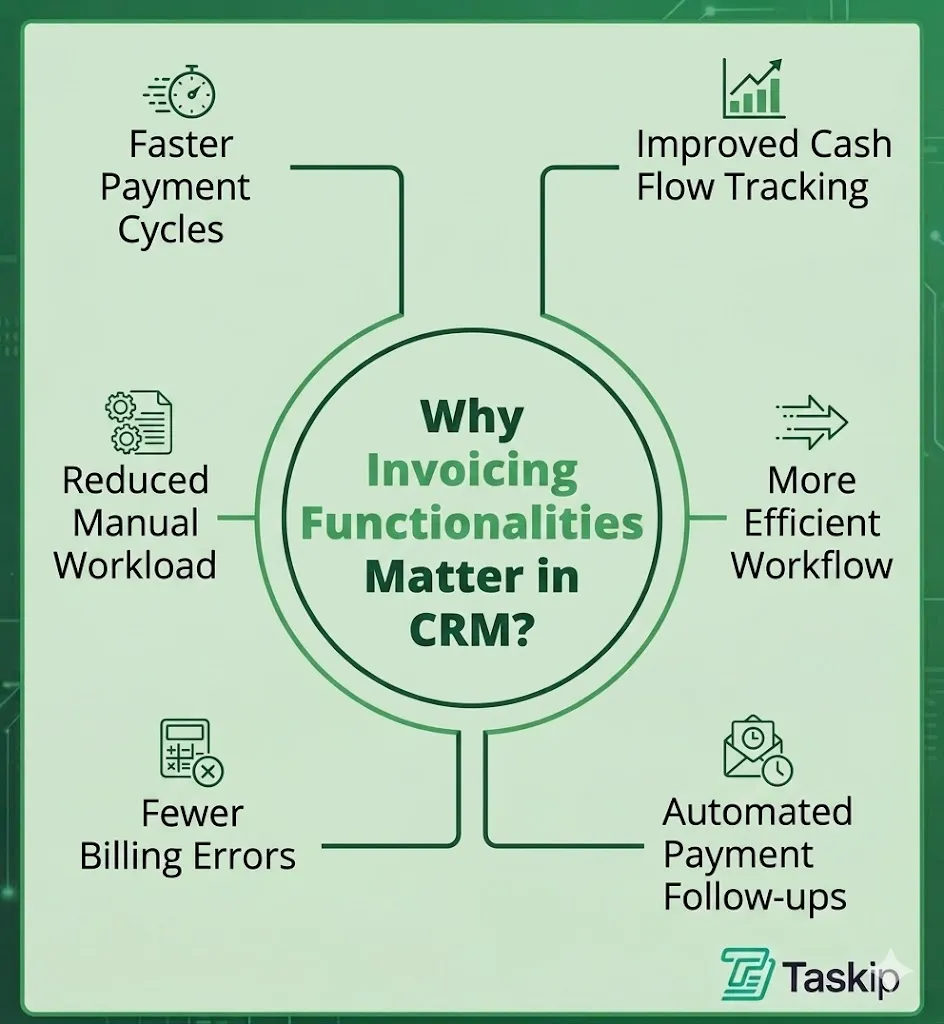
In most businesses, the biggest delay happens after a deal is closed, as the team needs to switch tools to create invoices, send them manually, and follow up for payments. CRM with built-in invoicing removes that gap.
With this, they can connect customer management directly with revenue collection, instead of treating them as two separate processes. Here are the benefits of having invoicing within the CRM system:
Faster Payment Cycles
Once a deal is marked as won or a project is completed, CRM invoice software allows you to generate the invoice instantly from the same client record. This reduces delays between delivery and payment collection.
Reduced Manual Workload
Client details such as name, service, pricing, and project data are automatically pulled from the CRM into invoices. This saves time and avoids repetitive data entry.
Fewer Billing Errors
In a CRM with a billing system, data is synced within the same system. As a result, the chances of incorrect amounts, missing client details, or duplicate invoices are significantly reduced.
Improved Cash Flow Tracking
As you use a CRM and invoicing software, it gives you the full financial picture alongside their sales pipeline, including which clients have paid, which invoices are overdue, and which deals are still pending. Thus, cash flow tracking becomes easier.
More Efficient Workflow
Teams don’t need to jump between CRM, spreadsheets, and accounting tools. Sales, project delivery, and billing stay in one continuous flow.
Automated Payment Follow-ups
Many CRM and invoicing systems can send reminders automatically, apply late fees, or schedule recurring invoices that improve on-time payments without manual effort.
Problems with Using Separate CRM and Invoicing Systems
Higher costs and complexity: More software subscriptions, integrations, and team training to manage.
Duplicate data entry: Enter client and pricing details in multiple tools.
Delayed invoicing: Switching platforms slows down invoice creation and payments.
Disconnected client records: Sales, projects, and payments stay scattered across systems.
More billing errors: Manual data transfer increases mistakes and duplicate invoices.
Poor cash flow visibility: Harder to track paid, pending, and overdue invoices.
CRM With Billing vs Separate Invoicing Software: Which Do You Need?
You need CRM billing software, with invoicing built into the CRM, if you bill the clients you sell to and want deals, projects and invoices on one client record. You need separate invoicing or accounting software if billing is mostly an accounting job, such as complex tax, payroll or multi-entity books, and sales lives elsewhere.
| Criteria | CRM with built-in billing | Separate invoicing software + CRM |
|---|---|---|
| Client data | Entered once, used for deals, projects and invoices | Kept in two systems and synced |
| Invoice from a won deal or quote | One click | Export, integration or manual re-entry |
| Payment status in the sales pipeline | Automatic | Only if the integration syncs it |
| Accounting depth (payroll, tax filing, ledgers) | Basic | Full |
| Cost | One subscription | Two subscriptions, plus an integration tool if needed |
| Best for | Agencies, freelancers and service businesses | Finance-led teams and businesses with complex accounting |
Can B2B billing software integrate with CRMs?
Yes. Most billing and accounting tools connect to popular CRMs through a native integration or a connector such as Zapier, so a won deal can create an invoice in the billing app. The catch is that the data still lives in two places: if the sync fails or a field doesn’t map, invoices and client records drift apart. A CRM with billing built in avoids that, because there is only one record to keep up to date.
Many agencies use both: a CRM with invoicing such as Taskip to quote, invoice and get paid, and an accounting tool for the books at month end.
8 Best CRM with Invoicing Software Tools: In-Depth Reviews
1. Taskip: Best All-in-one CRM with Invoicing Software for Agencies
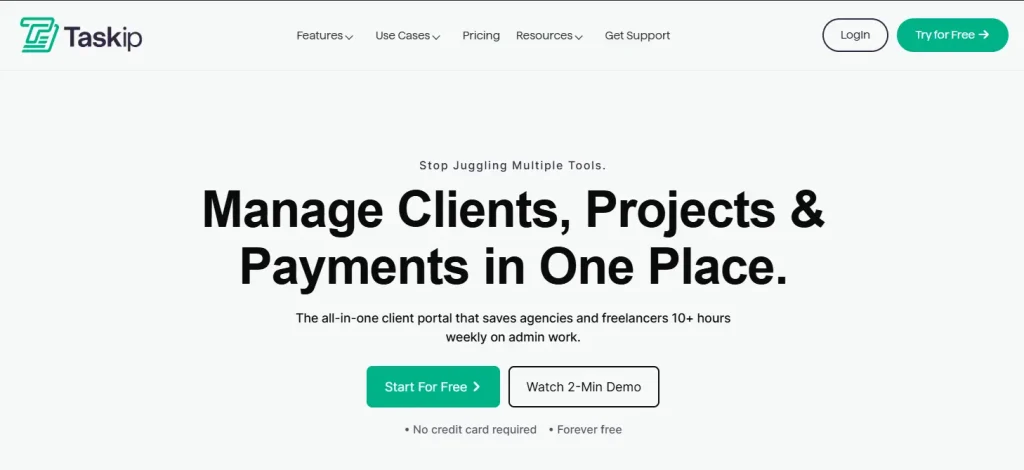
Taskip is an all-in-one agency management platform. It combines CRM, invoicing, project management, client portal, sales pipeline, and workflow automation in one workspace. If you are a freelancer or running an agency, Taskip is definitely the best platform to manage your clients and day-to-day tasks. For a wider comparison, see our list of the best project management software with CRM.
Taskip uses a single database across all modules. A lead in the CRM becomes a quotation, and an accepted quotation converts to an invoice in one click. Payment status then updates automatically in the same dashboard as the sales pipeline, so there is no data re-entry or tool switching. Taskip invoices also support scheduled sending and personal notes.
Key Features
- Invoice dashboard with paid, pending, and overdue status at a glance
- Custom branding: logo, theme colours, digital signature on every invoice
- Multiple professionally designed invoice templates
- Quote-to-invoice conversion in one click (all line items transfer automatically)
- Online payment acceptance via card and bank transfer
- Multi-currency invoicing with automatic tax adjustments
- Recurring billing for retainer clients
- Branded client portal: clients view invoices, projects, and messages in one place
- Visual sales pipeline with customisable stages
- Workflow automation, meeting scheduler, support tickets, WhatsApp inbox, and team collaboration
Full feature details are on the Taskip invoicing page.
Pros & Cons
| Pros | Cons |
| Only tool on this list combining CRM, invoicing, portal, and projects natively | Not a full accounting system (no payroll, no tax filing) |
| Flat-rate pricing: no per-seat cost as team grows | Newer platform with fewer third-party integrations than HubSpot or Zoho |
| Multi-currency and recurring billing included | |
| Free plan with no credit card required | |
| Most agencies are fully set up within one week |
Best For
Digital marketing agencies, design agencies, software companies, consulting firms, and freelancers who want one platform for clients, projects, and billing.
Pricing
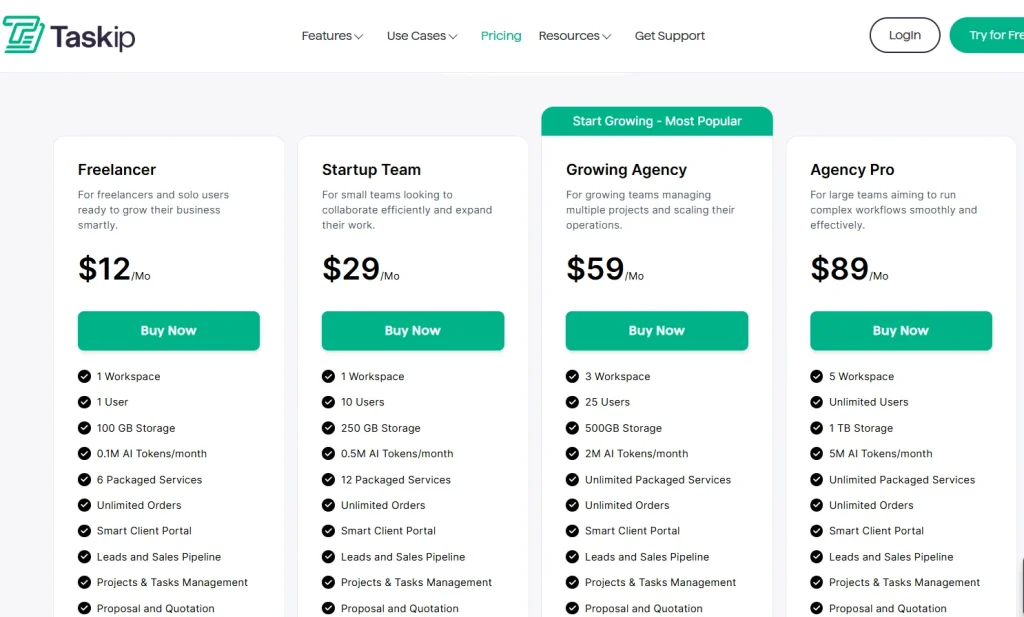
Free plan available. Paid plans are flat monthly prices, not per seat: Freelancer $12, Startup Team $29 (up to 10 users), Growing Agency $59 (up to 25 users) and Agency Pro $89 (unlimited users). 7-day free trial, no card. See current pricing.
User Review
Taskip has a 4.6 rating out of 5 in G2.
Positive Taskip Review
“It brings all your business operations together in one intuitive platform. The dashboard instantly gives you clarity over your revenue, clients, discussions, meetings, projects, and invoices—making it so much easier to see where everything stands. I love how quick actions are always one click away, allowing you to seamlessly hop between tasks, meetings, or ongoing discussions without ever getting lost in a sea of tabs.”
Negative Taskip Review
“If I were being really picky, I’d say that sometimes it takes too many clicks to access certain features. That said, as I mentioned, the Taskip team listens to feedback and improves the tool each week.”
Most tools on this list handle invoicing and client management well, but Taskip also extends into post-sale workflows. While many CRMs focus mainly on sales and billing, Taskip helps you manage ongoing client work and support in the same system through features like support tickets and invoicing. This makes it easier to stay organized after a deal is closed and continue managing the full client journey in one place.
2. HoneyBook: Best for Solo Creative Freelancers

HoneyBook is a client management platform for freelancers. It combines proposals, contracts, and invoices in one document flow, with the most polished client-facing templates of any tool on this list.
Though HoneyBook has native invoicing and built-in billing, its pipeline is very basic. It does not support complex deal stages, team-based delivery, or multi-currency billing like Taskip. It is mainly designed for solo workflows, not agency operations. So, before committing to HoneyBook, read the HoneyBook Reviews 2026: 5 Massive Updates.
Key Features
- Native invoices with client-facing templates
- Proposals, contracts, and invoices in one document
- Payment plans and installment billing
- Automated payment reminders
- Stripe and PayPal payment acceptance
- Basic client portal
Pros & Cons
| Pros | Cons |
| Best invoice and proposal templates on this list | CRM pipeline is basic: not suitable for agencies with deal stages |
| Payment plans and installments work smoothly | Per-seat cost escalates quickly on higher tiers |
| Clean mobile app | No multi-currency support |
| Handles the full proposal-to-payment flow for solo freelancers | HoneyBook branding visible to clients on lower tiers |
Best for: Solo photographers, designers, copywriters, and creative freelancers who prioritise client-facing polish over pipeline depth.
Pricing
HoneyBook had a massive price hike in its plan. Review the HoneyBook pricing breakdown for 2026 for details.
- Starter: $36/month
- Essentials: $59/month (2 users)
- Premium: $129/month (unlimited users)
($29, $49 and $109 a month billed yearly)
User Review
HoneyBook has a 4.4 rating out of 5 in G2.
Positive HoneyBook Review
“I like how easy it is to use and how so many aspects of an essential business is included such as the invoicing, questionnaires, proposals, etc. The platform is very easy to use and blend in with my project management.”
Negative HoneyBook Review
“I wish their task project pipeline was a little more user friendly on the project management side. For people who aren’t familiar with interacting with CRMs that much, when I want to share an outlook on something with Jacqui (the real estate agent whose marketing I do) it can be difficult to breakdown and explain in remote settings.”
3. Dubsado: Best for Automation-Heavy, Contract-First Workflows
Dubsado is a workflow automation platform for service businesses. It organizes client work around contracts, forms, and billing rules, with invoices tied into automated sequences.
Dubsado has amazing automation features within its native invoicing; it triggers automatically based on contract status, form submissions, and workflow stage. Payment plans, late fees, and deposit collection all run without manual action once configured. However, the shortcoming is that the setup is time-consuming.
Key Features
- Native invoices tied to contracts and automated workflows
- Payment plans, deposits, and late fee automation
- Deep workflow builder: trigger invoice on contract sign, form submit, or date
- Stripe and PayPal payment acceptance
- Preset system for repeatable service packages
- Basic client portal
Pros & Cons
| Pros | Cons |
| Best workflow automation for contract-driven service businesses | 2 to 3 days of setup required before going live |
| Payment plans and late fees built in natively | Interface feels older than newer tools on this list |
| Works well for coaches, consultants, and photographers | Solo-focused: poor fit for team collaboration |
| Strong preset system saves time on repeat services | Feature complexity is overkill for simple invoicing needs |
Best For
Solo consultants, coaches, and photographers with structured, repeatable, contract-driven processes who are comfortable with a multi-day setup.
Pricing
- Starter: $35/month or $335/year (unlimited projects, 1 lead form, 3 extra users included)
- Premier: $55/month or $525/year (all features)
User Review
Dubsado has a 4.3/5 rating on G2.
Positive Dubsado Review
“It’s brilliant for keeping contracts, invoices, scheduling and time tracking all in one place. The first time I sent a proposal to a client, it was accepted, contact signed and invoice paid within 5 minutes of me sending it.”
Negative Dubsado Review
“I had my first health coaching client and I issued an invoice using stripe on Dubsado. My client was almost charged 100 times more than what I sent invoice for. I contacted to stripe but stripe asked me to contact Dubsado and Dubsado never admitted or was able to explain their fault. So I’m considering of switching to a different CRM system”
4. Flowlu: Best Value CRM With Invoicing Software for Teams
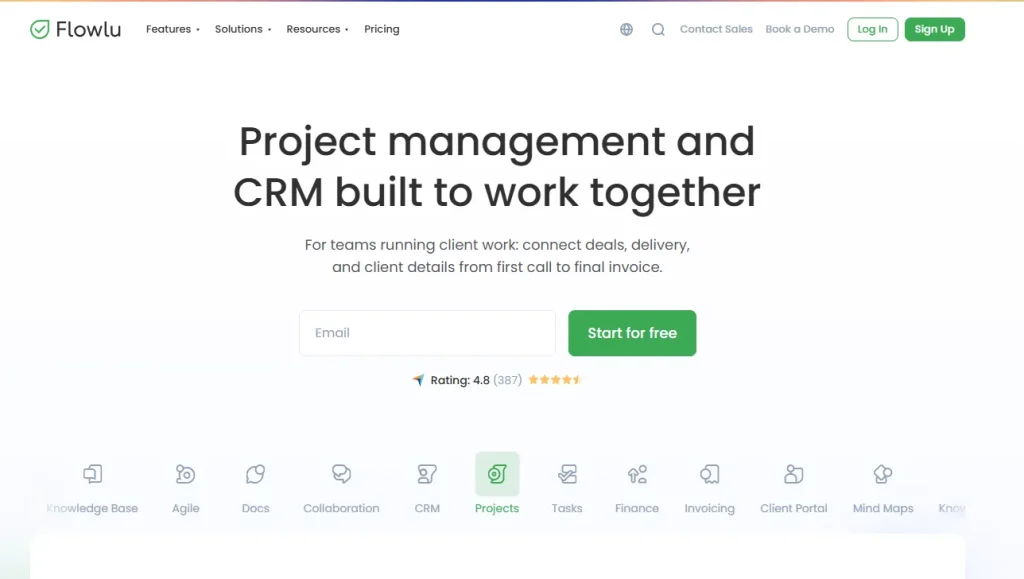
Flowlu is an all-in-one business management platform covering CRM, project management, invoicing, time tracking, and financial reporting. It offers more features per dollar than any other tool on this list. Invoices in Flowlu auto-populate with client data, project milestones, and billed time; no re-entry required. Flowlu includes more features than most service businesses need, but the navigation takes time to learn.
Key Features
- Native CRM, project management, invoicing, and time tracking in one system
- Time-to-invoice billing: tracked hours populate invoices automatically
- Unlimited invoices on all paid plans
- Multi-currency with per-client tax rules
- White-label client portal
- Recurring billing and subscription management
- Financial reporting and cash flow overview
Pros & Cons
| Pros | Cons |
| Most features per dollar on this list | Interface is visually dense with a learning curve |
| Time tracking connects directly to invoice creation | Mobile app lags behind desktop in quality |
| Unlimited invoices on paid plans with no caps | More features than needed for simple CRM and invoicing |
| Multi-currency handles international clients | Not as polished or fast to learn as Taskip or HoneyBook |
Best For
Budget-conscious teams of 3 to 10 who need deep feature coverage, including time tracking, and are comfortable investing time in setup.
Pricing
- Free: $0 (2 users, 100 contacts, 1 pipeline)
- Essential: $12/user/month ($9 billed yearly)
- Advanced: $22/user/month ($17 billed yearly)
User Review
G2 rating 4.7 out of 5
Positive Review
I am delighted with the functionality of this system, how they managed to harmoniously include many functions in one system. Also – Flowlu is constantly making updates due to which the system acquires a perfect look. Thank you! I have studied more than 15 of the most popular CRM systems And if in short, Clickup is really overloaded with functionality and too complicated, Asana lacks a lot of things… The rest are narrowly focused on different industries. But Flowlu is a universal system with great prospects. If they had shares, I would buy!
Negative Review
old school design, no mac os app, no dark mode
5. OneSuite: Best Clean-UX CRM with Invoicing Software For Agencies
OneSuite is an agency management platform built for freelancers and small agencies. CRM, project management, and invoicing share a single database, with client data flowing automatically from lead to invoice.
For invoice generation, client details are auto-populated from CRM records and have solid invoicing features. But as it is a new tool, its third-party integration library and community support resources are smaller.
Key Features
- Native CRM, project management, and invoicing in one system
- Automatic data flow from lead to invoice
- Branded invoices with Stripe and PayPal payment acceptance
- Client portal with invoice visibility and project updates
- Built-in e-signatures
- Recurring billing
Pros & Cons
| Pros | Cons |
| Clean, fast interface with a short learning curve | No multi-currency support |
| Low per-user price | Newer platform: smaller integration library and community |
| Strong client portal included on all plans | Fewer blog resources and case studies than legacy tools |
| Setup takes less time than Dubsado or Flowlu |
Best For
Small agencies of 2 to 10 people want clean UX, predictable pricing, and a native CRM with invoicing software at a low per-user price.
Pricing
- Pro: $9 per user/month, or $7 per user/month billed yearly. 14-day free trial.
User Review
G2 review 4.8 out of 5
Positive OneSuite Review
“The invoicing and leads management features have greatly enhanced the functionality of the OneSuite software, making it indispensable for our daily business operations. These tools have simplified our financial processes and improved our ability to track and convert leads effectively.”
Negative OneSuite Review
“For the task there is no option to track the time. it has to be entered manually. They have an extention to import leads but time checkin, checkout a important function is missing.”
6. Bonsai: Best Simple CRM with Invoicing Software for Freelancers
Bonsai (also called Hello Bonsai) is a freelance business management platform. It combines CRM, proposals, contracts, time tracking, and invoicing in one tool designed for solo operators. So, if you are working with a big team or running an agency, Bonsai is not the ideal choice for you. It supports only up to three members. Moreover, it has no visual sales pipeline and offers limited CRM customisation compared to Dubsado or HoneyBook.
For a direct comparison between Bonsai and HoneyBook, the Bonsai vs HoneyBook breakdown covers which wins for different freelancer types. If Bonsai is not the right fit, the Bonsai alternatives guide lists 15 options at similar or lower price points.
Key Features
- Native invoicing tied to contracts and project milestones
- Time tracking with direct-to-invoice billing
- Proposal and contract templates for common freelance services
- Automated payment reminders
- Expense tracking with basic financial reporting
- Client contact management with communication history
Pros & Cons
| Pros | Cons |
| Fastest setup on this list: most freelancers are live in under an hour | Built for solo use only: not suitable for teams |
| Minimal interface with no learning curve | No visual sales pipeline or complex deal stages |
| Time tracking connects directly to invoice generation | Limited customisation compared to Dubsado or HoneyBook |
| Solid proposal-to-invoice flow for service freelancers | No white-label option for client portals |
Best For
Freelancers and independent contractors who want the fastest setup and the simplest possible CRM with invoicing software for solo use.
Pricing
- Basic: $15/user/month (no invoicing)
- Essentials: $25/user/month, the first plan with invoicing
- Premium: $39/user/month
- Elite: $59/user/month
Billed yearly: $9, $19, $29 and $49. 7-day free trial.
User Review
G2 rating 4.3 out of 5
Positive Review
Honestly, for the price I’m paying, the product is solid. I’ve had my gripes with their support team and some of the UI changes they’ve made over the past year, but overall, they’re addressing a critical business function that’s remained affordable even as my team has expanded. The ability to track my time and have the hours automatically populate into an invoice has been incredibly time-saving. Offering online payments while passing on fees to clients who choose that option has been a great feature as well. Overall, the templates and integrations have made the product very enjoyable to use, and it’s become so essential that I actually take the time to reach out to customer support and provide feedback when things aren’t working correctly.
Negative Review
Customer support can be difficult to work with, whether it’s their staff not knowing how some features work, providing incorrect responses, or giving canned answers for the wrong issue. I feel like they’ve improved over the past year, but it’s still a challenge. The chat experience still feels like you’re just a ticket in their queue, not like you’re having a real conversation with a human.
7. Monday CRM: Best for Teams Already Inside the Monday Ecosystem
Monday CRM is a sales-focused CRM built on the monday.com work management platform. It handles contact management, pipeline visualization, and automation. Invoicing is available through the built-in Quotes and Invoices app. And the best thing is that teams already using monday.com for project management can add basic CRM with invoicing software functionality without a platform migration or a new vendor.
Key Features
- Visual Kanban and list pipeline with drag-and-drop stages
- Quotes and Invoices app for basic billing inside the platform
- CRM workflow automations triggered by pipeline stage changes
- Email tracking and centralized communication log
- 200+ integrations, including Stripe, Gmail, Slack, and Zoom
- Reporting dashboards with deal value and pipeline velocity
Pros & Cons
| Pros | Cons |
| Best visual pipeline UX on this list | Invoicing is app-based: not truly native |
| Strong automations for deal-stage workflows | Per-seat pricing: $28/seat/month at Pro tier (yearly), 3-seat minimum |
| 200+ integrations cover most existing stacks | No dedicated client portal on any plan |
| Familiar interface if already using monday.com | No recurring billing or multi-currency |
Best For
Sales teams already using monday.com for project work who need a light CRM with invoicing software and want to avoid switching platforms.
Pricing
- Basic: $12/seat/month
- Standard: $17/seat/month
- Pro: $28/seat/month, all billed yearly ($18 / $25 / $41 monthly), with a 3-seat minimum. Quotes & Invoices is on every plan, capped at 20, 50 and 250 documents a month.
User Review
G2 rating 4.7 out of 5
Positive Review
I like that it keeps all my projects organized. I can categorize them by start, completed, and in progress. It allows for communication between those involved in the project.
Negative Review
Calendar views are limiting. I just want to see the calendar for the month but I don’t have that option.
8. Zoho CRM Plus: Best for Zoho Ecosystem Teams
Zoho CRM Plus is a bundled suite that includes Zoho CRM, Zoho Invoice, Zoho Projects, Zoho Desk, and several other Zoho apps. It covers the full sales-to-billing workflow for teams already using multiple Zoho products.
Zoho CRM and Zoho Invoice share data. When a deal is closed, the CRM can trigger an invoice in Zoho Invoice without re-entering client details.
However, the drawback is that Zoho CRM and Zoho Invoice are two separate applications with different interfaces. Users switch between apps to manage billing, which breaks the seamless workflow that a native CRM with invoicing software provides. Per-user pricing makes it one of the most expensive options on this list for teams.
Key Features
- Zoho CRM with customizable pipelines and AI-powered deal scoring (Zia)
- Zoho Invoice for professional invoicing, recurring billing, and payment tracking
- Workflow automation across CRM and billing modules
- Multi-currency with per-region tax rules
- Deep integration across Zoho Books, Projects, Desk, and Campaigns
- 800+ third-party integrations via Zoho Marketplace
Pros & Cons
| Pros | Cons |
| Strong multi-currency and international billing | CRM and Invoice are separate apps: requires switching interfaces |
| Powerful if already embedded in the Zoho stack | Complex UI with a steep learning curve across apps |
| AI deal scoring included in mid-tier plans | Support quality is inconsistent on lower-tier plans |
| 800+ integrations cover almost any tool stack | per-user pricing |
Pricing
- Zoho CRM Standard: $20/user/month ($14 yearly), no native invoices
- Zoho CRM Professional: $35/user/month ($23 yearly), adds native quotes and invoices
- Zoho CRM Plus (full suite including Zoho Invoice): check zoho.com for your region
User Review
G2 rating 4.7 out of 5
Positive Reviews
Well, what I like most about Zoho Invoice is how easy it is to use. It is very intuitive, very easy to set up from the first moment, and they are constantly updating and adding some improvements that make my work easier.
Negative Reviews
Somehow, I’m disappointed with the GST column, as it takes a lot of time to push GST records. There’s also an issue with customer limitations, and I really wish they would increase the number of customers allowed in the free plan.
We created a live account on each platform and ran the same test: import 15 sample clients, build one sales pipeline stage, and send a branded invoice with a payment link, timing each step from signup to sent invoice.
We weighted three things equally:
– How native the invoicing felt (versus bolted-on)
– How fast we could get to a sent invoice with no tutorials
– Whether pricing was transparent without a sales call
Where a tool required a demo call to see pricing, we noted that as a mark against it.
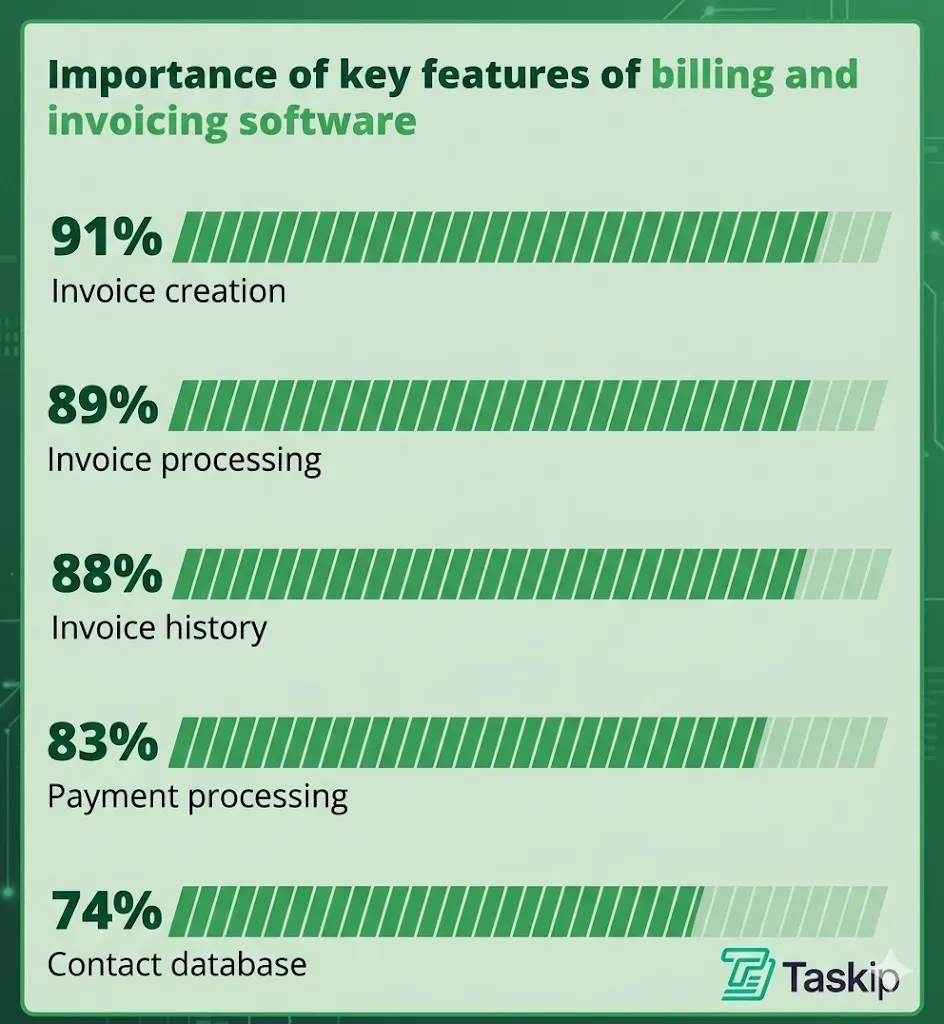
What to Look for in CRM with Invoicing Software?
Here are the features that matter most, and what to check on each one before you commit.
| Must-have CRM features | Must-have invoicing features |
| Contact and lead management | Invoice creation and custom templates |
| Sales pipeline tracking | Invoice automation |
| Task and follow-up system | Payment tracking |
| Activity tracking | Payment gateway integration |
| Basic automation | Automated payment reminders |
| Recurring billing support | |
| Client payment history |
1. True Native Invoicing
The invoicing module had to be part of the core product. Not a Zapier workflow. Not a PandaDoc add-on. Not an API connection to QuickBooks. Third-party billing integrations break, go out of sync, and add subscription costs you were not expecting. A genuine CRM with invoicing software bills clients from the same system it uses to track them.
The tradeoff with native invoicing is flexibility: if you’re already deeply invested in QuickBooks or Xero for accounting, a native-invoicing tool like Taskip means an extra sync step rather than a direct integration. For teams starting fresh, that tradeoff is worth it for the reliability; for teams with an entrenched accounting stack, weigh it against the switching cost.
2. Centralized Data Management
When you enter a client’s data, it should appear everywhere: in proposals, invoices, contracts, and project records, without anyone copying and pasting. When CRM and invoicing share a single database, all client details, deal history, and payment records live together. This eliminates the tool-switching and manual transfers that cause billing errors in the first place.
In Taskip, your sales pipeline, project work, and billing are all connected. You can track a client from the first interaction to final payment in one dashboard, improving visibility and reducing operational gaps.
3. Invoice Customization, Branding, and Templates
Your invoice is a client-facing document. It should look like it came from your business, not from whichever software you subscribed to. The minimum bar: logo upload, at least one colour option, a digital signature field, tax field control, and two or more templates. Tools that locked branding behind expensive tiers, or produced visibly generic output regardless of plan, were marked down.
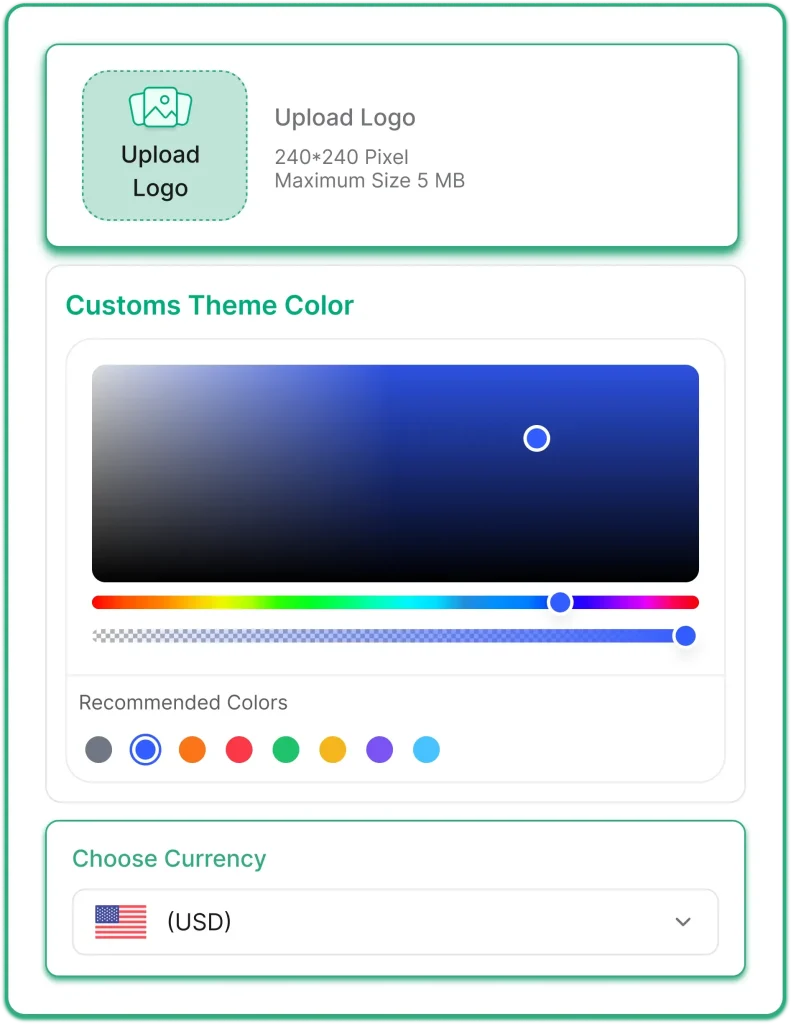
Image: Customizable Invoice In Taskip
Taskip supports fully branded invoice templates with custom logos, brand colours, digital signatures, and multiple template designs. Every invoice you send looks consistent and aligned with your business identity, without any manual design work per client.
4. Ease Of Use
Speed-to-first-invoice matters. A tool your team avoids setting up is a tool you wasted money on. We timed each platform from a blank account to a sent invoice, no tutorials, no help articles.
| Tool | Time to first invoice | Setup difficulty |
| Taskip | Under 30 minutes | Low |
| Bonsai | Under 1 hour | Very low |
| HoneyBook | Under 1 hour | Low |
| OneSuite | Under 1 hour | Low |
| Flowlu | 2 to 4 hours | Medium |
| monday CRM | 1 to 2 hours | Low to medium |
| Zoho CRM Plus | Half a day to full day | High |
| Dubsado | 2 to 3 days | High |
Invoice creation should be fast and directly tied to your workflow. CRM and invoicing software lets you generate invoices using existing client or project data, reducing repetitive input.
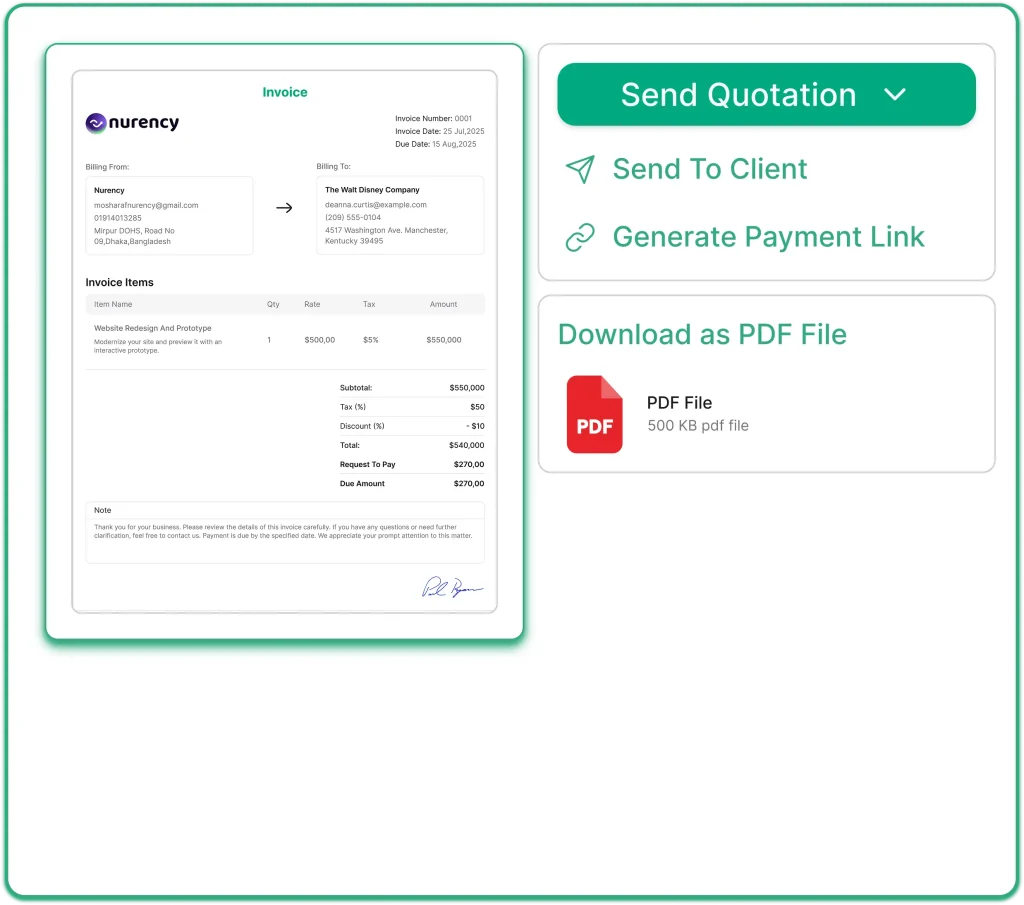
Image: Taskip Invoice Creation
With Taskip, you can create invoices within the same system where you manage clients and tasks. You can also preview invoices before sending, download them as PDF, print, or share via email or payment link – all from one screen.
Once sent, you can track invoice status, such as sent, pending, or paid, giving you a clear view of outstanding payments without relying on separate tools.
5. Built-in Tax Handling
Managing taxes manually increases the risk of calculation errors and compliance issues. CRM and invoicing tools typically allow you to add tax rates, apply them to invoices, and adjust totals as needed.
This ensures consistency across invoices and helps maintain accurate billing without needing external calculations or spreadsheets.
6. Easy Integrations with Payment Tools
A payment link inside the invoice itself is the difference between getting paid in 2 days and getting paid in 2 weeks. Clients should be able to click a button and pay by card or bank transfer without leaving the invoice or navigating to a separate portal. Once paid, the status should update automatically in the CRM.
With Taskip, clients pay online via credit card, debit card, or bank transfer directly from the invoice link. Payment is automatically marked as received in the dashboard, so you are not manually reconciling transactions. For a technical reference on how invoicing and payment processing connect, the Stripe invoicing documentation covers the full flow. If you bill internationally, confirm the tool supports multi-currency: Taskip, Flowlu, Bonsai and Zoho CRM do. HoneyBook and Dubsado bill in one account currency, and monday CRM sets the currency per document.
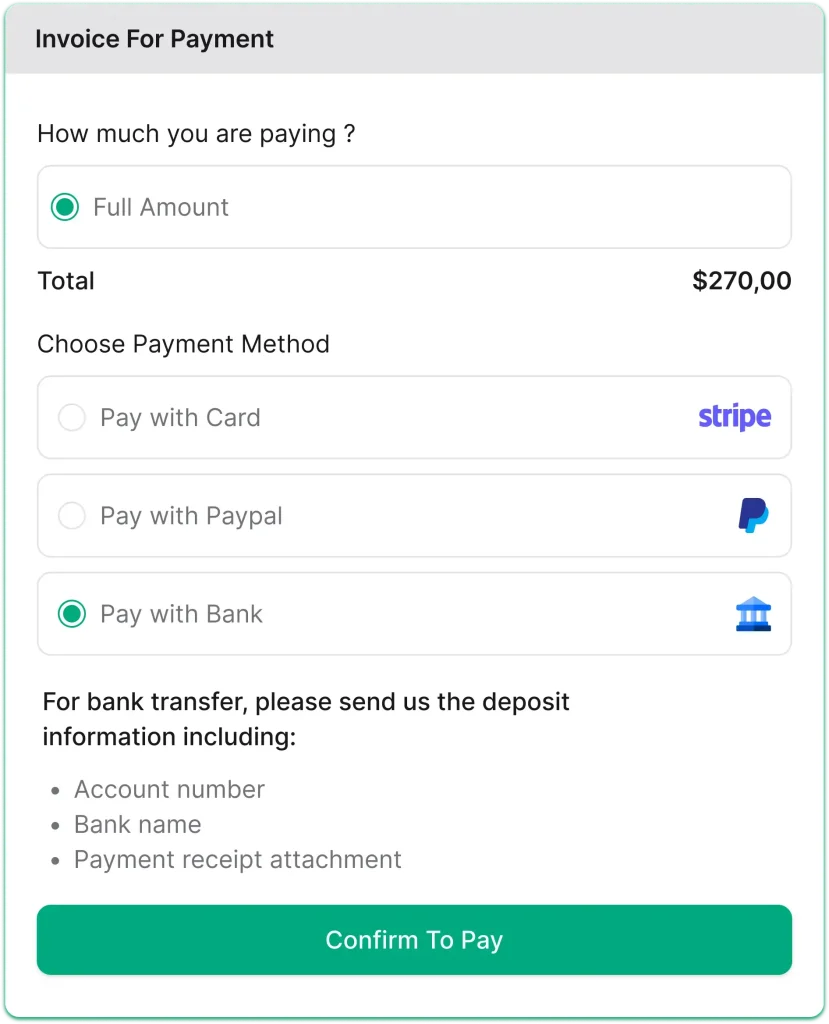
Image: Paying Bills With Taksip
7. Automation, Recurring Billing, and Reporting
Agencies billing 15 or 20 retainer clients monthly cannot afford to create invoices manually each cycle. Recurring billing, payment reminders, and retainer management need to run without manual input. Beyond that, your dashboard should show you total revenue, outstanding invoices, and payment trends at a glance, so you are not opening a separate spreadsheet to understand your own cash flow. If you are still billing from a spreadsheet, our free agency billing template is a cleaner starting point.
Taskip covers both sides: automated recurring invoices on your billing schedule, plus a dashboard showing total sales, revenue collected, recent invoices, and team performance in one view. Below is how each platform stacks up on automation specifically.
| Feature | Taskip | HoneyBook | Dubsado | Flowlu | OneSuite | Bonsai | monday CRM | Zoho |
| Recurring invoices | Yes | Yes | Yes | Yes | Yes | Yes | No | Yes |
| Automated reminders | Yes | Yes | Yes | Yes | Yes | Yes | No | Yes |
| Late fee handling | No | Yes | No | No | No | Yes | No | No |
| Milestone-based billing | Partial | No | Yes | Yes | Partial | Partial | No | Partial |
| Retainer management | Yes | No | Yes | Yes | Yes | No | No | Yes |
HoneyBook and Bonsai can add late fees to overdue invoices automatically. If billing by the hour is a regular part of your workflow, Flowlu and Bonsai handle time-tracking-to-invoice natively. Most others on this list do not.
Invoicing Features Compared
| Tool | Recurring invoices | Online payment on the invoice | Tax rates | Multi-currency | Quote to invoice |
|---|---|---|---|---|---|
| Taskip | Yes | Yes (Stripe, PayPal and more) | Yes | Yes, 100+ currencies | Yes, one click |
| HoneyBook | Yes | Yes (card, ACH, Apple Pay, Google Pay) | Yes | No, one account currency | Limited: proposal includes payment |
| Dubsado | Yes, with autopay | Yes (Stripe, PayPal, Square) | Yes | No, one account currency | Limited: invoice from completed proposal |
| Flowlu | Yes, Advanced plan and up | Yes (Stripe, PayPal) | Yes | Yes, Advanced plan and up | Yes, one click |
| OneSuite | Yes | Yes (Stripe, PayPal and more) | Yes | Check with OneSuite | Yes, as a draft invoice |
| Bonsai | Yes | Yes | Yes | Yes, per invoice | Not confirmed |
| monday CRM | Not confirmed | Limited: link to an external payment page | Yes | Limited: per document | Not confirmed |
| Zoho CRM | Via Zoho Invoice or a marketplace app | Via Zoho Invoice | Via Zoho Invoice | Yes | Yes, Professional plan and up |
Checked on 22 October 2026 on each vendor’s feature pages and help centre.
Which Tool Should You Actually Pick?
If you’re a solo freelancer with simple billing needs, go with Bonsai or HoneyBook. Both get you from signup to a sent invoice fastest, and neither buries you in CRM features you won’t use as a one-person operation.
If you’re a growing agency that needs pipeline tracking and billing in the same place, Taskip or OneSuite are the better fit. They offer native invoicing without giving up CRM depth, so you’re not bolting a billing tool onto a separate CRM.
If you’re already deep in the Zoho ecosystem or need heavy customization, Zoho CRM Plus is worth the longer setup. The integration with tools you already use outweighs the extra onboarding time.
If your workflow is automation-heavy and contract-first, Dubsado stands out for invoices that trigger automatically from contracts, forms and workflow stages. If chasing overdue payments is your main headache, HoneyBook and Bonsai can add late fees automatically.
Who Uses CRM With Invoicing Software?
CRM and invoicing software is used by businesses and professionals who manage clients and need to handle both relationships and payments in one system. The users include:
- Freelancers & Solopreneurs: They prefer a combined CRM and invoicing solution to manage clients, send invoices, and track payments easily
- Agencies: As agencies deal with multiple clients, a CRM + invoicing software allows them to manage clients, projects, and billing workflows in a single tool.
- Consultants: They use this software to manage proposals, contracts, and client invoicing in one place.
- Advertising & Media Agencies: Managing ad spend and media placements requires tight financial control. So, using CRM + invoicing software, they coordinate campaigns, client approvals, and billing across multiple projects.
- Small Businesses: Small businesses organize sales pipelines and automate billing with CRM and invoicing software.
- Service-based Companies: They use this to connect client work with fast and accurate invoicing.
Best CRM With Invoicing for Small Business
The best invoice system for a small business is one that’s free or cheap to start, doesn’t charge for every new team member, and sends a branded invoice with a payment link on day one. These five fit:
| Tool | Best for | Starting price with invoicing | Free plan |
|---|---|---|---|
| Taskip | Small agencies and service teams that want CRM, projects and invoicing together | $12/month flat; $29/month for up to 10 users | Yes |
| Flowlu | Budget teams that also track time | $12/user/month ($9 yearly) | Yes, 2 users |
| HoneyBook | Solo creatives in the US, Canada, UK or Australia | $36/month ($29 yearly) | No, 30-day trial |
| Bonsai | Solo freelancers billing by the hour | $25/user/month ($19 yearly) | No, 7-day trial |
| Zoho CRM | Businesses already using Zoho apps | $35/user/month ($23 yearly), Professional plan | CRM free for 3 users, without invoices |
Prices checked on 22 October 2026.
For most small businesses with a team, Taskip is the strongest fit: flat pricing means adding people doesn’t raise the bill, and the free plan lets you send your first invoices before paying anything. If you only need the occasional invoice, our free invoice generator does the job without an account.
The Bottom Line
Choosing a CRM with native invoicing isn’t just about billing; it’s about eliminating gaps in your workflow. A unified system reduces manual work, speeds up payments, and creates a more seamless client experience.
Taskip stands out by connecting the full lifecycle from lead management to invoicing and post-sale handling in one platform. Instead of juggling multiple tools, you can manage clients, services, and payments in a single workflow.
If you want to reduce tool sprawl and streamline your client-to-cash process, Taskip is one of the strongest CRM and invoicing solutions!
FAQs on CRM & Invoicing Software
Who Uses CRM & Invoicing Software?
CRM and invoicing software is used by freelancers, agencies, consultants, small businesses, and service-based companies that manage clients and need to handle billing in one system.
What’s the difference between CRM with native invoicing and using separate tools?
A CRM with native invoicing keeps client data, deals, and billing in one place, while separate tools require switching systems, manual data entry, and increase the risk of delays and errors.
Can I use my existing Stripe or PayPal account with these platforms?
Yes, most CRM and invoicing tools support Stripe, PayPal, or bank transfer integrations so clients can pay directly through invoices.
Do I really need CRM features if I just want to invoice clients?
If you send occasional invoices, a basic invoicing tool is enough, but if you manage multiple clients or projects, CRM features help you stay organized and avoid missed follow-ups.
What happens to my data if I switch platforms?
Most tools allow you to export your data, such as clients and invoices, but migration options vary, so it is important to check import and export features before switching.
What is an invoice in CRM?
An invoice in a CRM is a bill created directly from client or deal data, including services, pricing, and payment details, all linked to the customer record.
What is the best free invoice app?
Free invoice apps exist, but are usually limited. For a one-off invoice, a free invoice template or our free invoice generator is enough. If you need CRM with invoicing, Taskip has a free plan, while automation and integrations usually come with paid plans.
Does CRM include invoicing?
Some CRMs include built-in invoicing, while others require integrations with external billing tools.
What are the benefits of using invoice and CRM software together?
Using invoice and CRM software together reduces manual work, improves accuracy, speeds up billing, and gives a complete view of client activity and payments in one place.
Does CRM with invoicing help improve payment speed?
Yes, CRM with invoicing helps improve payment speed by allowing businesses to send invoices immediately after a deal or project milestone without delays.
Which is the best CRM with invoicing for small businesses?
The best CRM with invoicing for small businesses depends on needs, but all-in-one platforms like Taskip are a strong choice for managing clients, projects, and payments in one system.
Can I integrate invoicing into my existing CRM?
Yes, many CRMs allow invoicing integrations, but native invoicing is usually more efficient because it avoids switching between multiple tools.