Three years into running his digital marketing agency, Marcus hit what many founders call the operational ceiling. Every time he stepped away, something broke. A missed client report, a wrong ad launch, or a new hire taking weeks to figure out basic tasks. The agency had grown to 11 people, but still ran like a founder-dependent operation.
The problem was not the team. It was that all knowledge lived in people’s heads. This is the tribal knowledge trap, and it is a major reason agencies stall between $500K and $2M in revenue. Without documented processes, every hire is a risk, and every absence creates disruption.
Agency SOPs (Standard Operating Procedures) solve this by turning scattered knowledge into repeatable systems that allow agencies to scale without depending on the founder.
- A practical framework for building agency SOPs from scratch
- Five free templates you can copy today
- Create SOPs with AI
- SOPs for different agency types
Table of Contents
Creating SOPs as a Freelancer or Solo Operator?
As a freelancer or solo agency owner, you create SOPs the same way larger agencies do, just scoped down to one person: document the 3-5 tasks you repeat every week (client onboarding, invoicing, weekly reporting, content delivery), write each as a numbered checklist with the tools and exact steps you use, and store it somewhere you’ll actually reopen (a pinned Notion page or Google Doc, not a random file).
The difference from an agency SOP: you’re writing it for future-you and for the first VA or subcontractor you bring on, not for a team. Keep each one under one page. Use it as your own onboarding doc when you hire your first hire, and as the thing you hand a client-facing VA on day one.
A freelancer SOP needs only four things:
- The trigger — when this task happens (e.g. “new client signs contract”)
- The steps — numbered, one action per line
- The tools — the exact apps/links you use, named
- The output — what “done” looks like
Start with your onboarding process. It’s the one task every freelancer repeats and the one most likely to be handed to someone else first.
What Are Agency SOPs? (And Why They Matter)
Agency SOPs (Standard Operating Procedures) are step-by-step written instructions that explain how recurring work in an agency should be done in a consistent way.
– The dictionary version from TechTarget
But here’s where most agencies go wrong: they treat SOPs as a compliance exercise. They write a 12-page document nobody reads, bury it in a shared drive folder called “Internal Docs,” and then wonder why nothing changes.
Good agency SOPs are short, specific, and built to be used, not filed away. The best ones fit on one or two pages and answer exactly three questions:
- What needs to happen?
- Who does each step?
- What does done look like?
SOP vs. Process vs. Checklist — What’s the Difference?
A process is the big-picture workflow that explains how something is done from start to finish, such as how you onboard a client or launch a campaign.
An SOP (Standard Operating Procedure) is the detailed step-by-step guide that shows exactly how to execute each part of that process. It removes ambiguity and tells the team what to do, when to do it, and how to do it.
A checklist is a simple verification tool used to confirm that each step of the SOP has been completed correctly. It focuses on validation, not instruction.
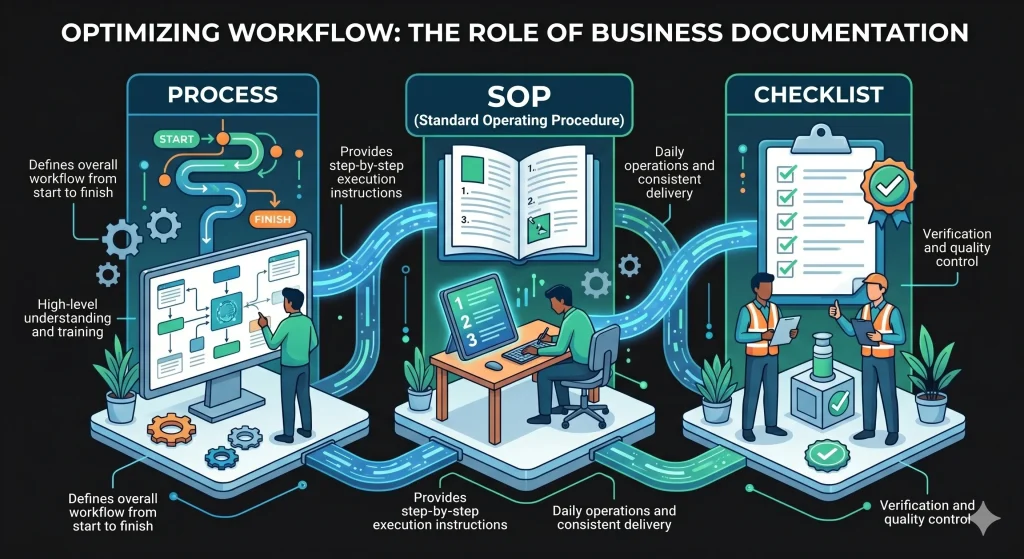
In agency operations, all three work together, but SOPs are the core system because they combine clarity and execution. When checklists are embedded inside SOPs, teams get both guidance and accountability in a single, usable document.
| Type | Purpose | Best Used For |
| Process | Defines the overall workflow from start to finish | High-level understanding and training |
| SOP (Standard Operating Procedure) | Provides step-by-step execution instructions | Daily operations and consistent delivery |
| Checklist | Confirms tasks are completed correctly | Verification and quality control |
Why Agency SOPs Are Non-Negotiable for Scaling
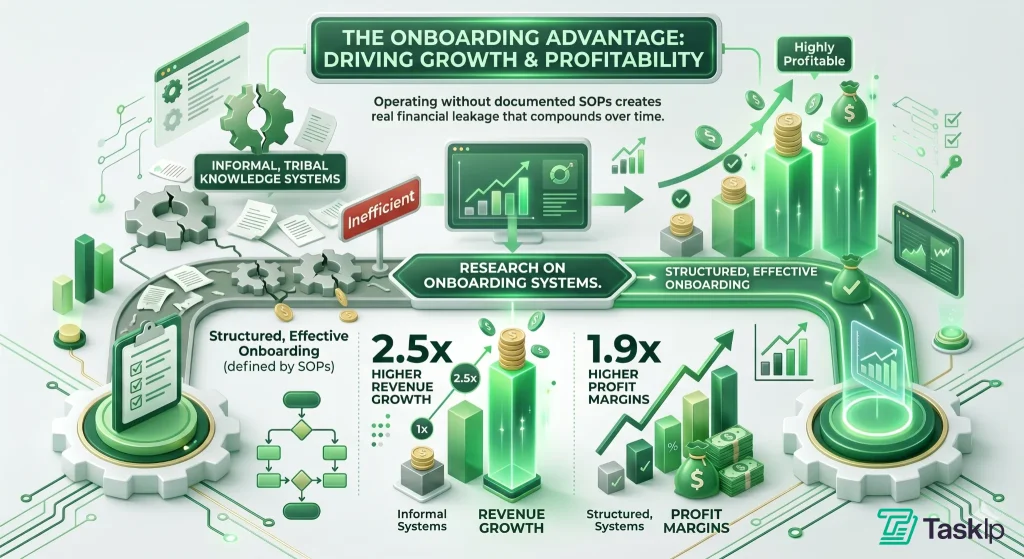
A study published in the National Library of Medicine found that companies with structured, effective onboarding achieve 2.5x higher revenue growth and 1.9x higher profit margins compared to organizations that rely on informal, tribal knowledge-based systems.
Here’s what well-built agency SOPs actually do in practice:
- Cut onboarding time in half: When a new account manager joins, instead of shadowing for three weeks and hoping they absorb the right habits, they follow a documented playbook. One content agency reported cutting new hire ramp-up from six weeks to three after documenting their top 10 workflows.
— Connor McAuley, Founder, Move at Pace
- Lower operational errors: Clear step-by-step instructions reduce mistakes and missed details in execution.
- Make client transitions seamless: When your best project manager leaves — and eventually they will — a solid SOP means the next person can pick up where they left off without the client noticing a gap in service quality.
- Free up founder time: Every process that lives in your head is a process that requires you. Document it, and you create a system that runs without you in the room.
- Enable quality control at scale: As your agency grows, you can’t personally review every deliverable. SOPs with QA checkpoints let you delegate with confidence.
- Increase agency valuation: If you ever want to sell your agency or bring on a partner, documented systems are one of the most concrete ways to demonstrate business value beyond the founder.
— Connor McAuley, Founder, Move at Pace
What Are the Essential Components of a Complete SOP Template?
A good agency SOP should be structured in a way that makes execution fast, clear, and consistent. Team members should be able to open the document, understand the workflow immediately, and complete the task without unnecessary clarification.
While SOP formats vary between agencies, the most effective SOPs usually include the following sections:
1. Title and Version Control
Without version control, teams can easily end up using outdated procedures that no longer reflect current workflows or tools. This is especially risky in fast-moving agency environments where processes evolve frequently.
The SOP title should clearly describe the process, along with a version number and last updated date.
Weak example: Client Onboarding
Strong example: SOP: B2B Client Onboarding Process | v2.1 | Last Updated: Oct 2026
This format ensures clarity, traceability, and easy document management across teams.
2. Purpose (Why This SOP Exists)
The purpose section explains why the process matters from a business perspective. It helps team members understand the impact of their actions, not just the steps they are following. This should be a single, clear statement focused on the outcome.
Example:
“This SOP standardizes the client onboarding process to ensure every new client receives the same setup experience, communication flow, and project preparation.”
When people understand the “why,” they execute more carefully and consistently.
3. Scope (When to Use It)
The scope defines when the SOP should be used and who it applies to. Without scope, teams may apply processes incorrectly or skip them entirely. A proper scope section clarifies which projects the SOP applies to, which team members are responsible, and when the workflow should be triggered.
Example:
“Use this SOP for all new retainer clients after contract signing and initial payment confirmation.”
4. Tools and Resources Required
Before execution begins, list everything needed to complete the process successfully. Providing these resources upfront prevents delays during execution. Typical items may include:
- Software platforms
- Login access or permissions
- Templates or documents
- Shared folders or dashboards
When everything is available upfront, workflows move faster and more smoothly.
In Practice: A reporting SOP may require Google Analytics access, the Looker Studio dashboard, a reporting template, and the client KPI sheet.
5. Step-by-Step Execution
This is the core of the SOP and should be written with maximum clarity and precision. Each step should represent one clear action and follow a logical sequence.
Strong SOPs use:
- action-driven verbs (Click, Open, Upload, Verify)
- short, direct instructions
- bold formatting for UI elements where needed
- screenshots for complex steps
If a step becomes too long, it should be broken into smaller sub-steps for better readability.
The goal is simple: a new team member should be able to complete the task without asking questions.
Comparison:
- Poor: “Prepare the onboarding setup.”
- Excellent: “Create a new client workspace inside the project management system and assign the onboarding template.”
Note: For complex workflows, screenshots and annotations should be added to reduce confusion.
6. Edge Cases & Notes
Real agency workflows rarely go exactly as planned. This section prepares the team for exceptions so they can continue working without needing constant managerial input. It should include common failure points and clear instructions for handling them.
Example:
“If the client does not have a Facebook Business Manager account, pause this SOP and send the ‘Account Setup Request’ template before proceeding.”
By documenting exceptions, you reduce dependency and keep workflows moving even when issues arise.
7. QA Checklist / Success Criteria
Every SOP should end with a clear definition of what “done” looks like. This ensures consistency in output and eliminates guesswork during final review.
A QA checklist should confirm that all critical steps were completed correctly.
Example:
- Welcome email sent to client
- Kickoff call scheduled and confirmed
- Project board created and assigned
- Tracking setup verified and active
This final checkpoint ensures quality control before the task is considered complete and handed off to the next stage.
How to Create SOPs For an Agency: Step-by-Step
Creating agency SOPs does not require shutting down operations for a month to write documentation. It requires a systematic approach to extracting knowledge from your top performers without slowing them down.
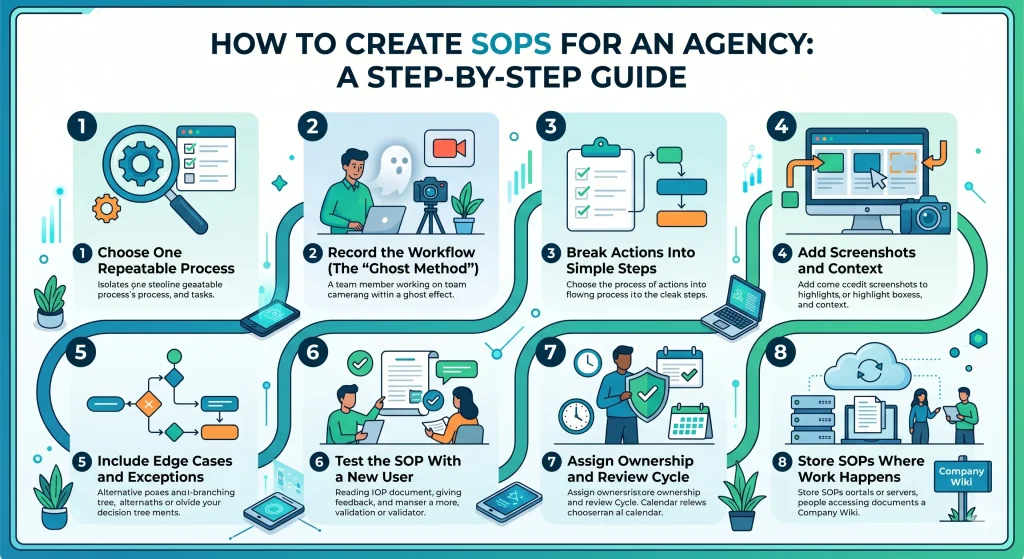
Here is the exact eight-step framework to document any agency workflow efficiently.
Step 1 — Choose One Repeatable Process
Do not attempt to document the entire agency at once. Start by identifying a single, high-friction task that consistently causes bottlenecks, requires heavy founder involvement, or has a high cost of failure.
- Avoid starting with highly creative tasks.
- Focus on technical, repeatable actions. Examples include setting up a new client in the CRM, generating the monthly performance report, or standardizing the deployment configuration for a new Digital Ocean server. Pick one and isolate it.
Step 2 — Record the Workflow (The “Ghost Method”)
The most inefficient way to write an SOP is to stare at a blank document and try to remember the steps. Instead, deploy the “Ghost Method.”
Have the resident expert execute the task exactly as they normally would. To capture the “hidden” steps that an expert usually takes for granted, you must record the process in real-time. You can assign a junior colleague to sit with them and write down every click, decision, and keyboard shortcut.
However, the absolute fastest way to do this is by recording your screen and using AI to transcribe it.
(Note: We break down the exact Loom + AI workflow and prompts to do this later in this guide.
Step 3 — Break Actions Into Simple Steps
Transcribe the recorded session into chronological, distinct steps. Every step must begin with a strong action verb. Do not combine multiple actions into a single bullet point.
Poor (Descriptive): “The next thing is to manage the app translations so they show up correctly for the user.”
Excellent (Action-Driven): “1. Navigate to the backend translation portal. 2. Locate the English source text in the code base. 3. Input the dynamic runtime translation.”
Step 4 — Add Screenshots and Context
Text leaves room for interpretation. Visuals eliminate it. For every critical click or complex interface, you must provide an annotated screenshot.
- Use a screen capture tool to take a snapshot of the interface.
- Draw a clear red box or arrow pointing to the exact button the user needs to click.
- Crop out unnecessary background noise to focus the reader’s eye purely on the action area.
Step 5 — Include Edge Cases and Exceptions
No process survives contact with reality 100% of the time. Dedicate a section of your SOP to “If/Then” troubleshooting scenarios so the executor does not have to halt their workflow to ask a manager for help.
- Identify the most common failure points.
- Example: If documenting client billing and project milestones, include a specific sub-section for: “What happens if the client’s bank delays the transfer?” Provide the exact follow-up protocol and email templates to use.
Step 6 — Test the SOP With a New User
An SOP is only functional if a non-expert can use it flawlessly to achieve the desired outcome.
- Hand the drafted SOP to a team member who has never performed the task.
- Watch them execute it without offering verbal help or guidance.
- Wherever they hesitate, ask a question, or click the wrong button, your SOP requires more detail or a clearer screenshot.
Step 7 — Assign Ownership and Review Cycle
Operational documentation degrades quickly as software platforms update their interfaces and agency strategies shift. An outdated SOP is worse than no SOP.
- Assign a specific, named team member as the “Owner” of the document.
- Establish a required review cycle (e.g., “Review every 6 months”). If an interface changes, the owner is strictly responsible for updating the steps and screenshots.
Step 8 — Store SOPs Where Work Happens
If an SOP is hidden in a deeply nested, disorganized folder structure, it will never be read. You must embed the documentation directly into the software tools your team uses every day.
- If the SOP covers generating proposals, handling contracts, or managing e-signatures, embed the link directly within your CRM template instructions.
- If the SOP is for a development sprint or a UI design review, embed the link directly into the ticket description.
Which Agency SOPs Should You Create First?
Most agencies make the mistake of documenting everything at once. This usually leads to unfinished SOP libraries that nobody uses.
A better approach is to start with the processes that are both frequent and high-impact. These are the workflows that directly affect client experience, revenue, and delivery quality.
The Frequency × Impact Framework
Plot your agency’s tasks on a grid based on two metrics:
- Frequency: How often does this task occur? (Daily, Weekly, Monthly, Rarely).
- Impact: What is the business cost if this task is executed poorly? (Lost revenue, client churn, security breach, minor annoyance).
The Prioritization Matrix
| Low Impact | High Impact | |
| High Frequency | Automate or Delegate (e.g., Social media posting, inbox triage) | START HERE (Core SOPs) (e.g., Client onboarding, reporting, billing) |
| Low Frequency | Ignore (Do Not Document) (e.g., Ordering office supplies, one-off favors) | Document Second (Risk Mitigation) (e.g., Annual tax prep, legal disputes) |
You must start building SOPs exclusively in the top-right quadrant: High Impact / High Frequency. These are the processes that drive your revenue and consume the majority of your team’s weekly bandwidth.
Core SOPs Every Agency Needs
Once you understand the Frequency × Impact Framework, the next step is execution. While every agency has unique quirks, the foundational operations are nearly identical across the industry.
Standardizing these nine core workflows will eliminate the vast majority of operational friction, allowing you to scale without breaking your delivery systems.
1. Client Onboarding & Offboarding
The start and end of a client relationship carry the highest operational risk. An onboarding SOP ensures every new client receives the same seamless setup, contract execution, and project preparation without requiring the founder to manage the process.
Conversely, an offboarding SOP is critical for security, ensuring all platform access is revoked, final invoices are cleared, and data is archived correctly when an engagement ends.
Need help mapping your onboarding workflow? See how to automate client onboarding in 6 simple steps→
2. Reporting
Agencies routinely waste dozens of hours manually pulling data for custom reports. A reporting SOP standardizes the exact metrics to include, where to pull them from, and the format for delivery. This ensures clients receive predictable, objective performance updates on a strict schedule, proving ROI without ad-hoc data requests.
3. Ad Campaign Setup
A single configuration error in an ad platform can waste thousands of dollars in client budget. An ad campaign setup SOP acts as a mandatory pre-flight checklist. It forces media buyers to verify naming conventions, budget limits, targeting parameters, and tracking pixels before any capital is deployed.
4. Content Approval Workflow
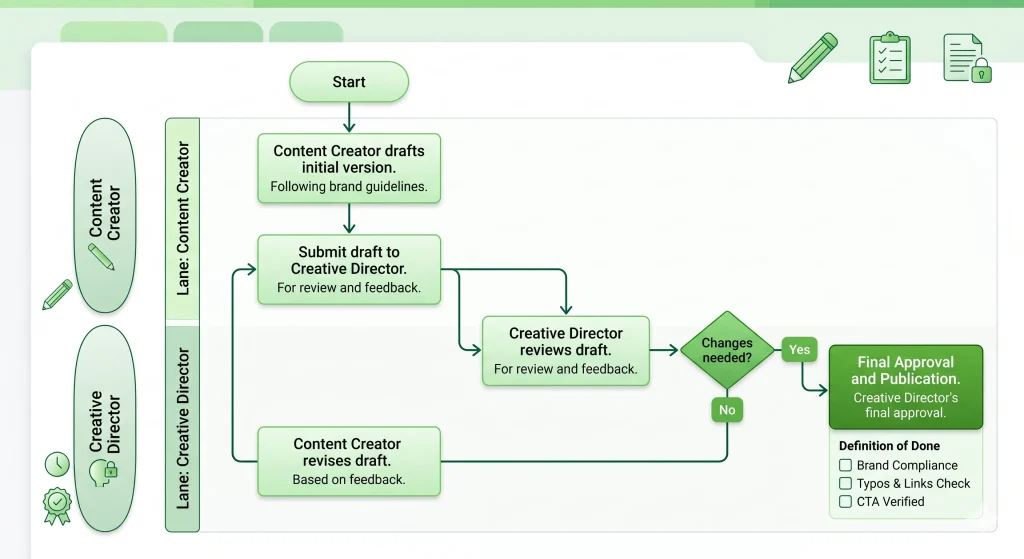
Deliverables often get stalled in endless email chains. This SOP defines exactly how creative assets are packaged and presented to the client, how feedback is consolidated into a single project management ticket, and the mandatory timeframe for explicit written sign-off. This keeps production schedules moving.
— Connor McAuley, Founder, Move at Pace
5. Billing & Invoicing
Cash flow dictates agency survival. A billing SOP removes the guesswork from revenue collection. It outlines precisely when invoices are generated, the automated follow-up sequence for failed or delayed payments, and how to update the CRM once revenue is secured in the bank.
6. Hiring & Onboarding (Internal)
Relying on tribal knowledge to train new hires guarantees a slow ramp-up period. An internal onboarding SOP ensures new employees are immediately provisioned with the correct software licenses, communication channels, and department-specific training materials. This drastically reduces their time-to-value and prevents managers from answering repetitive setup questions.
7. Revision Handling
Without a strict process, client feedback quickly mutates into scope creep. A revision handling SOP sets clear boundaries. It dictates how to log feedback efficiently, route it to the correct developers or designers, and when to officially push back on out-of-scope requests to protect agency profit margins.
8. Social Media Scheduling
Social media management involves high-frequency, repetitive actions that are prone to formatting errors. This SOP ensures strict adherence to naming conventions, correct account tagging, precise publishing times, and cross-platform formatting rules before anything is loaded into a scheduling tool.
9. Access & Tool Management
The daily “Who has the password for this?” scramble wastes time and creates massive security vulnerabilities. This SOP establishes a rigid protocol for securely storing credentials, sharing access via encrypted password managers, and strictly rotating API keys or passwords the moment an employee leaves the agency.
Free Agency SOP Templates (Copy & Use)
Below are the core systems and process templates every agency needs, ready to copy and customize.
Source: Snake Nation
Template 1: Client Onboarding SOP
Title: SOP: New Client Onboarding | v1.0 | Last Updated: [Date]
Purpose: To transition a signed client into an active project without founder involvement.
Scope: Trigger when the contract is signed, and the deposit is received. Ends when the kickoff call begins.
Tools: [PM Tool], [Cloud Storage], [Email Client], [Scheduling Tool]
Steps:
- Create the client folder in [Cloud Storage] using your master folder template. Rename it to [Client Name] – [Year].
- Add the client to [PM Tool] and set up their project workspace.
- Send the welcome email that includes what to expect next, the onboarding questionnaire link, and a link to book the kickoff call. Before sending the welcome email, use a project discovery questionnaire generator to prepare questions that capture the client’s requirements and expectations.
- Review questionnaire responses before the call. Note any gaps, risks, or points needing clarification.
- Run the kickoff call. Confirm goals, KPIs, communication cadence, and first deliverable deadline. Record the call.
- Send the post-kickoff summary email within 24 hours — agreed next steps, deadlines, and team contacts.
- Set up the reporting dashboard and verify that the data is pulling correctly before sharing with the client.
Edge Cases:
- If the client requests contract changes: pause the SOP and escalate to the Account Director. Do not approve changes independently.
- If the questionnaire is not returned within 48 hours, send one follow-up. If no response after a further 24 hours, call directly.
QA Checklist:
- Contract signed and stored
- Client workspace lives in [PM Tool]
- Kickoff call scheduled
- Reporting dashboard verified
Notes: If the client doesn’t respond to the questionnaire within 48 hours, escalate to the account director. Any scope changes discussed during kickoff must be confirmed in writing before the team proceeds.
Template 2: Weekly Client Reporting SOP
Title: SOP: Weekly Client Performance Report | v1.0 | Last Updated: [Date]
Purpose: To deliver consistent, accurate performance reports that prove ROI and stop clients from sending “any updates?” emails.
Scope: Trigger every [Day] at [Time] for all active retainer clients. Report sent by [agreed delivery time].
Tools: [Reporting Dashboard], [Email Client]
Steps:
- Open the client’s reporting dashboard. Set the date range to the previous 7 days (Monday–Sunday).
- Cross-reference the primary KPI against the source platform to confirm accuracy — do not trust the dashboard alone.
- Write three insights:
- What improved and why
- What underperformed
- What specific action are you taking next week to address it
- Open the [Weekly Update Email Template]. Paste the dashboard link and your three insights.
- Schedule the email to send at the agreed delivery time.
- Log the report as sent in [PM Tool] and save a copy to the client’s shared folder.
Edge Cases:
- If the dashboard connection breaks: screenshot data directly from the source platform, attach to the email, note the issue, and submit a ticket to restore the connection.
QA Checklist:
- Date range confirmed correct
- KPIs cross-referenced with the source platform
- Three insights written — no filler
- Report sent on time
Notes: If tracking data is missing or a platform is down, clearly mention it in the report. Never send placeholder data or unfinished notes.
Template 3: Content Approval SOP
Title: SOP: Client Content Review & Approval | v1.0 | Last Updated: [Date]
Purpose: To get the client’s sign-off on content without email back-and-forth, missed feedback, or publishing unapproved work.
Scope: Trigger when the internal team completes a draft asset. Ends when written approval is received.
Tools: [Design/Staging Tool], [PM Tool], [Email Client]
Steps:
- Review the asset against the original brief: tone, messaging, CTAs, and brand guidelines.
- Package all assets into a single review link or document. Do not send raw source files.
- Email the client with a clear 48-hour feedback deadline. Subject line: Approval Needed: [Asset Name] — Due [Date].
- Consolidate all client feedback into one numbered list inside the project ticket. Do not act on scattered messages; one consolidated list only.
- Assign revisions to the relevant team member with a clear deadline.
- Once revisions are complete, re-send for final sign-off. Do not publish without written approval.
Edge Cases:
- If the client requests changes outside the original scope, send the [Scope Management Email Template] before making any changes.
- Verbal approvals do not count. Always confirm in writing.
QA Checklist:
- Asset reviewed against the brief before sending
- Feedback consolidated into one list
- Written approval received
- Final asset moved to “Approved for Publish” folder
Template 4: Ad Campaign Launch SOP (Paid Ads)
Title: SOP: Ad Campaign Pre-Flight & Launch | v1.0 | Last Updated: [Date]
Purpose: To act as a strict pre-flight check — zero errors in budget, targeting, or tracking before spending client money.
Scope: Trigger after the client formally approves ad creatives and copy. Ends when the campaign is confirmed live and delivering.
Tools: [Ad Platform], [UTM Builder], [Tracking Verification Tool]
PRE-LAUNCH CHECKLIST
| Category | Details |
| Strategy & Budget | Campaign objective confirmed, budget and dates approved, KPIs documented |
| Creative Assets | Creatives approved, copy proofread, landing pages tested |
| Tracking & Measurement | Pixel/tag installed, UTM tracking added, test conversion verified |
| Targeting & Structure | Audience targeting reviewed, exclusions added, budget and bid strategy checked |
Steps:
- Build the campaign using the naming convention: [Client Code] – [Objective] – [Month/Year].
- Input the budget exactly as specified in the approved media plan. Double-check all optimization toggles.
- Upload approved creatives. Paste approved copy and headlines.
- Append UTM parameters to all destination URLs.
- Verify conversion tracking is firing correctly on the destination page before publishing.
- Request a peer review — a second team member must verify budget settings before you publish.
- Launch. Screenshot the campaign-active confirmation. Log the exact launch time.
- Monitor the first two hours: confirm delivery, tracking, and spend pacing.
- Send the client a launch confirmation email with preview links.
Edge Cases:
- If tracking is not firing: do not launch. Tag the technical lead immediately.
- For campaigns above [your threshold]: a second manager sign-off is required before launch.
QA Checklist:
- The naming convention was applied correctly
- Budget verified by a second person
- Tracking confirmed firing on the destination page
- The campaign is live and delivering
Template 5: New Hire Onboarding SOP
Title: SOP: New Hire Onboarding | v1.0 | Last Updated: [Date]
Purpose: To get every new team member productive and working independently within 5 business days.
Scope: Trigger when the employment agreement is signed. Ends when the Day 5 check-in is complete.
Tools: [Email Admin Tool], [Communication Tool], [PM Tool], [Password Manager]
Pre-Start — 3 Days Before:
- Create the company email address and activate the account.
- Add to [Communication Tool] and assign to relevant team channels.
- Set up [PM Tool] account and assign to active client workspaces.
- Provision role-specific credentials via [Password Manager]. Never share passwords via email.
- Send the welcome email with: Day 1 schedule, tool access instructions, and the top 5 SOPs to read in Week 1.
Day 1:
- Run a 30-minute welcome call: company mission, team structure, how communication works, and 30-day goals.
- Walk through core tools. Record this walkthrough for future hires.
Days 2–3:
- New hire shadows a senior team member for a full morning. Observation only — no solo tasks yet.
- New hire reads the top 5 role SOPs, attempts each on a test task, and notes questions for their manager.
Days 4–5:
- Assign the first solo task – low risk, clear brief, SOP attached, firm deadline. Check in at the midpoint.
- Run the end-of-week check-in: what worked, what was confusing, and goals for Week 2.
Edge Cases:
- If tool access is not ready on Day 1, escalate to ops on Day 0; a new hire should never sit without access on their first day.
- Contractors: use an abbreviated version, access provisioning, and first-task briefing only.
QA Checklist:
- All tool access confirmed before Day 1
- Welcome call completed
- First solo task assigned with SOP attached
- End-of-week check-in done and notes logged
Template 6: Client Offboarding SOP
Purpose: Close out a client relationship cleanly, protect deliverables and access, and leave the door open for referrals or return business.
Scope: Applies to every client engagement ending, whether by contract completion, non-renewal, or termination.
Tools & Resources: CRM, billing software, cloud storage, ad/analytics platforms, password manager.
Steps:
- Confirm end date and final deliverable in writing with the client.
- Send final invoice and confirm payment before revoking any access.
- Export and archive all client files, reports, and campaign data.
- Revoke team and client access to shared accounts (ad accounts, analytics, CMS, drive folders).
- Transfer ownership of any client-owned assets (domains, ad accounts, social pages) back to the client.
- Send an offboarding summary: what was delivered, final metrics, and handoff notes.
- Request a testimonial or referral within 7 days of offboarding.
- Update CRM status to “Closed” and tag the reason (churn, project end, non-renewal).
Edge Cases: Client disputes final invoice → escalate to account lead before revoking access. Client requests data after offboarding → keep exports for 90 days before deleting.
QA Checklist:
- Final payment received
- All access revoked
- Files archived
- Assets transferred
- Offboarding summary sent
- CRM updated
Template 7: Revision Handling SOP
Purpose: Standardize how client feedback and revision requests are logged, scoped, and turned around so revisions don’t derail timelines.
Scope: Applies to any deliverable under active client review (creative, copy, campaigns, reports).
Tools & Resources: Project management tool, shared feedback doc or annotation tool (e.g. Frame.io, Google Docs comments).
Steps:
- Log every revision request in the project tool the same day it’s received, don’t work from email/Slack alone.
- Categorize the request: in-scope (covered by contract) or out-of-scope (billable extra).
- Confirm turnaround time with the client based on your SLA (e.g. 2 business days for in-scope).
- Assign the revision to the original owner where possible for context continuity.
- Make the change and note exactly what was changed in the task.
- Re-share for client approval; do not mark “done” until the client confirms.
- If a third round of revisions is requested on the same asset, flag to the account lead.
Edge Cases: Client requests exceed contracted revision rounds → account lead quotes additional cost before work starts. Conflicting feedback from multiple client stakeholders → request one consolidated sign-off contact.
QA Checklist:
- Request logged same day
- In/out-of-scope confirmed
- Turnaround communicated
- Change documented
- Client sign-off received
Template 8: Social Media Scheduling SOP
Purpose: Keep social content publishing consistent, on-brand, and approved before it goes live.
Scope: Applies to all scheduled organic social posts across client or company accounts.
Tools & Resources: Scheduling platform (Buffer, Hootsuite, Later), content calendar, brand guidelines doc.
Steps:
- Pull the week’s content from the approved content calendar.
- Draft captions and select/crop assets to each platform’s spec (aspect ratio, character limit).
- Add UTM tracking links where relevant.
- Submit the batch for internal review against brand guidelines.
- Submit to client for approval if required by contract (minimum 48 hours before publish).
- Schedule approved posts in the platform tool.
- Spot-check the queue every Monday for the week ahead, confirm nothing is missing or duplicated.
- Log actual publish confirmation; flag any failed/skipped posts within 24 hours.
Edge Cases: Breaking news or brand crisis → pause all scheduled posts immediately, notify account lead. Platform algorithm/feature change → note in the SOP’s changelog, don’t wait for the quarterly review.
QA Checklist:
- Content pulled from calendar
- Specs correct per platform
- UTM added
- Internal review passed
- Client approval logged (if required)
- Queue spot-checked
Template 9: Access Management SOP
Purpose: Control who has access to which client and internal accounts, and remove access immediately when it’s no longer needed.
Scope: Applies to all client ad accounts, analytics, CMS, social pages, and shared drives; and all internal team accounts.
Tools & Resources: Password manager (1Password, LastPass), access request log, offboarding checklist.
Steps:
- New team member or contractor requests access via the access request log, not by asking individuals directly.
- Account lead approves the request and specifies exact scope (e.g. “Editor” not “Admin” unless justified).
- Access is granted through the password manager or platform’s own role system, never by sharing raw passwords in chat.
- Log the grant: who, what, when, approved by whom.
- Review all active access quarterly against current team/client roster.
- Revoke access same-day when a team member leaves, a contractor’s engagement ends, or a client offboards.
- Confirm revocation in the log within 24 hours.
Edge Cases: Someone needs emergency access outside business hours → account lead can approve verbally but must log it retroactively within 24 hours. Client insists on sharing raw admin credentials → document the exception and flag the security risk in writing.
QA Checklist:
- Request logged
- Scope approved
- Access granted via proper channel
- Grant logged
- Quarterly review completed
- Same-day revocation on exit
 Taskip
Want your team to follow these SOPs automatically?
Taskip lets you attach SOPs directly to recurring task templates — so the right process appears at the moment the work starts. No more digging through folders or reminding the team.
No credit card is required!
How to Use AI to Create SOPs Faster?
AI does not replace SOP thinking; it removes the slow part: writing, structuring, and formatting. The goal is to turn real execution (your screen, your workflow, your decisions) into clean documentation in minutes instead of hours.
1. Loom + ChatGPT Workflow for SOP Creation
One of the fastest ways to create agency SOPs is by combining screen recordings with AI-assisted documentation. Instead of writing SOPs from scratch, you simply record the workflow while performing the task, then use AI to structure it into a clean, repeatable process document.
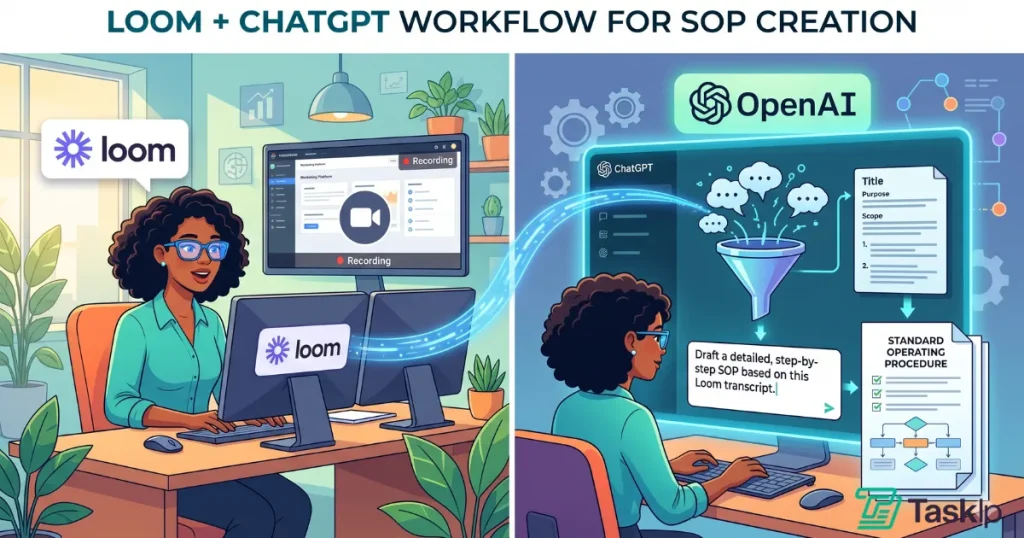
This approach captures real execution, reduces documentation time, and makes SOP creation far easier to scale across the agency.
| Step | Details |
| Step 1 | Record the Workflow in Loom Perform the task exactly as you normally do it while recording your screen. Speak out loud while working so the context is captured naturally. |
| Step 2 | Transcribe the Recording Use Loom’s transcript or any AI transcription tool to convert the video into text. |
| Step 3 | Clean the Raw Transcript Remove filler words, repetition, and irrelevant conversation while keeping actions intact. |
| Step 4 | Generate SOP with ChatGPT Paste the cleaned transcript into ChatGPT and request structured SOP formatting with steps, headings, and checklists. |
| Step 5 | Refine for Clarity and Execution Ensure each step is actionable, begins with a verb, and can be followed by a new team member without explanation. |
| Step 6 | Add Screenshots and Final Polish Insert key screenshots from the recording to support critical steps. |
2. Best Prompt for Generating SOPs
A strong prompt makes the difference between a generic AI response and a usable SOP. Instead of asking AI to “write an SOP,” provide the workflow transcript and clearly define the structure, formatting, and execution requirements. This produces cleaner documentation, more actionable steps, and SOPs that are easier for teams to follow during real work.
Convert the following workflow into a clear agency SOP.
Structure it with: Field section, Step-by-step actions, and Notes.
Each step must start with an action verb and be written so a new hire can execute it without guidance.
Remove filler text and keep only operational instructions.
Here is the transcript:
[PASTE TRANSCRIPT]
3. Turning Screen Recordings Into Documentation
Screen recordings are the fastest source of truth for SOP creation because they capture real execution, not theoretical steps.
A strong workflow looks like this:
- Record real task execution
- Extract transcript automatically
- Convert into a structured SOP
- Add screenshots from key moments
- Validate by letting another team member follow it
This removes the biggest SOP problem, which is guessing how work is actually done.
4. Where AI Helps (and Where It Fails)
AI is strong when used as a structuring tool, not a decision maker.
Where AI Helps
- Converting messy transcripts into structured SOPs
- Formatting steps into consistent templates
- Rewriting unclear instructions into action-based language
- Creating multiple SOP versions quickly
- Standardizing tone and structure across the agency
Where AI Fails
- Understanding real business context without guidance
- Identifying edge cases unique to your workflow
- Knowing which step is actually correct vs outdated
- Replacing human validation and testing
The best system is simple: Humans define the process, AI formats the process, and humans validate the process.
SOPs for Digital Marketing Agencies (+ Template)
An SOP for a digital marketing agency is a written, step-by-step procedure for a recurring marketing task, such as campaign setup, reporting, or content approval, so any team member executes it the same way without needing the original person who built the process.
The digital marketing agencies need most:
- Campaign setup and QA (naming conventions, tracking/UTM setup, budget approval before launch)
- Client reporting (data pull, template, delivery day/time, escalation for missed KPIs)
- Content approval (draft → internal review → client approval → publish, with turnaround SLAs at each step)
- Ad account access and offboarding (who gets access, what gets revoked when a client or employee leaves)
- Keyword/content briefing (research inputs, brief template, handoff to writer)
Marketing SOP template — minimum fields to include:
- Task name and owner
- Trigger (what starts this process)
- Tools used (name the actual platforms: Meta Ads Manager, Google Ads, GA4, etc.)
- Numbered steps
- Who approves before it goes live
- What “done” looks like
Use the free templates below as your starting marketing SOP template set — they cover onboarding, reporting, campaign launch, and content approval, the four processes most digital marketing agencies document first.
SOPs by Agency Type: What Your Specific Agency Actually Needs
The SOP requirement differs for varying agency types. Essential agency fulfillment SOPs & execution details are as follows:
| Agency Model | Essential SOP | What It Is For (Execution Details) | Standard Tools |
| SEO & Content | Technical SEO Pre-Flight | A strict first-30-days checklist to audit site health. Covers checking robots.txt, XML sitemaps, fixing 404 errors, and running Core Web Vitals speed tests. | Ahrefs, Screaming Frog |
| SEO & Content | Content Upload & QA | Prevents messy CMS uploads. Mandates image compression (<100kb), Alt Text, exact H2/H3 hierarchies, and a minimum of two internal links per post. | WordPress, TinyPNG |
| SEO & Content | Keyword Brief Generation | Standardizes instructions for writers. Defines the exact search intent, primary/secondary keywords, competitor benchmarks, and required Call-to-Action (CTA). | Google Docs, SurferSEO |
| Performance Marketing | Daily Pacing Check | A mandatory 10-minute daily routine to ensure monthly ad spend is on track, catch platform disapprovals, and verify CPA variance. | Meta Ads, Google Ads |
| Performance Marketing | A/B Testing Protocol | Enforces scientific testing discipline. Dictates testing only one variable at a time and requires minimum impression counts before pausing a “loser” ad. | Optimizely, Meta Ads |
| Performance Marketing | Creative Refresh Workflow | Removes guesswork from ad fatigue. Sets hard data triggers (e.g., CTR drops below 1%) that automatically notify the design team to build new ad variations. | Figma, Asana |
| Web Development | Staging to Production | The ultimate safety net for code pushes. Mandates live database backups, cache clearing, and running live dummy transactions post-launch to prevent crashed sites. | GitHub, WP Engine |
| Web Development | Cross-Browser QA Testing | A pre-delivery checklist requiring developers to verify site layouts, buttons, and forms across specific mobile devices (iOS/Android) and browsers. | BrowserStack |
| Web Development | Routine CMS Maintenance | A monthly protocol for safely updating plugins and patching security vulnerabilities without breaking the live frontend environment. | ManageWP |
| PR & Outreach | Media List Vetting | Rules for finding the right journalists. Mandates verifying recent coverage history and prohibits pitching generic info@ email addresses. | Muck Rack, Cision |
| PR & Outreach | Pitch & Follow-Up Cadence | Dictates the exact communication timeline: When to send the first pitch, how many days to wait for Follow-Up #1, and when to send the final “breakup” email. | Pitchbox, BuzzStream |
| PR & Outreach | Press Release Syndication | The formatting rules for wire distribution include handling strict embargo dates, deadlines, and placing company boilerplates correctly. | PR News |
Where to Store Your SOPs So Teams Actually Use Them
The biggest mistake agencies make is hiding their SOPs in a deeply nested Google Drive folder where they are forgotten.
The core concept for storing SOPs is simple: Store the master document in one central library, but embed the links to that document exactly where the daily work happens. Here is the ideal setup:
1. In a Central Company Wiki
This is your single source of truth. House all your actual SOP text, screenshots, and videos in a dedicated knowledge base like Notion, Slite, or Guru, organized by department. If a process changes, you update the Wiki here once, and it updates everywhere else.
2. Inside Your Proposal & CRM Software
Onboarding SOPs should be embedded right where the client signs. This is where a tool like Taskip excels. Because it natively handles your proposals, contracts, and e-signatures (starting at $12/month for freelancers), you can build the onboarding steps directly into the platform. The moment a client signs, the team knows exactly what to do next.
3. Directly Within Task Descriptions
Your daily execution happens in project management platforms like Asana or ClickUp. Do not just assign a blank task called “Set up social media.” Instead, paste the link from your Central Wiki directly into the task description. The instructions are right there when the developer or designer needs them.Asana’s agency project management guide offers excellent frameworks for this.
4. Inside Automated Workflows
The most efficient SOPs run quietly in the background. By setting up rules in platforms like Zapier or Make, you can automate the repetitive administrative steps of your process. Instead of relying on a team member to manually read and execute an onboarding checklist, the software handles the routine tasks.
A CRM system like Taskip is the most effective option for adoption. SOPs are embedded directly into tasks and workflows, meaning they appear at the exact moment of execution. This removes friction and ensures the SOP is actually used, not just stored.
SOPs must live where work happens. If your team has to switch tools or search for documents during execution, they will not use them consistently.
Standard Operating Procedure Example for a Creative Agency
Here is an example of an SOP for a creative agency:
Common SOP Mistakes Agencies Make
Writing for perfection instead of usability: A two-page SOP someone follows beats a ten-page masterpiece nobody reads. Aim for clarity over comprehensiveness.
Skipping the test step: Never finalize an SOP without having someone unfamiliar with the process follow it. Every point of confusion is a gap.
Treating SOPs as one-time work: SOPs are not a “set and forget” document. They need continuous updates as tools, clients, and workflows evolve. Otherwise, they slowly become useless.
No version control: When you update an SOP, date, and version it, for instance: “Client Onboarding SOP v2.3 — Updated March 2025.” Otherwise, you’ll have team members following outdated procedures.
No ownership or maintenance system: Every SOP needs a named person responsible for keeping it current. Without ownership, documentation drifts into irrelevance.
Documenting everything at once. Trying to SOP your entire agency in a weekend leads to burnout and half-finished documents. Pick your top five by Frequency × Impact and do those properly first.
Storing SOPs in the wrong place: If SOPs are buried in folders or tools that are not part of daily work, teams simply stop referring to them. They must live where the work happens.
Final Takeaway: Start With One SOP This Week
The agencies that scale past $2M are not the most creative or best connected. They are the ones who deliver consistent work without relying on the founder for every decision. SOPs are what make that possible.
Start with the five templates in this guide and document the process that creates the most delays or client issues first. However, the real challenge is not writing SOPs, but getting teams to actually use them. This is where most agencies fail.
A tool like Taskip solves this by connecting SOPs directly to tasks and workflows, so processes are followed during daily execution, not stored in separate documents. This reduces errors, improves onboarding speed, and removes founder dependency.
Frequently Asked Questions
How long should an agency SOP be?
Most effective agency SOPs are one to three pages. The goal is to give someone enough detail to complete the process correctly, without overwhelming them with information they don’t need. If your SOP is running past four or five pages, it’s likely covering more than one distinct process and should be split into two documents. The test: can a capable new hire follow it successfully on their first try without asking questions?
What’s the difference between an SOP and a process map?
A process map is a visual diagram showing the flow of a process — who hands off to whom, what the decision points are, and where parallel tracks exist. An SOP is the written instruction set for how to actually execute each step. Process maps are useful for high-level understanding and identifying bottlenecks. SOPs are what you hand to the person doing the work. For complex, multi-team processes, both are valuable when used together.
How do I get my team to actually follow SOPs?
The two biggest factors: where you store them and how you introduce them. SOPs stored in the project management tool your team uses daily will be followed far more than those buried in a shared drive. On introduction: involve your team in writing or reviewing the SOP before rolling it out. People follow processes more consistently when they have a hand in building them. After launch, reference the SOP explicitly in training and project setup rather than assuming people will find it on their own.
How often should agency SOPs be updated?
A minimum quarterly review works for most agencies. In practice, SOPs should be updated any time a meaningful process change occurs — new tool adoption, platform changes, team restructuring, or when you discover through experience that a step is regularly skipped or causing confusion. Assign an owner to each SOP and make updating it part of their role. A good prompt: “If a new hire joined tomorrow, would this SOP still be accurate?”
Can I use AI to write agency SOPs?
Yes, and it’s one of the highest-value uses of AI for small agencies. The most effective approach is the Ghost Method: record yourself completing the process using a screen recorder like Loom, generate a transcript, and then prompt an AI tool to structure the transcript as a formatted SOP. This gives you a first draft in minutes that’s based on how the process actually works rather than how you think it should work. You’ll still need to review and refine it, but AI dramatically reduces the blank-page problem that causes most SOP projects to stall.
Can I use AI to write agency SOPs?
You can use nd it’s one of the highest-value uses of AI for small agencies. The most effective approach is the Ghost Method: record yourself completing the process using a screen recorder like Loom, generate a transcript, and then prompt an AI tool to structure the transcript as a formatted SOP. This gives you a first draft in minutes that’s based on how the process actually works rather than how you think it should work. You’ll still need to review and refine it, but AI dramatically reduces the blank-page problem that causes most SOP projects to stall.
What’s the difference between SOP and a checklist?
An SOP (Standard Operating Procedure) is a step-by-step system that explains how a process is done from start to finish, including context, tools, and execution steps. Meanwhile, a checklist is a simple verification tool used to confirm that each step has been completed correctly. In short, an SOP shows how to do the work, while a checklist confirms the work was done correctly.
How to Keep SOPs Updated?
To keep SOPs reliable, assign an owner to every SOP and schedule a quarterly review cycle. Whenever a process changes, whether due to a new tool, workflow update, or team restructuring, the SOP owner must update it immediately, the same week, not months later.
What is an SOP for a digital marketing agency?
It’s a written, step-by-step procedure for a recurring marketing task, such as campaign setup, client reporting, or content approval, so any team member can execute it consistently without relying on one specific person’s knowledge.
How many SOP templates does an agency need to start?
Most agencies need 9 core SOPs to cover the recurring work that causes the most delays and errors: client onboarding, offboarding, weekly reporting, content approval, paid ad campaign launch, new hire onboarding, revision handling, social media scheduling, and access management.
Can freelancers use agency SOPs?
Yes. A freelancer SOP uses the same four parts as an agency SOP (trigger, steps, tools, output) scoped to one person instead of a team, most often for onboarding, invoicing, and weekly reporting.
What’s the difference between a marketing SOP template and a general SOP template?
A marketing SOP template names the actual platforms used (Meta Ads Manager, Google Ads, GA4, a CMS) and includes an approval step before anything goes live to the client; a general SOP template is platform-agnostic and skips the client-approval step.