
Hubflo Pricing 2026: Plans Start at $67 But a 5-Person Team Pays $514/Mo
Is Hubflo good for solo consultants? Yes, but only on Starter ($67/mo). Once you add a second team member, you’re forced to the Business plan at $142/mo. Most solo operators hit the 50-client cap within 6–12 months.
Moreover, Hubflo now sells two separate products under one brand – ‘AI Inbox’ and ‘Portal & Client Management’. Each is priced and billed independently. Moreover, add in the per-seat fees, the mobile app add-on, and the implementation packages, and your real monthly cost can be two to three times higher than the headline number.
This guide walks you through every plan, every limit, and every extra charge so you can make an informed decision before you commit.
TL;DR: What You Need to Know
- Hubflo runs two separate products with two separate bills: AI Inbox and Portals & Client Management
- AI Inbox PRO: $31/user/month (launch price, regular $39)
- Portals: Starter $67/month, Business $142/month, Unlimited $262/month (annual billing)
- Add-ons like the mobile app ($79/month) and implementation ($599+) are not included in any plan
- No free plan exists. A free trial is available on request
Table of Contents
What Is Hubflo and What Does It Do?

Hubflo is a client management platform built for service businesses. It gives your clients a branded portal where they can log in to access files, complete forms, send messages, and track project progress. Over time, Hubflo has expanded well beyond the basic portal into invoicing, document workflows, automation, and now a separate AI-powered inbox product.
The core promise is simple: replace the scattered stack of tools your team uses today and bring everything into one workspace. Whether that promise holds at your team size and budget is exactly what this guide is designed to help you figure out.
Who Is Hubflo Built For?
Hubflo works best for small to mid-sized service businesses that deal with recurring clients and want those clients to have a professional, branded experience. Its strongest use cases include:
- Consultants and freelancers managing ongoing client relationships
- Marketing, creative, and design agencies
- Accounting, legal, and professional services firms
- Coaches and virtual service providers
Hubflo Pricing: Two Separate Products and Two Separate Price Tags
This is the most important thing to understand before you evaluate Hubflo pricing. As of 2026, Hubflo is not one product. It is two, and each one comes with its own billing.
Product 1: AI Inbox
Hubflo AI Inbox is the newer of the two products. It layers on top of your existing email and acts as an AI-powered collaborative inbox. It drafts emails, summarizes meetings, creates tasks from conversations, and manages shared inboxes for your team. Think of it as an intelligent assistant sitting inside your Gmail or Outlook, built specifically around client communication.
Product 2: Portals and Client Management
This is the original Hubflo and what most people are searching for when they look up Hubflo pricing. It covers your branded client portal, file sharing, Smartdoc forms, project tracking, messaging, and invoicing.
Do You Need One or Both?
You can buy either product on its own. However, most agencies that want a complete client management setup will need both, which means two separate subscriptions running simultaneously. That combined cost adds up fast, and we break down the real numbers later in this guide.
Hubflo Pricing For AI Inbox: How Much Does It Cost?
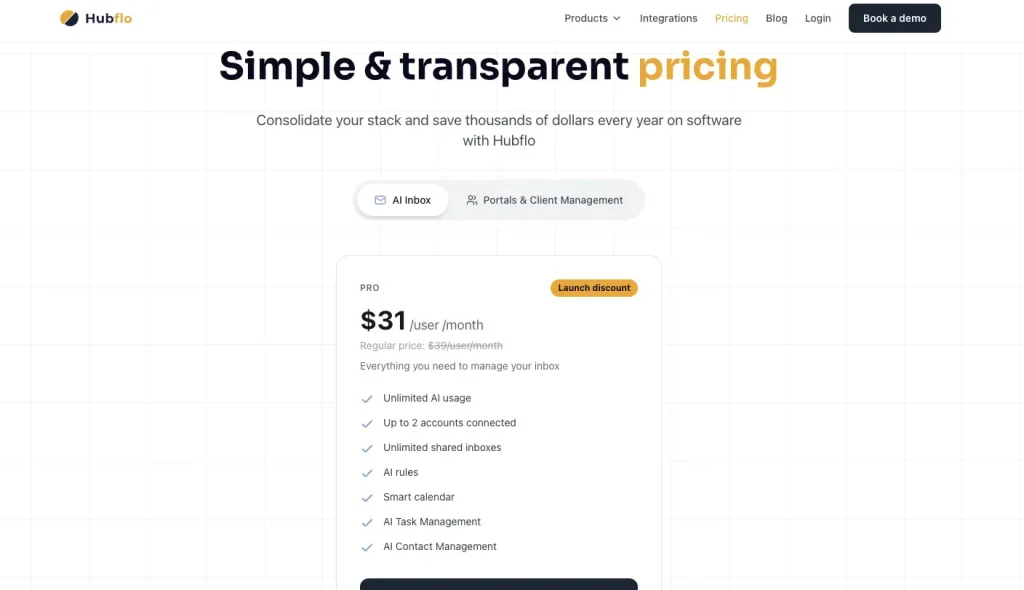
The Only Plan Available: PRO at $31 Per User Per Month
Right now, Hubflo AI Inbox has a single plan called PRO. Your current price is $31 per user per month as a launch discount. The regular price, clearly stated on the pricing page, is $39 per user per month.
What You Get With the PRO Plan
| Feature | Included |
| Unlimited AI usage | Yes |
| Connected email accounts | Up to 2 |
| Shared inboxes | Unlimited |
| AI rules for sorting and auto-replies | Yes |
| Smart calendar | Yes |
| AI task management | Yes |
| AI contact management | Yes |
What Is Not Included
- Only 2 email accounts can be connected — teams managing multiple client-facing inboxes will hit this limit fast
- No free or lower-tier entry option; it is PRO or nothing
- Portals and Client Management are not included; that is a separate subscription
The Launch Price Warning: You Should Plan for $39
For a 5-person team, the gap between $31 and $39 per user is $480 per year. Hubflo has labeled this a launch discount, which means the price will increase. Therefore, build your budget around $39, not $31, so you are not caught off guard when the promotional rate ends.
If you want to understand how AI tools are changing agency pricing more broadly, this guide on AI agency pricing in 2026 gives useful context alongside this one.
Is Hubflo AI Inbox Worth It?
If managing client emails takes up a significant part of your day, the AI drafting, follow-up automation, and shared inbox features can genuinely save hours each week. However, if your team already uses a dedicated tool like Front or Help Scout, the incremental value is harder to justify at $39 per user per month on top of everything else.
Hubflo Pricing For Portals and Client Management: Every Plan Explained
Hubflo offers four pricing tiers for its Portals product: Starter, Business, Unlimited, and Enterprise. Each is designed for a different stage of business growth, from solo operators with a handful of clients to larger organizations that need advanced automation, compliance controls, and white-label capabilities.
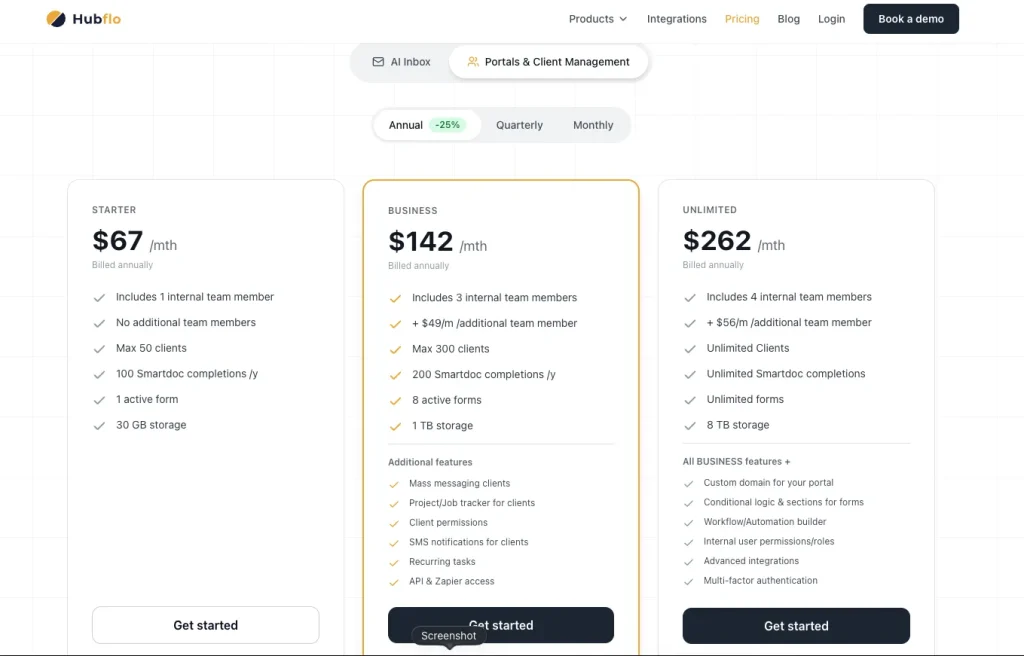
How Hubflo Billing Works: Monthly, Quarterly, and Annual Options
Before you look at any plan price, understand your billing options. Hubflo gives you three cycles, and the difference between monthly and annual billing is meaningful.
| Plan | Monthly | Quarterly | Annual | You Save Annually |
| Starter | $89/month | $79/month | $67/month | ~$264 |
| Business | $189/month | $169/month | $142/month | ~$564 |
| Unlimited | $349/month | $309/month | $262/month | ~$1,044 |
Annual billing is almost always the smarter financial move if you are confident that Hubflo fits your workflow. On the Unlimited plan alone, you save over $1,000 per year simply by committing upfront.
a. Hubflo Starter Plan: $67/Month (Annual)
The Starter plan is Hubflo’s entry point, designed for freelancers, solo consultants, coaches, and independent service providers who need a clean portal without the complexity of agency-level features.
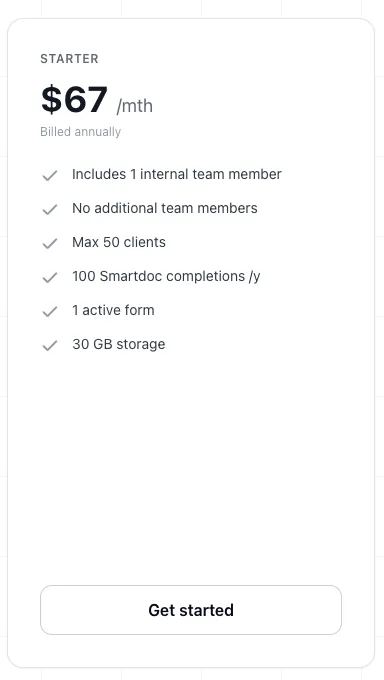
At $67 per month, you get the essentials: a branded client workspace, secure messaging, file sharing, and basic Smartdoc functionality for sending contracts and proposals. It is a focused, no-frills portal experience.
Starter Pricing by Billing Cycle
| Billing Cycle | Price |
| Annual | $67/month |
| Quarterly | $79/month |
| Monthly | $89/month |
What Is Included
- Client portal and workspaces
- Secure client messaging
- File sharing
- Smartdoc functionality for contracts and proposals
- 1 active form
- 30 GB storage
Your Hard Limits on Starter
| Feature | Limit |
| Internal users | 1 |
| Clients | 50 |
| Smartdoc completions | 100/year |
| Active forms | 1 |
| Storage | 30 GB |
Additional Users
Starter does not allow additional user seats at all. If you need a second team member, you must upgrade to Business.
Best For
Solo service providers managing fewer than 50 active clients who need a professional portal for file sharing and basic communication. The moment you hire someone or your client count approaches 50, you will find yourself upgrading sooner than expected.
b. Hubflo Business Plan: $142/Month (Annual)
The Business plan is where Hubflo starts making sense for real agency work. It introduces the features that solo plans simply cannot offer: automation, project tracking, API access, and team collaboration. For most small agencies, this is the first tier that feels genuinely functional.
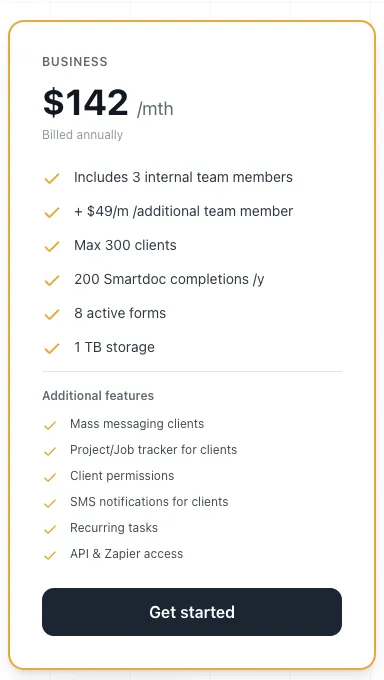
Business Pricing by Billing Cycle
| Billing Cycle | Price |
| Annual | $142/month |
| Quarterly | $169/month |
| Monthly | $189/month |
What Is Included
Everything in Starter, plus:
- Mass messaging to all clients
- Project and job tracker
- Client permission management
- SMS notifications for clients
- Recurring tasks
- API and Zapier access
- 8 active forms
- 1 TB storage
- 200 Smartdoc completions per year
Your Hard Limits on Business
| Feature | Limit |
| Internal users included | 3 |
| Clients | 300 |
| Smartdoc completions | 200/year |
| Active forms | 8 |
| Storage | 1 TB |
What Extra Users Will Actually Cost You
| Your Team Size | Monthly Cost |
| 3 users (included) | $142 |
| 5 users | $240 |
| 8 users | $387 |
Each additional seat costs $49 per month. That number compounds quickly as your team grows, and it is the most common place where Business plan buyers see their bill balloon past what they budgeted.
Best For
Small agencies and consulting firms with two to five team members managing up to 300 clients. It is the right choice if you need API integrations, recurring task automation, and project tracking without yet needing the full Unlimited feature set.
c. Hubflo Unlimited Plan: $262/Month (Annual)
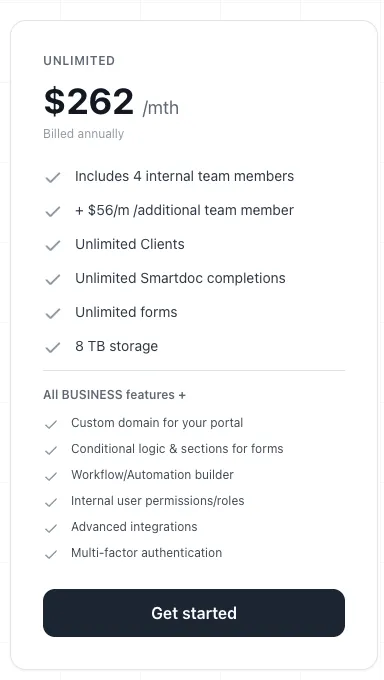
The Unlimited plan is where Hubflo becomes a truly scalable platform. It removes most of the caps that make lower tiers feel restrictive and unlocks the features that agencies actually need to build a polished, automated client experience.
If your business has outgrown Business or you simply need a custom domain, workflow automation, and unlimited document capacity, this is your plan.
Unlimited Pricing by Billing Cycle
| Billing Cycle | Price |
| Annual | $262/month |
| Quarterly | $309/month |
| Monthly | $349/month |
What Is Included
Everything in Business, plus:
- Custom domain for your client portal
- Workflow and automation builder
- Conditional form logic
- Internal user roles and permissions
- Advanced integrations
- Multi-factor authentication (MFA)
- Unlimited clients, forms, and Smartdoc completions
- 8 TB storage
Your Limits on Unlimited
| Feature | Limit |
| Internal users included | 4 |
| Clients | Unlimited |
| Smartdoc completions | Unlimited |
| Forms | Unlimited |
| Storage | 8 TB |
What Extra Users Will Cost You Here
| Your Team Size | Monthly Cost |
| 4 users (included) | $262 |
| 10 users | $598 |
Extra seats cost $56 per month each on this plan, which is slightly more expensive per seat than Business. For a 10-person team, you are looking at $598 per month before any add-ons or AI Inbox fees.
Best For
Established agencies managing more than 300 clients, teams with high document and form volumes, and businesses that need a fully branded portal under their own domain with automated client onboarding workflows.
d. Hubflo Enterprise Plan: Custom Pricing
Enterprise is Hubflo’s top tier, built for organizations with advanced security, compliance, and support requirements. There is no public price. You contact sales and negotiate a custom contract.

What Enterprise Gets You
Everything in Unlimited, plus:
- White-glove implementation
- Advanced portal customization
- Dedicated Customer Success Manager
- Priority product roadmap input
- Fully white-labeled mobile application
- Single Sign-On (SSO)
- Business Associate Agreement (BAA)
Unlimited vs Enterprise: Which Do You Actually Need?
For most agencies, Enterprise is not necessary. The key reasons to consider it are SSO requirements from your IT department, a fully white-labeled mobile app under your brand in the app store, BAA support for healthcare-adjacent industries, or the need for a dedicated success manager. If none of those apply to you, Unlimited delivers far better value.
Hubflo Client Portal: What It Includes and Which Plan You Need
The client portal is the core of what Hubflo does. Every plan includes it, but what your clients can actually do inside that portal and how branded it feels depends entirely on which tier you’re on.
What the Hubflo Client Portal Does
When you set up a client in Hubflo, they get their own dedicated workspace with a login. Inside that workspace, they can access shared files, view and complete forms, send messages directly to your team, track the progress of their project, and sign contracts and proposals. From the client’s perspective, it replaces the scattered mix of email threads, Dropbox links, and PDF attachments most agencies still rely on.
Every portal is branded with your logo and colors from the Starter plan onward. However, the depth of that branding and how much your clients can do inside it scales with your plan.
Hubflo Plans Compared: What Each Plan Unlocks in the Portal
| Feature | Starter | Business | Unlimited |
|---|---|---|---|
| Branded client workspace | Yes | Yes | Yes |
| Secure client messaging | Yes | Yes | Yes |
| File sharing | Yes | Yes | Yes |
| Smartdoc forms and contracts | Yes (100/year) | Yes (200/year) | Unlimited |
| Active intake forms | 1 | 8 | Unlimited |
| Project and job tracker (client-visible) | No | Yes | Yes |
| SMS notifications to clients | No | Yes | Yes |
| Mass messaging to all clients | No | Yes | Yes |
| Conditional form logic | No | No | Yes |
| Workflow automation for onboarding | No | No | Yes |
| Custom domain for your portal | No | No | Yes |
| Client limit | 50 | 300 | Unlimited |
The Feature Most Buyers Miss in Hubflo: Custom Domain
On Starter and Business, your client portal lives on a Hubflo subdomain. Your clients see Hubflo’s domain in their browser, not yours. If white-labeling and full brand ownership matter to your business, you need the Unlimited plan at $262/month to use your own domain.
The mobile app is a separate consideration. If your clients expect to access their portal from iOS or Android and most do that is a paid add-on starting at $79/month on any plan. It is not included by default.
Which Hubflo Plan Do You Actually Need?
If you manage fewer than 50 clients solo and just need a clean portal for file sharing and contracts, Starter at $67/month covers the basics.
If you have a small team and clients need to see project status and receive SMS updates, Business at $142/month is the minimum viable plan.
If you need automated client onboarding workflows, conditional forms, or your own portal domain, Unlimited at $262/month is the only option before add-ons.
Hubflo Add-On Pricing: The Costs Most Buyers Do Not Expect
Here is where Hubflo pricing gets uncomfortable for a lot of buyers. The features listed above cover the portal itself. But the moment you want a mobile app, a proposal generator, or onboarding support, you are looking at separate line items that do not appear anywhere on the plan comparison.
1. Client Portal Mobile App: Starting at $79 Per Month
If your clients expect to access their portal from their phone, you will need this add-on. Hubflo’s mobile app gives clients an iOS and Android experience with push notifications. It comes in two versions.
The grey-label version keeps some Hubflo branding visible. The fully white-label version removes all Hubflo branding so your clients only see your company name in the app store. Pricing starts at $79 per month for grey-label, with white-label costing more.
For most client-facing agencies, the mobile app is not optional. It is expected. And at $79 per month minimum on top of your existing plan, it is a cost that should be in your budget from day one.
Where Taskip Wins
With Taskip, your clients get a fully functional iOS and Android mobile app included in every plan at no extra charge. There is no add-on fee, no grey-label versus white-label distinction, and no additional monthly cost. The Taskip client portal is built for mobile access from the start.
2. Implementation and Onboarding Assistance: Starting at $599
Getting Hubflo set up properly takes work, especially if you are migrating from multiple tools or building complex automation workflows. Hubflo offers paid implementation packages to help with that.
Three tiers of implementation support are available, starting at $599. Each includes onboarding calls, data import assistance, template setup, and integration configuration. For teams building out custom portals from scratch, the investment can save significant time. For smaller businesses, the self-serve documentation and live chat support are usually enough to get started.
3. PropoAI: A Completely Separate Product at $69 Per Month
PropoAI is Hubflo’s AI-powered proposal generator. It creates branded, interactive proposals with pricing pages, add-ons, contracts, e-signatures, and engagement tracking. The important thing to understand is that this is not part of any Hubflo plan. It is a standalone product billed at $69 per month, on top of everything else.
If winning new business depends on sending polished, trackable proposals quickly, PropoAI can accelerate your sales process. However, for teams that already use Smartdocs for basic contracts, it is an optional upgrade rather than something you need from day one.
Where Taskip Wins
With Taskip, proposals are built into every plan at no extra charge. You can create and send professional, branded proposals directly from your dashboard without paying a separate $69 per month. It is included from your very first day on the platform. Compare that to Hubflo, where you pay for the portal, then pay separately for the proposal tool, then pay again for the mobile app.
Hubflo Pricing For Team: Paid & Free Seats
Not everyone you add to Hubflo will cost you money. Hubflo separates roles into paid and non-paid categories, and knowing the difference can meaningfully reduce your monthly bill.
Paid Seats: These Count Against Your Plan
| Role | Access Level |
| Owner | Full platform access |
| Regular Member | Standard access |
| Limited Member | Restricted task-level access |
Free Seats: These Do Not Cost Anything
| Role | Access Level |
| Accountant | Billing and financial data only |
| Contractor | Limited external collaborator access |
If your bookkeeper or a freelance contractor only needs occasional access, adding them as a non-paid role is a smart way to keep your seat count lower without losing functionality.
What Happens If You Cancel Hubflo Plan
You can cancel or remove users at any time. Your access continues until the end of your current billing period. For annual plans, Hubflo does not publicly confirm prorated refunds, so it is worth contacting their support team before you commit to a full year upfront.
What You Cannot Do on Each Hubflo Plan
Before you pick a plan, it is worth knowing exactly what each one locks you out of. This is where a lot of buyers get surprised after signing up.
| Restriction | Starter | Business | Unlimited |
| Add a second user | No | Yes | Yes |
| Use the API | No | Yes | Yes |
| Connect Zapier | No | Yes | Yes |
| Send mass client messages | No | Yes | Yes |
| Use more than 1 form | No | Up to 8 | Unlimited |
| Complete more than 100 Smartdocs/year | No | 200/year | Unlimited |
| Build automated workflows | No | No | Yes |
| Use your own portal domain | No | No | Yes |
| Apply conditional form logic | No | No | Yes |
| Require MFA for your team | No | No | Yes |
| Manage more than 300 clients | No | No | Yes |
| Access SSO | No | No | No (Enterprise only) |
What Does Hubflo Actually Cost? Real Monthly Bills by Business Size
Understanding Hubflo pricing on paper is one thing. Seeing what it actually costs your specific team is another. The plans look reasonable in isolation, but once you account for your team size, the AI Inbox, and the add-ons most agencies genuinely need, the numbers shift significantly.
Here are three realistic scenarios based on how agencies actually use the platform.
Scenario 1: Solo Freelancer on Starter Only
This is the most straightforward Hubflo pricing scenario. You are a solo operator, you manage a manageable client roster, and you need a clean, professional portal to replace the scattered email and Dropbox setup you have been using.
The Starter plan at $67 per month covers everything you need at this stage: a branded client workspace, secure messaging, file sharing, and basic Smartdoc functionality for contracts. There are no seat fees, no add-ons required, and no hidden charges.
| Item | Monthly Cost |
| Starter plan (annual billing) | $67 |
| Extra seats | $0 |
| Add-ons | $0 |
| Your total | $67/month |
This is a reasonable price for what you get. Just keep in mind that the 50-client cap and the single-user limit will become real constraints the moment your workload grows. At that point, you are looking at a plan upgrade, whether you are ready for it or not.
Scenario 2: 5-Person Agency Using Business, AI Inbox and Mobile App
This is where Hubflo pricing starts to look very different from the headline number. A typical small agency on the Business plan does not just need the portal. Your team also needs the AI Inbox product for managing client emails, and your clients expect a mobile app to access their portal on the go.
None of those are included in the $142 base price. They are billed separately on top.
Here is what your actual monthly bill looks like:
| Item | Monthly Cost |
| Business plan (annual billing) | $142 |
| 2 extra seats at $49 each | $98 |
| AI Inbox PRO for 5 users at $39 each | $195 |
| Mobile app add-on (grey-label) | $79 |
| Your total | $514/month ($6,168/year) |
That $142 Business plan covers just 27% of your actual monthly bill. The rest comes from add-ons and seat fees that are easy to miss when you are comparing plans on the pricing page. For most small agencies, this is the scenario that prompts a serious look at alternatives.
Where Taskip Wins
A 5-person team on Taskip’s Startup Team plan pays $29/month. That includes 10 users, a branded client portal, project management, workflow automation, invoicing, built-in AI credits, and mobile app access. Proposals are built in, too. No add-ons, no double-billing.
Scenario 3: 10-Person Firm Running the Full Hubflo Stack
At this team size, Hubflo pricing becomes one of your more significant software line items. The Unlimited plan is the right tier for a firm of this size since it removes client caps, unlocks workflow automation, and allows a custom portal domain. However, you still pay extra for every team member beyond the four included seats, and both products still bill separately.
| Item | Monthly Cost |
| Unlimited plan (annual billing) | $262 |
| 6 extra seats at $56 each | $336 |
| AI Inbox PRO for 10 users at $39 each | $390 |
| Mobile app add-on (grey-label) | $79 |
| Your total | $1,067/month ($12,804/year) |
At over $12,800 per year, Hubflo is no longer a small operational cost. It is a major budget commitment. Many firms at this scale begin evaluating whether a flat-rate, all-inclusive platform can deliver comparable functionality at a fraction of the price. The per-seat model that felt manageable at three or five people becomes the dominant cost driver once your team reaches double digits.
That is the reality of Hubflo pricing at scale. The portal is capable and well-built, but the billing structure was not designed with growing headcount in mind.
What Real Users Say About Hubflo Pricing
G2 Hubflow Pricing Review
Rating: 4.7/5 · 36 reviews
“
“The pricing structure is simple. I did a lot of research on client portals and Hubflo just stood out from the crowd.”
Trustpilot Hubflow Pricing Review
Rating: 4.4/5 · 16 reviews
“
“Hubflo simplifies the management of client interactions while providing robust tools for project management and billing. Definitely worth investing into once my project starts!”
Hubflo Pricing vs Competitors: How Does It Stack Up?
| Feature | Hubflo | Taskip | SuiteDash | HoneyBook | ManyRequests | Copilot |
|---|---|---|---|---|---|---|
| Starting Price | $67/month | Free | $19/month | $19/month | $99/month | $29/user/month |
| Users Included | 1 | Unlimited (free) | Unlimited | 1 | 1 | Per seat |
| Free Plan | No | Yes | No | No | No | No |
| Client Portal | Yes | Yes | Yes | Yes | Yes | Yes |
| Project Management | Business plan+ | Yes | Yes | Pipeline only | Yes | Basic |
| Invoicing & Payments | Yes | Yes | Yes | Yes | Limited | Yes |
| Proposals & Contracts | Via Smartdocs | Built-in | Yes | Yes | Limited | Limited |
| AI Features | Separate product (+$31/user/mo) | Built-in, all plans | No | Basic | No | Limited |
| AI Proposals | Add-on (+$69/mo) | Built-in, all plans | No | No | No | No |
| Mobile App | Add-on (+$79/mo) | Included free | Available | Yes | No | Yes |
| White Label | Unlimited plan only | $59/month plan | Yes | No | Yes | Yes |
| Workflow Automation | Unlimited plan+ | Yes | Yes | Limited | No | No |
| API / Zapier | Business plan+ | Yes | Yes | Limited | Yes | Yes |
| Forms & Onboarding | Limited on Starter | Yes | Yes | Yes | Yes | Yes |
| File Sharing | Yes | Yes | Yes | Yes | Yes | Yes |
| Client Limit | 50–300 (capped by plan) | Unlimited | Unlimited | Unlimited | Unlimited | Unlimited |
Why Taskip Comes Out Ahead
Beyond that gap, Hubflo charges separately for three things Taskip includes by default: AI ($31/user/month), the mobile app ($79/month), and AI proposals ($69/month).
Compared to other competitors, SuiteDash and ManyRequests offer white-label but no AI at any price. Whereas HoneyBook has no white-label option, and Copilot charges per seat with no free plan and limited automation.
Considering all these, Taskip is definitely the best alternative for Hubflo pricing.
Hubflo vs HoneyBook: Which Is Better for Service Businesses?
If you’re comparing Hubflo and HoneyBook, you’re likely a consultant or small agency trying to decide whether you need a proper client portal or a streamlined CRM built around proposals and payments. The two products serve overlapping audiences but solve genuinely different problems, and picking the wrong one means either overpaying for features you won’t use or hitting walls you didn’t see coming.
Here is how they compare on the things that actually matter for client-facing service work.
Hubflo vs HoneyBook Pricing at a Glance
| HoneyBook | Hubflo | |
|---|---|---|
| Entry price (annual) | $29/month | $67/month |
| Mid-tier (annual) | $49/month | $142/month |
| Top tier (annual) | $109/month | $262/month |
| Free plan | No (7-day trial) | No (trial on request) |
| Transaction fees | 2.9% + 25¢ per card payment | None |
HoneyBook starts more than 50% cheaper than Hubflo. But HoneyBook charges 2.9% + 25¢ on every card payment you collect. If your agency processes $10,000/month in client payments, that is an extra $290 per month on top of your subscription, which quickly erases the price advantage.
Hubflo does not charge transaction fees on top of your plan. For agencies with consistent monthly billing, that difference alone can flip the cost comparison.
Client Portal: Hubflo Wins Clearly
This is the sharpest difference between the two. Hubflo was built from the ground up as a client portal platform. Each client gets their own branded workspace where they can log in, view files, complete forms, track project progress, and send messages. The portal is the product.
HoneyBook does not offer a dedicated client portal. Your clients receive links to individual documents: a proposal here, an invoice there, but there is no persistent branded space they return to. For one-off projects and simple deliverables, that works fine. For ongoing retainer relationships where you want clients to feel like they have a professional home base with your branding, it falls short.
If a branded, persistent client portal is a requirement for your business, HoneyBook is not the right tool regardless of price.
Project Management
Hubflo includes a project and job tracker from the Business plan ($142/month) upward, with recurring tasks and client permission management. It is not a full project management suite, but it handles the basics of tracking deliverables and status for each client relationship.
HoneyBook’s project management is pipeline-only. You can move clients through stages of your workflow, but there is no task management, no client-visible project tracking, and no way to build a structured delivery process inside the tool.
For consultancies managing multi-phase engagements where the client needs visibility into what’s happening and what’s next — Hubflo handles this. HoneyBook does not.
Proposals, Contracts, and Payments
This is HoneyBook’s strongest area. Its proposal and contract workflow is polished, fast, and tightly integrated with payment collection. You can send a branded proposal, get it signed, and collect a deposit in a single flow. For independent service providers who close deals frequently, this is genuinely well-built.
Hubflo handles proposals through Smartdocs, which covers the basics — branded proposals, e-signatures, contract templates — but the flow is not as refined as HoneyBook’s end-to-end experience. Hubflo also caps Smartdoc completions by plan: 100 per year on Starter, 200 on Business. If you send a lot of proposals, you may hit that limit.
Mobile App
HoneyBook includes a mobile app on all plans at no extra charge.
Hubflo’s mobile app is a paid add-on starting at $79/month for the grey-label version. If your clients expect to access their portal from their phones which most do that cost is unavoidable on Hubflo.
White Label and Branding
HoneyBook offers no white-label option on any plan. Your clients will see HoneyBook branding on the documents and emails they receive.
Hubflo unlocks custom domain and full white-label capabilities on the Unlimited plan ($262/month). For agencies that want every client touchpoint to reflect their own brand, not a software vendor’s, Hubflo is the more capable platform but only once you’re paying for the top tier.
The Verdict: Hubflo vs HoneyBook
Choose HoneyBook if you are a solo service provider or small team whose main need is a clean, fast pipeline for proposals, contracts, and payment collection. The lower price point and polished billing workflow make it strong for straightforward client engagements. Just account for the transaction fees in your actual cost calculation.
Choose Hubflo if you need a proper branded client portal that clients return to throughout a project, ongoing project tracking with client visibility, or white-label capabilities under your own domain. It costs more, but it delivers a meaningfully different product, one designed around the client relationship, not just the transaction.
Neither is a clear winner for growing agencies, though. Once you add Hubflo’s seat fees, mobile app, and AI Inbox, a 5-person team pays $514/month. HoneyBook at that team size will cost considerably less but leaves you without a real portal.
That gap is exactly why tools like Taskip exist, combining the client portal depth of Hubflo with an all-in pricing structure that does not require stacking add-ons to get basic functionality.
Taskip vs Hubflo: A Direct Pricing Comparison
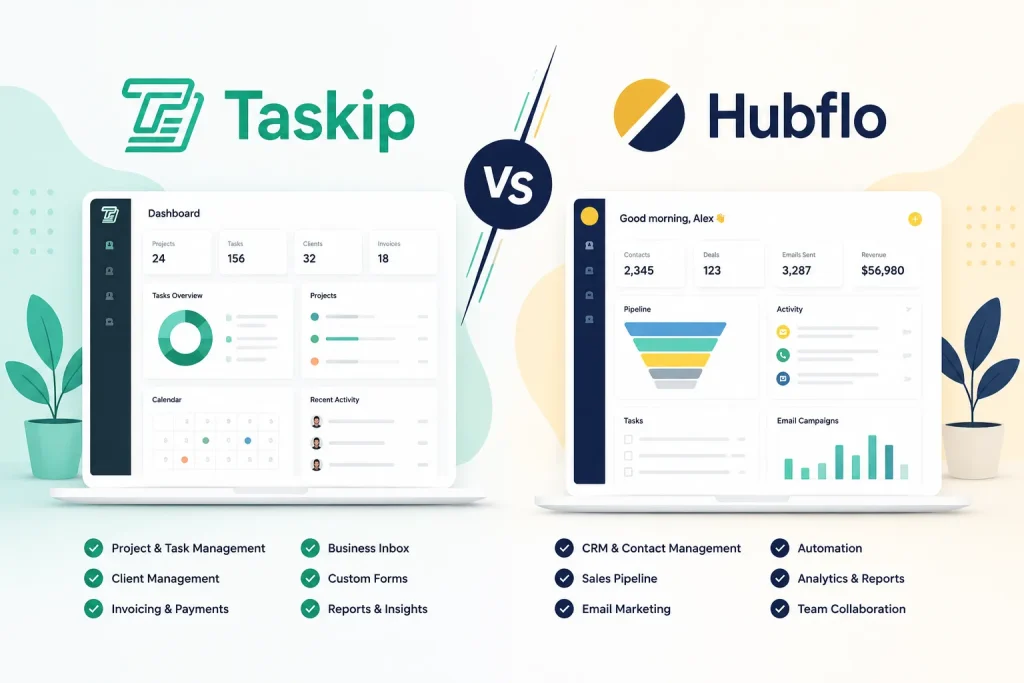
A 5-person agency on Hubflo Business, with AI Inbox and mobile app, pays $514/month. That same agency on Taskip’s Startup Team plan pays $29/month for 10 users, with a branded client portal, project management, workflow automation, invoicing, AI credits, and a mobile app included. No add-ons. No double-billing.
Beyond that gap, Hubflo charges separately for three things Taskip includes by default: AI ($31/user/month), the mobile app ($79/month), and AI proposals ($69/month). At the team scale, those extras alone cost more than Taskip’s entire plan.
If your team needs white label, the Taskip Growing Agency plan at $59/month covers 25 users, 3 workspaces, full white label and custom branding, unlimited clients, and public API access. Everything in one price. See the full Taskip pricing breakdown.
If your Hubflo bill has grown past $300/month because of seats, add-ons, or two-product billing, running a real comparison is worth your time: 10 Best Hubflo Alternatives in 2026.
Final Verdict: Is Hubflo Pricing Worth It?
Hubflo works well for solo operators and small teams who stay within plan limits. But the moment your team grows, the per-seat fees, two separate product bills, and add-ons for basics like a mobile app and proposals push the real cost well past what the pricing page suggests. A 5-person agency ends up paying over $500 a month.
If you want the same functionality without the overhead, Taskip gives you client portals, proposals, AI tools, mobile access, and unlimited users starting at $29/month. Everything included, nothing hidden.
Ready to make the switch? Try Taskip free, no credit card required.
Hubflo Pricing: Frequently Asked Questions
Does Hubflo offer a Free Plan or a free trial?
Hubflo does not offer a permanent free plan. A free trial is available on request through the demo booking or sign-up process.
Are Hubflo AI Inbox and Portals the Same Product?
No. They are two completely separate products with separate billing. AI Inbox handles your email and communication layer. Portals handles your client-facing workspaces, file sharing, forms, and project management.
Can I Buy Just One Product Without the Other?
Yes, you can. However, most agencies that want a complete client management setup will find themselves needing both, which means two separate monthly subscriptions.
Does Hubflo Charge Extra Per Client?
No. Your billing is based on internal team members, not client count. That said, Starter limits you to 50 clients, Business to 300, and Unlimited removes the cap entirely.
How Many Clients Can Each Hubflow Plan Handle?
The number of clients you can manage depends on the plan you choose. The Starter plan supports up to 50 clients, making it suitable for freelancers and small businesses. The Business plan increases the limit to 300 clients, which is ideal for growing agencies and service teams. Both the Unlimited and Enterprise plans remove client restrictions entirely, allowing you to manage as many clients as needed without worrying about account limits.
Can I Add Team Members Without Upgrading My Hubflo Plan?
On Business, yes. Extra seats cost $49 per month each. On Unlimited, extra seats cost $56 per month each. On Starter, no additional users are permitted at all.
What Happens When I Hit My Smartdoc or Form Limit in Hubflo?
Hubflo will prompt you to upgrade when you approach your plan’s limits. If your business involves regular contract signing or form submissions, factor this into your plan selection from the start rather than hitting a wall mid-project.
Can I Cancel a Hubflo Annual Plan Mid-Year?
Yes, you can cancel at any time. Your access continues until the billing period ends. Hubflo does not publicly confirm prorated refunds for annual plans. Confirm their current policy with support before committing to a full year.
What Problem Does Hubflo Solve?
When your files live in Dropbox, your communication happens over email, and your contracts go through yet another tool, things fall through the cracks. Hubflo pulls those touchpoints into one place. Your clients get a single login; your team gets a single dashboard. That is the core value, and for many businesses, it genuinely delivers.
How to Apply a Promo Code in Hubflo?
Go to Settings, then Hubflo Subscription, then Manage Subscription, then Edit Subscription, then Apply Coupon. Enter your code and save. Promo codes occasionally appear through partner programs or affiliate sites, and stacking one with annual billing is the most cost-effective combination available.
Does Booking a Demo in Hubflo Help?
Hubflo offers free demo sessions through its website. While no public discount is guaranteed at the demo stage, SaaS companies routinely offer extended trials or promotional pricing during or after sales calls. It is always worth asking directly when you have the sales team’s attention.


Get Summary On: