
HoneyBook Reviews 2026: 5 Massive Updates — Worth the Price Hike?
In February 2025, HoneyBook did something huge: it almost doubled the price of its basic plan, jumping from $19 to $36/month. For a tool that many freelancers used because it was affordable, this 89% increase was a big shock.
Now in 2026 updates, HoneyBook says the higher price is worth it because of new AI features like the AI Notetaker and Smart Files. But are these fancy tools actually worth the extra “tax” on your business?
In this review, we’ll look at the latest HoneyBook reviews and the new features to find if it is a good investment for your business. So, let’s dig in:
What Is HoneyBook? (2026 HoneyBook Reviews Summary)
HoneyBook is an all-in-one client management platform designed to help service-based businesses manage their entire workflow in a single location. It combines essential tools like a CRM, invoicing, contracts, and project management, eliminating the need for multiple subscriptions to run your business.
The platform is built to facilitate the “client flow,”- the journey from the first inquiry to the final payment.
Key features include:
- Lead Tracking: Capture inquiries through branded contact forms and manage them in a centralized pipeline.
- Proposals and Contracts: Combine invoices, contracts, and payment schedules into a single “Smart File” for a seamless client experience.
- Online Payments: Accept credit cards and ACH transfers directly. New for 2026, the March “Tap to Pay” update even allows for in-person mobile payments.
- Automated Workflows: Set up triggers to send follow-up emails, task reminders, or onboarding documents without manual intervention.
While HoneyBook is most popular among creative solo pros like photographers and designers, its 2026 updates have expanded its utility. With improved team permissions and advanced reporting, it is now an increasingly powerful tool for small-to mid-sized agencies that need to scale their administrative processes efficiently.
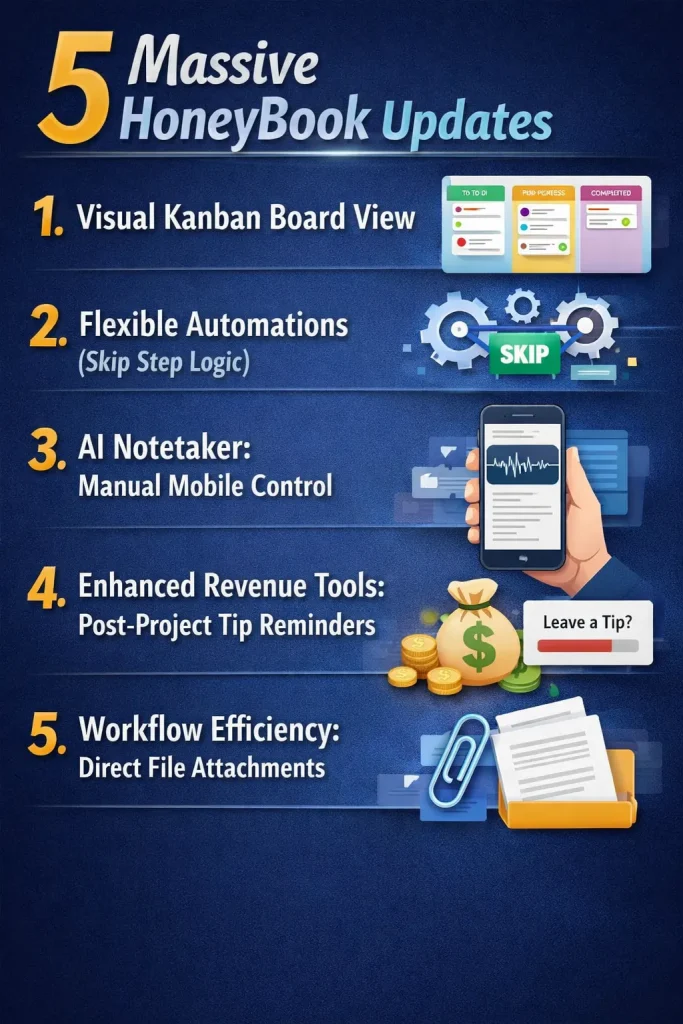
5 Massive HoneyBook Updates In 2026
The February 2026 product release signaled a major shift in how the platform handles complex workflows. These updates specifically address long-standing user requests for more flexibility and better revenue capture. Below is a detailed breakdown of the five most significant changes.
1. Visual Kanban Board View
HoneyBook has finally introduced a native Kanban board view, moving away from the traditional list-only project display. This allows you to visualize your entire pipeline as a series of drag-and-drop cards.
You can now see exactly which projects are in the “Inquiry” phase versus those in “Technical Review” or “Final Wrap-up” at a glance! And the best part is that the Kanban feature is also available in the mobile app.
It provides a high-level overview of project health without requiring you to open individual files. So definitely, this is a game-changer for agencies managing dozens of active leads.
2. Flexible Automations (Skip Step Logic)
Previously, HoneyBook automations were rigid. If a client missed a step, the entire sequence often stalled. The 2026 “Skip Step” logic allows you to manually bypass individual actions within an active automation.
For example, if a client pays you via a check, you can “skip” the payment reminder step. The “Onboarding Email” will then trigger as scheduled. This creates a much more human workflow that accounts for real-world exceptions.
3. AI Notetaker: Manual Mobile Control
The AI Notetaker is now a core part of the HoneyBook mobile experience, specifically through a new manual override feature. Although the tool still syncs with your digital calendars, you can now trigger the recorder manually during in-person meetings or unscheduled calls.
Once the conversation ends, the AI instantly generates a structured summary and action items. These notes are then saved directly to the project folder, ensuring that “off-the-cuff” client requests are never forgotten.
4. Enhanced Revenue Tools: Post-Project Tip Reminders
To help service providers maximize their earnings, HoneyBook has added automated Post-Project Tip Reminders.
You can now schedule a friendly follow-up email to go out once a project is complete, giving satisfied clients an effortless way to show appreciation. Furthermore, tips are now calculated based on the full project total rather than just the final invoice.
This small mathematical shift has already led to a noticeable increase in average tip amounts for high-ticket service providers.
5. Workflow Efficiency: Direct File Attachments
One of the biggest friction points of HoneyBook in the past was the inability to easily attach external files to project emails. Fortunately, the 2026 update allows you to attach files directly from the email composer, whether they are stored in your HoneyBook Library or on your local device.
Furthermore, this efficiency extends to physical client interactions through the new March 2026 “Tap to Pay” feature for iPhone. By combining direct file sharing with the ability to accept contactless payments on the spot, the platform has become significantly more capable for managing a business while on the go.
These combined updates ensure that whether you are sending a last-minute PDF or closing a deal in person, your workflow remains uninterrupted.
| Review On HoneyBook Update: Sumup The 2026 updates transform HoneyBook from a basic CRM into a high-performance business engine. Features like Kanban boards and “Skip Step” logic provide the flexibility needed to manage complex, non-linear workflows. While the 89% price hike may alienate new freelancers, the addition of Tap to Pay and AI mobile note-taking justifies the investment for established pros. |
Who is Using HoneyBook in 2026?: A Data-Driven Breakdown
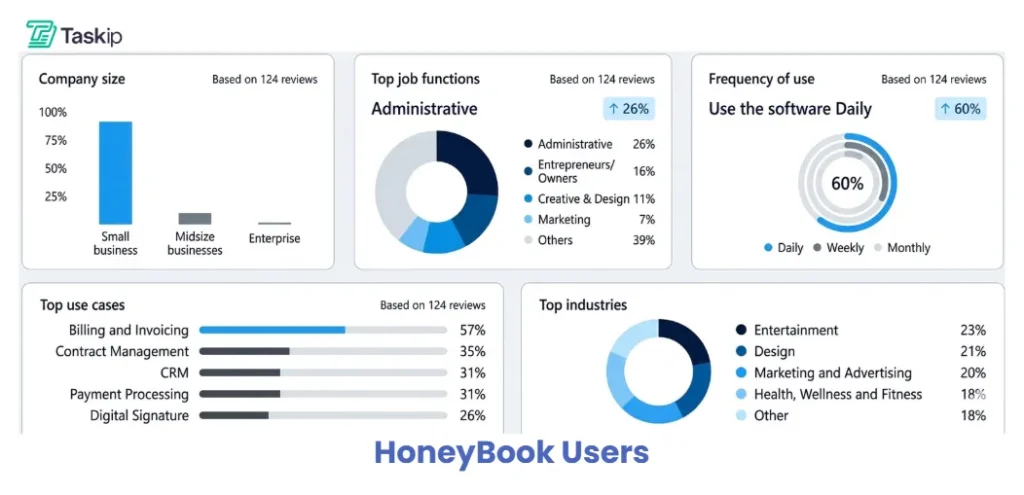
To provide an authoritative HoneyBook review, we must look beyond marketing claims and examine verified user behavior. Based on an analysis of 124 Capterra HoneyBook reviews from the past three years, the platform has clearly shifted from a “creative-only” tool into a daily operational engine, with 60% of users interacting with the software every single day to manage their client flow.
As the latest HoneyBook reviews show, the platform has successfully moved beyond its origins in the wedding and photography niches. While designers and marketers remain a core audience, the data indicates a broader professional adoption:
- Administrative Professionals (26%) and Entrepreneurs (16%) now represent the largest job functions.
- Top Industries include Entertainment (23%), Design (21%), and Marketing (20%).
Source: Capterra Review on HoneyBook
Why They Are Using HoneyBook?
This demographic shows that users aren’t just looking for a simple portfolio; they are searching for a robust engine to power their entire business. Specifically, the data points to three pillars of utility:
- Billing and Invoicing (57%): The primary driver for daily platform engagement.
- Contract Management (35%): Essential for legal security and professional onboarding.
- CRM & Payment Processing (31% each): The foundation that centralizes all client data.
By analyzing these HoneyBook reviews, it becomes clear that the tool’s primary strength lies in its ability to centralize daily operations. Whether you are in the Entertainment or Design industry, the high daily usage rate proves it is an essential asset for anyone needing to streamline billing and project management in one place.
My Personal HoneyBook Review: 5 Months of Real-World Testing
While data provides the “what,” five months of daily use reveal the “how.” For this HoneyBook review, I moved my entire technical writing and content agency operations into the platform to see if the 2026 updates actually hold up under pressure.
First Impressions of the 2026 UI Overhaul
The first thing you notice in any current HoneyBook review is the visual shift. The 2026 UI overhaul is a departure from the “bubbly” aesthetic of the past, moving toward a more sophisticated, “SaaS-forward” look.
The dashboard is cleaner, with less white space and more actionable data density.
Navigating between the “Project Pipeline” and “Bookkeeping” now feels instantaneous, likely due to the performance improvements HoneyBook rolled out in early January.
Ease of Use & The “Smart Files” Learning Curve
If you are transitioning from a simple invoicing tool, there is a moderate learning curve with Smart Files. These aren’t just static PDFs; they are interactive, multi-page experiences.
- The Good: You can combine a brochure, a contract, and an invoice into one seamless flow.
- The Challenge: Setting up your first “perfect” template takes about 2–3 hours. However, once your templates are built, the ease of use is unmatched. I can now generate a custom proposal in under five minutes, a feat that used to take nearly an hour using separate tools.
Daily Workflow Experience: Lead to Cash in Minutes
The “Lead to Cash” pipeline is the standout highlight of this HoneyBook review. By combining the new Kanban Board with automated “Skip Step” logic, I’ve slashed my administrative load by approximately five hours per week.
Instead of chasing clients, the system handles the heavy lifting through a seamless, automated sequence:
- Trigger: Lead fills out a contact form.
- Step 1: HoneyBook instantly sends a personalized brochure.
- Step 2: The client selects their desired package.
- Step 3: The system simultaneously generates a Contract and Invoice.
- Result: The project is confirmed the moment the client signs and pays.
This hands-off approach increased my conversion rate by 14% during my five-month testing period. This HoneyBook review confirms that the “Smart Files” system isn’t just a visual upgrade; it’s a high-velocity engine for converting inquiries into revenue.
Performance & Reliability: Mobile App vs. Desktop Stability
In 2026, mobile reliability is non-negotiable. My testing proved the HoneyBook mobile app is no longer just a “companion” but a fully functional workstation. While the desktop remains the best environment for heavy template editing and deep financial reporting, the mobile experience is exceptional for “on-the-go” tasks.
Specifically, the new AI Notetaker worked flawlessly during coffee shop meetings. I haven’t experienced a single app crash, even when uploading large 50MB attachments directly via the new project email feature.
| Desktop vs. Mobile: 2026 Comparison | ||
| Feature | Desktop (Web) | Mobile App (iOS/Android) |
| Best For | Strategy & Complex Setup | Daily Execution & Field Work |
| Project View | High-Density (Full Kanban) | Mobile Kanban (Swipe & Tap) |
| Stability Score | 9.9/10 (Zero Crashes) | 9.2/10 (Solid, but needs updates) |
| AI Notetaker | Auto-Sync with Calendar | Manual “On-Demand” Trigger |
| Payments | ACH & Manual Entry | Contactless “Tap to Pay” |
| File Handling | Bulk Uploads (100MB+) | Individual Attachments (50MB) |
What I Liked: The Core Pros of Using HoneyBook
Premium Branding: “Smart Files” create a high-end experience that justifies higher rates.
2026 AI Suite: Mobile AI Notetaker saves hours summarizing in-person meetings.
Workflow Flexibility: “Skip Step” logic lets you bypass tasks without breaking automations.
Revenue Boosters: Tap to Pay and automated tip reminders directly increase cash flow.
Centralized Timeline: Every email, file, and payment is logged in one project folder.
What I Didn’t Like: The Honest Cons
Sudden Price Hike: The jump to $36/mo for the Starter plan is a significant barrier for new freelancers on a budget. This, moreover, creates a fear of future price increases.
Feature Gatekeeping: You must pay $59/mo (Essentials) to access Automations and the Scheduler, which limits the value of the entry-level plan.
Slow Payout Speeds: Unlike competitors offering instant deposits, HoneyBook still takes 2–3 business days for card payments.
Template Learning Curve: The drag-and-drop builder for Smart Files can be “fidgety” and time-consuming to set up initially.
Limited Multi-Company Support: Managing separate brands under one login is restricted to the $129/mo Premium plan.
HoneyBook Price Hike: Is the Premium Tier Still Worth It?
On February 4, 2025, HoneyBook updated the prices and packages, leading to a 89.5% price increase! This made HoneyBook a premium tool, not something that a beginner or small freelancer would prefer.
| Criteria | Starter | Essentials | Premium |
| Price (Monthly) | $36 | $59 | $129 |
| Price (Monthly, Billed Yearly) | $29 | $49 | $109 |
| Lead forms | 1 form | 3 form | Unlimited |
| Scheduler | 1 session | Unlimited sessions | Unlimited sessions |
| Automatic Meeting Reminders | Email only | Email & SMS | Email & SMS |
| AI chat | ✅ | ✅ | ✅ |
| ✅ | ✅ | ✅ | |
| Forms and questionnaires | ✅ | ✅ | ✅ |
| Invoices and proposals | ✅ | ✅ | ✅ |
| AI automations builder | ❌ | ✅ | ✅ |
| Financial reports | Basic | Standard | Advanced |
| Automated tax categorization | ❌ | ✅ | ✅ |
| Automated Workflow | ❌ | ✅ | ✅ |
| Team members | ❌ | Up to 2 | Unlimited |
| Priority support | ❌ | ❌ | ✅ |
| Onboarding specialist | ❌ | ❌ | ✅ |
| Multiple companies | ❌ | ❌ | ✅ |
| White labeling | ❌ | ✅ | ✅ |
Seeing the features that HoneyBook brings with its increasing price, is it really worth investing in? This shift makes the Starter plan ($36/mo) difficult to recommend for beginners due to its lack of automation. However, for established businesses and scaling agencies, the Essentials ($59/mo) and Premium ($129/mo) plans remain worthy investments. The time saved through the new AI Automations Builder, Skip-Step logic, and Unlimited Scheduler often outweighs the increased monthly cost.
But again, the pricing is too high; you will get many alternatives offering such or even better features at a much lower price!
HoneyBook Alternatives: Who is Winning the 2026 Market?
With the increased price of HoneyBook, users are looking for an affordable option that can offer all essential features while saving money. And here come the alternatives that are successfully running in the market:
1. Taskip
Taskip is an all-in-one agency management and client portal platform designed for freelancers, solopreneurs, agencies, and other big or small businesses. It has a free plan, and pricing starts at just $12/month.
Here is a feature comparison that makes Taskip a better HoneyBook alternative:
| Criteria | HoneyBook | Taskip |
| Free Plan | ❌ | ✅(Forever free, $0 all life) |
| Lowest Tier Cost | $36/m | $12/m |
| Highest Tier Cost | $129/m | $89/m |
| Lifetime Plan | ❌ | ✅ |
| Global Availablity | ❌(U.S. and Canada only) | ✅ |
| Card Transaction Fee | ✅(2.9%+25¢, etc.) | ❌ (no platform fee needed) |
| White-labeling | ✅ | ✅ |
| Client Portal | ✅ | ✅ |
| Automation | ✅ | ✅ |
| Time Tracking & Reporting | ✅ | ✅ |
| Built-in Service Catalog | ❌ | ✅ |
| Built-in Chatbox | ❌ | ✅ |
| API Access | ❌ | ✅ |
Comparing the price and features, we can clearly see the winner- Taskip.
2. Bonsai
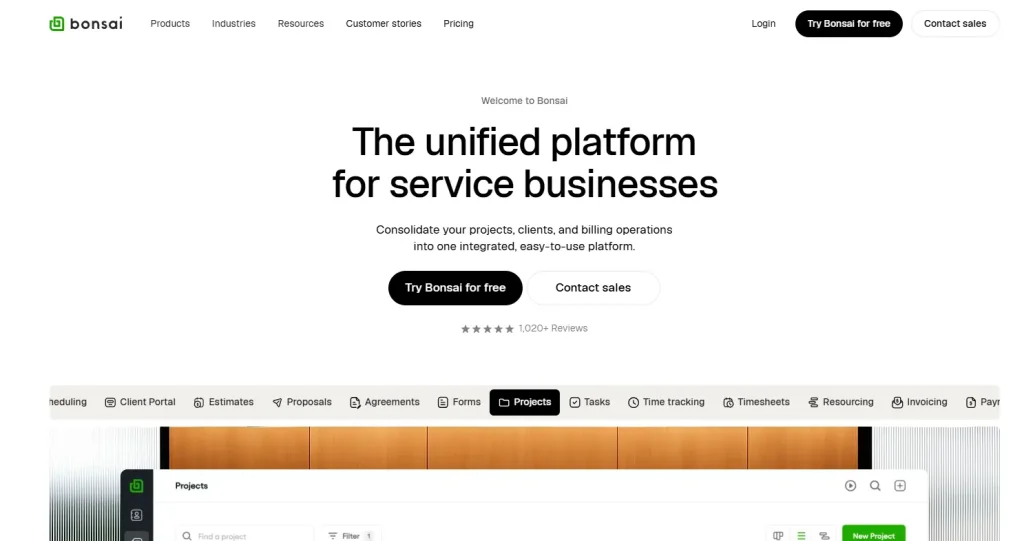
Bonsai is an all-in-one tool built for freelancers. It helps you handle everything in one place, from sending contracts and proposals to tracking your time and getting paid. It even helps you manage your taxes.
Because it has over 500 templates and works in 180 countries, it is a great choice for freelancers who work with clients all over the world.
Key Features
- 500+ Customizable Templates
- Time Tracking
- Tax Management
- Client CRM
- Expense Tracking
- Online Signatures
- Accounting Integration
- Client Portal
3. Dubsado
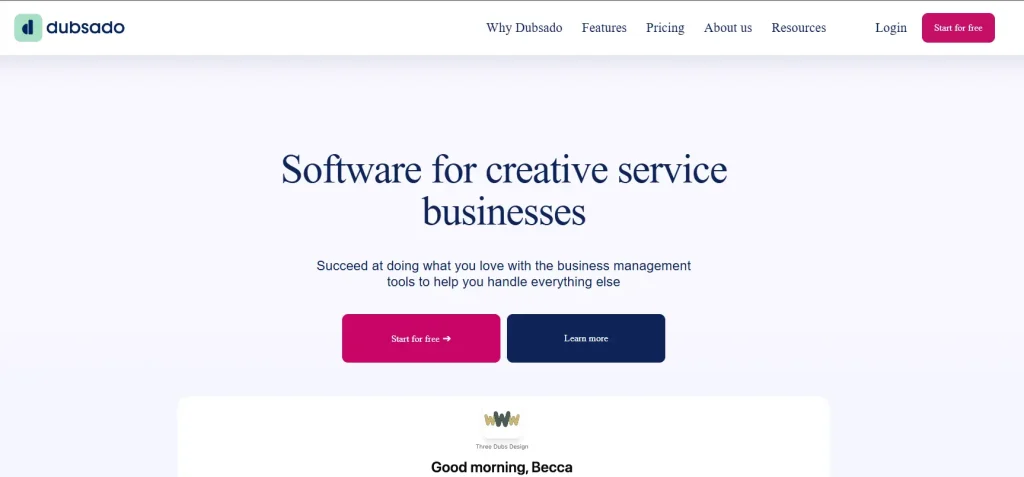
Dubsado is excellent for making your brand look great with custom forms and private areas for your clients to log in. Plus, it can do your “busy work” for you. Once you set it up, the system can automatically send emails or files based on what your client does, freeing up hours on your schedule every week.
Key Features:
- Visual Pipeline Tracking
- Custom Forms
- Interactive Client Portal
- Scheduler Integration
- Canned Emails
- Payment Processing
For details of the best HoneyBook alternatives, read this: Best HoneyBook Alternatives in 2026.
What Other Users Say: Reviews from Capterra, G2, and Trustpilot
| Platform Rating Snapshots | ||
| Platform | Rating | Total Review |
| Capterra | 4.7 / 5 | 678+ Reviews |
| G2 | 4.4 / 5 | 180+ Reviews |
| Trustpilot | 4.3 / 5 | 570+ Reviews |
To provide an objective look at HoneyBook’s standing in 2026, I’ve synthesized data from over 1,400 verified reviews across the top software aggregators. In 2026, user sentiment is split between those who value the all-in-one convenience and those frustrated by increasing costs and slow payouts.
| The Highs (What they Love) | The Lows (What they Hate) |
| “Elite Client Experience”: Users consistently report that the polished look of Smart Files allows them to close higher-ticket deals. | “The 2–3 Day Payout Lag”: This is the #1 complaint. In 2026, users find the standard payout speed “dated” compared to instant-transfer competitors. |
| “Human-Centric Support”: In a sea of AI chatbots, HoneyBook’s real-person support remains a top-rated feature in every recent HoneyBook review. | “Pricing Sticker Shock”: The 89.5% price hike has created a wave of 3-star reviews from “solo” freelancers who feel priced out. |
| “The AI Notetaker Magic”: The mobile manual override is a massive hit for professionals who do business via coffee shop meetings and calls. | “Email Deliverability”: A recurring “hidden” issue where some automated files end up in client spam folders. |
Final Verdict: Should You Buy HoneyBook in 2026?
The 2025/2026 pricing update changed everything. With the starting price jumping to $36/month, HoneyBook is no longer a “budget-friendly” option for beginners. It is now a high-end tool for established businesses.
If you are an agency where a fancy look is everything, HoneyBook is still a great choice. But if you are a growing business looking for more features at a better price, the market has changed. In this case, Taskip is the best alternative to switch to, offering more features for much less money. Explore Taskip and get your plan now!
FAQs on HoneyBook Review
Is the HoneyBook $36/mo Starter plan worth it for beginners?
Most experts say no. The Starter plan lacks the Automation Builder and the Unlimited Scheduler: the two things that actually save you time.
What is “Skip-Step” logic in HoneyBook, and why does it matter?
One of the best updates in 2026 is the ability to skip a single step in an automated workflow without breaking the entire chain. For example, if a client pays you in person, you can “skip” the automated payment reminder email so you don’t look unprofessional.
Is Taskip really a better HoneyBook alternative?
If you want to pay less while getting more, yes. Taskip offers features that HoneyBook lacks, like a Support Ticket system and a Service Catalog at a much lower starting price. Plus, Taskip’s Lifetime Deal means you can stop paying monthly “rent” entirely, which isn’t an option with HoneyBook.



Get Summary On: