The agency in 2026 is more competitive than ever. Success isn’t just about creative excellence; it’s about operational efficiency, financial clarity, and client satisfaction. Agencies juggling multiple tools for project management, client communication, invoicing, and sales pipeline management lose productivity and increase overhead costs.
This comprehensive guide reviews the best agency management software solutions available today, helping you make an informed decision that aligns with your agency’s size, budget, and specific needs.
Quick Comparison: Top Agency Management Software Solutions at a Glance
| Software | Best For | Starting Price | Key Strength |
| Taskip | All-in-one agency management | Custom pricing | Unified client portal + project management + sales pipeline |
| Worklenz | Profitability-focused agencies | Contact for pricing | Real-time project finance + time tracking |
| Wrike | Enterprise collaboration | $25/user/month | Gartner Magic Quadrant Leader (3 years) |
| Scoro | End-to-end business management | $26/user/month | Integrated project + sales + billing + reporting |
| Teamwork | Client-facing project delivery | $10.99/user/month | Excellent client collaboration + help desk |
| Asana | Team task management | $10.99/user/month | Intuitive interface + powerful automation |
| ClickUp | Highly customizable workflows | $7/user/month | Extreme flexibility + AI integration |
| Basecamp | Simple project organization | $99/month (flat) | 21 years proven reliability + ease of use |
| ProofHub | Creative agency projects | $49/user/month | Multiple project views + built-in proofing |
| Accelo | Professional services automation | Contact for pricing | Comprehensive PSA + CRM integration |
The bottom line? Modern agencies need a unified platform that eliminates tool switching, centralizes communication, and provides real-time visibility into projects and finances. Whether you’re a boutique firm or a growing agency with dozens of team members, there’s a solution that fits your workflow.
1. Taskip: The Ultimate All-in-One Agency Management Platform
Taskip goes beyond traditional project management software by offering a complete business management ecosystem specifically designed for service-based businesses. The platform features an intuitive client portal where clients can view project updates, access files, and provide feedback in real-time. Internally, teams benefit from comprehensive task management, integrated CRM functionality, automated invoicing, and real-time collaboration tools.
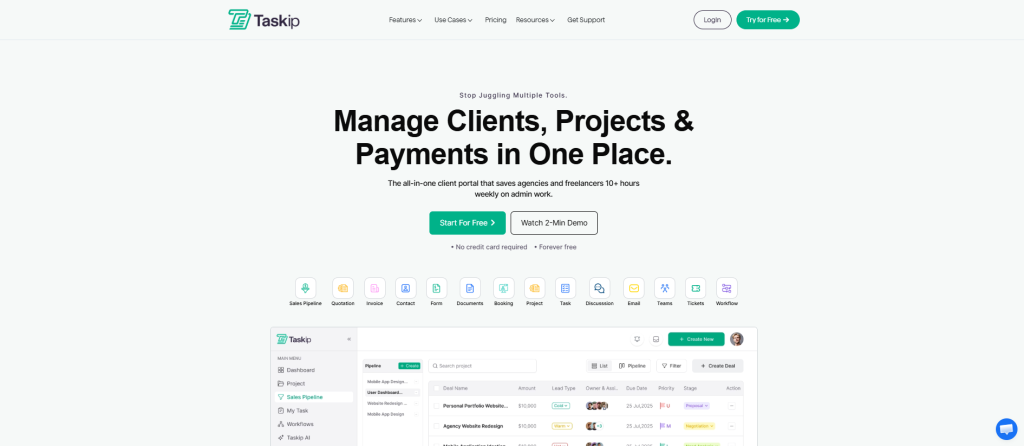
What sets Taskip apart is its ability to replace 8+ industry-standard tools while maintaining ease of use. Instead of maintaining separate subscriptions for Trello, Zoho CRM, Calendly, HelpCrunch, and Typeform, agencies can consolidate their entire operation into one streamlined platform.
Key Features of Taskip
1. All-in-One Client Portal
Provide your clients with a branded portal where they can track projects, view invoices, upload files, and communicate with your team—all in one place. Build trust, reduce back-and-forth emails, and deliver an exceptional client experience that sets you apart.
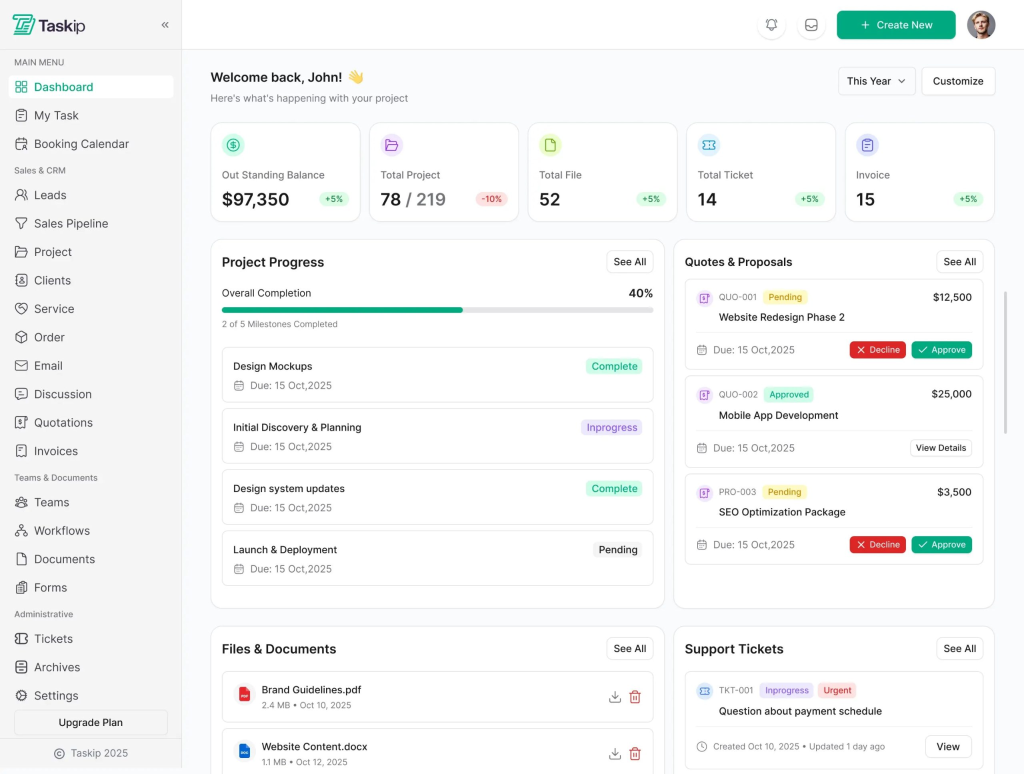
- Connect, collaborate, and deliver projects with a unified client workspace
- Real-time project visibility and transparency
- Document sharing and centralized communication
- Multi-user client access with customizable permissions
- Enhance trust through transparent project tracking
2. Quick Quote & Proposal Management
Effortlessly create, organize, and send quotations to clients. Share them by email, download as PDFs, or publish online. Quickly update statuses, duplicate, convert to invoices, and set reminders all in one simple place.
- Create professional quotations and estimates
- Send proposals for digital signatures to clients or entire teams
- Automatic invoice generation from approved quotations
- Professional proposal templates with branding options
- Track quote status and conversion rates
3. Ticket Management & Support
Allow clients to submit tickets from their portal or email with ease. Real-time notifications, file sharing, and priority tracking keep your team in sync for quick issue resolution, even when offline.
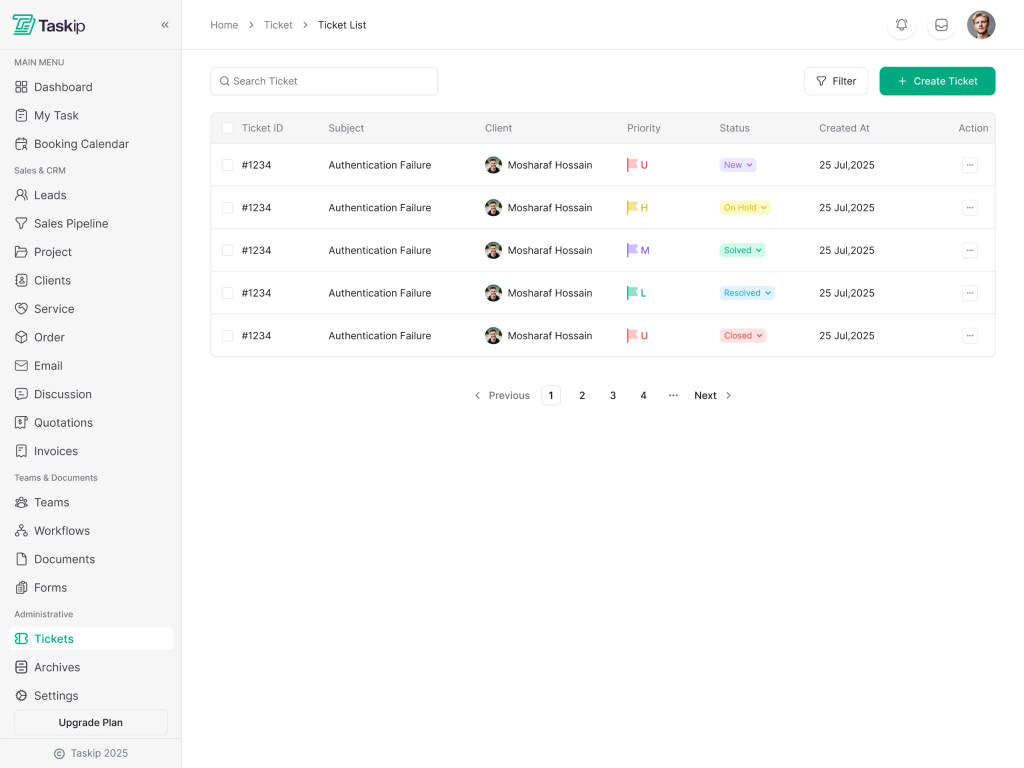
- Customers can raise support issues directly
- Real-time team response and resolution tracking
- Ticket prioritization and assignment
- Seamless client-team communication
- Reduce support response time significantly
4. Integrated Sales Pipeline
Manage your sales deals effortlessly with a clear pipeline, from prospecting to closing. Track deals through stages, set priorities, and assign tasks to your sales team. Whether it’s scheduling calls or meetings, keep your team aligned and close deals faster.
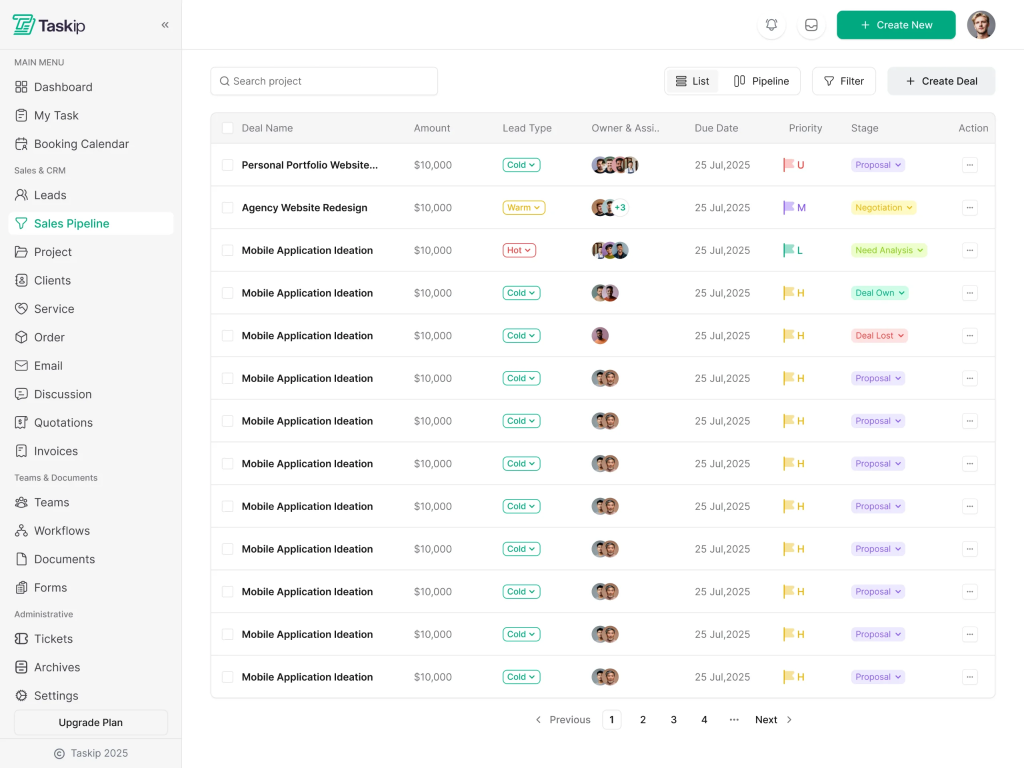
- Leverage built-in CRM for deal tracking
- Create and manage sales tasks, events, and calls
- Real-time pipeline visibility
- Automated workflow management
- Drive revenue growth with organized lead management
5. Task Management
Manage projects from start to finish with powerful tools that keep your team aligned and clients informed. Track tasks, set deadlines, collaborate in real time, and deliver exceptional results, all in one intuitive platform designed for agencies and teams.
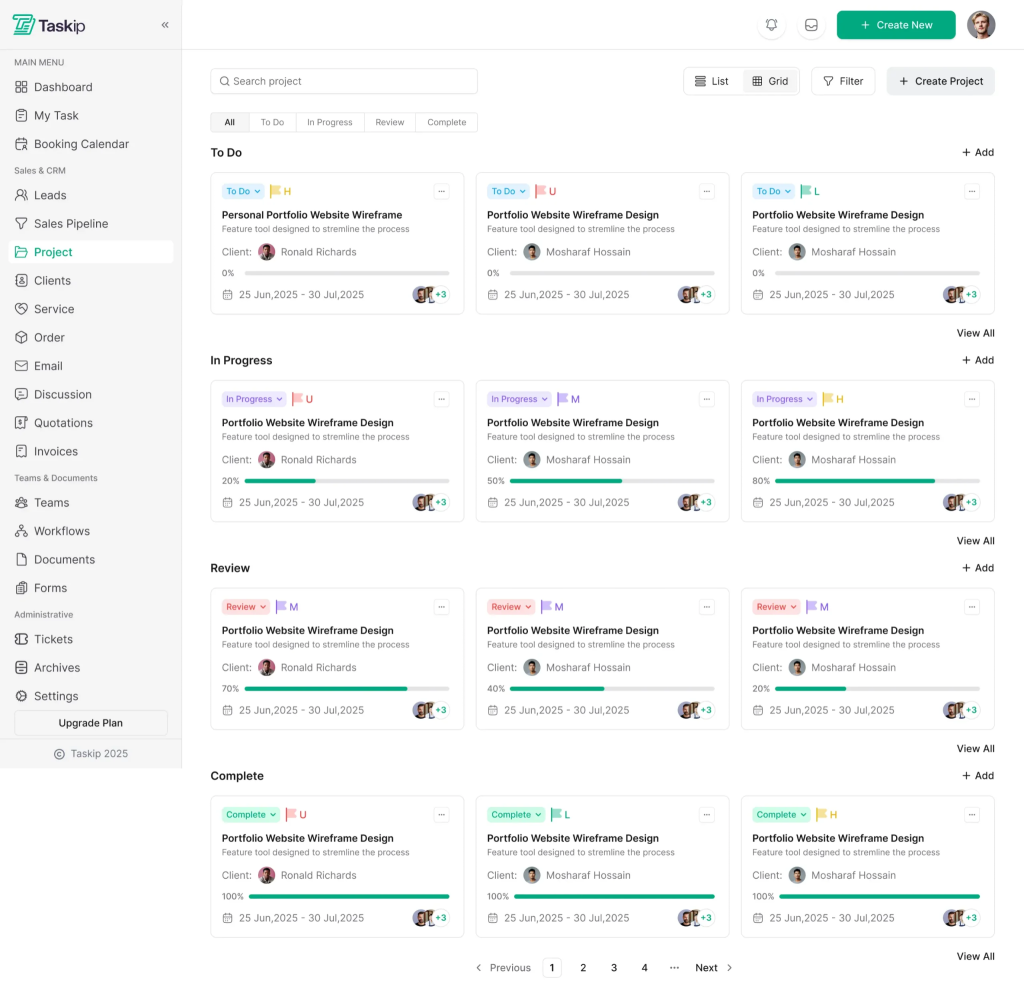
- Assign and track tasks with clear ownership
- Set deadlines and monitor progress
- Multiple project view options
- Real-time progress updates
- Nothing falls through the cracks
6. Meeting Scheduling
Stop the endless email back and forth for scheduling. Let clients and team members book meetings with you based on your real time availability. Automate reminders, manage different meeting types, and sync everything with your calendar, all from one simple and powerful scheduling platform.
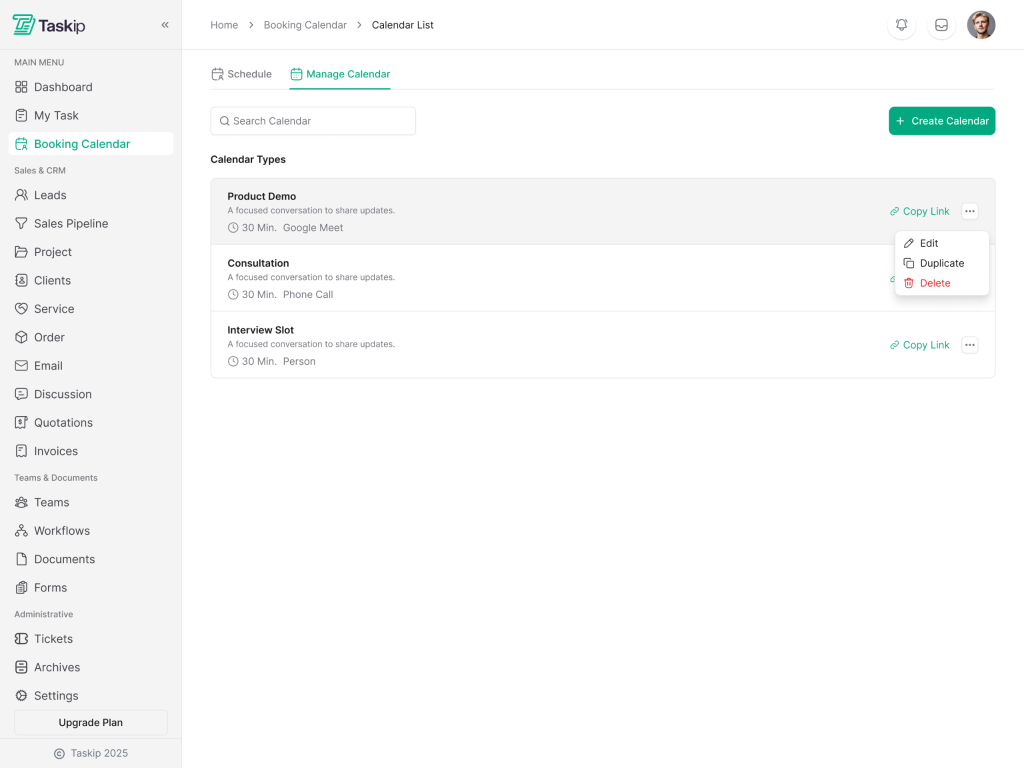
- Customizable time slots for client meetings
- Automated booking and email confirmations
- Reduce scheduling back-and-forth
- Integration with team calendars
- Professional, client-friendly scheduling interface
7. Document Collaboration
Keep all your documents organized and easily accessible to clients or team members. Share with customizable permissions, publish to the web, and collaborate using mentions, tables, images, and code blocks for dynamic documents.
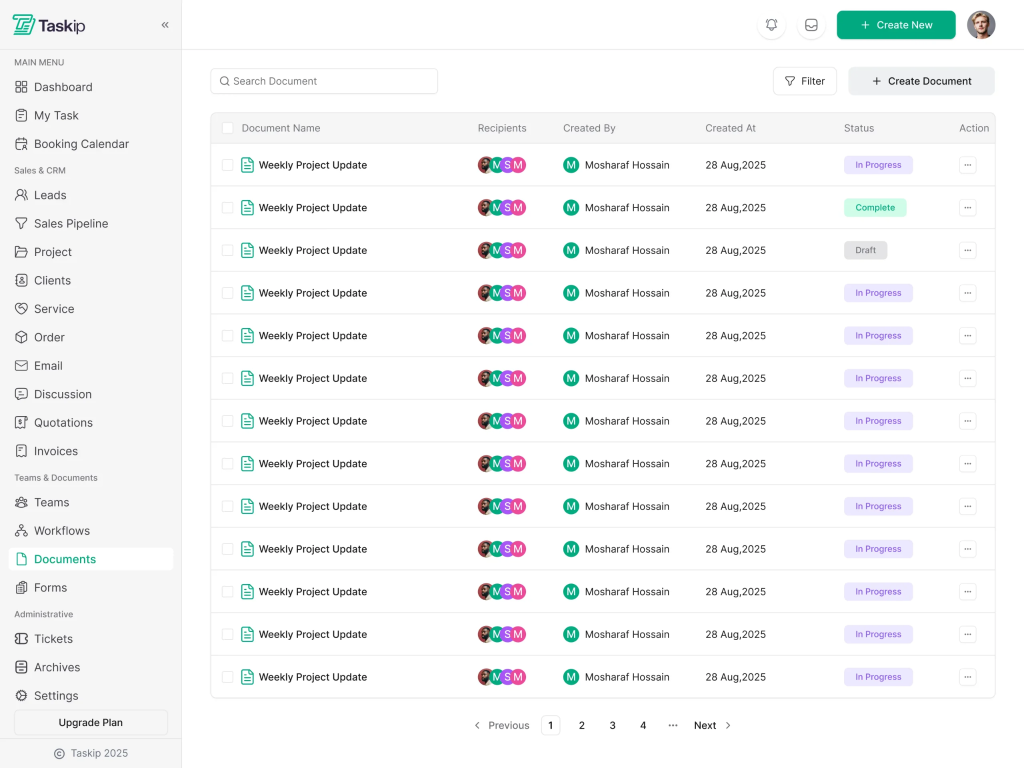
- Organize all project documents in one place
- Easy access for clients and team members
- Version control and document history
- Secure file sharing
- Centralized documentation reduces confusion
8. Workflow Automation
Simplify your business processes by automating tasks like turning emails into contacts, managing support tickets, or automating project stages. Endless possibilities for efficient workflows!
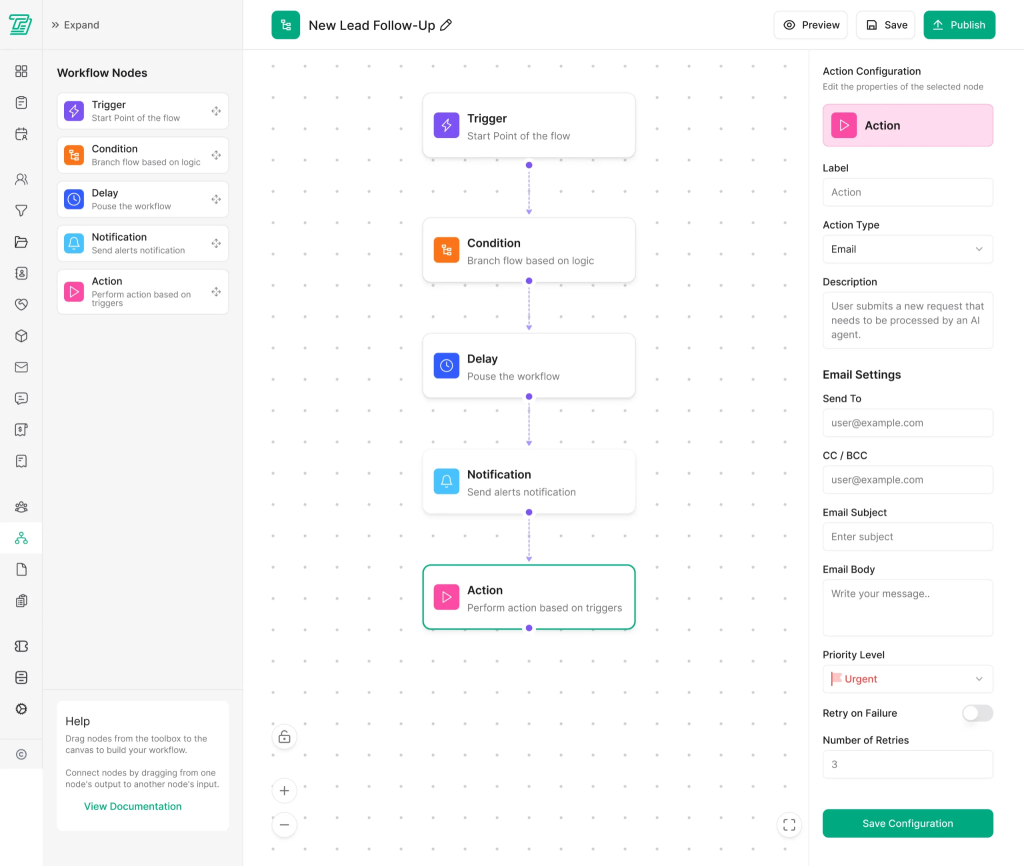
- Automate repetitive tasks and processes
- Convert emails to contacts automatically
- Trigger workflows based on project milestones
- Reduce manual data entry
- Focus team time on high-value activities
9. Custom Form Builder
Design personalized forms with conditional fields, customizable styles, and public sharing options. Add reCAPTCHA or Turnstile for security, and easily manage form submissions with success messages or redirection after submission. Perfect for gathering user feedback or queries with ease.
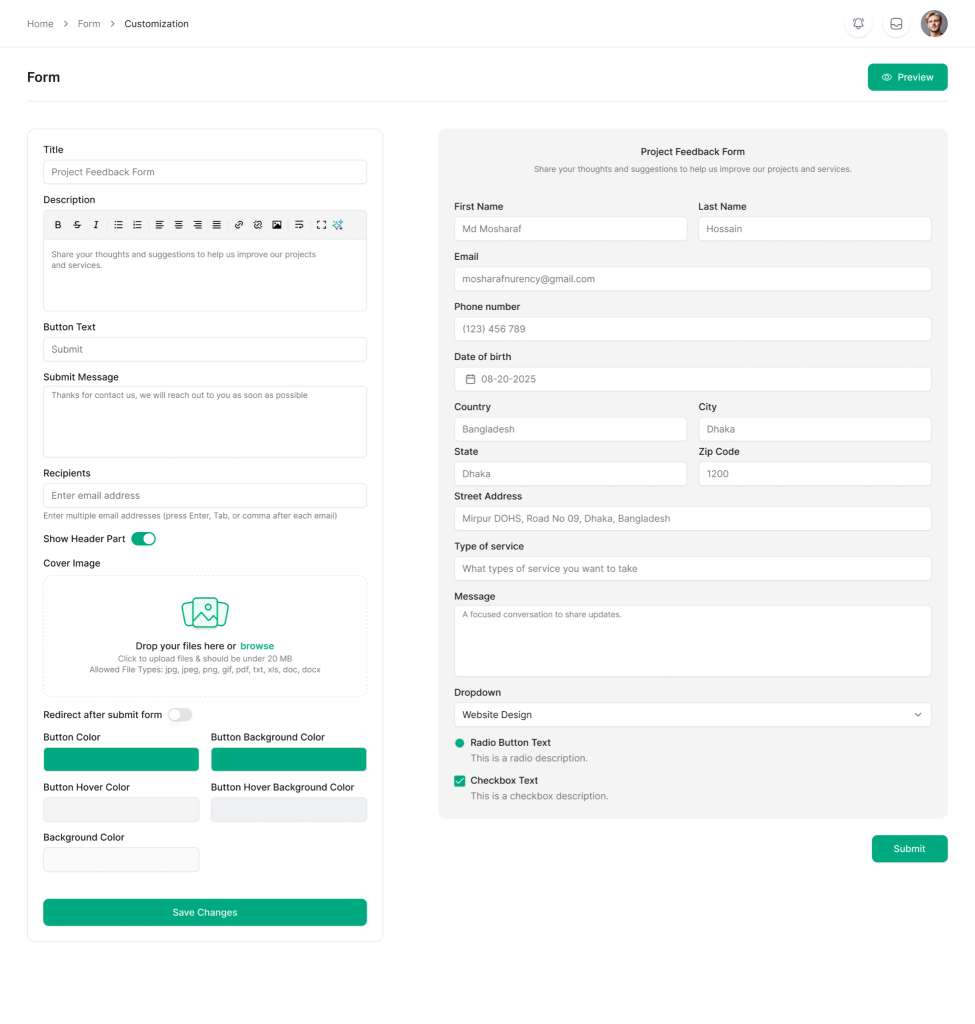
- Design personalized forms with conditional logic
- Customizable styling matching your brand
- Public sharing for client intake
- Automated data collection
- Streamline client onboarding
Taskip Pros and Cons
| Pros | Cons |
| All-in-one consolidation – Replace 8+ tools with one platform, reducing complexity and cost | Mobile app in development – Coming soon; desktop/web access is primary for now |
| Exceptional value – Single subscription vs. multiple SaaS tools provides significant cost savings | Customization may require setup time – Initial configuration and form building require dedicated time investment |
| Unified client experience – Clients appreciate the professional, branded portal with transparency | |
| Real-time collaboration – Teams and clients work together seamlessly in one place | |
| Workflow automation – Reduce manual tasks with intelligent process automation | |
| Professional invoicing – Generate invoices directly from quotes automatically | |
| Transparent project management – Clients stay informed without confusion | |
| Revenue growth focused – Sales pipeline and CRM built-in from day one |
2. Worklenz: The Profitability-Focused Agency Platform
For agencies obsessed with understanding project profitability, Worklenz delivers unmatched financial insight. The platform tracks every hour, every cost, and every revenue stream, enabling agencies to make data-driven decisions about project pricing, resource allocation, and team capacity. Unlike generic project management tools, Worklenz was built specifically for the agency business model.
Key Features
- Real-time project finance – Track costs, revenue, and margin in real-time
- Integrated time tracking – Automatic time logging with billable hour separation
- Client portal – Dedicated portal for transparent project visibility
- Resource utilization tracking – Understand team capacity and allocation
- Financial reporting – Detailed reports on profitability by project and client
- Budget management – Set and monitor project budgets
- Team performance metrics – Identify top performers and optimize allocation
Worklenz Pros and Cons
| Pros | Cons |
| Purpose-built for agencies – Every feature designed with agency workflows in mind | Steeper learning curve – Feature-rich interface requires dedicated training time |
| Exceptional financial visibility – Understand project profitability better than any competitor | Limited to certain agency types – Best for agencies with billable hour model; less ideal for retainer/fixed-price agencies |
| Time tracking built-in – Integrated time tracking without third-party tools | Reporting complexity – Powerful but can be overwhelming for small agencies initially |
| Accurate project costing – Know your true project costs and margins | Higher price point – Premium platform with premium pricing |
| Resource optimization – Make smart decisions about team allocation and capacity | Smaller feature set – Doesn’t include some peripheral features like CRM or invoicing |
3. Wrike: Enterprise-Grade Collaboration & Project Management
Wrike is the choice for large agencies and enterprises managing complex, multi-team projects with sophisticated dependencies. The platform provides powerful visual collaboration tools, including Gantt charts, Kanban boards, and timeline views. Wrike’s real strength lies in its ability to manage interconnected projects, resource planning at scale, and providing executives with clear visibility into all work happening across the organization.
Key Features
- Advanced workflow visualization – Gantt charts, Kanban boards, timeline views
- Custom dashboards – Create executive dashboards with key metrics
- Time tracking – Built-in time tracking with billable hour separation
- Workload management – Visual team capacity planning
- Real-time collaboration – In-app comments, file sharing, and discussions
- Portfolio management – Multi-project oversight for executives
- Advanced reporting – Comprehensive analytics and custom reports
- Integrations – Extensive integrations with popular business tools
Wrike Pros and Cons
| Pros | Cons |
| Gartner Leader status – Proven, recognized by industry analysts for three consecutive years | Overwhelming for small teams – Feature-rich platform can feel overly complex for small agencies |
| Enterprise-grade security – Robust security features suitable for Fortune 500 clients | Steep price for SMBs – $25/user/month starting price; costs escalate with team size |
| Exceptional visualization tools – Outstanding Gantt charts and portfolio views | Learning curve is significant – Requires dedicated training and admin support |
| Scalable architecture – Grows with enterprise needs without performance degradation | Implementation time – Proper setup requires significant consulting time |
4. Scoro: Comprehensive End-to-End Business Management
Scoro takes the “everything you need in one place” approach and executes it exceptionally well. The platform seamlessly integrates project workflows with sales pipelines, so agencies can track deals from initial contact through project delivery to final invoice. Scoro is particularly powerful for agencies that want to reduce tool switching and maintain a single source of truth for all business data.
Key Features
- Project management – Task management, Gantt charts, Kanban boards
- CRM functionality – Pipeline management, lead tracking, deal forecasting
- Invoicing & billing – Professional invoicing with payment tracking
- Time tracking – Billable hour tracking with invoice generation
- Reporting & analytics – Comprehensive dashboards and custom reports
- Portfolio management – Multi-project oversight
- Team collaboration – Built-in messaging and file sharing
- Workflow automation – Automate repetitive business processes
Scoro Pros and Cons
| Pros | Cons |
| True all-in-one platform – Project management, CRM, billing, and reporting all integrated seamlessly | Interface complexity – Numerous features can overwhelm new users initially |
| Excellent value proposition – Comprehensive feature set at competitive pricing | Customization learning curve – Significant time needed to optimize workflows for your agency |
| Integrated pipeline & projects – See the complete customer journey from lead to invoice | Performance issues at scale – Some users report slowdowns with very large datasets |
| Strong invoicing system – Professional invoicing deeply integrated with projects and time tracking | Support response times – Customer support can be slow during peak periods |
5. Teamwork: Client-Facing Excellence & Collaboration
Teamwork positions itself as the agency solution that puts client collaboration first. The platform provides clients with a branded portal where they can track project progress, approve work, and communicate with the team—all without overwhelming complexity. Internally, Teamwork provides teams with powerful task management, time tracking, and integrated support ticketing, enabling unified communication with clients.
Key Features
- Client portal – Branded, professional client workspace
- Task management – Assign, track, and collaborate on tasks
- Time tracking – Billable and non-billable hour separation
- Help desk integration – Support tickets directly within project context
- File sharing – Centralized project documentation
- Gantt charts – Timeline visualization and milestone tracking
- Approval workflows – Client approval processes built-in
- Invoicing – Time-based invoice generation
Teamwork Pros and Cons
| Pros | Cons |
| Exceptional client experience – Outstanding branded client portal that impresses customers | Less comprehensive CRM – Lacks sophisticated sales pipeline features compared to Scoro |
| Intuitive interface – Easy for both teams and clients to adopt quickly | Limited reporting depth – Financial reporting less advanced than enterprise PSA tools |
| Great for time-based billing – Seamless connection between time tracking and invoicing | Scalability concerns – Performance can lag with very large project portfolios |
| Affordable entry point – Competitive pricing starting at $10.99/user/month | Mobile experience – Mobile app exists but lacks some desktop functionality |
6. Asana: Task-Centric Collaboration Platform
Asana’s strength lies in its intuitive task management and team collaboration features. The platform makes it crystal clear what work exists, who owns it, and when it’s due. While Asana doesn’t offer invoicing or financial tracking, it excels as a pure project and task management solution with exceptional ease of use.
Key Features
- Task management – Hierarchical task organization with subtasks
- Multiple views – List, board, timeline, and calendar views
- Custom fields – Extensible task metadata
- Portfolio management – High-level project overview
- Timeline (Gantt) – Visual project scheduling
- Team collaboration – Built-in messaging and file sharing
- Automation rules – Task automation without code
- Goal tracking – OKR and goal alignment
Asana Pros and Cons
| Pros | Cons |
| Exceptional ease of use – Most intuitive project management interface in market; new users get productive immediately | No invoicing or CRM – Missing financial management and sales pipeline features that agencies often need |
| Beautiful interface – Modern, aesthetic design improves team adoption | Limited reporting – Analytics less comprehensive than dedicated business management platforms |
| Flexible customization – Custom fields and automation allow substantial personalization | Pricing per user – Scales to be expensive for large teams; difficult cost control |
| Strong integrations – Extensive Zapier and direct app integrations | Limited client visibility – Client collaboration features less robust than Teamwork or Taskip |
7. ClickUp: The Flexibility Champion
ClickUp’s core strength is flexibility. The platform provides an incredibly comprehensive feature set that can be molded into virtually any workflow. For agencies with unique processes or those willing to spend time on optimization, ClickUp delivers unmatched customization potential.
Key Features
- Multiple views – List, board, timeline, calendar, spreadsheet views
- Extensive customization – Custom fields, statuses, and workflows
- Time tracking – Built-in time tracking with billable hour support
- Document collaboration – Integrated wiki and document space
- Automation – Advanced automation builder without code
- Portfolio management – Multi-project oversight
- CRM features – Basic contact and deal management
- AI integration – Emerging AI features for task summarization
ClickUp Pros and Cons
| Pros | Cons |
| Exceptional flexibility – Customize nearly every aspect to match your workflows exactly | Learning curve is steep – Feature richness and customization options can overwhelm newcomers |
| Comprehensive feature set – One platform can genuinely replace multiple tools | Interface complexity – Information density and UI can feel cluttered initially |
| Affordable pricing – Starting at $7/user/month provides exceptional value | Implementation overhead – Requires significant setup and optimization time before seeing ROI |
| Constant feature development – Regular updates add new capabilities and improvements | Support varies by tier – Lower pricing tiers have limited support access |
8. Basecamp: The Simplicity Winner
Basecamp proves that you don’t need a feature-bloated platform to run projects successfully. Instead, Basecamp provides clear task management, team messaging, file organization, and schedule visibility in an interface so intuitive that team members rarely need training. The company’s flat-rate pricing ($99/month for unlimited users and projects) removes complexity from budgeting.
Key Features
- To-do lists – Simple, hierarchical task management
- Team messaging – Organized discussions by topic
- File management – Centralized project file storage
- Schedule – Project calendar and timeline visibility
- Automatic check-ins – Automated status updates reduce meetings
- Docs & files – Document collaboration space
- Guest access – Client and vendor access options
Basecamp Pros and Cons
| Pros | Cons |
| Exceptional simplicity – Minimal learning curve; teams adopt immediately | Limited advanced features – No time tracking, invoicing, or reporting beyond basics |
| Flat-rate pricing – $99/month for unlimited users and projects; superior cost model | Not ideal for complex workflows – Simpler approach means less customization for sophisticated agencies |
| Proven reliability – 21+ years in business with consistent customer loyalty | No CRM or financial tools – Requires integration with other tools for complete business management |
| Professional presence – Company has maintained strong reputation despite market competition | Declining market share – Losing mindshare to more feature-rich competitors in recent years |
9. ProofHub: Creative Agency Powerhouse
ProofHub understands that creative agencies need more than just task management—they need to streamline the approval workflow. The platform includes sophisticated proofing tools, multiple project views optimized for creative work, and reporting features that reveal project profitability. ProofHub bridges the gap between generic project management and creative-specific tools.
Key Features
- Built-in proofing – Comment directly on creative assets with version tracking
- Multiple views – Kanban, Gantt, table, and calendar views
- Time tracking – Detailed time tracking with billable hour separation
- Reporting – Project profitability and resource utilization reports
- Timesheet management – Comprehensive timesheet approval workflows
- File storage – Centralized asset storage with version control
- Gantt charts – Visual timeline management
ProofHub Pros and Cons
| Pros | Cons |
| Exceptional proofing capabilities – Built-in review and approval workflows save enormous time vs. email approvals | Limited CRM integration – Lacks comprehensive sales pipeline features |
| Creative-focused features – Version tracking, asset management optimized for creative work | Pricing is higher – At $49/user/month, costs more than generic alternatives |
| Profitability reporting – Deep insight into project profitability and resource costs | Client portal less sophisticated – Not as polished as dedicated client communication platforms |
| Comprehensive time tracking – Detailed timesheet management with approval workflows | Smaller ecosystem – Fewer integrations than market-leading platforms |
10. Accelo: Professional Services Automation (PSA) Specialist
Accelo’s power lies in its comprehensive view of the entire client relationship. The platform recognizes that agencies don’t just manage projects—they sell services, scope work, deliver projects, track time, and invoice clients. Accelo integrates all these functions into a cohesive system with specialized features for each stage of the client journey.
Key Features
- CRM system – Pipeline management and sales forecasting
- Project management – Task and milestone tracking
- Time tracking – Billable hour tracking with invoicing
- Resource scheduling – Team capacity planning and allocation
- Quoting – Professional quote generation
- Invoicing – Time and project-based invoicing
- Reporting & analytics – Profitability and utilization reporting
Accelo Pros and Cons
| Pros | Cons |
| True PSA platform – Purpose-built for the entire professional services workflow | Higher pricing – Premium platform with premium cost; requires contacting sales for quotes |
| Integrated pipeline & projects – Seamlessly track from initial lead through project completion | Complexity – Steep learning curve with extensive features and customization options |
| Excellent financial tracking – Comprehensive profitability and utilization reporting | Support quality varies – Some users report inconsistent support experiences |
| CRM fully integrated – No need for separate CRM; sales and delivery workflows unified | Implementation time – Significant setup and configuration required for optimal use |
Making Your Decision: Selection Criteria for Best Agency Management Software
When evaluating best agency management software, consider these key factors:
1. Team Size & Agency Type
- Solo to small team (1-5): Basecamp, Taskip, ClickUp
- Growing agency (6-20): Teamwork, Asana, ProofHub, Scoro, Taskip
- Established agency (20+): Wrike, Accelo, Worklenz, Scoro
2. Primary Pain Points
- Client communication: Taskip, Teamwork, Scoro
- Project profitability: Worklenz, Accelo, Scoro
- Creative approvals: ProofHub, Taskip
- Enterprise collaboration: Wrike, Scoro
- Simplicity: Basecamp, Teamwork
3. Budget Constraints
- Bootstrap budget (<$100/month total): Basecamp ($99), ClickUp
- Growing budget ($100-300/month): Teamwork, Asana, ProofHub
- Enterprise budget (300+): Wrike, Accelo, Worklenz, Scoro
4. Feature Requirements
- All-in-one: Taskip, Scoro, Accelo, Worklenz
- Project management focus: Asana, Basecamp, ClickUp, Teamwork
- Creative workflows: ProofHub, Taskip
- Financial management: Accelo, Worklenz, Scoro
5. Integration Needs
- Zapier ecosystem: ClickUp, Asana
- Native integrations: Wrike, Scoro, Taskip
- Simple and limited: Basecamp
- Comprehensive suite: Accelo, Worklenz
Expert Verdict: Your Path Forward
Choosing the best agency management software is one of the most impactful decisions you can make for operational efficiency and profitability. The right platform eliminates tool switching, centralizes communication, provides financial clarity, and enhances the client experience.
If you want an all-in-one solution that consolidates your entire tech stack while remaining intuitive and user-friendly, Taskip stands out as the compelling choice. By replacing multiple tools—project management, CRM, client portals, invoicing, and workflow automation—Taskip provides exceptional value and unified operations.
For teams prioritizing profitability and financial insight, Worklenz or Accelo deliver depth that generic platforms cannot.
For enterprise-grade complexity, Wrike’s three-time Gartner leadership and Scoro’s comprehensive feature set provide proven reliability.
For boutique agencies valuing simplicity, Basecamp or Teamwork remain unmatched in ease of use.
The best agency management software is the one your team will actually use consistently. Consider starting with a free trial or demo of your top 2-3 choices. Test with real workflows. Involve your team in the evaluation. The effort you invest in selection now will pay dividends in productivity, profitability, and client satisfaction for years to come.
Ready to transform your agency operations? Explore Taskip today and discover how one unified platform can replace the fragmented tools slowing your team down.
Frequently Asked Questions About Best Agency Management Software
Q: Can one platform really replace 8+ tools?
A: Yes, software like Taskip, Scoro, and Accelo genuinely consolidate project management, CRM, invoicing, and client communication. However, you may still need specialized tools for advanced accounting, marketing automation, or industry-specific functions.
Q: What’s the typical implementation timeline?
A: Taskip typically take 1-2 weeks of setup and training. Enterprise platforms like Wrike and Accelo may require 4-8 weeks of proper implementation.
Q: How do I calculate ROI from agency management software?
A: Calculate the sum of your current tool costs and estimate the team time saved through automation and reduced tool switching. Most agencies see positive ROI within 3-6 months of proper implementation.
Q: Should I choose based on price alone?
A: No. The cheapest tool rarely provides the best value. A $50/month tool that saves 10 hours of team time monthly is better than a $10/month tool that creates frustration. Focus on features that solve your specific pain points.
Q: Can I migrate from my current tools?
A: Most modern platforms offer data import assistance and provide migration guides. Plan for data verification time, but most migrations can be completed in 1-2 weeks.
Q: What about data security?
A: All solutions reviewed here meet enterprise-grade security standards. Verify SOC 2, GDPR, and HIPAA compliance for your specific requirements before committing.