
Free AI Proposal Generator & Proposal Builder
Describe the project, pick a type and tone, and get a full proposal draft with scope, deliverables, timeline and pricing. Edit it, then download Word or PDF. No signup.
Trusted by 1,850+ agencies and freelancers · Rated 4.8/5 on G2 · Updated October 2026
Rated 4.8/5 on G2 (6 reviews) · No signup required to generate or download.
Nothing you type is stored unless you choose to save it. Review before sending.
Fill in the details and generate to see your proposal here.
What is a Proposal Generator?
A free proposal generator, also called a proposal builder or proposal creator, turns a few project details into a complete business proposal: executive summary, the client's problem, your solution and scope, deliverables, timeline, pricing and next steps, ready to review and edit.
How it works: choose one of 7 proposal types, describe the client's problem and your scope, add an optional budget and timeline, and the AI drafts every section in the tone and language you pick.
What it is not: full proposal software. The free generator does not track opens, collect e-signatures or take payments. Save the draft to a free Taskip account when you want to send it as a link and manage it with your client.
Prefer a ready-made layout? Download a proposal template in Word or follow the project proposal format.
Proposal Generator at a glance
- Price
- Free
- Signup
- None to generate or download
- Proposal types
- 7, from project to IT
- Tones
- Professional, Friendly, Persuasive
- Languages
- English, Spanish, French, German, Portuguese
- Download
- Word (.docx), or PDF from the print window
How to Use the Proposal Generator
Choose a proposal type
Project, sales, service agreement, consulting, marketing, construction or IT.
- Not sure which one? See "Which Proposal Type Do You Need?" below.
Describe the project
Client, project title, the problem or goal, and the scope you are proposing.
- List exact deliverables, not just a project name.
- Mention the options or packages you want to offer.
Set budget, timeline and tone
An optional budget range and timeline, plus a tone that matches the relationship.
Generate, edit and download
The AI drafts the full proposal. Edit any section, then download a Word (.docx) file, save a PDF from the print window, or save it to a free Taskip account.
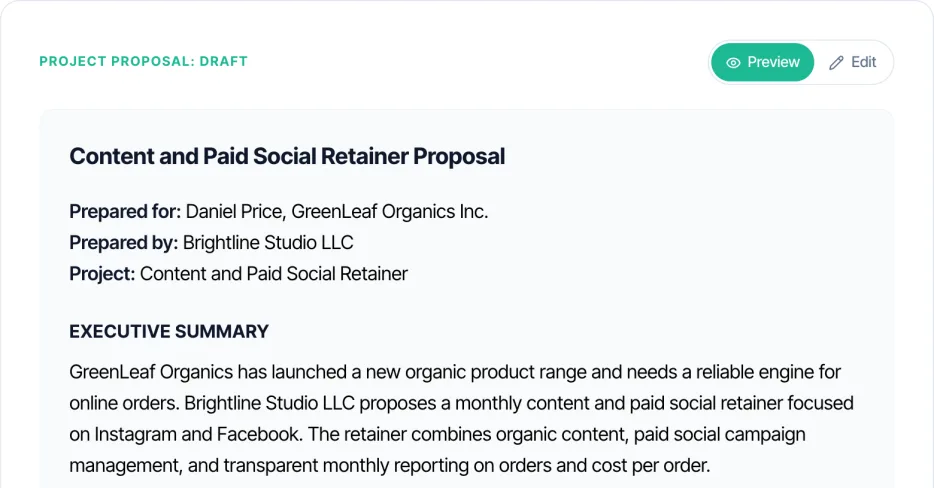
Sample Proposal Made with the Generator
The screenshot above is a real draft for a content and paid social retainer. Here is what the generator writes in each section.
| Section | What the AI writes | Example line |
|---|---|---|
| Title and parties | Proposal title, who it is for and who it is from | Content and Paid Social Retainer Proposal, for GreenLeaf Organics |
| Executive summary | The client's goal and your recommendation | A monthly content and paid social retainer focused on Instagram and Facebook |
| Problem and goal | The client's situation in plain words | More online orders from a new organic product range |
| Solution and scope | What you will do | Organic content, paid social management and monthly reporting |
| Deliverables | The concrete outputs | Posts and reels each month, campaign management, a monthly report |
| Timeline | When the work happens | 3-month minimum, starting in November |
| Investment | Pricing, as a table when there are options | Starter, Growth and Scale monthly packages |
| Next steps | How the client says yes | Approve a package to schedule the kickoff |
Which Proposal Type Do You Need?
The generator offers 7 proposal types. Here is when to use each one and the sections that matter most.
Project Proposals
A defined piece of client work with a start and an end.
Key sections
- Scope and deliverables
- Timeline
- Budget by phase
Tip: See the project proposal format for a filled sample.
Sales Proposals
Pitching a product, package or retainer to a new buyer.
Key sections
- Problem and ROI
- Pricing options
- Next steps
Tip: Tiers beat a single number: let the buyer choose.
Service Agreement Proposals
Terms the client is likely to sign as the agreement itself.
Key sections
- Scope and terms
- Payment schedule
- Acceptance
Tip: Follow up with a signed contract from the contract maker.
Consulting Proposals
Advice-led work where your method and track record sell it.
Key sections
- Situation
- Methodology
- Fees
Tip: See the consulting proposal template.
Marketing Proposals
Campaigns and retainers for agencies and marketers.
Key sections
- Strategy
- Deliverables per month
- Reporting
Tip: See the agency proposal template.
Construction Proposals
Build and renovation work with materials and site conditions.
Key sections
- Scope and exclusions
- Materials
- Payment stages
Tip: Write what is excluded as clearly as what is included.
IT Proposals
Software, infrastructure and integration projects.
Key sections
- Technical scope
- Integrations
- Support after launch
Tip: Name every system you will connect to, so scope creep has nowhere to start.
Freelancing? Start from the freelance proposal template. Legal work? See the law firm proposal template.
Proposals by Industry
The same 7 types cover most businesses. These are the details to type into the description for each industry.
Web design and development
Sites and apps paid by milestone.
Add to your description
- Pages or features
- Milestones and launch date
- Hosting and support after launch
Marketing agencies
Campaigns and monthly retainers.
Add to your description
- Channels and monthly deliverables
- Who pays ad spend
- Reporting cadence
IT and software services
Implementation, integration and support.
Add to your description
- Systems involved
- Data migration
- Support hours
Consultants
Assessments, strategy and advisory retainers.
Add to your description
- Interviews and workshops
- Deliverable report
- Fee structure
Construction and contractors
Site work with materials and permits.
Add to your description
- Site address
- Materials and labor
- Payment stages
Healthcare services
Clinics and providers proposing services to organisations.
Add to your description
- Service scope
- Compliance requirements to meet
- Staffing and schedule
Free Proposal Software vs. a Proposal Generator
A generator writes the proposal. Proposal software manages it after you send it. Here is when each is enough.
| Free proposal generator (this tool) | Proposal software (HoneyBook, Bonsai, Moxie, Taskip) | |
|---|---|---|
| Best for | Writing a proposal fast, a few times a month | Sending many proposals and tracking them |
| Account | Not needed | Needed, usually with a trial or paid plan |
| Writes the content | Yes, with AI | Templates, some with AI |
| Tracking and e-signature | No | Yes |
| Turns into a quote or invoice | No | Yes, in most tools |
Ready to track proposals and get them signed? Taskip takes a proposal through quote, contract and invoice on one client record, with a free plan to start.
Online Proposals: Send a Link Instead of a PDF
An online proposal is a web link instead of an attachment. The client opens it in the browser, picks an option and accepts with an e-signature, and you see when they viewed it. PDFs still suit formal buyers and RFPs. To send this draft as an online proposal, save it to a free Taskip account and share it from there.
Proposal Generator vs. Proposal Template in Word
Both are free. They suit different situations.
| Proposal generator (this tool) | Proposal template in Word | |
|---|---|---|
| Best for | A new kind of project, or wording built around one client | Proposals you send often with the same structure |
| How you start | Describe the project in a form | Download a .docx and replace placeholders |
| Wording | Drafted from your details | Written by you |
| Where to get it | On this page | The proposal template in Word page, or the business proposal format hub |
Proposal Generator vs. Maker vs. Builder vs. Creator
All four terms get searched for the same thing, a tool that turns project details into a proposal, but they hint at slightly different approaches.
| Term | What it usually means | How this tool works |
|---|---|---|
| Proposal Generator | AI or logic drafts the content for you from a few inputs | Describe the project, AI writes the full draft |
| Proposal Maker | Often a form-based tool where you type into fixed fields | Same fields feed the AI draft rather than a rigid template |
| Proposal Builder | Usually implies drag-and-drop sections or a visual editor | Edit mode lets you adjust any section after the AI drafts it |
| Proposal Creator | A general term for any of the above | Creates a complete, editable proposal you can download |
Proposal vs. Quote vs. Estimate vs. Statement of Work
These four documents serve different stages of the same deal, and mixing them up costs you credibility.
| Document | When it’s sent | What it covers | Binding? |
|---|---|---|---|
| Estimate | Very early, before scope is fully known | A rough price range | No |
| Proposal | After an initial conversation, to win the work | The problem, your solution, deliverables, timeline and pricing | No, until accepted |
| Quote | After scope is defined, focused on price | Itemized pricing for agreed work. See the quotation generator | Usually, until it expires |
| Statement of Work (SOW) | After the proposal is accepted | Detailed deliverables, success criteria and sign-off, usually attached to a contract | Yes, once referenced by a signed contract |
What Should a Business Proposal Include?
- A brief executive summary stating the problem and your proposed solution
- The specific scope of work and deliverables, not a vague description
- A realistic timeline with milestones the client can hold you to
- Transparent pricing, ideally broken into packages or line items
- Why you, or your team, specifically, not a generic capabilities list
- A clear next step: how the client says yes
Best Practices for Proposals That Get Signed
- Send it within a day or two of the conversation, while the client’s interest is still fresh
- Lead with the client’s problem, not your company history
- Break pricing into packages or tiers instead of one number, so the client can pick, not just accept or reject
- Match the tone to the relationship: formal for enterprise procurement, direct for a founder you already know
- Set a validity period on the pricing so it can’t be held against you months later
- End with a specific call to action, a link or a line to sign, not "let us know if you have questions"
Free Proposal Templates
Prefer to start from a fixed template? These are free to download, with no email required.
- Business proposal format and templates: six proposals in Word and PDF, plus a filled sample.
- Proposal template in Word: the same six as editable .docx files.
- Project proposal format: the 12 sections, a filled sample and how to write each one.
- Freelance proposal template: about you, approach, options and next steps.
- Agency proposal template: case study, strategy and retainer packages.
- Consulting proposal template: situation, methodology, phases and fees.
What You Get
- 7 proposal types: project, sales, service agreement, consulting, marketing, construction, IT
- Full editable draft with a live Preview/Edit toggle
- Word (.docx) download, plus PDF from the print window, no watermark
- 5-language output: English, Spanish, French, German, Portuguese
- Formatted pricing/investment section from a budget range
- No signup required to generate or download
No Signup, Unlike Most Proposal Software
Generate and download free. Most proposal tools ask for an account or a trial before you can create anything.
7 Proposal Types in One Tool
Project, sales, service agreement, consulting, marketing, construction and IT proposals, each with sections suited to that type.
5 Languages, Not Just English
Draft the full proposal in English, Spanish, French, German or Portuguese.
Edit Every Section
Switch to Edit mode to adjust the executive summary, scope or pricing before downloading.
AI Proposal Generator vs. Proposal Software vs. Static Template
| This Tool | Proposal Software (PandaDoc, Proposify) | Static Template | |
|---|---|---|---|
| Cost | Free | Paid plan required for full features | Free to low cost |
| Signup required | No | Yes | Depends on source |
| Turnaround | Under a minute | Minutes, once set up | Minutes to fill in |
| Tailored to your deal | Yes, drafted from your details | Yes, with manual editing | No, generic language |
| Word download | Yes, without an account | Usually PDF or link | Usually Word |
| Tracking and e-signature | No (yes after saving to Taskip) | Yes | No |
Common Mistakes to Avoid
✕ What Not to Do
✓ What to Do Instead
✕ What Not to Do
Vague scope or deliverables
Client disputes what was promised
✓ What to Do Instead
Be specific in the project description field, list exact deliverables, not just a project title, so the AI drafts a scope section you can point back to.
✕ What Not to Do
No pricing breakdown
Client hesitates or asks for a quote instead
✓ What to Do Instead
Fill in the budget range field so the draft includes a formatted pricing section instead of leaving pricing to a follow-up email.
✕ What Not to Do
Missing or vague timeline
Client assumes a faster turnaround than planned
✓ What to Do Instead
Set the timeline field with real milestones so the draft states delivery dates up front.
✕ What Not to Do
Wrong tone for the relationship
Proposal feels mismatched to the client
✓ What to Do Instead
Match the tone to how you already talk to this client: Professional for enterprise, Friendly for close relationships, Persuasive for competitive pitches.
✕ What Not to Do
No clear next step
Client reads the proposal and does nothing
✓ What to Do Instead
Check the draft ends with a call to action before sending, and add one in Edit mode if it is missing.
✕ What Not to Do
Sending the AI draft without proofreading
Factual or formatting mistakes reach the client
✓ What to Do Instead
Switch to Edit mode and read the full draft before downloading or sending. The AI works from what you typed, not what you meant.
What Taskip Customers Say
“The team is very personable and genuinely want you to have the best experience with the system. I look forward to streamlining all my client data, contracts, invoicing and reminders for business.”
Ramie C.
Owner, Kinetic Timing

“All in 1 business management CRM tool. I love using a client management system that lets me handle everything from contracts to invoices.”
Verified User
Information Technology & Services
Learn More
Want this automated end-to-end?
Taskip's Quotations tracks status, sends reminders, and converts to invoices, free to start.
Related Free Tools
Quotation Generator
Add your business details, client info, and line items. Get an instant quote with tax and discounts calculated live as you type. No signup, no watermark.
- Itemized line items with quantity, unit price, and automatic totals
- Tax and discount calculated automatically on the subtotal
- Multi-currency support across 39 world currencies, including USD, EUR, GBP, INR, AED and BDT
- 3 quotation templates (Modern, Minimal, Corporate) with 6 accent colors
- Logo and signature upload, reused automatically on your next quote
Contract Generator
Contract creator for freelancers, agencies and small businesses. Pick one of 7 contract types, describe the deal, and get a full draft in under 30 seconds. Edit any clause, then download. Free, no login.
- 7 contract types: service, employment, NDA, partnership, vendor, consulting, licensing
- Full editable draft with a live Preview/Edit toggle
- Word (.docx) download, plus PDF from the print window, no watermark
- 5-language output: English, Spanish, French, German, Portuguese
- Multi-currency deal value support
Invoice Generator
Make an invoice online in under a minute. Add your business details, client info and line items, and create invoices online free with tax and discounts calculated for you. Download the PDF or print it. No signup, no watermark.
- Auto-incrementing invoice numbers, editable per invoice
- Multi-currency support across 39 world currencies
- Automatic tax (VAT, GST, or sales tax) and discount calculation on the subtotal
- Custom logo upload, remembered automatically for your next invoice
- PDF and CSV download, plus direct browser printing
Scope of Work Generator
Describe the project, deliverables, and success criteria. Get a full SOW draft with timeline and budget. Editable, no signup.
- Objectives, deliverables, and success criteria written from your project description
- Timeline and optional budget section
- Assumptions and sign-off block included by default
- Full editable draft with a live Preview/Edit toggle
- Word (.docx) download, plus PDF from the print window, no watermark
Discovery Questionnaire Generator
Describe the project type and goals. Get a full discovery questionnaire covering audience, scope, budget, and stakeholders. Editable, no signup.
- 6 core areas: goals & success metrics, target audience, scope & deliverables, budget & timeline, stakeholders & decision-makers, tools/constraints
- 15-40 questions, scaled to project complexity
- Written as client-facing questions, ready to send as-is
- Full draft generated in under a minute
- Editable before download in Edit mode
Creative Brief Generator
Generate a complete, professional creative brief in seconds. Free, instant, no signup.
- 7 project types (Branding, Website, Marketing Campaign, Social Media, Video/Content, Packaging, Other)
- Structured sections: objectives, audience, key message, deliverables, tone
- Automatic milestone/timeline table
- Optional competitor/reference section
- Editable preview before export
Client Intake Form Generator
Generate a professional client intake questionnaire tailored to your service. Free, instant, no signup.
- Six-section structure: contact, service details, billing, files/access, scheduling, sign-off
- Tailored to 7 service/industry types
- Fillable-blank format, ready to print or fill digitally
- Tracks outstanding contract/NDA sign-off status
- DOCX export for word-processor filling
Explore More Free Tools
Legal & Agreements
Billing
Project Scoping
Finance & Tax
FAQs: Proposal Generator
Is this proposal generator really free?
Yes. Generating, editing and downloading are free with no signup. A free Taskip account is only needed if you choose Save to my account.
Is there free proposal software?
Most proposal software, such as HoneyBook, Bonsai and Moxie, needs an account and a trial or paid plan before you can create proposals. This generator is free with no account. Taskip, which adds tracking and e-signatures, also has a free-forever plan to start on; check the pricing page for what each plan includes.
Can I download the proposal in Word?
Yes. Download DOCX saves an editable Word file. Download PDF opens a clean print window where you choose Save as PDF.
What proposal types can I generate?
Project proposals, sales proposals, service agreements, consulting proposals, marketing proposals, construction proposals and IT proposals, each drafted with sections suited to that type.
Which proposal type should I choose?
A defined client project: Project. Pitching a product or retainer: Sales. Terms the client will sign: Service Agreement. Advice-led work: Consulting. Campaigns: Marketing. Build work: Construction. Software and infrastructure: IT.
What is a proposal builder?
A tool that assembles a proposal from sections, usually with a visual editor. This generator works the same way, but the AI writes the sections for you and you edit them afterwards.
Can I edit the generated proposal?
Yes. Switch to Edit mode to adjust any section directly before downloading or sending.
Can I include pricing in the proposal?
Yes. Give it a budget range and the draft includes a pricing or investment section, formatted as a table when there are several line items or packages.
Does it support languages other than English?
Yes. Choose English, Spanish, French, German or Portuguese and the whole proposal is drafted in that language.
Is my proposal information stored?
No. Your details are sent to generate the draft and are not stored afterward. Nothing is saved unless you click "Save to my account," which creates a free Taskip workspace and stores the proposal there as an editable document.
Can clients accept and sign the proposal online?
Not inside the free generator. Send the Word or PDF file yourself, or save it to a free Taskip account and send it from there, where clients can review and sign documents online with Taskip e-signatures.
Is the generated proposal legally binding?
A proposal is usually not binding until the client accepts it, but once accepted it often becomes the basis of the agreement. For higher-value work, follow it with a signed contract from the contract maker.
Can I use this to respond to an RFP (request for proposal)?
Yes for the writing: the executive summary, scope, deliverables, timeline and pricing draft in minutes. It does not track RFP deadlines or compliance requirements, so paste the draft into the format the RFP asks for.
Who makes this proposal generator?
Taskip, client management software for agencies and freelancers. Taskip handles proposals, quotes, contracts with e-signatures, invoices, a client portal and projects in one place.