
Free Scope of Work Generator: Create an SOW with AI
Describe the project, deliverables, and success criteria. Get a full SOW draft with timeline and budget. Editable, no signup.
Trusted by 1,850+ agencies and freelancers · Rated 4.8/5 on G2 · Updated October 2026
Rated 4.8/5 on G2 (6 reviews) · No signup required to generate or download.
Nothing you type is stored unless you choose to save it.
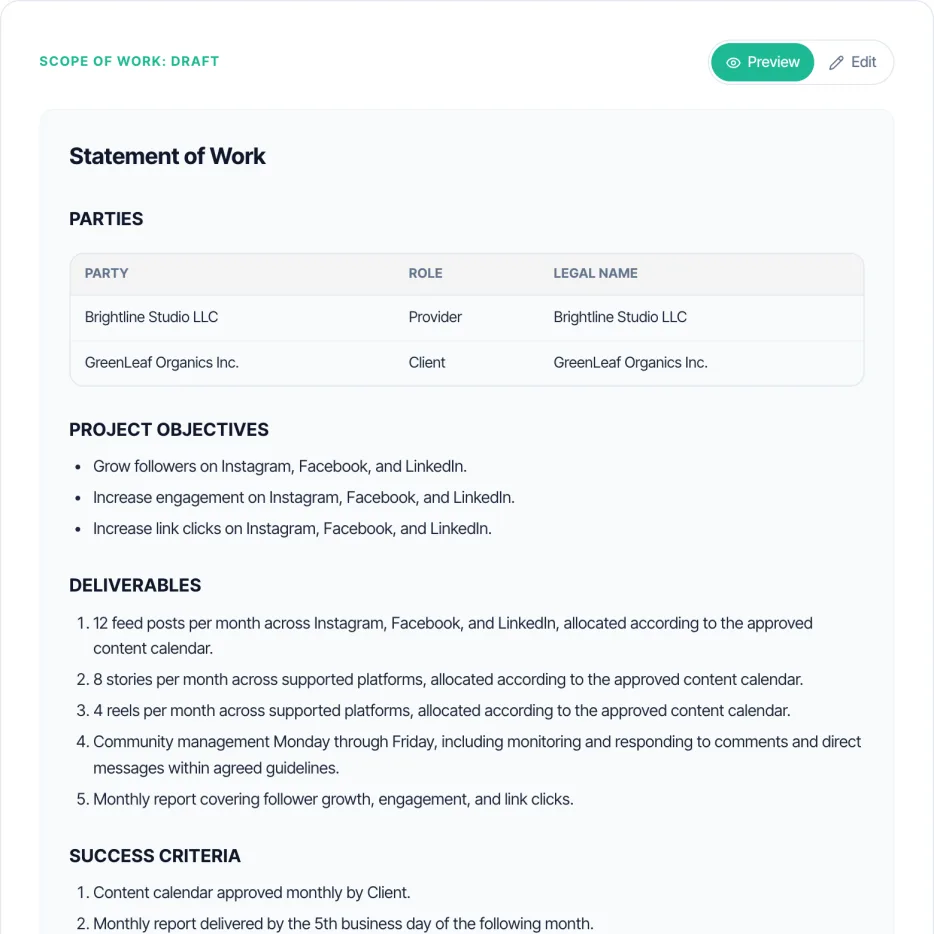
Fill in the details and generate to see your SOW here.
What is a Scope of Work Generator?
A free AI scope of work generator turns your project objectives and deliverables into a full SOW draft, with success criteria, timeline, assumptions, and sign-off written for you in seconds, ready to attach to a contract.
How it works: name the provider and client, describe the objectives and deliverables, add success criteria, timeline and an optional budget, and the AI drafts every section in the language you pick.
What it is not: a contract. A scope of work describes the work; pair it with a signed contract from the contract maker for payment, liability and termination terms.
Want to see a finished one first? Read a filled branding, social media management or website scope of work example.
Scope of Work Generator at a glance
- Price
- Free
- Signup
- None to generate or download
- Inputs
- Objectives, deliverables, success criteria, timeline, budget
- Languages
- English, Spanish, French, German, Portuguese
- Download
- Word (.docx), or PDF from the print window
- Save
- Free Taskip account, optional
How to Use the Scope of Work Generator
Name the parties
Your business (Provider) and the client.
Define objectives & deliverables
What the project achieves and exactly what gets delivered.
Set success criteria, timeline & budget
How success is measured, when it’s due, and the budget if you want it included.
Generate, edit & download
The AI drafts the full SOW. Edit any section, then download a Word (.docx) file, save a PDF from the print window, or save it to a free Taskip account.
Scope of Work by Profession
Branding and Design
List logo concepts, revision rounds, identity elements and file formats. See a filled branding scope of work.
Website Projects
Count page templates, name the CMS and set acceptance criteria for performance and testing. See a filled website scope of work.
Social Media Management
Define posting cadence, platforms covered, and whether content creation and ad spend are included. See a filled social media management scope of work.
Marketing Agencies
Separate strategy, creative and media-buy scope so a client can approve or cut one phase without renegotiating everything. See a filled digital marketing scope of work, or start from the agency scope of work template.
IT and Software Projects
Include environment and access assumptions and a clear definition of complete (tested, deployed, documented) per deliverable.
Content Creators
Define deliverables by content type and quantity (videos, posts, edits per month), not a vague content package.
Freelancers
A short, specific SOW protects fixed-price work; list the revisions included and what counts as an extra.
AI and Tech Consulting
Spell out data access, tooling assumptions and what success means for an AI or automation deliverable before work starts.
Scope of Work Examples
Filled scope of work examples you can copy or download in Word and PDF, with deliverables tables, timelines, out-of-scope lists and payment schedules.
- Branding scope of work example: an 8-week brand identity project.
- Social media management scope of work example: a monthly retainer across three platforms.
- Website scope of work example: a 10-week WordPress redesign.
- Digital marketing scope of work example: a 12-week product launch campaign.
- Agency scope of work template: a general agency SOW.
SOW vs. Proposal vs. Contract: Which Comes First?
Send a proposal to win the work. Once the client agrees, write the scope of work to pin down deliverables, dates and acceptance. Then sign a contract that references the SOW for the legal terms. In Taskip all three sit on the same client record, and the signed SOW becomes a project your team can track.
What You Get
- Objectives, deliverables, and success criteria written from your project description
- Timeline and optional budget section
- Assumptions and sign-off block included by default
- Full editable draft with a live Preview/Edit toggle
- Word (.docx) download, plus PDF from the print window, no watermark
- 5-language output: English, Spanish, French, German, Portuguese
No Signup, Unlike Most SOW Tools
Generate and download free. Many SOW tools ask for an account before you see a draft.
Built to Attach to a Contract
Drafts a SOW meant to sit alongside a signed contract, not replace one, with the sections a Provider/Client engagement actually needs.
Success Criteria Included
Every draft states how success is measured, not just what gets delivered, so scope disputes have a clear reference point.
Edit Every Section
Switch to Edit mode to adjust objectives, deliverables, or timeline before downloading.
Scope of Work vs. Contract vs. Proposal
| Scope of Work (SOW) | Contract | Proposal | |
|---|---|---|---|
| Purpose | Defines exactly what work gets done | Covers the legal relationship: payment, liability, termination | Pitches the engagement before it is agreed to |
| When it’s used | After scope is agreed, attached to or referenced by a contract | Signed before work begins | Sent before either side commits |
| Binding on its own? | Usually not, binding once referenced by a signed contract | Yes, once signed | No, until accepted |
| Covers deliverables & success criteria? | Yes, in detail | Rarely, references the SOW instead | At a summary level |
| Typical pairing | Attached to a contract | Often references a separate SOW | Often followed by a SOW and contract once accepted |
Common Mistakes to Avoid
✕ What Not to Do
✓ What to Do Instead
✕ What Not to Do
No measurable success criteria
Provider and client disagree on whether the work is "done"
✓ What to Do Instead
State specific, checkable success criteria, not just a deliverables list, so completion isn’t a matter of opinion.
✕ What Not to Do
Vague deliverables
Scope creep, since anything could technically count
✓ What to Do Instead
List each deliverable specifically, with format and quantity where relevant, instead of a general description.
✕ What Not to Do
No assumptions section
Disputes over who provides what (access, content, approvals)
✓ What to Do Instead
State what you’re assuming the client will provide or handle; every generated draft includes an assumptions section by default.
✕ What Not to Do
Treating the SOW as a replacement for a contract
No legal terms for payment, liability, or termination
✓ What to Do Instead
Pair the SOW with a signed contract for the legal relationship; use our contract generator alongside this tool.
✕ What Not to Do
No timeline or milestone dates
Client assumes a faster delivery than planned
✓ What to Do Instead
Fill in the timeline field with real dates or phase durations, not just a total duration.
✕ What Not to Do
Skipping the sign-off section
No clear record that both sides agreed to the scope
✓ What to Do Instead
Keep the sign-off block in the generated draft; don’t delete it when editing.
Learn More
Want this automated end-to-end?
Taskip's Project Management tracks status, sends reminders, and converts to invoices, free to start.
Related Free Tools
Contract Generator
Contract creator for freelancers, agencies and small businesses. Pick one of 7 contract types, describe the deal, and get a full draft in under 30 seconds. Edit any clause, then download. Free, no login.
- 7 contract types: service, employment, NDA, partnership, vendor, consulting, licensing
- Full editable draft with a live Preview/Edit toggle
- Word (.docx) download, plus PDF from the print window, no watermark
- 5-language output: English, Spanish, French, German, Portuguese
- Multi-currency deal value support
Proposal Generator
Describe the project, pick a type and tone, and get a full proposal draft with scope, deliverables, timeline and pricing. Edit it, then download Word or PDF. No signup.
- 7 proposal types: project, sales, service agreement, consulting, marketing, construction, IT
- Full editable draft with a live Preview/Edit toggle
- Word (.docx) download, plus PDF from the print window, no watermark
- 5-language output: English, Spanish, French, German, Portuguese
- Formatted pricing/investment section from a budget range
Project Timeline Generator
Describe your project, phases, and deliverables. Get a full phased timeline with a schedule table. Editable, no signup.
- Phased schedule with milestones and deliverables per phase
- Optional team members/roles and inter-phase dependencies factored into the plan
- Full editable draft with a live Preview/Edit toggle
- PDF and DOCX download, no watermark
- 5-language output: English, Spanish, French, German, Portuguese
Independent Contractor Agreement Generator
Describe the project scope, compensation, and payment schedule. Get a full independent contractor or freelance agreement draft with IP and termination clauses. Editable, no signup.
- Full contract draft: scope, compensation, payment schedule, IP transfer, confidentiality, termination
- Payment schedule options: hourly, weekly, bi-weekly, monthly, per milestone, or upon completion
- IP transfer to the client upon full payment by default, editable if you want to retain or license rights
- Full editable draft with a live Preview/Edit toggle
- PDF and DOCX download, no watermark
NDA Generator
Choose mutual or unilateral, name the parties, describe the confidential information. Get a full NDA draft in seconds. Editable, no signup.
- Mutual or unilateral NDA, your choice
- Definition of confidential information, obligations, and standard exclusions written for you
- Duration options: 1, 2, 3, 5 years, or indefinite
- Full editable draft with a live Preview/Edit toggle
- Word (.docx) download, plus PDF from the print window, no watermark
Retainer Agreement Generator
Describe the ongoing scope, retainer fee, and payment schedule. Get a full retainer agreement draft. Editable, no signup.
- Full retainer draft: scope, fee, payment schedule, term, and renewal terms
- Payment schedule options: weekly, bi-weekly, monthly, or quarterly
- Covers consulting, marketing, legal, IT support, creative agency, and general professional services retainers
- Full editable draft with a live Preview/Edit toggle
- PDF and DOCX download, no watermark
Explore More Free Tools
Legal & Agreements
Billing
Project Scoping
Finance & Tax
FAQs: Scope of Work Generator
Is the scope of work generator really free?
Yes. Generating, editing and downloading are free with no signup. A free Taskip account is only needed if you choose Save to my account.
What sections does the generated SOW include?
The parties, objectives, deliverables, success criteria, timeline, an optional budget, assumptions and exclusions, and an acceptance and sign-off section.
What do I need to fill in?
Your name or business, the client, the objectives and the deliverables are required. Success criteria, timeline and budget are optional but make the draft more specific.
Can I edit the SOW before downloading?
Yes. Switch to Edit mode and change any section before you download.
Can I download the scope of work in Word?
Yes. Download DOCX saves an editable Word file. Download PDF opens a print-ready view where you choose Save as PDF.
Does it support languages other than English?
Yes. Choose English, Spanish, French, German or Portuguese.
Is my project information stored?
No. Your details are sent to generate the draft and are not stored afterward. Nothing is saved unless you click "Save to my account."
Is a scope of work legally binding on its own?
Usually it is binding as part of, or referenced by, a signed contract. Pair it with the contract maker for the legal terms.
What is the difference between a SOW, a proposal and a contract?
A proposal wins the work, the SOW defines exactly what will be delivered, and the contract sets the legal terms both sides sign.
How do I stop scope creep with a SOW?
List deliverables with quantities, write success criteria you can check, keep the exclusions section, and handle extras through a written change request.