
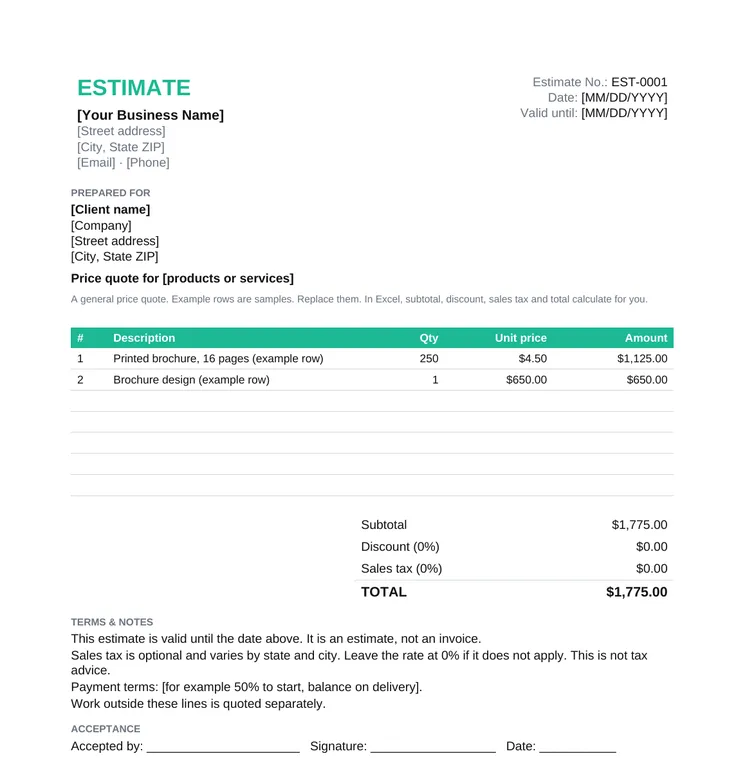
Price Quote and Sales Quote
A straightforward price quote or sales quote for products and one-off jobs.
- Estimate number, date and valid until
- Quantity, unit price and amount
- Discount, optional sales tax and total
- Terms and a signature line
A free estimate template for Word, Excel and PDF. Estimate number, US date, valid-until date, line items, optional sales tax, discount, terms and a signature line. Three versions: a price quote, a design project and an agency services estimate.
4.6/5 from 9 reviews on G2 · Free for commercial use, no email required · Updated November 2026What is an estimate template?
An estimate template is a ready-to-fill estimate or price quote with an estimate number, a valid-until date, line items, an optional sales tax line, and a place to sign.
Use it before the scope is final, when the client needs a number to decide. An estimate can still move. A quotation is the fixed offer you send once the scope is agreed, and an invoice is the request for payment after the work. The difference is spelled out in quote vs invoice vs estimate. For a fixed-price offer, use a quotation template.
Each file is free for commercial use, with no signup. In Excel, yellow cells are yours to type. Subtotal, discount, sales tax and total calculate on their own. Need a fixed-price offer instead? Use a quotation template.
A straightforward price quote or sales quote for products and one-off jobs.
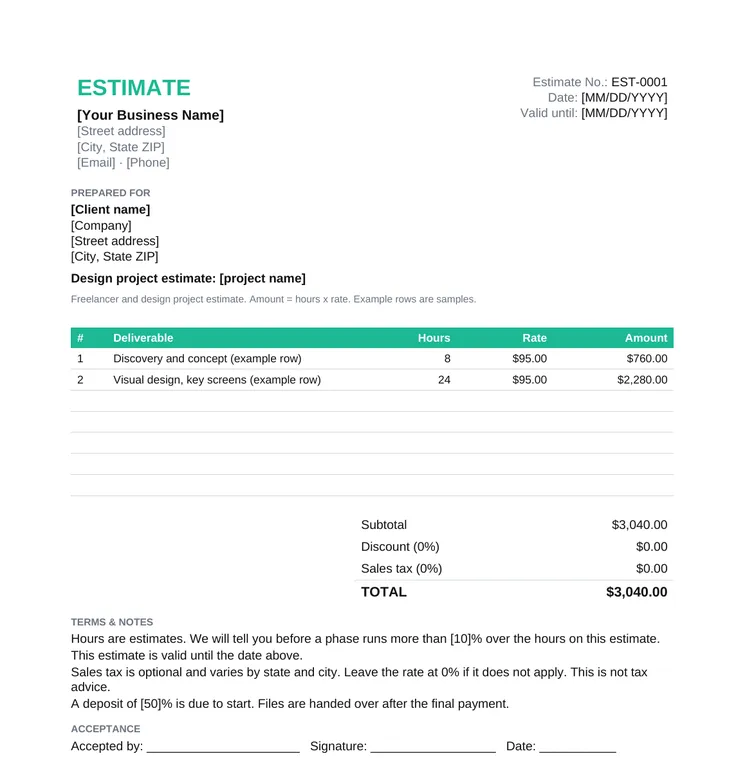
Designers and freelance studios pricing a project by hours and rate.
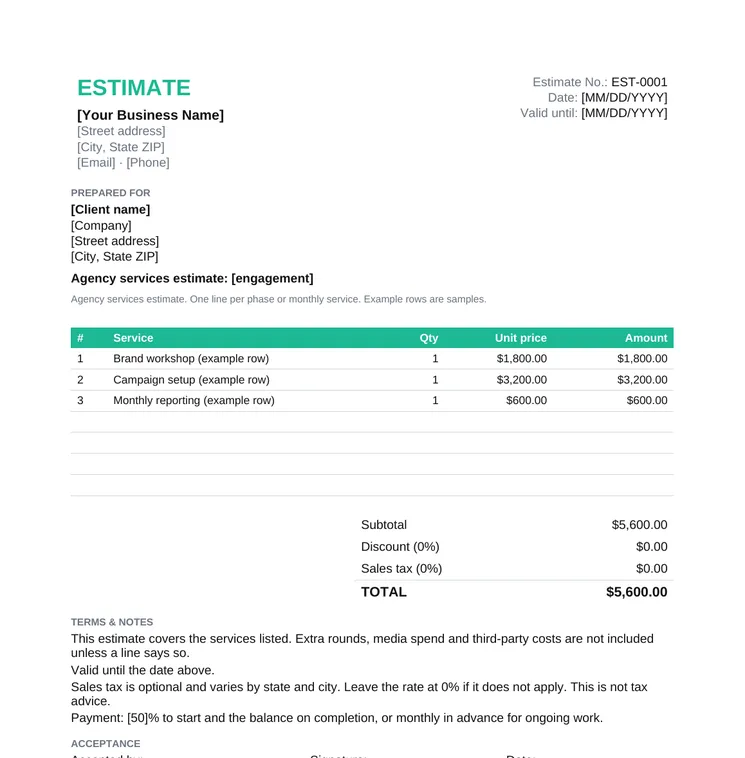
Agencies estimating phases, a campaign or a monthly service.
These are the fields clients look for. Sales tax is included as its own line because many buyers need it separate from the service price. Leave the rate at 0% when it does not apply.
| Field | What to enter | Example |
|---|---|---|
| Estimate number | A unique number you can match to the later quote or invoice | EST-0001 |
| Date | The day you send it, in US format | 11/16/2026 |
| Valid until | The last day this figure holds | 12/16/2026 |
| Your details | Business name, address, email and phone | [Your Business Name], [City, State ZIP] |
| Client | Name, company and address | [Client name], [Company] |
| Line items | Description, quantity or hours, rate and amount | 8 hours x $95.00 |
| Subtotal and discount | Sum of the lines, then any discount | Subtotal $3,040.00, discount 0% |
| Sales tax | Your state and local rate, or 0% if tax does not apply | Optional. There is no single US rate |
| Total | Subtotal, minus discount, plus sales tax | Calculated in Excel |
| Terms and signature | Payment, what is excluded, and a place to accept | 50% to start. Accepted by, signature, date |
Sales tax rules differ by state, and by whether you sell goods or services. This template gives you a line for the rate. It is not tax advice.
Price quote for products and simple jobs, design project for hours and rate, agency services for phases and retainers.
Replace the square-bracket placeholders with your business details and the client.
Estimate number, today's date as MM/DD/YYYY, and a valid-until date. Do not leave the validity open.
One row per item, phase or deliverable. Delete the example rows. In Excel the amount is quantity times rate.
Enter a discount percent if you offer one. Enter your sales tax rate, or leave 0% when sales tax does not apply.
Add payment terms and what is excluded, then send a PDF. For a fixed offer later, move the same lines into a quotation.
The math is the same. What changes is how you describe the lines. How to write a winning quote covers the wording once the figure becomes a fixed offer.
Quantity and unit price. Use it for a product, a print run or a single job the client can compare.
Hours and rate per deliverable, so a design client can see where the time goes.
Phases and monthly services. Say what is outside the fee, such as media spend and extra rounds.
Word is the one to edit when you want a longer note under the table. You type the totals, or you use the Excel file and let it calculate. The Excel estimate multiplies quantity by rate, subtracts a discount percent from the subtotal, then applies the sales tax rate you type. Empty rows stay blank.
The PDF is the copy you send or print. Keep the Word or Excel file as your master. Google Docs opens the .docx, Google Sheets opens the .xlsx, and the formulas still run in Sheets.
Quote vs Invoice vs Estimate
When to send each one, and what the client is agreeing to.
How to Write a Winning Quote
Turn the estimate into a fixed quote the client can accept.
Free Quotation Templates
Word, Excel and PDF quotations for a fixed-price offer.
Quotation Format in Word
The same quotations as editable Word files.
Free Quotation Generator
Build the quote in the browser and download a PDF.
Free Invoice Templates
Invoice the work once it is delivered.
A ready-made estimate you fill in instead of building a document from a blank page. It has an estimate number, the date, a valid-until date, line items, a subtotal, an optional sales tax line, terms and a signature line. The files on this page are free Word, Excel and PDF downloads.
No. An estimate is an early figure and can still change. A quote is a fixed offer for an agreed scope. An invoice asks for payment after the work. A short comparison is on quote vs invoice vs estimate.
Your business details, the client, an estimate number, the date in MM/DD/YYYY, a valid-until date, a line for each item with quantity and price, the subtotal, any discount, sales tax if it applies, the total, payment terms and a signature line.
Yes. Amount is quantity times rate. The sheet then takes a discount percent off the subtotal and applies the sales tax percent you enter. Both rates start at 0%. Type your state and local rate, or leave tax at 0% if it does not apply. This is not tax advice.
Yes. The first file is a price quote and sales quote: quantity, unit price, discount, optional sales tax and total. The other two are the same layout for a design project and for agency services.
Yes. Fill it online in Taskip opens the free quotation generator. You add the lines, set USD, enter a tax rate and download a PDF, with no signup. The Word and Excel files on this page add the valid-until date, the estimate number and the signature line.