Early access: 30% off yearly. Code EARLY30 · Ends Nov 26 →
Taskip
United Kingdom · Word, Excel and PDF

Invoice Template UK: Free Word, Excel and PDF

A free invoice template UK businesses can fill in as a VAT invoice template. Word, Excel and PDF, with the HMRC full VAT invoice fields, VAT at 20%, 5% and 0%, a non-VAT sole trader file, and a design services version. Amounts in pounds. Dates as DD/MM/YYYY.

4.6/5 from 9 reviews on G2 · Free for commercial use, no email required · Updated 17 November 2026

What is an invoice template UK?

An invoice template UK is a ready-to-fill VAT invoice with a sequential number, the tax point, both parties, the VAT rate on each line, and the total VAT in pounds.

Use it when a VAT-registered business invoices a customer in the UK. The fields follow HMRC VAT Notice 700/21. It is the bill you send after the supply, not a quote. Send a quotation first. For India, use the GST invoice format. If you are not VAT registered, use the sole trader file on this page.

  • Free Word, Excel and PDF downloads, no email required
  • Excel calculates the amount excluding VAT, VAT at 20%, 5% and 0%, and the total
  • Pounds, and dates as DD/MM/YYYY
  • A separate file for sole traders who are not VAT registered
  • A design services version with hours and a rate excluding VAT

Download a Free Invoice Template UK

Each file is free for your own invoices, with no signup. In Excel, yellow cells are yours to type. Grey cells calculate. Quote the work first with a quotation template, or see GST quotation formats if the client is in India.

What a Full UK VAT Invoice Must Show

These are the details in VAT Notice 700/21, section 4.1, and VAT guide (Notice 700), section 16.3. The standard rate is 20% and the reduced rate is 5%. The zero rate still exists (Notice 700, section 3.3). Which rate applies depends on the supply. Payment terms and bank details are not on HMRC's list. They are on the template so the customer can pay.

FieldWhat to enterExample
Invoice numberA sequential number from one or more series, unique to that documentINV-2026-001
Tax pointThe time of supply17/11/2026
Invoice dateThe date of issue, where it is different from the tax point. The template has both fields17/11/2026
SupplierYour name, address and VAT registration number. A trading name is allowed if the registered name and address also appear[Your business name], [postcode], VAT number
CustomerThe name and address of the person you supplied[Customer name], [postcode]
DescriptionEnough to identify the goods or servicesWebsite design, homepage
Quantity and unit priceQuantity of goods or extent of the services, and the unit price. For a service, the unit can be an hour8 hours at £85.00
Amount excluding VATFor each description, the amount payable excluding VAT. Any currency is allowed on this line£1,000.00
VAT rateThe rate for that description: 20% standard, 5% reduced or 0% zero20%
TotalsThe gross total excluding VAT, and the total VAT chargeable in sterling. The template also shows the total including VAT, as the worked example in section 4.3 does£1,300.00 excluding VAT, £210.00 VAT
Cash discountThe rate of any cash discount you offer. Write "none" if you do not offer oneNone
Payment terms and bank detailsNot an HMRC requirement. Due date, sort code and account number, so the invoice can be paid14 days, sort code and account

This is not tax advice. Rates and special cases, including a margin scheme or the reverse charge, are for your accountant or HMRC.

How to Fill In the UK VAT Invoice

1

Choose the file

Standard VAT invoice for mixed or single rates. Design services if you bill hours. The sole trader file only if you are not VAT registered.

2

Add both parties

Replace the square brackets with your name, address and VAT registration number, and the customer name and address.

3

Number and date it

The next invoice number in your series. Invoice date and tax point as DD/MM/YYYY. If they are the same day, enter that day in both.

4

List each supply

Description, quantity and unit price excluding VAT. Delete the example rows. In Excel the net amount is quantity times price.

5

Set the VAT rate

In Excel, pick 20%, 5% or 0% on each line. VAT, the total excluding VAT and the total including VAT calculate. In Word, type the totals.

6

Add how to pay

Payment terms, sort code and account number. State any cash discount rate, or write none. Save a PDF to send, and keep the Word or Excel file.

VAT Invoice, Sole Trader Invoice or Design Invoice

Only a VAT-registered business can issue a VAT invoice. If you supply standard-rated or reduced-rated goods or services to another VAT-registered person, you must issue one, normally within 30 days of the supply (Notice 700/21, section 3.1). You do not have to issue a VAT invoice for a zero-rated supply (Notice 700, section 16.2.1).

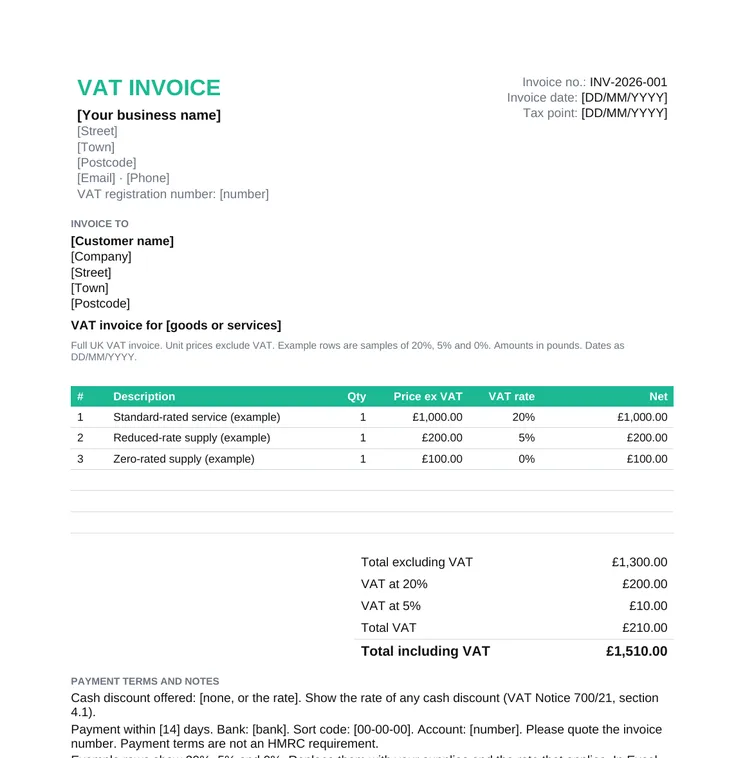
Standard VAT invoice

The full field list, with 20%, 5% and 0% on the lines that need them. Example rows are labelled as examples. Replace them with your own supplies and the rate that applies.

  • One rate per line
  • VAT totalled in pounds
  • Bank details under the totals

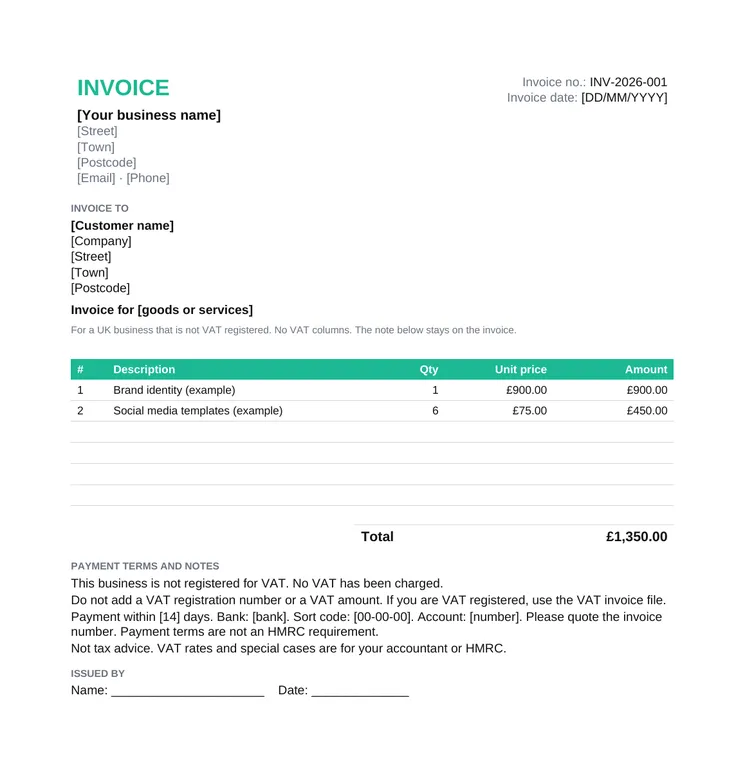
Not VAT registered

No VAT number, no VAT column and no VAT amount. The file states that the business is not VAT registered and that no VAT has been charged. That note is for the customer. HMRC does not prescribe the sentence.

  • Do not show a VAT number
  • Do not add VAT to the price
  • Use the VAT file once you register

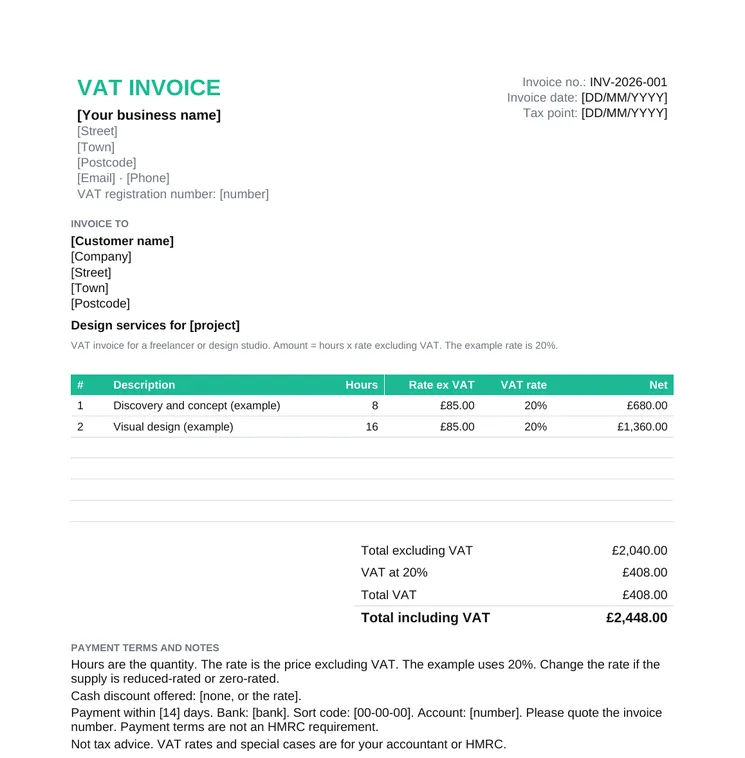
Freelancer and design services

The same full VAT invoice, with hours and a rate excluding VAT. The example uses 20%. Change the rate if that line is reduced-rated or zero-rated. A freelancer who is not VAT registered should use the sole trader file instead.

  • Hours times rate
  • VAT on the net amount
  • A short payment note

Simplified VAT Invoices, up to £250

A simplified VAT invoice is only for a supply of £250 or less, including VAT. VAT Notice 700/21 sections 4.4 and 4.5 describe it for retailers and for other businesses. Show your name, address and VAT registration number, the time of supply (tax point), a description of the goods or services, and for each VAT rate the total amount payable including VAT in sterling and the VAT rate. Exempt supplies must not be included. The same limit is in regulation 16A of the VAT Regulations 1995.

Above £250, issue a full VAT invoice. That is the standard file on this page. There is no separate simplified download here, because most business invoices are over the limit or need the full field list. A retailer asked for an invoice over £250 issues a full VAT invoice or, where the notice allows it, a modified invoice that shows VAT-inclusive values.

Common Mistakes

  • Reusing an invoice number, or leaving a gap you cannot explain later.
  • A VAT amount in a currency other than sterling. Line amounts may be in any currency. The total VAT must be in pounds (Notice 700/21, section 4.1).
  • Charging VAT, or showing a VAT number, when you are not VAT registered. Use the sole trader file.
  • One VAT rate for the whole invoice when a line is zero-rated or reduced-rated. Put the rate on each line.
  • Working out VAT on the amount that already includes VAT. On this template the rate applies to the amount excluding VAT.
  • A date written as MM/DD/YYYY, or a price with a comma as the decimal mark.
  • Calling the document a quotation. A quote is a quotation template. The invoice comes after the supply.

This is not tax advice. Rates and special cases, including a margin scheme or the reverse charge, are for your accountant or HMRC.

Word, Excel or PDF

Word is the file to edit when you want a longer note under the table. You type the totals. Excel multiplies quantity by the unit price excluding VAT, applies 20%, 5% or 0% on that line, and totals the net, the VAT at each rate and the amount including VAT. Empty rows stay blank.

The PDF is the copy you send or print. Keep the Word or Excel file as your master. Google Docs opens the .docx. Google Sheets opens the .xlsx, and the formulas still run.

Invoice Template UK FAQs

What is a free invoice template for the UK?

A ready-made invoice you fill in instead of laying out a document from a blank page. The VAT file has a sequential invoice number, the invoice date, the tax point, your VAT registration number, the customer, a VAT rate on each line, and the total VAT in pounds. Word, Excel and PDF are free to download.

What must a UK VAT invoice include?

Under VAT Notice 700/21, section 4.1, a full VAT invoice needs a sequential number, the time of supply, the date of issue where that differs, your name, address and VAT registration number, the customer name and address, a description, the quantity and unit price, the VAT rate and the amount excluding VAT for each description, the total excluding VAT, any cash discount rate, and the total VAT in sterling. This is not tax advice. Rates and special cases, including a margin scheme or the reverse charge, are for your accountant or HMRC.

When can I use a simplified VAT invoice?

Only when the supply is £250 or less, including VAT. VAT Notice 700/21 sections 4.4 and 4.5 say it shows your name, address and VAT number, the tax point, a description, and for each rate the VAT-inclusive total in sterling and the rate. Exempt supplies must not be on it. Above £250, use the full VAT invoice. This page does not include a simplified file.

What if I am a sole trader and not VAT registered?

Use the non-VAT file. It has no VAT number, no VAT rate and no VAT amount, and it states that the business is not VAT registered and that no VAT has been charged. That wording is a note for the customer, not a sentence HMRC prescribes. Do not add VAT to the price.

Does the Excel invoice calculate 20%, 5% and 0% VAT?

Yes, on the standard VAT invoice and the design services invoice. The amount excluding VAT is quantity times unit price. You pick 20%, 5% or 0% on the line. The sheet then shows VAT at 20%, VAT at 5%, total VAT and the total including VAT. The example rates are samples. This is not tax advice.

Can I fill the UK invoice online in Taskip?

Yes. Fill it online in Taskip opens the free invoice generator. Add the lines, set GBP, enter a tax rate and download a PDF, with no signup. The Excel file on this page also keeps the tax point and a separate rate of 20%, 5% or 0% on each line.