Early access: 30% off yearly. Code EARLY30 · Ends Nov 26 →
Taskip
United Arab Emirates · Word, Excel and PDF

Tax Invoice Format UAE: Free Word, Excel and PDF

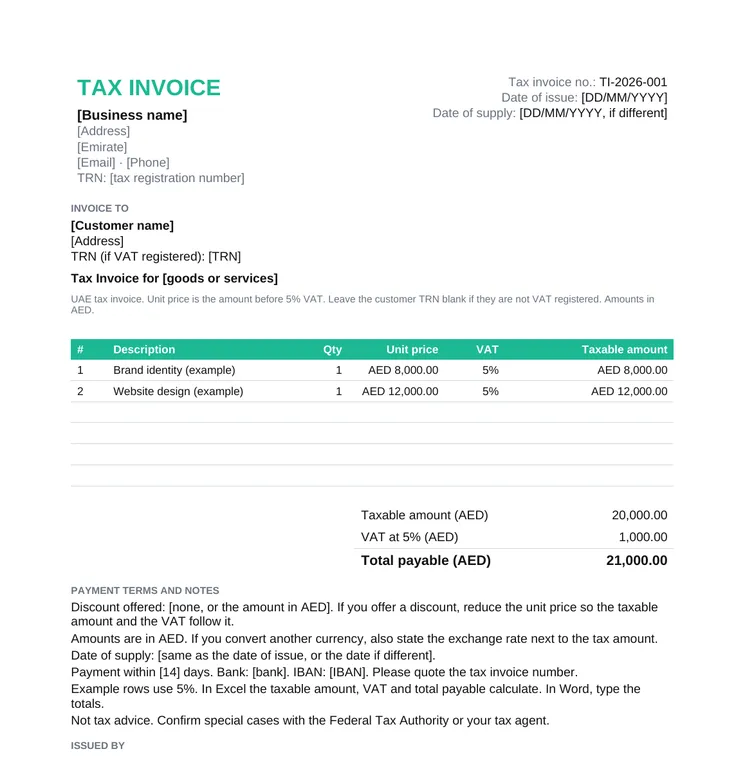
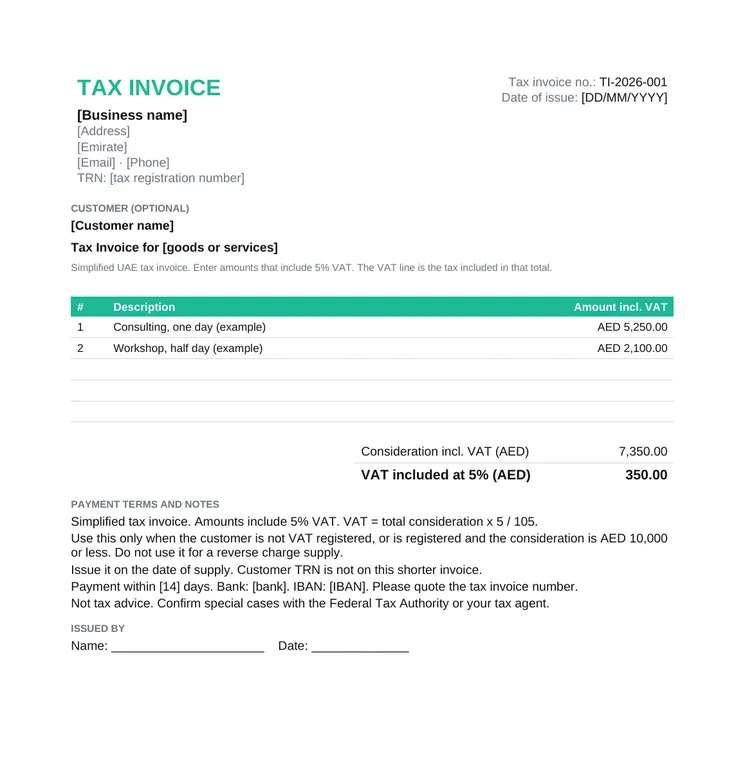
A free tax invoice format UAE businesses can download in Word, Excel and PDF. The full tax invoice carries the Federal Tax Authority fields, 5% VAT in dirhams, and the supplier TRN. A second file is the simplified tax invoice.

4.6/5 from 9 reviews on G2 · Free for commercial use, no email required · Updated November 2026

What is a tax invoice format UAE?

A UAE tax invoice format is a tax invoice headed Tax Invoice, with the supplier TRN, a sequential number, the date of issue, and 5% VAT shown in dirhams.

Use it when a VAT-registered business in the UAE makes a taxable supply. The field list is Article 59 of the VAT Executive Regulation. The standard rate is 5%. It is an invoice, not a quote. Send a quotation first. For India, use the GST invoice format and the GST quotation format.

  • Free Word, Excel and PDF downloads, no email required
  • The words Tax Invoice at the top of both files
  • Excel calculates the taxable amount, 5% VAT and the total payable in AED
  • A simplified tax invoice for the cases in Article 59(5)
  • Customer TRN only where the customer is VAT registered

Download a Free UAE VAT Invoice Template

Both files are free for your own invoices, with no signup. In Excel, yellow cells are yours to type. Amounts are in AED. Quote the job first with a quotation template. For an India GST quote, use the GST quotation format.

What a UAE Tax Invoice Must Show

Article 59(1) of the Executive Regulation of Federal Decree-Law No. 8 of 2017 lists the particulars of a tax invoice. The standard rate is 5% under Article 3 of the Federal Decree-Law No. 8 of 2017. This file is in dirhams. If you convert another currency, the same article also requires the exchange rate next to the tax amount.

FieldWhat to enterExample
TitleThe words Tax Invoice, clearly displayedTax Invoice
SupplierName, address and tax registration number (TRN) of the registrant making the supply[Business name], TRN
CustomerName, address and TRN where the customer is a registrant. Leave the TRN blank if they are not[Customer name], TRN or blank
Invoice numberA sequential number, or a unique number that shows the order of the invoice in a seriesTI-2026-001
Date of issueThe date you issue the tax invoice17/11/2026
Date of supplyInclude it when it is different from the date of issue17/11/2026, if different
Each lineDescription, quantity or volume, unit price, the rate of tax and the amount payable, in AED1 project at AED 8,000.00, 5%
DiscountThe amount of any discount offered. If you offer one, reduce the unit price so the taxable amount matches. Article 39 of the Decree-Law reduces the value of the supply by a discountNone, or the amount
VAT and totalThe tax amount charged, in AED, and the gross amount payable, in AEDVAT AED 1,000.00, total AED 21,000.00

This is not tax advice. Special cases, including the reverse charge and designated zones, are for your tax agent or the Federal Tax Authority.

How to Fill In the UAE Tax Invoice

1

Choose full or simplified

Use the full tax invoice unless Article 59(5) allows a simplified one. Do not use the simplified file for a reverse charge supply under Article 48.

2

Add the supplier

Your name, address and TRN. Leave the words Tax Invoice at the top.

3

Add the customer

On the full invoice, name and address, plus their TRN if they are VAT registered. The simplified file does not ask for a customer TRN.

4

Number and date it

The next number in your series, the date of issue, and the date of supply if it is a different day.

5

Enter the lines

Description, quantity and unit price. In the full Excel file the taxable amount is quantity times unit price, and VAT is 5%. On the simplified file, enter amounts that already include 5% VAT.

6

Check the dirham totals

Taxable amount, VAT and the total payable must be in AED. Write any discount in the notes and reduce the unit price so the VAT follows it. Save a PDF to send.

Full Tax Invoice or Simplified Tax Invoice

A full tax invoice is the default. Issue it within 14 days of the date of supply (Article 59(13) of the Executive Regulation of Federal Decree-Law No. 8 of 2017). A simplified tax invoice has a shorter list, in Article 59(2): the words Tax Invoice, your name, address and TRN, the date of issue, a description, and the total consideration and the tax amount in AED.

You may use that shorter invoice in two cases only, and not where the reverse charge in Article 48 applies (Article 59(5)). The customer is not registered for VAT, or the customer is registered and the consideration for the supply does not exceed AED 10,000. Issue a simplified tax invoice on the date of supply (Article 59(13)). The simplified Excel file treats every amount as including 5% VAT, and works out the VAT as total consideration times 5 divided by 105.

Where a supply is wholly zero-rated, and you keep records that show the particulars of that supply, Article 59(3) says you are not required to issue a tax invoice for it. This template does not cover that case.

Common Mistakes

  • Leaving the words Tax Invoice off the document. Article 59 requires them on both the full and the simplified invoice.
  • Omitting the customer TRN when the customer is VAT registered, on a full tax invoice.
  • Showing the VAT in a currency other than AED, or omitting the exchange rate when you converted another currency.
  • Using a simplified tax invoice above AED 10,000 for a VAT-registered customer, or using one on a reverse charge supply.
  • Calculating 5% on a price that already includes VAT, on the full invoice. On that file the rate applies to the taxable amount. The simplified file is the one where the price includes VAT.
  • A discount written in the notes while the line prices stay at the old amount, so the VAT does not follow the discounted value.
  • No date of supply when it is not the date of issue.

This is not tax advice. Special cases, including the reverse charge and designated zones, are for your tax agent or the Federal Tax Authority.

Word, Excel or PDF

Word is the file to edit when you want a longer note. You type the totals. The full Excel invoice multiplies quantity by unit price, applies 5%, and adds the taxable amount and the VAT into the total payable. The simplified Excel invoice adds up amounts that include VAT, then splits out the VAT at 5%.

The PDF is the copy you send or print. Keep the Word or Excel file. Google Docs opens the .docx. Google Sheets opens the .xlsx, and the formulas still run.

UAE Tax Invoice FAQs

What is a tax invoice format in the UAE?

A tax invoice issued by a VAT-registered business, with the words Tax Invoice on it, the supplier TRN, a sequential number, the date of issue, and the VAT amount in dirhams. The files on this page are a full tax invoice and a simplified tax invoice, in Word, Excel and PDF.

What must a UAE VAT invoice include?

Article 59(1) of the Executive Regulation of Federal Decree-Law No. 8 of 2017 requires the words Tax Invoice, the supplier name, address and TRN, the customer name, address and TRN where the customer is registered, a sequential number, the date of issue, the date of supply if different, a description, and for each line the unit price, quantity, tax rate and amount payable in AED. It also requires any discount, the gross amount payable in AED, and the tax amount in AED. The standard rate is 5% (Article 3 of the Decree-Law). This is not tax advice. Special cases, including the reverse charge and designated zones, are for your tax agent or the Federal Tax Authority.

When can I issue a simplified tax invoice in the UAE?

Article 59(5) allows it when the customer is not registered for VAT, or when the customer is registered and the consideration does not exceed AED 10,000. It is not allowed where the reverse charge in Article 48 applies. Article 59(2) says it shows Tax Invoice, your name, address and TRN, the date of issue, a description, and the total consideration and the tax in AED. Issue it on the date of supply.

What is the VAT rate on a UAE tax invoice?

The standard rate is 5%, under Article 3 of Federal Decree-Law No. 8 of 2017. The full Excel file applies 5% to the taxable amount. The simplified file assumes the amounts already include 5% VAT. This template does not set out zero-rated or exempt supplies.

Does the Excel tax invoice calculate 5% VAT in AED?

Yes. On the full invoice, the taxable amount is quantity times unit price, VAT is 5% of that amount, and the total payable adds them up. On the simplified invoice, you enter VAT-inclusive amounts and the sheet shows the VAT included, using 5 divided by 105. Totals are in AED. This is not tax advice.

Can I fill the UAE tax invoice online?

Yes. Fill it online in Taskip opens the free invoice generator. Set AED, enter 5% tax and your TRN, and download a PDF with no signup. The Word and Excel files add the date of supply, the customer TRN and the simplified layout from Article 59.