
Free Document Signing Tool: Sign a PDF Online
Upload a PDF, draw or type your signature, and place it on the page. Download the signed file in seconds. Free, no signup, and your document never leaves your browser.
1,850+ workspaces created by agencies and freelancers in 40+ countries. 4.6/5 from 9 reviews on G2 · Updated November 2026
Your signed PDF will appear here
Upload a PDF to sign it. Add a signature, initials, a date or a text field, then download the signed file.
- No signup and no watermark
- The file never leaves your browser
- Original text stays selectable
What is a Document Signing Tool?
A free document signing tool lets you add your signature to a PDF online without printing, scanning or creating an account. Upload the file, draw or type your signature, place it on the page, and download a signed PDF that keeps the original text and layout intact.
How it works: the PDF is opened and rendered in your browser, not on a server. You create a signature once, then click the page to place it, drag it into position, and add initials, a date or a text note if the document needs them. Download gives you the signed PDF immediately.
What it is not: an audit trail or a certificate authority. This free tool places your signature image on the file. It does not record who opened the document, prove the signer's identity, or add a cryptographic seal. If you need that, save the document to a free Taskip account and send it for e-signature.
Signing a contract you still have to write? Draft it first with the contract generator, the NDA generator or the scope of work generator, then come back and sign it.
Document Signing Tool at a glance
- Price
- Free, no watermark
- Signup
- None to sign or download
- File type
- Privacy
- The file stays in your browser
- Limit
- 60 pages per PDF, no document limit
- Fields
- Signature, initials, date, text
- Output
- Signed PDF download
- Send for signature
- Free Taskip account
How to Use the Document Signing Tool
Upload your PDF
Choose a PDF from your device or drag it onto the page. It opens in your browser and is not uploaded anywhere.
- PDF only. Word, image and scanned files are not supported yet.
- Up to 25 MB and 60 pages.
Create your signature
Draw your signature with a mouse, trackpad or finger, or type your name. Add initials and today's date in the same step.
Place the fields
Click the page to drop each field where the document expects it, then drag it into position. Click a field to select it and remove it if it lands wrong.
- Signature block, initials on each page, date next to the signature.
- Text fields cover names, titles and reference numbers.
Download the signed PDF
Download gives you the signed file straight away. The original pages, text and images stay intact. Or save it to a free Taskip account to send it for e-signature.
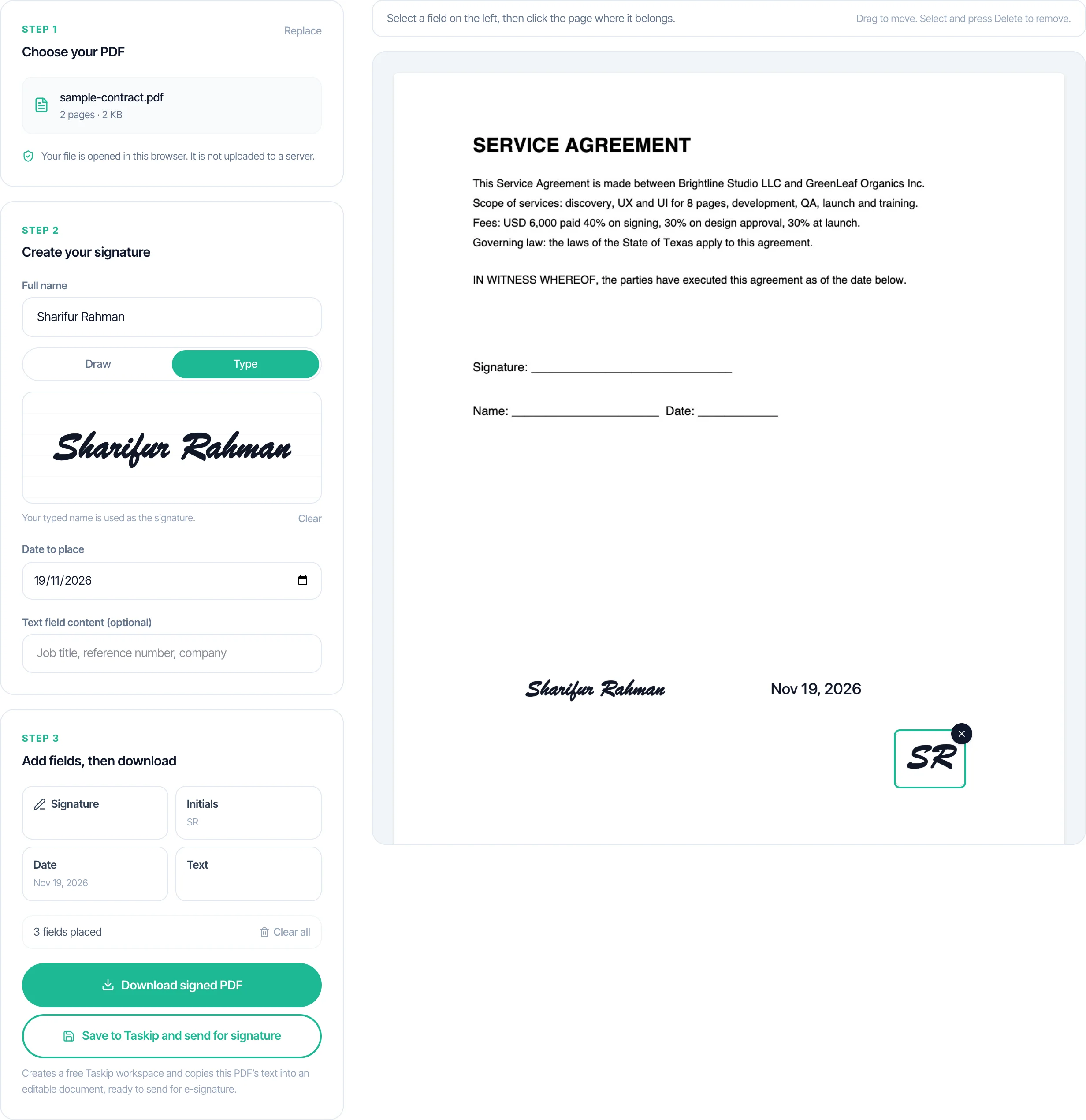
Sample Signed PDF: Where Each Field Goes
A service agreement usually needs four kinds of field. This is the placement most contracts expect.
| Field | Where it goes | Why it matters |
|---|---|---|
| Signature | On the signature line at the end, above the printed name | Shows the signer agreed to the terms |
| Printed name and title | Under the signature line, or as a text field | Identifies who signed and in what role |
| Date | Beside the signature, filled on the day of signing | Sets when the agreement took effect |
| Initials | Bottom corner of each page in a multi-page contract | Makes it harder to dispute that a page was swapped |
| Company name | In the signature block, if signing for a business | Connects the signature to the legal entity |
Sign Your Own Copy vs Send for Signature vs Digital Signature
Three different jobs get called e-signing. Pick the one you actually need.
| Sign your own copy | Send for signature | Digital signature | |
|---|---|---|---|
| What it means | You add your signature to a PDF | Someone else signs, and you track it | A certificate proves the file is unchanged |
| This free tool | Yes | No, save to Taskip to send | No |
| Account needed | No | Yes | Usually yes |
| Proof produced | The signed file | Audit trail, signer identity, timestamps | Cryptographic validation |
| Typical use | Signing a client copy, initialling pages | Client contracts, proposals, NDAs | Regulated and high-value agreements |
Is an Electronic Signature Legally Binding?
Rules differ by country, but most legal systems recognise an electronic signature when the parties intend to sign and a record is kept. This is general information, not legal advice.
- United States: the ESIGN Act and UETA recognise electronic signatures and records, with listed exceptions.
- European Union: eIDAS sets three levels: simple, advanced and qualified. Most everyday contracts accept a simple electronic signature. Some filings require more.
- United Kingdom: the Electronic Communications Act 2000 and retained eIDAS rules recognise electronic signatures for most contracts.
- Canada: provincial electronic commerce acts, based on the UNCITRAL Model Law, recognise electronic signatures for most agreements.
- Australia: the Electronic Transactions Act 1999 recognises electronic signatures when agreed by the parties and properly recorded.
- India: the Information Technology Act 2000 recognises electronic records and digital signatures. Some document classes, such as negotiable instruments and certain powers of attorney, still need a physical form.
- UAE: the Electronic Transactions and Trust Services Law recognises electronic signatures, with higher assurance levels for some government and regulated filings.
Documents You Should Not E-Sign
Most commercial contracts are fine to sign electronically. These usually are not, depending on where you are.
- Wills, codicils and some trusts, which commonly require witnesses and a physical signature.
- Some real estate transfers, deeds and notarised documents.
- Certain court filings and sworn affidavits.
- Documents that a specific regulator, court or counterparty requires in wet ink.
- Anything where a qualified electronic signature or a notary is mandated, such as some regulated financial and immigration filings.
- If in doubt, ask a local lawyer before signing. The tool cannot tell you which category your document falls into.
What Proof to Keep After Signing
A signed PDF is evidence, but it is stronger with a record around it. This free tool produces only the file, so keep these yourself if the agreement matters.
- The signed PDF, stored somewhere you will still have it when the project ends.
- The unsigned original, so you can show exactly what was signed.
- The date and time of signing, and the email or message that sent it.
- Who signed, in what role, and on behalf of which company.
- The full email thread where the other side agreed to sign electronically.
- If you need all of the above captured automatically, use an e-signature flow with an audit trail and a completion certificate.
How Agencies, Consultants and Freelancers Get Documents Signed
The same workflow works for a studio of two and a solo consultant: draft the document, get the signature, then invoice without re-typing anything.
Creative and design agencies
Retainer agreements, statements of work and campaign approvals, often signed by a marketing lead rather than a founder.
Documents they sign
- Retainer agreement
- Statement of work
- Brand asset release
Tip: Draft the scope of work first, then send the retainer and the scope together.
Marketing consultants
Monthly advisory agreements and NDA-protected audits, where the client signs once and the work repeats.
Documents they sign
- Consulting agreement
- NDA
- Project change request
Tip: Use the consulting agreement template if you send the same terms every month.
Freelance designers and developers
Project contracts with deposits, revision limits and IP transfer, signed quickly so work can start.
Documents they sign
- Project contract
- Deposit invoice approval
- IP transfer clause
Tip: The freelance contract template covers deposits, revisions and ownership.
Management and operations consultants
Engagement letters and SOWs reviewed by procurement, where initials on each page are common.
Documents they sign
- Engagement letter
- SOW
- Vendor onboarding form
Tip: Add an initials field to every page. Procurement teams often reject a contract signed only on the last page.
Bookkeepers and accountants
Engagement letters that need a signature before any client data is handled.
Documents they sign
- Engagement letter
- Data processing agreement
- Authority to act
Tip: Keep the signed letter with the client record, not just in an inbox.
Photo and video studios
Booking agreements, usage rights and location releases signed before a shoot day.
Documents they sign
- Booking agreement
- Usage licence
- Location release
Tip: Collect the signed release before the shoot, not on the day.
Need a signature from the client rather than just your own? Save the document to a free Taskip account and send it for e-signature from Taskip Documents.
Before You Send a Document for Signature
A five-minute check saves a second round of emails.
- Open the PDF and confirm it is the final version, not a draft watermark or an old revision.
- Check the counterparty legal name and company number match the entity that will pay.
- Confirm the signature, date and initials placements are on the right pages.
- Make sure the governing law and notice details are filled in, if the document has them.
- Agree with the other side that an electronic signature is acceptable before you send.
- Keep the unsigned original next to the signed copy.
Free Contract, NDA and SOW Templates
Need the document before you sign it? These are free, with no email required.
- Contract template in Word: six editable contract templates.
- Service contract format: the numbered format and a filled sample.
- Freelance contract template: deposit, revisions and IP.
- NDA template in Word: mutual and one-way confidentiality agreements.
- Scope of work generator: deliverables, timeline and acceptance criteria, written for you.
- Prefer AI? Generate the first draft with the contract generator or the NDA generator.
What You Get
- Sign a PDF in the browser, with no upload to a server
- Draw or type a signature, plus initials, date and text fields
- Drag any field into place and delete it before downloading
- Real signed PDF download, original text and layout preserved
- No signup, no watermark and no document limit
- One-click save to a free Taskip account to send for e-signature
Your File Never Leaves the Browser
The PDF is opened and signed locally. No upload, no storage, no retention window to think about.
A Real Signed PDF, Not a Screenshot
The original pages and text stay intact. The signature is added on top, so the file still searches, copies and prints cleanly.
No Signup Before You Download
Upload, sign, download. An account is only offered when you want to send the document to somebody else.
Signature, Initials, Date and Text
Cover the fields a real contract needs, including initials on each page and a date beside the signature.
Free Signing Tool vs PDF Editor vs Paid E-Signature Software
| This tool | A PDF editor | Paid e-signature software | |
|---|---|---|---|
| Cost | Free | Often paid or limited on the free tier | Monthly plan or per-envelope fee |
| Account needed | No | Usually yes | Yes |
| Where the file goes | Stays in your browser | Uploaded to the vendor | Uploaded to the vendor |
| Your own signature | Yes | Yes | Yes |
| Other people sign | No, save to Taskip to send | No | Yes |
| Audit trail and seal | No | No | Yes |
| Tracking and reminders | No | No | Yes |
| Best for | Signing your own copy now | Editing PDF content | Repeat client agreements |
Common Mistakes to Avoid
✕ What Not to Do
✓ What to Do Instead
✕ What Not to Do
Signing a scanned copy instead of the original
Blurry text, no searchable content
✓ What to Do Instead
Sign the original PDF when you have it. A scan keeps the signature but loses selectable text, which also means it cannot be saved as a Taskip document.
✕ What Not to Do
Forgetting to initial pages in a multi-page contract
Disputed page swaps
✓ What to Do Instead
Add an initials field to each page of a contract, not just the signature page. Most agreements expect it.
✕ What Not to Do
Placing the signature over the contract text
Unreadable terms
✓ What to Do Instead
Drop the field on the signature line, then drag it down or left if it overlaps a clause. Check the page at 100% before downloading.
✕ What Not to Do
Leaving the date blank
Unclear when the agreement started
✓ What to Do Instead
Add a date field next to the signature. Use the same date the other party signs, or state the effective date in the contract.
✕ What Not to Do
Emailing a PDF for signature with no proof
No record of who signed or when
✓ What to Do Instead
If the signature matters, send it through an e-signature flow that logs the signer, time and IP, rather than emailing a copy to sign and return.
✕ What Not to Do
Assuming a signature image is a digital signature
False sense of security
✓ What to Do Instead
A drawn or typed signature is an electronic signature, not a certificate-based digital signature. If your industry or counterparty needs the latter, use a qualified provider.
What Taskip Customers Say
“The team is very personable and genuinely want you to have the best experience with the system. I look forward to streamlining all my client data, contracts, invoicing and reminders for business.”
Ramie C.
Owner, Kinetic Timing

“All in 1 business management CRM tool. I love using a client management system that lets me handle everything from contracts to invoices.”
Verified User
Information Technology & Services
Learn More
Want this automated end-to-end?
Taskip's Documents tracks status, sends reminders, and converts to invoices, free to start.
Related Free Tools
Contract Generator
Contract creator for freelancers, agencies and small businesses. Pick one of 7 contract types, describe the deal, and get a full draft in under 30 seconds. Edit any clause, then download. Free, no login.
- 7 contract types: service, employment, NDA, partnership, vendor, consulting, licensing
- Full editable draft with a live Preview/Edit toggle
- Word (.docx) download, plus PDF from the print window, no watermark
- 5-language output: English, Spanish, French, German, Portuguese
- Multi-currency deal value support
NDA Generator
Choose mutual or unilateral, name the parties, describe the confidential information. Get a full NDA draft in seconds. Editable, no signup.
- Mutual or unilateral NDA, your choice
- Definition of confidential information, obligations, and standard exclusions written for you
- Duration options: 1, 2, 3, 5 years, or indefinite
- Full editable draft with a live Preview/Edit toggle
- Word (.docx) download, plus PDF from the print window, no watermark
Scope of Work Generator
Describe the project, deliverables, and success criteria. Get a full SOW draft with timeline and budget. Editable, no signup.
- Objectives, deliverables, and success criteria written from your project description
- Timeline and optional budget section
- Assumptions and sign-off block included by default
- Full editable draft with a live Preview/Edit toggle
- Word (.docx) download, plus PDF from the print window, no watermark
Proposal Generator
Describe the project, pick a type and tone, and get a full proposal draft with scope, deliverables, timeline and pricing. Edit it, then download Word or PDF. No signup.
- 7 proposal types: project, sales, service agreement, consulting, marketing, construction, IT
- Full editable draft with a live Preview/Edit toggle
- Word (.docx) download, plus PDF from the print window, no watermark
- 5-language output: English, Spanish, French, German, Portuguese
- Formatted pricing/investment section from a budget range
Independent Contractor Agreement Generator
Describe the project scope, compensation, and payment schedule. Get a full independent contractor or freelance agreement draft with IP and termination clauses. Editable, no signup.
- Full contract draft: scope, compensation, payment schedule, IP transfer, confidentiality, termination
- Payment schedule options: hourly, weekly, bi-weekly, monthly, per milestone, or upon completion
- IP transfer to the client upon full payment by default, editable if you want to retain or license rights
- Full editable draft with a live Preview/Edit toggle
- PDF and DOCX download, no watermark
Retainer Agreement Generator
Describe the ongoing scope, retainer fee, and payment schedule. Get a full retainer agreement draft. Editable, no signup.
- Full retainer draft: scope, fee, payment schedule, term, and renewal terms
- Payment schedule options: weekly, bi-weekly, monthly, or quarterly
- Covers consulting, marketing, legal, IT support, creative agency, and general professional services retainers
- Full editable draft with a live Preview/Edit toggle
- PDF and DOCX download, no watermark
Explore More Free Tools
Legal & Agreements
Billing
Project Scoping
Finance & Tax
FAQs: Document Signing Tool
Is this document signing tool really free?
Yes. Signing, placing fields and downloading are free, with no account, no watermark and no document limit. A free Taskip account is only needed if you want to save the document and send it to someone for signature.
Do I need to sign up to sign a PDF?
No. Unlike most e-signature services, which ask for an account before you can finish a document, you can sign and download here without one. Signup only appears if you choose to save the document to Taskip.
What file types can I sign?
PDF only. The tool does not open Word (.docx), images or scanned paper files directly. If you have a Word or image file, save or print it to PDF first, then upload that.
Is my document uploaded to a server?
No. The PDF is read and rendered in your browser, and the signed file is created there too. Nothing is sent to Taskip unless you choose Save to Taskip, and that sends only the text layer so an editable document can be created. The file itself is never uploaded.
Can I sign a scanned PDF?
Yes, you can place a signature on any PDF and download it. Saving to Taskip needs a text layer, so a scanned file with no selectable text can be downloaded but not saved as a Taskip document.
How do I create my signature?
Draw it with a mouse, trackpad or finger, or type your name and the tool renders it as a signature. Both produce a transparent image that is placed on the PDF.
Can I add initials, a date or text?
Yes. Signature, initials, date and text fields are all available. Dates use a fixed format (for example Nov 18, 2026) and text fields can hold a name, job title or reference number.
Does it work on a phone or tablet?
Yes. The signature pad accepts touch input, and you can scroll between pages, drag fields and download the signed PDF from a mobile browser.
Can I get someone else to sign the document?
Not inside the free tool. To collect a signature from a client, save the document to a free Taskip account, add the signer, send it, and track when it is opened and signed. The client does not need a Taskip account.
Is an electronic signature legally binding?
Usually yes, when the parties intend to sign, consent to doing business electronically, and a record of the signature is kept. In the US this comes from the ESIGN Act and UETA, in the EU from eIDAS, and most other countries have an equivalent law. Some documents are excluded, including wills, certain court filings and some notarised deeds. This is general information, not legal advice.
What is the difference between an electronic signature and a digital signature?
An electronic signature is any electronic mark showing intent to sign, such as a typed name or a drawn signature. A digital signature is a specific technical signature that uses a certificate and cryptography to prove the document has not changed. This tool adds an electronic signature. It does not add a digital certificate.
Does this tool add an audit trail or certificate?
No. It places your signature on the PDF and nothing else. There is no record of who opened the file, no timestamp authority and no cryptographic seal. For a tracked, sealed signature, use the e-signature flow in a free Taskip account.
Will my signed PDF keep its original text?
Yes. The original pages are preserved and the signature is added on top, so text stays selectable and searchable. Nothing is flattened or converted to an image.
Can I remove a signature after placing it?
Yes, before you download. Click the field to select it and delete it, then place it again. Once the PDF is downloaded, the signature is baked into that copy, so sign a fresh copy if you need to change it.
Can I use this for a client contract or an NDA?
Yes. It works on any PDF, including a service agreement, NDA, scope of work or proposal. If the client also has to sign, save it to Taskip and send it to them rather than emailing a copy for them to sign separately.
Does it work for documents from India, the UK, Canada or Australia?
The tool does not depend on the country. Legality does. India recognises electronic signatures under the Information Technology Act 2000, the UK under the Electronic Communications Act 2000 and eIDAS, Canada under provincial e-commerce acts, and Australia under the Electronic Transactions Act 1999. Check the rules for your document type where you are.
Can I email the signed PDF?
Yes. Download the signed file and attach it to any email. If you need proof of who signed and when, send it through Taskip e-signatures instead of email.
Who makes this document signing tool?
Taskip, client management software for agencies and freelancers. Taskip handles proposals, contracts with e-signatures, quotes, invoices, projects and a client portal in one place.