This feature allows you to turn incoming emails into actionable tasks—perfect for managing client requests, form submissions, or any incoming workflow that requires follow-up.
Step 1: Go to Workflow Section #
- Open the Workflow module from the sidebar.
- Click + Create Workflow in the top-right corner.
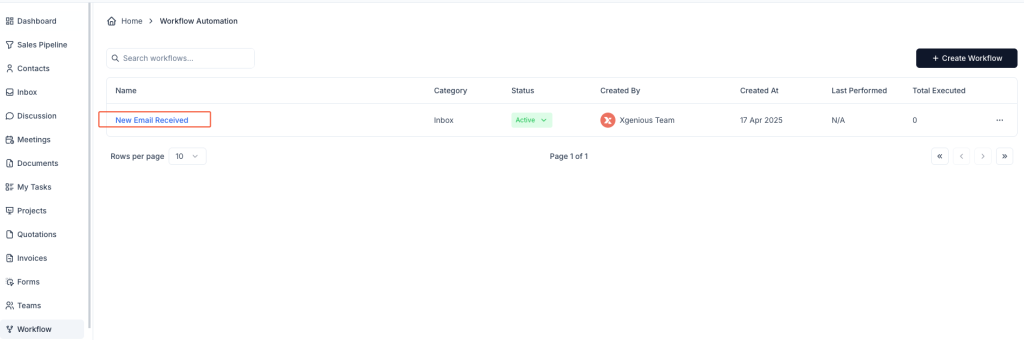
Step 2: Define Basic Workflow Settings #
- Workflow Name: Enter a name (e.g.,
New Email Received). - Workflow Action: Select New Message Received under the Inbox tab.
Step 3: Set a Condition Based on Email Subject #
In the IF section:
- Select Subject from the dropdown.
- Choose the condition Contain.
- Enter a keyword or phrase to match, such as
[Contact Form].
This ensures the task is only created when an incoming email subject contains this specific phrase.
Step 4: Add the Task Creation Action #
In the THEN section, choose Create Task and fill in the required task details:
- Select Pipeline: Choose the related pipeline (e.g.,
Customization onboarding pipeline). - Select Stage: Choose the pipeline stage (e.g.,
Prospecting). - Select Deal: Pick an existing deal or lead the task is linked to (e.g.,
test). - Title: Use a dynamic field such as
{{email_subject}}to make the task title match the email’s subject. - Type: Select task type (e.g.,
To Do). - Assignee: Choose a team member to assign the task to.
- Select Priority: Choose task priority (e.g.,
Medium). - Description: Add context or default content (e.g.,
Email content). You can manually enter text or use variables.

You can also click + Add Action to include more steps like tagging, replying, or converting the sender into a contact.
Step 5: Save and Activate #
Click Create Workflow. Once active, Taskip will automatically create a task for every matching email based on your rule.
Example Use Case #
Workflow Name: Contact Form Task
Condition:
- Subject contains
[Contact Form]
Action: - Create Task in
Customization onboarding pipeline - Assign to
Nafis Abdullah - Title:
{{email_subject}} - Priority: Medium
- Description:
Email content
This automation ensures that every contact form submission becomes a task for your team to follow up on, no manual effort needed.


