Templates in Taskip allow you to quickly generate professional documents such as proposals, scope of work agreements, and project outlines using predefined content structures. This helps you save time and ensures consistency across your documentation.
Step 1: Navigate to the Documents Section
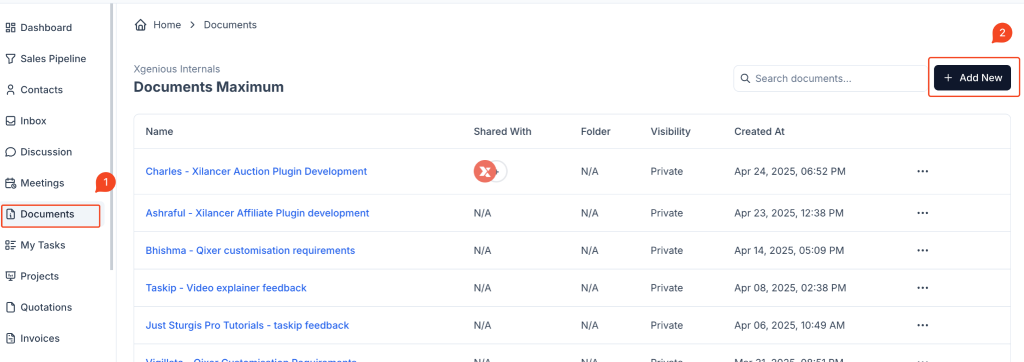
- From the left-hand sidebar, click on “Documents”.
- On the document dashboard, click the “Add New” button located in the top right corner.
Step 2: Fill in Basic Document Information
When the “Create a Document” popup appears:
- Enter a clear and relevant name for your document in the “Name” field.
- Choose the visibility of the document:
- Private: Only you can see this document.
- Shared: Visible to others in your workspace depending on permissions.
Step 3: Select a Template
Under the “Template” dropdown:
- You can either scroll through or search for available templates.
- Choose the appropriate template for your use case. Examples include:
- SOW: Design and Development One
- SOW: E-commerce Website Development
- SOW: Content Writing & Blog Strategy
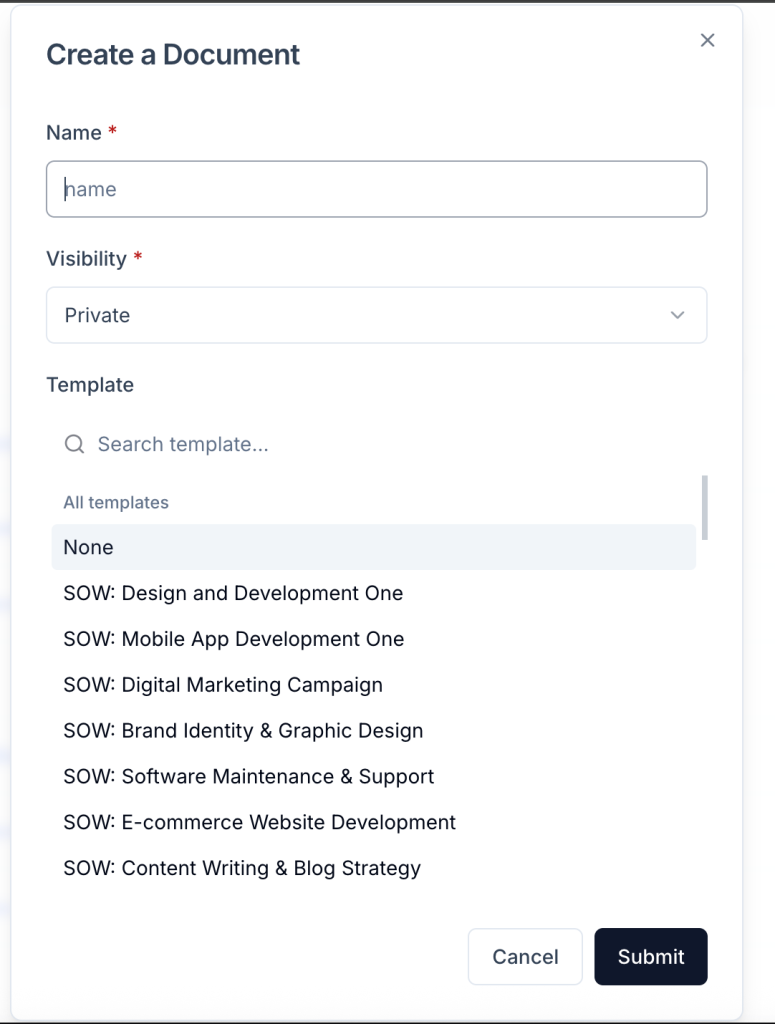
Selecting a template will auto-load structured content into your document, which you can then customize.
Step 4: Submit and Start Editing
Click the “Submit” button to create the document using the selected template. You will be redirected to the editor where the template content is already loaded.
You can now update and personalize the document as needed.
Benefits of Using Templates
- Speeds up the document creation process
- Maintains consistency across your organization
- Helps ensure important sections are not missed


