Taskip allows you to create and manage tax classes that can be applied to both invoices and quotations. Whether you’re charging VAT, GST, or a custom tax, you can configure multiple tax entries, search them dynamically, and even create new taxes directly while creating a document.
How to Add a New Tax Class #
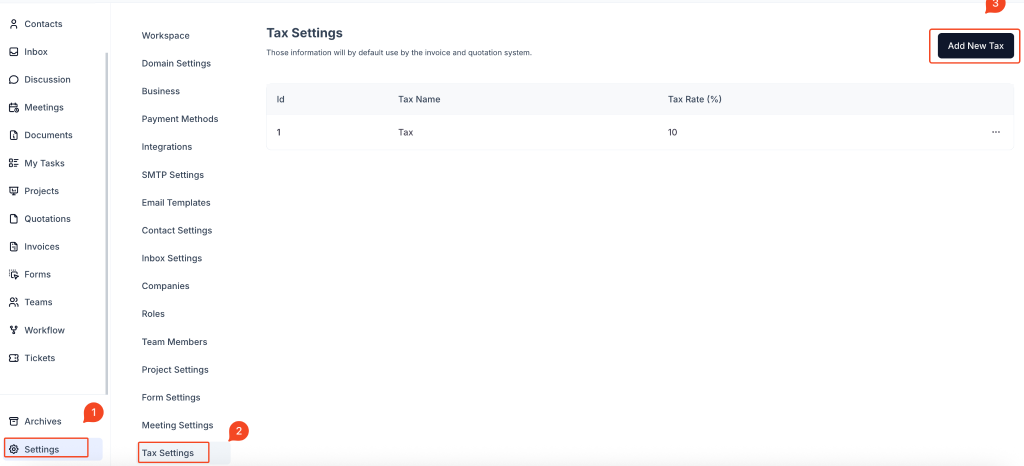
1. Go to Settings
From the sidebar, click on Settings.
2. Navigate to Tax Settings
Under the Settings menu, select Tax Settings.
3. Click “Add New Tax”
On the top-right corner, click the Add New Tax button to open the tax creation form.
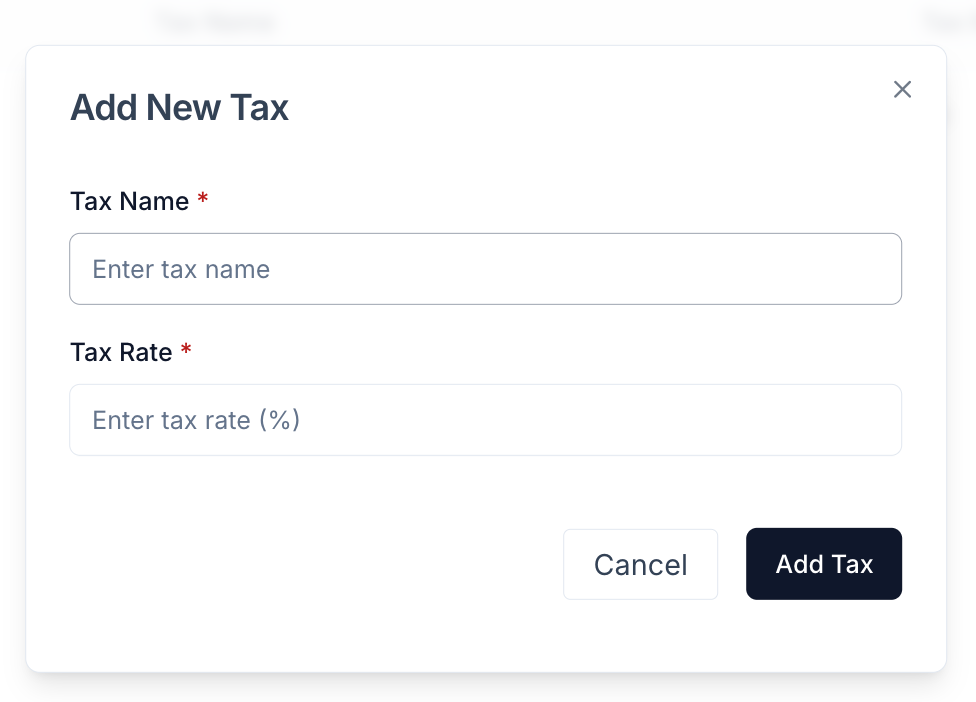
4. Fill Out Tax Details
- Tax Name: Provide a clear name such as
VATorService Tax. - Tax Rate (%): Enter the percentage rate, e.g.,
10for 10%.
Click Add Tax to save.
Once added, the tax class will be available globally and can be reused across invoices and quotations.
Applying Tax in Invoices and Quotations #

1. Create or Edit an Invoice or Quotation
Open an existing invoice/quotation or start a new one.
2. Scroll to the Total Section
Locate the Add Tax field in the totals area below your listed items.
3. Search or Select a Tax Class
Click on the Add Tax dropdown to:
- Search existing tax classes
- Select one or multiple taxes to apply
4. Add New Tax from the Dropdown
If you need a new tax:
- Click the dropdown
- Choose the option to Add New Tax
- Fill out the Tax Name and Tax Rate (%)
- Save, and it will be instantly available for use
Key Features #
- Supports multiple tax classes for different regions or tax types
- Tax rates are calculated automatically and reflected in the Total
- Applies uniformly to both invoices and quotations
- Allows inline tax creation for speed and flexibility
- Automatically updates available tax options across the workspace
Best Practices #
- Name taxes clearly (e.g.,
GST 18%) for quick recognition - Review tax policies applicable to your region before adding new entries
- Use consistent naming and rates to avoid confusion across documents
- Apply taxes at the time of quotation for accurate client estimates
Frequently Asked Questions (FAQ) #
Can I add more than one tax to a single invoice or quotation? #
Yes. You can apply multiple tax classes to the same document.
Will the applied tax be calculated automatically? #
Yes. Taskip automatically calculates the tax amount and adds it to the total.
Can I add a new tax while editing a document? #
Yes. You can create a new tax directly from the tax dropdown while editing an invoice or quotation.
Can I apply different tax rates to different items? #
Currently, taxes are applied at the document level. Item-level tax support may be added in future versions.
Is the tax applied the same for both invoices and quotations? #
Yes. The tax system is shared and consistent across both modules.


