Taskip allows you to fully customize your invoice numbering format to match your business’s accounting or organizational standards. This feature is handy for enhancing clarity, improving traceability, and maintaining chronological order in your billing system.
Steps to Configure Invoice Number Format #
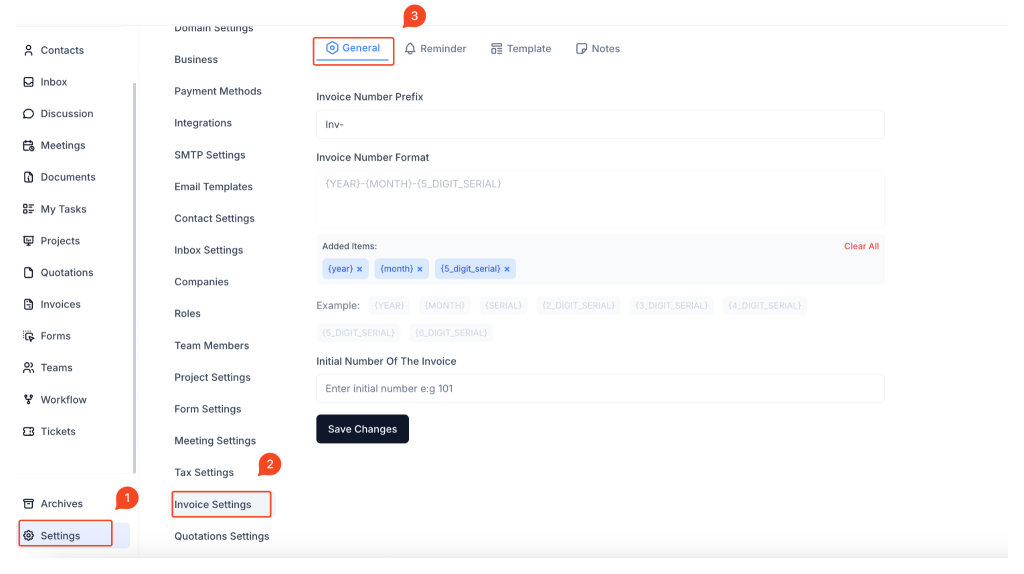
1. Open Settings
In the Taskip sidebar, scroll to the bottom and click on Settings.
2. Navigate to Invoice Settings
Inside the Settings menu, select Invoice Settings from the left-hand column.
3. Click the ‘General’ Tab
Within the Invoice Settings page, switch to the General tab to access formatting options.
Configurable Fields #
Invoice Number Prefix

This is the fixed text that appears before every invoice number. It helps you identify invoices quickly and differentiate between different invoice types or departments.
Example inputs:
INV-TASKIP-ACCT-
Invoice Number Format
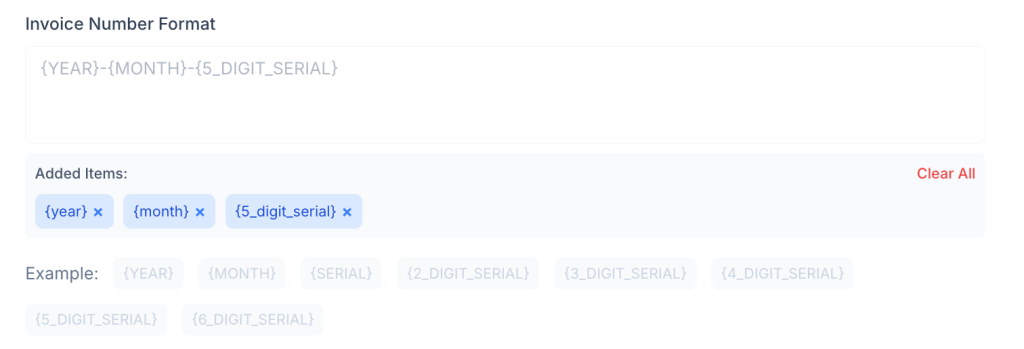
You can build a custom invoice number using the following dynamic placeholders:
| Placeholder | Description |
|---|---|
{year} | Inserts the current year (e.g., 2025) |
{month} | Inserts the current month (e.g., 07) |
{serial} | Basic incremental number (no padding) |
{2_digit_serial} | Serial padded to 2 digits (e.g., 01) |
{3_digit_serial} | Serial padded to 3 digits (e.g., 001) |
{4_digit_serial} | Serial padded to 4 digits (e.g., 0001) |
{5_digit_serial} | Serial padded to 5 digits (e.g., 00001) |
{6_digit_serial} | Serial padded to 6 digits (e.g., 000001) |
Example Format
If you use the format:INV-{year}-{month}-{5_digit_serial}
Your generated invoice number might look like: INV-2025-07-00001
Initial Number of the Invoice

This field lets you define the starting number of the serial sequence. For example, entering 101 with a 5-digit serial will generate your first invoice as INV-2025-07-00101. This is useful if you’re migrating from another system or want to skip certain numbers for internal reasons.
Save and Apply Changes #
Once you’ve configured the prefix, format, and initial number, click the Save Changes button to activate the new invoice numbering format.
Best Practices #
- Choose a unique prefix that aligns with your business or department naming.
- Use
{year}and{month}to help group and track invoices chronologically. - Select a serial format that allows for enough invoice volume per time period.
- Set an appropriate initial number if you’re continuing from a previous sequence.
Summary #
Taskip provides flexible options for invoice number formatting, allowing you to define a custom prefix, use dynamic placeholders for date elements, and control the serial starting point. This enhances clarity, traceability, and professionalism in your invoicing system.
Let me know if you’d like a follow-up article for quotation number formatting or a visual version with callouts.
Frequently Asked Questions (FAQ) #
Can I change the invoice number format later? #
Yes, you can update the format anytime by revisiting the Invoice Settings. However, previously issued invoices will retain their original numbers.
What happens if I remove {year} or {month}? #
Your invoice numbers will not include those elements. This may make tracking by date more difficult unless you rely on serials alone.
Is the prefix mandatory? #
No, but it’s recommended for clarity and categorization, especially if you issue other documents like quotations.
Can I reuse the same format for different departments? #
You can use a shared format but differentiate departments by using unique prefixes (e.g., HR-, SALES-, FIN-).
Will Taskip prevent duplicate invoice numbers? #
Yes. Taskip auto-increments the serial based on the format and initial number to ensure uniqueness.
How do I reset the serial number at the start of a new year? #
Currently, serials do not reset automatically. You would need to manually update the initial number and adjust the format as needed.


