To add phone number input support to a form, follow these steps:
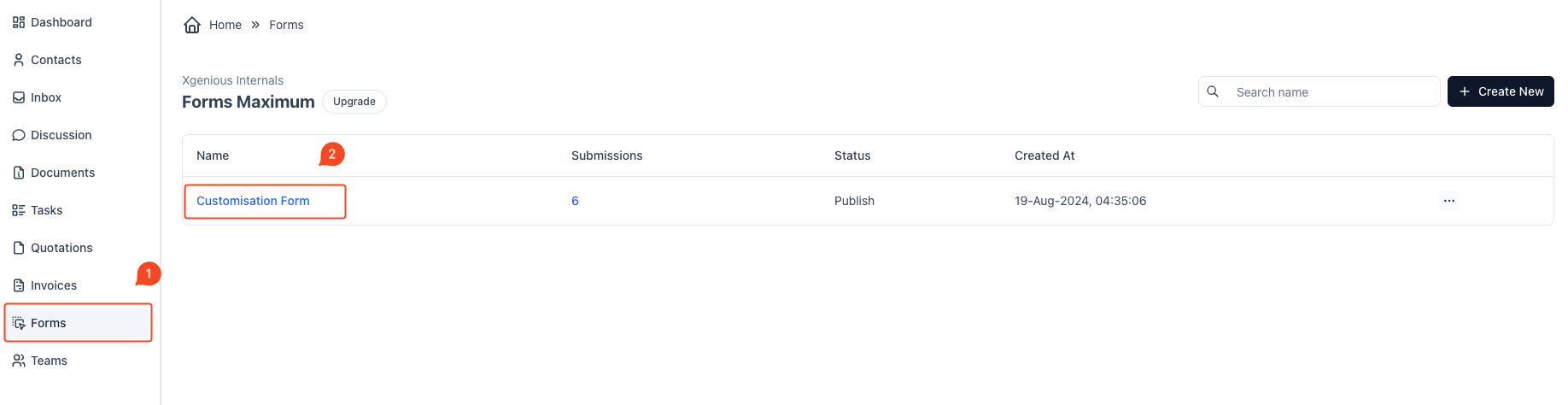
- Navigate to Forms Section:
- Go to the “Forms” tab from the sidebar (indicated as step 1 in the second image).
- Select the Form to Edit:
- Select the form you want to edit from the list (indicated as step 2 in the second image).
Add reCAPTCHA Field:
- From the form field options on the right, find the
Recaptchaoption. - Drag and drop the
Recaptchafield into your form wherever you want it to appear.

- Configure reCAPTCHA Settings:
- After adding the field, click on it to configure its settings.
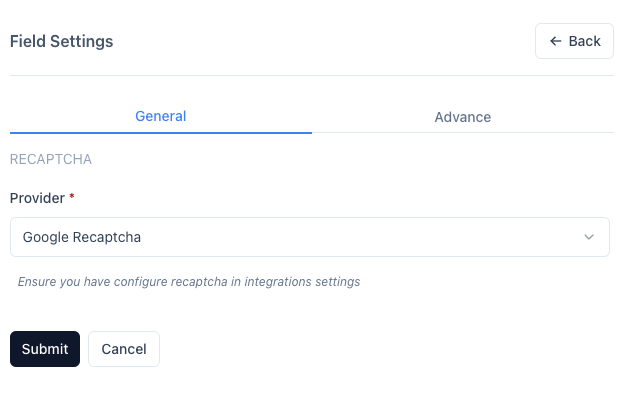
- Under
Field Settings, select the Provider (eitherGoogle reCAPTCHAorCloudflare Turnstile). - Make sure that the provider is already configured in the
Settings->Integration Settings(you should have thesiteKeyandsecretKeyset up). - For the provider you have select Google Recaptcha or Clourdflare Tunrstile
- Save the Form:
- Once the
Recaptchafield is added and configured, save the form. - The form will now include the CAPTCHA validation as a security step before submission.
- Once the
That’s it! Your form is now protected with reCAPTCHA to prevent spam and bots from submitting fake entries.


