Leads are potential clients or contacts that you can track, manage, and convert into customers. Taskip provides an easy-to-use system to organize your leads and streamline your sales process.
How does it work? #
Taskip’s lead management system helps you capture, categorize, and track all your potential clients in one place. You can assign statuses, sources, and notes to each lead, making it easier to prioritize follow-ups and convert leads into customers.
Navigation #
To access and manage leads:
- Go to the Taskip main menu.
- Select Leads from the navigation menu.
- Here you can view all your leads, filter them by status or source, and manage them efficiently.
How to Create a Lead? #
Adding a new lead is simple:
- Go to Taskip > Leads.
- Click the Create Lead button.
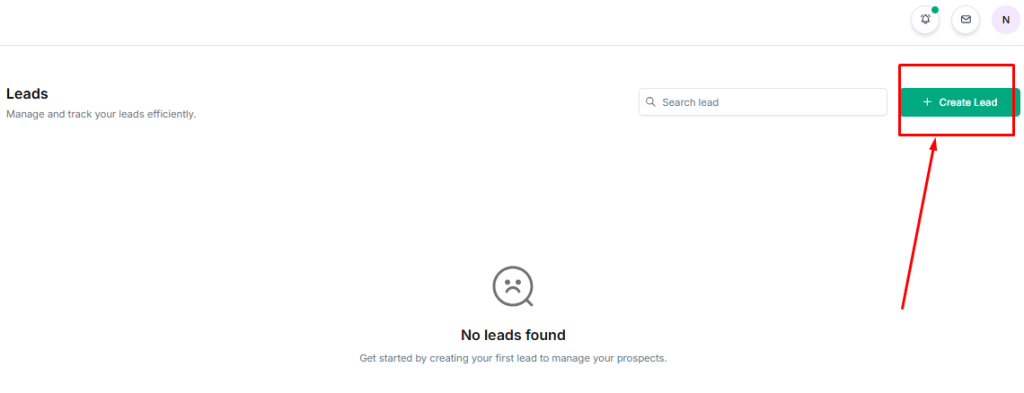
3. Fill in the lead details:
- First Name
- Last Name
- Phone
- Company Name
- Website
- Status
- Currency
- Lead Value
- Lead Source
- Last Interaction Date
- Leads Owner
- Leads Owner
- Country
- State
- City
- Zip code
- Description
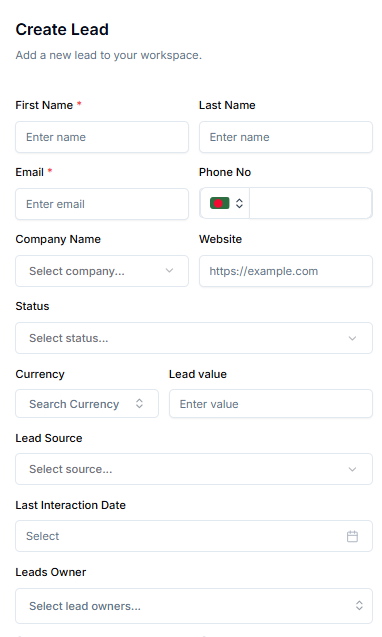
4. Click Custom fields to add additional fields.
5. Click Save to add the lead to your list.


