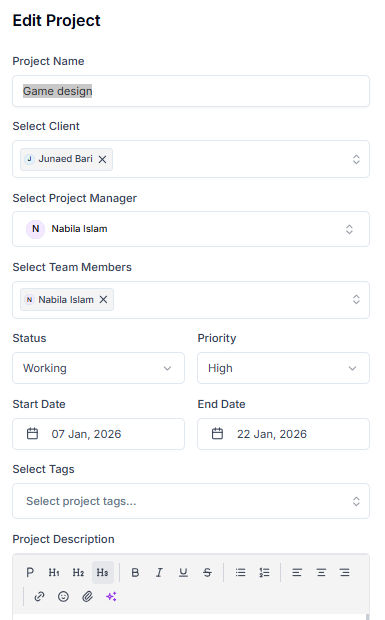
Editing a project in Taskip allows you to update important details as your work evolves. Whether it’s changing deadlines, updating team members, or modifying project information, this feature ensures your project stays accurate and up to date.
Why Is This Feature Included? #
Projects often change over time. This feature helps you keep everything aligned by allowing quick updates to project details, improving team coordination, and ensuring everyone has the latest information.
How To Edit a Project? #
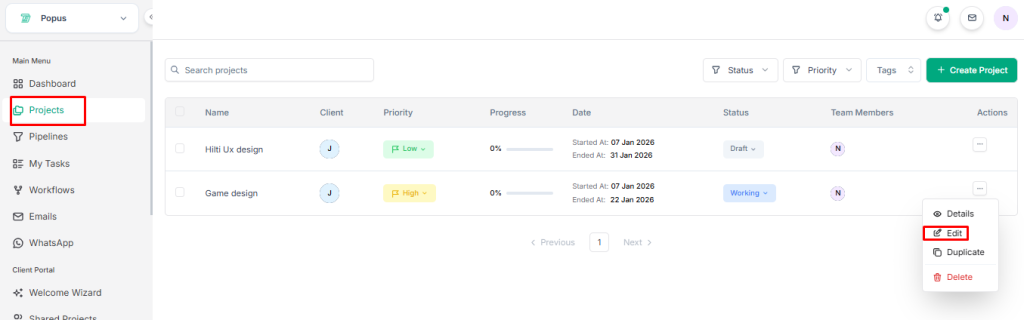
- Go to the Main Menu and select Projects.
2. Find the project you want to edit.
3. Click on the three-dot menu on the right side of the project.
4. Select Edit Project.
5. An edit page will appear where you can update the following:
- Project Name
- Select Client
- Select Project Manager
- Select Team Members
- Status
- Priority
- Start Date
- End Date
- Select Tags
- Project Description
- Project Visibility
6. After making the necessary changes, click Save Changes.