Uploading files in a project allows you to keep all important documents, resources, and references in one place. This makes collaboration easier and ensures your team has quick access to everything they need.
How to upload a file? #
- Go to the Main Menu and select Projects.
- To upload a file in a new project:
- Click Create Project.
- Fill in the required details.
- Select the project.
- Click on the three-dot menu on the right.
- Click Edit Project.
- Scroll down to the Project Description section.
- Click on the Attachment icon.
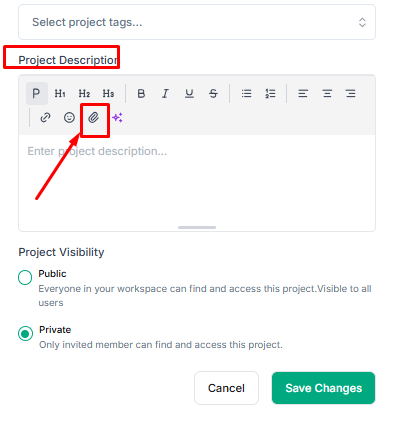
5. You will see two options:
- Insert URL
- Upload File
6. Select your preferred option and upload the file.
7. Click Save Changes.
Your file will be successfully uploaded to the project.
Note: You can control file access by adjusting the Project Visibility (Public/Private).


