The Service Catalog in Taskip allows you to create and manage a list of services your agency offers. It productizes your services and provides standardized offerings, streamlines client purchases, and simplifies the sales process by enabling clients to directly select and request services.
How Does it Work? #
The Service Catalog lets you turn your services into structured, ready-to-sell offerings. You start by creating a service with basic details like name, description, category, and pricing. Then, you can enhance the service by adding multiple packages (pricing tiers) with different deliverables, timelines, and prices to give clients flexible options.
Once your service is set up, you can attach a project portfolio to showcase past work and add FAQs to address common client questions. After publishing, clients can easily browse your services, understand what’s included, and request them directly, making the entire sales and onboarding process faster and more organized.
Navigation #
Go to the main menu and Select Services
How to Create a Service #
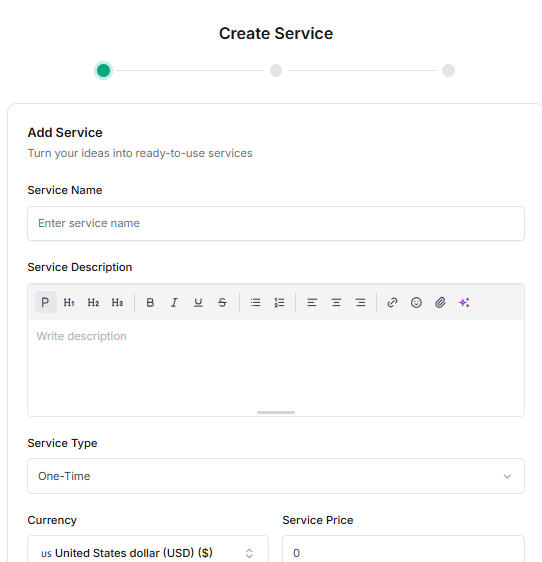
Step 1: Basic Information
- Click on Create Service
- Enter the following details:
- Service Name
- Service Description
- Service Type
- Currency & Service Price
- Select a Service Category
- Upload a service image (Max file size: 20 MB)
- Click Save and Continue
Step 2: Add Packages (Pricing Tiers) #
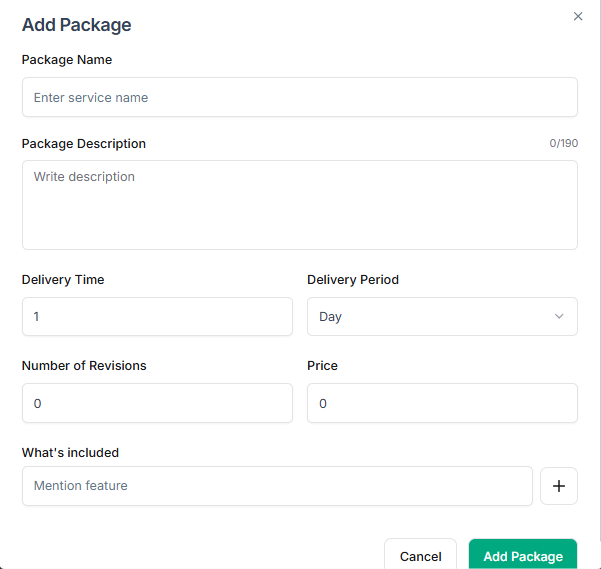
- Click Add Package to create different pricing tiers
- Fill in the required information:
- Package Name
- Description
- Delivery Time & Delivery Period
- Number of Revisions
- Price
- What’s Included
- Click Add Package
- Click Save and Continue
Step 3: Service Details #
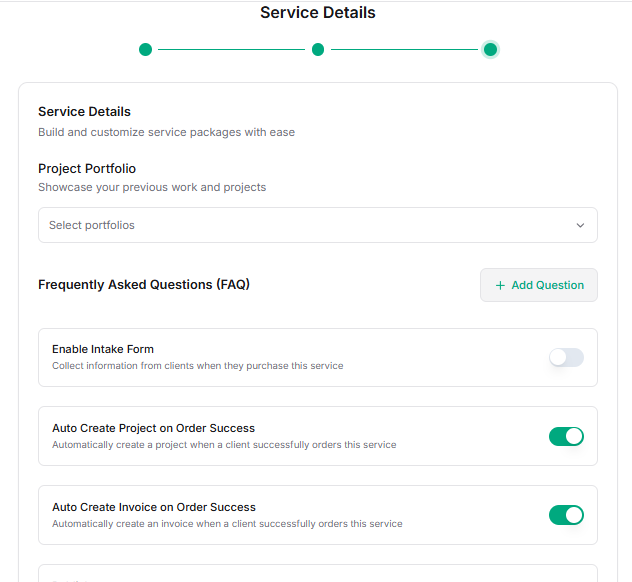
- You will be redirected to the Service Details page
- Select a Project Portfolio from the dropdown to showcase previous work
- Add FAQs to provide additional information to clients
- Click Save