Taskip offers multiple project views to help you visualize and manage your work in the way that suits you best. Whether you prefer a structured list or a visual workflow, switching views allows you to stay organized and track progress efficiently.
How Does It Work? #
Each project in Taskip can be displayed in different formats. These views present the same project data in various layouts, making it easier to manage tasks, stages, and timelines based on your workflow preference.
Navigation #
- Log in to your Taskip account.
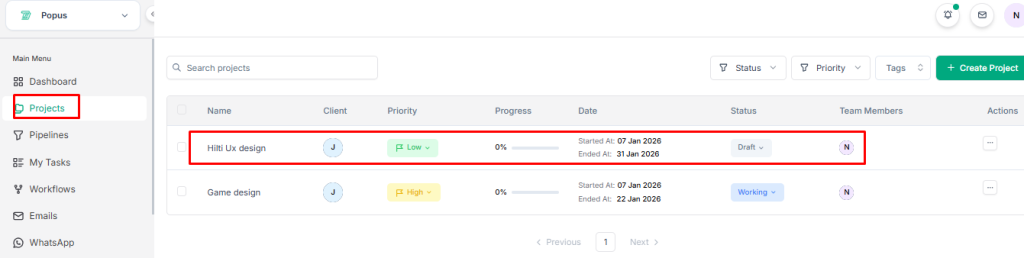
- Go to the Main Menu.
- Select Projects.
Available View Options #
- List View – Displays tasks and details in a structured list.
- Kanban View – Shows tasks in columns based on stages for workflow tracking.
- Gantt View – Visualizes project timelines and dependencies.
- Calendar View – Displays tasks and deadlines in a calendar format.
How to Switch Views for a Project? #
- Go to the Projects section.
- Select the project you want to view.
3. On the top bar, locate the view options (List, Kanban, Gantt, Calendar).
4. Click on your preferred view style.
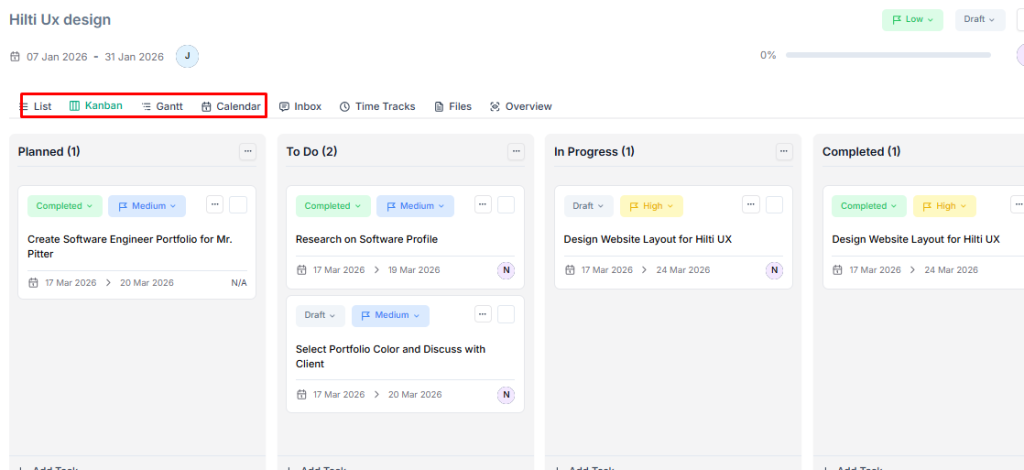
5. The project will instantly update and display in the selected view.


