Taskip allows you to automate follow-up email reminders for quotations that have not yet been accepted. You can configure reminders to trigger before or after the quotation expiry date and personalize them using dynamic placeholders.
Steps to Configure Quotation Reminders #
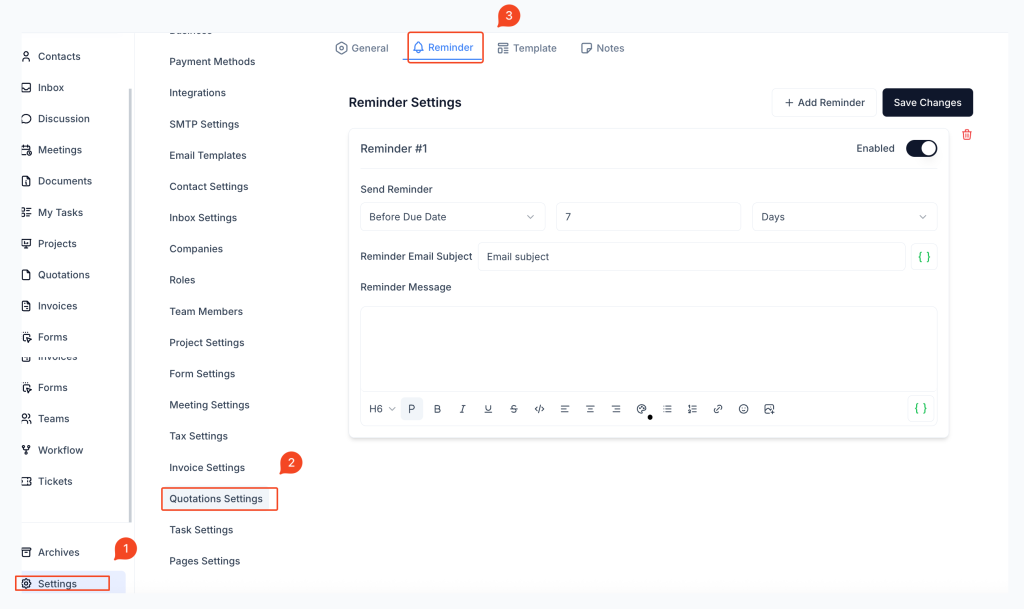
1. Go to Settings
Navigate to Settings from the sidebar.
2. Select Quotation Settings
Choose Quotation Settings from the settings menu.
3. Open the Reminder Tab
Click on the Reminder tab to begin setting up quotation follow-up emails.
Configure a New Reminder #
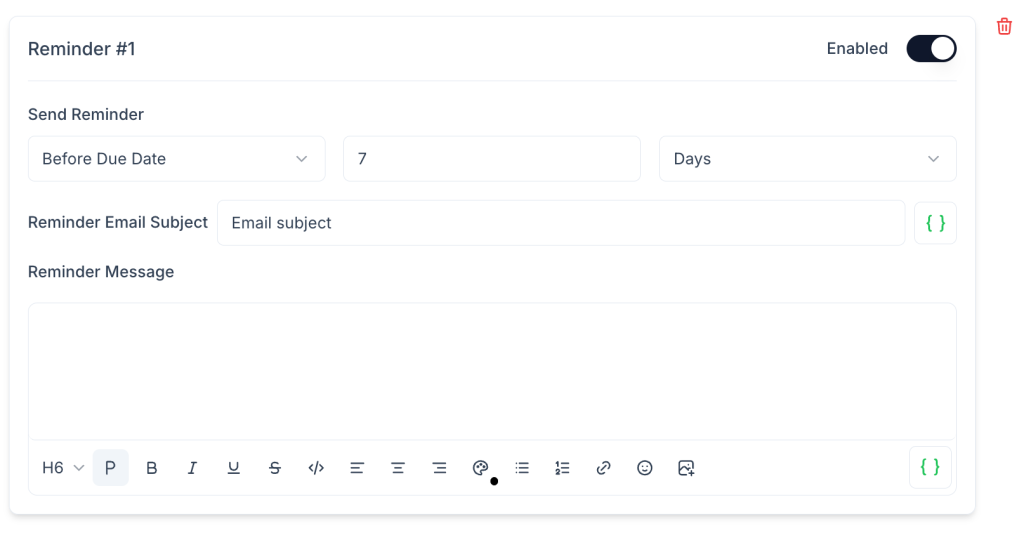
Send Reminder
- Choose whether to send the reminder Before Expiry Date or After Expiry Date.
- Define how many days before or after the expiry the reminder should be sent.
Reminder Email Subject
- Enter the email subject line.
- You can personalize it using variables such as
{{Contact_first_name}}or{{Quotation_subject}}.
Reminder Message
- Customize the email body using the editor.
- Available placeholders include:
{{Contact_first_name}}{{Contact_last_name}}{{Contact_email}}{{Quotation_subject}}
Toggle Reminder Status
Enable or disable each reminder using the switch at the top-right of the reminder box.
Add Multiple Reminders
Click Add Reminder to schedule additional reminders for the same quotation.
Save Changes
Click Save Changes to activate your settings.
Best Practices #
- Use reminders to prompt clients before the quotation expires.
- Personalize content using contact names and quotation details.
- Use multiple reminders (before and after) to improve response rates.
Frequently Asked Questions (FAQ) #
Can I schedule multiple reminders per quotation? #
Yes, you can add several reminders at different intervals.
What dynamic fields can I use in quotation reminders? #
You can use placeholders like {{Contact_first_name}}, {{Quotation_subject}}, and {{Contact_email}}.
Do reminders stop once the quotation is accepted? #
Yes. Once the quotation is accepted, reminders will no longer be sent.
Can I temporarily turn off a reminder? #
Yes. Use the toggle switch to disable any reminder without deleting it.
Can reminders be deleted? #
Yes. Use the trash icon to permanently remove any reminder.


